My Room Mode TOYOTA BZ4X 2023 Owners Manual
[x] Cancel search | Manufacturer: TOYOTA, Model Year: 2023, Model line: BZ4X, Model: TOYOTA BZ4X 2023Pages: 628, PDF Size: 11.91 MB
Page 2 of 628
2
Owners Manual_USA_M42C01_enTABLE OF CONTENTS
For your information...................
7
Reading this manual ................ 12
How to search .......................... 13
Pictorial index .......................... 14
1-1. For safe use Before driving ................... 26
For safe driving ................ 27
Seat belts ......................... 29
SRS airbags ..................... 34
Front passenger occupant classification system ...... 44
1-2. Child safety Riding with children .......... 49
Child restraint systems..... 50
1-3. Emergency assistance Safety Connect ................ 64
1-4. Theft deterrent system Immobilizer system .......... 68
Alarm................................ 69
2-1. Electric vehicle system Electric Vehicle system fea-tures ............................... 72
Electric Vehicle system pre- cautions .......................... 76
Battery Electric Vehicle driv- ing tips ............................ 81
Driving range.................... 832-2. Charging
Charging equipment ......... 85
AC charging cable ............ 87
Locking and unlocking AC charging connector ......... 93
Power sources that can be used................................ 96
Charging methods ............ 98
Charging tips ................. 100
Things to know before charging....................... 102
How to use AC charging 105
How to use DC charging 113
Using the charging schedule function ........................ 118
Using My Room Mode ... 129
When charging cannot be carried out ................... 133
3-1. Instrument cluster Warning lights and indicators.................................... 148
Gauges and meters ....... 152
Multi-information display 155
4-1. Key information Keys .............................. 162
Digital key ...................... 165
1For safety and security
2Electric Vehicle system
3
Vehicle status
information and
indicators
4Before driving
Page 71 of 628
71
Owners Manual_USA_M42C01_en
2
2
Electric Vehicle system
Electric Vehicle system
2-1. Electric vehicle systemElectric Vehicle system fea-tures ............................. 72
Electric Vehicle system pre- cautions ........................ 76
Battery Electric Vehicle driv- ing tips .......................... 81
Driving range.................. 83
2-2. Charging Charging equipment....... 85
AC charging cable.......... 87
Locking and unlocking AC charging connector....... 93
Power sources that can be used ............................. 96
Charging methods.......... 98
Charging tips ............... 100
Things to know before charging .................... 102
How to use AC charging .................................. 105
How to use DC charging .................................. 113
Using the charging schedule function...................... 118
Using My Room Mode 129
When charging cannot be carried out ................. 133
Page 98 of 628
982-2. Charging
Owners Manual_USA_M42C01_en
■AC charging (P.105)
This is a charging method used
when charging from an AC out-
let with the AC charging cable or
charging that uses AC charger.
By setting charging schedule, it is
also possible to charge at the
desired date and time. ( P. 1 1 8 )
■DC charging ( P.113)
This is a charging method that
uses a DC charger that com-
plies with SAE J 1772. The trac-
tion battery can be charged in a
shorter time than AC charging.
SAE is an abbreviation for an
industrial standard issued by the
Society of Automotive Engi-
neers.
This vehicle is equipped with
several functions that are linked
with charging.
■My Room Mode ( P.129)
When the charging cable is con-
nected to the vehicle, electrical
components such as the air con-
ditioning system and audio sys-
WARNING
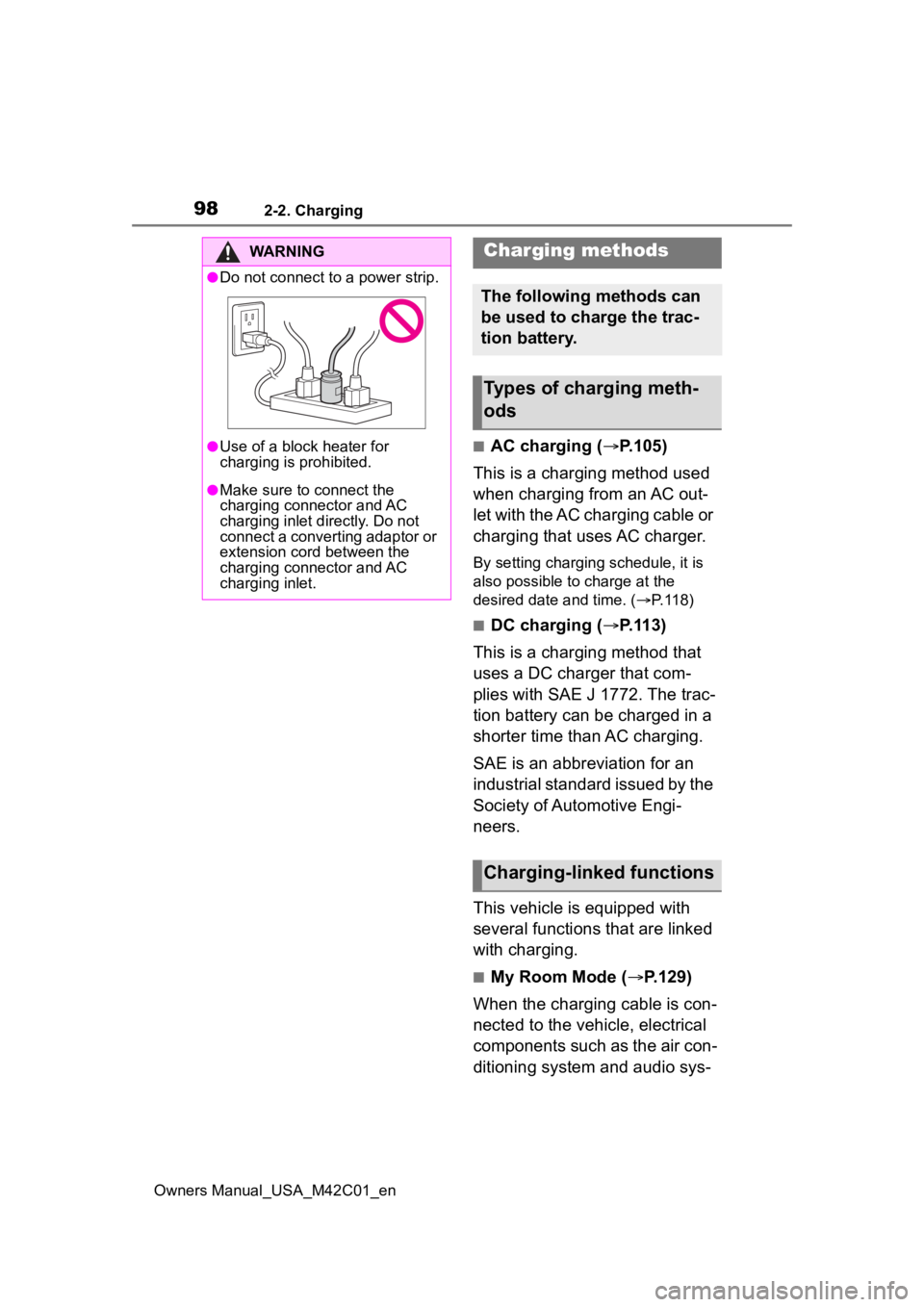
●Do not connect to a power strip.
●Use of a block heater for
charging is prohibited.
●Make sure to connect the
charging connector and AC
charging inlet directly. Do not
connect a converting adaptor or
extension cord between the
charging connector and AC
charging inlet.
Charging methods
The following methods can
be used to charge the trac-
tion battery.
Types of charging meth-
ods
Charging-linked functions
Page 99 of 628
992-2. Charging
Owners Manual_USA_M42C01_en
2
Electric Vehicle system
tem can be used by the power
supply from an external power
source
*.
*: Depending on the situation, elec-
tricity of the traction battery may
be consumed.
■Traction battery heater
When the outside temperature
is low and the charging cable is
connected to the vehicle, this
function automatically warms
the traction battery until it
reaches or exceeds a certain
temperature.
The operation of this function
is stopped automatically when
the charging cable is discon-
nected or if the charging cable
is left connected to the vehicle
for approximately 3 days.
When the charging schedule
is used ( P.118), this func-
tion will operate according to
the schedule settings.
■Traction battery warming
control
This control operates after the
charging cable remains con-
nected to the vehicle for approx-
imately 3 days and the traction
battery heater automatically
stops. It automatically insulates
the traction battery in extremely
low temperatures.
This control stops 31 days
after the charging cable is
connected, even if it is still
connected to the vehicle.
When this control operates,
charging schedule settings
are ignored and charging
starts immediately.
■Traction battery cooler
When the traction battery is hot
and the AC charging cable is
connected to the vehicle, this
function cools the traction bat-
tery to protect it.
The function may operate when
continuously driving at high
speeds such as driving on high-
ways or freeways, or during DC
charging.
■Using My Room Mode during
DC charging
P.130
■Traction battery heater
●Traction battery heater may oper-
ate when charging is not being
performed.
●When Traction battery heater is
operating, the charging indicator
will illuminate.
●When Traction battery heater is
operating during charging, the
charging may take longer than
normal.
●The remaining charge of the trac-
tion battery declines when the
traction battery hea ter operates, it
might be necessary to recharge
the traction battery again in order
to supplement the remaining
charge.
■Traction battery cooler
●For AC charging: Traction battery
cooler settings can be changed on
the multi-information display.
( P.100)
●The AC charging indicator will illu-
Page 104 of 628
1042-2. Charging
Owners Manual_USA_M42C01_en
●Avoid frequent DC charging
Also, if the capacit y of the traction
battery capacity reduces, the dis-
tance that can be driven decreases.
However, vehicle performance does
not significantly become worse.
■When the remaining charge of
the traction battery is low after
charging
In the following situations, the
remaining charge of the traction bat-
tery after charging completes may
be less than normal in order to pro-
tect the traction bat tery (the driving
range after the battery is fully
charged may be shorter).
*
●Charging is perf ormed when the
outside temperature is low or high
●Charging is perf ormed immedi-
ately after high-l oad driving or in
extreme heat
In any other situati on, if the remain-
ing charge of the traction battery is
significantly lower than normal after
charging completes, have the vehi-
cle inspected by your Toyota dealer.
*: When this occurs, even if the remaining charge display of the
traction battery shows that it is
fully charged, the remaining
charge rapidly decreases faster
than normal.
■When the charging amount sent
to the traction battery
decreases
When the amount of power supplied
by the charger is low or operation of
the battery heater, etc., reduces the
charging power sent to the traction
battery, the charging amount sent to
the traction battery may decrease.
■Certification
This device complies with Part 15 of
the FCC Rules. Operation is subject
to the following two conditions:
(1) this device may not cause harm- ful interference, and (2) this device
must accept any interference
received, including interference that
may cause undesired operation.
■Charging time may increase
In the following situ ations, charging
time may become longer than nor-
mal:
●In very hot or very cold tempera-
tures.
●When the traction battery
becomes hot, such as immedi-
ately after high-load driving.
●The vehicle is consuming a lot of
electricity, for e xample, when the
headlights are on, etc.
●When using “My Room Mode”.
( P.129)
●There is a power outage during
charging.
●There is an interruption in the
electrical supply.
●There is a drop in the voltage of
external power source.
●The charge in the 12-volt battery
is low, for example due to the
vehicle being left unused for a
long period of time.
●When the upper limit of charging
current is changed in the charging
current setting of the vehicle
( P.108)
●When the battery heater operates.
( P. 9 9 )
●When the “Battery Cooler” is oper-
ated before charging. ( P. 9 9 )
●When the plug generates heat
due to a loose outlet connection,
etc.
●When adjusting the power supply
with the charger.
●When frequently and repeatedly
using DC charging.
●When selecting “DC charging
power” setting other than “MAX”.
●When the temperature of
charging-related parts is high.
Page 120 of 628
1202-2. Charging
Owners Manual_USA_M42C01_enschedule, connect the AC
charging connector
The charging start time is deter-
mined based on the charging
schedule at the t ime that the AC
charging connector was connected.
●Connect the AC charging connec-
tor before the start time
When the charging mode is set to
“Start”, if you connect the AC
charging connector after the set
start time, the next charging sched-
ule will be referenced.
When the charging mode is “Start-
Stop”, if you connect the AC
charging connector after the start
time, charging will start immediately
and charging will be performed until
the stop time.
●After connecting the AC charging
connector, check that the charging
indicator of the charging port
flashes ( P. 8 6 )
●Do not use an ou tlet that has a
power cut off function (including a
timer function)
Use an outlet that constantly sup-
plies electricity. For outlets where
the power is cut off due to a timer
function, etc., charging may not be
carried out accord ing to plan if the
power is cut off during the set time.
■When the AC charging connec-
tor remains connected to the
vehicle
●When the charging mode is set to
“Start”, even if multiple consecu-
tive charging schedules are regis-
tered, the next charge will not be
carried out according to the
charging schedule until the AC
charging connector is removed
and reconnected after charging
completes. Also, when the traction
battery is fully charged, charging
according to the charging sched- ule will not be carried out.
●If the charging stop time is
reached before t
he traction bat-
tery is fully cha rged and the
charging mode is set to “Start-
Stop”, the nearest charging
schedule after the stop time is
updated as the next charging
schedule, and charging is
repeated until the battery is fully
charged.
■Smartphone-linked operation
After applying to Toyota App, it is
possible to use the smartphone
application to change charging
schedule settings.
For details about Toyota Apps, refer
to http://www.toyota.com/
connected-services in the United
States and http://www.toy-
ota.ca/connected in Canada.
■When charging schedules are
ignored
When the following operations are
performed while the charging
schedule is on standby, charging
schedule is temporarily canceled
and charging is started.
●When the Remote Air Condition-
ing System ( P.409) is operated
●When turning “My Room Mode”
on ( P.129)
●When turning “Charge Now” on
( P.124, 128)
●When an operation that temporar-
ily cancel charging using the
charging schedule ( P.107)
■Battery heater ( P.99)/“Battery
Cooler” ( P. 9 9 )
Depending on the temperature of
the traction battery , the traction bat-
tery heater or traction battery cooler
may be activated and the charging
indicator may light up while the timer
is waiting for charging.
Page 129 of 628
1292-2. Charging
Owners Manual_USA_M42C01_en
2
Electric Vehicle system
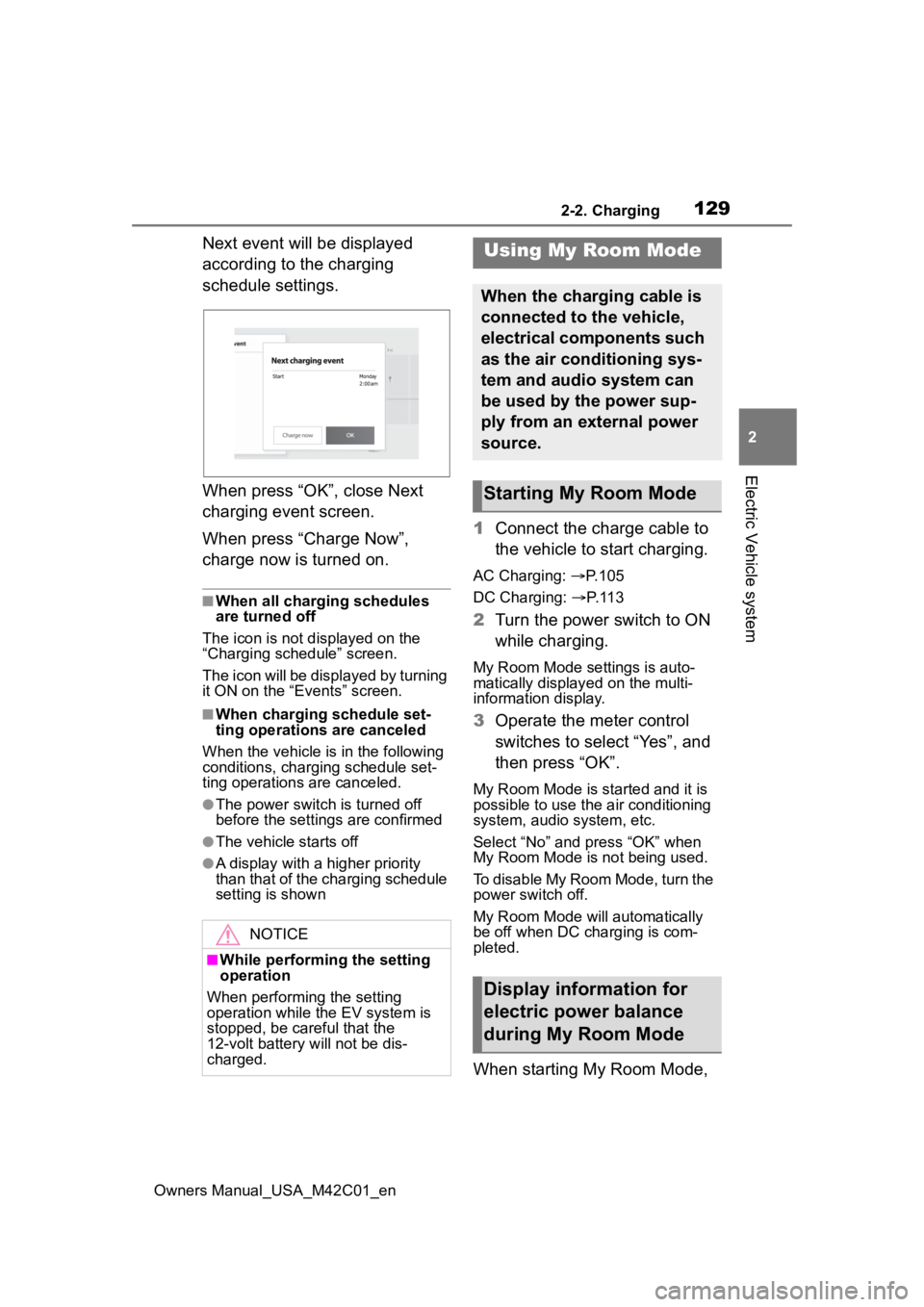
Next event will be displayed
according to the charging
schedule settings.
When press “OK”, close Next
charging event screen.
When press “Charge Now”,
charge now is turned on.
■When all charging schedules
are turned off
The icon is not displayed on the
“Charging schedule” screen.
The icon will be displayed by turning
it ON on the “Events” screen.
■When charging schedule set-
ting operations are canceled
When the vehicle is in the following
conditions, charging schedule set-
ting operations are canceled.
●The power switch is turned off
before the setting s are confirmed
●The vehicle starts off
●A display with a higher priority
than that of the charging schedule
setting is shown
1Connect the charge cable to
the vehicle to start charging.
AC Charging: P. 1 0 5
DC Charging: P. 1 1 3
2 Turn the power switch to ON
while charging.
My Room Mode settings is auto-
matically display ed on the multi-
information display.
3 Operate the meter control
switches to select “Yes”, and
then press “OK”.
My Room Mode is started and it is
possible to use the air conditioning
system, audio system, etc.
Select “No” and press “OK” when
My Room Mode is not being used.
To disable My Room Mode, turn the
power switch off.
My Room Mode will automatically
be off when DC charging is com-
pleted.
When starting My Room Mode,
NOTICE
■While performing the setting
operation
When performing the setting
operation while t he EV system is
stopped, be careful that the
12-volt battery will not be dis-
charged.
Using My Room Mode
When the charging cable is
connected to the vehicle,
electrical components such
as the air conditioning sys-
tem and audio system can
be used by the power sup-
ply from an external power
source.
Starting My Room Mode
Display information for
electric power balance
during My Room Mode
Page 130 of 628
1302-2. Charging
Owners Manual_USA_M42C01_en
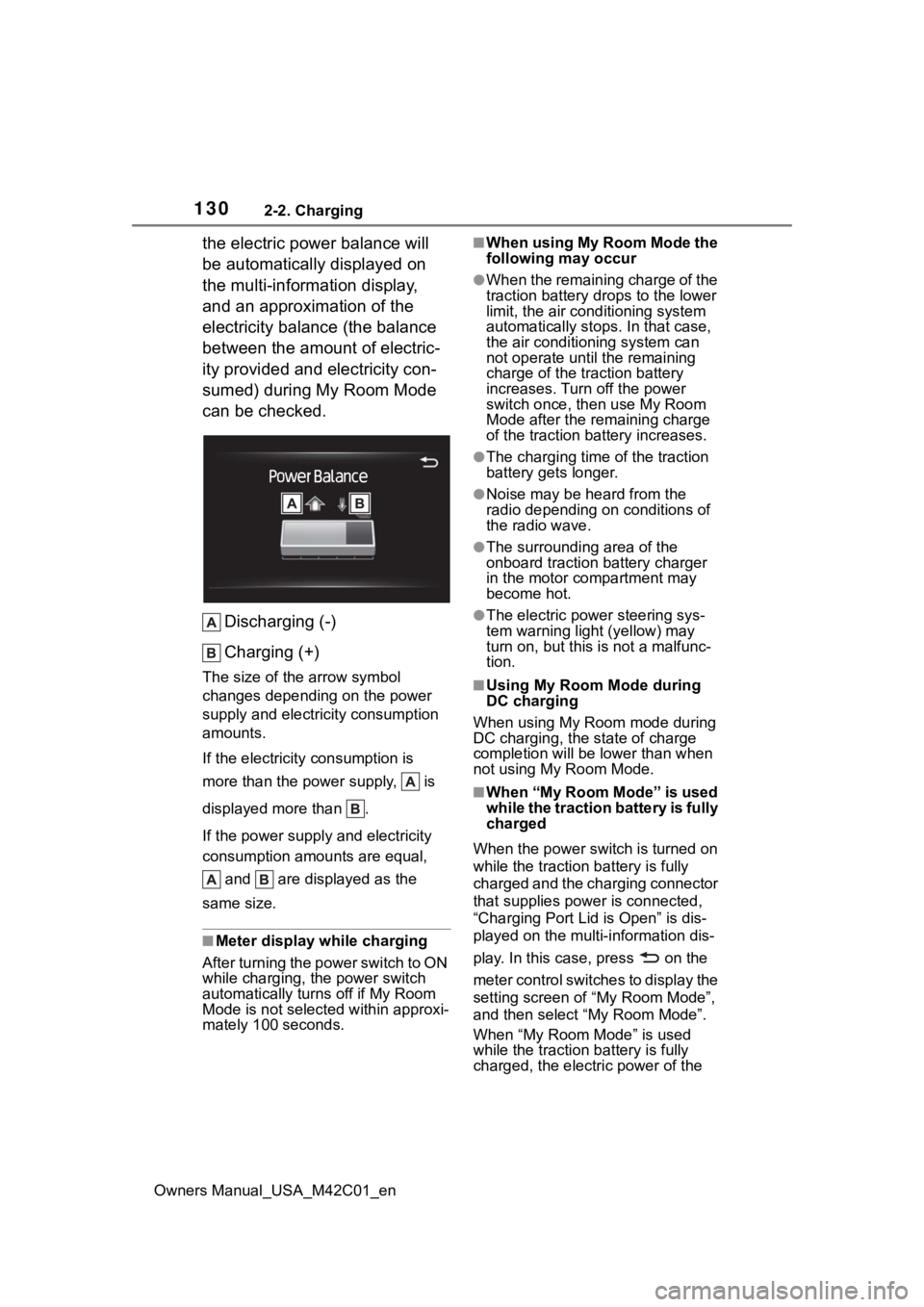
the electric power balance will
be automatically displayed on
the multi-information display,
and an approximation of the
electricity balance (the balance
between the amount of electric-
ity provided and electricity con-
sumed) during My Room Mode
can be checked.Discharging (-)
Charging (+)
The size of the arrow symbol
changes depending on the power
supply and electric ity consumption
amounts.
If the electricity consumption is
more than the power supply, is
displayed more than .
If the power supply and electricity
consumption amounts are equal,
and are displayed as the
same size.
■Meter display while charging
After turning the power switch to ON
while charging, the power switch
automatically turns off if My Room
Mode is not selected within approxi-
mately 100 seconds.
■When using My Room Mode the
following may occur
●When the remaining charge of the
traction battery d rops to the lower
limit, the air conditioning system
automatically stops. In that case,
the air conditioning system can
not operate until the remaining
charge of the traction battery
increases. Turn off the power
switch once, then use My Room
Mode after the remaining charge
of the traction battery increases.
●The charging time of the traction
battery gets longer.
●Noise may be heard from the
radio depending on conditions of
the radio wave.
●The surrounding area of the
onboard traction battery charger
in the motor compartment may
become hot.
●The electric power steering sys-
tem warning light (yellow) may
turn on, but this is not a malfunc-
tion.
■Using My Room Mode during
DC charging
When using My Room mode during
DC charging, the state of charge
completion will be lo wer than when
not using My Room Mode.
■When “My Room Mode” is used
while the traction battery is fully
charged
When the power switch is turned on
while the traction b attery is fully
charged and the charging connector
that supplies power is connected,
“Charging Port Lid is Open” is dis-
played on the multi-information dis-
play. In this cas e, press on the
meter control switches to display the
setting screen of “My Room Mode”,
and then select “My Room Mode”.
When “My Room Mode” is used
while the traction b attery is fully
charged, the electric power of the
Page 131 of 628
1312-2. Charging
Owners Manual_USA_M42C01_en
2
Electric Vehicle system
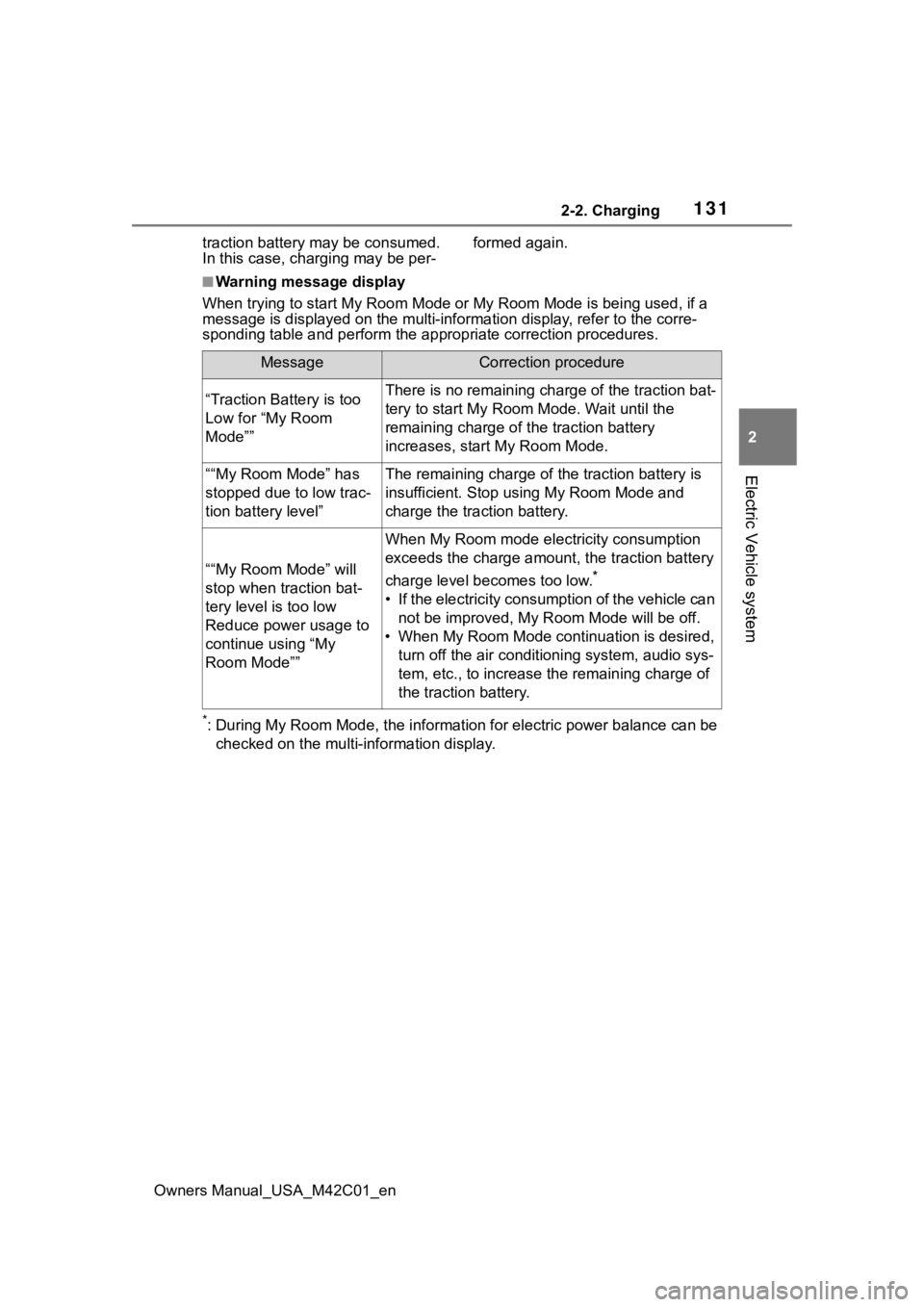
traction battery may be consumed.
In this case, charging may be per- formed again.
■Warning message display
When trying to start My Room Mode or My Room Mode is being used , if a
message is displayed on the multi -information display, refer to the corre-
sponding table and perform the app ropriate correction procedures.
*: During My Room Mode, the informa tion for electric power balance can be
checked on the multi-information display.
MessageCorrection procedure
“Traction Battery is too
Low for “My Room
Mode””There is no remaining charge of the traction bat-
tery to start M y Room Mode. Wait until the
remaining charge of the traction battery
increases, start My Room Mode.
““My Room Mode” has
stopped due to low trac-
tion battery level”The remaining charge of the traction battery is
insufficient. Stop using My Room Mode and
charge the traction battery.
““My Room Mode” will
stop when traction bat-
tery level is too low
Reduce power usage to
continue using “My
Room Mode””
When My Room mode electricity consumption
exceeds the charge amount, the traction battery
charge level becomes too low.
*
• If the electricity consumption of the vehicle can not be improved, My R oom Mode will be off.
• When My Room Mode continuation is desired, turn off the air conditioning system, audio sys-
tem, etc., to increase t he remaining charge of
the traction battery.
Page 132 of 628
1322-2. Charging
Owners Manual_USA_M42C01_en
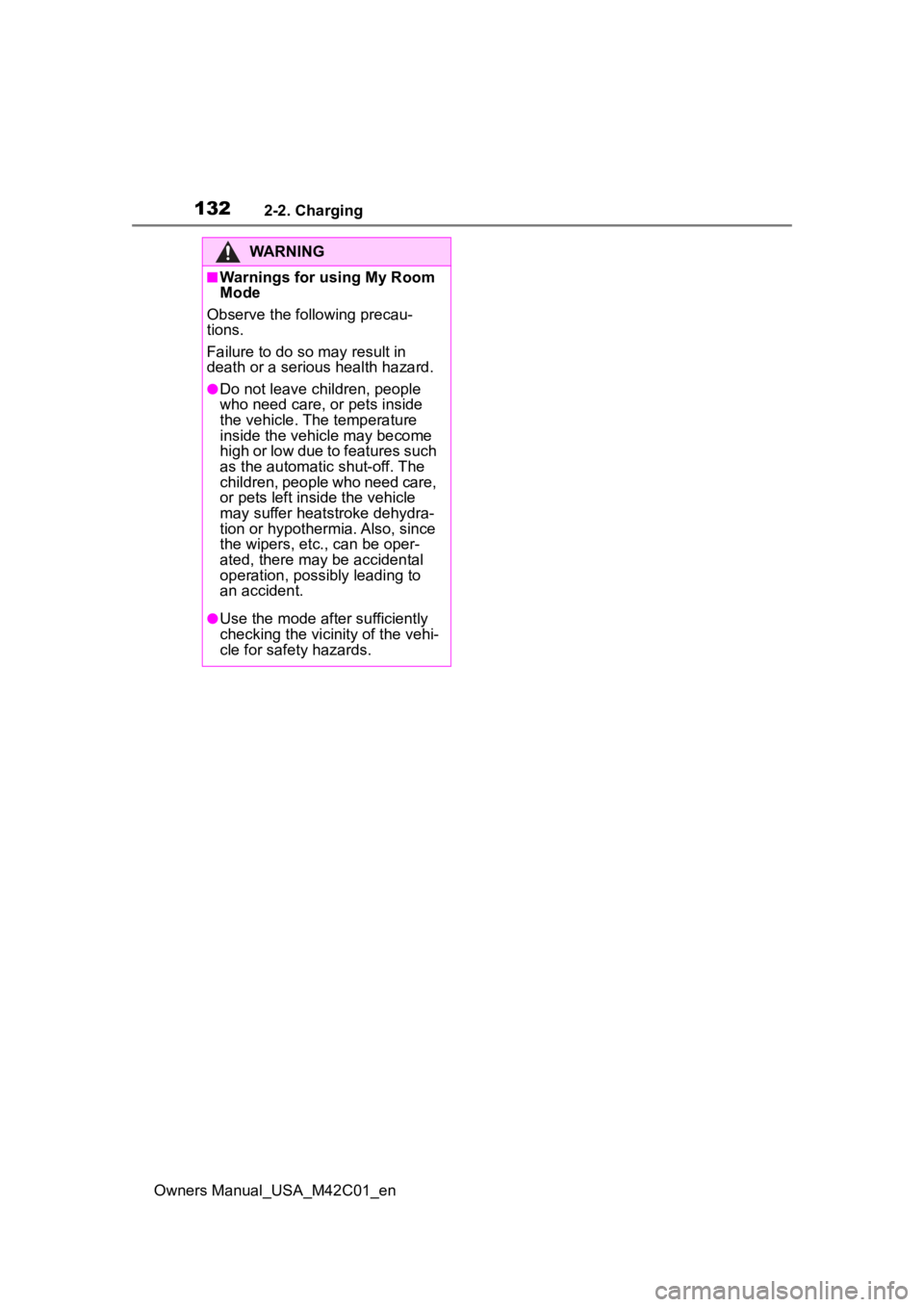
WARNING
■Warnings for using My Room
Mode
Observe the following precau-
tions.
Failure to do so m ay result in
death or a seri ous health hazard.
●Do not leave children, people
who need care, or pets inside
the vehicle. The temperature
inside the vehicle may become
high or low due to features such
as the automatic shut-off. The
children, people who need care,
or pets left inside the vehicle
may suffer heatstroke dehydra-
tion or hypothermia. Also, since
the wipers, etc., can be oper-
ated, there may be accidental
operation, possibly leading to
an accident.
●Use the mode after sufficiently
checking the vicinity of the vehi-
cle for safety hazards.