Front light TOYOTA C-HR 2018 1.G User Guide
[x] Cancel search | Manufacturer: TOYOTA, Model Year: 2018, Model line: C-HR, Model: TOYOTA C-HR 2018 1.GPages: 516, PDF Size: 9.32 MB
Page 51 of 516
511-1. For safe use
1
For safety and security
C-HR_OM_USA_OM10526U
WARNING
■Front passenger occupant classi fication system precautions
Observe the following precautions regarding the front passenger occupant
classification system.
Failure to do so may cause death or serious injury.
● Wear the seat belt properly.
● Make sure the front passenger’s seat belt plate has not been left inserted
into the buckle before someone sits in the front passenger seat.
● Make sure the “AIR BAG OFF” indicator light is not illuminated when using
the seat belt extender for the front passenger seat. If the “AIR BAG OFF”
indicator light is illuminated, disconnect the extender tongue from the seat
belt buckle, and reconnect the seat belt. Reconnect the seat belt extender
after making sure the “AIR BAG ON” indicator light is illuminated. If you
use the seat belt extender while the “A IR BAG OFF” indicator light is illumi-
nated, the SRS airbags for the front passenger may not activate, which
could cause death or serious injury in the event of a collision.
● Do not apply a heavy load to the front passenger seat.
● Do not put weight on the front passenger seat by putting your hands or
feet on the front passenger seat seatback from the rear passenger seat.
● Do not let a rear passenger lift the front passenger seat with their fee\
t or
press on the seatback with their legs.
● Do not put objects under the front passenger seat.
Page 52 of 516
521-1. For safe use
C-HR_OM_USA_OM10526U
WARNING
■Front passenger occupant classi fication system precautions
● Do not recline the front passenger seatback so far that it touches the rear
seat. This may cause the “AIR BAG OFF” indicator light to be illuminated,
which indicates that the SRS airbags for the front passenger will not
deploy in the event of a severe accident. If the seatback touches the rear
seat, return the seatback to a position where it does not touch the rear
seat. Keep the front passenger seatback as upright as possible when the
vehicle is moving. Reclining the seatback excessively may lessen the
effectiveness of the seat belt system.
● If an adult sits in the front passenger seat, the “AIR BAG ON” indicator
light is illuminated. If the “AIR BAG OFF” indicator is illuminated, ask the
passenger to sit up straight, well back in the seat, feet on the floor, and
with the seat belt worn correctly. If the “AIR BAG OFF” indicator still
remains illuminated, either ask the passenger to move to the rear seat, or
if that is not possible, move the front passenger seat fully rearward.
● When it is unavoidable to install a forward-facing child restraint system on
the front passenger seat, install the child restraint system on the front pas-
senger seat in the proper order. ( →P. 57)
● Do not modify or remove the front seats.
● Do not kick the front passenger seat or subject it to severe impact. Other-
wise, the SRS warning light may come on to indicate a malfunction of the
front passenger occupant classification system. In this case, contact your
Toyota dealer immediately.
● Child restraint systems installed on the rear seat should not contact the
front seatbacks.
● Do not use a seat accessory, such as a cushion and seat cover, that cov-
ers the seat cushion surface.
● Do not modify or replace the upholstery of the front seat.
Page 59 of 516
591-2. Child safety
1
For safety and security
C-HR_OM_USA_OM10526U
WARNING
■When using a child restraint system
Observe the following precautions.
Failure to do so may result in death or serious injury.
● Never install a rear-facing child restraint system on the front passenger
seat even if the “AIR BAG OFF” indicator light is illuminated. In \
the event
of an accident, the force of the rapid inflation of the front passenger airbag
can cause death or serious injury to the child if the rear-facing child
restraint system is installed on the front passenger seat.
● A forward-facing child restraint system may be installed on the front pas-
senger seat only when it is unavoidable. A child restraint system that
requires a top tether strap should not be used in the front passenger seat
since there is no top tether strap anchor for the front passenger seat.
If the head restraint interferes with the child restraint system installation
and the head restraint can be removed, remove the head restraint.
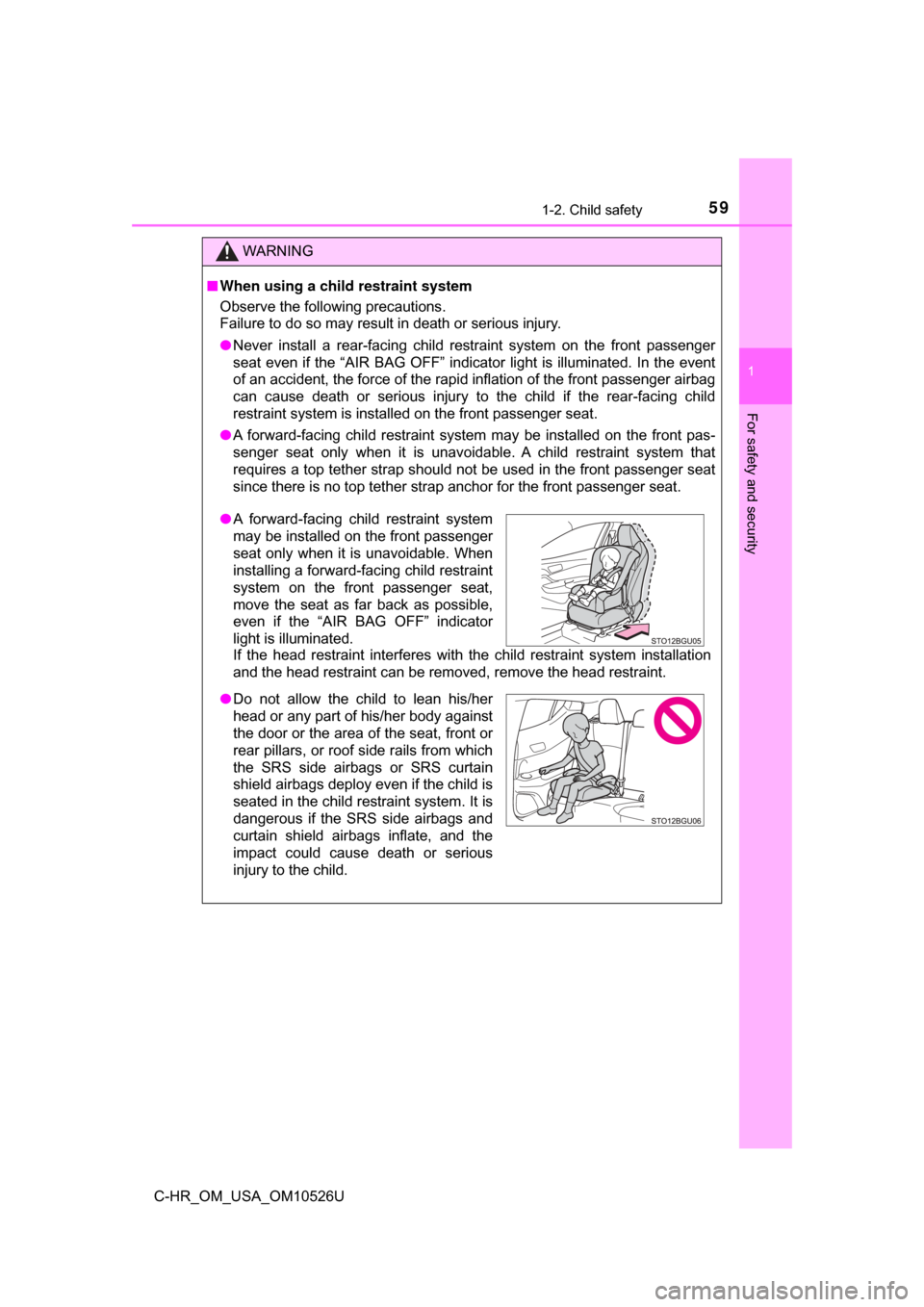
●A forward-facing child restraint system
may be installed on the front passenger
seat only when it is unavoidable. When
installing a forward-facing child restraint
system on the front passenger seat,
move the seat as far back as possible,
even if the “AIR BAG OFF” indicator
light is illuminated.
●Do not allow the child to lean his/her
head or any part of his/her body against
the door or the area of the seat, front or
rear pillars, or roof side rails from which
the SRS side airbags or SRS curtain
shield airbags deploy even if the child is
seated in the child restraint system. It is
dangerous if the SRS side airbags and
curtain shield airbags inflate, and the
impact could cause death or serious
injury to the child.
Page 80 of 516
802. Instrument cluster
C-HR_OM_USA_OM10526U
*1: These lights turn on when the engine switch is turned to the “ON” position(vehicles without a smart key system) or IGNITION ON mode (vehicles
with a smart key system) to indicate that a system check is being per-
formed. They will turn off after the engine is started, or after a few seconds.
There may be a malfunction in a system if a light does not come on, or if
the lights do not turn off. Have the vehicle inspected by your Toyota dealer.
*2: The light comes on to indicate a malfunction.
*3: The light flashes to indicate a malfunction.
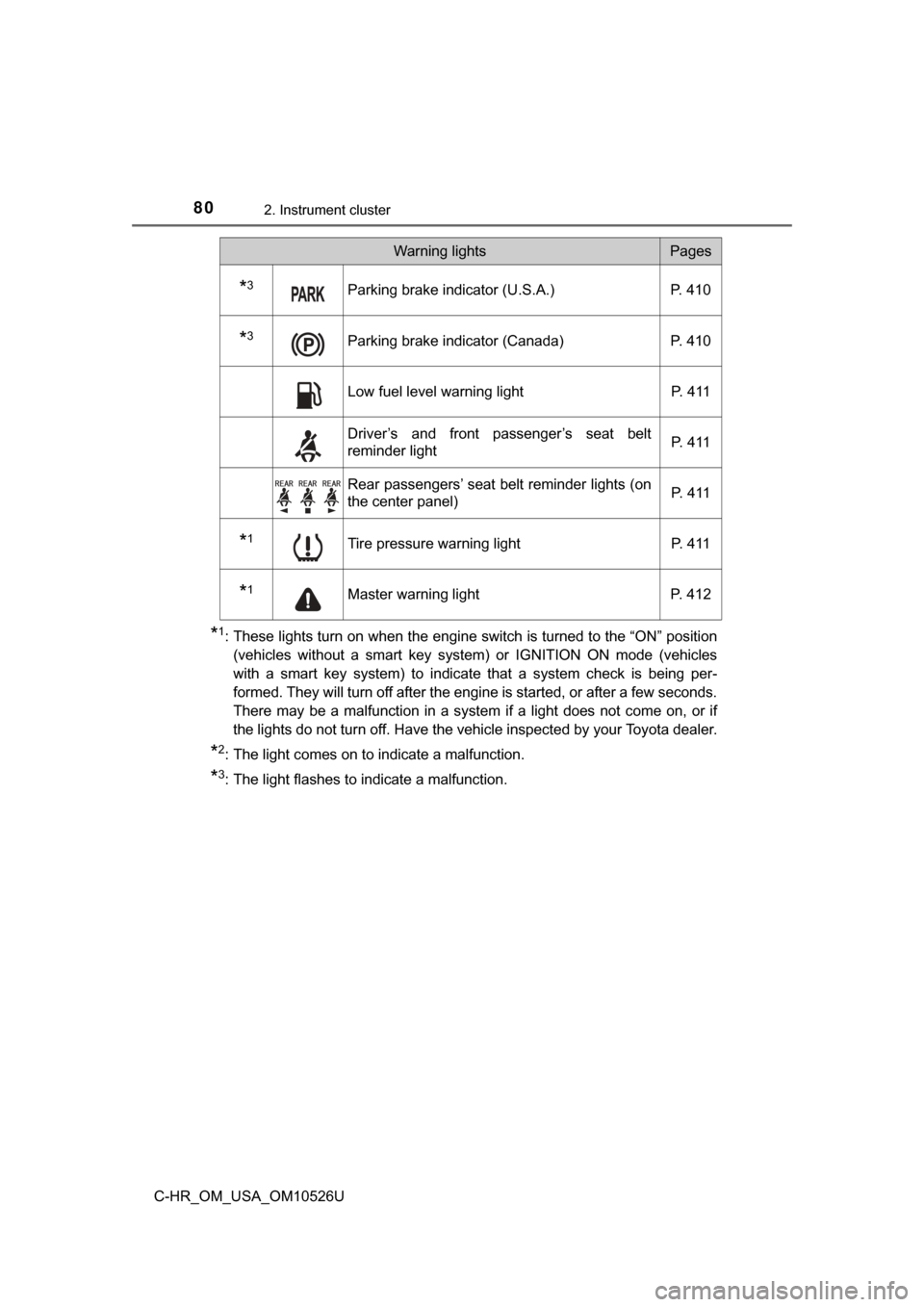
*3Parking brake indicator (U.S.A.) P. 410
*3Parking brake indicator (Canada) P. 410
Low fuel level warning light P. 411
Driver’s and front passenger’s seat belt
reminder lightP. 4 1 1
Rear passengers’ seat belt reminder lights (on
the center panel)
P. 4 1 1
*1Tire pressure warning light
P. 411
*1Master warning lightP. 412
Warning lightsPages
Page 110 of 516
1103-2. Opening, closing and locking the doors
C-HR_OM_USA_OM10526U
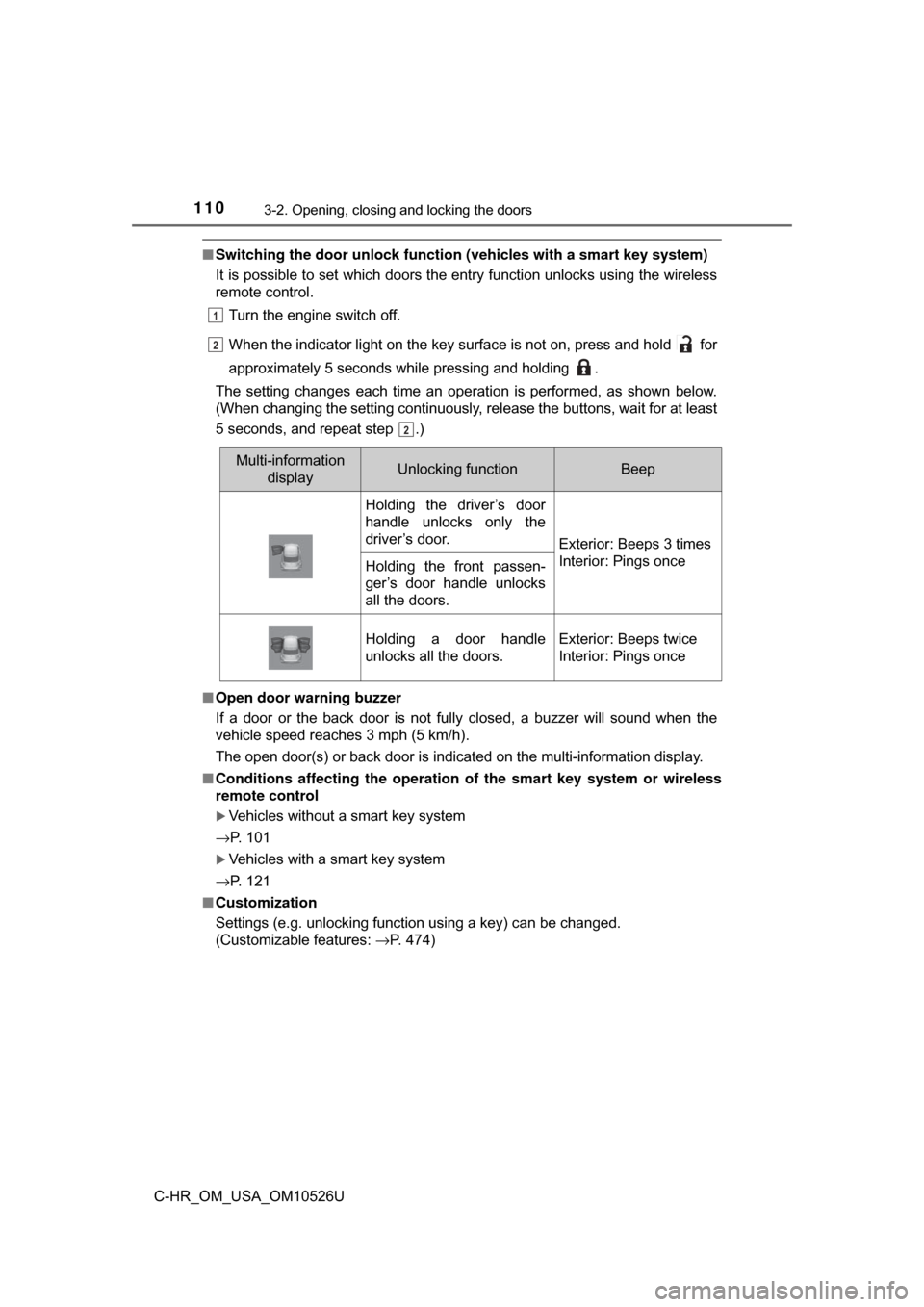
■Switching the door unlock functi on (vehicles with a smart key system)
It is possible to set which doors the entry function unlocks using the wireless
remote control.
Turn the engine switch off.
When the indicator light on the key surface is not on, press and hold for
approximately 5 seconds while pressing and holding .
The setting changes each time an operation is performed, as shown below.
(When changing the setting continuously, release the buttons, wait for at least
5 seconds, and repeat step .)
■ Open door warning buzzer
If a door or the back door is not fully closed, a buzzer will sound when the
vehicle speed reaches 3 mph (5 km/h).
The open door(s) or back door is indicated on the multi-information display.
■ Conditions affecting the operation of the smart key system or wireless
remote control
Vehicles without a smart key system
→P. 101
Vehicles with a smart key system
→P. 121
■ Customization
Settings (e.g. unlocking function using a key) can be changed.
(Customizable features: →P. 474)
1
22
2
Multi-information
displayUnlocking functionBeep
Holding the driver’s door
handle unlocks only the
driver’s door.
Exterior: Beeps 3 times
Interior: Pings once
Holding the front passen-
ger’s door handle unlocks
all the doors.
Holding a door handle
unlocks all the doors.Exterior: Beeps twice
Interior: Pings once
Page 129 of 516
1293-3. Adjusting the seats
3
Operation of each component
C-HR_OM_USA_OM10526U
WARNING
Observe the following precautions. Failure to do so may result in death or
serious injury.
■When folding the rear seatbacks down
● Do not fold the seatbacks down while driving.
● Stop the vehicle on level ground, set the parking brake and shift the shift
lever to P.
● Do not allow anyone to sit on a folded seatback or in the luggage compart-
ment while driving.
● Do not allow children to enter the luggage compartment.
● Do not allow anyone to sit on the rear center seat if the rear right seat is
folded down, as the seat belt buckle for the rear center seat belt is th\
en
concealed under the folded seat and cannot be used.
● Be careful not to get your hand caught when folding the rear seatbacks.
● Adjust the position of the front seats before folding down the rear seat-
backs so that the front seats do not interfere with the rear seatbacks w\
hen
folding down the rear seatbacks.
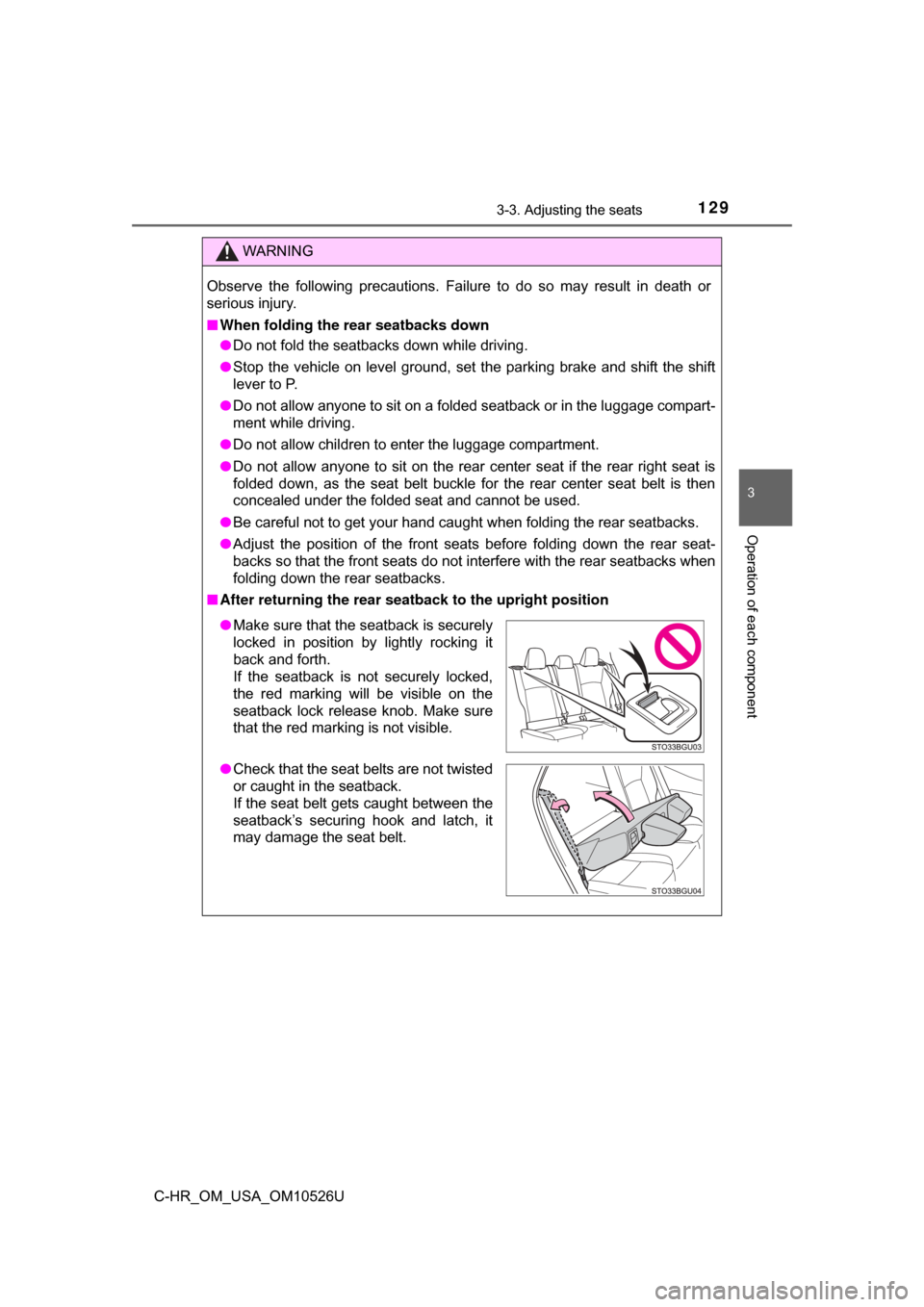
■ After returning the rear seat back to the upright position
●Make sure that the seatback is securely
locked in position by lightly rocking it
back and forth.
If the seatback is not securely locked,
the red marking will be visible on the
seatback lock release knob. Make sure
that the red marking is not visible.
● Check that the seat belts are not twisted
or caught in the seatback.
If the seat belt gets caught between the
seatback’s securing hook and latch, it
may damage the seat belt.
Page 141 of 516
1413-5. Opening and closing the windows
3
Operation of each component
C-HR_OM_USA_OM10526U
■The power windows can be operated when
Vehicles without a smart key system:
The engine switch is in the “ON” position.
Vehicles with a smart key system:
The engine switch is in IGNITION ON mode.
■ Operating the power windows a fter turning the engine off
Vehicles without a smart key system:
The power windows can be operated for approximately 45 seconds after the
engine switch is turned to the “ACC” or “LOCK” position. They cannot, how-
ever, be operated once either front door is opened.
Vehicles with a smart key system:
The power windows can be operated for approximately 45 seconds after the
engine switch is turned to ACCESSORY mode or turned off. They cannot,
however, be operated once either front door is opened.
■ Jam protection function
If an object becomes jammed between the side window and the window
frame while the side window is closing, side window movement is stopped
and the side window is opened slightly.
■ Catch protection function
If an object becomes caught between the door and side window while the
side window is opening, side window movement is stopped.
Page 176 of 516
1764-2. Driving procedures
C-HR_OM_USA_OM10526U
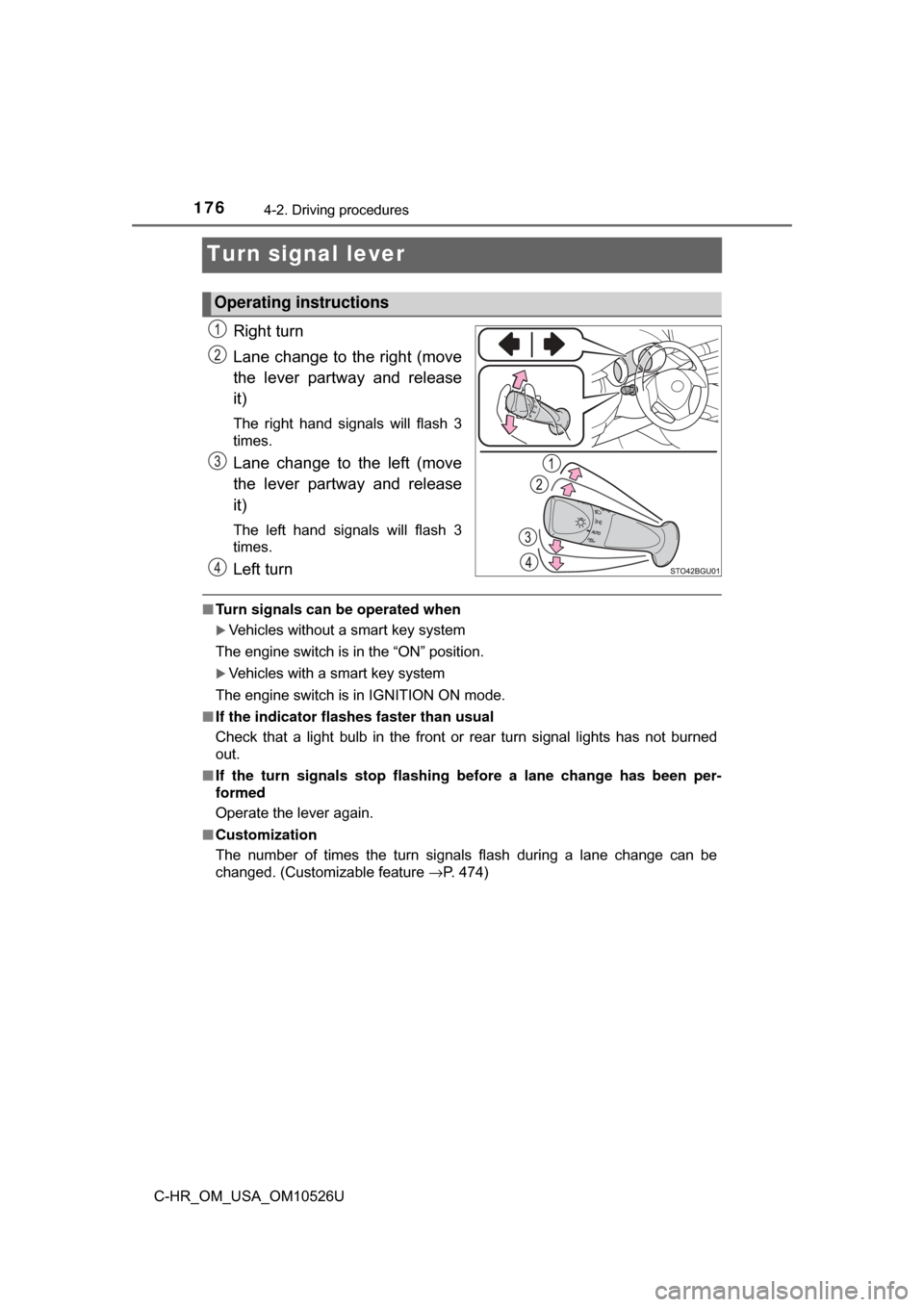
Turn signal lever
Right turn
Lane change to the right (move
the lever partway and release
it)
The right hand signals will flash 3
times.
Lane change to the left (move
the lever partway and release
it)
The left hand signals will flash 3
times.
Left turn
■Turn signals can be operated when
Vehicles without a smart key system
The engine switch is in the “ON” position.
Vehicles with a smart key system
The engine switch is in IGNITION ON mode.
■ If the indicator flashes faster than usual
Check that a light bulb in the front or rear turn signal lights has not burned
out.
■ If the turn signals stop flashing before a lane change has been per-
formed
Operate the lever again.
■ Customization
The number of times the turn signals flash during a lane change can be
changed. (Customizable feature →P. 474)
Operating instructions
Page 192 of 516
1924-3. Operating the lights and wipers
C-HR_OM_USA_OM10526U
■High beam automatic turning on or off conditions
●When all of the following conditions are fulfilled, the high beam will be auto-
matically turned on (after approximately 1 second):
• Vehicle speed is above approximately 21 mph (34 km/h).
• The area ahead of the vehicle is dark.
• There are no vehicles ahead with headlights or tail lights turned on.
• There are few streetlights on the road ahead.
● If any of the following conditions are fulfilled, the high beam will be automat-
ically turned off:
• Vehicle speed drops below approximately 17 mph (27 km/h).
• The area ahead of the vehicle is not dark.
• Vehicles ahead have headlights or tail lights turned on.
• There are many streetlights on the road ahead.
■ Camera sensor detection information
●The high beam may not be automatically turned off in the following situa-
tions:
• When oncoming vehicles suddenly appear from a curve
• When the vehicle is cut off in front of by another vehicle
• When vehicles ahead are hidden from sight due to repeated curves, road
dividers or roadside trees
• When vehicles ahead appear from the faraway lane on wide road
• When vehicles ahead have no lights
● The high beam may be turned off if a vehicle ahead that is using fog lights
without using the headlights is detected.
● House lights, street lights, traffic signals, and illuminated billboards or signs
may cause the high beam to switch to the low beams, or the low beams to
remain on.
● The following factors may affect the amount of time taken to turn the high
beam on or off:
• The brightness of headlights, fog lights, and tail lights of vehicles ahe\
ad
• The movement and direction of vehicles ahead
• When a vehicle ahead only has operational lights on one side
• When a vehicle ahead is a two-wheeled vehicle
• The condition of the road (gradient, curve, condition of the road surface,
etc.)
• The number of passengers and amount of luggage
Page 208 of 516
2084-5. Using the driving support systems
C-HR_OM_USA_OM10526U
WARNING
●If the part of the windshield in front of the camera sensor is fogged up or
covered with condensation or ice, use the windshield defogger to remove
the fog, condensation or ice. ( →P. 293)
● If water droplets cannot be properly removed from the area of the wind-
shield in front of the camera sensor by the windshield wipers, replace the
wiper insert or wiper blade.
If the wiper inserts or wiper blades need to be replaced, contact your
Toyota dealer.
● Do not attach window tinting to the windshield.
● Replace the windshield if it is damaged or cracked.
If the windshield needs to be replaced, contact your Toyota dealer.
● Do not get the camera sensor wet.
● Do not allow bright lights to shine into the camera sensor.
● Do not dirty or damage the camera sensor.
When cleaning the inside of the windshield, do not allow glass cleaner to
contact the lens. Also, do not touch the lens.
If the lens is dirty or damaged, contact your Toyota dealer.
● Do not subject the camera sensor to a strong impact.
● Do not change the installation position or direction of the camera sensor or
remove it.
● Do not disassemble the camera sensor.
● Do not install an electronic device or device that emits strong electric
waves near the camera sensor.
● Do not modify any components of the vehicle around the camera sensor
(inside rear view mirror, etc.) or ceiling.
● Do not attach any accessories that may obstruct the camera sensor to the
hood, front grille or front bumper. Contact your Toyota dealer for details.
● If a surfboard or other long object is to be mounted on the roof, make sure
that it will not obstruct the camera sensor.
● Do not modify the headlights or other lights.