Front light TOYOTA C-HR 2018 1.G Owner's Manual
[x] Cancel search | Manufacturer: TOYOTA, Model Year: 2018, Model line: C-HR, Model: TOYOTA C-HR 2018 1.GPages: 516, PDF Size: 9.32 MB
Page 222 of 516
2224-5. Using the driving support systems
C-HR_OM_USA_OM10526U• When there are patterns or paint on the road or a wall that may be mis-
taken for a vehicle or pedestrian
*
• When driving near an object that reflects radio waves, such as a largetruck or guardrail
• When driving near a TV tower, broadcasting station, electric power plant, or other location where strong radio waves or electrical noise may be
present
*: Depending on the region in which the vehicle was sold, the pedestrian
detection function may not be available.
■ Situations in which the system may not operate properly
●In some situations such as the following, a vehicle may not be detected by
the radar sensor and camera sensor, preventing the system from operating
properly:
• If an oncoming vehicle is approaching your vehicle
• If a vehicle ahead is a motorcycle or bicycle
• When approaching the side or front of a vehicle
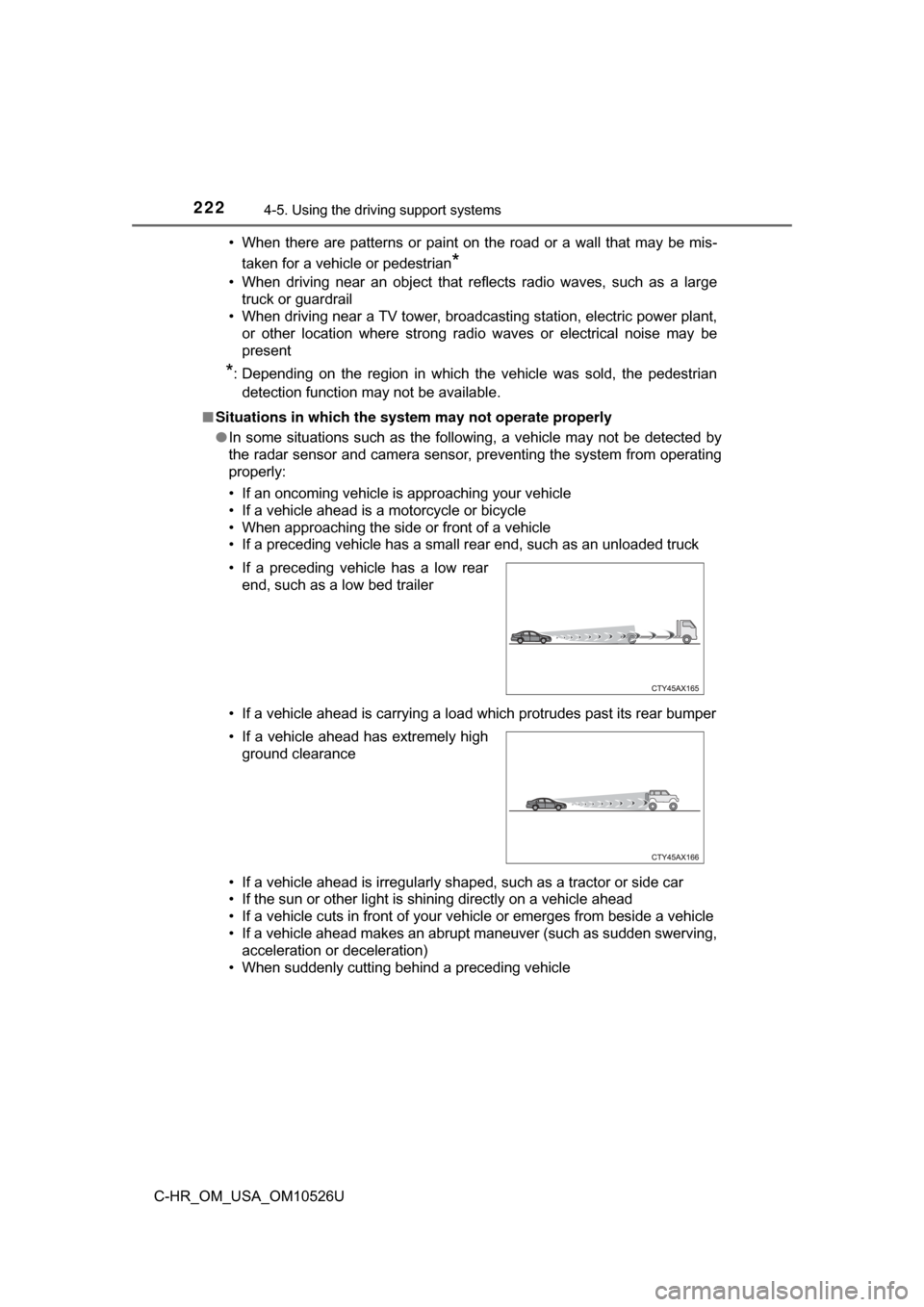
• If a preceding vehicle has a small rear end, such as an unloaded truck
• If a vehicle ahead is carrying a load which protrudes past its rear bumper
• If a vehicle ahead is irregularly shaped, such as a tractor or side car
• If the sun or other light is shining directly on a vehicle ahead
• If a vehicle cuts in front of your vehicle or emerges from beside a vehicle
• If a vehicle ahead makes an abrupt maneuver (such as sudden swerving,
acceleration or deceleration)
• When suddenly cutting behind a preceding vehicle • If a preceding vehicle has a low rear end, such as a low bed trailer
• If a vehicle ahead has extremely high ground clearance
Page 223 of 516
2234-5. Using the driving support systems
4
Driving
C-HR_OM_USA_OM10526U• When driving in inclement weather such as heavy rain, fog, snow or a
sandstorm
• When the vehicle is hit by water, snow, dust, etc., from a vehicle ahead
• When driving through steam or smoke
• When driving in a place where the surrounding brightness changes sud- denly, such as at the entrance or exit of a tunnel
• When a very bright light, such as the sun or the headlights of oncoming traffic, shines directly into the camera sensor
• When the surrounding area is dim, such as at dawn or dusk, or while at
night or in a tunnel
• After the engine has started the vehicle has not been driven for a certain amount of time
• While making a left/right turn and for a few seconds after making a left/ right turn
• While driving on a curve and for a few seconds after driving on a curve
• If your vehicle is skidding
• If the wheels are misaligned
• If a wiper blade is blocking the camera sensor
• The vehicle is wobbling.
• The vehicle is being driven at extremely high speeds.
• When driving on a hill
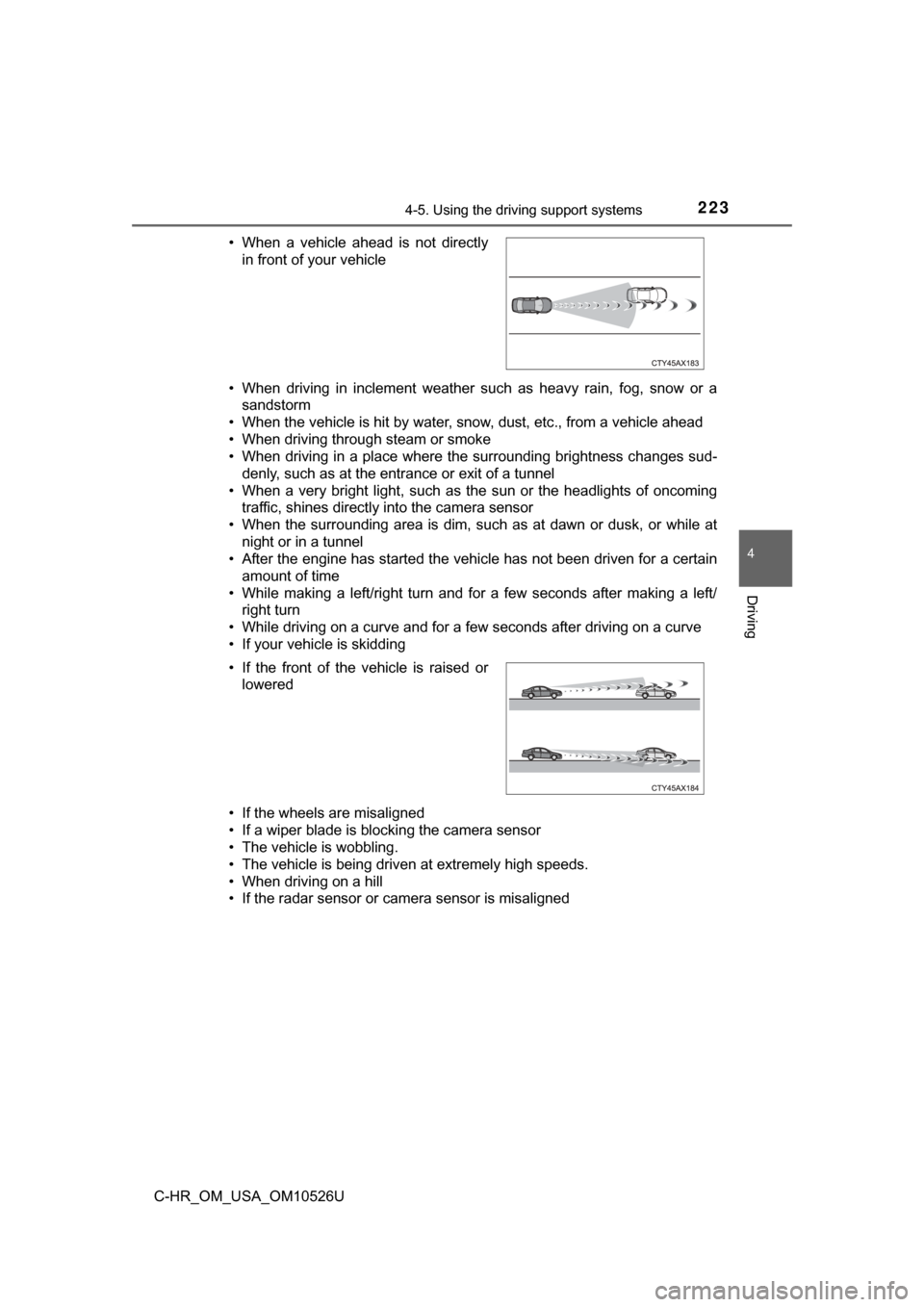
• If the radar sensor or camera sensor is misaligned • When a vehicle ahead is not directly
in front of your vehicle
• If the front of the vehicle is raised or lowered
Page 225 of 516

2254-5. Using the driving support systems
4
Driving
C-HR_OM_USA_OM10526U■
If the PCS warning light flashes or illuminates, and a warning message is
displayed on the mult i-information display
The pre-collision system may be tem porarily unavailable or there may be a
malfunction in the system.
● In the following situations, the warning light will turn off, the message will
disappear and the system will become operational when normal operating
conditions return:
• When the radar sensor or camera sensor or the area around either sen-
sor is hot, such as in the sun
• When the radar sensor or camera sensor or the area around either sen- sor is cold, such as in an extremely cold environment
• When the radar sensor or front grille emblem is dirty or covered with
snow, etc.
• When the part of the windshield in front of the camera sensor is fogged up or covered with condensation or ice
(Defogging the windshield: →P. 293)
• If the camera sensor is obstructed, such as when the hood is open or a sticker is attached to the windshield near the camera sensor
● If the PCS warning light continues to flash or illuminate, or the warning mes-
sage does not disappear, the system may be malfunctioning. Have the vehi-
cle inspected by your Toyota dealer immediately.
■ If VSC is disabled
●If VSC is disabled ( →P. 281), the pre-collision brake assist and pre-collision
braking functions are also disabled.
● The PCS warning light will turn on and “VSC Turned Off Pre-Collision Brake
System Unavailable.” will be displayed on the multi-information display.
Page 283 of 516
2834-5. Using the driving support systems
4
Driving
C-HR_OM_USA_OM10526U
WARNING
■The ABS does not operate effectively when
● The limits of tire gripping performance have been exceeded (such as
excessively worn tires on a snow covered road).
● The vehicle hydroplanes while driving at high speed on wet or slick roads.
■ Stopping distance when the ABS is operating may exceed that of nor-
mal conditions
The ABS is not designed to shorten the vehicle’s stopping distance. Always
maintain a safe distance from the vehicle in front of you, especially in the
following situations:
● When driving on dirt, gravel or snow-covered roads
● When driving with tire chains
● When driving over bumps in the road
● When driving over roads with potholes or uneven surfaces
■ TRAC/VSC may not operate effectively when
Directional control and power may not be achievable while driving on slip-
pery road surfaces, even if the TRAC/VSC system is operating.
Drive the vehicle carefully in conditions where stability and power may be
lost.
■ Hill- start assist control does not operate effectively when
● Do not overly rely on hill-start assist control. Hill-start assist control may
not operate effectively on steep inclines and roads covered with ice.
● Unlike the parking brake, hill-start assist control is not intended to hold the
vehicle stationary for an extended period of time. Do not attempt to use
hill-start assist control to hold the vehicle on an incline, as doing so may
lead to an accident.
■ When the TRAC/VSC is activated
The slip indicator light flashes. Always drive carefully. Reckless driving may
cause an accident. Exercise particular care when the indicator light flashes.
■ When the TRAC/VSC syst ems are turned off
Be especially careful and drive at a speed appropriate to the road condi-
tions. As these are the systems to help ensure vehicle stability and driving
force, do not turn the TRAC/VSC systems off unless necessary.
Page 285 of 516
2854-6. Driving tips
4
Driving
C-HR_OM_USA_OM10526U
Winter driving tips
●Use fluids that are appropriate to the prevailing outside tempera-
tures. • Engine oil
• Engine coolant
• Washer fluid
● Have a service technician ins pect the condition of the battery.
● Have the vehicle fitted with four snow tires or purchase a set of tire
chains for the front tires
*.
Ensure that all tires are the same size and brand, and that chains match
the size of the tires.
*: Tire chains cannot be mounted on 18 inch tires.
Perform the following accordin g to the driving conditions:
● Do not try to forcibly open a window or move a wiper that is frozen.
Pour warm water over the frozen area to melt the ice. Wipe away
the water immediately to prevent it from freezing.
● To ensure proper operation of the climate control system fan,
remove any snow that has accumulated on the air inlet vents in
front of the windshield.
● Check for and remove any excess ice or snow that may have accu-
mulated on the exterior lights, vehicle’s roof, chassis, around the
tires or on the brakes.
● Remove any snow or mud from the bottom of your shoes before
getting in the vehicle.
Carry out the necessary preparations and inspections before
driving the vehicle in winter. Al ways drive the vehicle in a man-
ner appropriate to the prevailing weather conditions.
Preparation for winter
Before driving the vehicle
Page 300 of 516
3005-2. Using the interior lights
C-HR_OM_USA_OM10526U
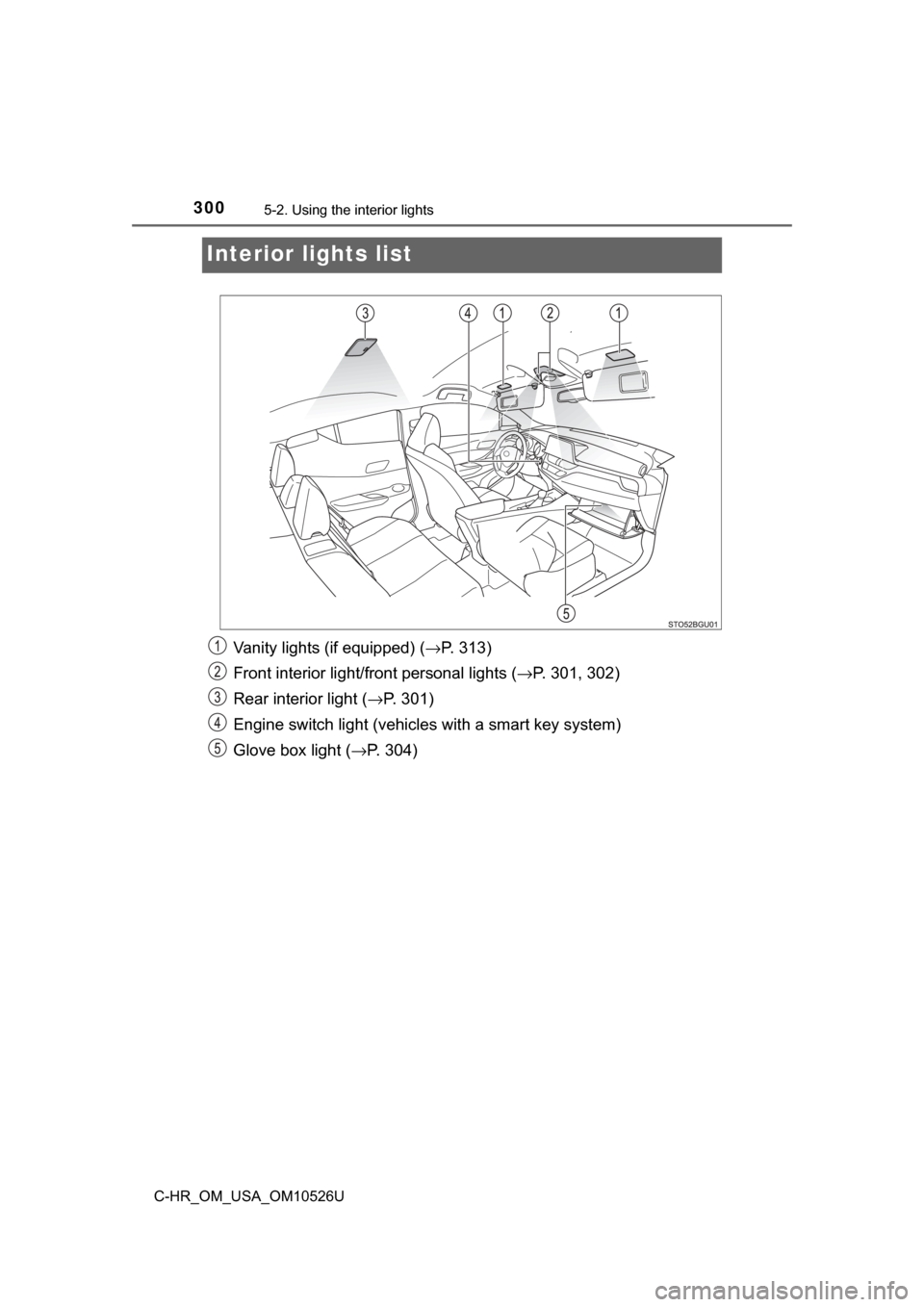
Interior lights list
Vanity lights (if equipped) ( →P. 313)
Front interior light/fr ont personal lights ( →P. 301, 302)
Rear interior light ( →P. 301)
Engine switch light (vehicles with a smart key system)
Glove box light (→ P. 304)
Page 301 of 516
3015-2. Using the interior lights
5
Interior features
C-HR_OM_USA_OM10526U■
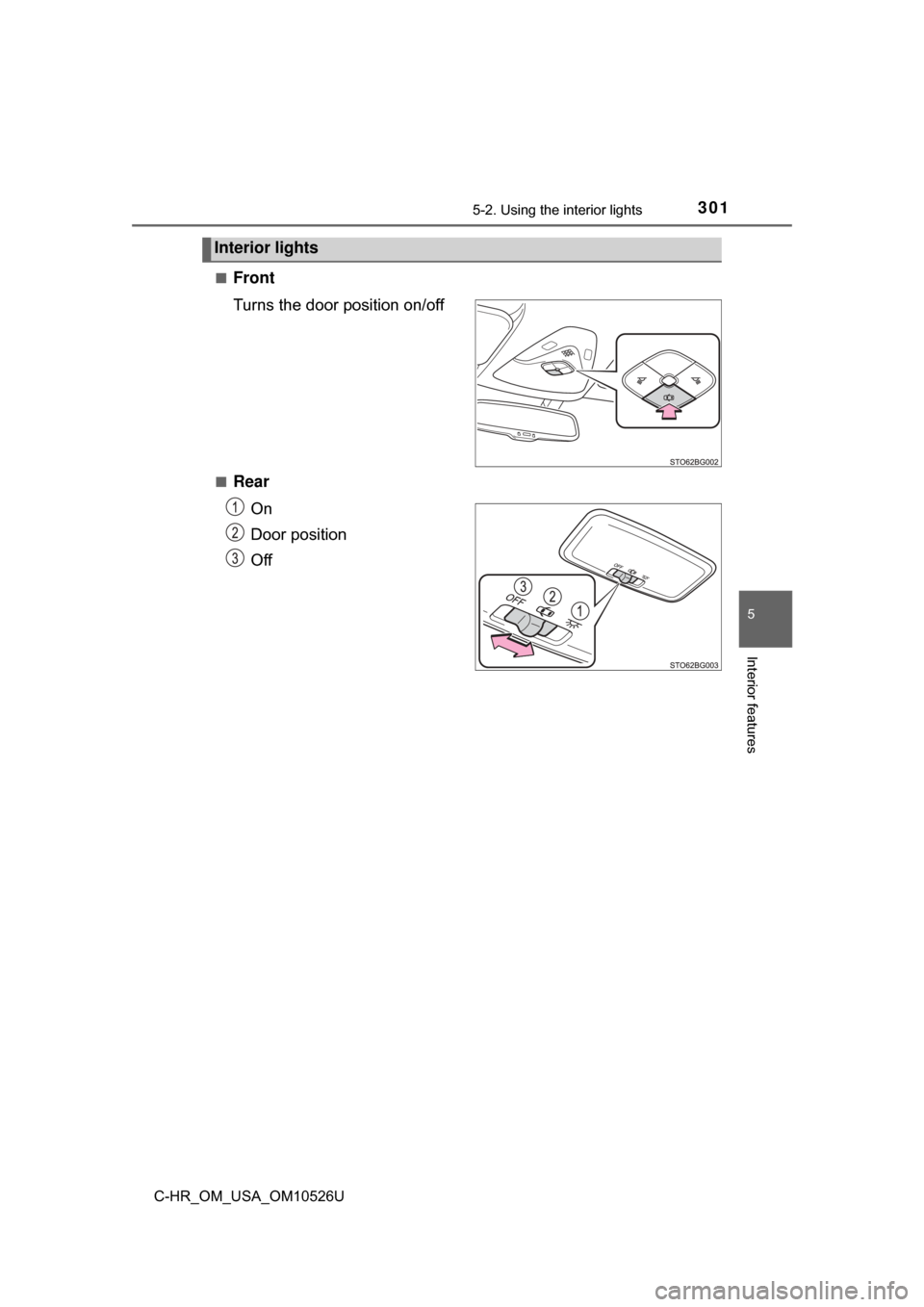
Front
Turns the door position on/off
■Rear
On
Door position
Off
Interior lights
Page 302 of 516
3025-2. Using the interior lights
C-HR_OM_USA_OM10526U
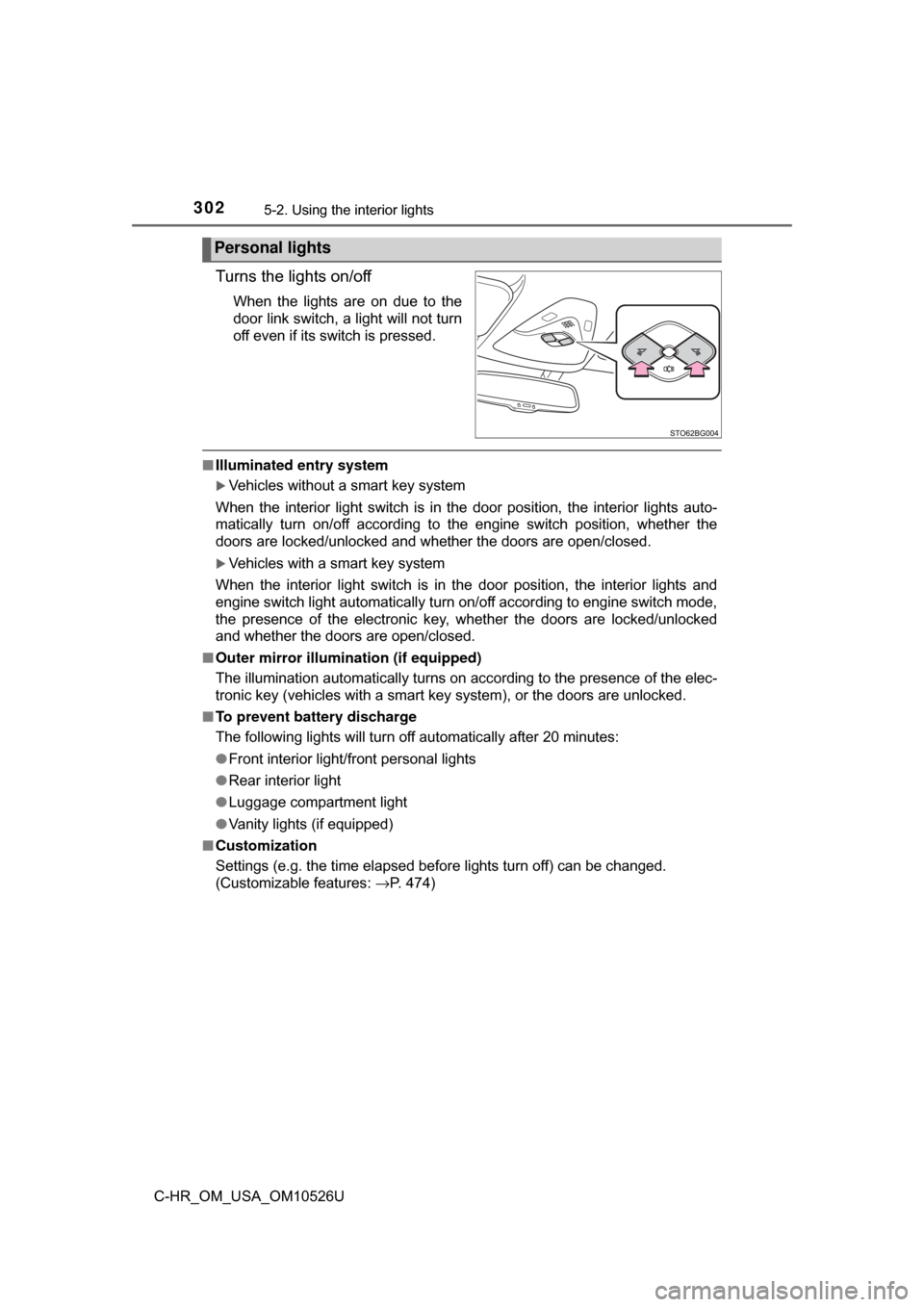
Turns the lights on/off
When the lights are on due to the
door link switch, a light will not turn
off even if its switch is pressed.
■Illuminated entry system
Vehicles without a smart key system
When the interior light switch is in the door position, the interior lights auto-
matically turn on/off according to the engine switch position, whether the
doors are locked/unlocked and whether the doors are open/closed.
Vehicles with a smart key system
When the interior light switch is in the door position, the interior lights and
engine switch light automatically turn on/off according to engine switch mode,
the presence of the electronic key, whether the doors are locked/unlocked
and whether the doors are open/closed.
■ Outer mirror illumination (if equipped)
The illumination automatically turns on according to the presence of the elec-
tronic key (vehicles with a smart key system), or the doors are unlocked.
■ To prevent battery discharge
The following lights will turn off automatically after 20 minutes:
●Front interior light/front personal lights
● Rear interior light
● Luggage compartment light
● Vanity lights (if equipped)
■ Customization
Settings (e.g. the time elapsed before lights turn off) can be changed.
(Customizable features: →P. 474)
Personal lights
Page 381 of 516
3816-3. Do-it-yourself maintenance
6
Maintenance and care
C-HR_OM_USA_OM10526U
Light bulbs
Check the wattage of the light bulb to be replaced. (→P. 457)
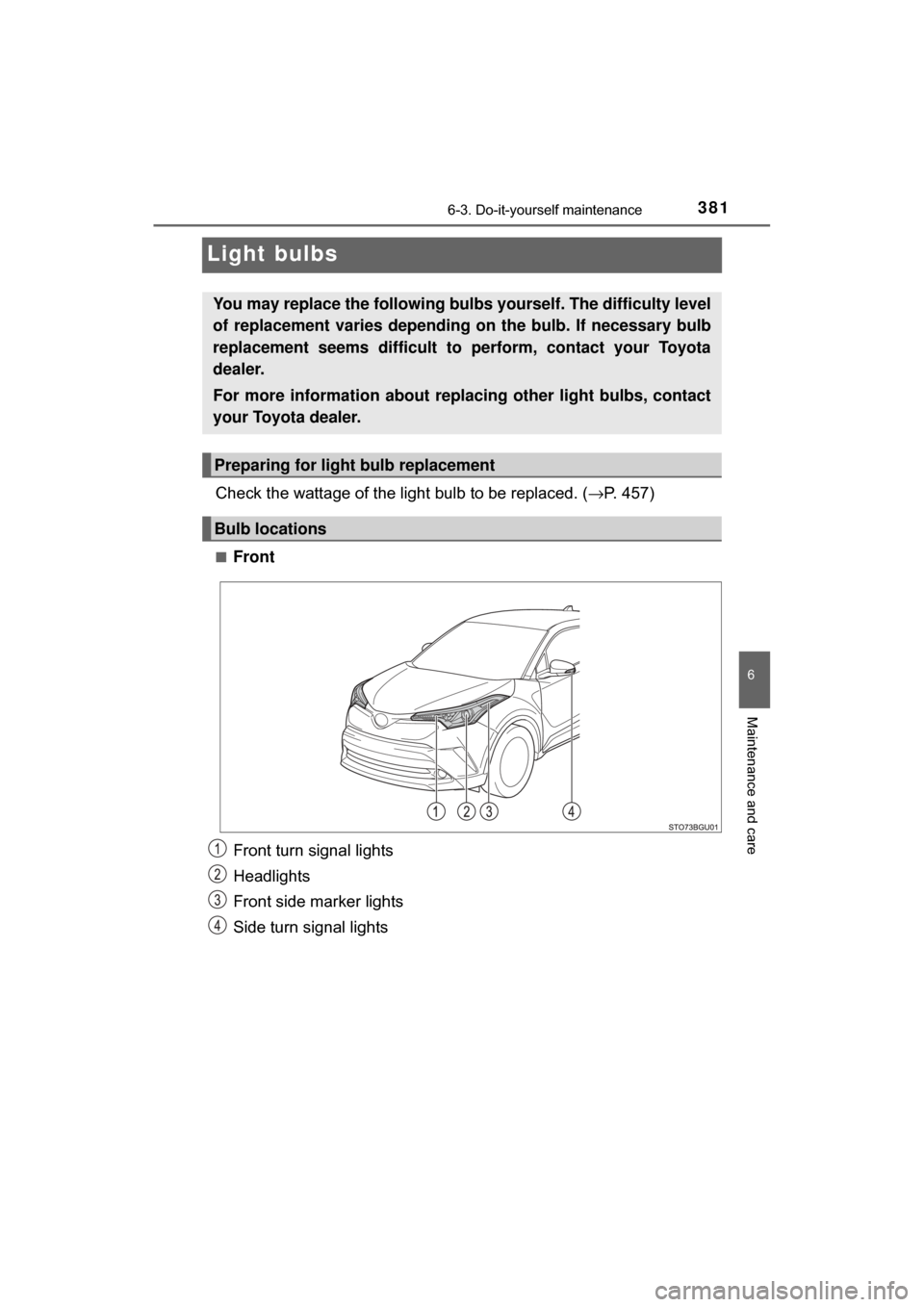
■Front
Front turn signal lights
Headlights
Front side marker lights
Side turn signal lights
You may replace the following bulb s yourself. The difficulty level
of replacement varies depending on the bulb. If necessary bulb
replacement seems difficult to perform, contact your Toyota
dealer.
For more information about replacing other light bulbs, contact
your Toyota dealer.
Preparing for light bulb replacement
Bulb locations
Page 383 of 516
3836-3. Do-it-yourself maintenance
6
Maintenance and care
C-HR_OM_USA_OM10526U
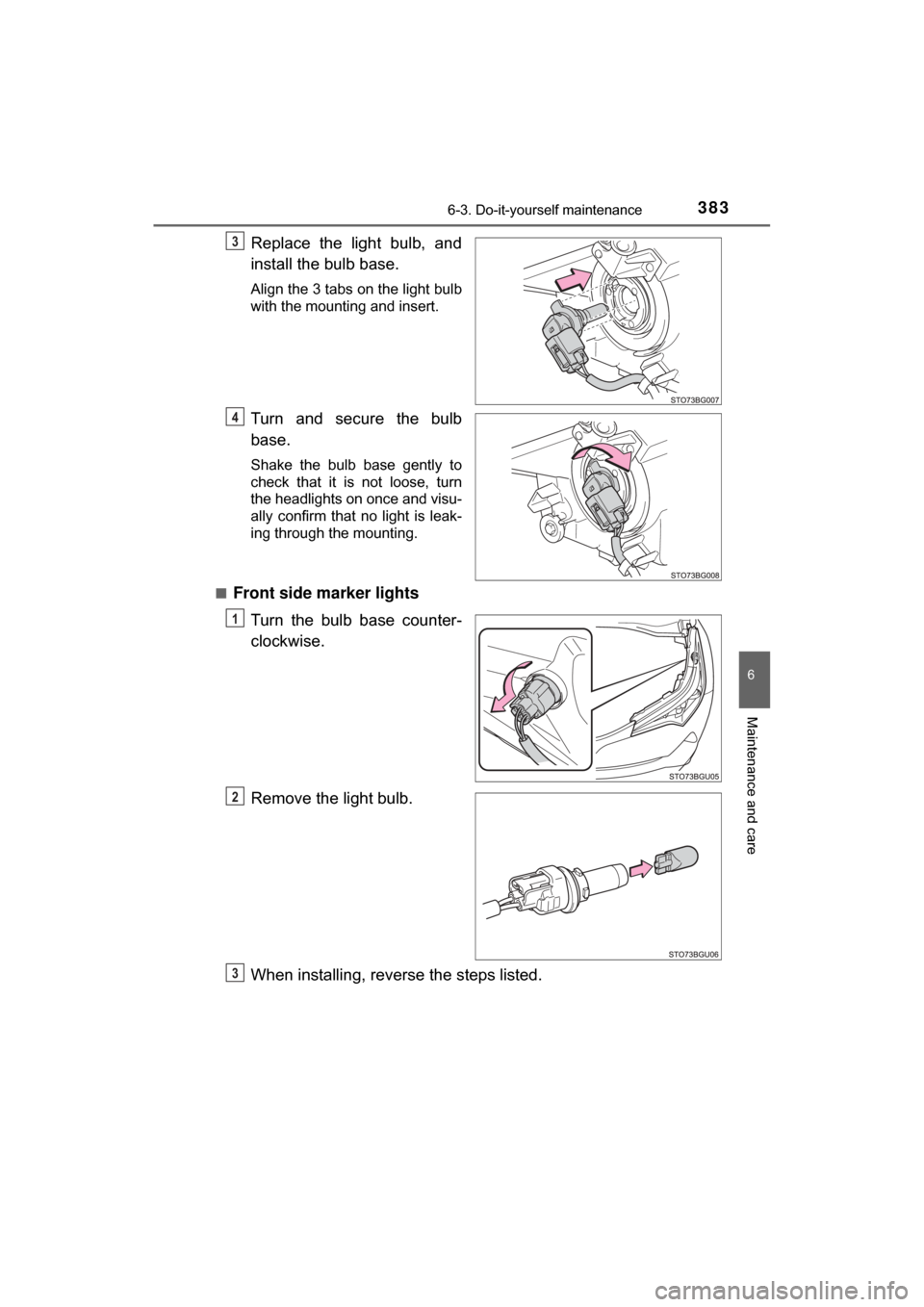
Replace the light bulb, and
install the bulb base.
Align the 3 tabs on the light bulb
with the mounting and insert.
Turn and secure the bulb
base.
Shake the bulb base gently to
check that it is not loose, turn
the headlights on once and visu-
ally confirm that no light is leak-
ing through the mounting.
■
Front side marker lights Turn the bulb base counter-
clockwise.
Remove the light bulb.
When installing, reve rse the steps listed.
3
4
1
2
3