door lock TOYOTA C-HR 2018 1.G Service Manual
[x] Cancel search | Manufacturer: TOYOTA, Model Year: 2018, Model line: C-HR, Model: TOYOTA C-HR 2018 1.GPages: 516, PDF Size: 9.32 MB
Page 321 of 516

3216-1. Maintenance and care
6
Maintenance and care
C-HR_OM_USA_OM10526U■
Automatic car washes
●Fold the mirrors before washing the vehicle. Start washing from the fron\
t of
the vehicle. Make sure to extend the mirrors before driving.
● Brushes used in automatic car washes may scratch the vehicle surface and
harm your vehicle's paint.
● Rear spoiler may not be washable in some automatic car washes. There
may also be an increased risk of damage to vehicle.
■ High pressure car washes
●Do not allow the nozzles of the car wash to come within close proximity of
the windows.
● Before using the car wash, check that the fuel filler door on your vehicle is
closed properly.
■ Note for a smart key system (if equipped)
If the door handle becomes wet while the electronic key is within the ef\
fective
range, the door may lock and unlock repeatedly. In that case, follow the fol-
lowing correction procedures to wash the vehicle:
●Place the key in a position 6 ft. (2 m) or more separate from the vehicle
while the vehicle is being washed. (Take care to ensure that the key is not
stolen.)
● Set the electronic key to battery-saving mode to disable the smart key sys-
tem. ( →P. 120)
■ Aluminum wheels
●Remove any dirt immediately by using a neutral detergent. Do not use hard
brushes or abrasive cleaners. Do not use strong or harsh chemical clean-
ers.
Use the same mild detergent and wax as used on the paint.
● Do not use detergent on the wheels when they are hot, for example after
driving for long distance in the hot weather.
● Wash detergent from the wheels immediately after use.
■ Bumpers and side moldings
Do not scrub with abrasive cleaners.
Page 333 of 516
3336-2. Maintenance
6
Maintenance and care
C-HR_OM_USA_OM10526U
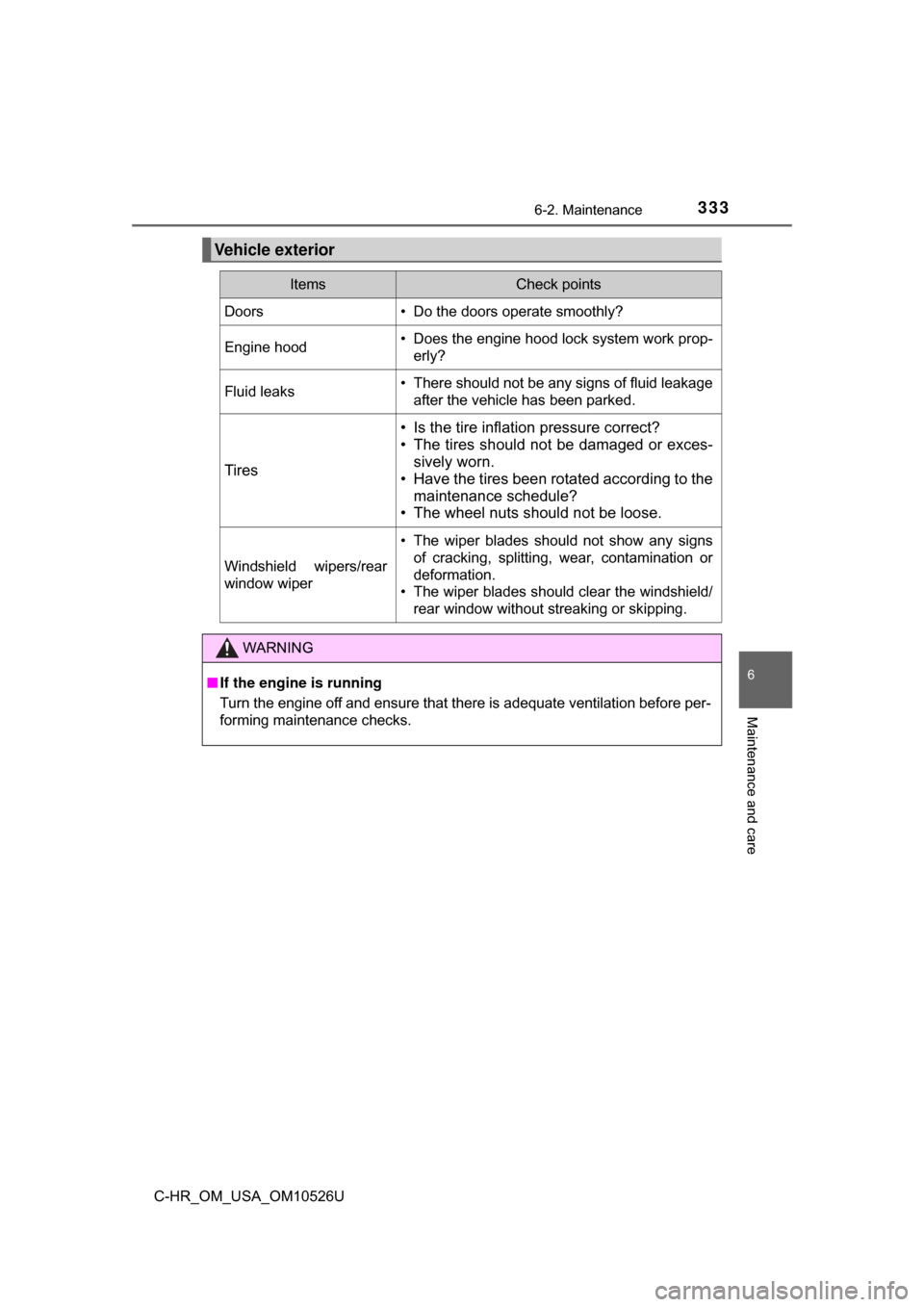
Vehicle exterior
ItemsCheck points
Doors• Do the doors operate smoothly?
Engine hood• Does the engine hood lock system work prop-erly?
Fluid leaks• There should not be any signs of fluid leakageafter the vehicle has been parked.
Tires
• Is the tire inflation pressure correct?
• The tires should not be damaged or exces-sively worn.
• Have the tires been rotated according to the
maintenance schedule?
• The wheel nuts should not be loose.
Windshield wipers/rear
window wiper
• The wiper blades should not show any signs
of cracking, splitting, wear, contamination or
deformation.
• The wiper blades should clear the windshield/
rear window without streaking or skipping.
WARNING
■If the engine is running
Turn the engine off and ensure that there is adequate ventilation before per-
forming maintenance checks.
Page 350 of 516
3506-3. Do-it-yourself maintenance
C-HR_OM_USA_OM10526U■
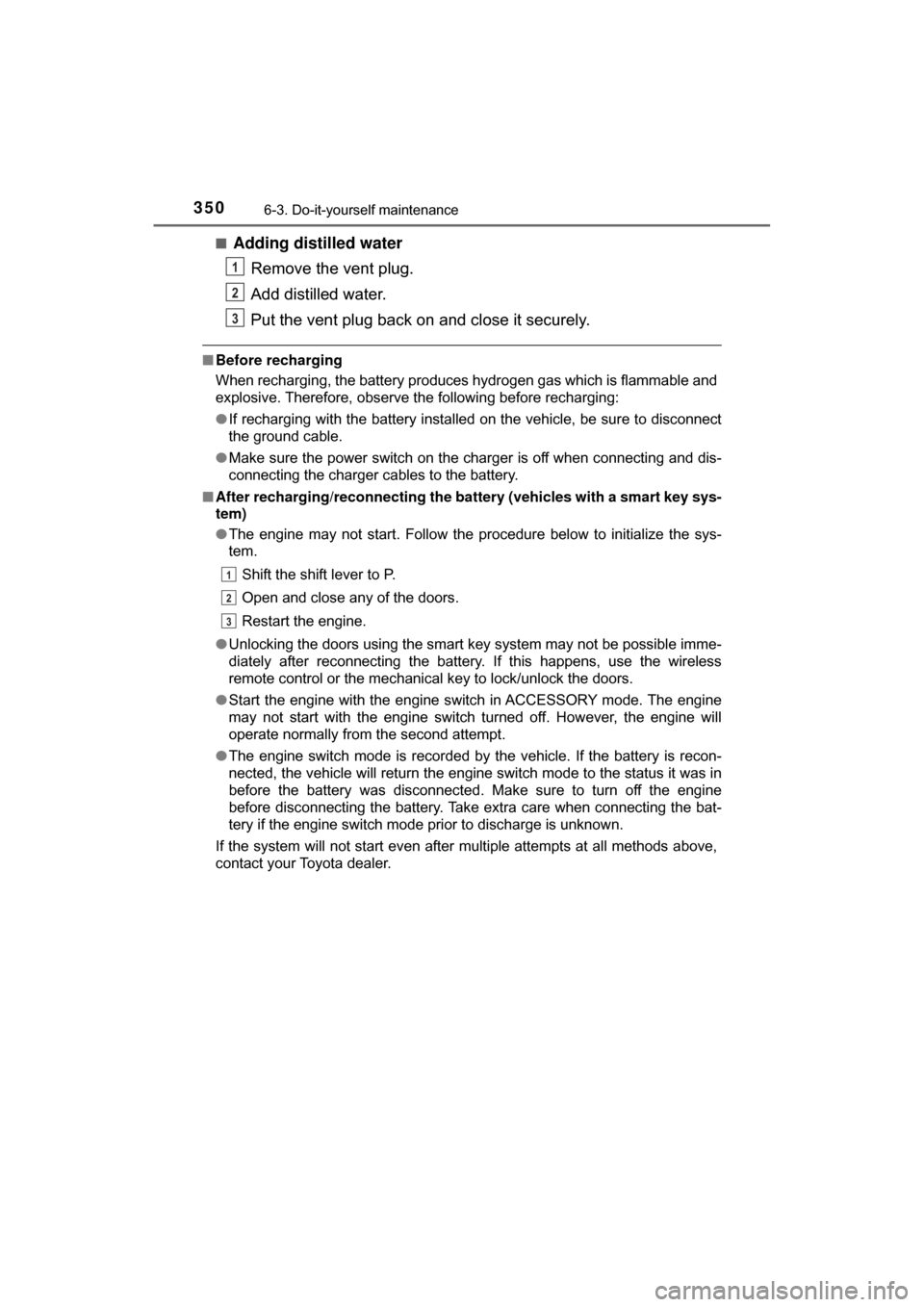
Adding distilled water
Remove the vent plug.
Add distilled water.
Put the vent plug back on and close it securely.
■Before recharging
When recharging, the battery produces hydrogen gas which is flammable and
explosive. Therefore, observe the following before recharging:
●If recharging with the battery installed on the vehicle, be sure to disconnect
the ground cable.
● Make sure the power switch on the charger is off when connecting and dis-
connecting the charger cables to the battery.
■ After recharging/reconnecting the ba ttery (vehicles with a smart key sys-
tem)
● The engine may not start. Follow the procedure below to initialize the sys-
tem.
Shift the shift lever to P.
Open and close any of the doors.
Restart the engine.
● Unlocking the doors using the smart key system may not be possible imme-
diately after reconnecting the battery. If this happens, use the wireless
remote control or the mechanical key to lock/unlock the doors.
● Start the engine with the engine switch in ACCESSORY mode. The engine
may not start with the engine switch turned off. However, the engine will
operate normally from the second attempt.
● The engine switch mode is recorded by the vehicle. If the battery is recon-
nected, the vehicle will return the engine switch mode to the status it was in
before the battery was disconnected. Make sure to turn off the engine
before disconnecting the battery. Take extra care when connecting the bat-
tery if the engine switch mode prior to discharge is unknown.
If the system will not start even after multiple attempts at all methods above,
contact your Toyota dealer.
1
2
3
1
2
3
Page 385 of 516
3856-3. Do-it-yourself maintenance
6
Maintenance and care
C-HR_OM_USA_OM10526U■
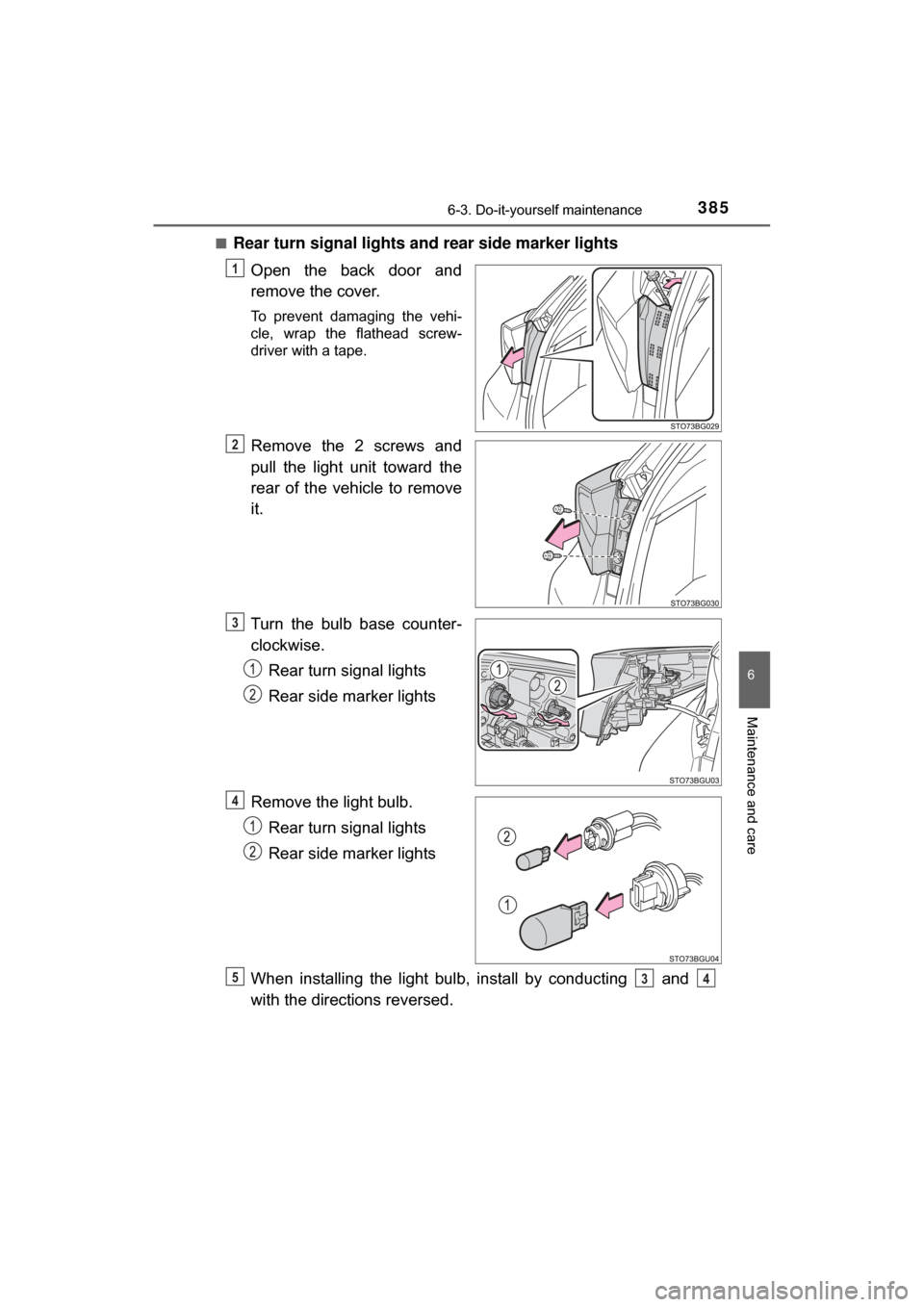
Rear turn signal lights and rear side marker lights
Open the back door and
remove the cover.
To prevent damaging the vehi-
cle, wrap the flathead screw-
driver with a tape.
Remove the 2 screws and
pull the light unit toward the
rear of the vehicle to remove
it.
Turn the bulb base counter-
clockwise.Rear turn signal lights
Rear side marker lights
Remove the light bulb. Rear turn signal lights
Rear side marker lights
When installing the light bulb, install by conducting and
with the directions reversed.
1
2
3
4
534
Page 387 of 516
3876-3. Do-it-yourself maintenance
6
Maintenance and care
C-HR_OM_USA_OM10526U■
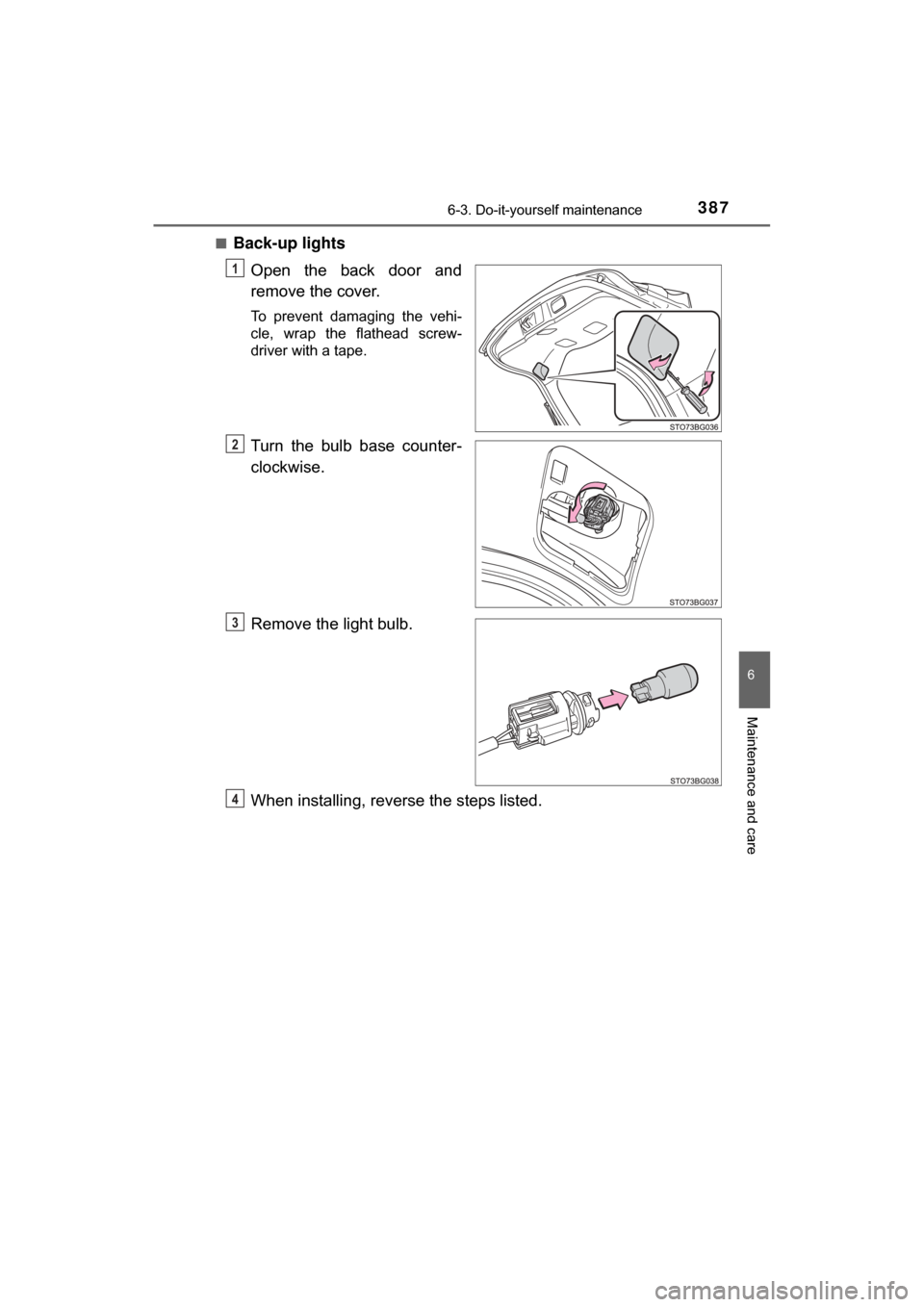
Back-up lights
Open the back door and
remove the cover.
To prevent damaging the vehi-
cle, wrap the flathead screw-
driver with a tape.
Turn the bulb base counter-
clockwise.
Remove the light bulb.
When installing, reve rse the steps listed.
1
2
3
4
Page 388 of 516
3886-3. Do-it-yourself maintenance
C-HR_OM_USA_OM10526U■
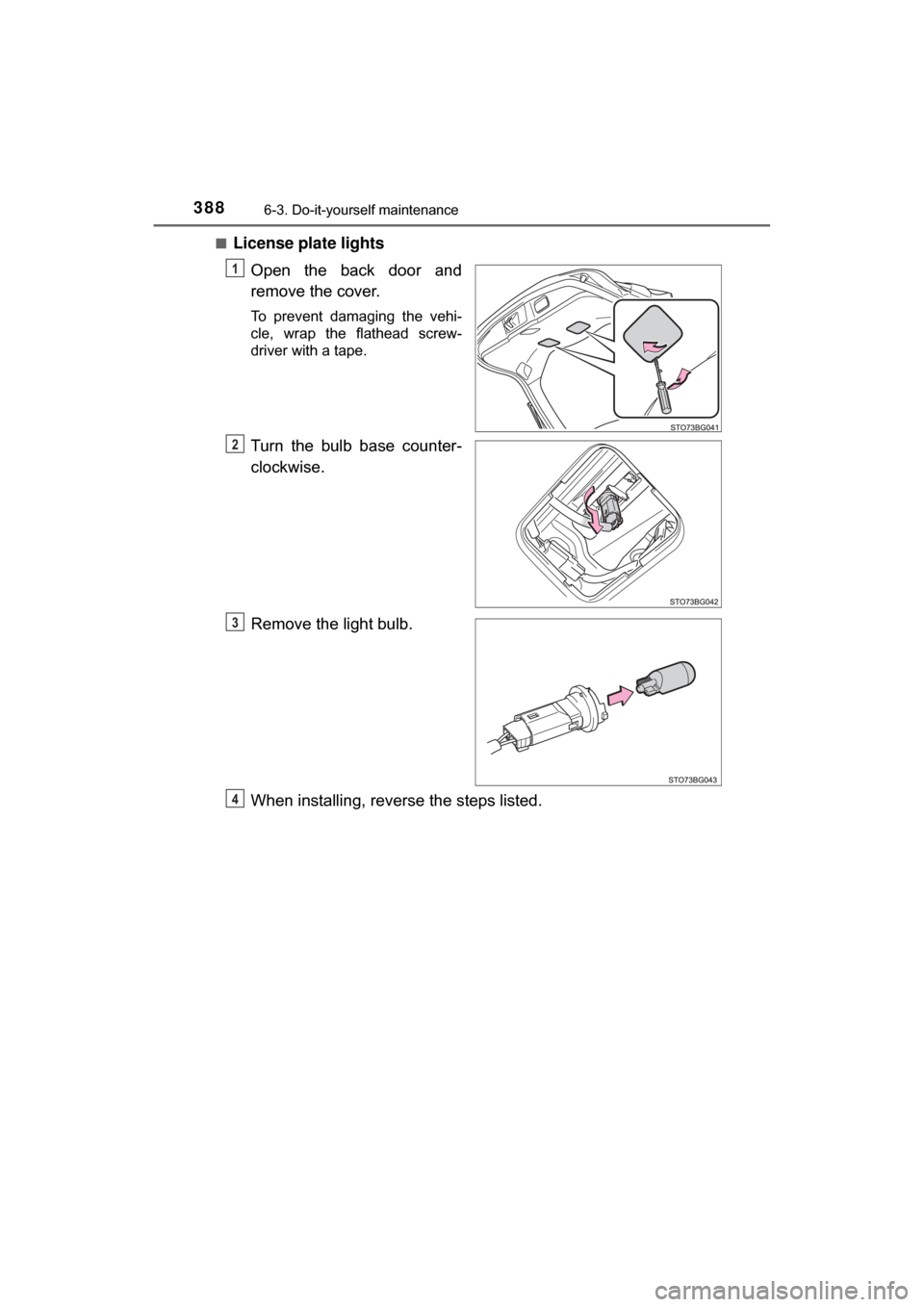
License plate lights
Open the back door and
remove the cover.
To prevent damaging the vehi-
cle, wrap the flathead screw-
driver with a tape.
Turn the bulb base counter-
clockwise.
Remove the light bulb.
When installing, reve rse the steps listed.
1
2
3
4
Page 420 of 516

4207-2. Steps to take in an emergency
C-HR_OM_USA_OM10526U
■Warning messages
The warning messages explained below may differ from the actual messages
according to operation conditions and vehicle specifications.
■ System warning lights
The master warning light does not come on or flash in the following cases.
Instead, a separate system warning light will come on along with a message
shown on the multi-information display.
“Anti-lock Brake System Malfunction Visit Your Dealer”:
The ABS warning light comes on. ( →P. 409)
■ If “Visit Your Dealer” is shown
The system or part shown on the multi-information display is malfunctioning.
Have the vehicle inspected by your Toyota dealer.
■ If a message about an operation is shown
●If a message about an operation of the accelerator pedal or brake pedal is
shown
A warning message about an operation of the brake pedal may be shown
while the driving assist systems such as PCS (Pre-Collision System) or the
dynamic radar cruise control with full-speed range is operating. If a warning
message is shown, be sure to decelerate the vehicle or follow the instruction
shown on the multi-information display.
● A warning message is shown when Brake Override System or Drive-Start
Control operates ( →P. 148). Follow the instructions on the multi-informa-
tion display.
● If a message about an operation of the engine switch is shown
An instruction for operation of the engine switch is shown when the inco\
rrect
procedure for starting the engine is performed or the engine switch is oper-
ated incorrectly. Follow the instructions shown on the multi -information dis-
play to operate the engine switch again.
● If a message about a shift lever operation is shown
To prevent the shift lever from being operated incorrectly or the vehicle from
moving unexpectedly, a message that requires shifting the shift lever may
be shown on the multi-information display. In that case, follow the instruction
of the message and shift the shift lever.
● If a message or image about an open/close state of a part or replenishment
of a consumable is shown
Confirm the part indicated by the multi-information display or a warning light,
and then perform the coping method such as closing the open door or
replenishing a consumable.
Page 422 of 516

4227-2. Steps to take in an emergency
C-HR_OM_USA_OM10526U■
If “A New Key has been Registered Contact Your Dealer for Details” is
shown (vehicles with a smart key system)
This message will be displayed each time the driver's door is opened when
the doors are unlocked from the outside for approximately one week after a
new electronic key has been registered.
If this message is displayed but you have not had a new electronic key regis-
tered, ask your Toyota dealer to check if an unknown electronic key (other
than those in your possession) has been registered.
■ If “Front camera unavailable” or “F ront camera vision blocked Clean and
demist windshield” is displayed.
The following systems may be suspended until the problem shown in the
message is resolved.
● PCS (Pre-Collision System)
● LDA (Lane Departure Alert with steering control)
● Dynamic radar cruise control with full-speed range
● Automatic High Beam
■ Warning buzzer
→P. 415
Page 436 of 516
4367-2. Steps to take in an emergency
C-HR_OM_USA_OM10526U
If the electronic key does not operate
properly (vehicles with a smart key system)
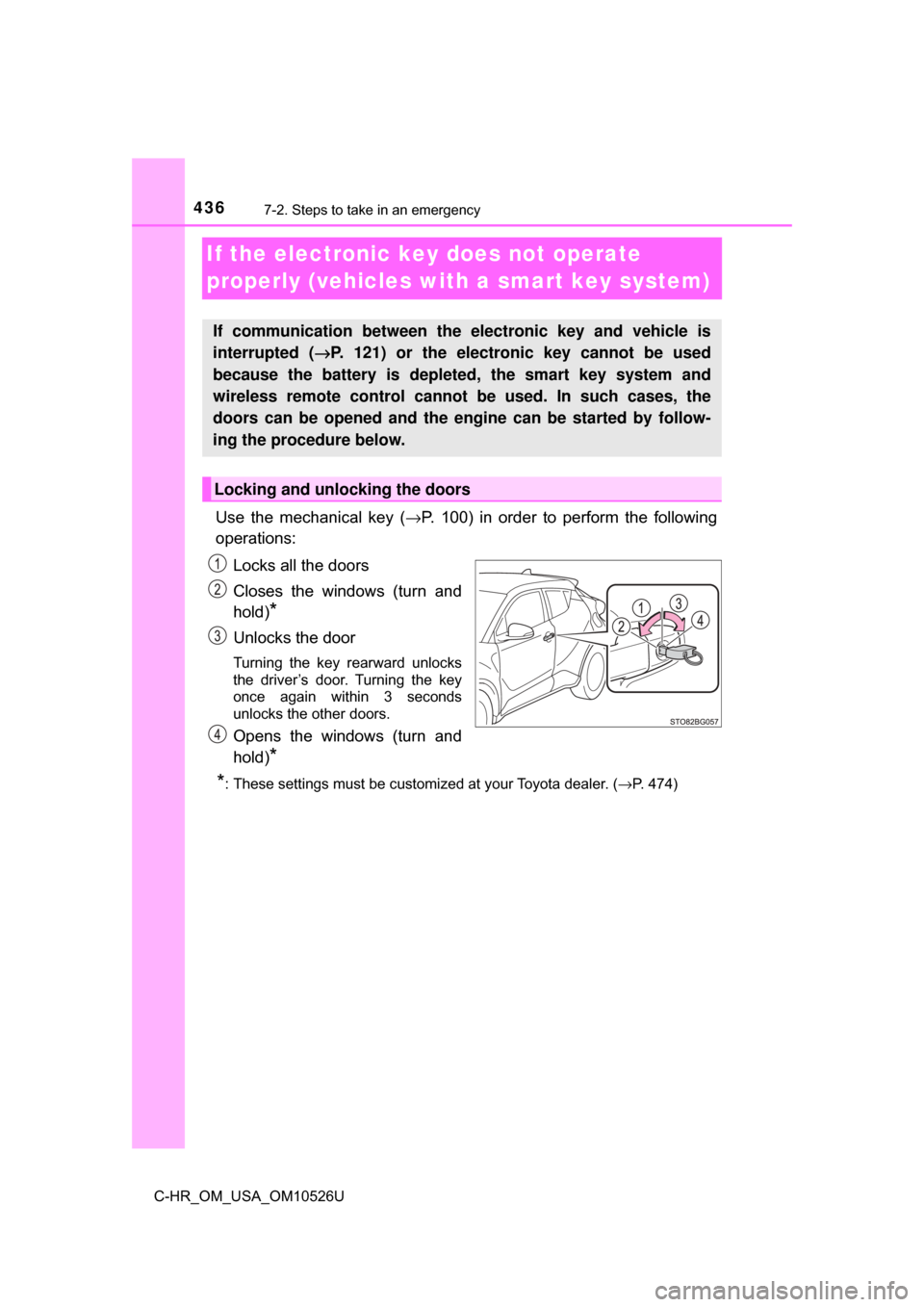
Use the mechanical key (→P. 100) in order to perform the following
operations:
Locks all the doors
Closes the windows (turn and
hold)
*
Unlocks the door
Turning the key rearward unlocks
the driver’s door. Turning the key
once again within 3 seconds
unlocks the other doors.
Opens the windows (turn and
hold)
*
*
: These settings must be customized at your Toyota dealer. ( →P. 474)
If communication between the electronic key and vehicle is
interrupted ( →P. 121) or the electronic key cannot be used
because the battery is depleted, the smart key system and
wireless remote control cannot be used. In such cases, the
doors can be opened and the engine can be started by follow-
ing the procedure below.
Locking and unlocking the doors
Page 476 of 516
4768-2. Customization
C-HR_OM_USA_OM10526U■
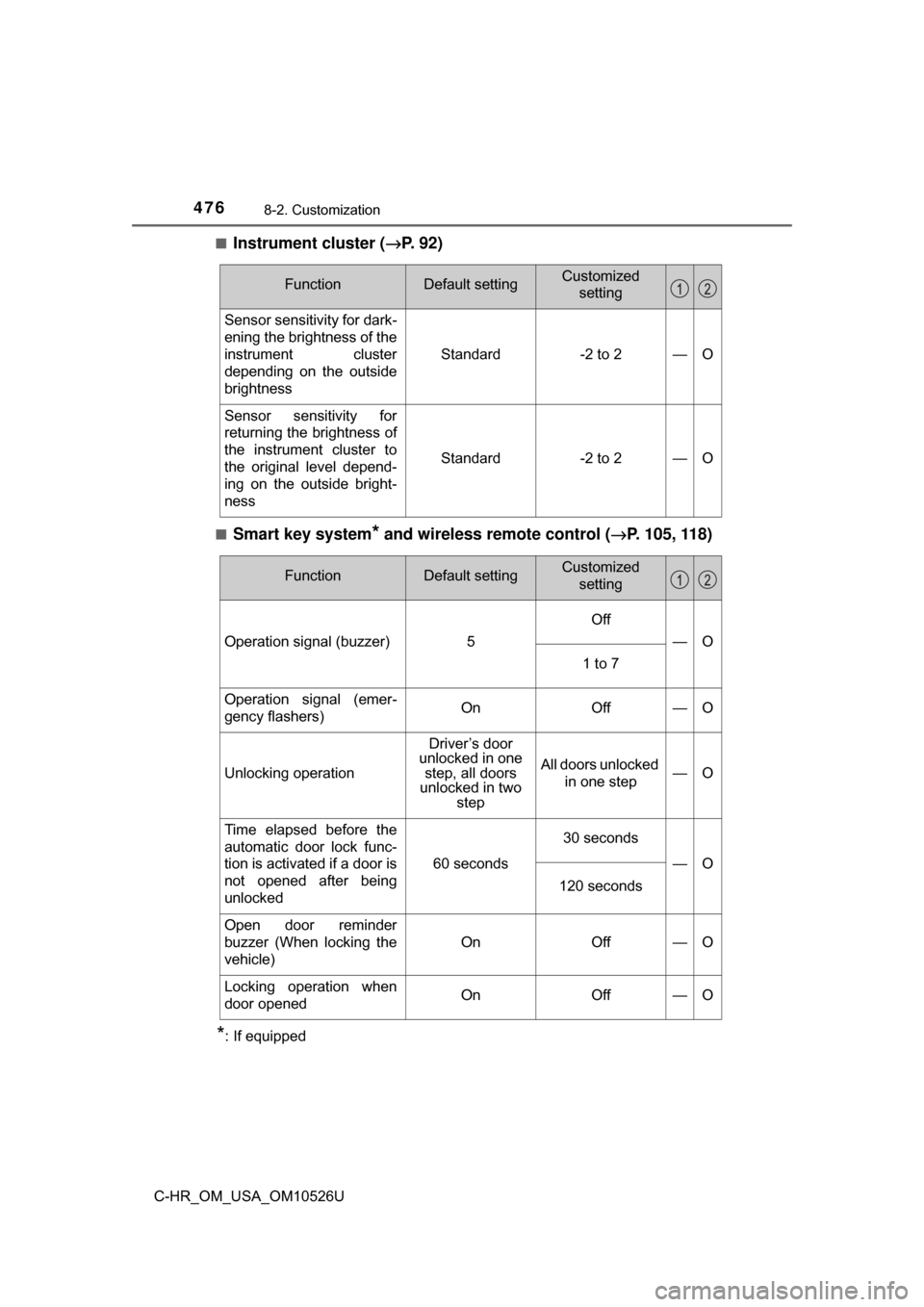
Instrument cluster (
→P. 92)
■Smart key system* and wireless remote control ( →P. 105, 118)
*: If equipped
FunctionDefault settingCustomized
setting
Sensor sensitivity for dark-
ening the brightness of the
instrument cluster
depending on the outside
brightness
Standard-2 to 2—O
Sensor sensitivity for
returning the brightness of
the instrument cluster to
the original level depend-
ing on the outside bright-
ness
Standard-2 to 2—O
FunctionDefault settingCustomized setting
Operation signal (buzzer)5
Off
—O
1 to 7
Operation signal (emer-
gency flashers)OnOff—O
Unlocking operation
Driver’s door
unlocked in one step, all doors
unlocked in two step
All doors unlocked
in one step—O
Time elapsed before the
automatic door lock func-
tion is activated if a door is
not opened after being
unlocked
60 seconds
30 seconds
—O
120 seconds
Open door reminder
buzzer (When locking the
vehicle)
OnOff—O
Locking operation when
door openedOnOff—O