Light TOYOTA C-HR 2018 1.G Workshop Manual
[x] Cancel search | Manufacturer: TOYOTA, Model Year: 2018, Model line: C-HR, Model: TOYOTA C-HR 2018 1.GPages: 516, PDF Size: 9.32 MB
Page 153 of 516
1534-1. Before driving
4
Driving
C-HR_OM_USA_OM10526U
WARNING
Observe the following precautions.
Failure to do so may result in death or serious injury.
■When the vehicle is parked
● Do not leave cigarette lighters in the vehicle. If a cigarette lighter is in a
place such as the glove box or on the floor, it may be lit accidentally when
luggage is loaded or the seat is adjusted, causing a fire.
● Do not attach adhesive discs to the windshield or windows. Do not place
containers such as air fresheners on the instrument panel or dashboard.
Adhesive discs or containers may act as lenses, causing a fire in the vehi-
cle.
● Do not leave a door or window open if the curved glass is coated with a
metallized film such as a silver-colored one. Reflected sunlight may cause
the glass to act as a lens, causing a fire.
● Always apply the parking brake, shift the shift lever to P, stop the engine
and lock the vehicle.
Do not leave the vehicle unattended while the engine is running.
If the vehicle is parked with the shift lever in P but the parking brake is not
set, the vehicle may start to move, possibly leading to an accident.
● Do not touch the exhaust pipes while the engine is running or immediately
after turning the engine off.
Doing so may cause burns.
■ When taking a nap in the vehicle
Always turn the engine off. Otherwise, if you accidentally move the shift
lever or depress the accelerator pedal, this could cause an accident or fire
due to engine overheating. Additionally, if the vehicle is parked in a poorly
ventilated area, exhaust gases may collect and enter the vehicle, leading to
death or a serious health hazard.
Page 163 of 516
1634-2. Driving procedures
4
Driving
C-HR_OM_USA_OM10526U
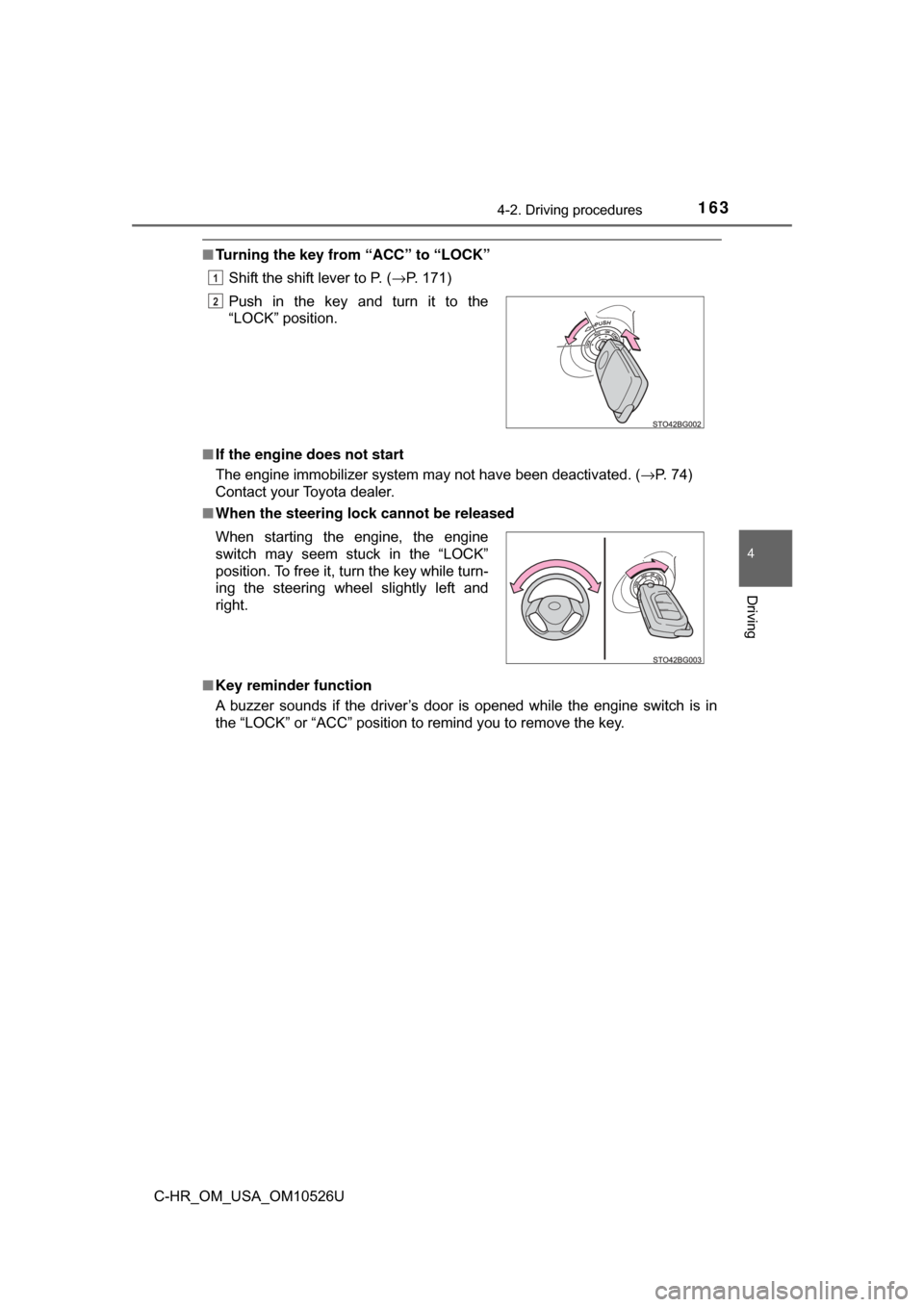
■Turning the key from “ACC” to “LOCK”
Shift the shift lever to P. ( →P. 171)
■ If the engine does not start
The engine immobilizer system may not have been deactivated. ( →P. 74)
Contact your Toyota dealer.
■ When the steering lock cannot be released
■ Key reminder function
A buzzer sounds if the driver’s door is opened while the engine switch is in
the “LOCK” or “ACC” position to remind you to remove the key.Push in the key and turn it to the
“LOCK” position.
1
2
When starting the engine, the engine
switch may seem stuck in the “LOCK”
position. To free it, turn the key while turn-
ing the steering wheel slightly left and
right.
Page 170 of 516
1704-2. Driving procedures
C-HR_OM_USA_OM10526U
NOTICE
■To prevent battery discharge
● Do not leave the engine switch in ACCESSORY or IGNITION ON mode
for long periods of time without the engine running.
● If “ACCESSORY” or “IGNITION ON” is displayed on the multi-information
display, the engine switch is not off. When exiting the vehicle, always
check that the engine switch is off.
● Do not stop the engine when the shift lever is in a position other than P. If
the engine is stopped in another shift lever position, the engine switch will
not be turned off but instead be turned to ACCESSORY mode. If the vehi-
cle is left in ACCESSORY mode, battery discharge may occur.
■ When starting the engine
● Do not race a cold engine.
● If the engine becomes difficult to start or stalls frequently, have your vehi-
cle checked by your Toyota dealer immediately.
■ Symptoms indicating a malfunction with the engine switch
If the engine switch seems to be operating somewhat differently than usual,
such as the switch sticking slightly, there may be a malfunction. Contact
your Toyota dealer immediately.
Page 176 of 516
1764-2. Driving procedures
C-HR_OM_USA_OM10526U
Turn signal lever
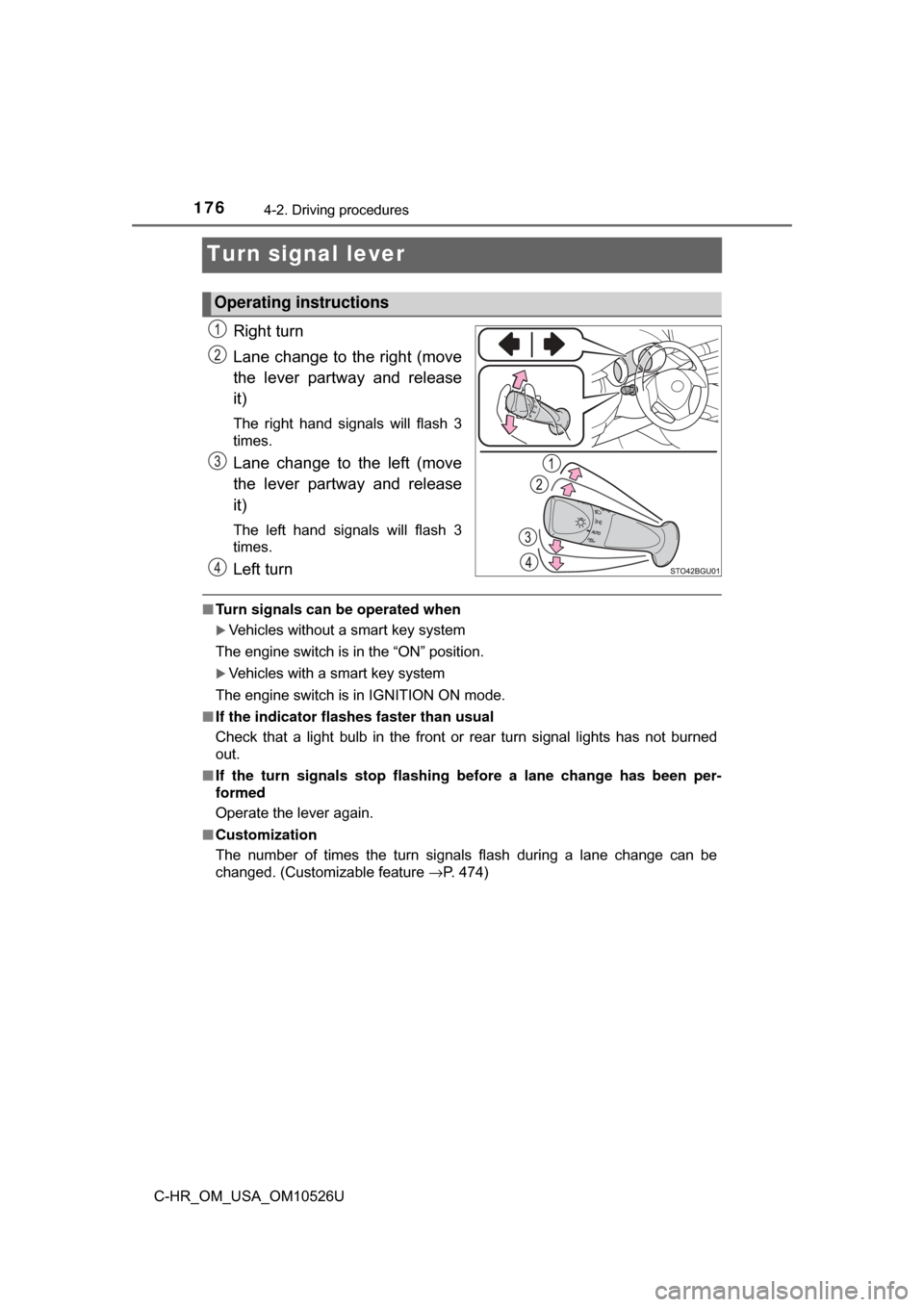
Right turn
Lane change to the right (move
the lever partway and release
it)
The right hand signals will flash 3
times.
Lane change to the left (move
the lever partway and release
it)
The left hand signals will flash 3
times.
Left turn
■Turn signals can be operated when
Vehicles without a smart key system
The engine switch is in the “ON” position.
Vehicles with a smart key system
The engine switch is in IGNITION ON mode.
■ If the indicator flashes faster than usual
Check that a light bulb in the front or rear turn signal lights has not burned
out.
■ If the turn signals stop flashing before a lane change has been per-
formed
Operate the lever again.
■ Customization
The number of times the turn signals flash during a lane change can be
changed. (Customizable feature →P. 474)
Operating instructions
Page 177 of 516
1774-2. Driving procedures
4
Driving
C-HR_OM_USA_OM10526U
Parking brake
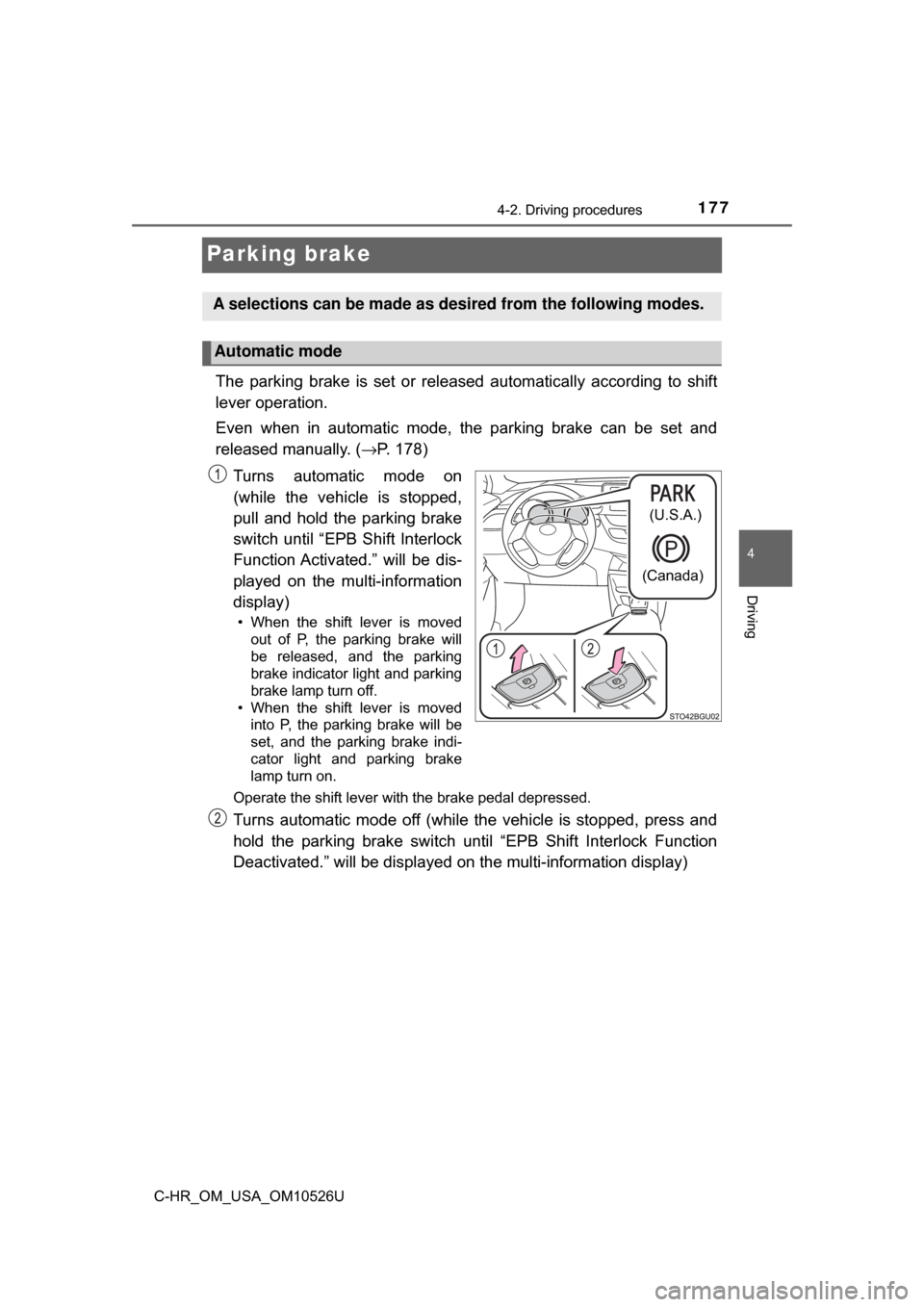
The parking brake is set or released automatically according to shift
lever operation.
Even when in automatic mode, the parking brake can be set and
released manually. ( →P. 178)
Turns automatic mode on
(while the vehicle is stopped,
pull and hold the parking brake
switch until “EPB Shift Interlock
Function Activated.” will be dis-
played on the multi-information
display)
• When the shift lever is moved out of P, the parking brake will
be released, and the parking
brake indicator light and parking
brake lamp turn off.
• When the shift lever is moved into P, the parking brake will be
set, and the parking brake indi-
cator light and parking brake
lamp turn on.
Operate the shift lever with the brake pedal depressed.
Turns automatic mode off (while the vehicle is stopped, press and
hold the parking brake switch until “EPB Shift Interlock Function
Deactivated.” will be displayed on the multi-information display)
A selections can be made as de sired from the following modes.
Automatic mode
(U.S.A.)
(Canada)
Page 178 of 516
1784-2. Driving procedures
C-HR_OM_USA_OM10526U
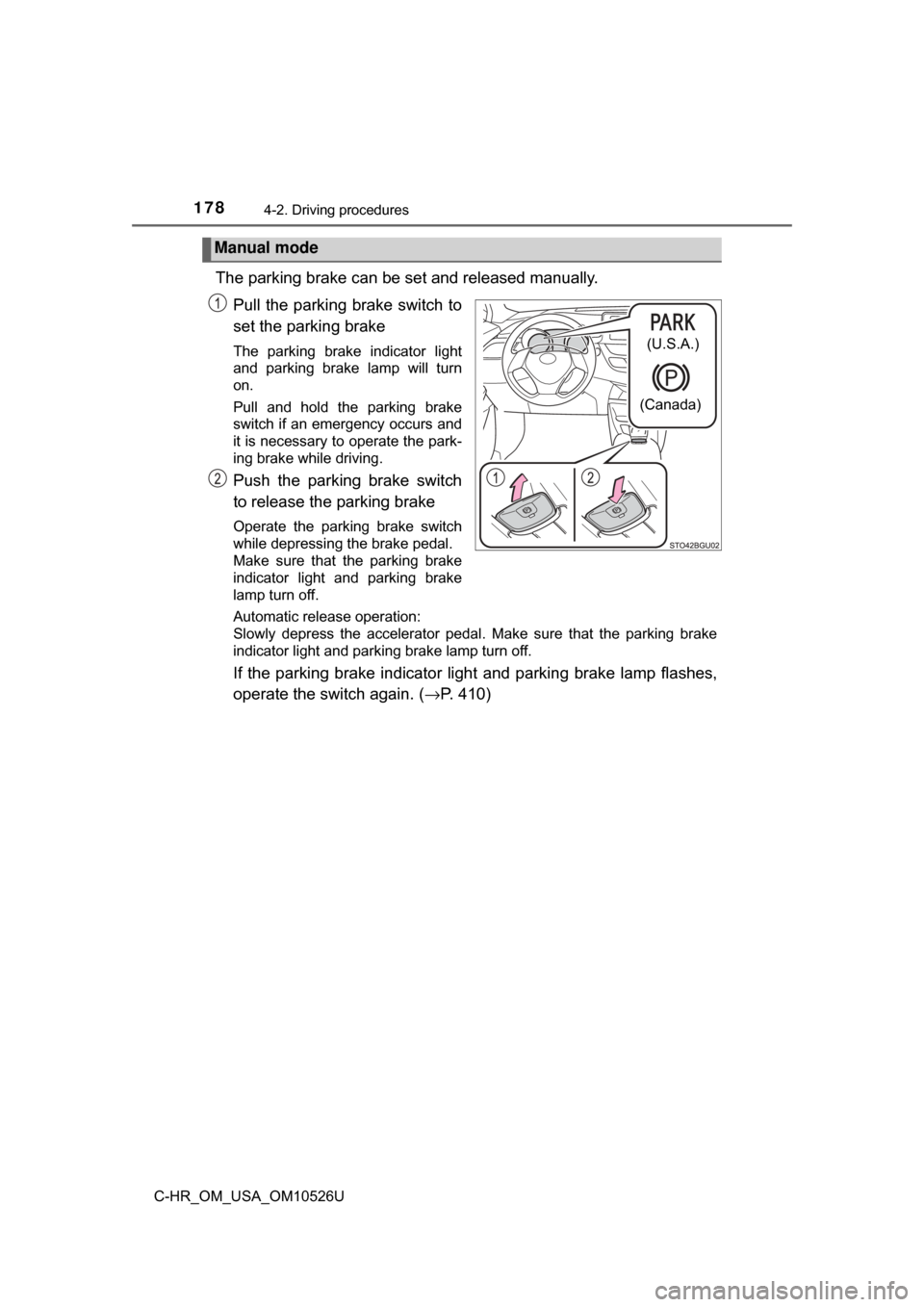
The parking brake can be set and released manually.Pull the parking brake switch to
set the parking brake
The parking brake indicator light
and parking brake lamp will turn
on.
Pull and hold the parking brake
switch if an emergency occurs and
it is necessary to operate the park-
ing brake while driving.
Push the parking brake switch
to release the parking brake
Operate the parking brake switch
while depressing the brake pedal.
Make sure that the parking brake
indicator light and parking brake
lamp turn off.
Automatic release operation:
Slowly depress the accelerator pedal. Make sure that the parking brake
indicator light and parking brake lamp turn off.
If the parking brake indicator light and parking brake lamp flashes,
operate the switch again. ( →P. 410)
Manual mode
(U.S.A.)
(Canada)
Page 179 of 516
 or IGNITION ON mo")
1794-2. Driving procedures
4
Driving
C-HR_OM_USA_OM10526U
■Parking brake operation
●When the engine switch is not in the “ON” position (vehicles with\
out a smart
key system) or IGNITION ON mode (vehicles with a smart key system), the
parking brake cannot be released using the parking brake switch.
● When the engine switch is not in the “ON” position (vehicles with\
out a smart
key system) or IGNITION ON mode (vehicles with a smart key system),
automatic mode (automatic brake setti ng and releasing) is not available.
■ Automatic release function
The parking brake is automatically released when slowly depress the acceler-
ator pedal.
The parking brake will be released automatically under the following condi-
tions:
●The driver’s door is closed.
● The driver’s seatbelt is fastened.
● Shift the shift lever is in a forward or reverse position.
● The malfunction indicator lamp or brake system warning light is not illumi-
nated.
If the automatic release function does not operate, manually release the park-
ing brake.
■ If “EPB Frequently Operated, Wait a Minute.” is displayed on the
multi-information display
If the parking brake is operated repeatedly over a short period of time, the
system may restrict operation to prevent overheating. If this happens, refrain
from operating the parking brake. Normal operation will return after about 1
minute.
■ If “EPB Activation Incomplete.” or “E PB Unavailable” is displayed on the
multi-information display
Operate the parking brake switch. If the message does not disappear after
operating the switch several times, the system may be malfunctioning. Have
the vehicle inspected by your Toyota dealer immediately.
■ Parking brake operation sound
When the parking brake operates, a motor sound (whirring sound) may be
heard. This does not indicate a malfunction.
Page 180 of 516

1804-2. Driving procedures
C-HR_OM_USA_OM10526U■
Parking brake indicator li ght and parking brake lamp
● Depending on the engine switch position/mode, the parking brake indicator
light and parking brake lamp will turn on and stay on as described below:
Vehicles without a smart key system
In the “ON” position: Comes on until the parking brake is released.
Not in the “ON” position: Stays on for approximately 15 seconds.
Vehicles with a smart key system
IGNITION ON mode: Comes on until the parking brake is released.
Not in IGNITION ON mode: Stays on for approximately 15 seconds.
● When the engine switch is turned off with the parking brake set, the parking
brake indicator light and parking brake lamp stay on for about 15 seconds.
This does not indicate a malfunction.
■ Changing the mode
When changing the automatic mode on/off, the message will be shown on the
multi-information display and the buzzer sounds.
■ Parking the vehicle
→P. 147
■ Parking brake engaged warning buzzer
A buzzer will sound if the vehicle is driven with the parking brake engaged.
“EPB Applied.” is displayed on the multi-information display.
■ Warning messages and buzzers
Warning messages and buzzers are used to indicate a system malfunction or
to inform the driver of the need for caution. If a warning message is shown on
the multi-information display, read the message and follow the instructions.
■ If the brake system warning light comes on
→P. 410
■ Usage in winter time
→P. 286
Page 182 of 516
1824-2. Driving procedures
C-HR_OM_USA_OM10526U
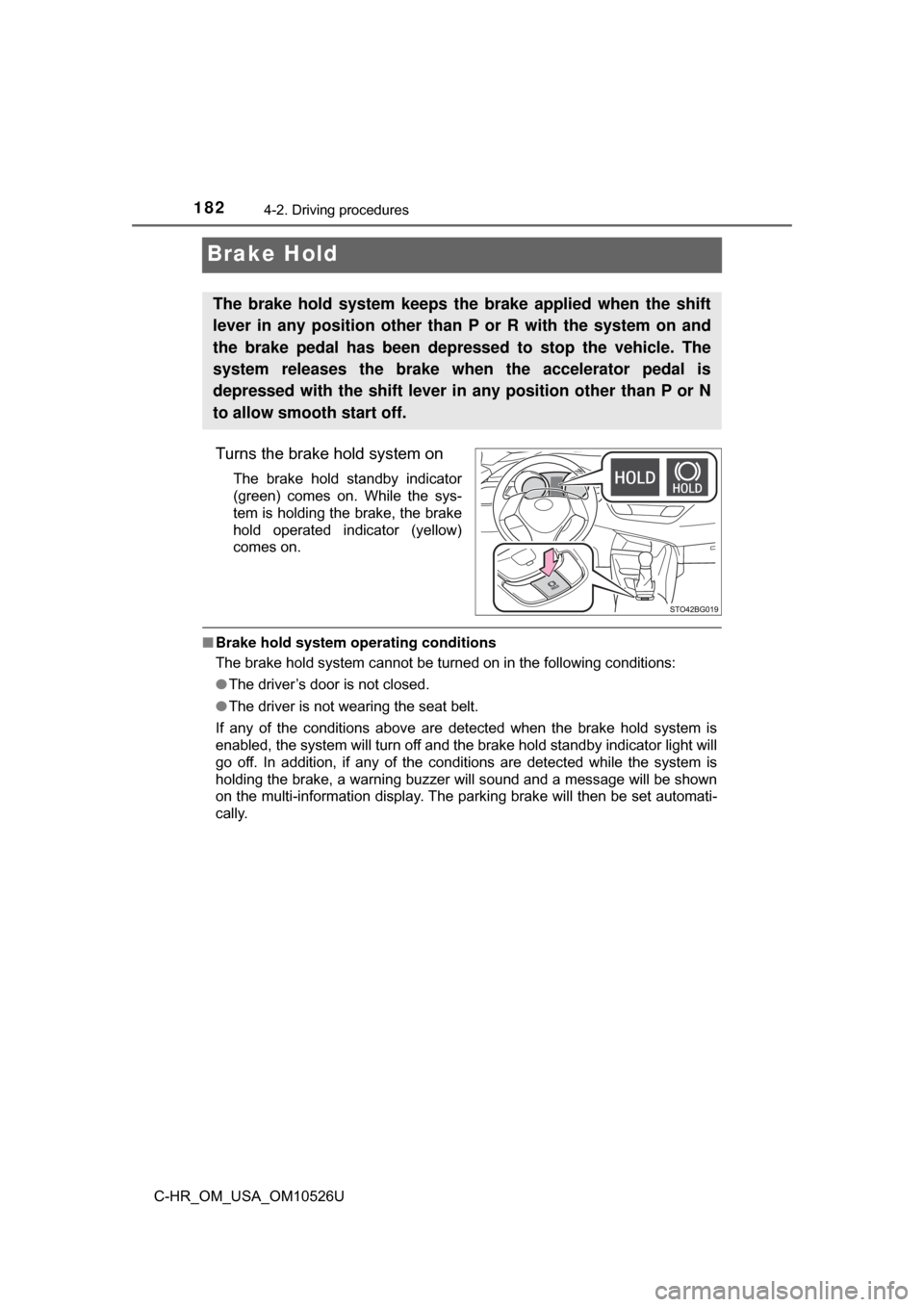
Brake Hold
Turns the brake hold system on
The brake hold standby indicator
(green) comes on. While the sys-
tem is holding the brake, the brake
hold operated indicator (yellow)
comes on.
■Brake hold system op erating conditions
The brake hold system cannot be turned on in the following conditions:
● The driver’s door is not closed.
● The driver is not wearing the seat belt.
If any of the conditions above are detected when the brake hold system i\
s
enabled, the system will turn off and the brake hold standby indicator light will
go off. In addition, if any of the conditions are detected while the system is
holding the brake, a warning buzzer will sound and a message will be shown
on the multi-information display. The parking brake will then be set automati-
cally.
The brake hold system keeps the brake applied when the shift
lever in any position other than P or R with the system on and
the brake pedal has been depressed to stop the vehicle. The
system releases the brake when the accelerator pedal is
depressed with the shift lever in any position other than P or N
to allow smooth start off.
Page 183 of 516

1834-2. Driving procedures
4
Driving
C-HR_OM_USA_OM10526U■
Brake hold function
●If the brake pedal is left released for a period of about 3 minutes after the
system has started holding the brake, the parking brake will be set automat-
ically. In this case, a warning buzzer sounds and a message is shown on the
multi-information display.
● To turn the system off while the system is holding the brake, firmly depress
the brake pedal and press the button again.
● The brake hold function may not hold the vehicle when the vehicle is on a
steep incline. In this situation, it may be necessary for the driver to apply the
brakes. A warning buzzer will sound and the multi-information display will
inform the driver of this situation. If a warning message is shown on the
multi-information display, read the message and follow the instructions.
■ When the parking brake is set automatically while the system is holding
the brakes
With the brake pedal depressed, release the parking brake by operating the
parking brake switch, making sure that the parking brake indicator light goes
off. ( →P. 177)
■ If “Brake Hold Fault Depress Brake to Deactivate Visit Your Dealer” is
displayed on the mult i-information display
The system may be malfunctioning. Have the vehicle inspected by your
Toyota dealer.
■ Warning messages and buzzers
Warning messages and buzzers are used to indicate a system malfunction or
to inform the driver of the need for caution. If a warning message is shown on
the multi-information display, read the message and follow the instructions.