navigation system TOYOTA C-HR 2020 Owners Manual (in English)
[x] Cancel search | Manufacturer: TOYOTA, Model Year: 2020, Model line: C-HR, Model: TOYOTA C-HR 2020Pages: 48, PDF Size: 3.81 MB
Page 5 of 48
3
OVERVIEW
FEATURES & OPERATIONS
TOYOTA SAFETY SENSE
SAFETY & EMERGENCY FEATURES
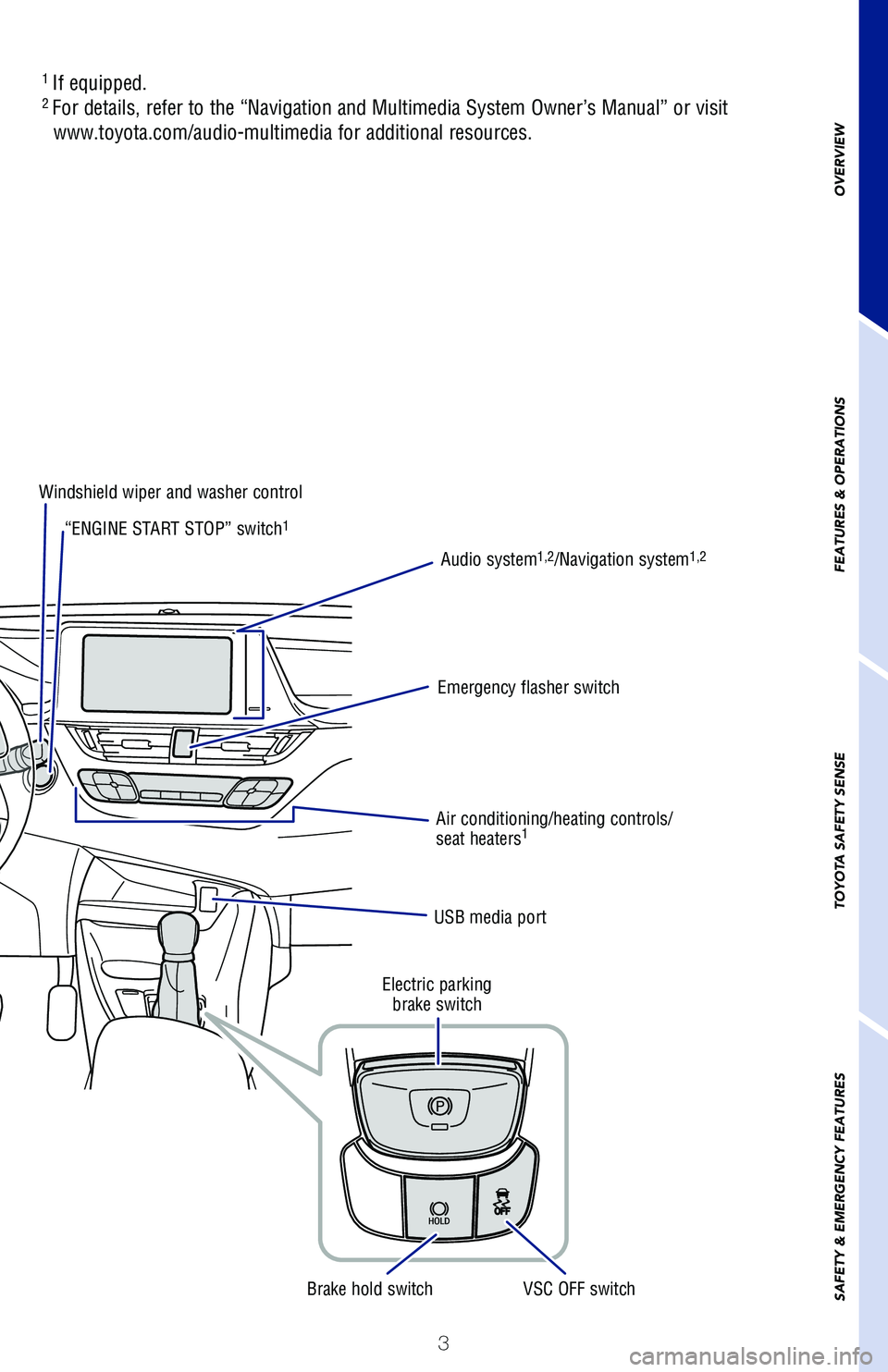
Air conditioning/heating controls/
seat heaters1
USB media port
Windshield wiper and washer control
Emergency flasher switchAudio system
1,2/Navigation system1,2
Electric parking
brake switch
VSC OFF switch
Brake hold switch
“ENGINE START STOP” switch
1
1
If equipped.2 For details, refer to the “Navigation and Multimedia System Owner’s M\
anual” or visit
www.toyota.com/audio-multimedia for additional resources.
Page 21 of 48
19
OVERVIEW
FEATURES & OPERATIONS
TOYOTA SAFETY SENSE
SAFETY & EMERGENCY FEATURES
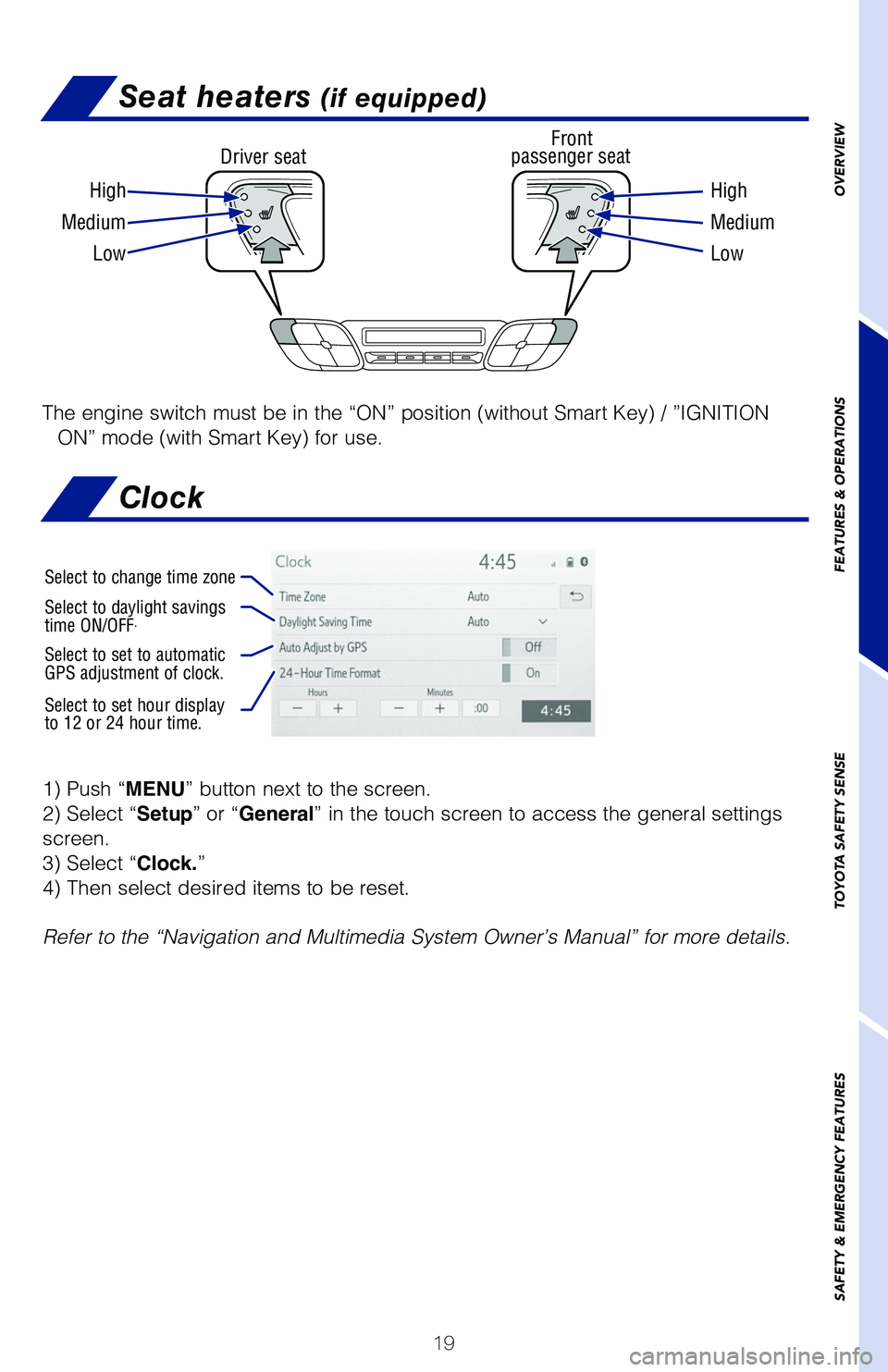
Seat heaters (if equipped)
Driver seat Front
passenger seat
High High
Medium Medium
Low Low
The engine switch must be in the “ON” position (without Smart Key) \
/ ”IGNITION
ON” mode (with Smart Key) for use.
1) Push “MENU” button next to the screen.
2) Select “Setup” or “General” in the touch screen to access the general settings
screen.
3) Select “Clock.”
4) Then select desired items to be reset.
Refer to the “Navigation and Multimedia System Owner’s Manual” for m\
ore details.
Select to change time zone
Select to daylight savings
time ON/OFF.
Select to set to automatic
GPS adjustment of clock.
Select to set hour display
to 12 or 24 hour time.
Clock
Page 22 of 48
 20
FEATURES & OPERATIONS
The engine switch must be in the “ACC” or “ON” position (witho\
ut Smart Key) /
“ACCESSORY” or ”IGNITION ON” mode (with Smart Key) for use.
(1)(2)
Pull
Pull
P")
20
FEATURES & OPERATIONS
The engine switch must be in the “ACC” or “ON” position (witho\
ut Smart Key) /
“ACCESSORY” or ”IGNITION ON” mode (with Smart Key) for use.
(1)(2)
Pull
Pull
Power outlet-12V DC
Audio
NOTE: Concentrating on the road should always be your first priority while
driving. Do not use the Audio Multimedia System if it will distract you.
Refer to the “Navigation and Multimedia System Owner’s Manual” or vi\
sit www.
toyota.com/audio-multimedia for additional resources.
Touch screen display
Access
AUDIO screen
Push to turn ON/OFF or
turn to adjust volume Turn to tune radio stations
manually or select tracks or filesAccess Bluetooth
hands-free
system
Seek station/
track/file
select
Access
HOME screen
Access
MENU screen
Access
Toyota apps
screen
Access
MAP screen
Page 23 of 48
21
OVERVIEW
FEATURES & OPERATIONS
TOYOTA SAFETY SENSE
SAFETY & EMERGENCY FEATURES
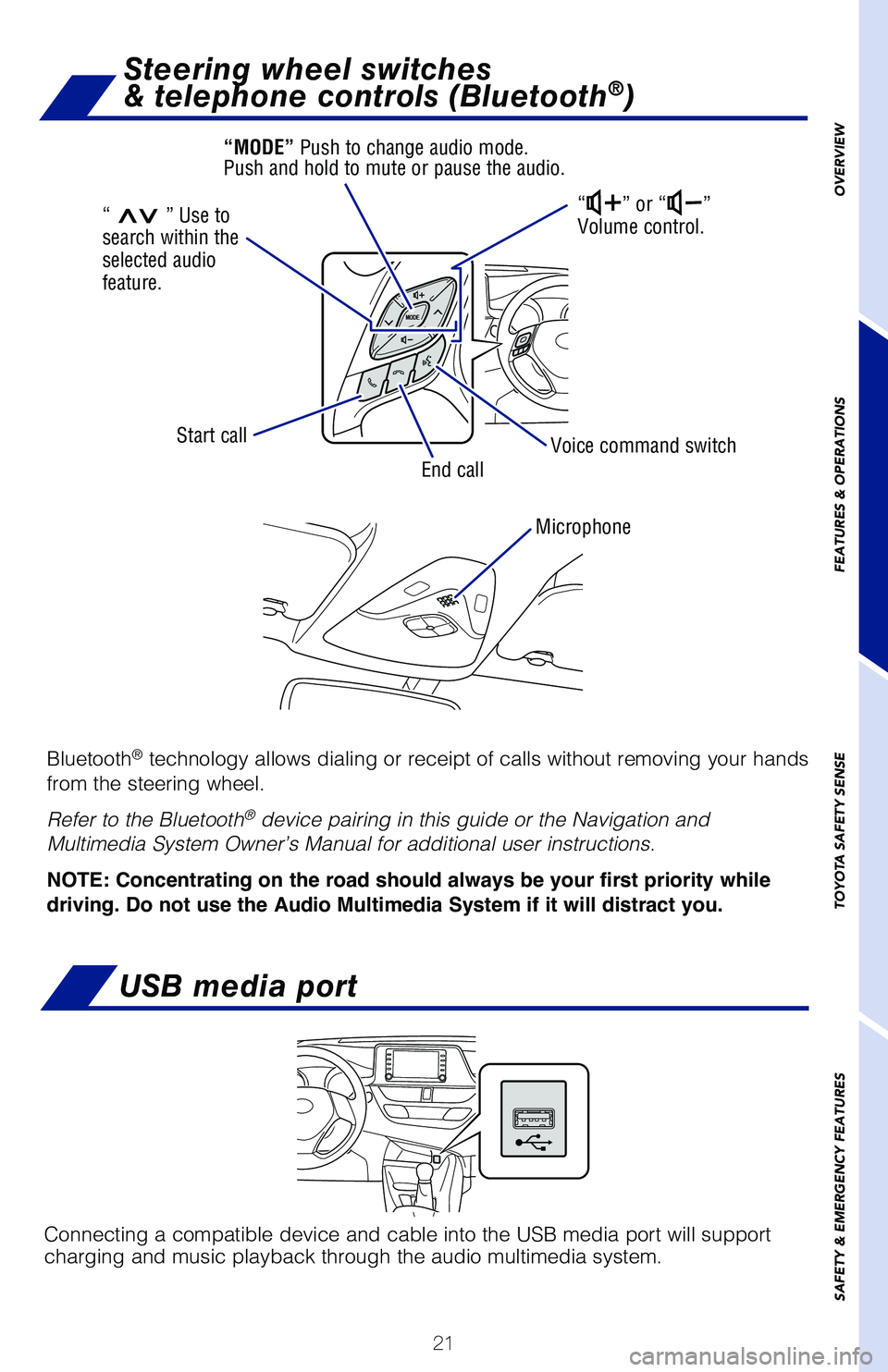
USB media port
Connecting a compatible device and cable into the USB media port will support
charging and music playback through the audio multimedia system.
Bluetooth® technology allows dialing or receipt of calls without removing your han\
ds
from the steering wheel.
Refer to the Bluetooth
® device pairing in this guide or the Navigation and
Multimedia System Owner’s Manual for additional user instructions.
NOTE: Concentrating on the road should always be your first priority while
driving. Do not use the Audio Multimedia System if it will distract you.
Microphone
Steering wheel switches
& telephone controls (Bluetooth®)
“” or “”
Volume control.
Voice command switch
End call
Start call
“>>” Use to
search within the
selected audio
feature. “MODE” Push to change audio mode.
Push and hold to mute or pause the audio.
Page 25 of 48
23
OVERVIEW
FEATURES & OPERATIONS
TOYOTA SAFETY SENSE
SAFETY & EMERGENCY FEATURES
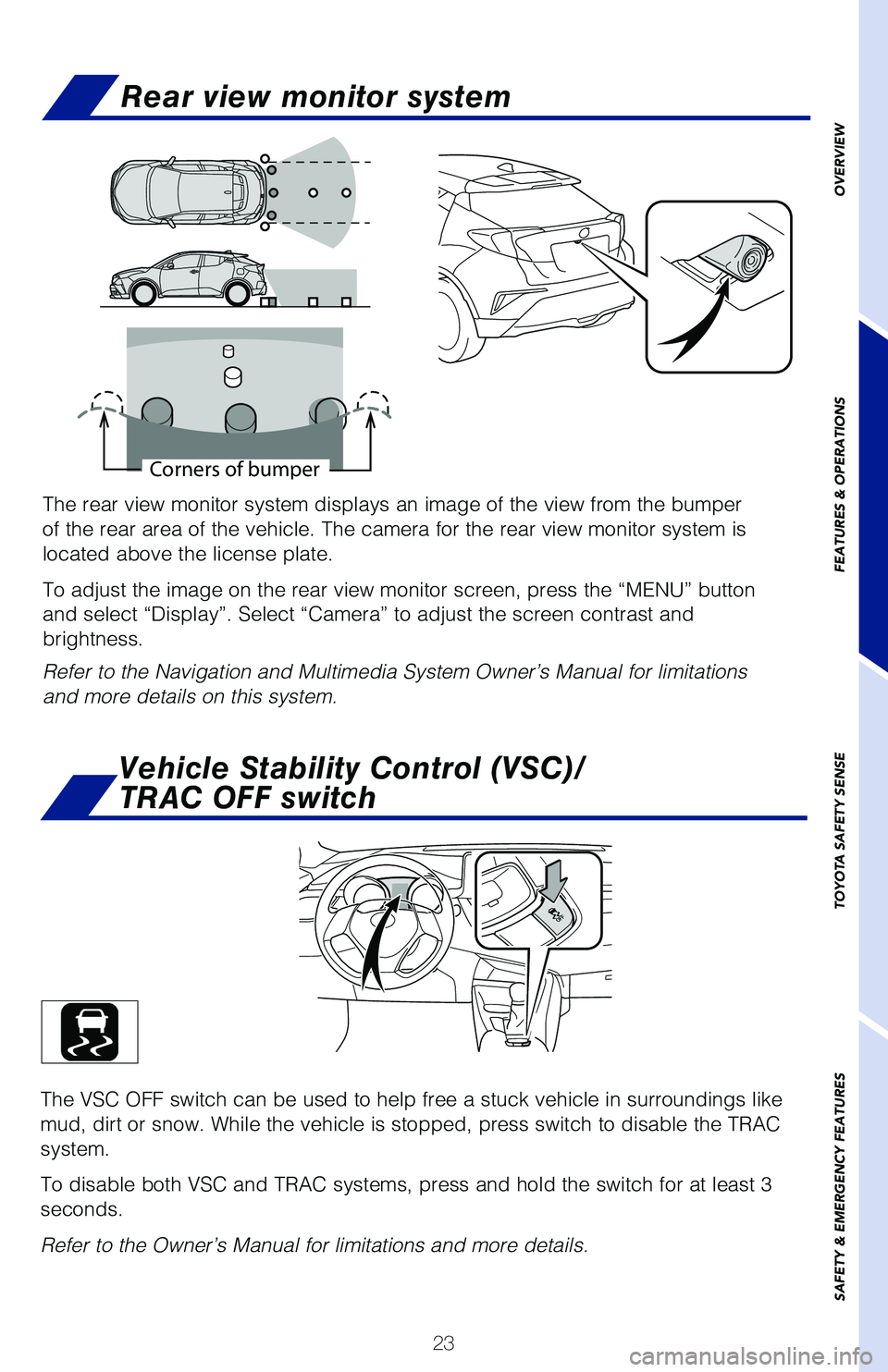
The rear view monitor system displays an image of the view from the bumper
of the rear area of the vehicle. The camera for the rear view monitor syst\
em is
located above the license plate.
To adjust the image on the rear view monitor screen, press the “MENU”\
button
and select “Display”. Select “Camera” to adjust the screen cont\
rast and
brightness.
Refer to the Navigation and Multimedia System Owner’s Manual for limitatio\
ns
and more details on this system.
Corners of bumper
The VSC OFF switch can be used to help free a stuck vehicle in surroundings\
like
mud, dirt or snow. While the vehicle is stopped, press switch to disable the\
TRAC
system.
To disable both VSC and TRAC systems, press and hold the switch for at lea\
st 3
seconds.
Refer to the Owner’s Manual for limitations and more details.
Vehicle Stability Control (VSC)/
TRAC OFF switch
Rear view monitor system