door lock TOYOTA C-HR 2020 Owners Manual (in English)
[x] Cancel search | Manufacturer: TOYOTA, Model Year: 2020, Model line: C-HR, Model: TOYOTA C-HR 2020Pages: 536, PDF Size: 11.99 MB
Page 2 of 536
TABLE OF CONTENTS2
C-HR_OM_USA_OM10634UFor your information....................... 6
Reading this manual .................... 10
How to search .............................. 11
Pictorial index .............................. 12
1-1. For safe use
Before driving ...................... 22
For safe driving ................... 24
Seat belts ............................ 26
SRS airbags ........................ 32
Front passenger occupant classification system ......... 46
Exhaust gas precautions ..... 53
1-2. Child safety Riding with children ............. 54
Child restraint systems ........ 55
1-3. Emergency assistance Safety Connect.................... 74
1-4. Theft deterrent system Engine immobilizer system............................... 81
2. Instrument cluster Warning lights and indicators........................... 86
Gauges and meters............. 94
Multi-information display ..... 97
Fuel consumption information ...................... 105 3-1. Key information
Keys................................... 110
3-2. Opening, closing and locking the doors
Side doors ......................... 118
Back door .......................... 125
Smart key system .............. 131
3-3. Adjusting the seats Front seats......................... 141
Rear seats ......................... 143
Head restraints .................. 145
3-4. Adjusting the steering wheel and mirrors
Steering wheel ................... 149
Inside rear view mirror ....... 151
Outside rear view mirrors ............................. 152
3-5. Opening and closing the windows
Power windows.................. 155
1For safety and security
2Instrument cluster
3Operation of each
component
Page 12 of 536

12Pictorial index
C-HR_OM_USA_OM10634U
Pictorial index
■
Exterior
Doors . . . . . . . . . . . . . . . . . . . . . . . . . . . . . . . . . . . . . . . . . . . P. 118
Locking/unlocking . . . . . . . . . . . . . . . . . . . . . . . . . . . . . . . . . . P. 118
Opening/closing the side windows. . . . . . . . . . . . . . . . . . . . . . P. 155
Locking/unlocking using the mechanical key
*1. . . . . . . . . . . . P. 449
Back door . . . . . . . . . . . . . . . . . . . . . . . . . . . . . . . . . . . . . . . . P. 125
Locking/unlocking . . . . . . . . . . . . . . . . . . . . . . . . . . . . . . . . . . P. 125
Outside rear view mirrors . . . . . . . . . . . . . . . . . . . . . . . . . . . P. 152
Adjusting the mirror angle . . . . . . . . . . . . . . . . . . . . . . . . . . . . P. 152
Folding the mirrors . . . . . . . . . . . . . . . . . . . . . . . . . . . . . . . . . . P. 153
Defogging the mirrors . . . . . . . . . . . . . . . . . . . . . . . . . . . . . . . P. 301
Page 16 of 536
16Pictorial index
C-HR_OM_USA_OM10634U
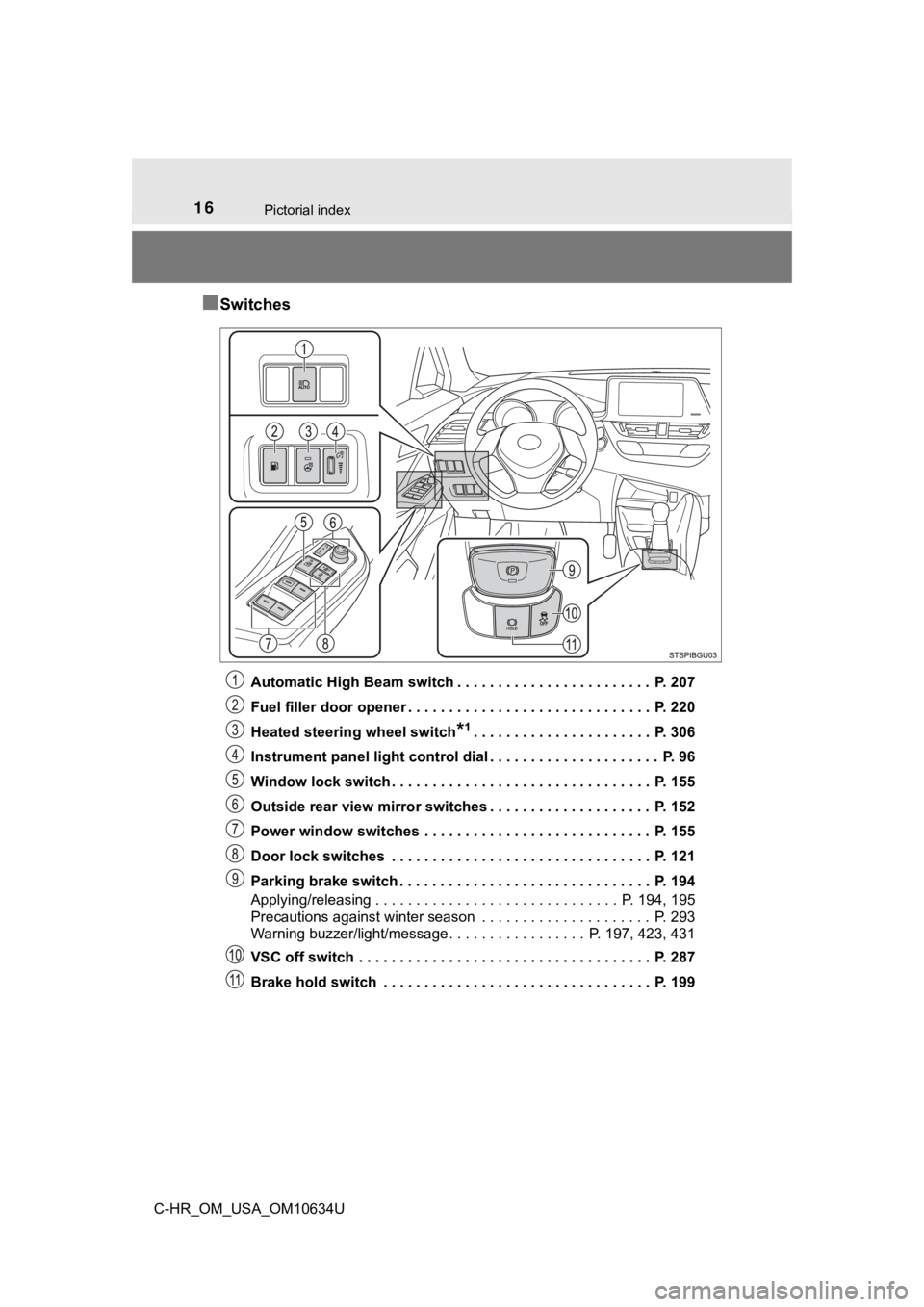
■Switches
Automatic High Beam switch . . . . . . . . . . . . . . . . . . . . . . . . P. 207
Fuel filler door opener . . . . . . . . . . . . . . . . . . . . . . . . . . . . . . P. 220
Heated steering wheel switch
*1. . . . . . . . . . . . . . . . . . . . . . P. 306
Instrument panel light control dial . . . . . . . . . . . . . . . . . . . . . P. 96
Window lock switch . . . . . . . . . . . . . . . . . . . . . . . . . . . . . . . . P. 155
Outside rear view mirror switches . . . . . . . . . . . . . . . . . . . . P. 152
Power window switches . . . . . . . . . . . . . . . . . . . . . . . . . . . . P. 155
Door lock switches . . . . . . . . . . . . . . . . . . . . . . . . . . . . . . . . P. 121
Parking brake switch . . . . . . . . . . . . . . . . . . . . . . . . . . . . . . . P. 194
Applying/releasing . . . . . . . . . . . . . . . . . . . . . . . . . . . . . . P. 194, 195
Precautions against winter season . . . . . . . . . . . . . . . . . . . . . P. 293
Warning buzzer/light/message. . . . . . . . . . . . . . . . . P . 197, 423, 431
VSC off switch . . . . . . . . . . . . . . . . . . . . . . . . . . . . . . . . . . . . P. 287
Brake hold switch . . . . . . . . . . . . . . . . . . . . . . . . . . . . . . . . . P. 199
Page 30 of 536
301-1. For safe use
C-HR_OM_USA_OM10634U
WARNING
■People suffering illness
Obtain medical advice and wear the seat belt in the proper way. (P. 26)
■ When children are in the vehicle
P. 6 6
■ Seat belt pretensioners (fro nt seats and outboard rear seats)
● Do not place anything, such as a cushion, on the front passenger’s seat.
Doing so will disperse the passenger’s weight, which prevents t he sensor
from detecting the passenger’s weight properly. As a result, th e seat belt
pretensioner for the front passenger’s seat may not activate in the event of
a collision.
● If the pretensioner has activated, the SRS warning light will c ome on. In
that case, the seat belt cannot be used again and must be replaced at
your Toyota dealer.
■ Adjustable shoulder anchor (front seats)
Always make sure the shoulder belt is positioned across the cen ter of your
shoulder. The belt should be kept away from your neck, but not falling off
your shoulder. Failure to do so could reduce the amount of prot ection in an
accident and cause death or serious injuries in the event of a sudden stop,
sudden swerve or accident. ( P. 27)
■ Seat belt damage and wear
● Do not damage the seat belts by allowing the belt, plate, or bu ckle to be
jammed in the door.
● Inspect the seat belt system periodically. Check for cuts, fray ing, and loose
parts. Do not use a damaged seat belt until it is replaced. Dam aged seat
belts cannot protect an occupant from death or serious injury.
● Ensure that the belt and plate are locked and the belt is not twisted.
If the seat belt does not function correctly, immediately conta ct your Toyota
dealer.
● Replace the seat assembly, including the belts, if your vehicle has been
involved in a serious accident, even if there is no obvious dam age.
● Do not attempt to install, remove, modify, disassemble or dispo se of the
seat belts. Have any necessary repairs carried out by your Toyota dealer.
Inappropriate handling may lead to incorrect operation.
Page 54 of 536
541-2. Child safety
C-HR_OM_USA_OM10634U
Riding with children
●It is recommended that children sit in the rear seats to avoid acci-
dental contact with the shift lever, wiper switch, etc.
● Use the rear door child-protector lock or the window lock switc h to
avoid children opening the door while driving or operating the
power window accidentally. ( P. 122, 155)
● Do not let small children operate equipment which may catch or
pinch body parts, such as the power window, hood, back door,
seats, etc.
Observe the following precautions when children are in the vehi -
cle.
Use a child restraint system app ropriate for the child, until the
child becomes large enough to properly wear the vehicle’s seat
belt.
WARNING
Never leave children unattended in the vehicle, and never allow children to
have or use the key.
Children may be able to start the vehicle or shift the vehicle into neutral.
There is also a danger that children may injure themselves by p laying with
the side windows, the moon roof (if equipped) or other features of the vehi-
cle. In addition, heat build-up or extremely cold temperatures inside the
vehicle can be fatal to children.
Page 109 of 536
109
3
Operation of
each component
C-HR_OM_USA_OM10634U 3-1. Key information
Keys .................................. 110
3-2. Opening, closing and locking the doors
Side doors ......................... 118
Back door .......................... 125
Smart key system ............. 131
3-3. Adjusting the seats Front seats ........................ 141
Rear seats......................... 143
Head restraints.................. 145
3-4. Adjusting the steering wheel and mirrors
Steering wheel .................. 149
Inside rear view mirror ...... 151
Outside rear view mirrors ............................. 152
3-5. Opening and closing the windows
Power windows ................. 155
Page 111 of 536
1113-1. Key information
3
Operation of each component
C-HR_OM_USA_OM10634U
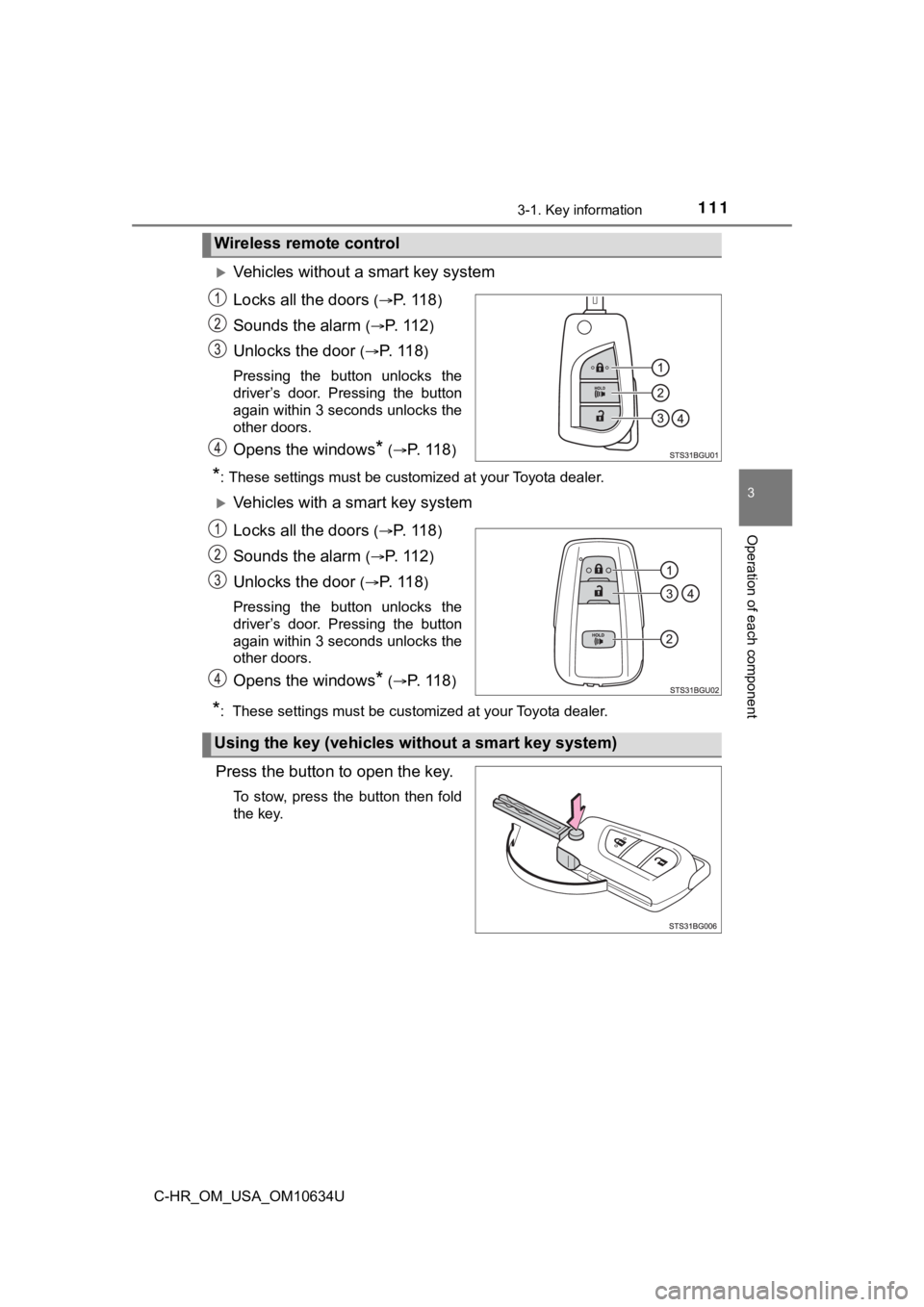
Vehicles without a smart key system
Locks all the doors
(P. 11 8)
Sounds the alarm ( P. 1 1 2)
Unlocks the door (P. 11 8)
Pressing the button unlocks the
driver’s door. Pressing the button
again within 3 seconds unlocks the
other doors.
Opens the windows* ( P. 1 1 8)
*: These settings must be customized at your Toyota dealer.
Vehicles with a smart key system
Locks all the doors
(P. 11 8)
Sounds the alarm ( P. 1 1 2)
Unlocks the door (P. 11 8)
Pressing the button unlocks the
driver’s door. Pressing the button
again within 3 seconds unlocks the
other doors.
Opens the windows* ( P. 1 1 8)
*: These settings must be customized at your Toyota dealer.
Press the button to open the key.
To stow, press the button then fold
the key.
Wireless remote control
Using the key (vehicles without a smart key system)
Page 118 of 536
1183-2. Opening, closing and locking the doors
C-HR_OM_USA_OM10634U
Side doors
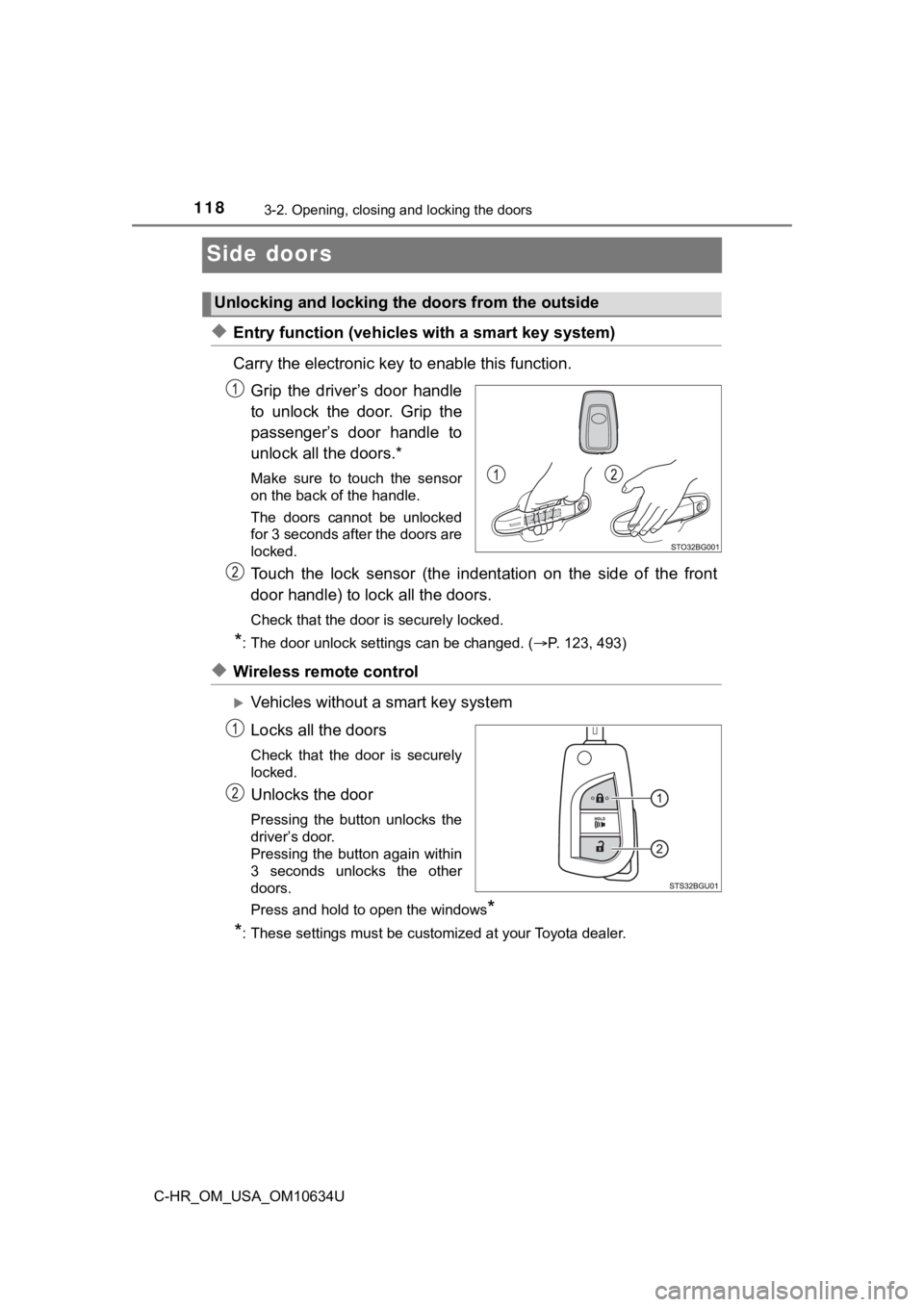
◆Entry function (vehicles with a smart key system)
Carry the electronic key to enable this function.
Grip the driver’s door handle
to unlock the door. Grip the
passenger’s door handle to
unlock all the doors.*
Make sure to touch the sensor
on the back of the handle.
The doors cannot be unlocked
for 3 seconds after the doors are
locked.
Touch the lock sensor (the indent ation on the side of the front
door handle) to lock all the doors.
Check that the door is securely locked.
*: The door unlock settings can be changed. ( P. 123, 493)
◆Wireless remote control
Vehicles without a smart key system
Locks all the doors
Check that the door is securely
locked.
Unlocks the door
Pressing the button unlocks the
driver’s door.
Pressing the button again within
3 seconds unlocks the other
doors.
Press and hold to open the windows
*
*
: These settings must be customized at your Toyota dealer.
Unlocking and locking the doors from the outside
Page 119 of 536
1193-2. Opening, closing and locking the doors
3
Operation of each component
C-HR_OM_USA_OM10634U
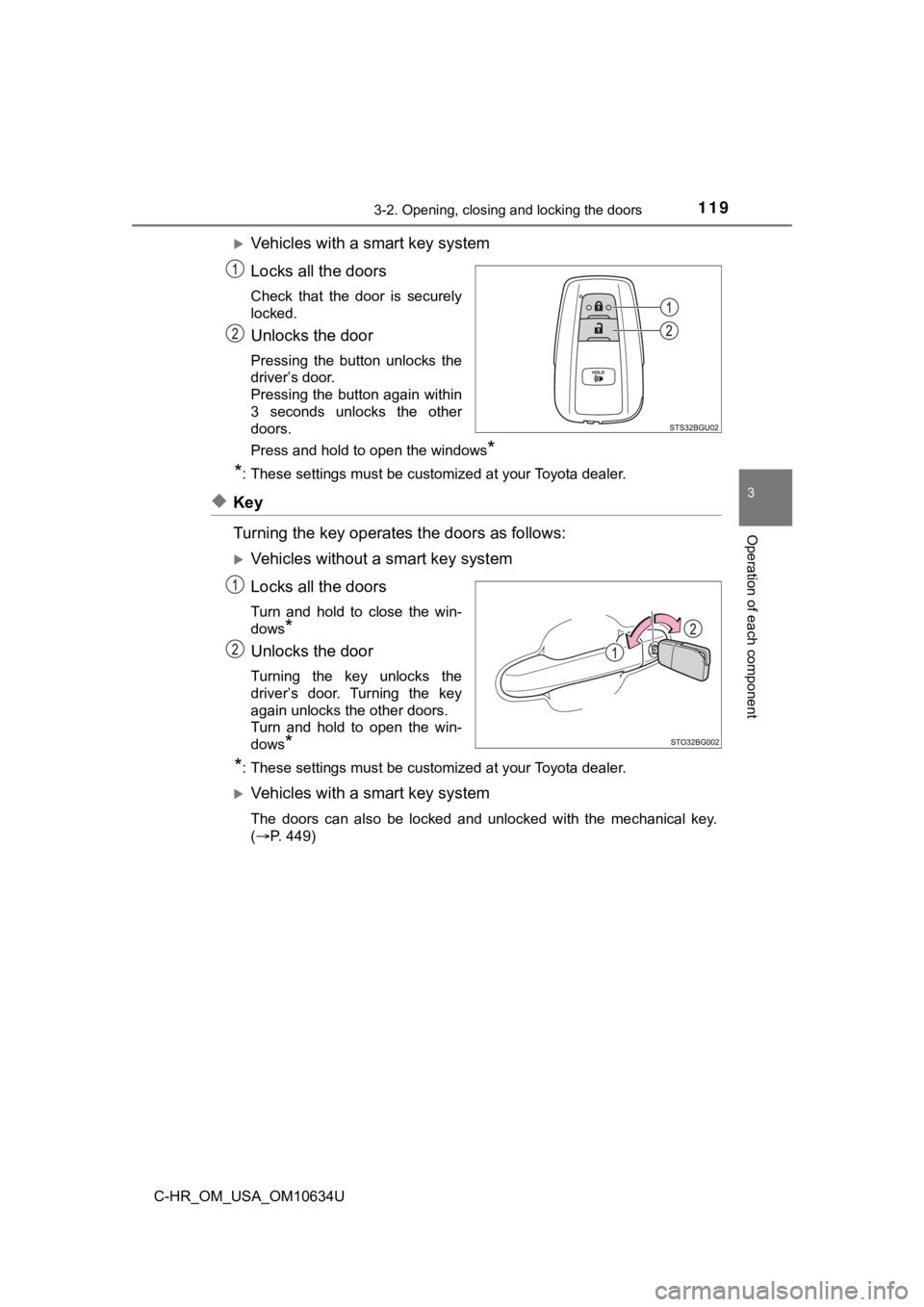
Vehicles with a smart key system
Locks all the doors
Check that the door is securely
locked.
Unlocks the door
Pressing the button unlocks the
driver’s door.
Pressing the button again within
3 seconds unlocks the other
doors.
Press and hold to open the windows
*
*
: These settings must be customized at your Toyota dealer.
◆Key
Turning the key operates the doors as follows:
Vehicles without a smart key system
Locks all the doors
Turn and hold to close the win-
dows
*
Unlocks the door
Turning the key unlocks the
driver’s door. Turning the key
again unlocks the other doors.
Turn and hold to open the win-
dows
*
*
: These settings must be customized at your Toyota dealer.
Vehicles with a smart key system
The doors can also be locked and unlocked with the mechanical k ey.
( P. 449)
Page 120 of 536
1203-2. Opening, closing and locking the doors
C-HR_OM_USA_OM10634U
■Operation signals
Doors:
A buzzer sounds and the emergency flashers flash to indicate th at the doors
have been locked/unlocked using the wireless remote control.
(Locked: once; Unlocked: twice)
Windows:
A buzzer sounds to indicate that the windows are operating.
■ Security feature
Vehicles without a smart key system
If a door is not opened within approximately 60 seconds after t he vehicle is
unlocked using the wireless remote control, the security feature automatically
locks the vehicle again.
Vehicles with a smart key system
If a door is not opened within approximately 60 seconds after t he vehicle is
unlocked using the entry function or wireless remote control, t he security fea-
ture automatically locks the vehicle again.
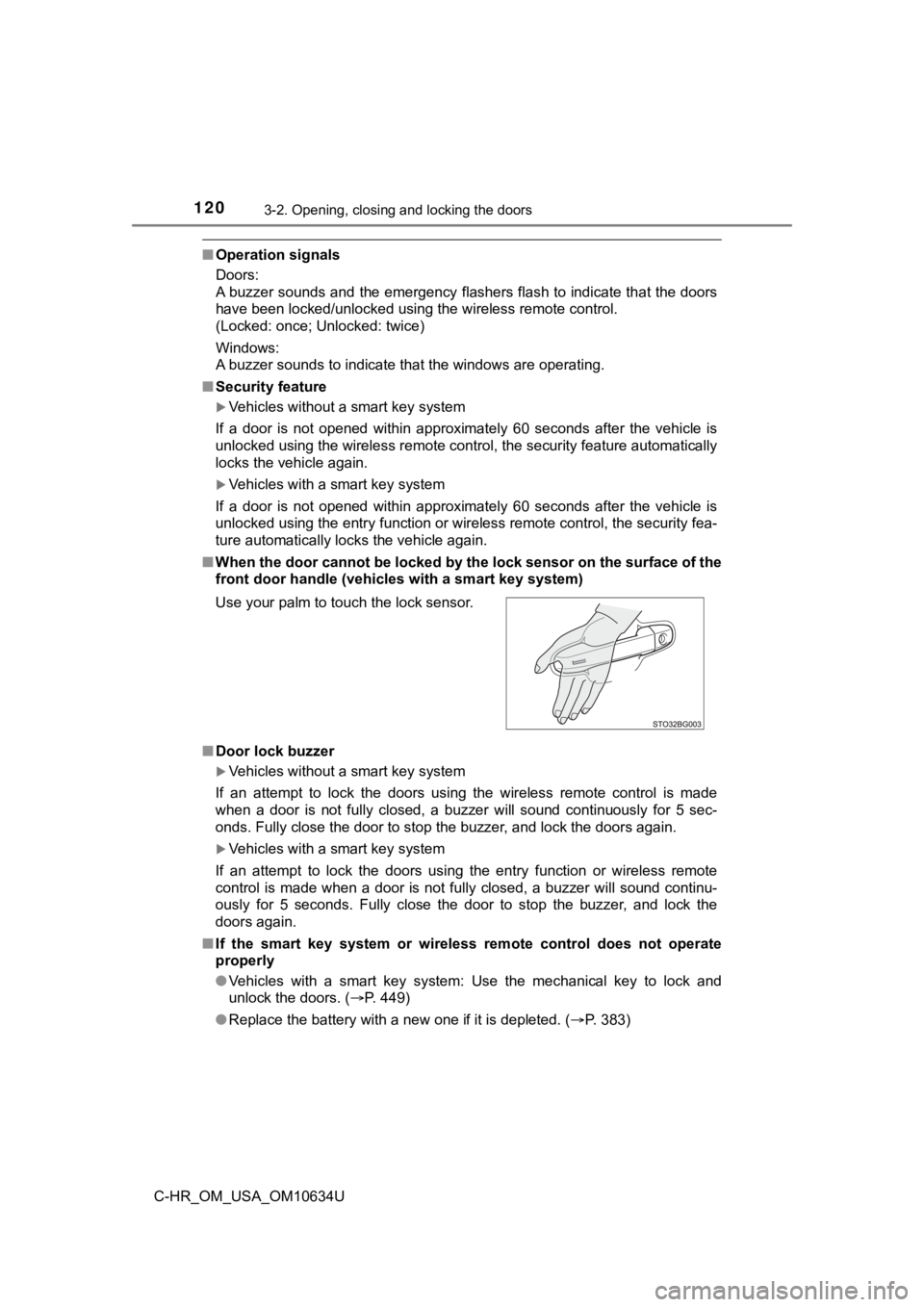
■ When the door cannot be locked by the lock sensor on the surface of the
front door handle (vehicl es with a smart key system)
■ Door lock buzzer
Vehicles without a smart key system
If an attempt to lock the doors using the wireless remote contr ol is made
when a door is not fully closed, a buzzer will sound continuous ly for 5 sec-
onds. Fully close the door to stop the buzzer, and lock the doors again.
Vehicles with a smart key system
If an attempt to lock the doors using the entry function or wir eless remote
control is made when a door is not fully closed, a buzzer will sound continu-
ously for 5 seconds. Fully close the door to stop the buzzer, a nd lock the
doors again.
■ If the smart key system or wireless remote control does not ope rate
properly
● Vehicles with a smart key system: Use the mechanical key to lock and
unlock the doors. ( P. 449)
● Replace the battery with a new one if it is depleted. ( P. 383)
Use your palm to touch the lock sensor.