remote control TOYOTA C-HR 2022 Owner's Manual
[x] Cancel search | Manufacturer: TOYOTA, Model Year: 2022, Model line: C-HR, Model: TOYOTA C-HR 2022Pages: 818, PDF Size: 113.75 MB
Page 610 of 818
6086-3. Do-it-yourself maintenance
C-HR_HV_OM_Europe_OM10720E
■Before recharging
When recharging, the 12-volt battery produces hydrogen gas whic h is flam-
mable and explosive. Therefore, observe the following precautio ns before
recharging:
● If recharging with the 12-volt battery installed on the vehicle, be sure to dis-
connect the ground cable.
● Make sure the power switch on the charger is off when connecting and dis-
connecting the charger cables to the 12-volt battery.
■ After recharging/reconnecting the 12-volt battery
● The hybrid system may not start. Follow the procedure below to initialize the
system.
Shift the shift lever to P.
Open and close any of the doors.
Restart the hybrid system.
● Vehicles with entry function: Unlocking the doors using the smart entry &
start system may not be possible immediately after reconnecting the 12-volt
battery. If this happens, use the wireless remote control or th e mechanical
key to lock/unlock the doors.
● Start the hybrid system with the power switch in ACCESSORY mode. The
hybrid system may not start with the power switch turned off. H owever, the
hybrid system will operate normally from the second attempt.
● The power switch mode is recorded by the vehicle. If the 12-volt battery is
reconnected, the vehicle will return the power switch mode to t he status it
was in before the 12-volt battery was disconnected. Make sure t o turn off
the power switch before disconnect the 12-volt battery. Take ex tra care
when connecting the 12-volt battery if the power switch mode pr ior to dis-
charge is unknown.
If the system will not start even after multiple attempts at al l methods above,
contact any authorized Toyota retailer or Toyota authorized rep airer, or any
reliable repairer.
1
2
3
Page 615 of 818
6136-3. Do-it-yourself maintenance
C-HR_HV_OM_Europe_OM10720E
6
Maintenance and care
■Before recharging
When recharging, the 12-volt battery produces hydrogen gas whic h is flam-
mable and explosive. Therefore, observe the following precautio ns before
recharging:
● If recharging with the 12-volt battery installed on the vehicle, be sure to dis-
connect the ground cable.
● Make sure the power switch on the charger is off when connecting and dis-
connecting the charger cables to the 12-volt battery.
■ After recharging/reconnecting the 12-volt battery
● The hybrid system may not start. Follow the procedure below to initialize the
system.
Shift the shift lever to P.
Open and close any of the doors.
Restart the hybrid system.
● Vehicles with entry function: Unlocking the doors using the smart entry &
start system may not be possible immediately after reconnecting the 12-volt
battery. If this happens, use the wireless remote control or th e mechanical
key to lock/unlock the doors.
● Start the hybrid system with the power switch in ACCESSORY mode. The
hybrid system may not start with the power switch turned off. H owever, the
hybrid system will operate normally from the second attempt.
● The power switch mode is recorded by the vehicle. If the 12-volt battery is
reconnected, the vehicle will return the power switch mode to t he status it
was in before the 12-volt battery was disconnected. Make sure t o turn off
the power before disconnect the 12-volt battery. Take extra car e when con-
necting the 12-volt battery if the power switch mode prior to d ischarge is
unknown.
If the system will not start even after multiple attempts all m ethods above,
contact any authorized Toyota retailer or Toyota authorized rep airer, or any
reliable repairer.
1
2
3
Page 649 of 818
6476-3. Do-it-yourself maintenance
C-HR_HV_OM_Europe_OM10720E
6
Maintenance and care
WARNING
■Battery precautions
Observe the following precautions.
Failure to do so may result in death or serious injury.
● Do not swallow the battery. Doing so may cause chemical burns.
● A coin battery or button battery is used in the electronic key. If a battery is
swallowed, it may cause severe chemical burns in as little as 2 hours and
may result in death or serious injury.
● Keep away new and removed batteries from children.
● If the cover cannot be firmly closed, stop using the electronic key and stow
the key in the place where children cannot reach, and then cont act any
authorized Toyota retailer or Toyota authorized repairer, or an y reliable
repairer.
● If you accidentally swallow a battery or put a battery into a part of your
body, get emergency medical attention immediately.
■ To prevent battery explosion or leakage of flammable liquid or gas
● Replace the battery with a new battery of the same type. If a wrong type of
battery is used, it may explode.
● Do not expose batteries to extremely low pressure due to high altitude or
extremely high temperatures.
● Do not burn, break or cut a battery.
■ Certification for the lithium battery
CAUTION:
RISK OF EXPLOSION IF BATTERY IS REPLACED BY AN INCORRECT
TYPE.
DISPOSE OF USED BATTERIES ACCORDING TO THE INSTRUCTIONS
NOTICE
■ For normal operation after replacing the battery
Observe the following precautions to prevent accidents:
● Always work with dry hands.
Moisture may cause the battery to rust.
● Do not touch or move any other component inside the remote control.
● Do not bend either of the battery terminals.
Page 748 of 818
7467-2. Steps to take in an emergency
C-HR_HV_OM_Europe_OM10720E
If the electronic key does not operate
properly
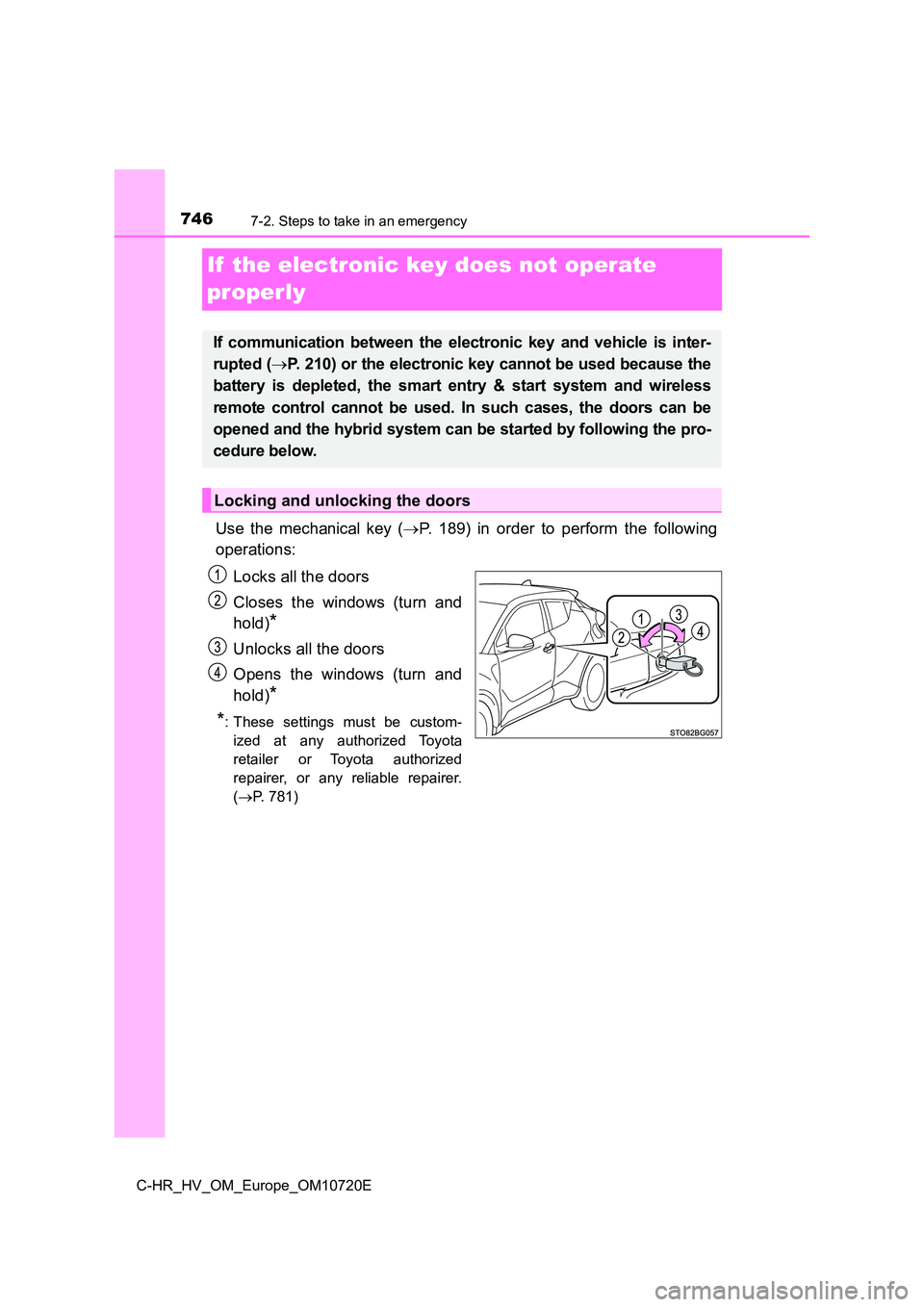
Use the mechanical key ( P. 189) in order to perform the following
operations:
Locks all the doors
Closes the windows (turn and
hold)*
Unlocks all the doors
Opens the windows (turn and
hold)*
*: These settings must be custom-
ized at any authorized Toyota
retailer or Toyota authorized
repairer, or any reliable repairer.
( P. 781)
If communication between the electronic key and vehicle is inter-
rupted ( P. 210) or the electronic key cannot be used because the
battery is depleted, the smart entry & start system and wireles s
remote control cannot be used. In such cases, the doors can be
opened and the hybrid system can be started by following the pr o-
cedure below.
Locking and unlocking the doors
Page 755 of 818
7537-2. Steps to take in an emergency
C-HR_HV_OM_Europe_OM10720E
7
When trouble arises
■When recharging or replacing the 12-volt battery
● In some cases, it may not be possible to unlock the doors using the smart
entry & start system when the 12-volt battery is discharged. Us e the wire-
less remote control or the mechanical key to lock or unlock the doors.
● The hybrid system may not start on the first attempt after the 12-volt battery
has recharged but will start normally after the second attempt. This is not a
malfunction.
● The power switch mode is memorized by the vehicle. When the 12-volt bat-
tery is reconnected, the system will return to the mode it was in before the
12-volt battery was discharged. Before disconnecting the 12-vol t battery,
turn the power switch off.
If you are unsure what mode the power switch was in before the 12-volt bat-
tery discharged, be especially careful when reconnecting the 12 -volt battery.
■ When replacing the 12-volt battery
2ZR-FXE engine
● Use a 12-volt battery that conforms to European regulations.
● Use a 12-volt battery that the case size is same as the previous one (LN1),
20 hour rate capacity (20HR) is equivalent (45Ah) or greater, a nd perfor-
mance rating (CCA) is equivalent (286A) or greater.
• If the sizes differ, the 12-volt battery cannot be properly se cured.
• If the 20 hour rate capacity is low, even if the time period w here the vehi-
cle is not used is a short time, the 12-volt battery may discha rge and the
hybrid system may not be able to start.
● For details, consult any authorized Toyota retailer or Toyota authorized
repairer, or any reliable repairer.
Page 786 of 818
7848-2. Customization
C-HR_HV_OM_Europe_OM10720E
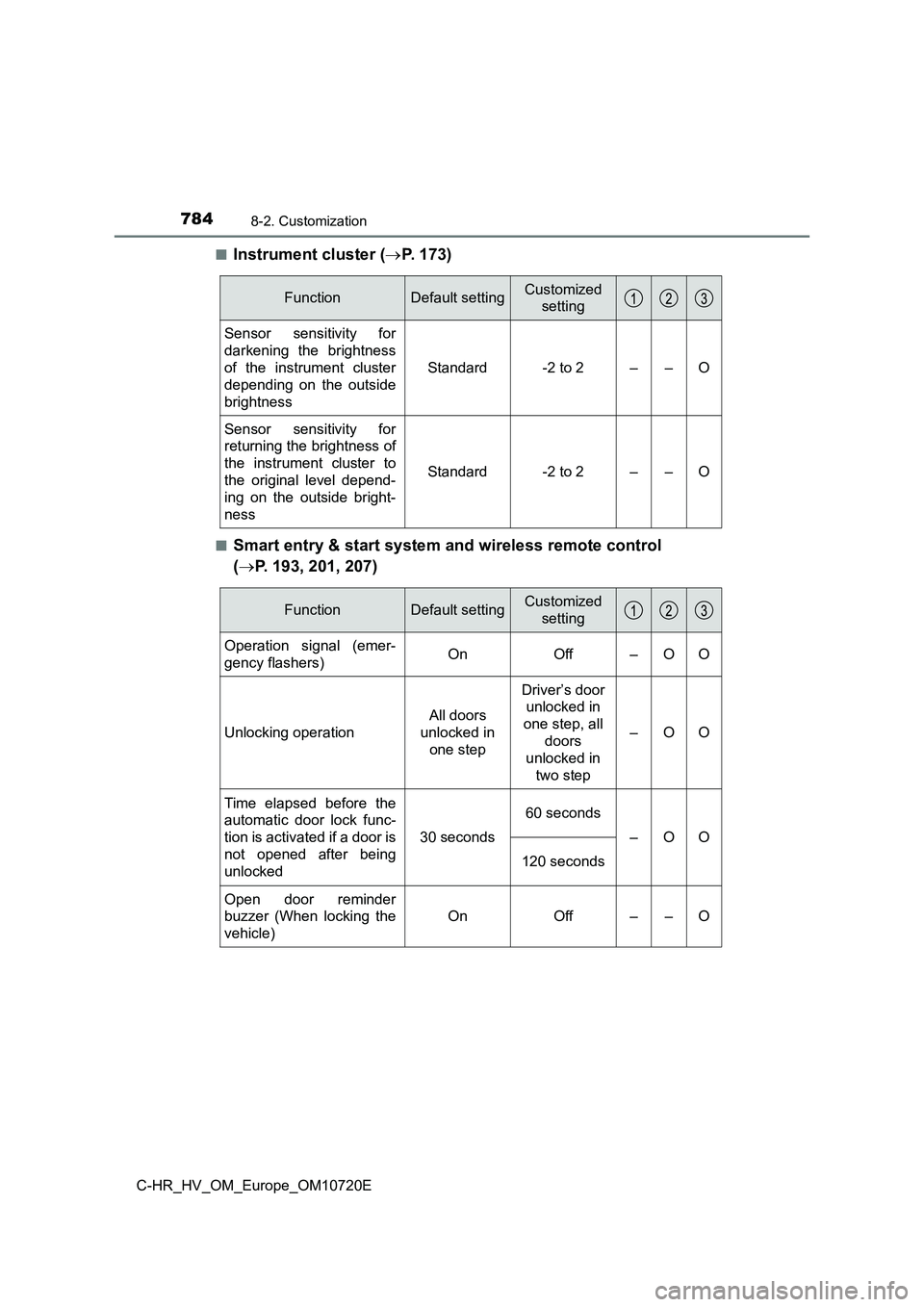
■Instrument cluster ( P. 173)
■Smart entry & start system and wireless remote control
( P. 193, 201, 207)
FunctionDefault settingCustomized
setting
Sensor sensitivity for
darkening the brightness
of the instrument cluster
depending on the outside
brightness
Standard-2 to 2––O
Sensor sensitivity for
returning the brightness of
the instrument cluster to
the original level depend-
ing on the outside bright-
ness
Standard-2 to 2––O
FunctionDefault settingCustomized
setting
Operation signal (emer-
gency flashers)OnOff–OO
Unlocking operation
All doors
unlocked in
one step
Driver’s door
unlocked in
one step, all
doors
unlocked in
two step
–OO
Time elapsed before the
automatic door lock func-
tion is activated if a door is
not opened after being
unlocked
30 seconds
60 seconds
–OO
120 seconds
Open door reminder
buzzer (When locking the
vehicle)
OnOff––O
Page 787 of 818
7858-2. Customization
C-HR_HV_OM_Europe_OM10720E
8
Vehicle specifications
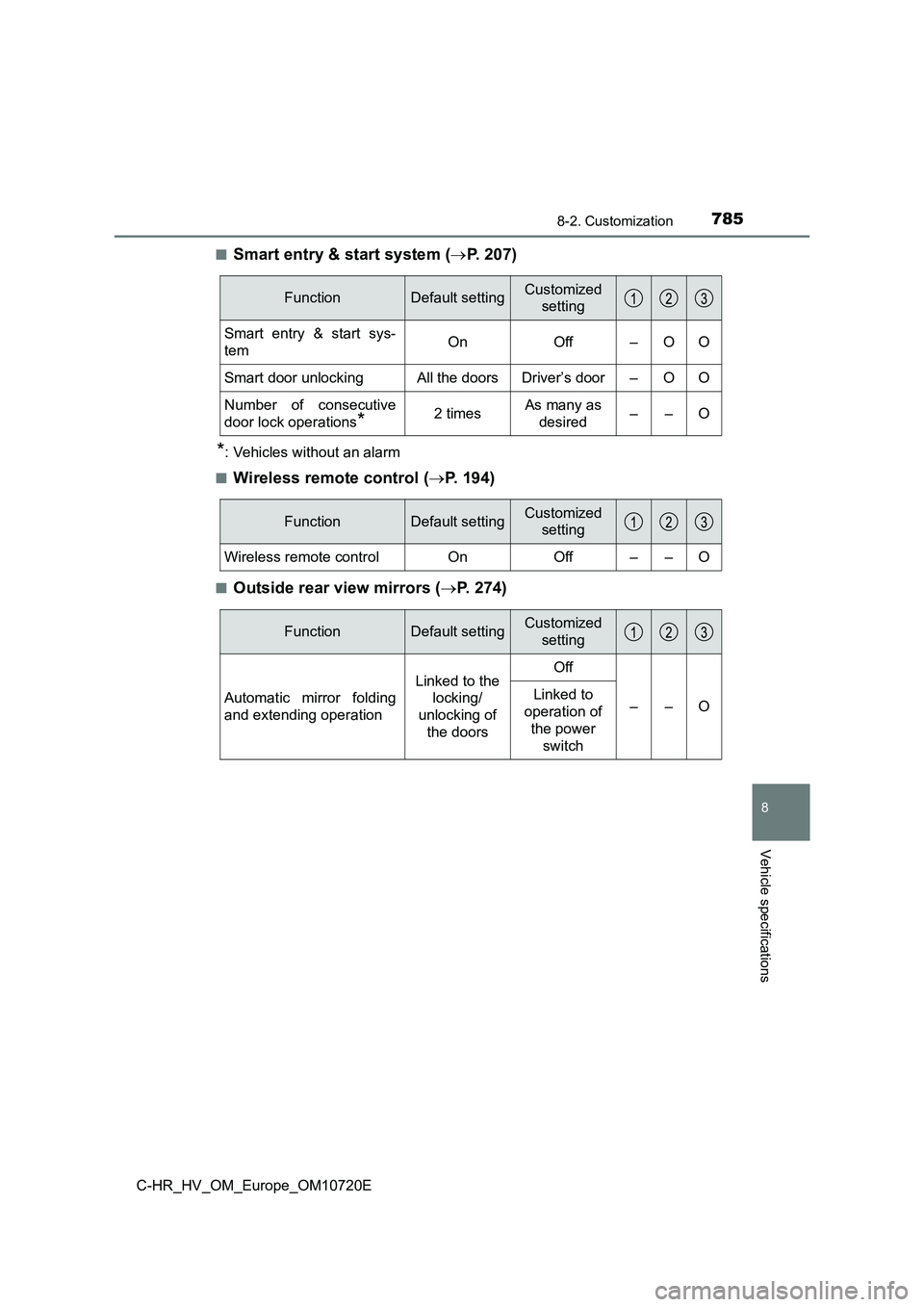
■Smart entry & start system (P. 207)
*: Vehicles without an alarm
■Wireless remote control ( P. 194)
■Outside rear view mirrors (P. 2 7 4 )
FunctionDefault settingCustomized
setting
Smart entry & start sys-
temOnOff–OO
Smart door unlockingAll the doorsDriver’s door–OO
Number of consecutive
door lock operations*2 timesAs many as
desired––O
FunctionDefault settingCustomized
setting
Wireless remote controlOnOff––O
FunctionDefault settingCustomized
setting
Automatic mirror folding
and extending operation
Linked to the
locking/
unlocking of
the doors
Off
––OLinked to
operation of
the power
switch
Page 788 of 818
7868-2. Customization
C-HR_HV_OM_Europe_OM10720E
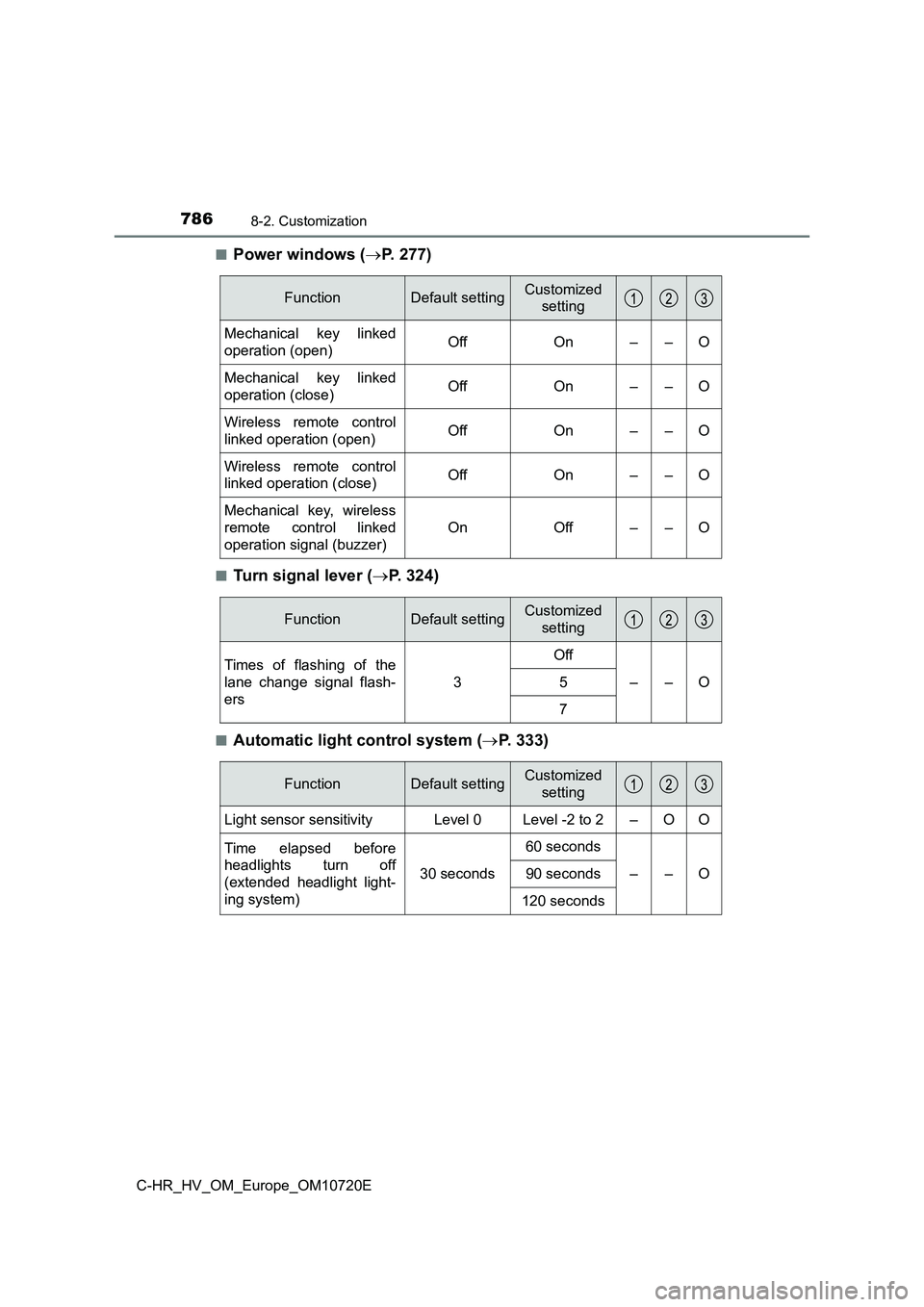
■Power windows ( P. 277)
■Turn signal lever (P. 324)
■Automatic light control system (P. 333)
FunctionDefault settingCustomized
setting
Mechanical key linked
operation (open)OffOn––O
Mechanical key linked
operation (close)OffOn––O
Wireless remote control
linked operation (open)OffOn––O
Wireless remote control
linked operation (close)OffOn––O
Mechanical key, wireless
remote control linked
operation signal (buzzer)
OnOff––O
FunctionDefault settingCustomized
setting
Times of flashing of the
lane change signal flash-
ers
3
Off
––O5
7
FunctionDefault settingCustomized
setting
Light sensor sensitivityLevel 0Level -2 to 2–OO
Time elapsed before
headlights turn off
(extended headlight light-
ing system)
30 seconds
60 seconds
––O90 seconds
120 seconds
Page 800 of 818
798What to do if... (Troubleshooting)
C-HR_HV_OM_Europe_OM10720E
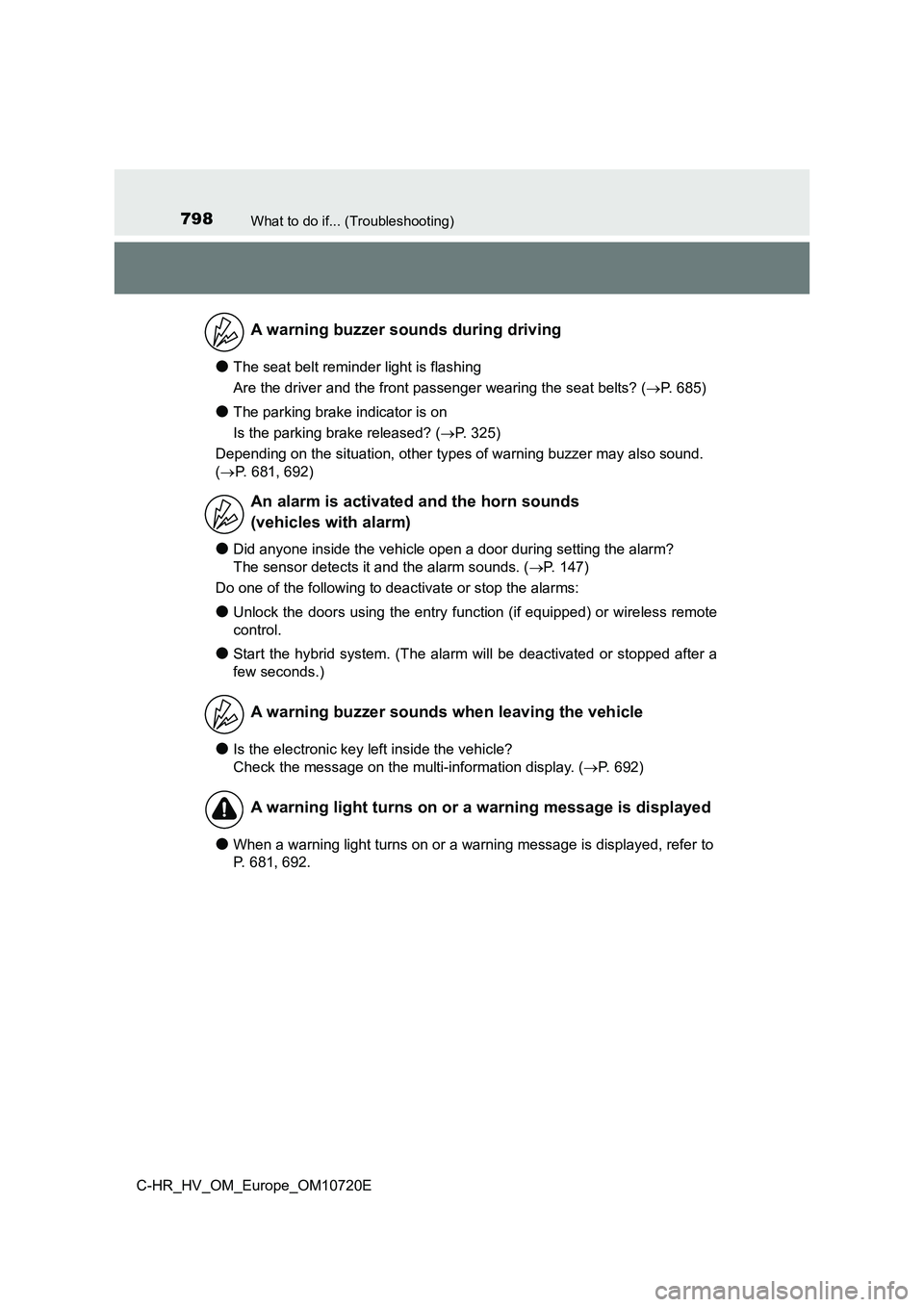
●The seat belt reminder light is flashing
Are the driver and the front passenger wearing the seat belts? (P. 685)
●The parking brake indicator is on
Is the parking brake released? ( P. 325)
Depending on the situation, other types of warning buzzer may a lso sound.
( P. 681, 692)
●Did anyone inside the vehicle open a door during setting the alarm?
The sensor detects it and the alarm sounds. ( P. 147)
Do one of the following to deactivate or stop the alarms:
●Unlock the doors using the entry function (if equipped) or wire less remote
control.
●Start the hybrid system. (The alarm will be deactivated or stop ped after a
few seconds.)
●Is the electronic key left inside the vehicle?
Check the message on the multi-information display. ( P. 692)
●When a warning light turns on or a warning message is displayed, refer to
P. 681, 692.
A warning buzzer sounds during driving
An alarm is activated and the horn sounds
(vehicles with alarm)
A warning buzzer sounds when leaving the vehicle
A warning light turns on or a warning message is displayed
Page 805 of 818
803Alphabetical index
C-HR_HV_OM_Europe_OM10720E
Daytime running light
system .................................... 336
Deck board ............................... 567
Defogger
Outside rear view mirrors ...... 552
Rear window ......................... 552
Windshield ............................ 551
Dimension ................................ 766
Display
BSM (Blind Spot Monitor) ..... 437
Drive information ................... 171
Dynamic radar cruise control
with full-speed range .......... 410
Energy monitor...................... 179
LTA (Lane Tracing Assist) .... 387
Multi-information display ....... 170
Parking assist system ........... 457
Pre-collision warning ............. 369
RSA (Road Sign Assist) ........ 403
Warning messages ............... 692
Do-it-yourself maintenance .... 593
Door lock
Back door .............................. 201
Side doors ............................. 193
Smart entry & start
system ........................ 193, 201
Wireless
remote control............. 194, 201
Doors
Back door.............................. 201
Door glasses ......................... 277
Door lock............................... 193
Open door
warning buzzer ........... 199, 202
Outside rear view mirrors...... 274
Rear door child-protectors .... 197
Side doors............................. 193
Double locking system ........... 145
Drive information ..................... 171
Drive-Start Control .................. 286
Driving
Break-in tips .......................... 287
Correct posture ....................... 34
Driving in the rain .................. 286
Driving mode select .............. 432
Hybrid Electric Vehicle
driving tips .......................... 540
Procedures ........................... 284
Winter drive tips .................... 543
Dynamic radar cruise
control .................................... 410
D