lights TOYOTA C-HR 2022 Workshop Manual
[x] Cancel search | Manufacturer: TOYOTA, Model Year: 2022, Model line: C-HR, Model: TOYOTA C-HR 2022Pages: 818, PDF Size: 113.75 MB
Page 390 of 818
3884-5. Using the driving support systems
C-HR_HV_OM_Europe_OM10720E
WARNING
■Situations unsuitable for LTA system
In the following situations, use the LTA switch to turn the sys tem off. Failure
to do so may lead to an accident, resulting in death or serious injury.
● Vehicle is driven on a road surface which is slippery due to rainy weather,
fallen snow, freezing, etc.
● Vehicle is driven on a snow-covered road.
● White (yellow) lines are difficult to see due to rain, snow, fog, dust, etc.
● Vehicle is driven in a temporary lane or restricted lane due to construction
work.
● Vehicle is driven in a construction zone.
● A spare tire, tire chains, etc. are equipped.
● When the tires have been excessively worn, or when the tire inflation pres-
sure is low.
● When your vehicle is towing a trailer or during emergency towing
■ Preventing LTA system malfunctions and operations performed by
mistake
● Do not modify the headlights or place stickers, etc. on the surface of the
lights.
● Do not modify the suspension etc. If the suspension etc. needs to be
replaced, contact any authorized Toyota retailer or Toyota auth orized
repairer, or any reliable repairer.
● Do not install or place anything on the hood or grille. Also, do not install a
grille guard (bull bars, kangaroo bar, etc.).
● If your windshield needs repairs, contact any authorized Toyota retailer or
Toyota authorized repairer, or any reliable repairer.
Page 393 of 818
3914-5. Using the driving support systems
4
Driving
C-HR_HV_OM_Europe_OM10720E
WARNING
●The traffic lines are yellow (which may be more difficult to recognize than
lines that are white).
● The white (yellow) lines cross over a curb, etc.
● The vehicle is driven on a bright surface, such as concrete.
● If the edge of the road is not clear or straight.
● The vehicle is driven on a surface that is bright due to reflected light, etc.
● The vehicle is driven in an area where the brightness changes suddenly,
such as at the entrances and exits of tunnels, etc.
● Light from the headlights of an oncoming vehicle, the sun, etc. enters the
camera.
● The vehicle is driven on a slope.
● The vehicle is driven on a road which tilts left or right, or a winding road.
● The vehicle is driven on an unpaved or rough road.
● The traffic lane is excessively narrow or wide.
● The vehicle is extremely tilted due to carrying heavy luggage or having
improper tire pressure.
● The distance to the preceding vehicle is extremely short.
● The vehicle is moving up and down a large amount due to road conditions
during driving (poor roads or road seams).
● When driving in a tunnel or at night with the headlights off or when a head-
light is dim due to its lens being dirty or it being misaligned .
● The vehicle is struck by a crosswind.
● The vehicle is affected by wind from a vehicle driven in a nearby lane.
● The vehicle has just changed lanes or crossed an intersection.
● Tires which differ by structure, manufacturer, brand or tread pattern are
used.
● When tires of a size other than specified are installed.
● Snow tires, etc. are equipped.
● The vehicle is being driven at extremely high speeds.
Page 417 of 818
4154-5. Using the driving support systems
4
Driving
C-HR_HV_OM_Europe_OM10720E
Example of deceleration cruising and follow-up cruising
When a preceding vehicle driving slower than the set speed
appears
When a vehicle is detected running ahead of you, the system aut omatically
decelerates your vehicle. When a greater reduction in vehicle s peed is
necessary, the system applies the brakes (the stop lights will come on at
this time). The system will respond to changes in the speed of the vehicle
ahead in order to maintain the vehicle-to-vehicle distance set by the driver.
Approach warning warns you when the system cannot decelerate su ffi-
ciently to prevent your vehicle from closing in on the vehicle ahead.
When the vehicle ahead of you stops, your vehicle will also sto p (vehicle is
stopped by system control). After the vehicle ahead starts off, pushing the
cruise control lever up or depressing the accelerator pedal (st art-off opera-
tion) will resume follow-up crui sing. If the start-off operation is not per-
formed, system control continues to keep your vehicle stopped.
When the turn signal lever is operated and your vehicle moves t o an over-
taking lane while driving at 80 km/h (50 mph) or more, the vehi cle will
accelerate to help to overtake a passing vehicle.
The system’s identification of what is an overtaking lane may b e deter-
mined solely based on the location of the steering wheel in the vehicle (left
side driver position versus right side driver position.) If the vehicle is driven
to a region where the overtaking lane is on a different side fr om where the
vehicle is normally driven, the vehicle may accelerate when the turn signal
lever is operated in the opposite direction to the overtaking l ane (e.g., if the
driver normally operates the vehi cle in a region where the overtaking lane
is to the right but then drives to a region where the overtakin g lane is to the
left, the vehicle may accelerate when the right turn signal is activated).
Example of acceleration
When there are no longer any preceding vehicles driving slower
than the set speed
The system accelerates until the set speed is reached. The syst em then
returns to constant speed cruising.
Page 469 of 818
4674-5. Using the driving support systems
4
Driving
C-HR_HV_OM_Europe_OM10720E
WARNING
■Cautions regarding the use of the system
There is a limit to the degree of recognition accuracy and cont rol perfor-
mance that this system can provide, do not overly rely on this system. The
driver is always responsible for paying attention to the vehicl e’ surroundings
and driving safely.
■ To ensure the system can operate properly
Observe the following precautions.
Failing to do so may result in the vehicle being unable to be d riven safely
and possibly cause an accident.
● Do not damage the sensors, and always keep them clean.
● Do not attach a sticker or install an electronic component, such as a backlit
license plate (especially fluorescent type), fog lights, fender pole or wire-
less antenna near a radar sensor.
● Do not subject the surrounding area of the sensor to a strong impact. If
subjected to an impact, have the vehicle inspected by any autho rized
Toyota retailer or Toyota authorized repairer, or any reliable repairer. If the
front or rear bumper needs to be removed/installed or replaced, contact
any authorized Toyota retailer or Toyota authorized repairer, o r any reliable
repairer.
● Do not modify, disassemble or paint the sensors.
● Do not attach a license plate cover.
● Keep your tires properly inflated.
■ When to disable the function
In the following situations, disable the function as it may ope rate even
though there is no possibility of a collision.
● Failing to observe the warnings above.
● A non-genuine Toyota suspension (lowered suspension, etc.) is installed.
Page 543 of 818
5414-6. Driving tips
4
Driving
C-HR_HV_OM_Europe_OM10720E
◆When braking
Make sure to operate the brakes gently and in a timely manner. A
greater amount of electrical energy can be regenerated when slo w-
ing down.
◆Delays
Repeated acceleration and deceleration, as well as long waits a t
traffic lights, will lead to bad fuel economy. Check traffic re ports
before leaving and avoid delays as much as possible. When drivi ng
in a traffic jam, gently release the brake pedal to allow the v ehicle to
move forward slightly while avoiding overuse of the accelerator
pedal. Doing so can help control excessive gasoline consumption .
◆Highway driving
Control and maintain the vehicle at a constant speed. Before st op-
ping at a toll booth or similar, allow plenty of time to releas e the
accelerator and gently apply the brakes. A greater amount of el ec-
trical energy can be regenerated when slowing down.
◆Air conditioning
Use the air conditioning only when necessary. Doing so can help
reduce excessive gasoline consumption.
In summer: When the ambient temperature is high, use the recirc u-
lated air mode. Doing so will help to reduce the burden on the air
conditioning system and reduce fuel consumption as well.
In winter: Because the gasoline engine will not automatically c ut out
until it and the interior of the vehicle are warm, it will cons ume fuel.
Fuel consumption can be improved by avoiding overuse of the
heater.
Page 545 of 818
543
4
4-6. Driving tips
Driving
C-HR_HV_OM_Europe_OM10720E
Winter driving tips
●Use fluids that are appropriate to the prevailing outside tempera-
tures.
• Engine oil
• Engine/power control unit coolant
• Washer fluid
● Have a service technician inspect the condition of the 12-volt bat-
tery.
● Have the vehicle fitted with four snow tires or purchase a set of tire
chains for the front tires*.
Ensure that all tires are the same size and brand, and that cha ins match
the size of the tires.
*: Tire chains cannot be mounted on 18-inch tires or 19-inch tir es.
Perform the following according to the driving conditions:
● Do not try to forcibly open a window or move a wiper that is frozen.
Pour warm water over the frozen area to melt the ice. Wipe away
the water immediately to prevent it from freezing.
● To ensure proper operation of the climate control system fan,
remove any snow that has accumulated on the air inlet vents in
front of the windshield.
● Check for and remove any excess ice or snow that may have accu-
mulated on the exterior lights, vehicle’s roof, chassis, around the
tires or on the brakes.
● Remove any snow or mud from the bottom of your shoes before
getting in the vehicle.
Carry out the necessary preparations and inspections before
driving the vehicle in winter. Always drive the vehicle in a ma n-
ner appropriate to the prevailing weather conditions.
Preparation for winter
Before driving the vehicle
Page 549 of 818
547
5Interior features
C-HR_HV_OM_Europe_OM10720E
5-1. Using the air conditioning
system and defogger
Air conditioning system ...... 548
Heated steering wheel/
seat heaters ..................... 557
5-2. Using the interior lights
Interior lights list ................. 559
• Interior lights .................. 560
• Personal lights ............... 560
5-3. Using the
storage features
List of storage features ...... 562
• Glove box ...................... 563
• Console box .................. 563
• Bottle holders ................ 564
• Cup holders ................... 565
Luggage compartment
features............................ 566
5-4. Using the
other interior features
Other interior features ........ 574
• Sun visors...................... 574
• Vanity mirrors ................ 574
• Clock ............................. 575
• Power outlet .................. 576
• Assist grips .................... 577
Page 560 of 818
5585-1. Using the air conditioning system and defogger
C-HR_HV_OM_Europe_OM10720E
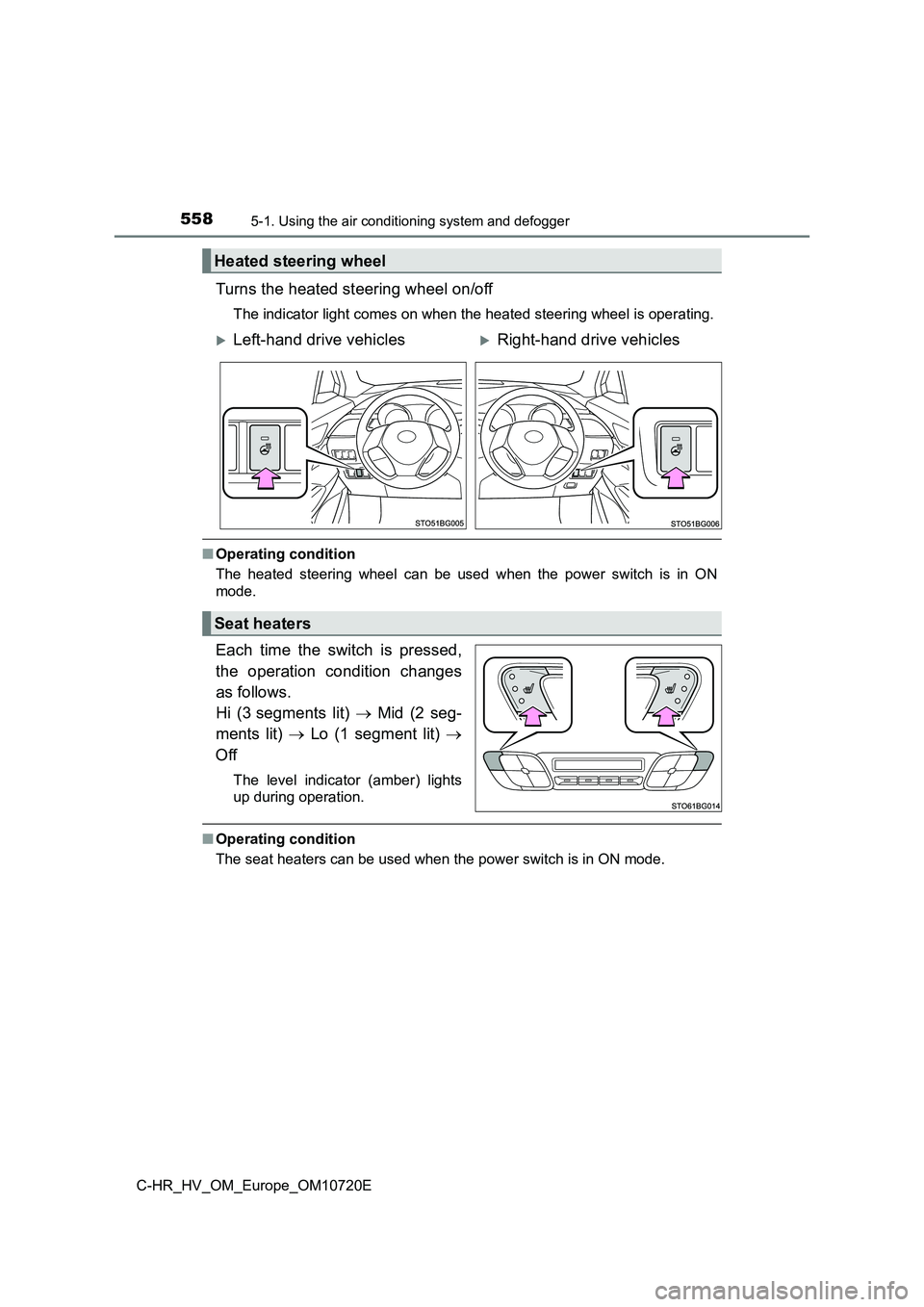
Turns the heated steering wheel on/off
The indicator light comes on when the heated steering wheel is operating.
■Operating condition
The heated steering wheel can be used when the power switch is in ON
mode.
Each time the switch is pressed,
the operation condition changes
as follows.
Hi (3 segments lit) Mid (2 seg-
ments lit) Lo (1 segment lit)
Off
The level indicator (amber) lights
up during operation.
■ Operating condition
The seat heaters can be used when the power switch is in ON mod e.
Heated steering wheel
Left-hand drive vehiclesRight-hand drive vehicles
Seat heaters
Page 561 of 818
5595-2. Using the interior lights
5
Interior features
C-HR_HV_OM_Europe_OM10720E
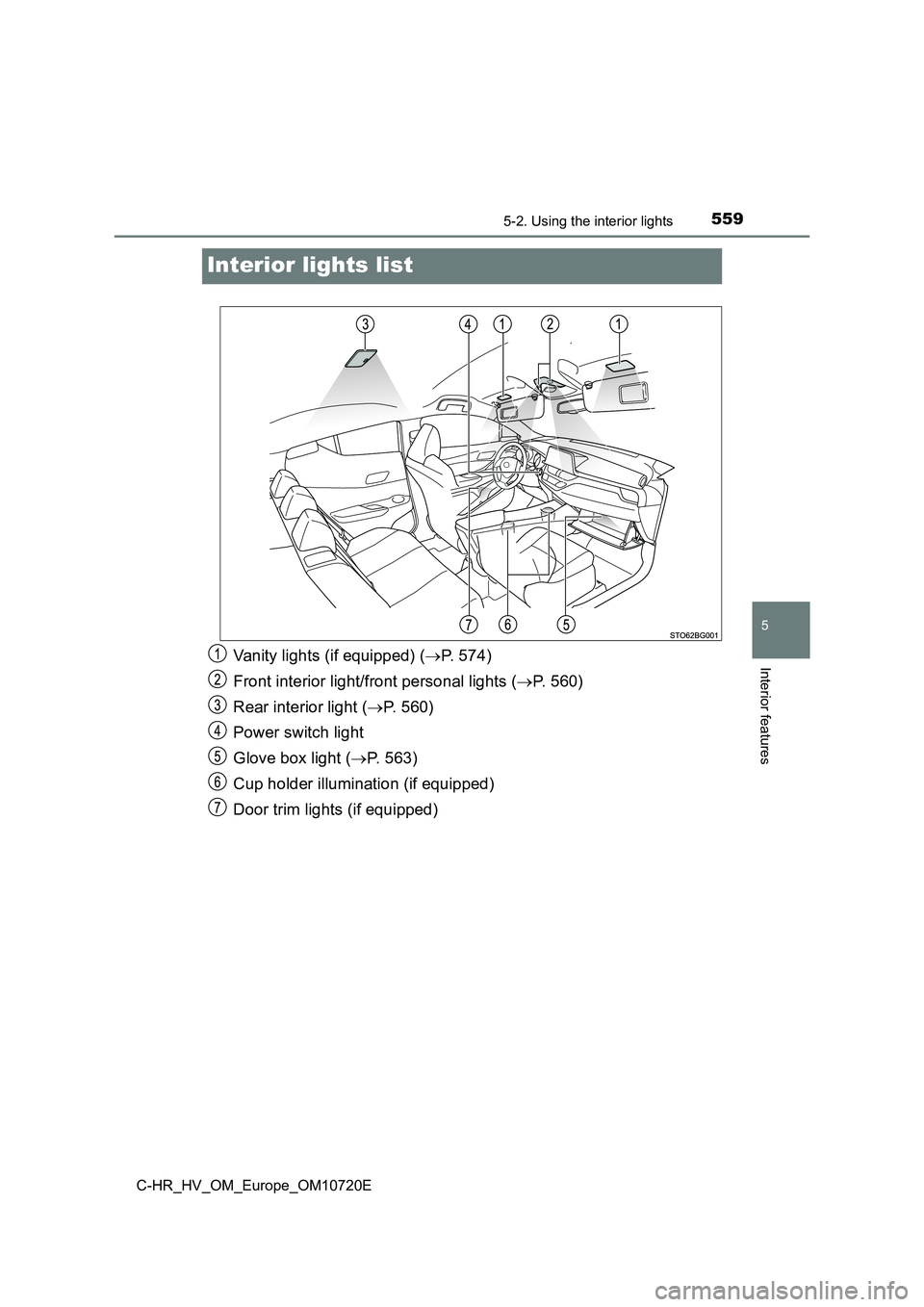
Interior lights list
Vanity lights (if equipped) (P. 574)
Front interior light/front personal lights ( P. 560)
Rear interior light ( P. 5 6 0 )
Power switch light
Glove box light ( P. 563)
Cup holder illumination (if equipped)
Door trim lights (if equipped)
Page 562 of 818
5605-2. Using the interior lights
C-HR_HV_OM_Europe_OM10720E
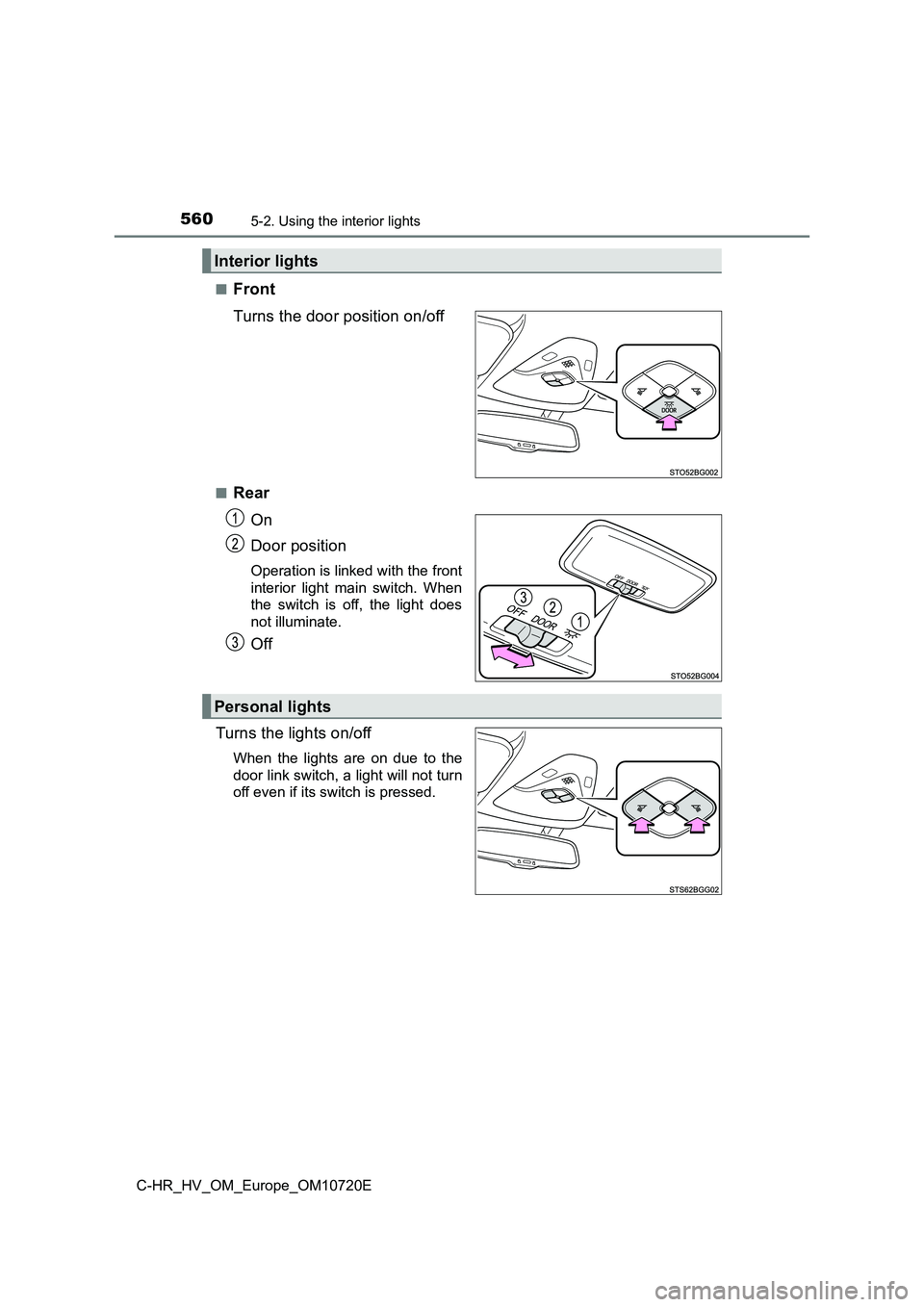
■Front
Turns the door position on/off
■Rear
On
Door position
Operation is linked with the front
interior light main switch. When
the switch is off, the light does
not illuminate.
Off
Turns the lights on/off
When the lights are on due to the
door link switch, a light will not turn
off even if its switch is pressed.
Interior lights
Personal lights