mirror TOYOTA C-HR 2023 Owner's Manual
[x] Cancel search | Manufacturer: TOYOTA, Model Year: 2023, Model line: C-HR, Model: TOYOTA C-HR 2023Pages: 814, PDF Size: 112.62 MB
Page 300 of 814
2984-1. Before driving
C-HR_HEV_OM_Europe_OM10764E
■Tire information
● Increase the tire inflation pressure to 20.0 kPa (0.2 kgf/cm2 or bar, 3 psi)
greater than the recommended value when towing. ( P. 774)
● Increase the air pressure of the trailer tires in accordance with the total
trailer weight and according to the values recommended by the m anufac-
turer of your trailer.
■ Trailer lights
Please consult at any authorized retailer or Toyota authorized repairer, or any
reliable repairer when installing trailer lights, as incorrect installation may
cause damage to the vehicle’s lights. Please take care to compl y with your
state’s laws when installing trailer lights.
■ Break-in schedule
Toyota recommends that vehicles fitted with new power train com ponents
should not be used for towing trailers for the first 800 km (50 0 miles).
■ Safety checks before towing
● Check that the maximum load limit for the towing hitch/bracket and hitch ball
is not exceeded. Bear in mind that the coupling weight of the t railer will add
to the load exerted on the vehicle. Also make sure that the tot al load exerted
on the vehicle is within the range of the weight limits. ( P. 295)
● Ensure that the trailer load is secure.
● Supplementary outside rear view mirrors should be added to the vehicle if
the traffic behind cannot be clearly seen with standard mirrors . Adjust the
extending arms of these mirrors on both sides of the vehicle so that they
always provide maximum visibility of the road behind.
■ Maintenance
● Maintenance must be performed more frequently when using the vehicle for
towing due to the greater weight burden placed on the vehicle c ompared to
normal driving.
● Retighten all bolts securing the hitching ball and bracket after towing for
approximately 1000 km (600 miles).
Page 342 of 814
3404-3. Operating the lights and wipers
C-HR_HEV_OM_Europe_OM10764E
● In the situations shown below, the system may not be able to accurately
detect surrounding brightness levels. This may cause the low be ams to
remain on or the high beams to cause problems for pedestrians, vehicles
ahead or other parties. In these cases, manually switch between the high
and low beams.
• In bad weather (rain, snow, fog, sandstorms, etc.)
• The windshield is obscured by fog, mist, ice, dirt, etc.
• The windshield is cracked or damaged.
• The front camera is deformed or dirty.
• The front camera temperat ure is extremely high.
• Surrounding brightness levels are equal to those of headlights , tail lights
or fog lights.
• Vehicles ahead have headlights that are either switched off, d irty, are
changing color, or are not aimed properly.
• When driving through an area of intermittently changing brightness and
darkness.
• When frequently and repeatedly driving ascending/descending ro ads, or
roads with rough, bumpy or uneven surfaces (such as stone-paved
roads, gravel tracks, etc.).
• When frequently and repeatedly taking curves or driving on a w inding
road.
• There is a highly reflective object ahead of the vehicle, such as a sign or
a mirror.
• The back of a vehicle ahead is highly reflective, such as a co ntainer on a
truck.
• The vehicle’s headlights are damaged or dirty.
• The vehicle is listing or tilting, due to a flat tire, a trail er being towed, etc.
• The high beam and low beam are repeatedly being switched betwe en in
an abnormal manner.
• The driver believes that the high beam may be causing problems or dis-
tress to other drivers or pedestrians nearby.
■ If “Headlight System Malfunction. Visit Your Dealer.” is displayed on the
multi-information display
The system may be malfunctioning. Have the vehicle inspected by any autho-
rized Toyota retailer or Toyota authorized repairer, or any rel iable repairer.
Page 358 of 814
3564-5. Using the driving support systems
C-HR_HEV_OM_Europe_OM10764E
WARNING
●If the part of the windshield in front of the front camera is fogged up or cov-
ered with condensation, or ice, use the windshield defogger to remove the
fog, condensation, or ice. ( P. 549)
● If water droplets cannot be properly removed from the area of the wind-
shield in front of the front camera by the windshield wipers, r eplace the
wiper insert or wiper blade.
● Do not attach window tint to the windshield.
● Replace the windshield if it is damaged or cracked.
After replacing the windshield, the front camera must be recali brated. Con-
tact any authorized Toyota retailer or Toyota authorized repair er, or any
reliable repairer for details.
● Do not allow liquids to contact the front camera.
● Do not allow bright lights to shine into the front camera.
● Do not dirty or damage the front camera.
When cleaning the inside of the windshield, do not allow glass cleaner to
contact the lens of the front camera. Also, do not touch the le ns.
If the lens is dirty or damaged, contact any authorized Toyota retailer or
Toyota authorized repairer, or any reliable repairer.
● Do not subject the front camera to a strong impact.
● Do not change the installation position or direction of the front camera or
remove it.
● Do not disassemble the front camera.
● Do not modify any components of the vehicle around the front camera
(inside rear view mirror, etc.) or ceiling.
● Do not attach any accessories to the hood, front grille or front bumper that
may obstruct the front camera. Contact any authorized Toyota re tailer or
Toyota authorized repairer, or any reliable repairer for details.
● If a surfboard or other long object is to be mounted on the roof, make sure
that it will not obstruct the front camera.
● Do not modify the headlights or other lights.
Page 437 of 814
435
4
4-5. Using the driving support systems
Driving
C-HR_HEV_OM_Europe_OM10764E
BSM (Blind Spot Monitor)
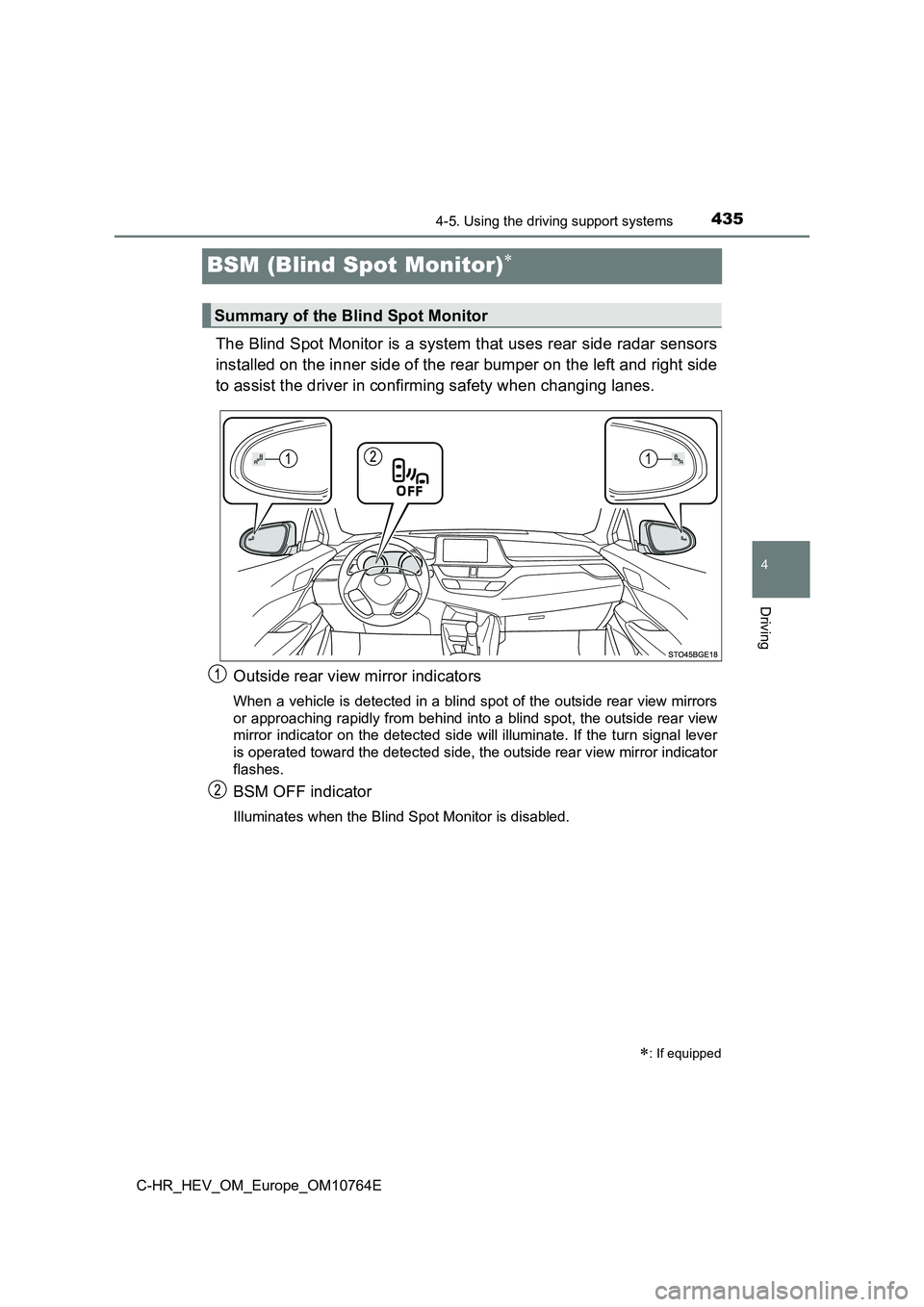
The Blind Spot Monitor is a system that uses rear side radar sensors
installed on the inner side of the rear bumper on the left and right side
to assist the driver in confirming safety when changing lanes.
Outside rear view mirror indicators
When a vehicle is detected in a blind spot of the outside rear view mirrors
or approaching rapidly from behind into a blind spot, the outsi de rear view
mirror indicator on the detected side will illuminate. If the t urn signal lever
is operated toward the detected side, the outside rear view mir ror indicator
flashes.
BSM OFF indicator
Illuminates when the Blind Spot Monitor is disabled.
: If equipped
Summary of the Blind Spot Monitor
Page 438 of 814
4364-5. Using the driving support systems
C-HR_HEV_OM_Europe_OM10764E
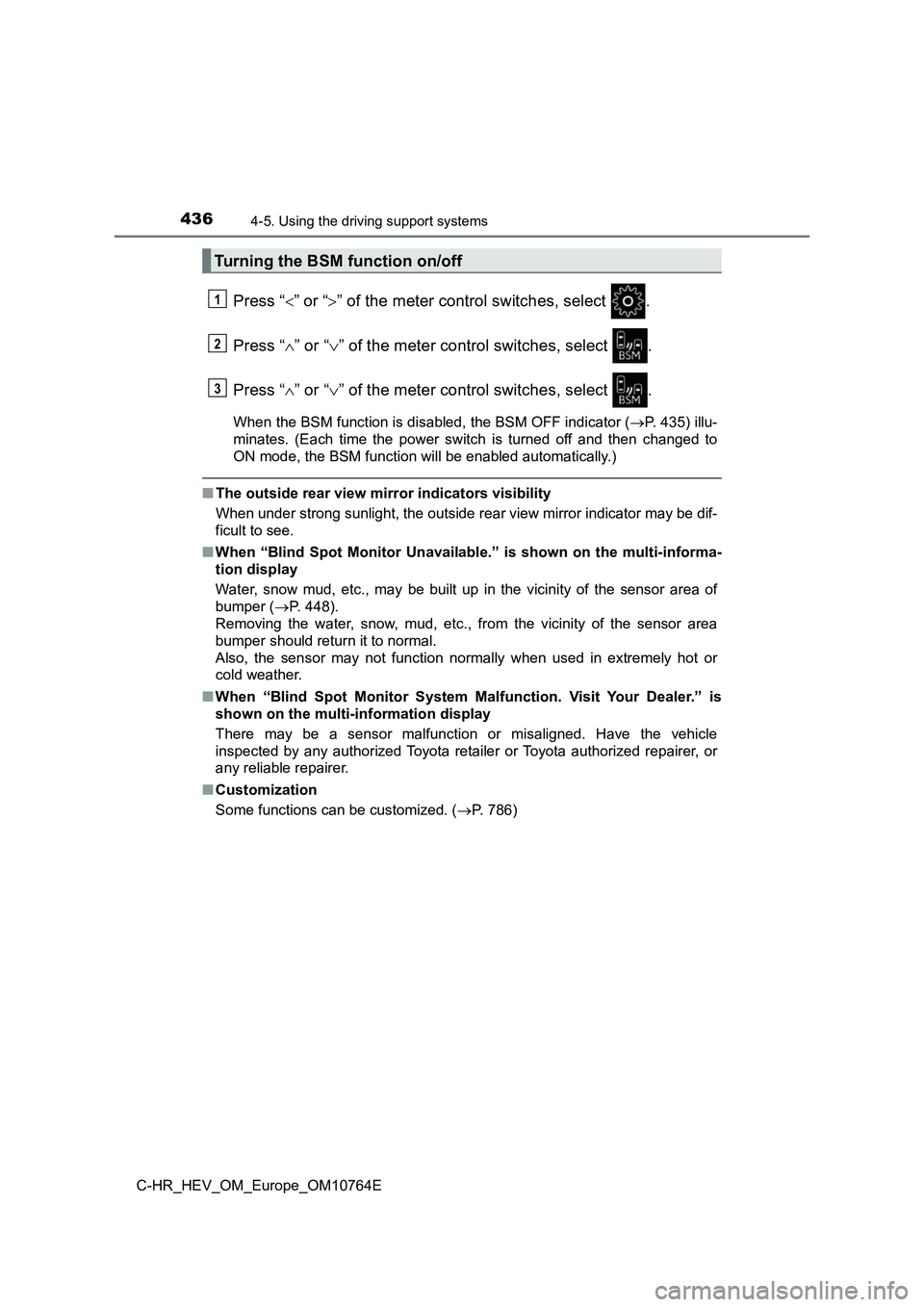
Press “” or “” of the meter control switches, select .
Press “ ” or “” of the meter control switches, select .
Press “ ” or “” of the meter control switches, select .
When the BSM function is disabled, the BSM OFF indicator (P. 435) illu-
minates. (Each time the power switch is turned off and then cha nged to
ON mode, the BSM function will be enabled automatically.)
■ The outside rear view mirror indicators visibility
When under strong sunlight, the out side rear view mirror indicator may be dif-
ficult to see.
■ When “Blind Spot Monitor Unavailable.” is shown on the multi-informa-
tion display
Water, snow mud, etc., may be built up in the vicinity of the s ensor area of
bumper ( P. 448).
Removing the water, snow, mud, etc., from the vicinity of the s ensor area
bumper should return it to normal.
Also, the sensor may not function normally when used in extreme ly hot or
cold weather.
■ When “Blind Spot Monitor System Malfunction. Visit Your Dealer.” is
shown on the multi-information display
There may be a sensor malfunction or misaligned. Have the vehic le
inspected by any authorized Toyota retailer or Toyota authorize d repairer, or
any reliable repairer.
■ Customization
Some functions can be customized. ( P. 786)
Turning the BSM function on/off
1
2
3
Page 451 of 814
4494-5. Using the driving support systems
4
Driving
C-HR_HEV_OM_Europe_OM10764E
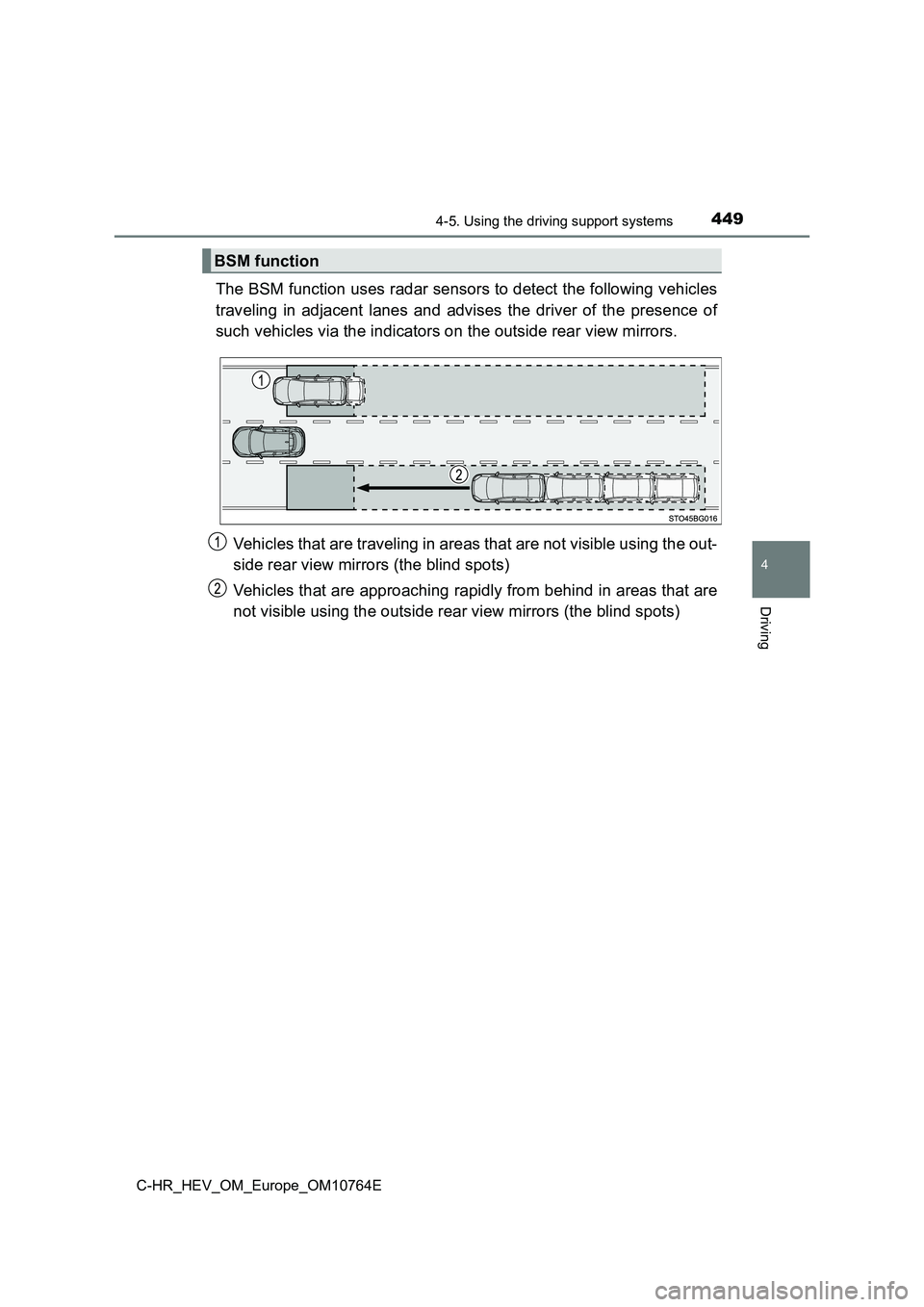
The BSM function uses radar sensors to detect the following vehicles
traveling in adjacent lanes and advises the driver of the prese nce of
such vehicles via the indicators on the outside rear view mirro rs.
Vehicles that are traveling in areas that are not visible using the out-
side rear view mirrors (the blind spots)
Vehicles that are approaching rapidly from behind in areas that are
not visible using the outside rear view mirrors (the blind spot s)
BSM function
Page 452 of 814
4504-5. Using the driving support systems
C-HR_HEV_OM_Europe_OM10764E
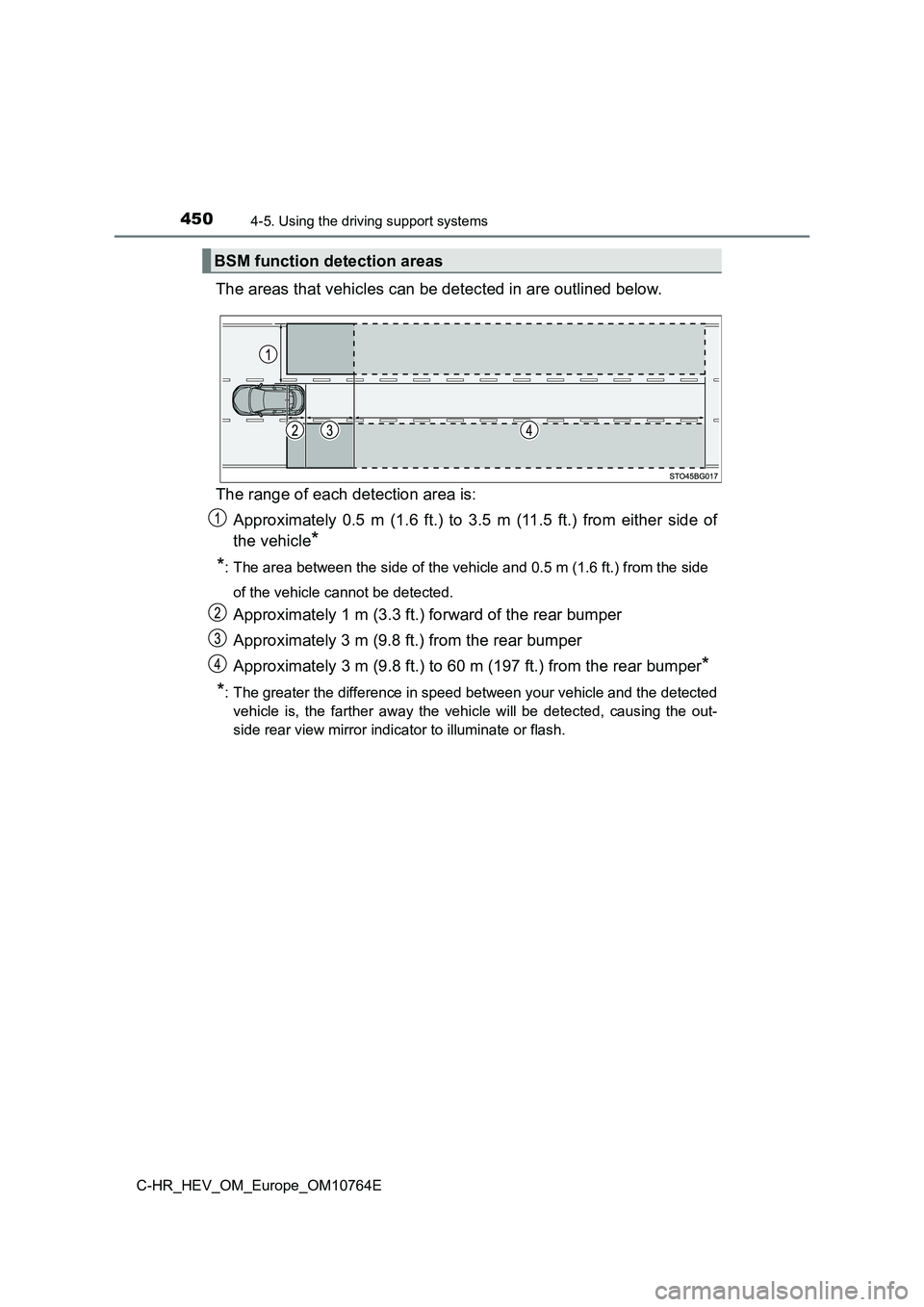
The areas that vehicles can be detected in are outlined below.
The range of each detection area is:
Approximately 0.5 m (1.6 ft.) to 3.5 m (11.5 ft.) from either s ide of
the vehicle*
*: The area between the side of the vehicle and 0.5 m (1.6 ft.) f rom the side
of the vehicle cannot be detected.
Approximately 1 m (3.3 ft.) forward of the rear bumper
Approximately 3 m (9.8 ft.) from the rear bumper
Approximately 3 m (9.8 ft.) to 60 m (197 ft.) from the rear bum per*
*: The greater the difference in speed between your vehicle and t he detected
vehicle is, the farther away the vehicle will be detected, caus ing the out-
side rear view mirror indicator to illuminate or flash.
BSM function detection areas
Page 469 of 814
467
4
4-5. Using the driving support systems
Driving
C-HR_HEV_OM_Europe_OM10764E
RCTA (Rear Crossing Traffic Aler t)
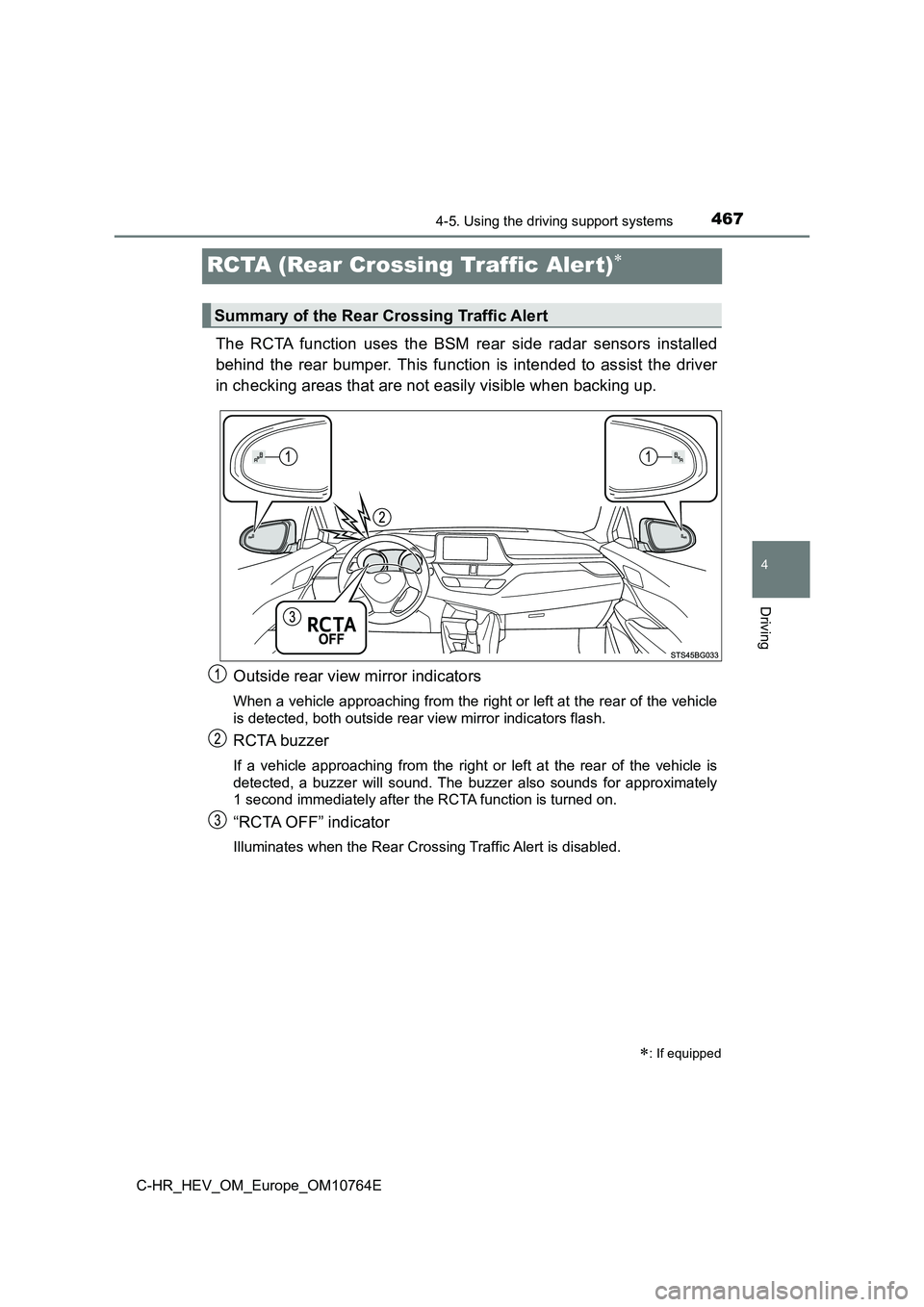
The RCTA function uses the BSM rear side radar sensors installed
behind the rear bumper. This function is intended to assist the driver
in checking areas that are not easily visible when backing up.
Outside rear view mirror indicators
When a vehicle approaching from the right or left at the rear o f the vehicle
is detected, both outside rear view mirror indicators flash.
RCTA buzzer
If a vehicle approaching from the right or left at the rear of the vehicle is
detected, a buzzer will sound. The buzzer also sounds for appro ximately
1 second immediately after the RCTA function is turned on.
“RCTA OFF” indicator
Illuminates when the Rear Cross ing Traffic Alert is disabled.
: If equipped
Summary of the Rear Crossing Traffic Alert
Page 470 of 814
4684-5. Using the driving support systems
C-HR_HEV_OM_Europe_OM10764E
Press “” or “” of the meter control switches, select .
Press “ ” or “” of the meter control switches, select .
Press “ ” or “” of the meter control switches, select “RCTA”.
When the RCTA function is disabled, the “RCTA OFF” indicator (P. 467)
illuminates. (Each time the power switch is turned off and then changed to
ON mode, the RCTA function will be enabled automatically.)
■ The outside rear view mirror indicators visibility
When under strong sunlight, the out side rear view mirror indicator may be dif-
ficult to see.
■ Hearing the RCTA buzzer
The RCTA buzzer may be difficult to hear over loud noises, such as if the
audio system volume is high.
■ When “RCTA Unavailable.” is shown on the multi-information display
Water, snow mud, etc., may be built up in the vicinity of the s ensor area of
bumper ( P. 448).
Removing the water, snow, mud, etc., from the vicinity of the s ensor area
bumper should return it to normal.
Also, the sensor may not function normally when used in extreme ly hot or
cold weather.
■ When “RCTA Malfunction Visit Your Dealer.” is shown on the multi-infor-
mation display
There may be a sensor malfunction or misaligned. Have the vehic le
inspected by any authorized Toyota retailer or Toyota authorize d repairer, or
any reliable repairer.
■ Rear side radar sensors
P. 448
Turning the RCTA function on/off
1
2
3
Page 471 of 814
4694-5. Using the driving support systems
4
Driving
C-HR_HEV_OM_Europe_OM10764E
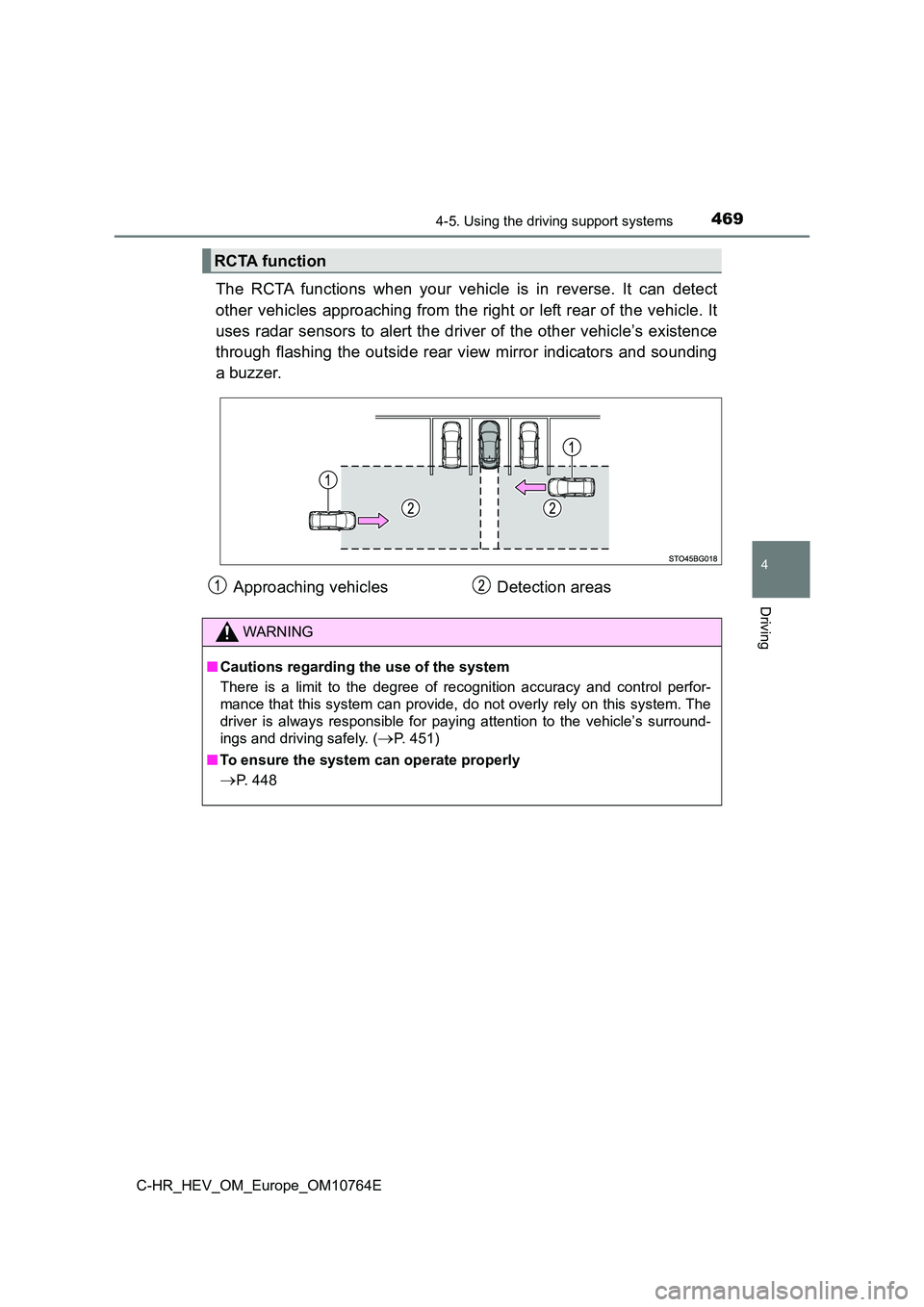
The RCTA functions when your vehicle is in reverse. It can detect
other vehicles approaching from the right or left rear of the v ehicle. It
uses radar sensors to alert the driver of the other vehicle’s e xistence
through flashing the outside rear view mirror indicators and so unding
a buzzer.
RCTA function
Approaching vehicles Detection areas
WARNING
■ Cautions regarding the use of the system
There is a limit to the degree of recognition accuracy and cont rol perfor-
mance that this system can provide, do not overly rely on this system. The
driver is always responsible for paying attention to the vehicl e’s surround-
ings and driving safely. (P. 451)
■ To ensure the system can operate properly
P. 448