brake sensor TOYOTA C_HR HYBRID 2016 User Guide
[x] Cancel search | Manufacturer: TOYOTA, Model Year: 2016, Model line: C_HR HYBRID, Model: TOYOTA C_HR HYBRID 2016Pages: 712, PDF Size: 49.31 MB
Page 374 of 712
3744-5. Using the driving support systems
C-HR_HV_OM_Europe_OM10538E
NOTICE
●If the road surface has any dips or inclines, the target parking spot cannot
be correctly set. Therefore, the vehicle may be parked at an angle or may
deviate from the parking spot. In these cases, do not use the parallel park-
ing assist mode.
● When there is a wall or other obstacle on the inner side of the parking
space, or when another parked vehicle extends into the road from its park-
ing spot, the target parking spot may be set in a position that juts out
slightly into the road.
● Depending on the surrounding environment, such as other parked vehi-
cles, the vehicle may be parked at an angle or may deviate from the park-
ing spot. Manually adjust vehi cle alignment as necessary.
● It may not be possible to detect objects that are low to the ground. Directly
confirm the safety of your surroundings and, if it seems the vehicle may
make contact with an obstacle, stop the vehicle by depressing the brake
pedal.
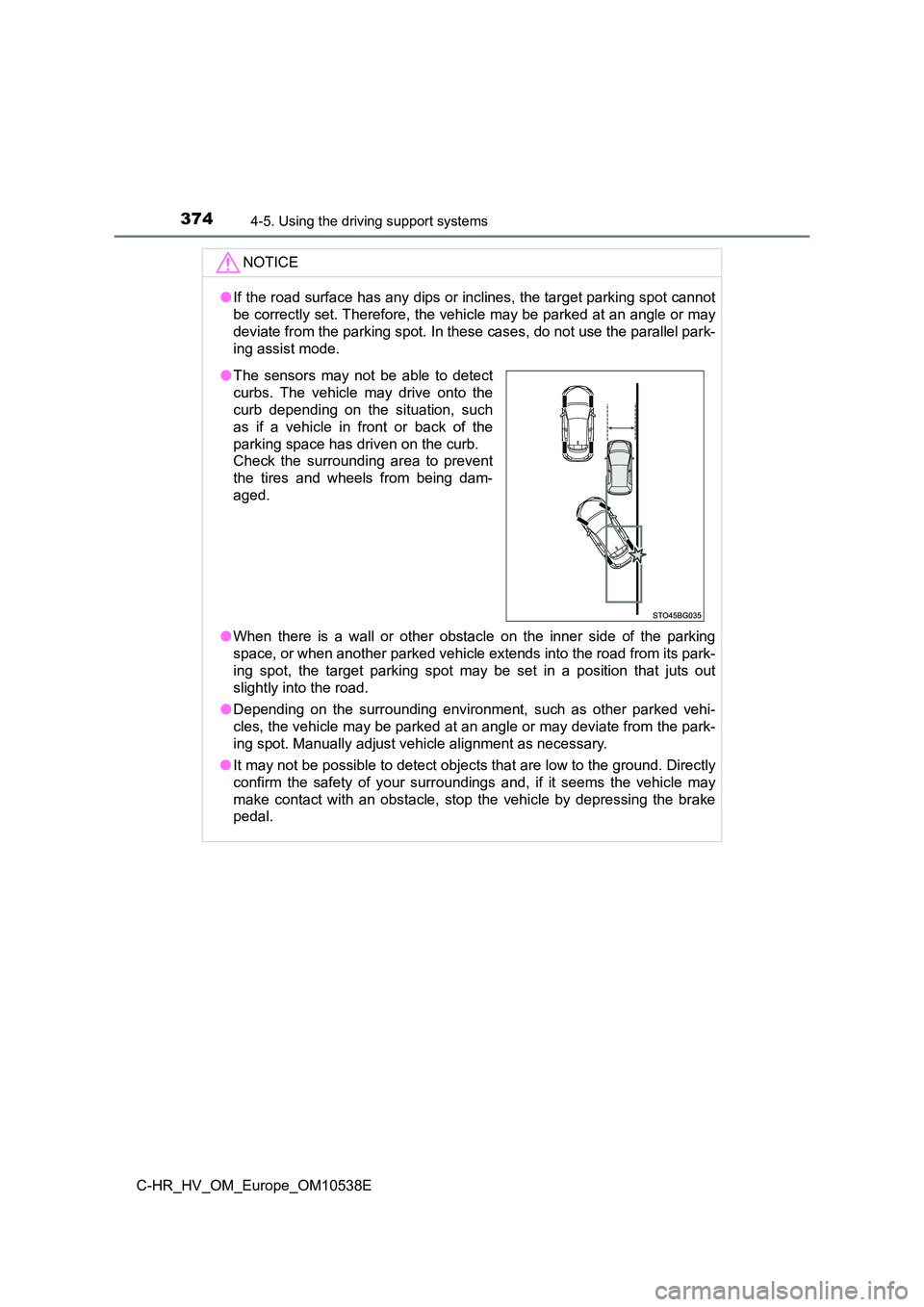
● The sensors may not be able to detect
curbs. The vehicle may drive onto the
curb depending on the situation, such
as if a vehicle in front or back of the
parking space has driven on the curb.
Check the surrounding area to prevent
the tires and wheels from being dam-
aged.
Page 381 of 712
3814-5. Using the driving support systems
4
Driving
C-HR_HV_OM_Europe_OM10538E
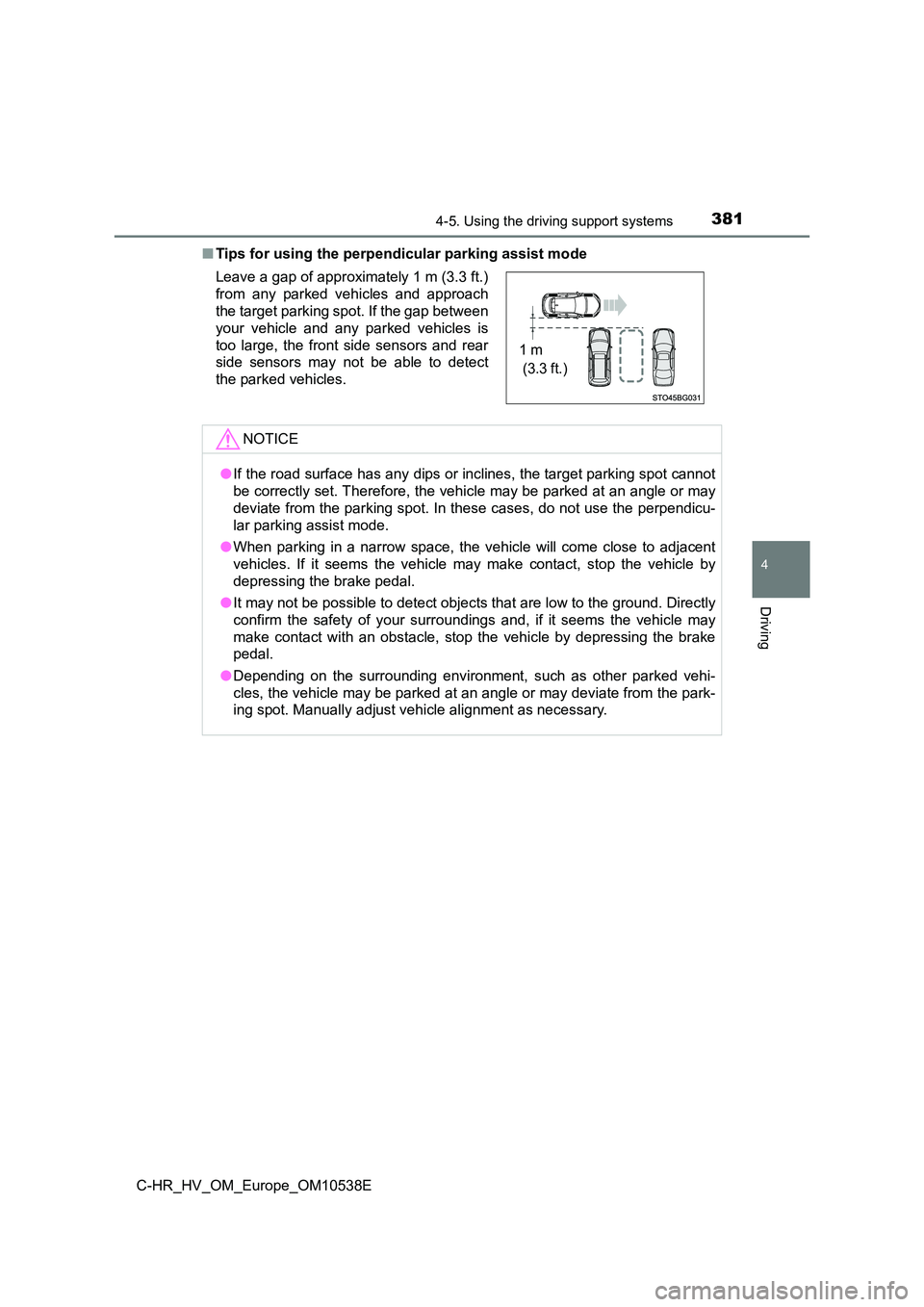
■ Tips for using the perpendicular parking assist mode
Leave a gap of approximately 1 m (3.3 ft.)
from any parked vehicles and approach
the target parking spot. If the gap between
your vehicle and any parked vehicles is
too large, the front side sensors and rear
side sensors may not be able to detect
the parked vehicles.
NOTICE
● If the road surface has any dips or inclines, the target parking spot cannot
be correctly set. Therefore, the vehicle may be parked at an angle or may
deviate from the parking spot. In these cases, do not use the perpendicu-
lar parking assist mode.
● When parking in a narrow space, the vehicle will come close to adjacent
vehicles. If it seems the vehicle may make contact, stop the vehicle by
depressing the brake pedal.
● It may not be possible to detect objects that are low to the ground. Directly
confirm the safety of your surroundings and, if it seems the vehicle may
make contact with an obstacle, stop the vehicle by depressing the brake
pedal.
● Depending on the surrounding environment, such as other parked vehi-
cles, the vehicle may be parked at an angle or may deviate from the park-
ing spot. Manually adjust vehi cle alignment as necessary.
1 m
(3.3 ft.)
Page 386 of 712
3864-5. Using the driving support systems
C-HR_HV_OM_Europe_OM10538E
■Exit parallel parking assist mode
● During assist control, if the driver determines that they are at a position
where take-off is possible and operates the steering wheel, assist control is
stopped at that position.
● Assist control cannot be used if there are no parked vehicles ahead, or if the
gap between the front of your vehicle and the vehicle parked ahead is too
large.
● When using the exit parallel parking assist mode, the assist mode may be
not be able to operate depending on the surrounding environment.
NOTICE
● The detection range of the sensors (P. 356) is limited. Directly confirm
the safety of your surroundings, and if there is a possibility of a contact
accident, stop the vehicle by depressing the brake pedal.
● It may not be possible to detect objects that are low to the ground. Directly
confirm the safety of your surroundings and, if it seems the vehicle may
make contact with an obstacle, stop the vehicle by depressing the brake
pedal.
● When departing for a position from which you can take off, directly confirm
the safety of your surroundings.
Page 397 of 712
3974-5. Using the driving support systems
4
Driving
C-HR_HV_OM_Europe_OM10538E
WARNING
●Do not rely solely upon the Simple Intelligent Parking Assist System. As
with unequipped vehicles, move forward and back up carefully while
directly confirming the safety of your surroundings and the area to the rear
of the vehicle.
● The sensor detection areas and reaction times are limited. When moving
forward or reversing, check the areas surrounding the vehicle (especially
the sides of the vehicle) for safety, and drive slowly, using the brake to
control the vehicle’s speed.
● Drive slowly while adjusting your speed by depressing the brake pedal
when backing up or moving forward.
● If it seems the vehicle may make contact with a pedestrian, another vehi-
cle or any other obstacles, stop the vehicle by depressing the brake pedal,
and then press the S-IPA switch to turn off the system.
● Use the system in a parking lot with a flat surface.
● Observe the following precautions, as the steering wheel automatically
turns during use.
• There is risk of a necktie, scarf, your arm, etc., being caught up in the
steering wheel. Please do not allow your upper body to be close to the
steering wheel. Also, do not allow children close to the steering wheel.
• There is a possibility of injury when the steering wheel turns if you have
long fingernails.
• In case of an emergency, stop the vehicle by depressing the brake
pedal, and then press the S-IPA switch to turn off the system.
● Always confirm that there is appropriate space before attempting to park
the vehicle and operate the system.
Page 400 of 712
4004-5. Using the driving support systems
C-HR_HV_OM_Europe_OM10538E
WARNING
●In the following situations, the sensors may not operate normally and may
lead to an accident. Drive carefully.
• Obstacles cannot be detected in the side areas until a scan of the side
areas is completed. ( P. 358)
• Even after the scan of the side areas is completed, obstacles such as
other vehicles, people or animals that approach from the sides cannot
be detected.
• The sensor is frozen (if it thaws, the system returns to normal).
A warning message may display at particularly low temperatures due to
the sensor freezing and it may not detect parked vehicles.
• The sensor is blocked by someone’s hand.
• The vehicle is tilted a large amount.
• The temperature is extremely hot or cold.
• The vehicle is driven on undulating roads, slopes, gravel roads, in areas
with tall grass, etc.
• An ultrasonic wave source is nearby, such as the horn or sensors of
another vehicle, a motorcycle engine or the air brake of a large vehicle.
• Heavy rain or a water strikes the vehicle.
• Do not install any accessories within the sensor detection range.
Page 598 of 712
5988-2. Steps to take in an emergency
C-HR_HV_OM_Europe_OM10538E
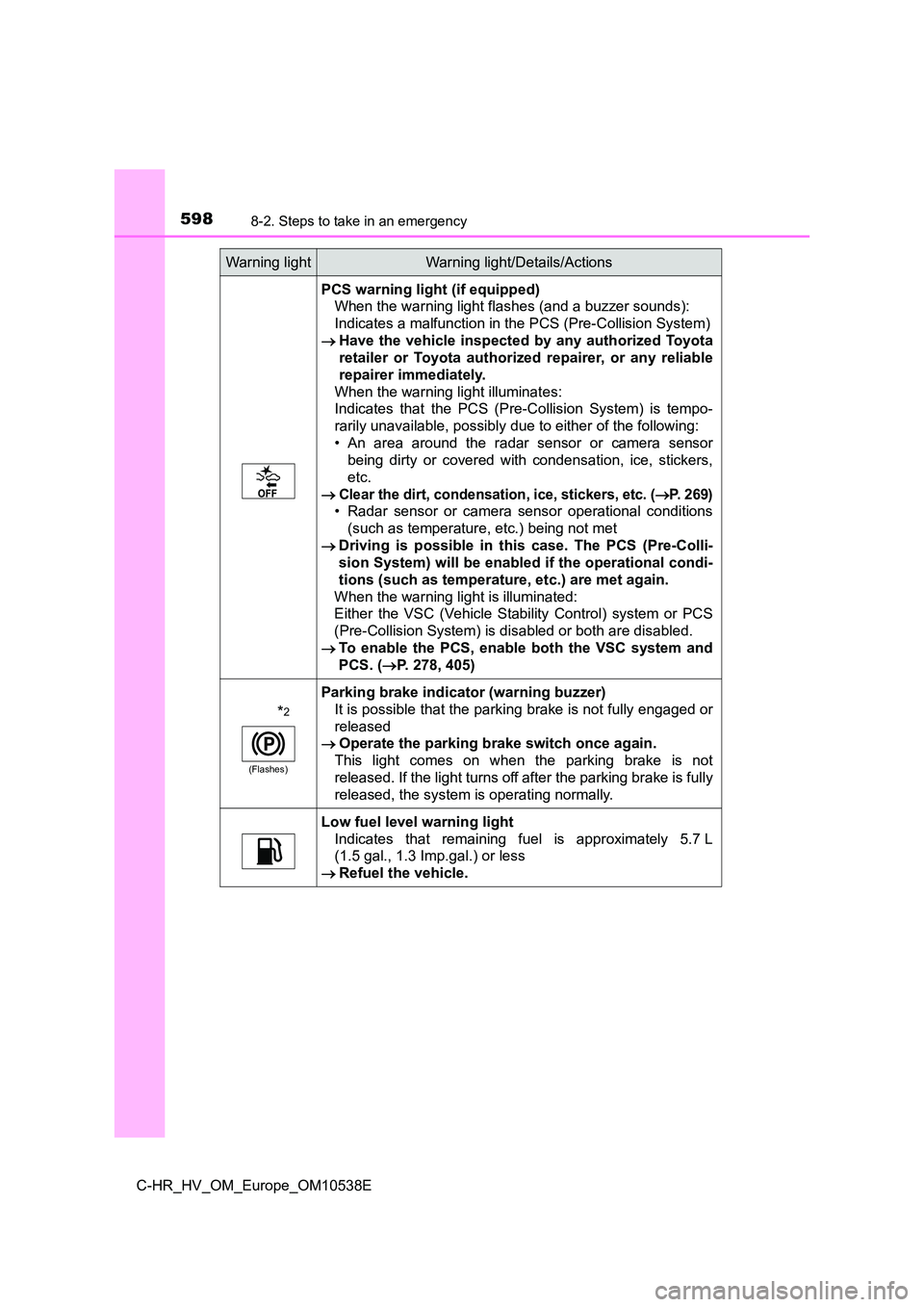
PCS warning light (if equipped)
When the warning light flashes (and a buzzer sounds):
Indicates a malfunction in the PCS (Pre-Collision System)
Have the vehicle inspected by any authorized Toyota
retailer or Toyota authorized repairer, or any reliable
repairer immediately.
When the warning light illuminates:
Indicates that the PCS (Pre-Collision System) is tempo-
rarily unavailable, possibly due to either of the following:
• An area around the radar sensor or camera sensor
being dirty or covered with condensation, ice, stickers,
etc.
Clear the dirt, condensation, ice, stickers, etc. (P. 269)
• Radar sensor or camera sensor operational conditions
(such as temperature, etc.) being not met
Driving is possible in this case. The PCS (Pre-Colli-
sion System) will be enabled if the operational condi-
tions (such as temperature, etc.) are met again.
When the warning light is illuminated:
Either the VSC (Vehicle Stability Control) system or PCS
(Pre-Collision System) is disabled or both are disabled.
To enable the PCS, enable both the VSC system and
PCS. ( P. 278, 405)
*2
(Flashes)
Parking brake indicator (warning buzzer)
It is possible that the parking brake is not fully engaged or
released
Operate the parking brake switch once again.
This light comes on when the parking brake is not
released. If the light turns off after the parking brake is fully
released, the system is operating normally.
Low fuel level warning light
Indicates that remaining fuel is approximately 5.7 L
(1.5 gal., 1.3 Imp.gal.) or less
Refuel the vehicle.
Warning lightWarning light/Details/Actions
Page 644 of 712
6448-2. Steps to take in an emergency
C-HR_HV_OM_Europe_OM10538E
WARNING
■When using the compact spare tire (if equipped)
● Remember that the spare tire provided is specifically designed for use with
your vehicle. Do not use your spare tire on another vehicle.
● Do not use more than one compact spare tire simultaneously.
● Replace the spare tire with a standard tire as soon as possible.
● Avoid sudden acceleration, abrupt steering, sudden braking and shifting
operations that cause sudden engine braking.
■ When the compact spare tire is attached (if equipped)
The vehicle speed may not be correctly detected, and the following systems
may not operate correctly:
*: If equipped
■ Speed limit when using the compact spare tire (if equipped)
Do not drive at speeds in excess of 80 km/h (50 mph) when a compact
spare tire is installed on the vehicle.
The compact spare tire is not designed for driving at high speeds. Failure to
observe this precaution may lead to an accident causing death or serious
injury.
■ After using the tools and jack
Before driving, make sure all the tools and jack are securely in place in their
storage location to reduce the possibility of personal injury during a collision
or sudden braking.
• ABS & Brake assist
• VSC
•TRC
• EPS
• Automatic High Beam*
• PCS (Pre-Collision System)*
• LDA (Lane Departure Alert with
steering control)*
• Dynamic radar cruise control with
full-speed range*
• Cruise control*
• BSM (Blind Spot Monitor)*
• Toyota parking assist-sensor*
• S-IPA (Simple Intelligent Parking
Assist System)*
• Rear view monitor system*
• Navigation system*
Page 694 of 712
694What to do if... (Troubleshooting)
C-HR_HV_OM_Europe_OM10538E
●The seat belt reminder light is flashing
Are the driver and the front passenger wearing the seat belts? ( P. 599)
●The parking brake indicator is on
Is the parking brake released? ( P. 236)
Depending on the situation, other types of warning buzzer may also sound.
( P. 595, 606)
●Did anyone inside the vehicle open a door during setting the alarm?
The sensor detects it and the alarm sounds. ( P. 106)
To stop the alarm, turn the power switch to ON mode or start the hybrid sys-
tem.
●Is the electronic key left inside the vehicle?
Check the message on the multi-information display. ( P. 606)
●When a warning light turns on or a warning message is displayed, refer to
P. 595, 606.
A warning buzzer sounds during driving
An alarm is activated and the horn sounds
(vehicles with alarm)
A warning buzzer sounds when leaving the vehicle
A warning light turns on or a warning message is displayed
Page 705 of 712
705Alphabetical index
C-HR_HV_OM_Europe_OM10538E
Navigation system*
Odometer .................................. 125
Oil
Engine oil .............................. 670
Opener
Back door .............................. 158
Fuel filler door ....................... 264
Hood ..................................... 526
Outside rear view mirrors ....... 190
Adjustment ............................ 190
Blind Spot Monitor................. 335
Folding .................................. 191
Outside rear view mirror
defoggers............................ 482
Outside temperature
display .................................... 125
Overheating .............................. 657
Overheating, Engine ................ 657
Parking assist sensors
S-IPA (Simple Intelligent
Parking Assist System)....... 363
Toyota parking
assist-sensor ...................... 351
Parking brake ........................... 236
Parking brake engaged
warning buzzer ................... 239
Warning light ................. 597, 598
PCS (Pre-Crash Safety)
Enabling/disabling the
system ................................ 278
Function ................................ 274
Warning light ......................... 598
Personal lights ......................... 491
Wattage ................................ 676
Power control unit coolant
Capacity ................................ 672
Checking ............................... 533
Preparing and checking
before winter....................... 412
Radiator ................................ 535
Power outlets ........................... 507
Power steering (Electric
Power Steering system) ....... 403
Warning light ......................... 596
Power switch............................ 221
Auto power off function ......... 223
Changing the power
switch modes...................... 222
If your vehicle has to be
stopped in an emergency ... 587
Starting the hybrid
system ................................ 221
Power windows
Catch protection function ...... 194
Door lock linked window
operation ............................ 196
Jam protection function......... 194
Operation .............................. 193
Window lock switch............... 193
Pre-Crash Safety (PCS)
Enabling/disabling the
system ................................ 278
Function ................................ 274
Warning light ......................... 598
N
O
P
*: For vehicles with navigation system or multimedia system,
refer to the “Navigation and multimedia system Owner’s manual”.
Page 707 of 712
707Alphabetical index
C-HR_HV_OM_Europe_OM10538E
Sensor
Automatic headlight
system ................................ 247
Camera sensor ..................... 269
Inside rear view mirror .......... 189
Intrusion sensor .................... 110
LDA (Lane Departure Alert
with steering control) .......... 289
Radar sensor ........................ 269
Rain-sensing windshield
wipers ................................. 257
Toyota parking assist
sensors ....................... 351, 395
Service reminder
indicators ............................... 116
Shift lever ................................. 231
If the shift lever cannot be
shifted from P ..................... 233
Hybrid transmission .............. 231
Shift lock system ..................... 232
Side airbags ............................... 43
Side doors ................................ 149
Side mirrors.............................. 190
Adjustment ............................ 190
Blind Spot Monitor................. 335
Folding .................................. 191
Heaters ................................. 482
Side turn signal lights
Replacing light bulbs ............. 579
Turn signal lever ................... 235
Wattage................................. 676
S-IPA ......................................... 363
Smart entry & start system ..... 163
Antenna location ................... 163
Entry functions ...................... 149
Starting the hybrid system .... 221
Snow tires................................. 412
Spare tire
Inflation pressure .................. 674
Storage location .................... 633
Spark plug ................................ 672
Specifications .......................... 666
Speech command system*
Speed limiter ............................ 330
Speedometer ............................ 125
Sport mode............................... 328
SRS airbags ............................... 43
Steering lock ............................ 224
Column lock release ............. 224
Steering wheel
Adjustment ............................ 186
Audio switches ...................... 419
Meter control switches .......... 130
Telephone switches .............. 455
TRIP switch........................... 126
Stop/tail lights .......................... 582
Storage feature ........................ 493
Storage precautions ................ 493
Stuck
If the vehicle becomes
stuck ................................... 662
Sun visors ................................ 505
Switch
Airbag manual on-off switch ... 57
Audio remote control
switches.............................. 419
Automatic High Beam
switch ................................. 250
Brake hold switch.................. 241
Cruise control
switch ......................... 307, 322
Door lock switches ................ 152
Driving mode select switch ... 328
Emergency flashers switch ... 586
Engine switch........................ 221
EV drive mode switch ........... 228
*: For vehicles with navigation system or multimedia system,
refer to the “Navigation and multimedia system Owner’s manual”.