stop start TOYOTA C_HR HYBRID 2016 User Guide
[x] Cancel search | Manufacturer: TOYOTA, Model Year: 2016, Model line: C_HR HYBRID, Model: TOYOTA C_HR HYBRID 2016Pages: 712, PDF Size: 49.31 MB
Page 107 of 712
1071-4. Theft deterrent system
1
For safety and security
C-HR_HV_OM_Europe_OM10538E
Do one of the following to deactivate or stop the alarm.
● Unlock the doors using the entry function (if equipped) or wireless
remote control.
● Start the hybrid system. (The alarm will be deactivated or stopped
after a few seconds.)
■ System maintenance
The vehicle has a maintenance-free type alarm system.
■ Items to check before locking the vehicle
To prevent unexpected triggering of the alarm and vehicle theft, make sure of
the following.
● Nobody is in the vehicle.
● The side windows are closed before the alarm is set.
● No valuables or other personal items are left in the vehicle.
Deactivating or stopping the alarm
Page 127 of 712
1272. Instrument cluster
2
Instrument cluster
C-HR_HV_OM_Europe_OM10538E
■The meters and display illuminate when
The power switch is turned to ON mode.
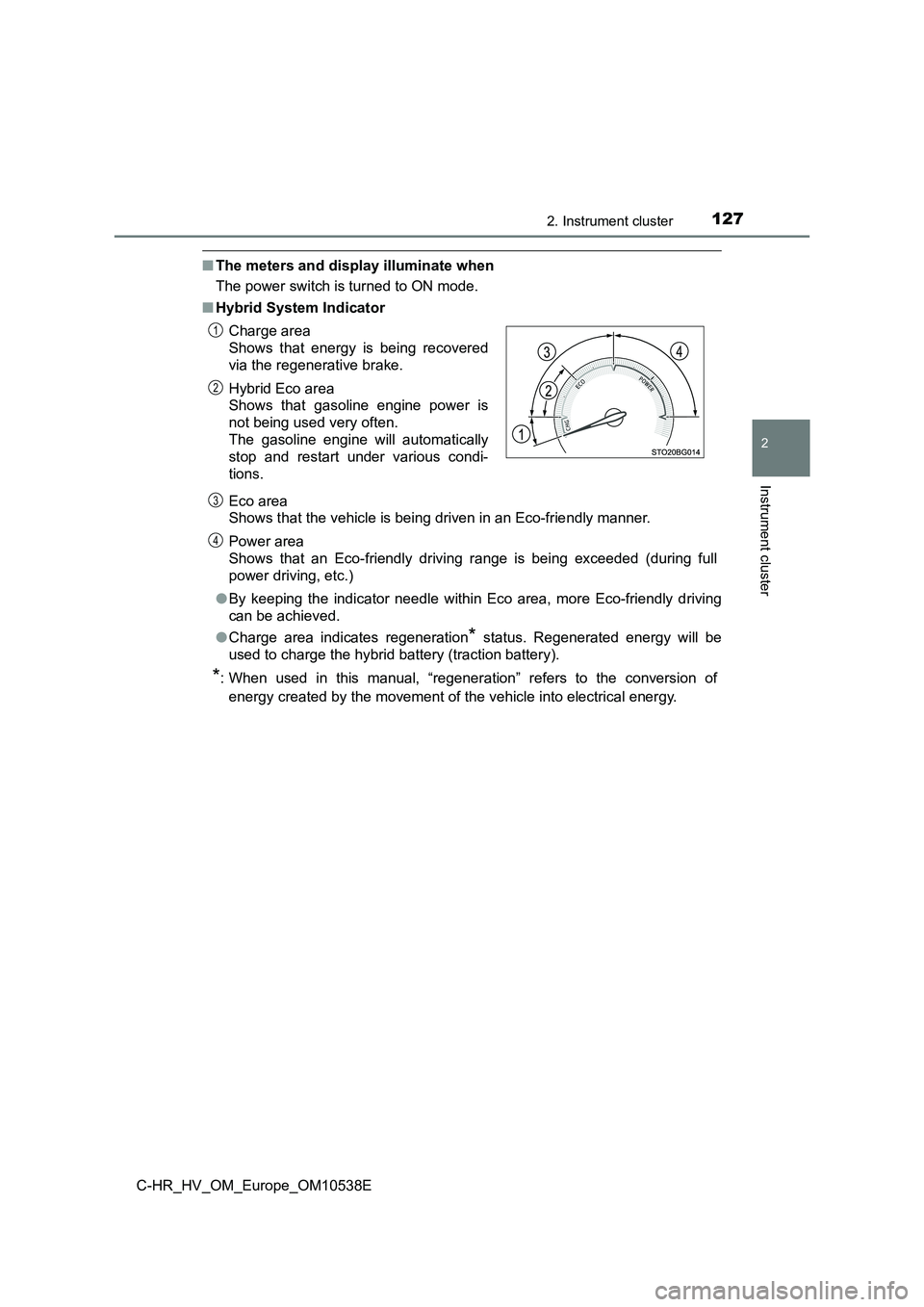
■ Hybrid System Indicator
Eco area
Shows that the vehicle is being driven in an Eco-friendly manner.
Power area
Shows that an Eco-friendly driving range is being exceeded (during full
power driving, etc.)
● By keeping the indicator needle within Eco area, more Eco-friendly driving
can be achieved.
● Charge area indicates regeneration* status. Regenerated energy will be
used to charge the hybrid battery (traction battery).
*: When used in this manual, “regeneration” refers to the conversion of
energy created by the movement of the vehicle into electrical energy.
Charge area
Shows that energy is being recovered
via the regenerative brake.
Hybrid Eco area
Shows that gasoline engine power is
not being used very often.
The gasoline engine will automatically
stop and restart under various condi-
tions.
1
2
3
4
Page 146 of 712
1463-1. Key information
C-HR_HV_OM_Europe_OM10538E
■ Electronic key battery depletion
● The standard battery life is 1 to 2 years.
● If the battery becomes low, an alarm will sound in the cabin and a message
will be displayed on the multi-information display when the hybrid system
stops.
● As the electronic key always receives radio waves, the battery will become
depleted even if the electronic key is not used. The following symptoms indi-
cate that the electronic key battery may be depleted. Replace the battery
when necessary. ( P. 561)
• The smart entry & start system or the wireless remote control does not
operate.
• The detection area becomes smaller.
• The LED indicator on the key surface does not turn on.
The battery can be exchanged by the users. ( P. 561) However, as there
may be damage to the key when exchanging, it is recommended to have
the battery exchanged at any authorized Toyota retailer or Toyota autho-
rized repairer, or any reliable repairer.
● To avoid serious deterioration, do not leave the electronic key within 1 m
(3 ft.) of the following electrical appliances that produce a magnetic field:
•TVs
• Personal computers
• Cellular phones, cordless phones and battery chargers
• Recharging cellular phones or cordless phones
• Table lamps
• Induction cookers
Page 151 of 712
1513-2. Opening, closing and locking the doors
3
Operation of each component
C-HR_HV_OM_Europe_OM10538E
■ Security feature
If a door is not opened within approximately 30 seconds after the vehicle is
unlocked, the security feature automatically locks the vehicle again.
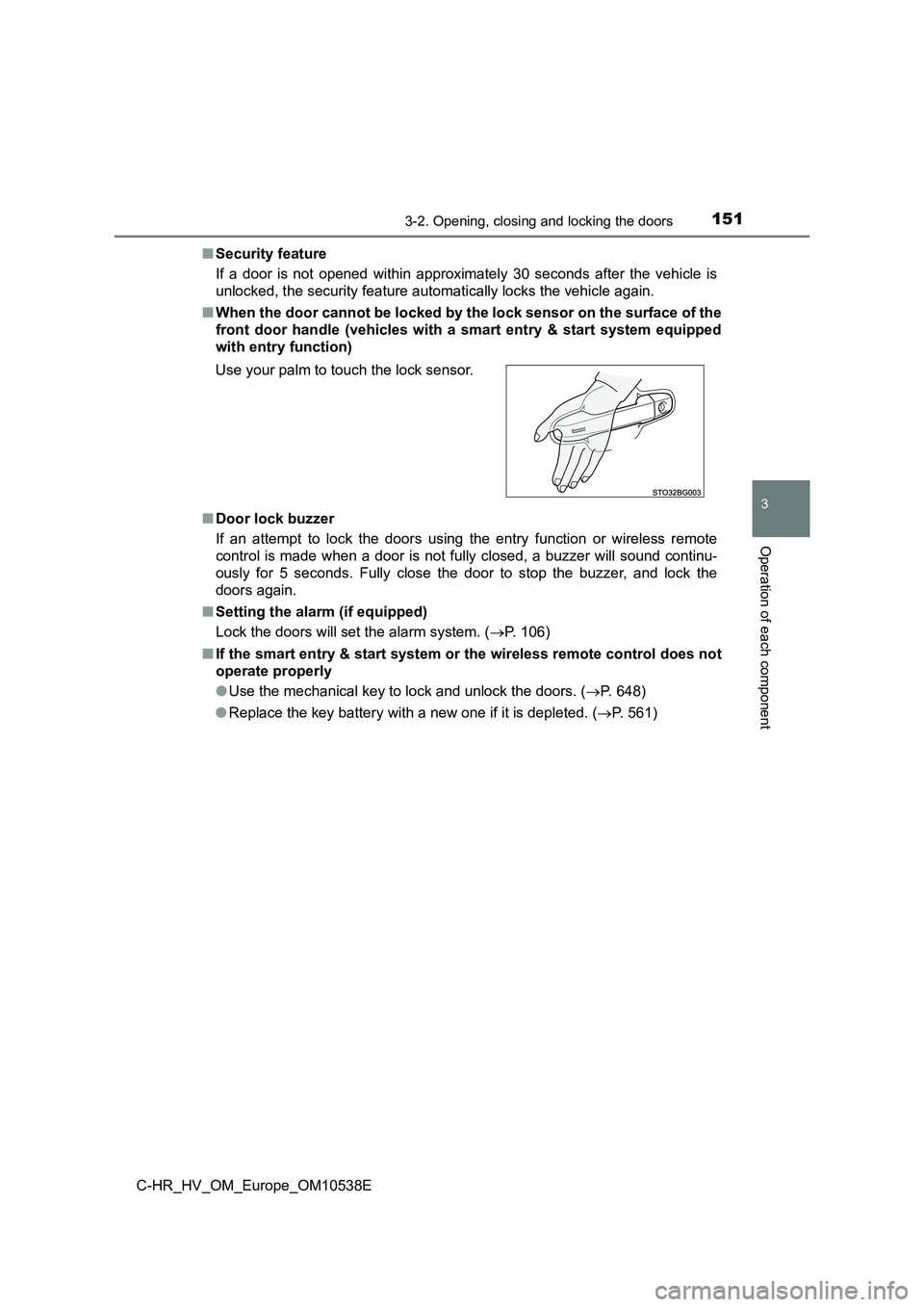
■ When the door cannot be locked by the lock sensor on the surface of the
front door handle (vehicles with a smart entry & start system equipped
with entry function)
■ Door lock buzzer
If an attempt to lock the doors using the entry function or wireless remote
control is made when a door is not fully closed, a buzzer will sound continu-
ously for 5 seconds. Fully close the door to stop the buzzer, and lock the
doors again.
■ Setting the alarm (if equipped)
Lock the doors will set the alarm system. ( P. 106)
■ If the smart entry & start system or the wireless remote control does not
operate properly
● Use the mechanical key to lock and unlock the doors. (P. 648)
● Replace the key battery with a new one if it is depleted. (P. 561)
Use your palm to touch the lock sensor.
Page 154 of 712
1543-2. Opening, closing and locking the doors
C-HR_HV_OM_Europe_OM10538E
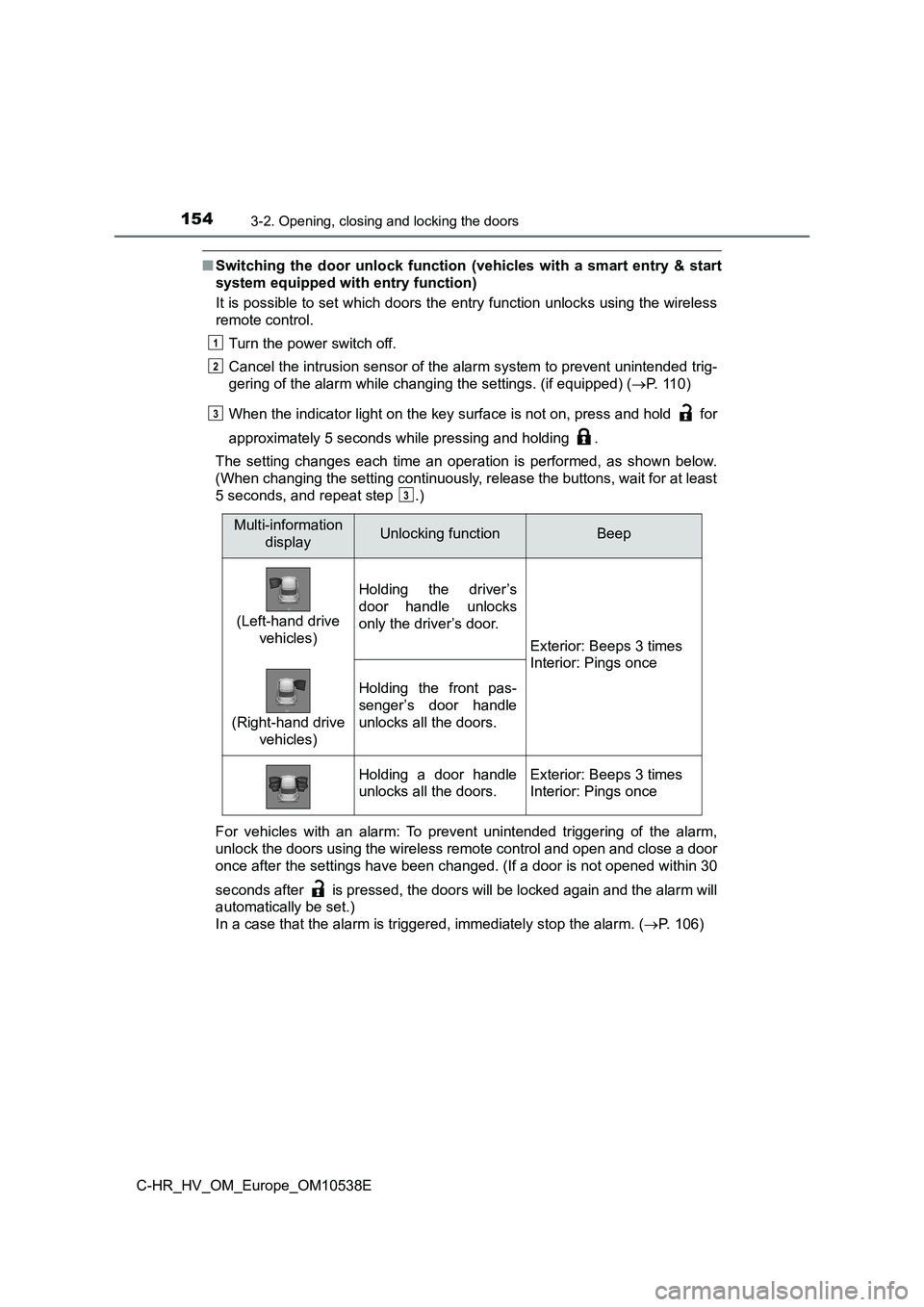
■Switching the door unlock function (vehicles with a smart entry & start
system equipped with entry function)
It is possible to set which doors the entry function unlocks using the wireless
remote control.
Turn the power switch off.
Cancel the intrusion sensor of the alarm system to prevent unintended trig-
gering of the alarm while changing the settings. (if equipped) ( P. 1 1 0 )
When the indicator light on the key surface is not on, press and hold for
approximately 5 seconds while pressing and holding .
The setting changes each time an operation is performed, as shown below.
(When changing the setting continuously, release the buttons, wait for at least
5 seconds, and repeat step .)
For vehicles with an alarm: To prevent unintended triggering of the alarm,
unlock the doors using the wireless remote control and open and close a door
once after the settings have been changed. (If a door is not opened within 30
seconds after is pressed, the doors will be locked again and the alarm will
automatically be set.)
In a case that the alarm is triggered, immediately stop the alarm. ( P. 106)
1
2
3
3
Multi-information
displayUnlocking functionBeep
(Left-hand drive
vehicles)
Holding the driver’s
door handle unlocks
only the driver’s door.
Exterior: Beeps 3 times
Interior: Pings once
(Right-hand drive
vehicles)
Holding the front pas-
senger’s door handle
unlocks all the doors.
Holding a door handle
unlocks all the doors.
Exterior: Beeps 3 times
Interior: Pings once
Page 165 of 712
1653-2. Opening, closing and locking the doors
3
Operation of each component
C-HR_HV_OM_Europe_OM10538E
■ When “Entry & Start System Malfunction. See Owner’s Manual.” is dis-
played on the multi-information display
The system may be malfunctioning. Have the vehicle inspected by any autho-
rized Toyota retailer or Toyota authorized repairer, or any reliable repairer
immediately.
■ Battery-saving function
The battery-saving function will be activated in order to prevent the electronic
key battery and the 12-volt battery from being discharged while the vehicle is
not operated for a long time.
● In the following situations, the smart entry & start system may take some
time to unlock the doors.
• The electronic key has been left within approximately 2 m (6 ft.) of the
outside of the vehicle for 10 minutes or longer.
• The smart entry & start system has not been used for 5 days or longer.
● If the smart entry & start system has not been used for 14 days or longer,
the doors cannot be unlocked at any doors except the driver’s door. In this
case, hold the driver’s door handle, or use the wireless remote control or
mechanical key to unlock the doors.
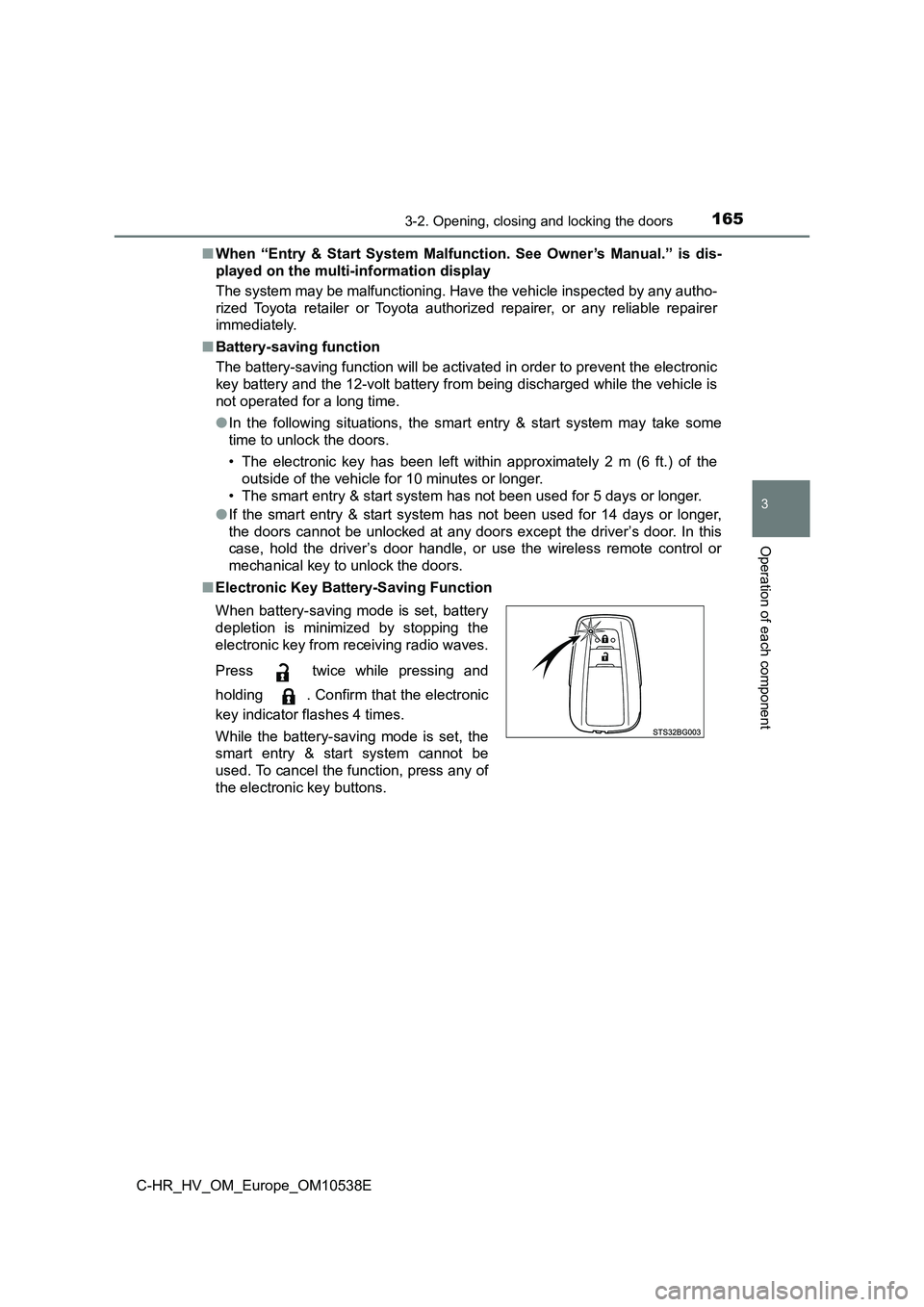
■ Electronic Key Battery-Saving Function
When battery-saving mode is set, battery
depletion is minimized by stopping the
electronic key from receiving radio waves.
Press twice while pressing and
holding . Confirm that the electronic
key indicator flashes 4 times.
While the battery-saving mode is set, the
smart entry & start system cannot be
used. To cancel the function, press any of
the electronic key buttons.
Page 169 of 712
1693-2. Opening, closing and locking the doors
3
Operation of each component
C-HR_HV_OM_Europe_OM10538E
■ If the smart entry & start system does not operate properly
● Locking and unlocking the doors: Use the mechanical key. (P. 648)
● Starting the hybrid system: P. 649
■ Customization
Settings (e.g. smart entry & start system) can be changed.
(Customizable features: P. 679)
■ If the smart entry & start system has been deactivated in a customized
setting
● Locking and unlocking the doors:
Use the wireless remote control or mechanical key. ( P. 150, 648)
● Starting the hybrid system and changing power switch modes: P. 649
● Stopping the hybrid system: P. 222
Page 195 of 712
1953-5. Opening and closing the windows
3
Operation of each component
C-HR_HV_OM_Europe_OM10538E
■ When the side window cannot be opened or closed
When the jam protection function or catch protection function operates
unusually and the side window cannot be opened or closed, perform the fol-
lowing operations with the power window switch of that door.
● Stop the vehicle. With the power switch in ON mode, within 4 seconds of the
jam protection function or catch protection function activating, continuously
operate the power window switch in the one-touch closing direction or one-
touch opening direction so that the side window can be opened and closed.
● If the side window cannot be opened and closed even when performing the
above operations, perform the following procedure for function initialization.
Turn the power switch to ON mode.
Pull and hold the power window switch in the one-touch closing direction
and completely close the side window.
Release the power window switch for a moment, resume pulling the
switch in the one-touch closing direction, and hold it there for approxi-
mately 6 seconds or more.
Press and hold the power window switch in the one-touch opening direc-
tion. After the side window is completely opened, continue holding the
switch for an additional 1 second or more.
Release the power window switch for a moment, resume pushing the
switch in the one-touch opening direction, and hold it there for approxi-
mately 4 seconds or more.
Pull and hold the power window switch in the one-touch closing direction
again. After the side window is completely closed, continue holding the
switch for a further 1 second or more.
If you release the switch while the window is moving, start again from the
beginning. If the window reverses and cannot be fully closed or opened,
have the vehicle inspected by any authorized Toyota retailer or Toyota
authorized repairer, or any reliable repairer.
1
2
3
4
5
6
Page 200 of 712
2004-1. Before driving
C-HR_HV_OM_Europe_OM10538E
Driving the vehicle
P. 2 2 1
With the brake pedal depressed, shift the shift lever to D. ( P. 231)
Release the parking brake. ( P. 236)
If the parking brake is in automatic mode, the parking brake is released
automatically when shifting the shift lever to any position other than P.
( P. 236)
Gradually release the brake pedal and gently depress the accelera-
tor pedal to accelerate the vehicle.
With the shift lever in D, depress the brake pedal.
If necessary, set the parking brake.
If the vehicle is to be stopped for an extended period of time, shift the shift
lever to P or N. ( P. 231)
The following procedures should be observed to ensure safe
driving:
Starting the hybrid system
Driving
Stopping
1
2
3
1
2
Page 201 of 712
2014-1. Before driving
4
Driving
C-HR_HV_OM_Europe_OM10538E
With the shift lever in D. depress the brake pedal.
Set the parking brake ( P. 236), and shift the shift lever to P
( P. 231).
If the parking brake is in automatic mode, the parking brake is set automat-
ically when shifting the shift lever to P. ( P. 236)
If parking on a hill, block the wheels as needed.
Press the power switch to stop the hybrid system.
Lock the door, making sure that you have the electronic key on your
person.
With the brake pedal depressed, shift the shift lever to D.
Pull the parking brake switch and parking brake is set manually.
(P. 237)
Release the brake pedal and gently depress the accelerator pedal
to accelerate the vehicle.
Press the parking brake switch and parking brake is released man-
ually. (P. 237)
Parking the vehicle
Starting off on a steep uphill
1
2
3
4
1
2
3
4