clock TOYOTA C_HR HYBRID 2017 Owners Manual
[x] Cancel search | Manufacturer: TOYOTA, Model Year: 2017, Model line: C_HR HYBRID, Model: TOYOTA C_HR HYBRID 2017Pages: 712, PDF Size: 49.31 MB
Page 5 of 712
5
1
6
5
4
3
2
C-HR_HV_OM_Europe_OM10538E
9
8
7
5-6. Using Bluetooth® devices
Bluetooth® audio/phone .....449
Using the steering
wheel switches ................455
Registering a Bluetooth®
device ..............................456
5-7. “SETUP” menu
Using the “SETUP” menu
(“Bluetooth*” menu) .........457
Using the “SETUP” menu
(“PHONE” menu) .............461
5-8. Bluetooth® Audio
Operating a Bluetooth®
enabled portable
player ...............................465
5-9. Bluetooth® Phone
Making a phone call ...........467
Receiving a phone call.......469
Speaking on the phone ......470
5-10. Bluetooth®
Bluetooth®.........................472
6-1. Using the air conditioning
system and defogger
Air conditioning system ..... 478
Heated steering
wheel/seat heaters .......... 488
6-2. Using the interior lights
Interior lights list ................ 490
• Interior lights ................. 491
• Personal lights .............. 491
6-3. Using the storage features
List of storage features...... 493
• Glove box ...................... 494
• Console box .................. 494
• Bottle holders ................ 495
• Cup holders .................. 496
Luggage compartment
features ........................... 497
6-4. Using the other interior
features
Other interior features ....... 505
• Sun visors ..................... 505
• Vanity mirrors ................ 505
• Clock ............................. 506
• Power outlet .................. 507
• Assist grips ................... 509
*: Bluetooth is a registered trademark of Bluetooth SIG, Inc.
6Interior features
Page 218 of 712
2184-1. Before driving
C-HR_HV_OM_Europe_OM10538E
Your vehicle will handle differently when towing a trailer. In order to
avoid accident, death or serious injury, keep the following in mind
when towing:
■Checking connections between trailer and lights
Stop the vehicle and check the operation of the connection between
the trailer and lights after driving for a brief period as well as before
starting off.
■Practicing driving with a coupled trailer
● Get the feel for turning, stopping and reversing with the trailer
coupled by practicing in an area with no or light traffic.
● When reversing with a coupled trailer, hold the section of the
steering wheel nearest to you and rotate clockwise to turn the
trailer left or counterclockwise to turn it right. Always rotate a little
at a time to prevent steering error. Have someone guide you
when reversing to lessen the risk of an accident.
■Increasing vehicle-to-vehicle distance
At a speed of 10 km/h (6 mph), the distance to the vehicle running
ahead of you should be equivalent to or greater than the combined
length of your vehicle and trailer. Avoid sudden braking that may
cause skidding. Otherwise, the vehicle may spin out of control. This
is especially true when driving on wet or slippery road surfaces.
■Sudden acceleration/steering input/cornering
Executing sharp turns when towing may result in the trailer colliding
with your vehicle. Decelerate well in advance when approaching
turns and take them slowly and carefully to avoid sudden braking.
■Important points regarding turning
The wheels of the trailer will travel closer to the inside of the curve
than the wheels of the vehicle. To make allowance for this, take the
turns wider than you would normally do.
Guidance
Page 435 of 712
4355-5. Using an external device
5
Audio system
C-HR_HV_OM_Europe_OM10538E
Press (“MENU”) to select iPod menu mode.
Turning the tune/scroll knob clockwise changes the play mode in
the following order:
“Playlists” “Artists” “Albums” “Songs” “Podcasts”
“Genres” “Composers” “Audiobooks”
Press the knob to select the desired play mode.
Selecting a play mode
1
2
3
Page 463 of 712
4635-7. “SETUP” menu
5
Audio system
C-HR_HV_OM_Europe_OM10538E
Select “Delete contacts” using the tune/scroll knob. (P. 453)
Select the desired phone number using the knob and press
(“YES”).
To delete all the registered phone numbers, press (“ALL”) and
then press (“YES”).
Press (“A-Z”) to display the registered names in alphabetical
order of the initial.
Select “Delete other PB” using the tune/scroll knob. ( P. 453)
Select the desired phonebook using the knob and press
(“YES”).
Select “Call volume” using the tune/scroll knob. ( P. 453)
Change the call volume.
To decrease the volume: Turn the knob counterclockwise.
To increase the volume: Turn the knob clockwise.
To set the volume, press (“BACK”).
Deleting a registered phone number
Deleting another cellular phone’s phonebook
Setting call volume
1
2
1
2
1
2
Page 464 of 712
4645-7. “SETUP” menu
C-HR_HV_OM_Europe_OM10538E
Select “Ringtone volume” using the tune/scroll knob. (P. 453)
Change the ring tone volume.
To decrease the volume: Turn the knob counterclockwise.
To increase the volume: Turn the knob clockwise.
To set the volume, press (“BACK”).
Select “Ringtone” using the tune/scroll knob. ( P. 453)
Using the knob, select a ring tone (1 - 3). To set the selected ring
tone, press (“BACK”).
Select “Transfer histories” using the tune/scroll knob ( P. 453) and
press (“YES”).
■ Phone number
Up to 1000 names can be stored.
■ Call history
Up to 10 numbers can be stored in each of the outgoing, incoming and
missed call history memories.
■ Limitation of number of digits
A phone number that exceeds 24 digits cannot be registered.
Setting ring tone volume
Setting ring tone
Transferring call histories
1
2
1
2
Page 469 of 712
469
5
5-9. Bluetooth® Phone
Audio system
C-HR_HV_OM_Europe_OM10538E
Receiving a phone call
Press the off-hook switch.
Press the on-hook switch.
Press the off-hook switch.
Pressing the off-hook switch again returns you to the previous call.
To decrease the volume: Turn the power/volume knob counterclock-
wise.
To increase the volume: Turn the power/volume knob clockwise.
Answering the phone
Refusing the call
Receiving a call when on another call
Adjusting the ring tone volume when receiving a call
Page 470 of 712
4705-9. Bluetooth® Phone
C-HR_HV_OM_Europe_OM10538E
Speaking on the phone
A call can be transferred between the cellular phone and system while
dialing, receiving a call, or during a call. Use one of the following
methods:
a. Operate the cellular phone.
Refer to the manual that comes with the cellular phone for the operation
of the phone.
b. Press the (“PHONE”).*
*: This operation can be performed only when transferring a call from the
cellular phone to the system during a call.
Press (“MUTE”).
Press [0-9] and use the tune/scroll knob to input the desired
digits.
• To send the input digits press (“SEND”).
• When finished, press (“EXIT”) to return to the previous
screen.
To decrease the volume: Turn the power/volume knob counterclock-
wise.
To increase the volume: Turn the power/volume knob clockwise.
Transferring a call
Muting your voice
Inputting digits
Setting call volume
Page 477 of 712
477
6Interior features
C-HR_HV_OM_Europe_OM10538E
6-1. Using the air conditioning
system and defogger
Air conditioning system ...... 478
Heated steering wheel/
seat heaters ..................... 488
6-2. Using the interior lights
Interior lights list ................. 490
• Interior light.................... 491
• Personal lights ............... 491
6-3. Using the storage features
List of storage features ...... 493
• Glove box ...................... 494
• Console box .................. 494
• Bottle holders ................ 495
• Cup holders ................... 496
Luggage compartment
features............................ 497
6-4. Using the other interior
features
Other interior features ........ 505
• Sun visors...................... 505
• Vanity mirrors ................ 505
• Clock ............................. 506
• Power outlet .................. 507
• Assist grips .................... 509
Page 506 of 712
5066-4. Using the other interior features
C-HR_HV_OM_Europe_OM10538E
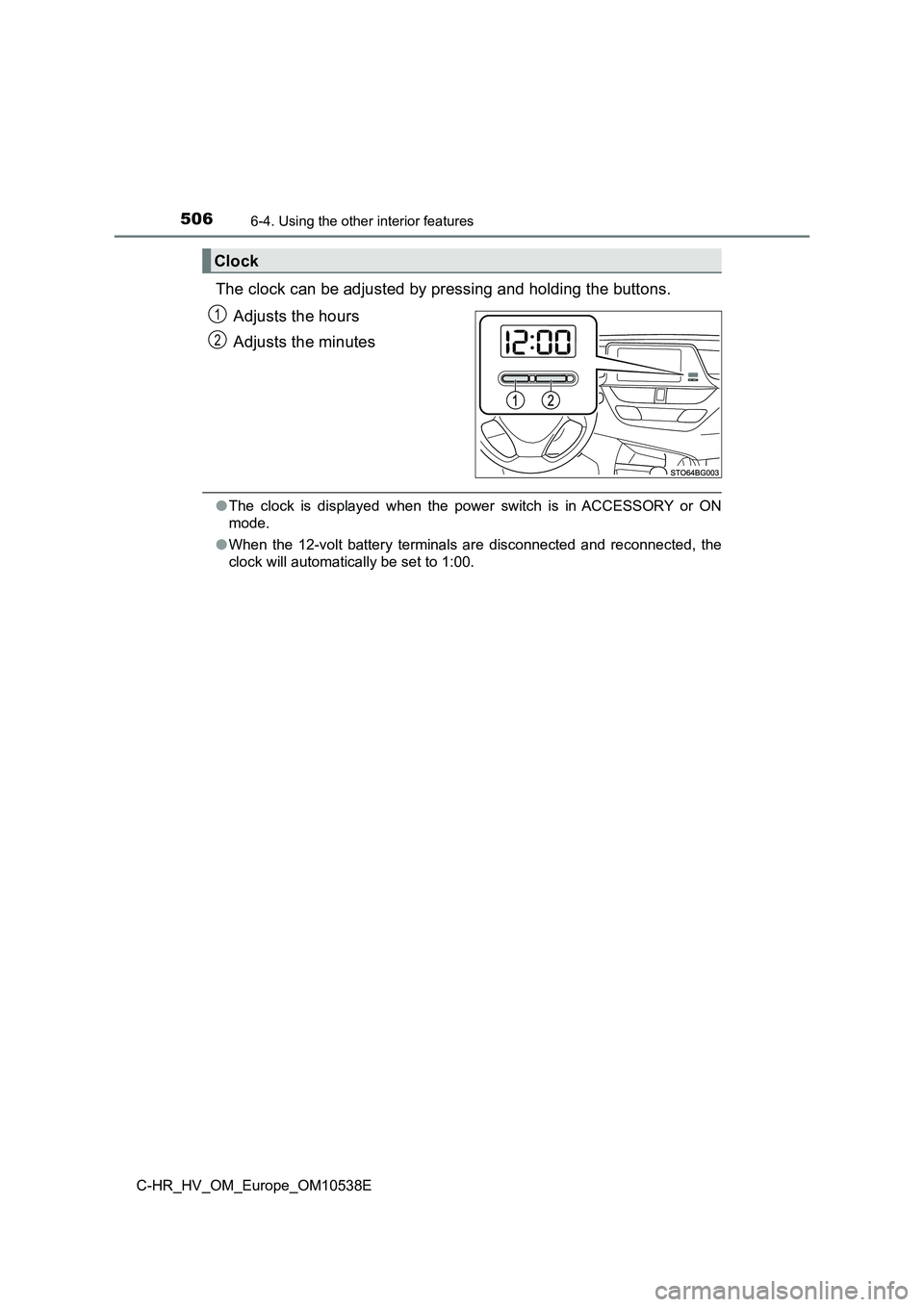
The clock can be adjusted by pressing and holding the buttons.
Adjusts the hours
Adjusts the minutes
● The clock is displayed when the power switch is in ACCESSORY or ON
mode.
● When the 12-volt battery terminals are disconnected and reconnected, the
clock will automatically be set to 1:00.
Clock
1
2
Page 531 of 712
5317-3. Do-it-yourself maintenance
C-HR_HV_OM_Europe_OM10538E
7
Maintenance and care
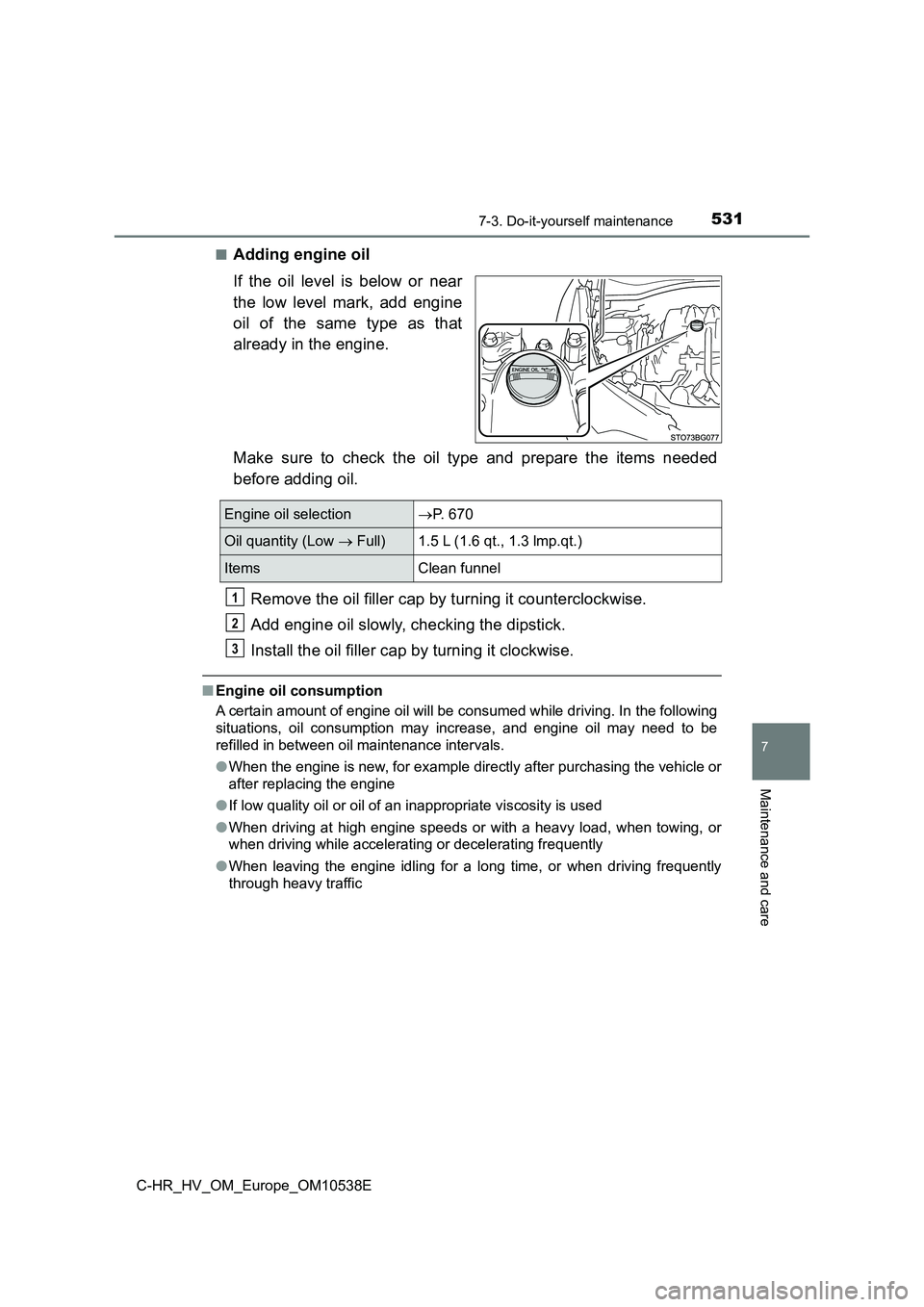
■Adding engine oil
If the oil level is below or near
the low level mark, add engine
oil of the same type as that
already in the engine.
Make sure to check the oil type and prepare the items needed
before adding oil.
Remove the oil filler cap by turning it counterclockwise.
Add engine oil slowly, checking the dipstick.
Install the oil filler cap by turning it clockwise.
■ Engine oil consumption
A certain amount of engine oil will be consumed while driving. In the following
situations, oil consumption may increase, and engine oil may need to be
refilled in between oil maintenance intervals.
● When the engine is new, for example directly after purchasing the vehicle or
after replacing the engine
● If low quality oil or oil of an inappropriate viscosity is used
● When driving at high engine speeds or with a heavy load, when towing, or
when driving while accelerating or decelerating frequently
● When leaving the engine idling for a long time, or when driving frequently
through heavy traffic
Engine oil selection P. 670
Oil quantity (Low Full)1.5 L (1.6 qt., 1.3 lmp.qt.)
ItemsClean funnel
1
2
3