programming TOYOTA CAMRY 2000 Service Repair Manual
[x] Cancel search | Manufacturer: TOYOTA, Model Year: 2000, Model line: CAMRY, Model: TOYOTA CAMRY 2000Pages: 4770, PDF Size: 86.41 MB
Page 4427 of 4770
Toyota Supports ASE CertificationPage 1 of 4
AX005±99Title:
TOYOTA VIP RS3000 PROGRAMMING
Models:
All Models
Technical Service
BULLETIN
April 9, 1999
This bulletin describes the procedures that are used to program the two±button remote
control for vehicles that are equipped with the dealer or port installed option (PIO), not
the factory security system. For factory security system remote control programming,
refer to the appropriate vehicle repair manual.
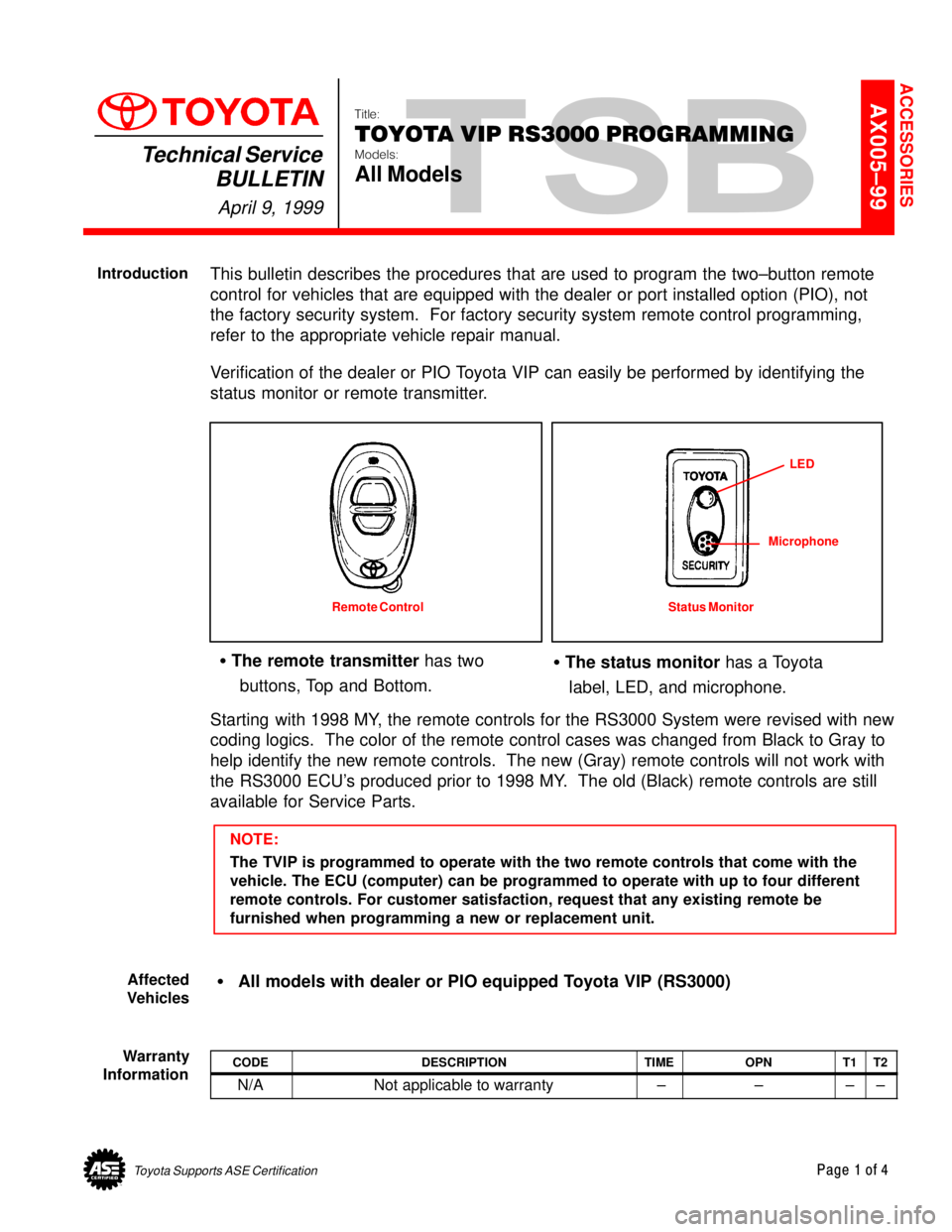
Verification of the dealer or PIO Toyota VIP can easily be performed by identifying the
status monitor or remote transmitter.
The remote transmitter has two
buttons, Top and Bottom. The status monitor has a Toyota
label, LED, and microphone.
Remote Control Status MonitorLED
Microphone
Starting with 1998 MY, the remote controls for the RS3000 System were revised with new
coding logics. The color of the remote control cases was changed from Black to Gray to
help identify the new remote controls. The new (Gray) remote controls will not work with
the RS3000 ECU's produced prior to 1998 MY. The old (Black) remote controls are still
available for Service Parts.
NOTE:
The TVIP is programmed to operate with the two remote controls that come with the
vehicle. The ECU (computer) can be programmed to operate with up to four different
remote controls. For customer satisfaction, request that any existing remote be
furnished when programming a new or replacement unit.
All models with dealer or PIO equipped Toyota VIP (RS3000)
CODEDESCRIPTIONTIMEOPNT1T2
N/ANot applicable to warranty ±±±±
ACCESSORIES
Introduction
Affected
Vehicles
Warranty
Information
Page 4428 of 4770
TOYOTA VIP RS3000 PROGRAMMING ± ALL MODELS ± AX005±99 April 9, 1999
Page 2 of 4
For location of the RS3000 ECU, refer to ECU Mounting Locations, Page 4.
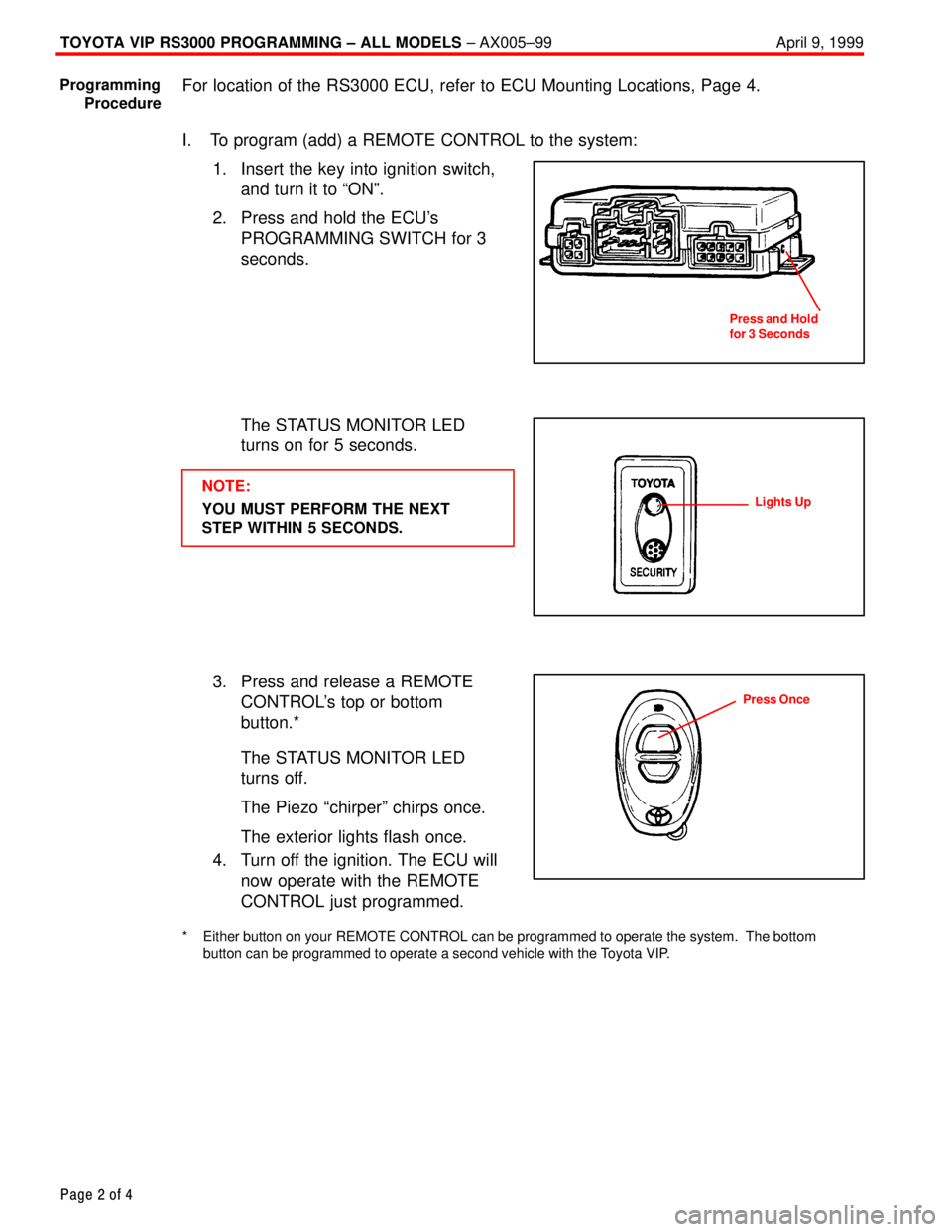
I. To program (add) a REMOTE CONTROL to the system:
1. Insert the key into ignition switch,
and turn it to ªONº.
2. Press and hold the ECU's
PROGRAMMING SWITCH for 3
seconds.
The STATUS MONITOR LED
turns on for 5 seconds.
NOTE:
YOU MUST PERFORM THE NEXT
STEP WITHIN 5 SECONDS.
3. Press and release a REMOTE
CONTROL's top or bottom
button.*
The STATUS MONITOR LED
turns off.
The Piezo ªchirperº chirps once.
The exterior lights flash once.
4. Turn off the ignition. The ECU will
now operate with the REMOTE
CONTROL just programmed.
* Either button on your REMOTE CONTROL can be programmed to operate the system. The bottom
button can be programmed to operate a second vehicle with the Toyota VIP.
Programming
Procedure
Press and Hold
for 3 Seconds
Lights Up
Press Once
Page 4429 of 4770
TOYOTA VIP RS3000 PROGRAMMING ± ALL MODELS ± AX005±99 April 9, 1999
Page 3 of 4
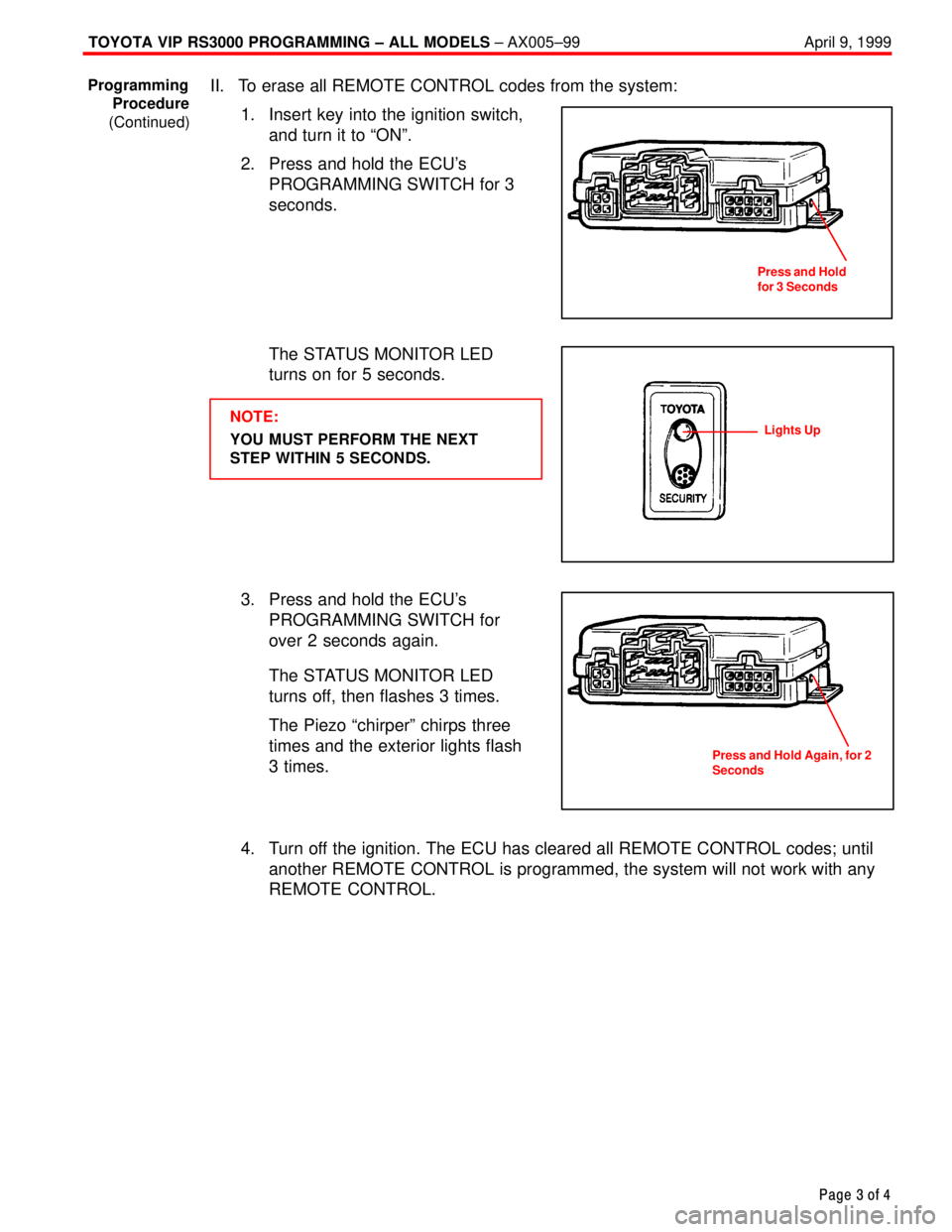
II. To erase all REMOTE CONTROL codes from the system:
1. Insert key into the ignition switch,
and turn it to ªONº.
2. Press and hold the ECU's
PROGRAMMING SWITCH for 3
seconds.
The STATUS MONITOR LED
turns on for 5 seconds.
NOTE:
YOU MUST PERFORM THE NEXT
STEP WITHIN 5 SECONDS.
3. Press and hold the ECU's
PROGRAMMING SWITCH for
over 2 seconds again.
The STATUS MONITOR LED
turns off, then flashes 3 times.
The Piezo ªchirperº chirps three
times and the exterior lights flash
3 times.
4. Turn off the ignition. The ECU has cleared all REMOTE CONTROL codes; until
another REMOTE CONTROL is programmed, the system will not work with any
REMOTE CONTROL.
Programming
Procedure
(Continued)
Press and Hold
for 3 Seconds
Lights Up
Press and Hold Again, for 2
Seconds
Page 4430 of 4770

TOYOTA VIP RS3000 PROGRAMMING ± ALL MODELS ± AX005±99 April 9, 1999
Page 4 of 4
1. '98 Model and prior has ECU located beneath the driver's seat.
2. '97 Model and prior has ECU located beneath the driver's seat.
ECU MOUNTING LOCATIONS
Page 4431 of 4770
Toyota Supports ASE CertificationPage 1 of 2
AX005±00Title:
RS3000 TVIP AUTOMATIC DOOR LOCK
FEATURE PROGRAMMING
Models:
All Models
Technical Service
BULLETIN
April 14, 2000
As a convenience feature, the RS3000 TVIP system is programmed to automatically lock
all of the vehicle's doors (for vehicles equipped with power door locks) when the ignition
key is turned to ªONº or ªSTARTº, and unlock them when the key is turned back to ªACCº
or ªLOCKº. The initial factory setting of this programmable feature is ªONº. For some
customers however, this feature is not desirable due to instances of passenger lockout
when the driver enters the vehicle first and starts the ignition.
For vehicles equipped with RS3000 TVIP, this bulletin advises the dealers to
communicate the following information to the customers at vehicle delivery:
1. Inform the customers of the RS3000 system's automatic (ignition controlled) door
lock/unlock feature.
2. Inquire about the customers' preference for it to be set ªONº or ªOFFº.
3. Reprogram the feature's setting according to the customer's preference.
To change the feature's operation mode, follow the programming procedures on page 2.
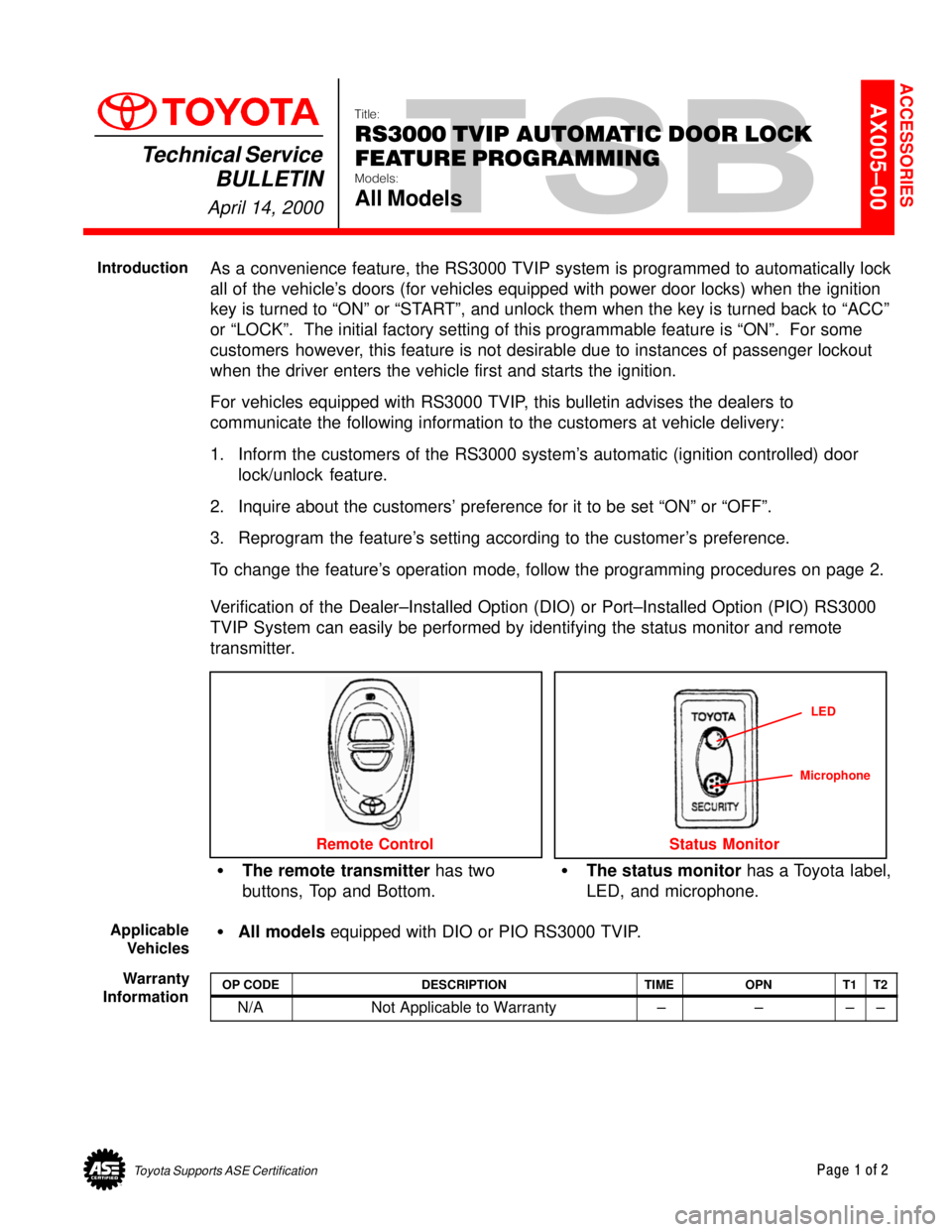
Verification of the Dealer±Installed Option (DIO) or Port±Installed Option (PIO) RS3000
TVIP System can easily be performed by identifying the status monitor and remote
transmitter.
The remote transmitter has two
buttons, Top and Bottom.The status monitor has a Toyota label,
LED, and microphone.
Remote Control
LED
Status Monitor
Microphone
All models equipped with DIO or PIO RS3000 TVIP.
OP CODEDESCRIPTIONTIMEOPNT1T2
N/ANot Applicable to Warranty ±±±±
ACCESSORIES
Introduction
Applicable
Vehicles
Warranty
Information
Page 4432 of 4770

RS30000 TVIP AUTOMATIC DOOR LOCK FEATURE PROGRAMMING ± AX005±00 April 14, 2000
Page 2 of 2
AUTOMATIC (IGNITION±CONTROLLED) DOOR LOCKING/UNLOCKING FUNCTION
The factory setting for the Automatic Door Locking/Unlocking Function is ªONº.
To change this feature's operation, follow the steps below:
1. Sit in the driver's seat with driver's door open.
2. Insert the key into the ignition switch, and turn it to ªONº position (not ªACCº)
5 times (ON > LOCK > ON > LOCK > ON > LOCK > ON > LOCK > ON) within a
10 second period.
System Response: The STATUS MONITOR's LED turns on, and the PIEZO
BUZZER sounds once.
NOTE:
You must perform the next steps within 30 seconds.
3. Select the customer's preferred operating mode.
ModeProgramming StepProgramming Completion
AUTOMATIC DOOR
LOCKING/UNLOCKING ªONºClose the driver's door.
Turn the ignition switch to the
ªLOCKº position.
System Response:
The PIEZO BUZZER sounds
once, and the exterior lights
flash once.
AUTOMATIC DOOR
LOCKING/UNLOCKING ªOFFºClose the driver's door,
then open and close it
one more time.
Turn the ignition switch to the
ªLOCKº position.
System Response:
The PIEZO BUZZER sounds
twice, and the exterior lights
flash twice.
Programming
Procedure
Page 4433 of 4770

Toyota Supports ASE CertificationPage 1 of 2
AX006±99Title:
RS3000 TVIP PROGRAMMING CHANGES
FOR GBS
Models:
All Models
Technical Service
BULLETIN
April 23, 1999
Starting with 1999 MY, the programming in the RS3000 ECU for the Glass Breakage
Sensor (GBS) to trigger the alarm has been changed to improve the Toyota Vehicle
Intrusion Protection (TVIP) system's theft warning feature when glass breakage or impact
to the glass is detected.
Previous operation of GBS (for 1998 MY and prior):
Upon (first) detection of breakage of the vehicle's glass, the GBS will sound the
security system for 5 seconds (3 horn honks).
If there is a second detection of glass breakage, within 5 seconds of the first
detection, the security system will sound for the full duration of 59 seconds.
Improved operation of GBS (from 1999 MY):
Upon (first) detection of breakage of the vehicle's glass, the GBS will sound the
security system for 20 seconds.
If there is a second detection of glass breakage, the security system will sound for the
full duration of 59 seconds, regardless of time between the first and second
detections.
After the first detection, any subsequent detection will trigger the alarm for the full
duration of 59 seconds as long as the security system is armed. The GBS trigger
cycle will reset once the security system is disarmed and then rearmed.
This improvement is intended to enhance the previous trigger cycle of the security
system and ward off an intruder.
The color of the previous (1998 MY and prior) RS3000 ECU was black. The new
RS3000 ECU color is gray.
All Models
PREVIOUS PART NUMBERCURRENT PART NUMBERPART NAME
08585±00921SAMERS3000 Base Kit
OP CODEDESCRIPTIONTIMEOPNT1T2
N/ANot applicable to warranty ±±±±
ACCESSORIES
Introduction
Affected
Vehicles
Parts
Information
Warranty
Information
Page 4434 of 4770
RS3000 TVIP PROGRAMMING CHANGES FOR GBS ± AX006±99 April 23, 1999
Page 2 of 2
When performing the RS3000 System Test, check the Glass Breakage Sensor sensitivity
as follows:
1. Press and release the Remote Control's top button to arm the system.
2. Wait two seconds.
3. With the tip of the ignition key (or striker tool), softly tap the center of the driver's door
window glass.
If the system is triggered (horn sounds for 20 seconds), the sensitivity must be
adjusted. Turn the Glass Breakage Sensor ECU's adjustment screw clockwise
one notch, and repeat this step again.
4. If the system is not triggered, repeat the glass tapping with moderate force.
The system should trigger when the glass is tapped with moderate force. If it is
not triggered, turn the Glass Breakage Sensor ECU's adjustment screw clockwise
one notch, and repeat this step again.
CAUTION:
Use caution when performing the step above. Do not tap the window glass with too
much force, or the glass may crack or break. Use extra caution when the temperature
is extremely cold.
NOTE:
The Owner's Guide included in the RS3000 Base Kit is changed to reflect the
(GBS logic) improvement. There is no change to the GBS ECU itself. Repair
Procedure
Page 4592 of 4770
Toyota Supports ASE CertificationPage 1 of 2
EL008±98Title:
PROGRAMMING OEM WIRELESS
DOOR LOCK REMOTE TRANSMITTERS
Models:
'97 ± '99 Camry
Technical Service
BULLETIN
December 4, 1998
This bulletin describes procedures used to program the three button remote transmitter to
vehicles that are equipped with Wireless Door Lock Control. The following information
applies
only to the Factory Wireless Door Lock Control, not dealer or port installed
options that also utilize remotes, such as VIP Keyless Entry/RS3000 or any aftermarket
system.
Verification of
Factory Wireless Door Lock Control can easily be performed by identifying
the TDS status monitor, functioning remote, or model grade.
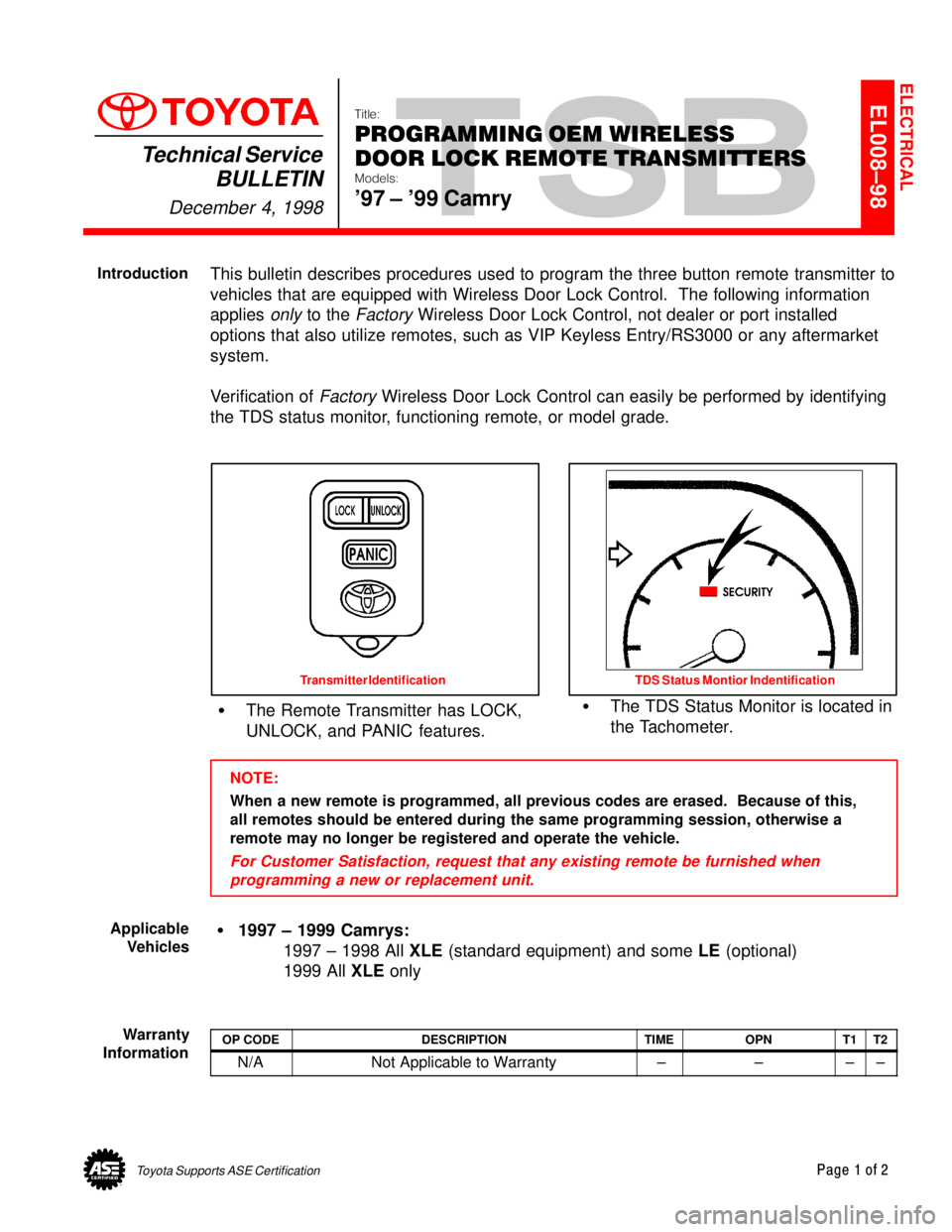
The Remote Transmitter has LOCK,
UNLOCK, and PANIC features.The TDS Status Monitor is located in
the Tachometer.
Transmitter Identification TDS Status Montior Indentification
NOTE:
When a new remote is programmed, all previous codes are erased. Because of this,
all remotes should be entered during the same programming session, otherwise a
remote may no longer be registered and operate the vehicle.
For Customer Satisfaction, request that any existing remote be furnished when
programming a new or replacement unit.
1997 ± 1999 Camrys:
1997 ± 1998 All XLE (standard equipment) and some LE (optional)
1999 All XLE only
OP CODEDESCRIPTIONTIMEOPNT1T2
N/ANot Applicable to Warranty ±±±±
ELECTRICAL
Introduction
Applicable
Vehicles
Warranty
Information
Page 4593 of 4770
PROGRAMMING OEM WIRELESS DOOR LOCK REMOTE TRANSMITTERS ± EL008±98 December 4, 1998
Page 2 of 2
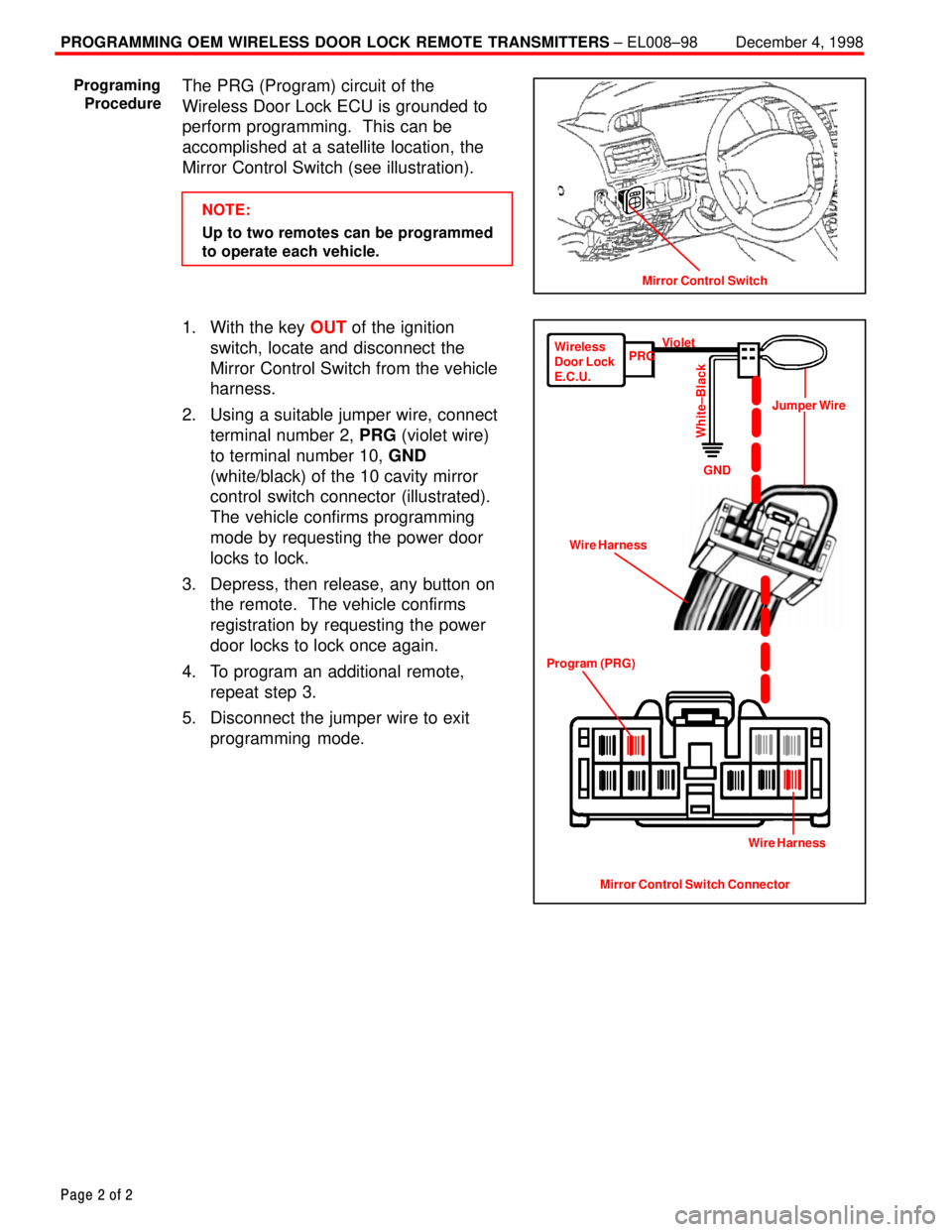
The PRG (Program) circuit of the
Wireless Door Lock ECU is grounded to
perform programming. This can be
accomplished at a satellite location, the
Mirror Control Switch (see illustration).
NOTE:
Up to two remotes can be programmed
to operate each vehicle.
1. With the key OUT of the ignition
switch, locate and disconnect the
Mirror Control Switch from the vehicle
harness.
2. Using a suitable jumper wire, connect
terminal number 2, PRG (violet wire)
to terminal number 10, GND
(white/black) of the 10 cavity mirror
control switch connector (illustrated).
The vehicle confirms programming
mode by requesting the power door
locks to lock.
3. Depress, then release, any button on
the remote. The vehicle confirms
registration by requesting the power
door locks to lock once again.
4. To program an additional remote,
repeat step 3.
5. Disconnect the jumper wire to exit
programming mode.
Mirror Control Switch
Programing
Procedure
Mirror Control Switch Connector Program (PRG)Wire HarnessJumper Wire Wireless
Door Lock
E.C.U.PRGViolet
GND
White±Black
Wire Harness