rear view mirror TOYOTA CAMRY 2010 XV40 / 8.G User Guide
[x] Cancel search | Manufacturer: TOYOTA, Model Year: 2010, Model line: CAMRY, Model: TOYOTA CAMRY 2010 XV40 / 8.GPages: 538, PDF Size: 9.22 MB
Page 68 of 538
68
1-3. Adjustable components (seats, mirrors, steering wheel)
Outside rear view mirrors
■Mirror angle can be adjusted when
Vehicles with smart key system
The “ENGINE START STOP” switch is in ACCESSORY or IGNITION ON
mode.
Vehicles without smart key system
The engine switch is in the “ACC” or “ON” position.
■ When the mirrors are fogged up (vehicles with mirror defoggers)
Turn on the mirror defoggers to defog the mirrors. ( P. 209)
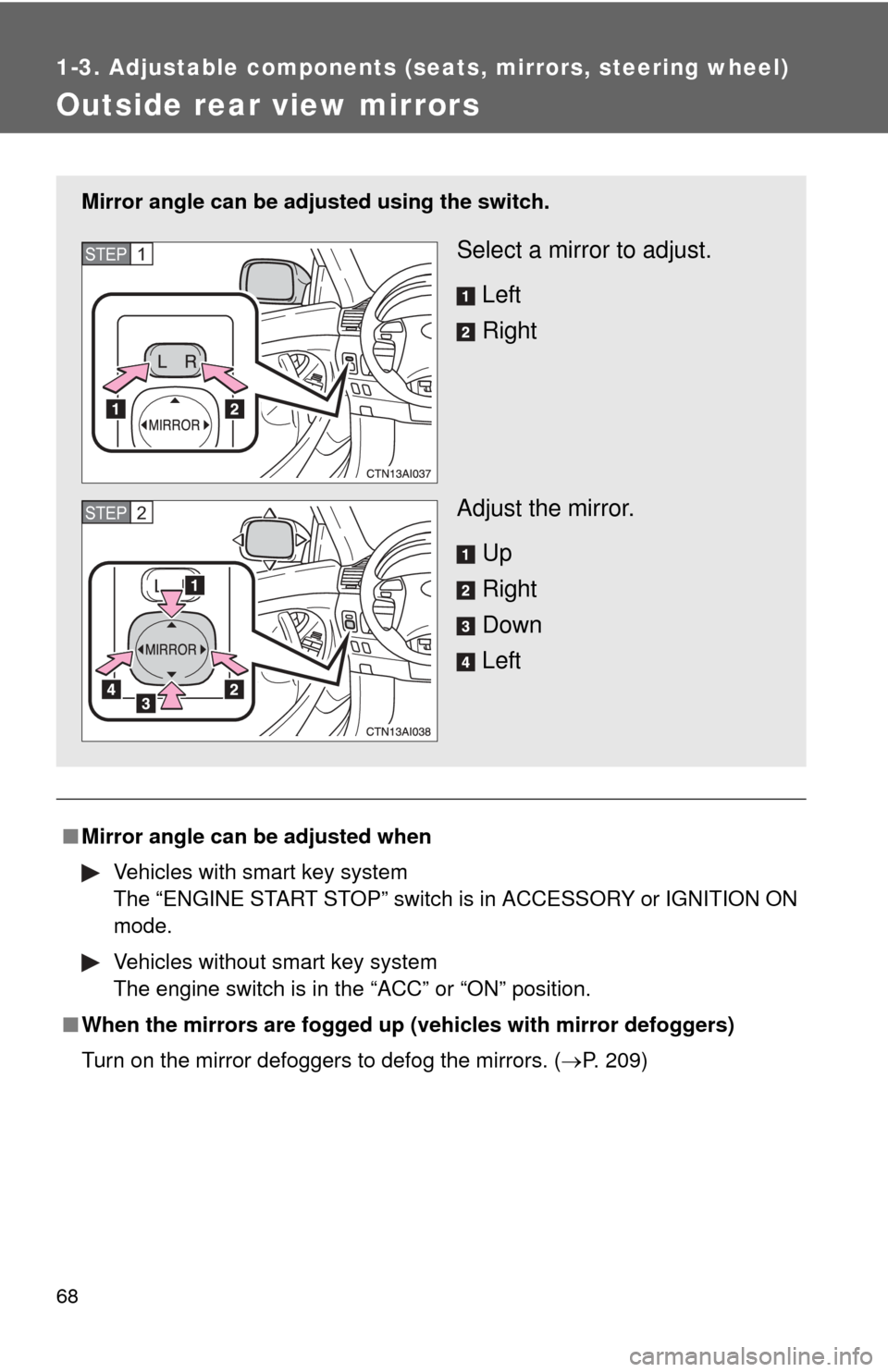
Mirror angle can be adjusted using the switch.
Select a mirror to adjust.
Left
Right
Adjust the mirror. Up
Right
Down
LeftSTEP1
STEP2
Page 69 of 538

69
1-3. Adjustable components (s
eats, mirrors, steering wheel)
1
Before driving
CAUTION
■When driving the vehicle
Observe the following precautions while driving.
Failing to do so may result in loss of control of the vehicle and cause an acci-
dent, resulting in death or serious injury.
●Do not adjust the mirrors while driving.
● Both the driver and passenger side mirrors must be properly adjusted
before driving.
■ When a mirror is moving
To avoid injury and mirror malfunction, be careful not to get your hand
caught by the moving mirror.
■ When the mirror defogg ers are operating (vehicles with mirror defog-
gers)
Do not touch the rear view mirror surfaces, as they can become very hot and
burn you.
Page 125 of 538

125
2-1. Driving procedures
2
When driving
CAUTION
●
When stopped on an inclined surface, use the brake pedal and parking
brake to prevent the vehicle from rolling backward or forward and causing
an accident.
● Do not adjust the position of the steering wheel, the seat, or the inside or
outside rear view mirrors while driving.
Doing so may result in a loss of vehicle control that can cause accidents
that may result in death or serious injury.
● Always check that all passengers' arms, heads or other parts of their bod-
ies are not outside the vehicle, as this may result in death or serious injury.
● Do not drive in excess of the speed limit. Even if the legal speed limit per-
mits it, do not drive over 85 mph (140 km/h) unless your vehicle has high-
speed capability tires. Driving over 85 mph (140 km/h) may result in tire
failure, loss of control and possible injury. Be sure to consult a tire dealer
to determine whether the tires on your vehicle are high-speed capability
tires or not before driving at such speeds.
■ When driving on slippery road surfaces
●Sudden braking, acceleration and steering may cause tire slippage and
reduce your ability to control the vehicle, resulting in an accident.
● Sudden changes in engine speed, such as engine braking caused by up-
shifting or down-shifting, may cause the vehicle to skid, resulting in an
accident.
● After driving through a puddle, lightly depress the brake pedal to make
sure that the brakes are functioning properly. Wet brake pads may prevent
the brakes from functioning properly. If the brakes on only one side are wet
and not functioning properly, steering control may be affected, resulting in
an accident.
■ When shifting the shift lever
Vehicles with an automatic transmission: Be careful not to shift the shift lever
with the accelerator pedal depressed.
This may lead to unexpected rapid acceleration of the vehicle that may
cause an accident and result in death or serious injury.
Page 185 of 538

185
2-5. Driving information
2
When driving
■
Before towing
●Ensure that your vehicle’s tires are properly inflated. ( P. 392)
● Trailer tires should be inflated according to the trailer manufacturer's rec-
ommendation.
● All trailer lights must work in order to be legal.
● Confirm all lights work each time you connect them.
● Check that your vehicle remains level when a loaded or unloaded trailer
is hitched. Do not drive if the vehicle is not level, and check for improper
tongue load, overloading, worn suspension, or other possible causes.
● Make sure the trailer cargo is securely loaded.
● Check that your rear view mirrors c onform to any federal, state/provincial
or local regulations. If they do not, inst all rear view mirrors appropriate for
towing purposes.
■ Break-in schedule
Toyota recommends that you do not use a new vehicle or a vehicle with any
new power train components (engine, transmission, differential, wheel bear-
ings, etc.) to tow a trailer for the first 500 miles (800 km) of driving.
■ Maintenance
●If you tow a trailer, your vehicle will require more frequent maintenance
due to the additional load. (See “Scheduled Maintenance Guide” or
“Owner's Manual Supplement”.)
● Retighten the fixing bolts of the towing ball and bracket after approxi-
mately 600 miles (1000 km) of trailer towing.
Page 194 of 538
194
3-1. Using the air conditioning system and defogger
Automatic air conditioning system ........................... 196
Manual air conditioning system ........................... 204
Rear window and outside rear view mirror
defoggers ....................... 209
3-2. Using the audio system Audio system types .......... 211
Using the radio ................. 215
Using the CD player ......... 223
Playing MP3 and WMA discs............................... 232
Operating an iPod
®
player ............................. 240
Operating a USB memory player ............................. 246
Optimal use of the audio system ........................... 253
Using the AUX adapter .... 258
Using the steering wheel audio switches ............... 260 3-3. Using the Bluetooth
®
audio system
Bluetooth
® audio
system ........................... 263
Using the Bluetooth
®
audio system.................. 266
Operating a Bluetooth
®
enabled portable
player ............................. 271
Setting up a Bluetooth
®
enabled portable
player ............................. 273
Bluetooth
® audio system
setup .............................. 278
Interior features3
Page 211 of 538
211
3-1. Using the air conditioning system and defogger
3
Interior features
Rear window and outside rear view mirror defoggers
■Outside rear view mirror defoggers (if equipped)
Turning the rear window defogger on will turn the outside rear view mirror
defoggers on.
■ When the indicator light on the sw itch flashes and a motor sound is
heard (vehicles with manual air conditioning)
If any of the following conditions occurs, it does not indicate a malfun\
ction.
● The “ENGINE START STOP” switch is in IGNITION ON mode (vehicles
with smart key system) or the engine switch is in the “ON” position (vehi-
cles without smart key system) after the battery is reconnected.
● Engine starting and stopping is repeated at short intervals.
● The engine is started with the low voltage battery.
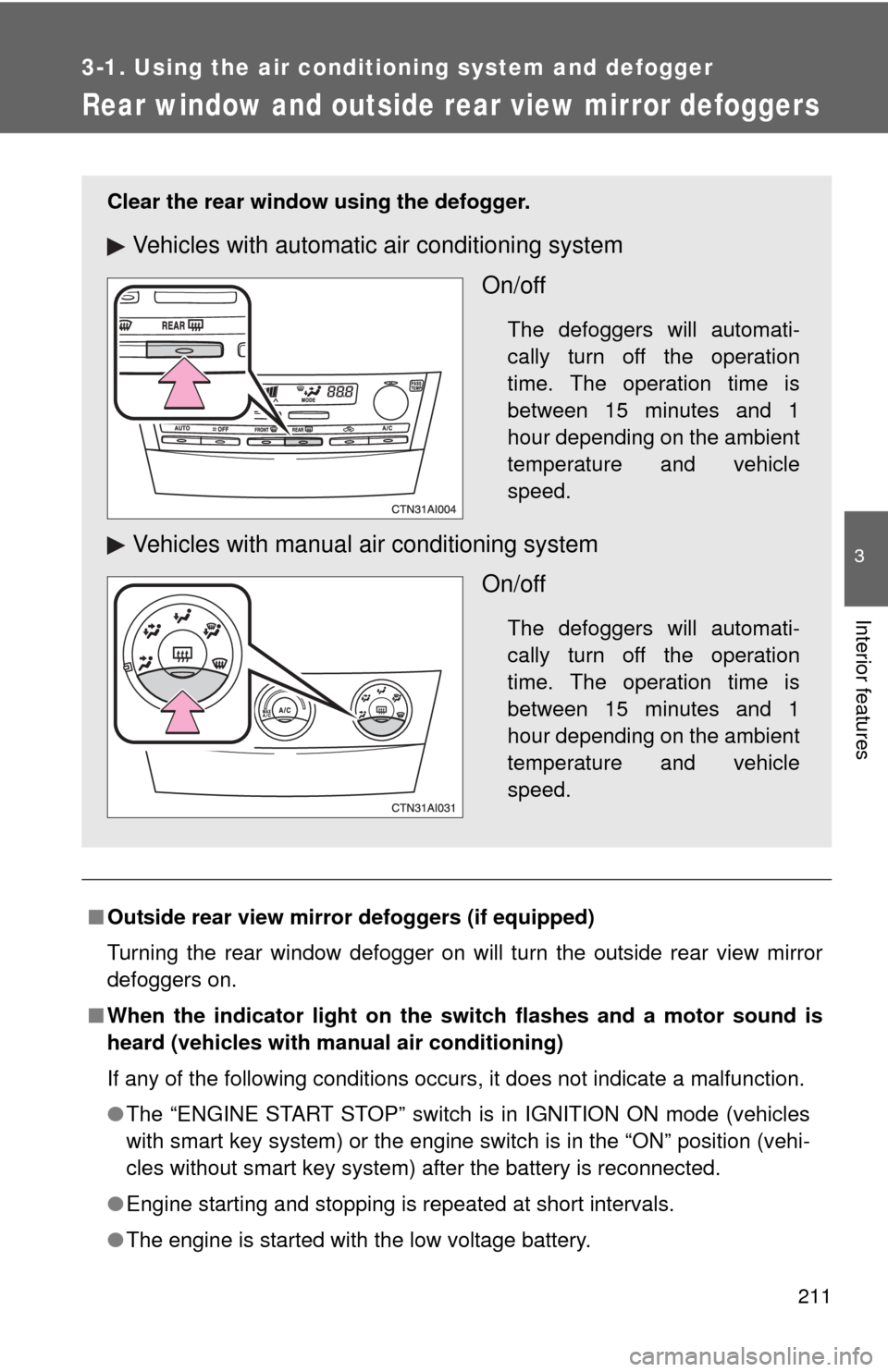
Clear the rear window using the defogger.
Vehicles with automatic air conditioning system
On/off
The defoggers will automati-
cally turn off the operation
time. The operation time is
between 15 minutes and 1
hour depending on the ambient
temperature and vehicle
speed.
Vehicles with manual air conditioning systemOn/off
The defoggers will automati-
cally turn off the operation
time. The operation time is
between 15 minutes and 1
hour depending on the ambient
temperature and vehicle
speed.
Page 212 of 538

212 3-1. Using the air conditioning system and defogger
CAUTION
■Outside rear view mirror defoggers (if equipped)
The surfaces of the outside rear view mirrors become hot. Do not touch
them to prevent from burning yourself.
Page 345 of 538
343
3-7. Other interior features
3
Interior features
Compass
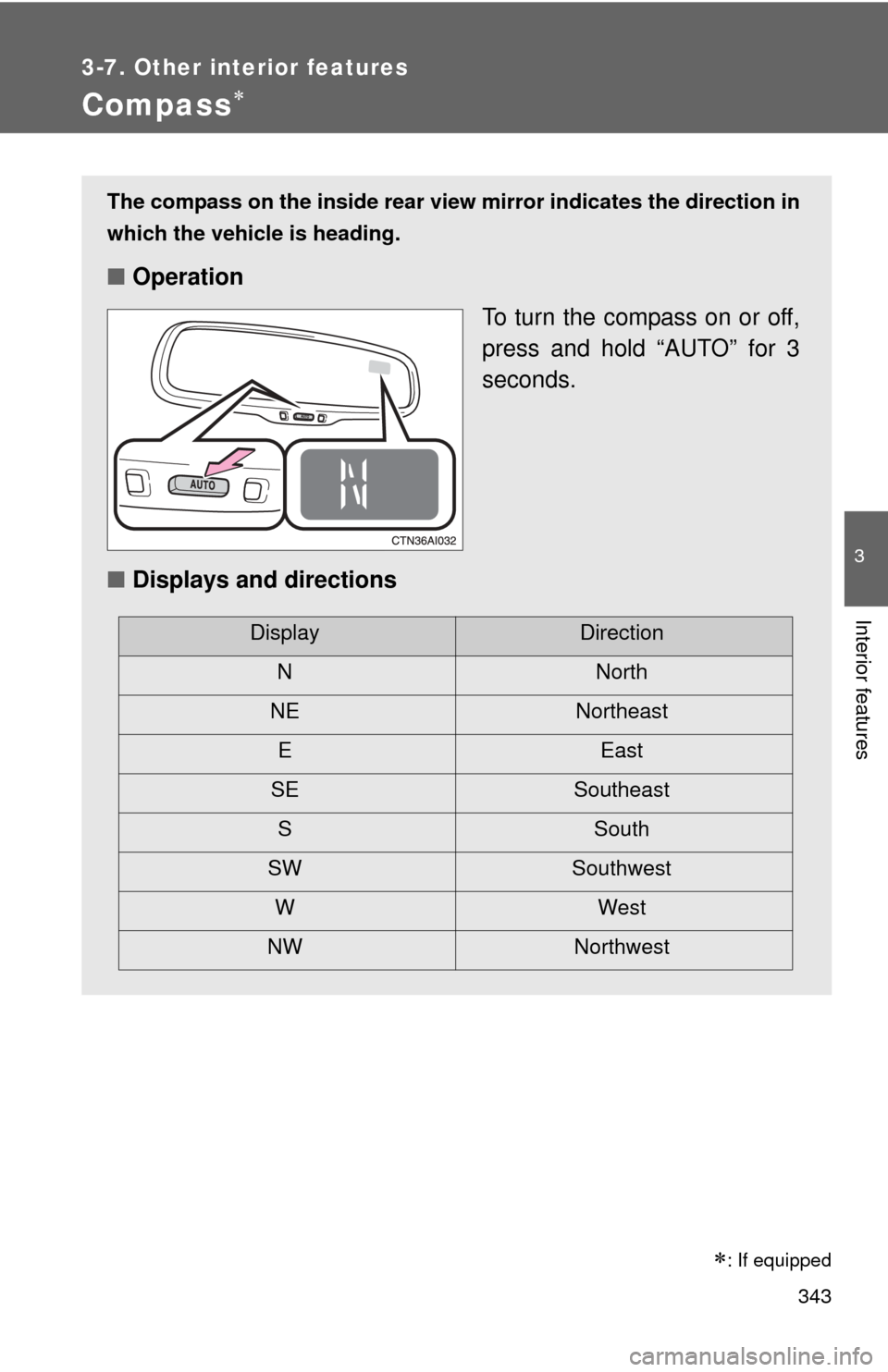
The compass on the inside rear view mirror indicates the direction in
which the vehicle is heading.
■ Operation
To turn the compass on or off,
press and hold “AUTO” for 3
seconds.
■ Displays and directions
DisplayDirection
NNorth
NE Northeast EEast
SE Southeast S South
SW Southwest
WWest
NW Northwest
: If equipped
Page 347 of 538
345
3-7. Other interior features
3
Interior features
■
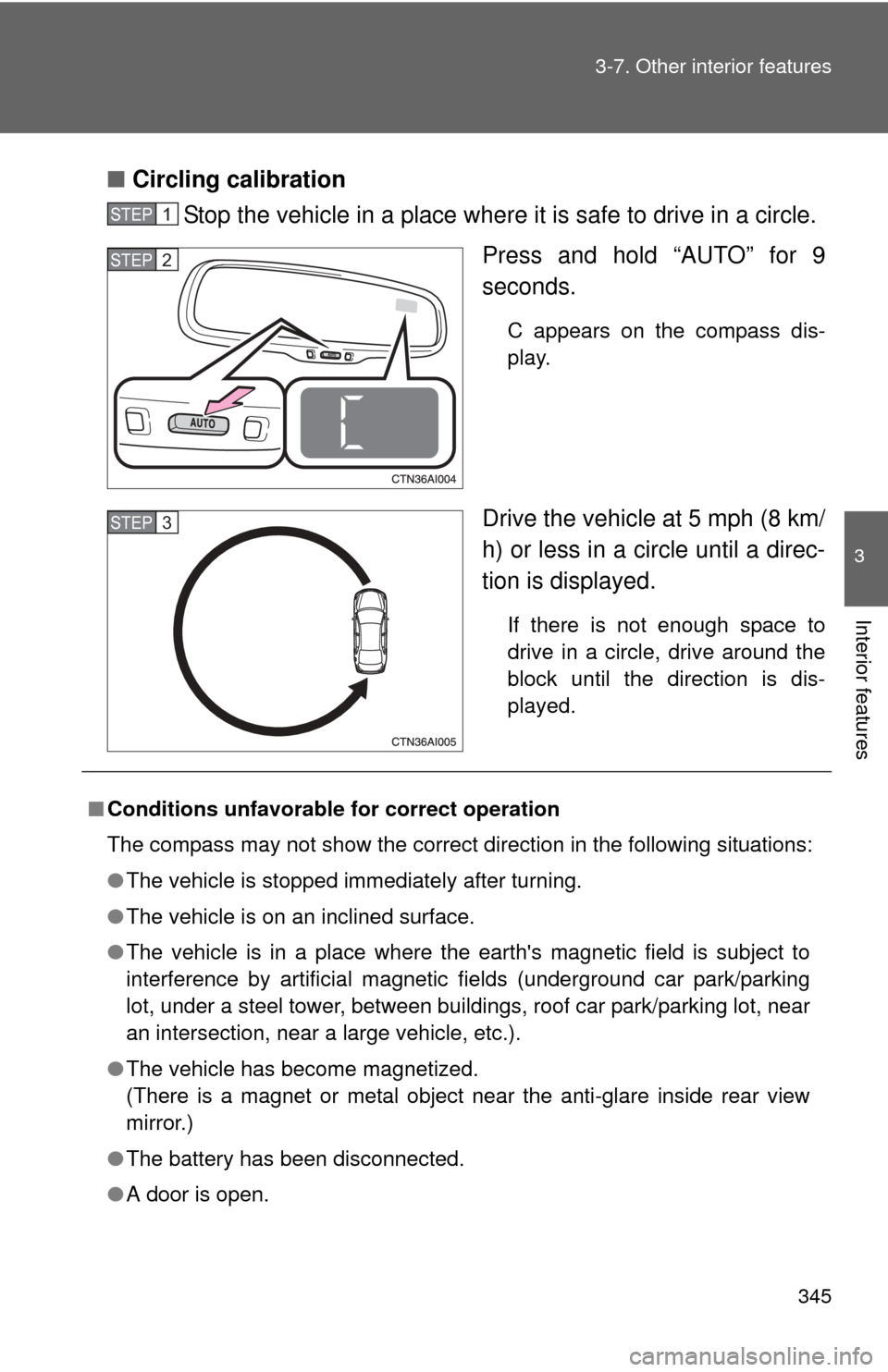
Circling calibration
Stop the vehicle in a place where it is safe to drive in a circle.
Press and hold “AUTO” for 9
seconds.
C appears on the compass dis-
play.
Drive the vehicle at 5 mph (8 km/
h) or less in a circle until a direc-
tion is displayed.
If there is not enough space to
drive in a circle, drive around the
block until the direction is dis-
played.
STEP1
STEP2
STEP3
■Conditions unfavorable for correct operation
The compass may not show the correct direction in the following situations:
●The vehicle is stopped immediately after turning.
● The vehicle is on an inclined surface.
● The vehicle is in a place where the earth's magnetic field is subject to
interference by artificial magnetic fields (underground car park/parking
lot, under a steel tower, between buildings, roof car park/parking lot, near
an intersection, near a large vehicle, etc.).
● The vehicle has become magnetized.
(There is a magnet or metal object near the anti-glare inside rear view
mirror.)
● The battery has been disconnected.
● A door is open.
Page 348 of 538

346 3-7. Other interior features
CAUTION
■While driving the vehicle
Do not adjust the display. Be sure to adjust the display only when the vehicle
is stopped.
■ When doing the circling calibration
Be sure to secure a wide space, and watch out for people and vehicles in the
neighborhood. Do not violate any local traffic rules while performing circling
calibration.
NOTICE
■To avoid compass malfunctions
Do not place magnets or any metal objects near the anti-glare inside rear
view mirror.
Doing this may cause a malfunction of the compass sensor.
■ To ensure normal operation of the compass
●Do not perform circling calibration of the compass in a place where the
earth's magnetic field is subject to interference by artificial magnetic fields.
● During calibration, do not operate electric systems (moon roof, power win-
dows, etc.) as they may interfere with the calibration.