fog light TOYOTA CAMRY 2010 XV40 / 8.G Owners Manual
[x] Cancel search | Manufacturer: TOYOTA, Model Year: 2010, Model line: CAMRY, Model: TOYOTA CAMRY 2010 XV40 / 8.GPages: 538, PDF Size: 9.22 MB
Page 3 of 538

1
2
3
4
5
6
7
3
2-3. Operating the lights and wipers
Headlight switch .................. 159
Fog light switch ................... 163
Windshield wipers and washer .............................. 164
2-4. Using other driving systems Cruise control ...................... 166
Driving assist systems ........ 170
2-5. Driving information Cargo and luggage ............. 175
Vehicle load limits ............... 178
Winter driving tips ............... 179
Trailer towing ...................... 183
Dinghy towing (automatic transmission) .................... 191
Dinghy towing (manual transmission) .................... 192
3-1. Using the air conditioning system and defogger
Automatic air conditioning system .............................. 196
Manual air conditioning system .............................. 204
Rear window and outside rear view mirror
defoggers .......................... 209
3-2. Using the audio system Audio system types ............. 211
Using the radio .................... 215 Using the CD player ........... 223
Playing MP3 and WMA
discs ................................. 232
Operating an iPod
®
player ............................... 240
Operating a USB memory player ............................... 246
Optimal use of the audio system .............................. 253
Using the AUX adapter....... 258
Using the steering wheel audio switches.................. 260
3-3. Using the Bluetooth
®
audio system
Bluetooth
® audio system .... 263
Using the Bluetooth®
audio system .................... 266
Operating a Bluetooth
®
enabled portable player.... 271
Setting up a Bluetooth
®
enabled portable player.... 273
Bluetooth
® audio system
setup ................................ 278
3-4. Using the hands-free phone system
(for cellular phone)
Hands-free phone system (for cellular phone)
features ............................ 279
Using the hands-free phone system
(for cellular phone) ........... 283
Making a phone call ........... 292
Setting a cellular phone ...... 296
Security and system setup ................................ 301
Using the phone book ........ 3053Interior features
Page 6 of 538
6
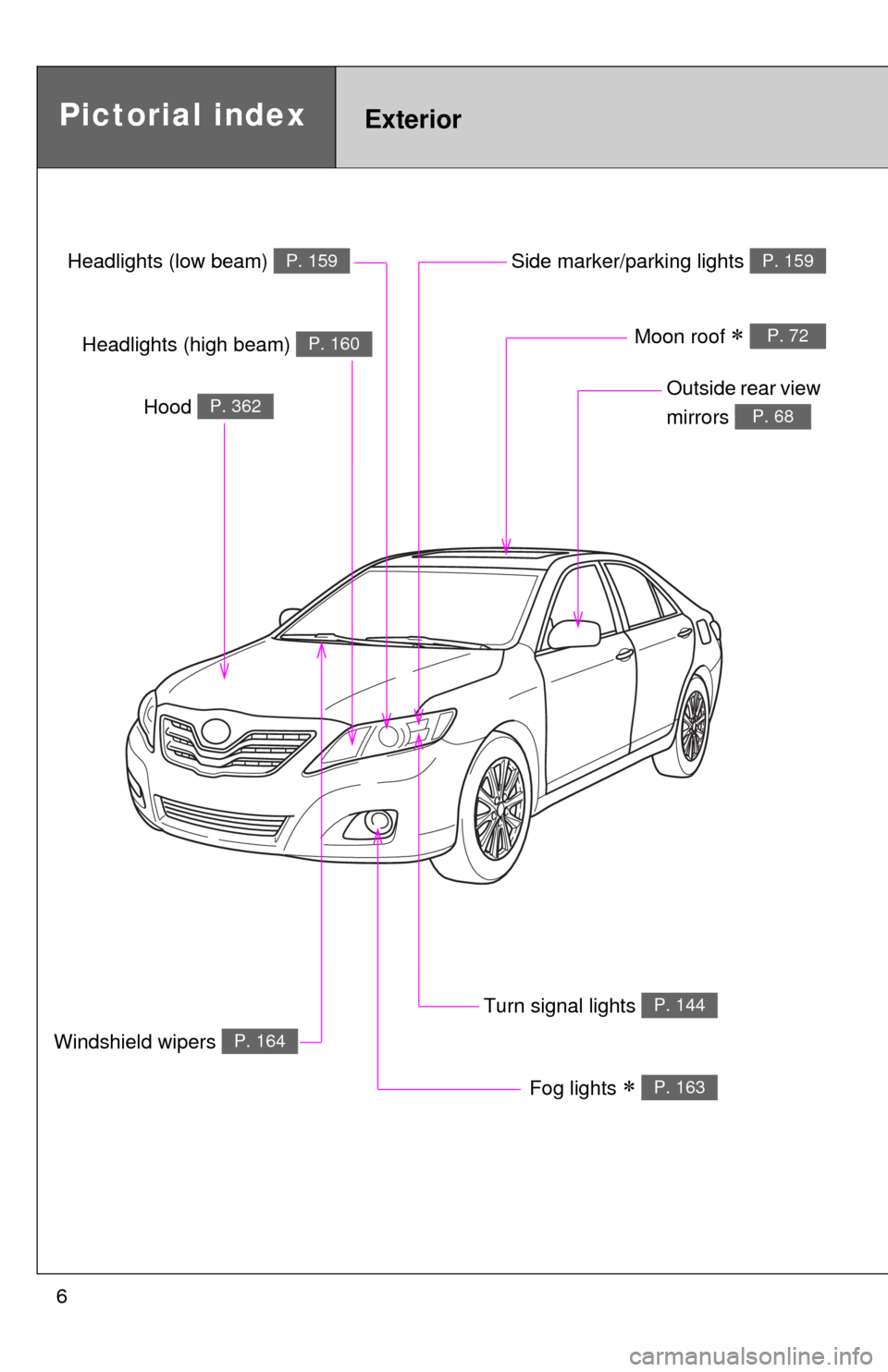
Headlights (low beam) P. 159
Pictorial indexExterior
Fog lights P. 163
Turn signal lights P. 144
Hood P. 362
Windshield wipers P. 164
Outside rear view
mirrors
P. 68
Side marker/parking lights P. 159
Headlights (high beam) P. 160Moon roof P. 72
Page 7 of 538
7
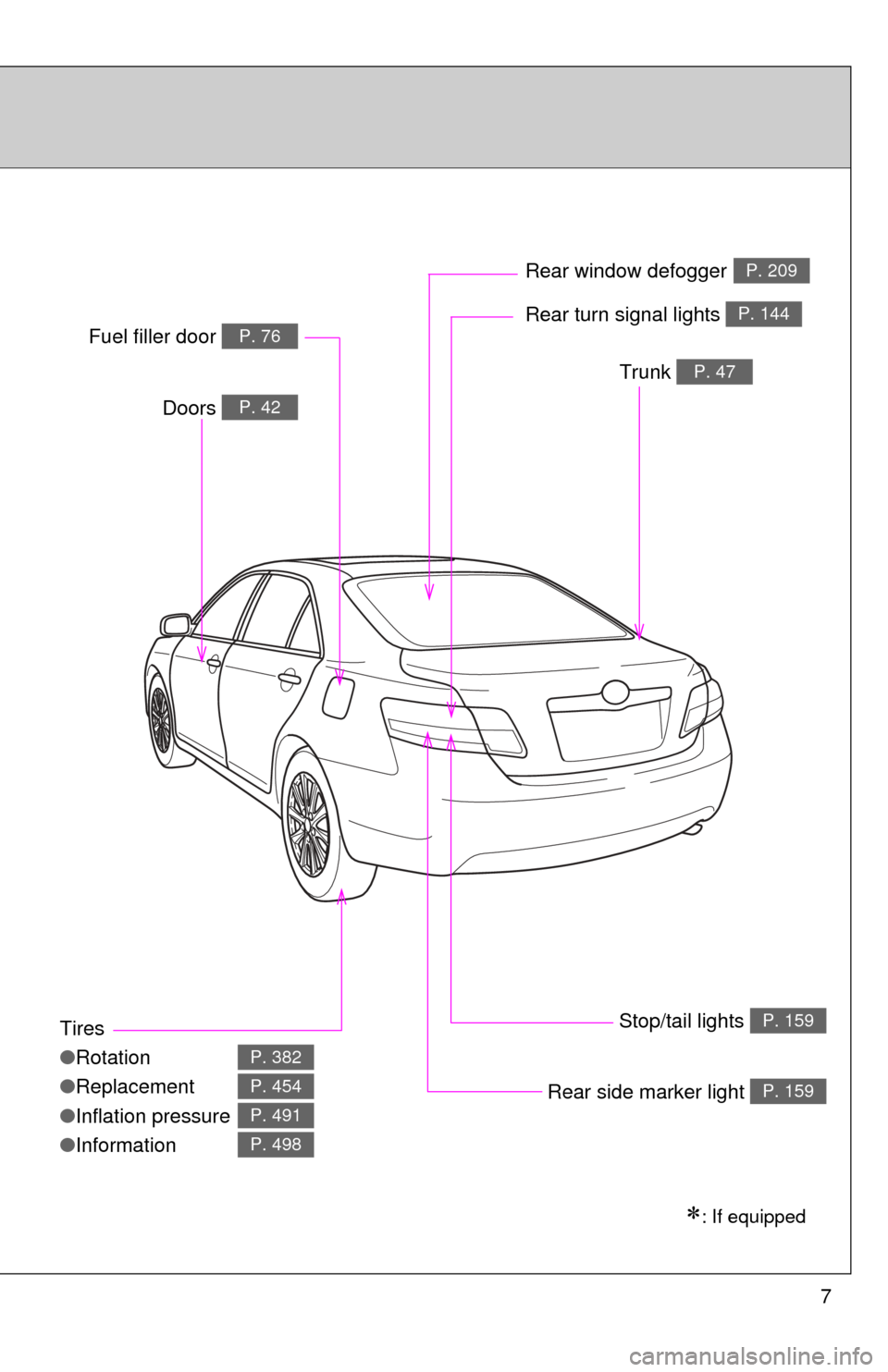
Tires
●Rotation
● Replacement
● Inflation pressure
● Information
P. 382
P. 454
P. 491
P. 498
Trunk P. 47
Doors P. 42
Fuel filler door P. 76Rear turn signal lights P. 144
Rear window defoggerP. 209
Stop/tail lights P. 159
: If equipped
Rear side marker light P. 159
Page 13 of 538
13
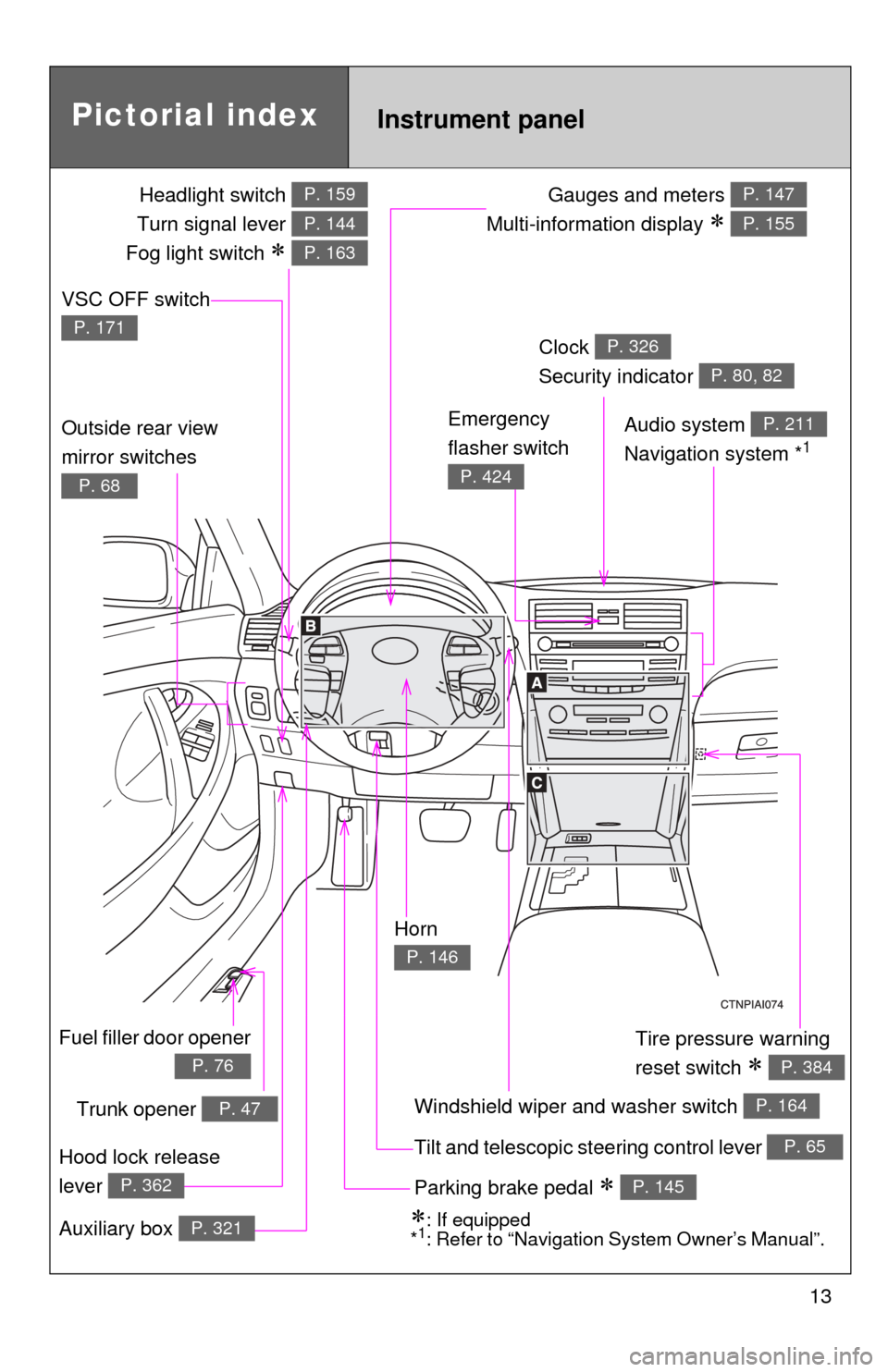
Gauges and meters
Multi-information display
P. 147
P. 155
Tilt and telescopic steering control lever P. 65
Pictorial index
Trunk opener P. 47
Headlight switch
Turn signal lever
Fog light switch
P. 159
P. 144
P. 163
Instrument panel
Audio system
Navigation system *1
P. 211
Windshield wiper and washer switch P. 164
Clock
Security indicator P. 326
P. 80, 82
Outside rear view
mirror switches
P. 68
Tire pressure warning
reset switch
P. 384
Parking brake pedal P. 145
Hood lock release
lever
P. 362
Fuel filler door opener
P. 76
Auxiliary box P. 321: If equipped
*1: Refer to “Navigation System Owner’s Manual”.
Emergency
flasher switch
P. 424
VSC OFF switch
P. 171
Horn
P. 146
Page 119 of 538
When driving2
119
2-1. Driving proceduresDriving the vehicle............ 120
Engine (ignition) switch (vehicles with smart
key system).................... 131
Engine (ignition) switch (vehicles without smart
key system).................... 135
Automatic transmission................... 138
Manual transmission ........ 142
Turn signal lever .............. 144
Parking brake ................... 145
Horn ................................. 146
2-2. Instrument cluster Gauges and meters ......... 147
Indicators and warning lights .............................. 151
Multi-information display............................ 155 2-3. Operating the lights
and wipers
Headlight switch ............... 159
Fog light switch ................ 163
Windshield wipers and washer ........................... 164
2-4. Using other driving systems
Cruise control ................... 166
Driving assist systems ..... 170
2-5. Driving information Cargo and luggage .......... 175
Vehicle load limits ............ 178
Winter driving tips ............ 179
Trailer towing ................... 183
Dinghy towing (automatic transmission) ................. 191
Dinghy towing (manual transmission) ................. 192
Page 122 of 538
122 2-1. Driving procedures
Starting on a steep uphillAutomatic transmission Firmly set the parking brake and shift the shift lever to D.
Gently depress the accelerator pedal.
Release the parking brake.
Manual transmission
With the parking brake firmly set and the clutch pedal fully
depressed, shift the shift lever to 1.
Lightly depress the accelerator pedal at the same time as
gradually releasing the clutch pedal.
Release the parking brake.
■Driving in the rain
●Drive carefully when it is raining, because visibility will be reduced, the
windows may become fogged-up, and the road will be slippery.
● Drive carefully when it starts to rain, because the road surface will be
especially slippery.
● Refrain from high speeds when driving on an expressway in the rain,
because there may be a layer of water between the tires and the road
surface, preventing the steering and brakes from operating properly.
■ Breaking in your new Toyota
To extend the life of the vehicle, the following precautions are recommended
to observe:
●For the first 186 miles (300 km):
Avoid sudden stops.
● For the first 994 miles (1600 km):
• Do not drive at extremely high speeds.
• Avoid sudden acceleration.
• Do not drive continuously in the low gears.
• Do not drive at a constant speed for extended periods.
STEP1
STEP2
STEP3
STEP1
STEP2
STEP3
Page 153 of 538
153
2-2. Instrument cluster
2
When driving
■
Indicators
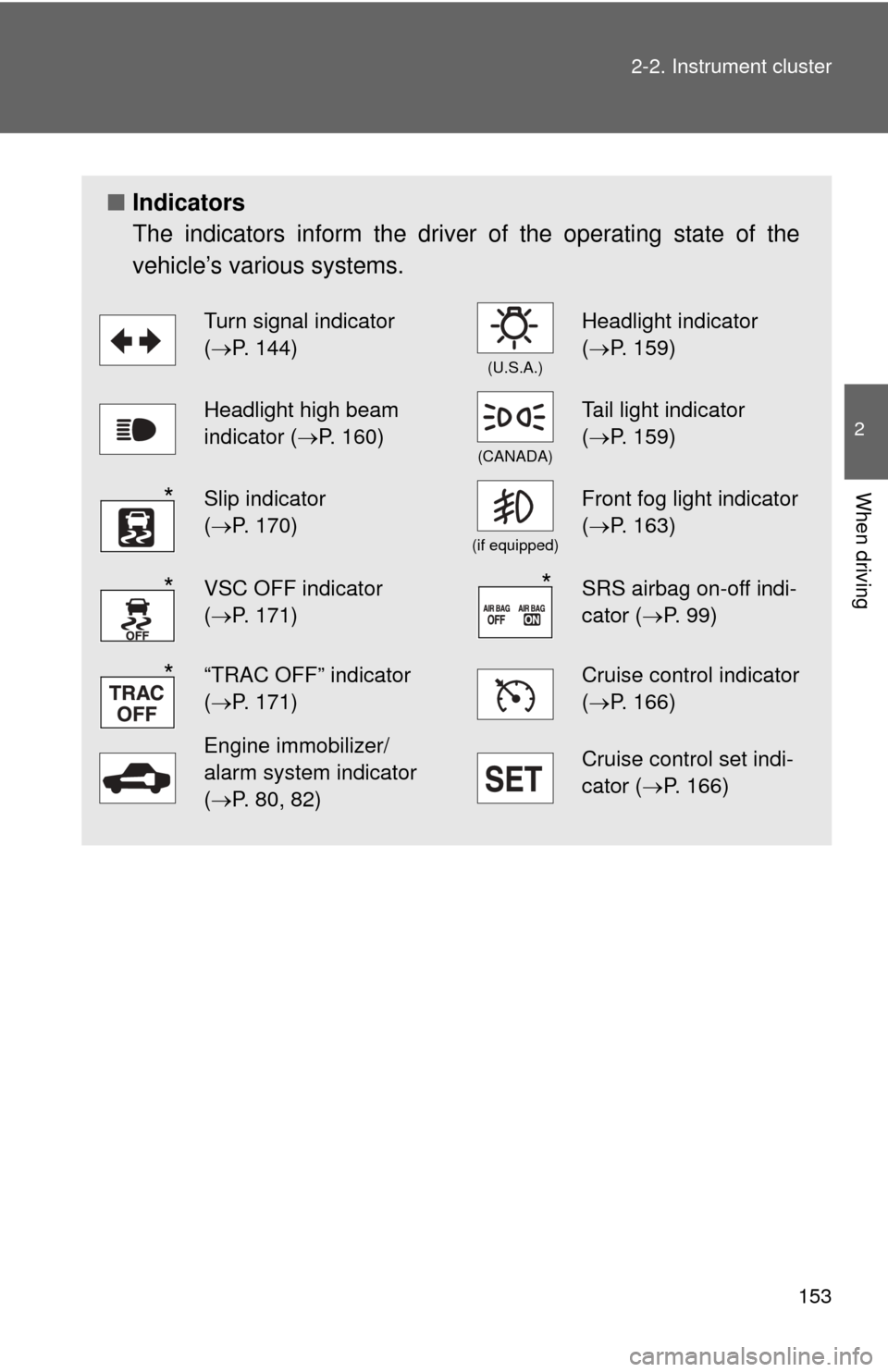
The indicators inform the driver of the operating state of the
vehicle’s various systems.
Turn signal indicator
(P. 144)
(U.S.A.)
Headlight indicator
( P. 159)
Headlight high beam
indicator ( P. 160)
(CANADA)
Tail light indicator
(P. 159)
Slip indicator
(P. 170)
(if equipped)
Front fog light indicator
( P. 163)
VSC OFF indicator
(P. 171)SRS airbag on-off indi-
cator (P. 99)
“TRAC OFF” indicator
(P. 171)Cruise control indicator
( P. 166)
Engine immobilizer/
alarm system indicator
(P. 80, 82)Cruise control set indi-
cator (P. 166)
*
**
*
Page 163 of 538
163
2-3. Operating the lights and wipers
2
When driving
Fog light switch
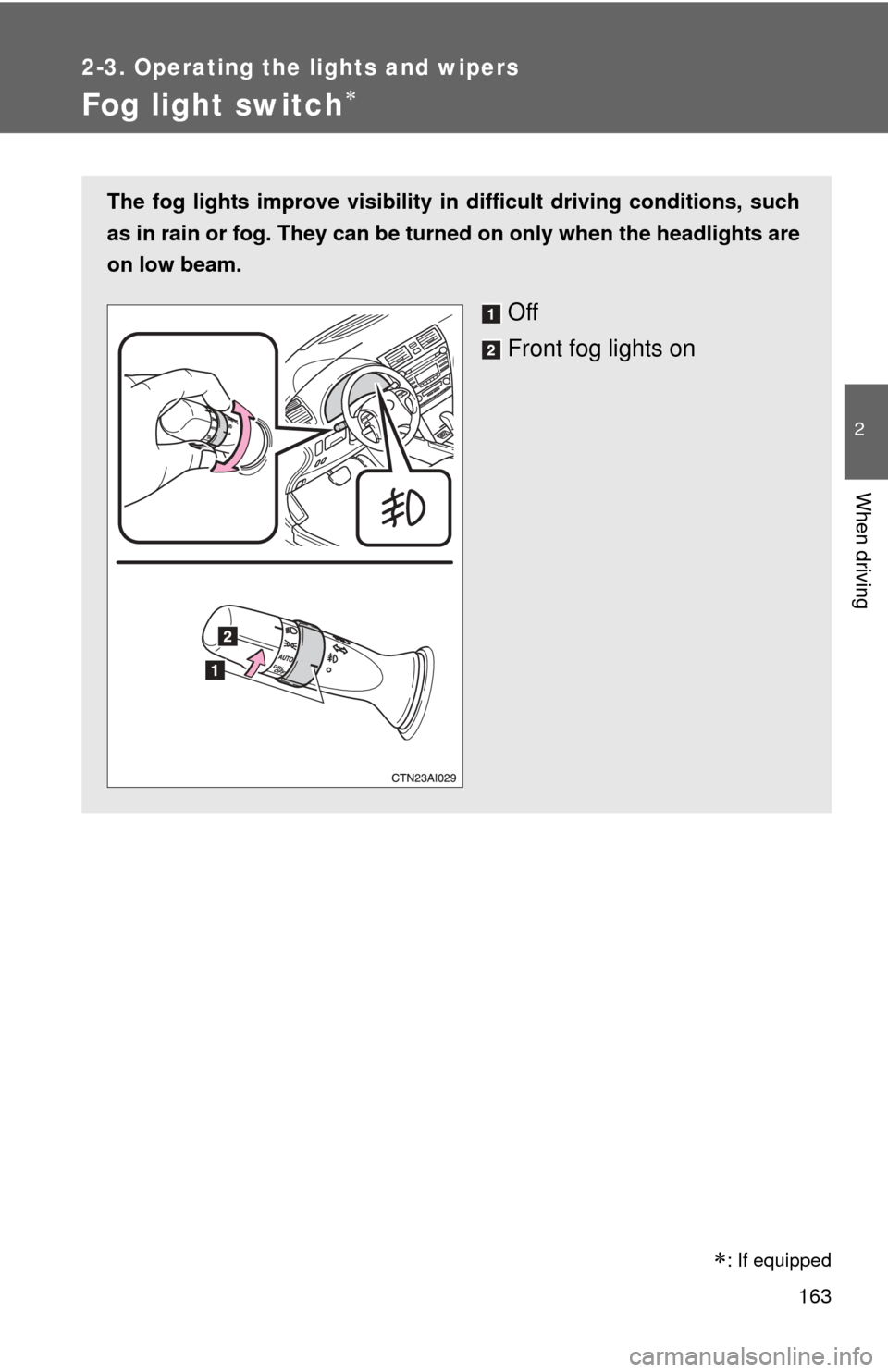
The fog lights improve visibility in difficult driving conditions, such
as in rain or fog. They can be turned on only when the headlights are
on low beam.
Off
Front fog lights on
: If equipped
Page 202 of 538
202 3-1. Using the air conditioning system and defogger
■Using the automatic mode
Fan speed is adjusted automatically in accordance with the temperature set-
ting and ambient conditions. As a result, the following may occur.
●Immediately after
is pressed, the fan may stop for a while until
warm or cool air is ready to flow.
● Cool air may flow to the area around the upper body when the heater is
on.
■ Using the system in recirculated air mode
The windows will fog up more easily if the recirculated air mode is used for
an extended period.
■ Switching between outside air and recirculated air modes
Recirculated air mode or outside air mode may be automatically switched to
in accordance with the temperature setting and the inside temperature.
■ Window defogger feature
Recirculated air mode may automatically switch to outside air mode in situa-
tions where the windows need to be defogged.
■ When outside air temperat ure approaches 32°F (0°C)
The air conditioning system may not operate even when
is pressed.
■ When the indicator light on
flashes
Press
and turn off the air conditioning system before turning it on
once more. There may be a problem in the air conditioning system if the indi-
cator light continues to flash. Turn the air conditioning system off and have it
inspected by your Toyota dealer.
■ Windshield air flow button
When any of the following conditions occurs, the indicator light on the button
may flash and a motor sound may be heard. This does not indicate a mal-
function.
●The “ENGINE START STOP” switch is in ON mode (vehicles with smart
key system) or the engine switch is in the “ON” position (vehicles without
smart key system) after the battery is reconnected.
● Engine starting and stopping is repeated at short intervals.
● The engine is started with the low voltage battery.
Page 203 of 538
203
3-1. Using the air conditioning system
and defogger
3
Interior features
■Plasmacluster *
This air conditioning system adopts plasmacluster technology, which helps
to keep good air quality in the cabin by emitting positive and negative ions
through the driver's side vent.
A slight noise may be heard during operation. This is not a malfunction.
Also, static electricity may be discharged near the driver's side vent due to
the high voltage used to operate the system.
To clean the drive's side vent, turn the system off and wipe the vent using a
soft cloth.
*: Plasmacluster technology is manufactured under license from SHARP Corporation. “Plasmacluster ” is a trademark of the SHARP Corporation.
■ Air conditioning odors
●During use, various odors from inside and outside the vehicle may enter
into and accumulate in the air conditioning system. This may then cause
odor to be emitted from the vents.
● To reduce potential odors from occurring:
• It is recommended that the air conditioning system be set to outside air
mode prior to turning the vehicle off.
• The start timing of the blower may be delayed for a short period of time immediately after the air conditioning system is started in automatic
mode.
CAUTION
■ To prevent the windshield from fogging up
Do not use during cool air operation in extremely humid weather.
The difference between the temperature of the outside air and that of the
windshield can cause the outer surface of the windshield to fog up, blocking
your vision.
■ Plasmacluster
Do not disassemble or repair the system because it contains high voltage
parts. Call your Toyota dealer if the system needs repair.