engine TOYOTA CAMRY 2011 XV50 / 9.G Owners Manual
[x] Cancel search | Manufacturer: TOYOTA, Model Year: 2011, Model line: CAMRY, Model: TOYOTA CAMRY 2011 XV50 / 9.GPages: 554, PDF Size: 9.69 MB
Page 2 of 554

TABLE OF CONTENTSIndex
2
1-1. Key informationKeys ..................................... 26
1-2. Opening, closing and locking the doors and
trunk
Smart key system................. 29
Wireless remote control ....... 40
Doors.................................... 44
Trunk .................................... 49
1-3. Adjustable components (seats, mirrors,
steering wheel)
Front seats ........................... 53
Rear seats ............................ 55
Head restraints ..................... 57
Seat belts ............................. 59
Steering wheel ..................... 67
Anti-glare inside rear view mirror.......................... 68
Outside rear view mirrors ..... 70
1-4. Opening and closing the windows and moon roof
Power windows .................... 72
Moon roof ............................. 75
1-5. Refueling Opening the fuel tank cap .... 79 1-6. Theft deterrent system
Engine immobilizer system ................................ 82
Alarm .................................... 85
1-7. Safety information Correct driving posture ......... 88
SRS airbags ......................... 90
Front passenger occupant classification
system .............................. 102
Child restraint systems ....... 107
Installing child restraints ..... 111
2-1. Driving procedures Driving the vehicle .............. 122
Engine (ignition) switch (vehicles with smart
key system) ...................... 133
Engine (ignition) switch (vehicles without smart
key system) ...................... 137
Automatic transmission ...... 140
Manual transmission........... 144
Turn signal lever ................. 146
Parking brake ..................... 147
Horn .................................... 149
2-2. Instrument cluster Gauges and meters ............ 150
Indicators and warning lights ................................. 154
Multi-information display ..... 158
1Before driving
2When driving
Page 5 of 554

1
2
3
4
5
6
7
5
4-3. Do-it-yourself maintenance
Do-it-yourself service precautions ....................... 365
Hood ................................... 368
Positioning a floor jack ........ 369
Engine compartment ........... 371
Tires .................................... 387
Tire inflation pressure ......... 397
Wheels ................................ 401
Air conditioning filter............ 403
Key battery .......................... 406
Checking and replacing fuses ................................. 410
Light bulbs........................... 423
5-1. Essential information Emergency flashers ............ 428
If your vehicle needs to be towed ........................... 429
If you think something is wrong ............................ 432
Fuel pump shut off system .............................. 433
Event data recorder ............ 434 5-2. Steps to take in an
emergency
If a warning light turns on or a warning buzzer
sounds... .......................... 436
If a warning message is displayed .......................... 448
If you have a flat tire ........... 458
If the engine will not start.... 469
If the shift lever cannot be shifted from P .............. 471
If you lose your keys........... 472
If the electronic key does not operate properly ......... 473
If the battery is discharged........................ 475
If your vehicle overheats .... 479
If the vehicle becomes stuck ................................. 482
If your vehicle has to be stopped in an
emergency ....................... 484
5When trouble arises
Page 17 of 554
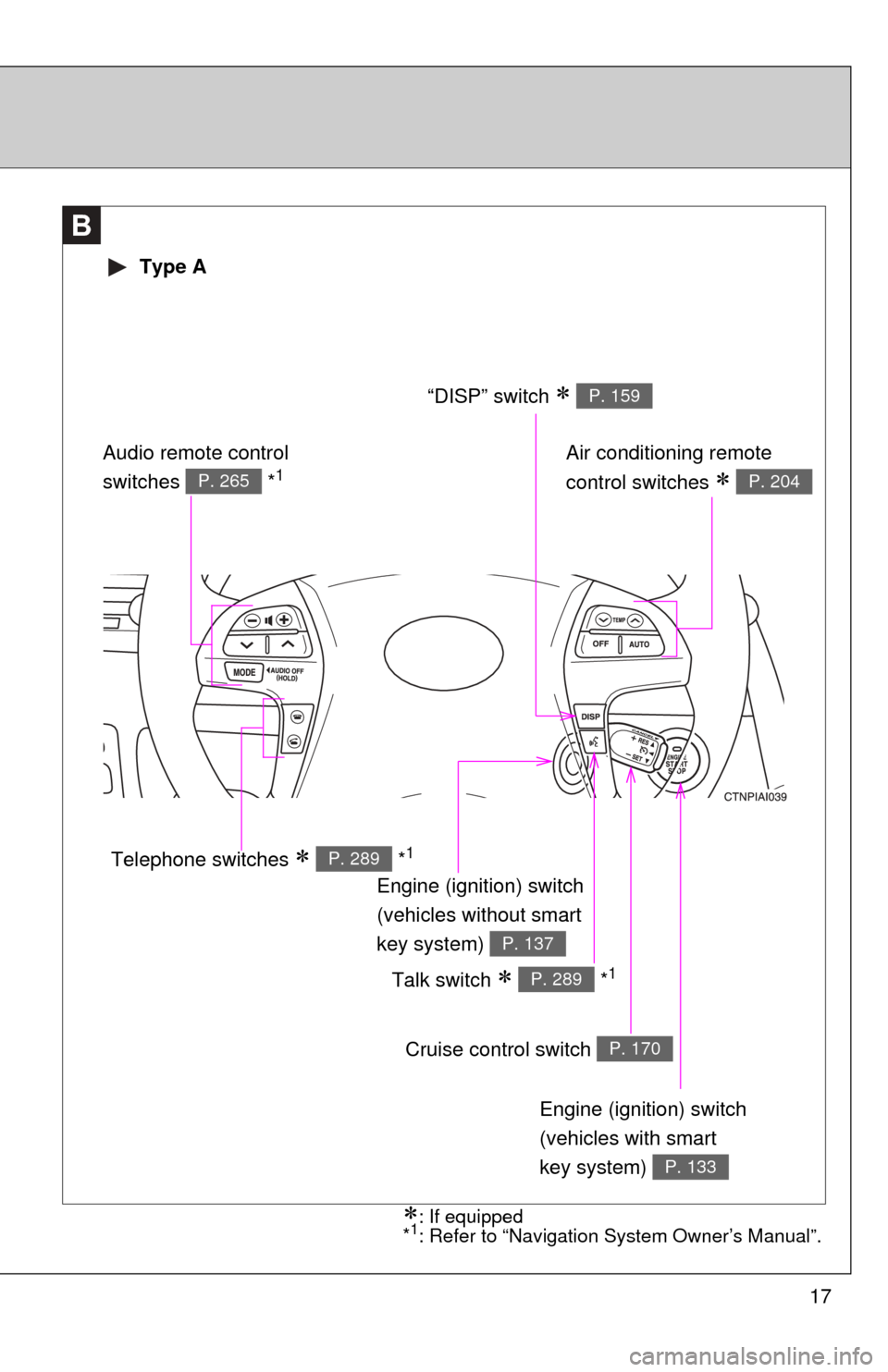
17
B
Engine (ignition) switch
(vehicles with smart
key system)
P. 133
Cruise control switch P. 170
Talk switch *1P. 289
Air conditioning remote
control switches
P. 204
Engine (ignition) switch
(vehicles without smart
key system)
P. 137
“DISP” switch P. 159
Telephone switches *1P. 289
Audio remote control
switches *1P. 265
Type A
: If equipped
*1: Refer to “Navigation System Owner’s Manual”.
Page 18 of 554
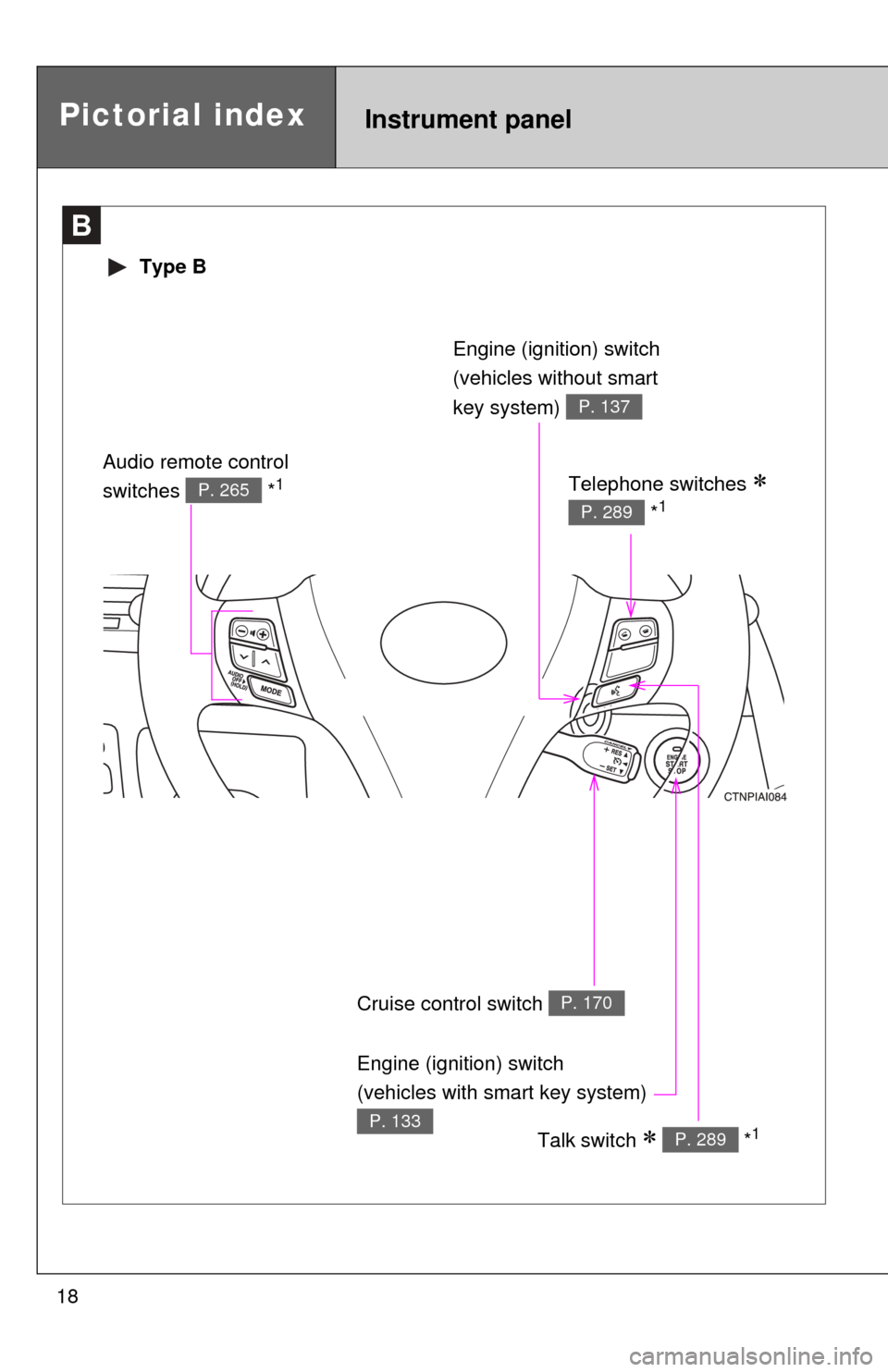
18
B
Type B
Cruise control switch P. 170
Talk switch *1P. 289
Engine (ignition) switch
(vehicles without smart
key system)
P. 137
Telephone switches
*1P. 289
Audio remote control
switches *1P. 265
Pictorial indexInstrument panel
Engine (ignition) switch
(vehicles with smart key system)
P. 133
Page 20 of 554

20
For your information
Main Owner’s Manual
Please note that this manual covers all models and all equipment, including
options. Therefore, you may find some explanations for equipment not
installed on your vehicle.
All specifications provided in this manual are current at the time of printing.
However, because of the Toyota policy of continual product improvement, we
reserve the right to make changes at any time without notice.
Depending on specifications, the vehicle shown in the illustrations may differ
from your vehicle in terms of equipment.
Noise from under vehicle after turning off the engine
Approximately five hours after the engine is turned off, you may hear sound
coming from under the vehicle for several minutes. This is the sound of a fuel
evaporation leakage check and, it does not indicate a malfunction.
Accessories, spare parts and modification of your Toyota
A wide variety of non-genuine spare parts and accessories for Toyota
vehicles are currently available on the market. You should know that these
parts are not covered by Toyota warranty and that Toyota is not responsible
for their performance, repair, or replacement, or for any damage they may
cause to, or adverse effect they may have on, your Toyota vehicle.
This vehicle should not be modified with non-genuine Toyota products.
Modification with non-genuine Toyota products could affect its performance,
safety or durability, and may even violate governmental regulations. In
addition, damage or performance problems resulting from the modification
may not be covered under warranty.
Page 25 of 554
Before driving1
25
1-1. Key informationKeys ................................... 26
1-2. Opening, closing and locking the doors and
trunk
Smart key system .............. 29
Wireless remote control ..... 40
Doors ................................. 44
Trunk .................................. 49
1-3. Adjustable components (seats, mirrors,
steering wheel)
Front seats ......................... 53
Rear seats.......................... 55
Head restraints................... 57
Seat belts ........................... 59
Steering wheel ................... 67
Anti-glare inside rear view mirror ....................... 68
Outside rear view mirrors.............................. 70 1-4. Opening and closing the
windows and moon roof
Power windows .................. 72
Moon roof ........................... 75
1-5. Refueling Opening the fuel tank cap ................................... 79
1-6. Theft deterrent system Engine immobilizer system ............................. 82
Alarm.................................. 85
1-7. Safety information Correct driving posture....... 88
SRS airbags ....................... 90
Front passenger occupant classification
system ........................... 102
Child restraint systems..... 107
Installing child restraints ........................ 111
Page 29 of 554
29
1
Before driving
1-2. Opening, closing and locking the doors and trunk
Smart key system
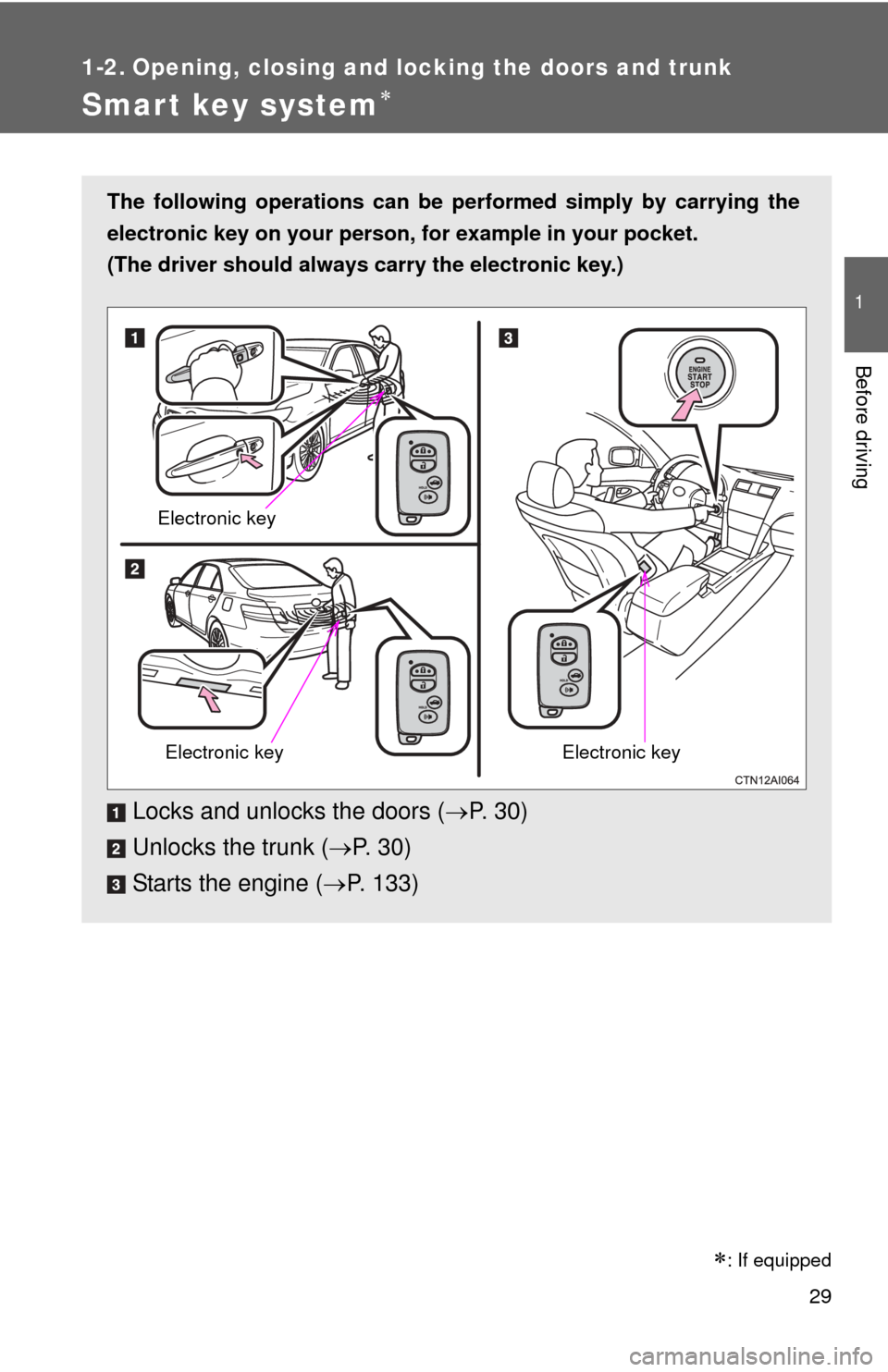
The following operations can be performed simply by carrying the
electronic key on your person, for example in your pocket.
(The driver should always carry the electronic key.)
Locks and unlocks the doors ( P. 3 0 )
Unlocks the trunk ( P. 3 0 )
Starts the engine ( P. 133)
Electronic key
Electronic keyElectronic key
: If equipped
Page 32 of 554
32 1-2. Opening, closing and locking the doors and trunk
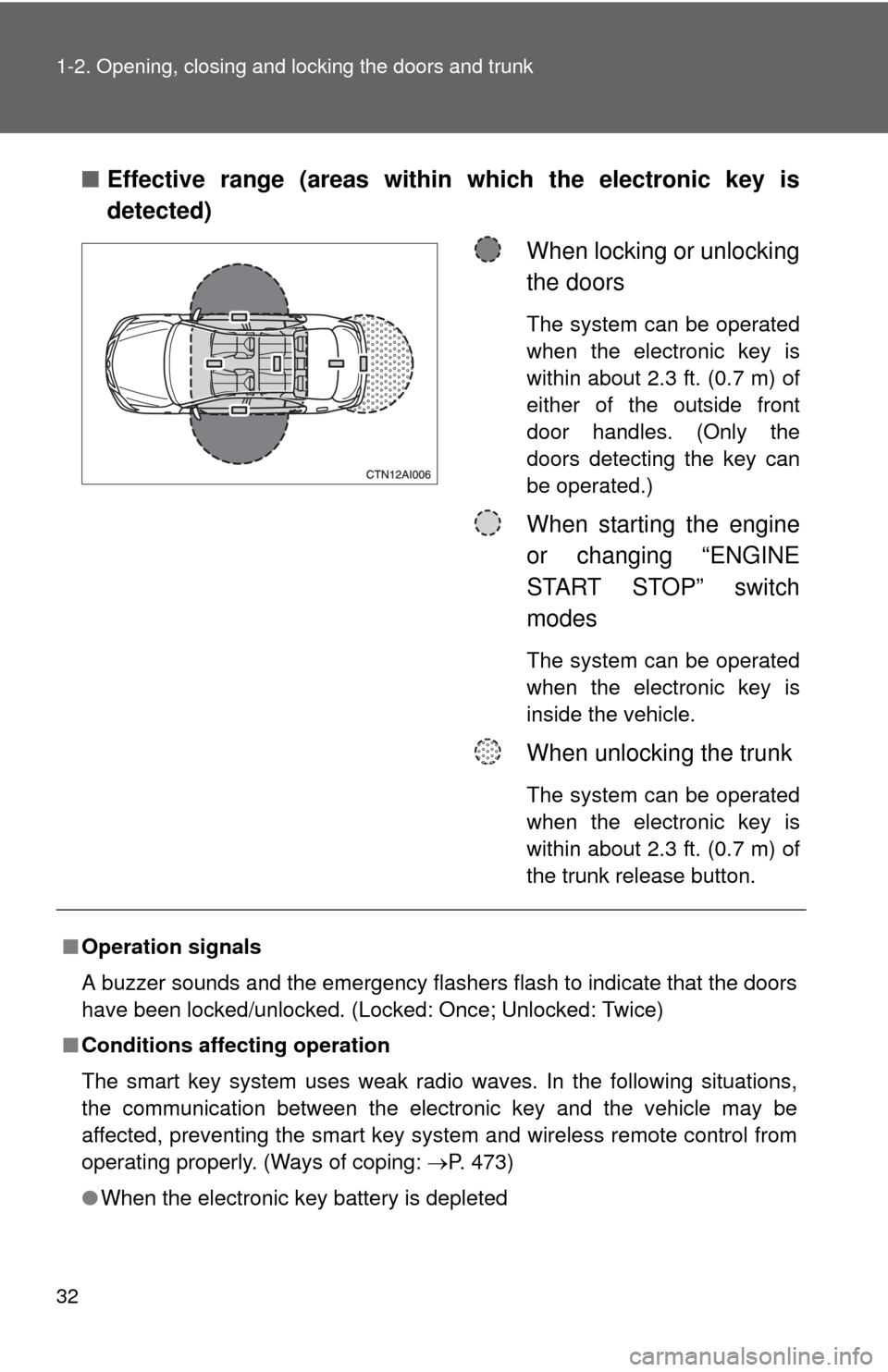
■Effective range (areas within which the electronic key is
detected)
When locking or unlocking
the doors
The system can be operated
when the electronic key is
within about 2.3 ft. (0.7 m) of
either of the outside front
door handles. (Only the
doors detecting the key can
be operated.)
When starting the engine
or changing “ENGINE
START STOP” switch
modes
The system can be operated
when the electronic key is
inside the vehicle.
When unlocking the trunk
The system can be operated
when the electronic key is
within about 2.3 ft. (0.7 m) of
the trunk release button.
■Operation signals
A buzzer sounds and the emergency flashers flash to indicate that the doors
have been locked/unlocked. (Locked: Once; Unlocked: Twice)
■ Conditions affecting operation
The smart key system uses weak radio waves. In the following situations,
the communication between the electronic key and the vehicle may be
affected, preventing the smart key system and wireless remote control from
operating properly. (Ways of coping: P. 473)
● When the electronic key battery is depleted
Page 33 of 554
33
1-2. Opening, closing and locking the doors and trunk
1
Before driving
●
Near a TV tower, electric power plant, gas station, radio station, large dis-
play, airport or other facility that generates strong radio waves or electri-
cal noise
● When carrying a portable radio, ce llular phone, cordless phone or other
wireless communication devices
● When the electronic key has come into contact with, or is covered by, a
metallic object
● When multiple electronic keys are in the vicinity
● When carrying or using the electronic key together with the following
devices that emit radio waves
• Another vehicle’s electronic key
• A wireless key that emits radio waves
• Personal computer
● If window tint with a metallic content or metallic objects are attached to
the rear window
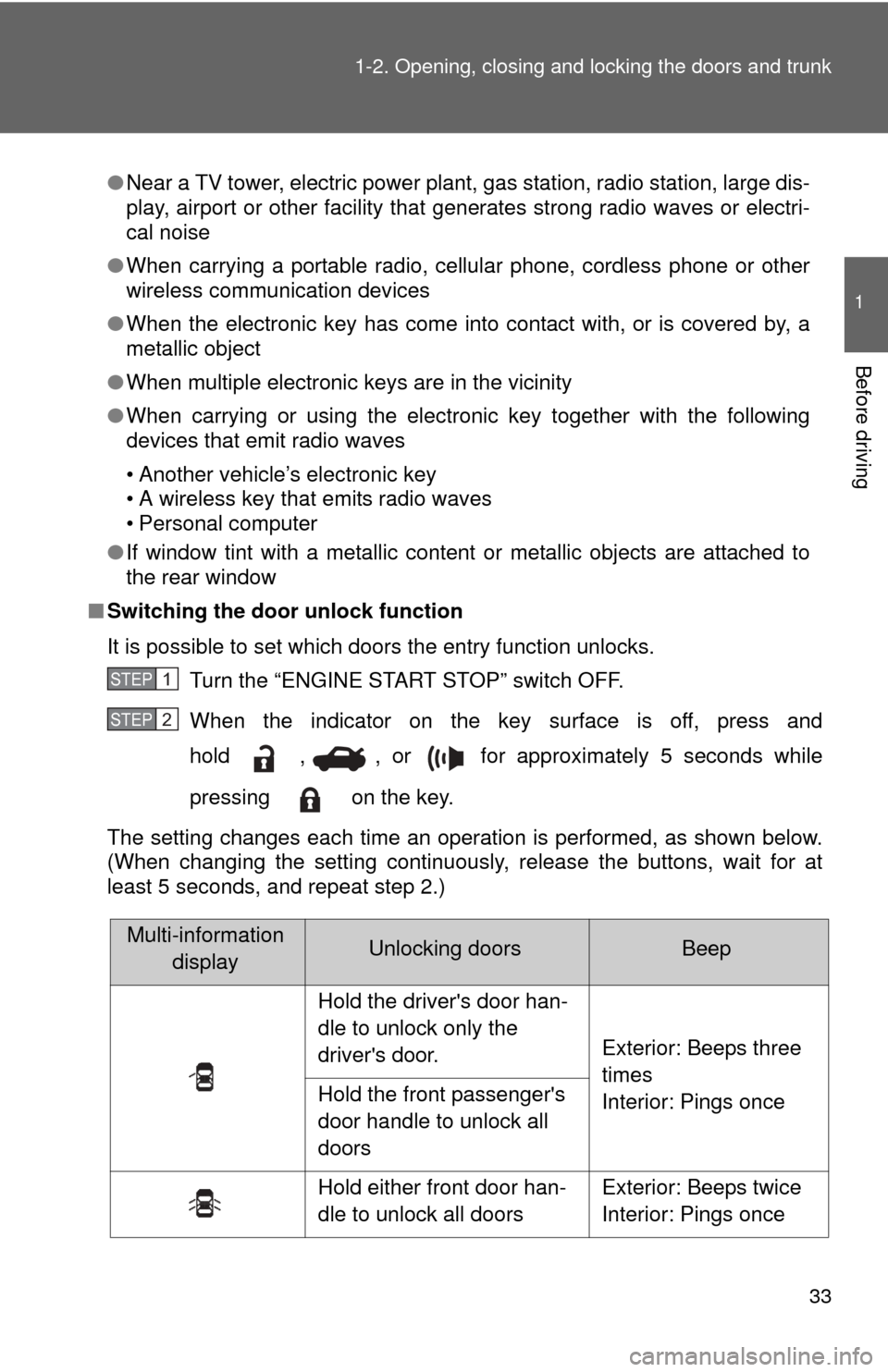
■ Switching the door unlock function
It is possible to set which doors the entry function unlocks.
Turn the “ENGINE START STOP” switch OFF.
When the indicator on the key surface is off, press and
hold , , or for approximately 5 seconds while
pressing on the key.
The setting changes each time an operation is performed, as shown below.
(When changing the setting continuously, release the buttons, wait for at
least 5 seconds, and repeat step 2.)
STEP1
STEP2
Multi-information displayUnlocking doorsBeep
Hold the driver's door han-
dle to unlock only the
driver's door. Exterior: Beeps three
times
Interior: Pings once
Hold the front passenger's
door handle to unlock all
doors
Hold either front door han-
dle to unlock all doors Exterior: Beeps twice
Interior: Pings once
Page 34 of 554
34 1-2. Opening, closing and locking the doors and trunk
Unlock the doors using the electronic key and open one of the
doors.
If a door is not opened within 60 seconds after is pressed, the
doors will be locked again and the alarm will automatically be set.
In case that the alarm is triggered, immediately stop the alarm.
(P. 85)
■ Battery-saving function
In the following circumstances, the entry function is disabled in order to pre-
vent the vehicle and electronic key batteries from discharging.
●When the entry function has not been used for 2 weeks or more
● When the electronic key has been left within approximately 6 ft. (2 m) of
the vehicle for 10 minutes or more
The system will resume operation when...
● The vehicle is locked using the door handle lock switch.
● The vehicle is locked/unlocked using the wireless remote control func-
tion. ( P. 4 0 )
● The vehicle is locked/unlocked using the mechanical key. ( P. 473)
■ Electronic key battery depletion
●The standard battery life is 1 to 2 years. (The battery becomes depleted
even if the electronic key is not used.) If the smart key system or the
wireless remote control function does not operate, or the detection area
becomes smaller, the battery may be depleted. Replace the battery when
necessary. ( P. 406)
● If the battery becomes low, an alarm will sound in the cabin when the
engine stops. ( P. 36, 454)
● To avoid serious deterioration, do not leave the electronic key within 3 ft.
(1 m) of the following electrical appliances that produce a magnetic field.
•TVs
• Personal computers
• Recharging cellular phones or cordless phones
• Table lampsSTEP3