battery TOYOTA CAMRY 2013 XV50 / 9.G Owner's Manual
[x] Cancel search | Manufacturer: TOYOTA, Model Year: 2013, Model line: CAMRY, Model: TOYOTA CAMRY 2013 XV50 / 9.GPages: 540, PDF Size: 7 MB
Page 295 of 540

295
3-3. Using the interior lights
3
Interior features
■
Illuminated entry system
Vehicles without a smart key system
The lights automatically turn on/off according to the engine switch position,
whether the doors are locked/unlocked, and whether the doors are open/
closed.
Vehicles with a smart key system
The lights automatically turn on/off according to “ENGINE START STOP”
switch mode, the presence of the electronic key, whether the doors are
locked/unlocked, and whether the doors are open/closed.
■ To prevent battery discharge
Vehicles without a smart key system
If the interior lights, personal lights and/or door courtesy lights are left on
when the engine switch is turned to the “LOCK” position, the lights will go off
automatically after 20 minutes.
Vehicles with a smart key system
If the interior lights, personal lights and/or door courtesy lights are left on
when the “ENGINE START STOP” switch is turned off, the lights will go off
automatically after 20 minutes.
■ Customization that can be co nfigured at Toyota dealer
Settings (e.g. the time elapsed before lights turn off) can be changed.
(Customizable features P. 501)
Personal lights
Page 306 of 540
306
3-5. Other interior features
Vanity mirrors
■To prevent battery discharge ( vehicles with vanity lights)
If the vanity lights remain on for 20 minutes while the engine is off, the lights
will turn off automatically.
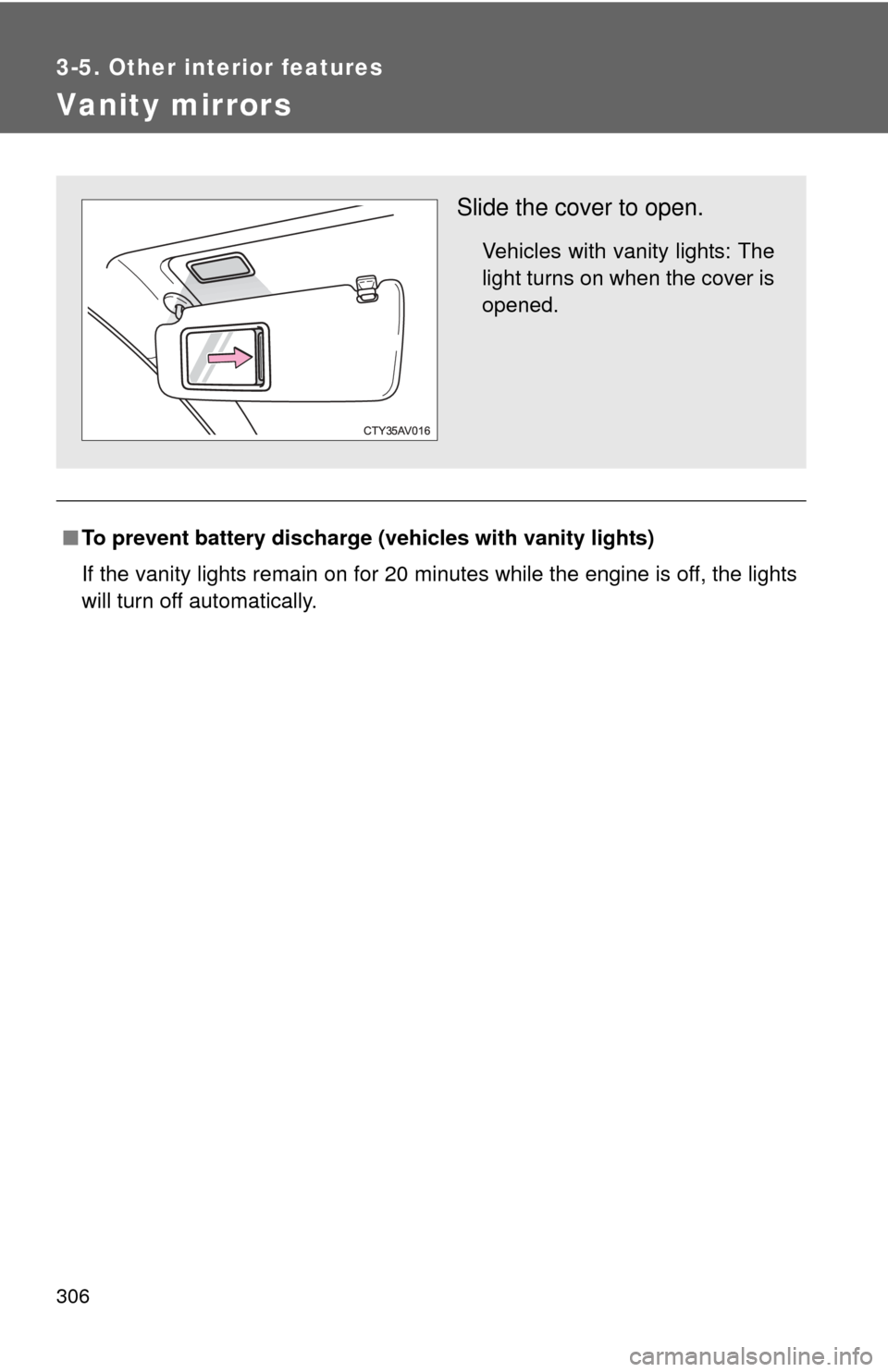
Slide the cover to open.
Vehicles with vanity lights: The
light turns on when the cover is
opened.
Page 307 of 540
307
3-5. Other interior features
3
Interior features
Clock
■The clock is displayed when
Vehicles without a smart key system
The engine switch is in the “ACC” or “ON” position.
Vehicles with a smart key system
The “ENGINE START STOP” switch is in ACCESSORY or IGNITION ON
mode.
■ When disconnecting and reco nnecting battery terminals
The time display will automatically be set to 1:00.
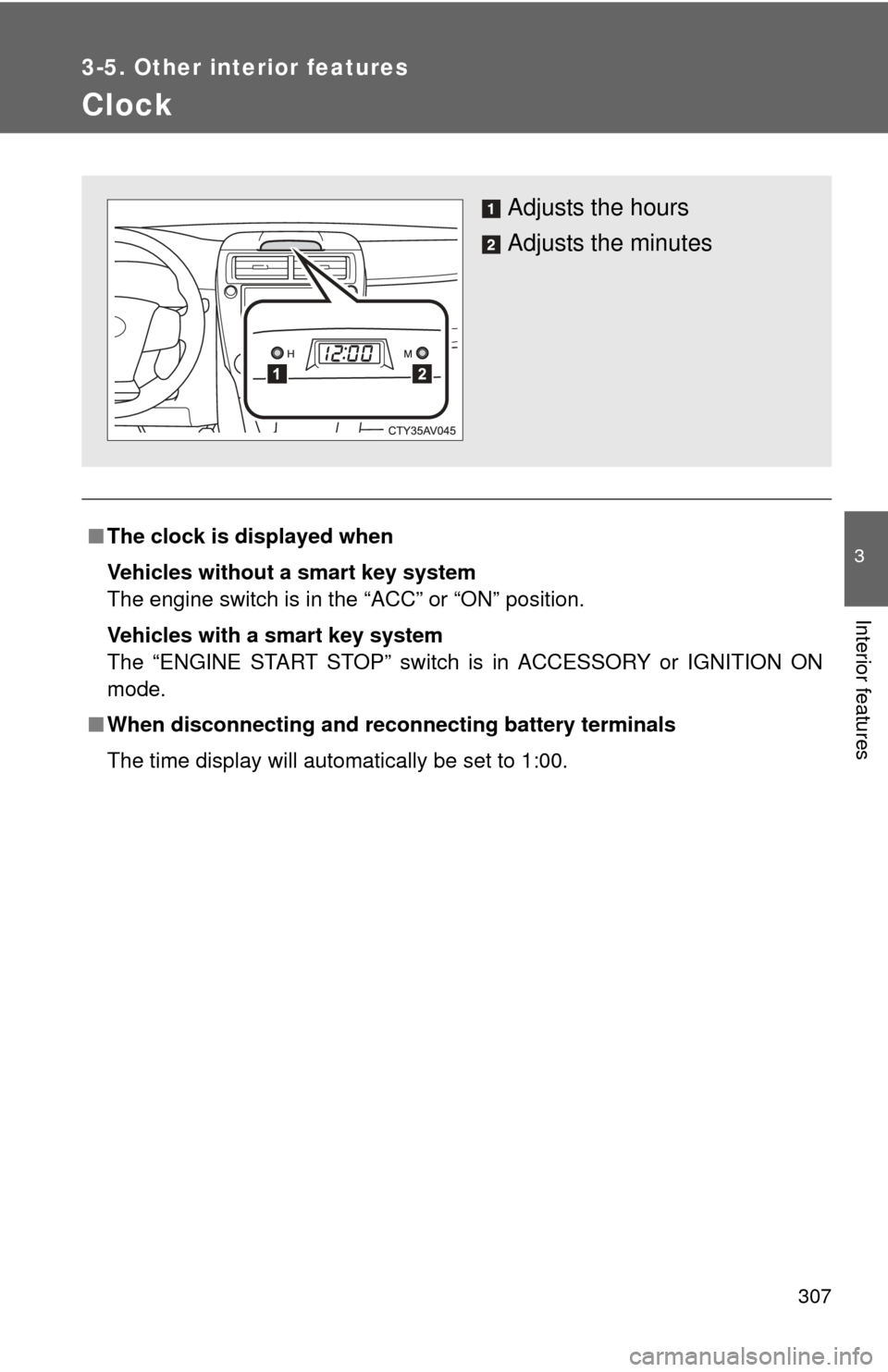
Adjusts the hours
Adjusts the minutes
Page 313 of 540

313
3-5. Other interior features
3
Interior features
NOTICE
■
To avoid damaging the power outlet
Close the power outlet lid when the power outlet is not in use.
Foreign objects or liquids that enter the power outlet may cause a short cir-
cuit.
■ To prevent blown fuse
Do not use an accessory that uses more than 12 V 10 A.
■ To prevent battery discharge
Do not use the power outlet longer than necessary when the engine is not\
running.
Page 315 of 540
315
3-5. Other interior features
3
Interior features
CAUTION
■
Burns
●Use caution when seating the following persons in a seat with the seat
heater on to avoid the possibility of burns:
• Babies, small children, the elderly, the sick and the physically chal-
lenged
• Persons with sensitive skin
• Persons who are fatigued
• Persons who have taken alcohol or drugs that induce sleep (sleeping drugs, cold remedies, etc.)
● Do not cover the seat with anything when using the seat heater.
Using the seat heater with a blanket or cushion increases the temperature
of the seat and may lead to overheating.
● Do not use the seat heater more than necessary. Doing so may cause
minor burns or overheating.
NOTICE
■To prevent seat heater damage
Do not put heavy objects that have an uneven surface on the seat and do
not stick sharp objects (needles, nails, etc.) into the seat.
■ To prevent battery discharge
Turn the seat heaters off when the engine is not running.
Page 328 of 540

328 3-5. Other interior features
■Before programming
●Install a new battery in the remote control transmitter.
● The battery side of the remote control transmitter must be pointed away
from the HomeLink
button.
■ To prevent battery discharge
Vehicles without a smart key system:
HomeLink
will turn off if a door has not been opened and closed for 20 min-
utes or the engine switch is left turned off. (After which programming cannot
be completed.) Open and close a door or turn the engine switch to the
“ACC” position to turn HomeLink
on. We recommend programming while
the engine switch is in the “ACC” position.
Vehicles with a smart key system:
HomeLink
will turn off if a door has not been opened and closed for 20 min-
utes or the “ENGINE START STOP” switch is left turned off. (After which pro-
gramming cannot be completed.) Open and close a door or turn the
“ENGINE START STOP” switch to ACCESSORY mode to turn HomeLink
on. We recommend programming while the “ENGINE START STOP” switch
is in ACCESSORY mode.
■ Certification for the garage door opener
U.S.A.
FCC ID: CB2051AHL4/CB251AHL4NR
NOTE:
This device complies with Part 15 of the FCC Rules. Operation is subject to
the following two conditions: (1) this device may not cause harmful interfer-
ence, and (2) this device must accept any interference received, including
interference that may cause undesired operation.
FCC WARNING:
Changes or modifications not expressly approved by the party responsible
for compliance could void the user's authority to operate the equipment.
Canada
IC ID: 051AHL4/51AHL4NR
NOTE:
Operation is subject to the following two conditions: (1) this device may not
cause interference, and (2) this device must accept any interference, includ-
ing interference that may cause undesired operation of the device.
Page 332 of 540
332 3-5. Other interior features
Referring to the map above, press “AUTO” to select the num-
ber of the zone you are in.
If the direction is displayed several seconds after adjustment, the
calibration is complete.
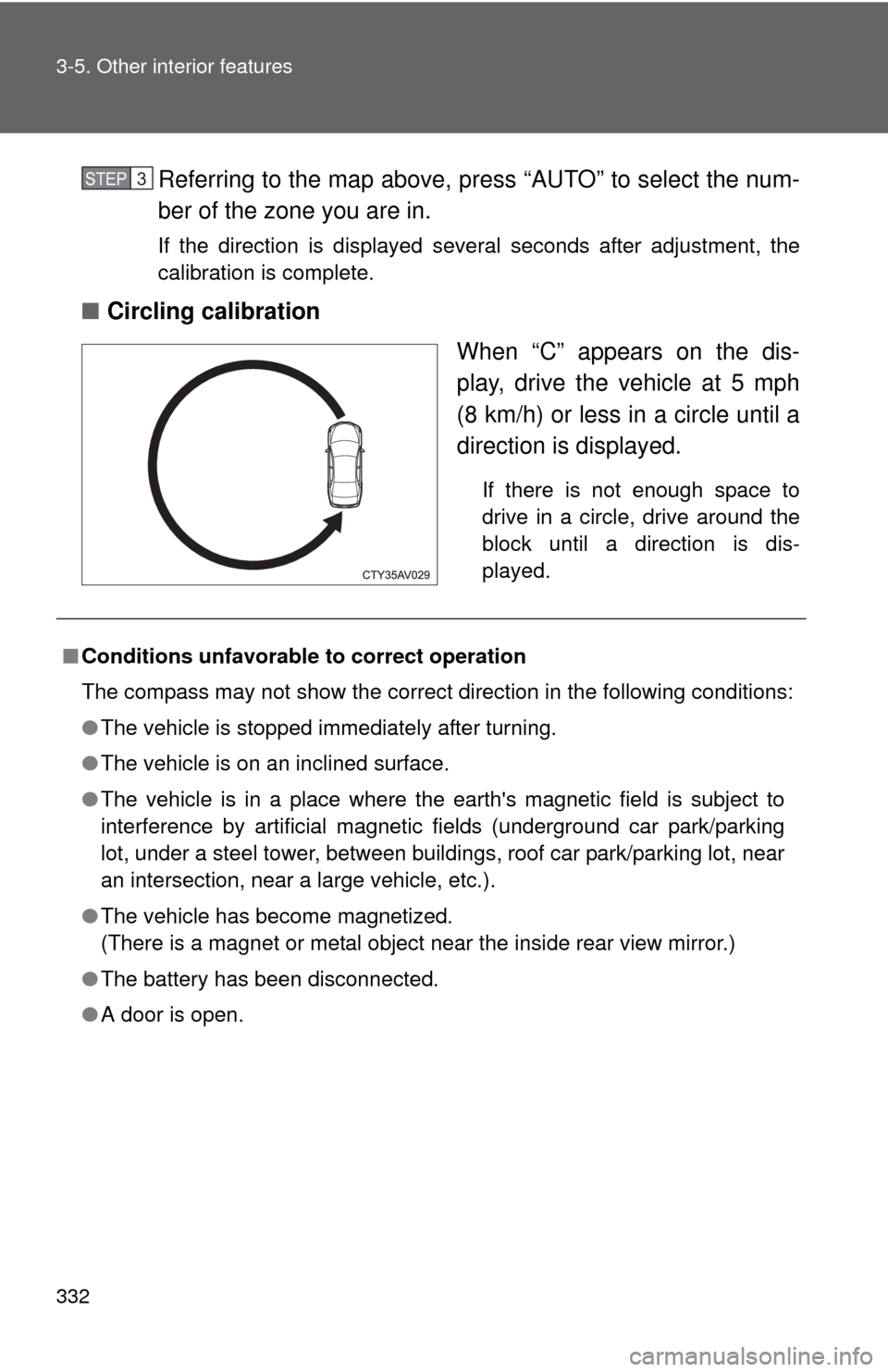
■Circling calibration
When “C” appears on the dis-
play, drive the vehicle at 5 mph
(8 km/h) or less in a circle until a
direction is displayed.
If there is not enough space to
drive in a circle, drive around the
block until a direction is dis-
played.
STEP3
■Conditions unfavorable to correct operation
The compass may not show the correct direction in the following conditions:
●The vehicle is stopped immediately after turning.
● The vehicle is on an inclined surface.
● The vehicle is in a place where the earth's magnetic field is subject to
interference by artificial magnetic fields (underground car park/parking
lot, under a steel tower, between buildings, roof car park/parking lot, near
an intersection, near a large vehicle, etc.).
● The vehicle has become magnetized.
(There is a magnet or metal object near the inside rear view mirror.)
● The battery has been disconnected.
● A door is open.
Page 341 of 540
Maintenance and care4
341
4-1. Maintenance and careCleaning and protecting the vehicle exterior ......... 342
Cleaning and protecting the vehicle interior .......... 345
4-2. Maintenance Maintenance requirements .................. 348
General maintenance....... 351
Emission inspection and maintenance (I/M)
programs........................ 355
4-3. Do-it-yourself maintenance
Do-it-yourself service precautions .................... 356
Hood ................................ 359
Positioning a floor jack ..... 360
Engine compartment ........ 362
Tires ................................. 376
Tire inflation pressure ...... 382
Wheels ............................. 386
Air conditioning filter......... 389
Wireless remote control/ electronic key battery ..... 391
Checking and replacing fuses .............................. 396
Light bulbs........................ 408
Page 343 of 540
343
4-1. Maintenance and care
4
Maintenance and care
■
When using a car wash (veh icles with a smart key system)
If the door handle becomes wet while the electronic key is within the effec-
tive range, the door may lock and unlock repeatedly. In that case, follow the
following correction procedures to wash the vehicle:
● Place the electronic key in a location 6 ft. (2 m) or more away from the
vehicle. (Take care to ensure that the key is not stolen.)
● Set the electronic key to battery-saving mode to disable the smart key
system. ( P. 39)
■ Aluminum wheels (if equipped)
●Remove any dirt immediately by using a neutral detergent. Do not use
hard brushes or abrasive cleaners. Do not use strong or harsh chemical
cleaners. Use the same mild detergent and wax as used on the paint.
● Do not use detergent on the wheels when they are hot, for example after
driving for long distance in the hot weather.
● Wash detergent from the wheels immediately after use.
■ Bumpers
Do not scrub with abrasive cleaners.
CAUTION
■When washing the vehicle
Do not apply water to the inside of the engine compartment. Doing so may
cause the electrical components etc. to catch fire.
■ Precautions regardin g the exhaust pipe
Exhaust gasses cause the exhaust pipe to become quite hot.
When washing the vehicle, be careful not to touch the pipe until it has cooled
sufficiently, as touching a hot exhaust pipe can cause burns.
■ Precaution regarding th e Blind Spot Monitor
If the paint of the rear bumper is chipped or scratched, the system may mal-
function. If this occurs, consult your Toyota dealer.
Page 350 of 540

350 4-2. Maintenance
CAUTION
■If your vehicle is not properly maintained
Improper maintenance could result in serious damage to the vehicle and
possible serious injury or death.
■ Handling of the battery
●Engine exhaust, some of its constituents, and a wide variety of automobile
components contain or emit chemicals known to the State of California to
cause cancer and birth defects and other reproductive harm. Work in a
well ventilated area.
● Oils, fuels and fluids contained in vehicles as well as waste produced by
component wear contain or emit chemicals known to the State of
California to cause cancer and birth defects or other reproductive harm.
Avoid exposure and wash any affected area immediately.
● Battery posts, terminals and related accessories contain lead and lead
compounds which are known to cause brain damage. Wash your hands
after handling. ( P. 372)