air conditioning TOYOTA CAMRY 2014 XV50 / 9.G Owner's Manual
[x] Cancel search | Manufacturer: TOYOTA, Model Year: 2014, Model line: CAMRY, Model: TOYOTA CAMRY 2014 XV50 / 9.GPages: 620, PDF Size: 7.47 MB
Page 253 of 620
253
3-1. Using the air conditioning system and defogger
3
Interior features
Rear window and outside rear view mirror defoggers
■The defoggers can be operated when
Vehicles without a smart key system
The engine switch is in the “ON” position.
Vehicles with a smart key system
The “ENGINE START STOP” switch is in IGNITION ON mode.
■ The outside rear view mirr or defoggers (if equipped)
Turning the rear window defogger on will turn the outside rear view mirror
defoggers on.
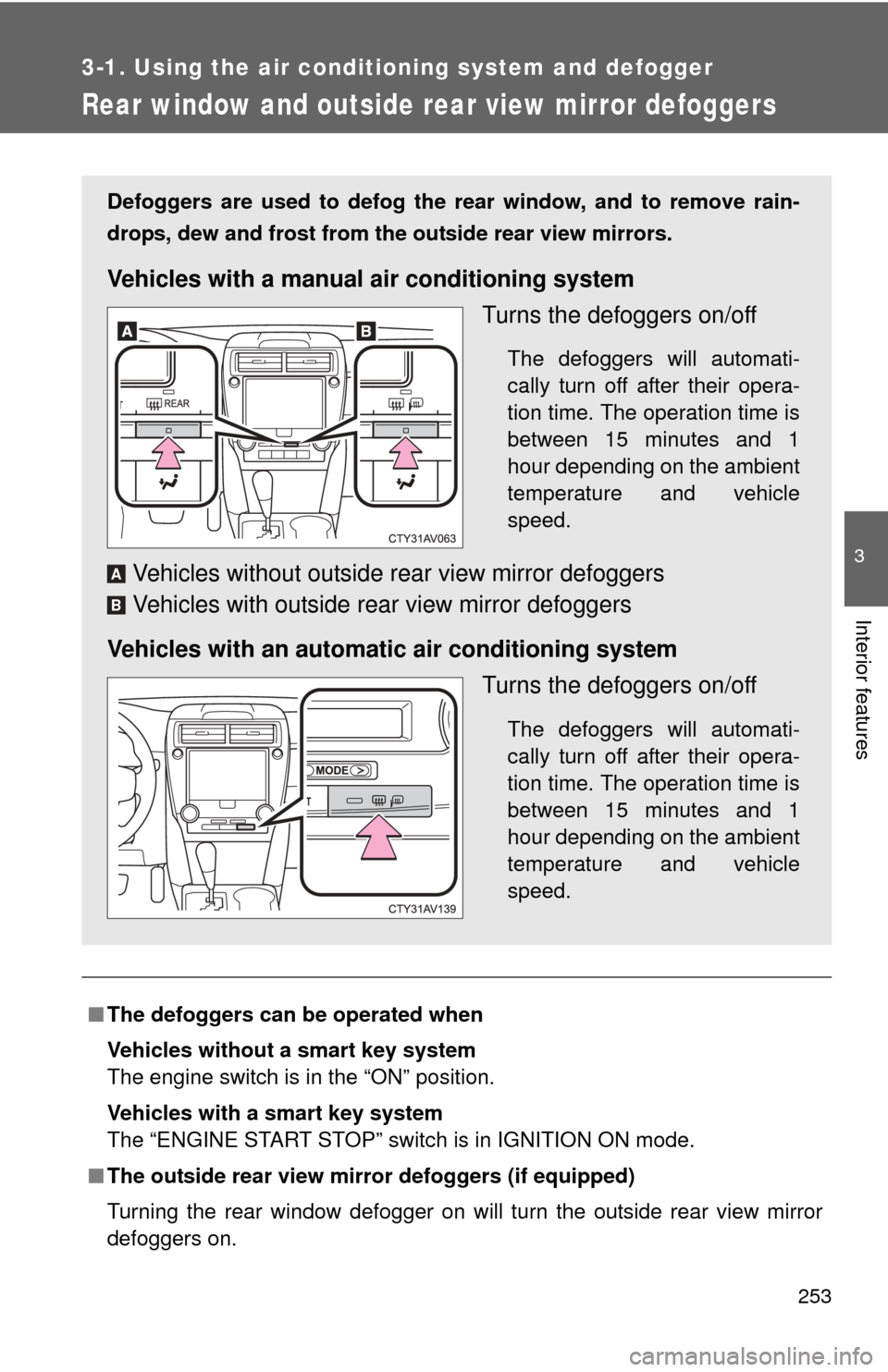
Defoggers are used to defog the rear window, and to remove rain-
drops, dew and frost from the outside rear view mirrors.
Vehicles with a manual air conditioning system
Turns the defoggers on/off
The defoggers will automati-
cally turn off after their opera-
tion time. The operation time is
between 15 minutes and 1
hour depending on the ambient
temperature and vehicle
speed.
Vehicles without outside rear view mirror defoggers
Vehicles with outside rear view mirror defoggers
Vehicles with an automatic air conditioning system Turns the defoggers on/off
The defoggers will automati-
cally turn off after their opera-
tion time. The operation time is
between 15 minutes and 1
hour depending on the ambient
temperature and vehicle
speed.
A
B
Page 254 of 620

254 3-1. Using the air conditioning system and defogger
CAUTION
■When the outside rear view mirr or defoggers are on (if equipped)
Do not touch the outside surface of the rear view mirrors, as they can
become very hot and burn you.
Page 352 of 620

352
3-2. Using the audio system
Bluetooth®
■When using the Bluetooth® audio system
● In the following conditions, the system may not function.
• If the portable audio player is turned off
• If the portable audio player is not connected
• If the portable audio player’s battery is low
● There may be a delay if a cellular phone connection is made during
Bluetooth
® audio play.
● Depending on the type of portable audio player that is connected to the
system, operation may differ slightly and certain functions may not be
available.
■ When using the hands-free system
●The audio system is muted when making a call.
● If both parties speak at the same time, it may be difficult to hear.
● If the received call volume is overly loud, an echo may be heard.
If the Bluetooth
® phone is too close to the system, quality of the sound
may deteriorate and connection status may deteriorate.
● In the following circumstances, it may be difficult to hear the other party:
• When driving on unpaved roads
• When driving at high speeds
• If a window is open
• If the air conditioning is blowing directly on the microphone
• If there is interference from the network of the cellular phone
■ Conditions under which th e system will not operate
● If using a cellular phone that does not support Bluetooth
®
●If the cellular phone is turned off
● If you are outside of cellular phone service coverage
● If the cellular phone is not connected
● If the cellular phone’s battery is low
● When outgoing calls are controlled, due to heavy traffic on telephone
lines, etc.
● When the cellular phone itself cannot be used
● When transferring phonebook data from the cellular phone
Page 358 of 620
358 3-2. Using the audio system
Casual speech recognizationDue to natural language speech re cognition technology, this system
enables recognition of a command when spoken naturally. However,
the system cannot recognize ev ery variation of each command.
In some situations, it is possible to omit the command for the proce-
dure and directly state the desired operation.
Not all voice commands are displayed in the short cut menu.
This function is available in English, Spanish and French.
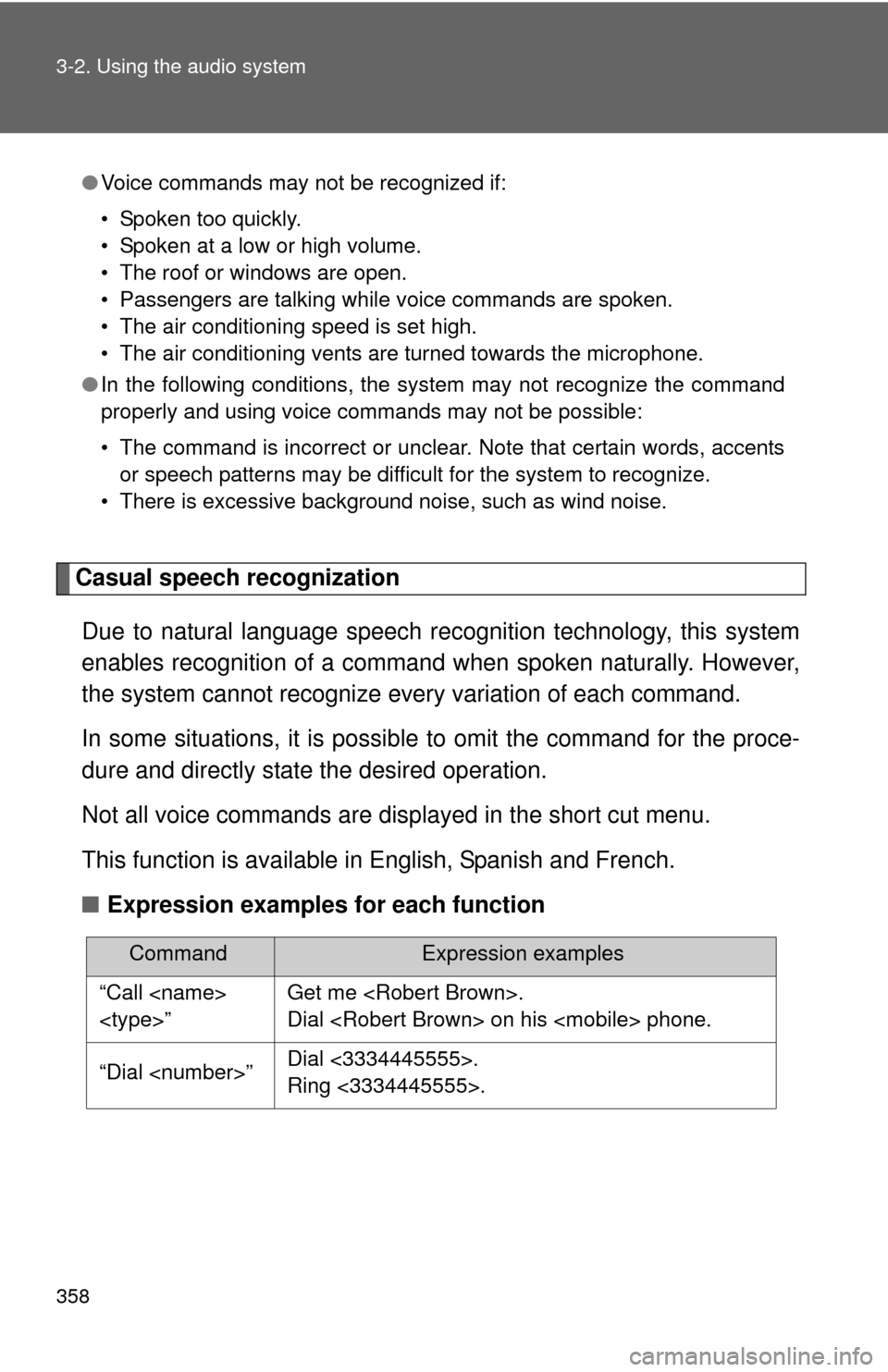
■ Expression examples for each function
●Voice commands may not be recognized if:
• Spoken too quickly.
• Spoken at a low or high volume.
• The roof or windows are open.
• Passengers are talking while voice commands are spoken.
• The air conditioning speed is set high.
• The air conditioning vents are turned towards the microphone.
● In the following conditions, the system may not recognize the command
properly and using voice commands may not be possible:
• The command is incorrect or unclear. Note that certain words, accents
or speech patterns may be difficult for the system to recognize.
• There is excessive background noise, such as wind noise.
CommandExpression examples
“Call
Dial
“Dial
Ring <3334445555>.
Page 419 of 620
Maintenance and care4
419
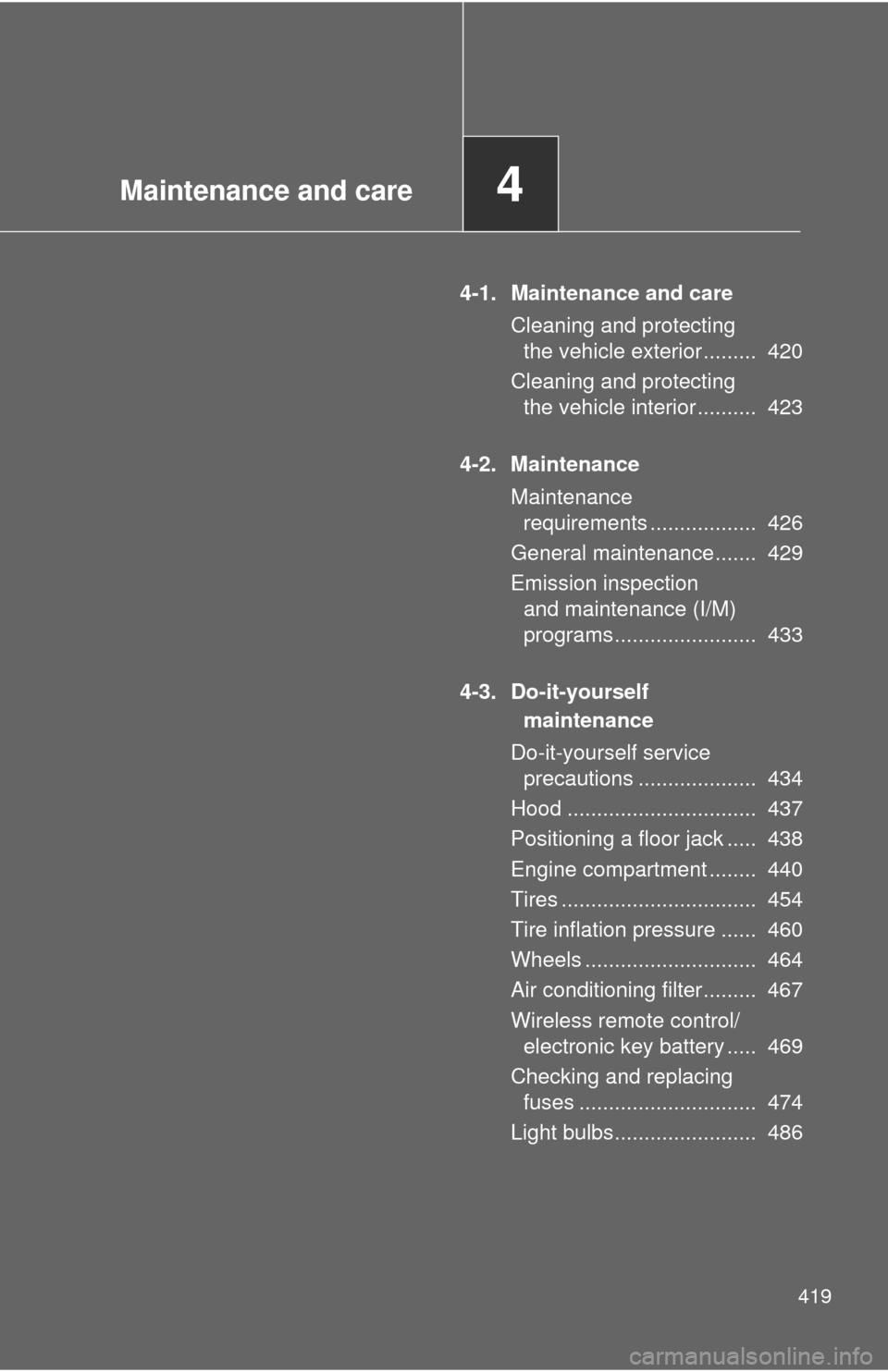
4-1. Maintenance and careCleaning and protecting the vehicle exterior ......... 420
Cleaning and protecting the vehicle interior .......... 423
4-2. Maintenance Maintenance requirements .................. 426
General maintenance....... 429
Emission inspection and maintenance (I/M)
programs........................ 433
4-3. Do-it-yourself maintenance
Do-it-yourself service precautions .................... 434
Hood ................................ 437
Positioning a floor jack ..... 438
Engine compartment ........ 440
Tires ................................. 454
Tire inflation pressure ...... 460
Wheels ............................. 464
Air conditioning filter......... 467
Wireless remote control/ electronic key battery ..... 469
Checking and replacing fuses .............................. 474
Light bulbs........................ 486
Page 436 of 620

436 4-3. Do-it-yourself maintenance
CAUTION
The engine compartment contains many mechanisms and fluids that may
move suddenly, become hot, or become electrically energized. To avoid death
or serious injury, observe the following precautions:
■When working on the engine compartment:
● Keep hands, clothing and tools away from the moving fan and engine
drive belt.
● Be careful not to touch the engine, radiator, exhaust manifold, etc. right
after driving as they may be hot. Oil and other fluids may also be hot.
● Do not leave anything that may burn easily, such as paper or rags, in the
engine compartment.
● Do not smoke, cause sparks or expose an open flame to fuel or the bat-
tery. Fuel and battery fumes are flammable.
● Be extremely cautious when working on the battery. It contains poisonous
and corrosive sulfuric acid.
■ When working near the electric c ooling fans or radiator grille
Vehicles without a smart key system: Be sure the engine switch is off. With
the engine switch in the “ON” position, the electric cooling fans may auto-
matically start to run if the air conditioning is on and/or the coolant tempera-
ture is high. ( P. 448)
Vehicles with a smart key system: Be sure the “ENGINE START STOP”
switch is off. With the “ENGINE START STOP” switch in IGNITION ON
mode, the electric cooling fans may automatically start to run if the air condi-
tioning is on and/or the coolant temperature is high. ( P. 448)
■ Safety glasses
Wear safety glasses to prevent flying or falling material, fluid spray, etc. from
getting in your eyes.
NOTICE
■If you remove the air cleaner filter
Driving with the air cleaner filter removed may cause excessive engine wear
due to dirt in the air.
Page 467 of 620
467
4-3. Do-it-yourself maintenance
4
Maintenance and care
Air conditioning filter
The air conditioning filter must be changed regularly to maintain air
conditioning efficiency.
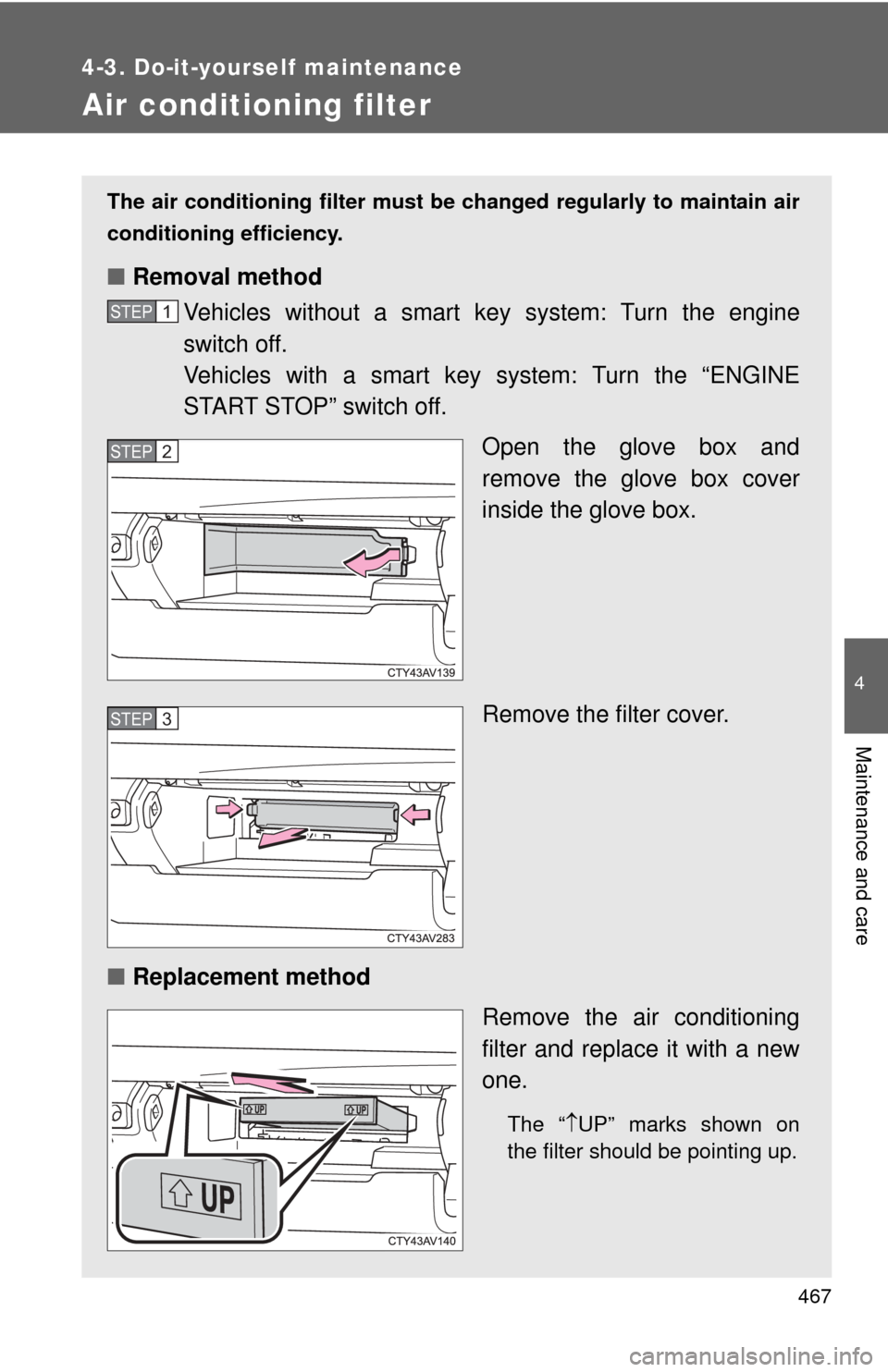
■ Removal method
Vehicles without a smart ke y system: Turn the engine
switch off.
Vehicles with a smart key system: Turn the “ENGINE
START STOP” switch off.
Open the glove box and
remove the glove box cover
inside the glove box.
Remove the filter cover.
■ Replacement method
Remove the air conditioning
filter and replace it with a new
one.
The “UP” marks shown on
the filter should be pointing up.
STEP1
STEP2
STEP3
Page 468 of 620

468 4-3. Do-it-yourself maintenance
■Checking interval
Inspect and replace the air conditioning filter according to the maintenance
schedule. In dusty areas or areas wit h heavy traffic flow, early replacement
may be required. (For scheduled maintenance information, please refer to
the “Scheduled Maintenance Guide” or “Owner’s Manual Supplement”.)
■ If air flow from the vents decreases dramatically
The filter may be clogged. Check the filter and replace if necessary.
NOTICE
■When using the air conditioning system
Make sure that a filter is always installed.
Using the air conditioning system without a filter may cause damage to the
system.
Page 478 of 620

478 4-3. Do-it-yourself maintenance
FuseAmpereCircuit
1 METER-IG2 5 A Gauge and meters
2FAN*
150 A Electric cooling fans
3 H-LP CLN 30 A No circuit
4 HTR 50 A Air conditioning system
5 ALT 120 A Charging system
6 ABS NO.2 30 A Vehicle stability control system
7 ST/AM2 30 A Starter system, ECU-IG2 NO.1,
A/B, ECU-IG2 NO.2
8 H-LP-MAIN 30 A H-LP LH-LO, H-LP RH-LO, MNL
H-LP LVL, headlights (low beam)
9 ABS NO.1 50 A Vehicle stability control system
10 EPS 80 A Electric power steering
11 S-HORN 7.5 A S-HORN
12 HORN 10 A Horns
13 EFI NO.2 15 A Multiport fuel injection system/
sequential multiport fuel injection
system, electronic controlled trans-
mission
14 EFI NO.3 7.5 A*
2Multiport fuel injection system/
sequential multiport fuel injection
system
10 A*
1
15 INJ
7.5 AMultiport fuel injection system/
sequential multiport fuel injection
system
16 ECU-IG2 NO.3 7.5 A Multiport fuel injection system/
sequential multiport fuel injection
system, steering lock system, elec-
tronic controlled transmission
17 IGN 15 A Starter system
18 D/L-AM2 20 A No circuit
Page 482 of 620

482 4-3. Do-it-yourself maintenance
4 TAIL15 AParking lights, side marker lights,
tail lights, license plate lights, fog
lights
5 EPS-IG1 7.5 A Electric power steering
6 ECU-IG1 NO.3 7.5 A Blind Spot Monitor
7 S/HTR&FAN
F/L 10 A Seat heaters
8 H-LP LVL 7.5 A No circuit
9 WASHER 10 A Windshield wipers and washer
10 A/C-IG1 7.5 A Air conditioning system
11 WIPER 25 A Windshield wipers and washer
12 BKUP LP 7.5 ABack-up lights, multiport fuel injec-
tion system/sequential multiport
fuel injection system, electronic
controlled transmission, audio sys-
tem, navigation system
13 DOOR NO.1 30 A Power windows
14 WIPER-S 5 A No circuit
15 P/OUTLET RR 20 A Power outlet
16 SFT LOCK-
ACC 5 A Shift lock control system
17 DOOR R/R 20 A Rear right-hand power windows
18 DOOR R/L 20 A Rear left-hand power windows
19 OBD 10 A On-Board diagnosis system
20 ECU-B NO.2 10 A Smart key system, tire pressure
warning system
21 DOOR NO.2 20 A Power windows
22 AM1 7.5 AMultiport fuel injection system/
sequential multiport fuel injection
system, starter system
FuseAmpereCircuit