phone TOYOTA CAMRY 2016 XV50 / 9.G Quick Reference Guide
[x] Cancel search | Manufacturer: TOYOTA, Model Year: 2016, Model line: CAMRY, Model: TOYOTA CAMRY 2016 XV50 / 9.GPages: 48, PDF Size: 1.46 MB
Page 3 of 48
OVERVIEW
FEATURES/OPERATIONS
SAFETY AND EMERGENCY FEATURES
1
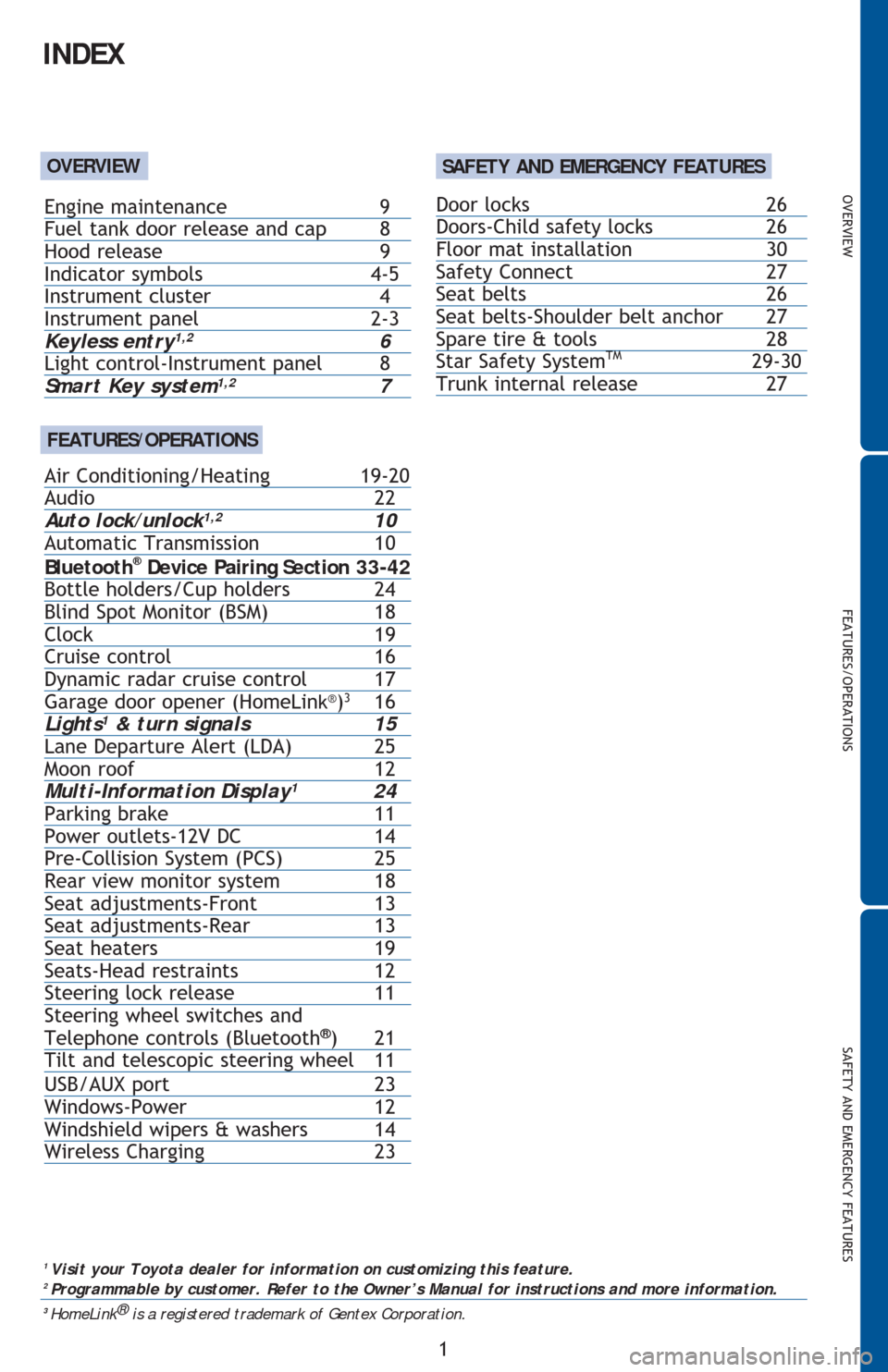
INDEX
1
Visit your Toyota dealer for information on customizing this feature.2 Programmable by customer. Refer to the Owner’s Manual for instructions and more information.3
HomeLink®
is a registered trademark of Gentex Corporation.
OVERVIEW
FEATURES/OPERATIONS
Door locks 26
Doors-Child safety locks 26
Floor mat installation 30
Safety Connect 27
Seat belts 26
Seat belts-Shoulder belt anchor 27
Spare tire & tools 28
Star Safety System
TM 29-30
Trunk internal release 27
Engine maintenance 9
Fuel tank door release and cap 8
Hood release 9
Indicator symbols 4-5
Instrument cluster 4
Instrument panel
2-3Keyless entry1,2 6
Light control-Instrument panel 8
Smart Key system1,2 7
Air Conditioning/Heating 19-20
Audio 22
Auto lock/unlock
1,2 10
Automatic Transmission 10
Bluetooth
® Device Pairing Section 33-42
Bottle holders/Cup holders 24
Blind Spot Monitor (BSM) 18
Clock 19
Cruise control 16
Dynamic radar cruise control 17
Garage door opener (HomeLin
k®)3
16
Light
s1 & turn signals 15
Lane Departure Alert (LDA) 25
Moon roof 12
Multi-Information Display
1 24
Parking brake 11
Power outlets-12V DC 14
Pre-Collision System (PCS) 25
Rear view monitor system 18
Seat adjustments-Front 13
Seat adjustments-Rear 13
Seat heaters 19
Seats-Head restraints 12
Steering lock release 11
Steering wheel switches and
Telephone controls (Bluetooth
®) 21
Tilt and telescopic steering wheel 11
USB/AUX port 23
Windows-Power 12
Windshield wipers & washers 14
Wireless Charging 23
SAFETY AND EMERGENCY FEATURES
Page 4 of 48
2
OVERVIEW
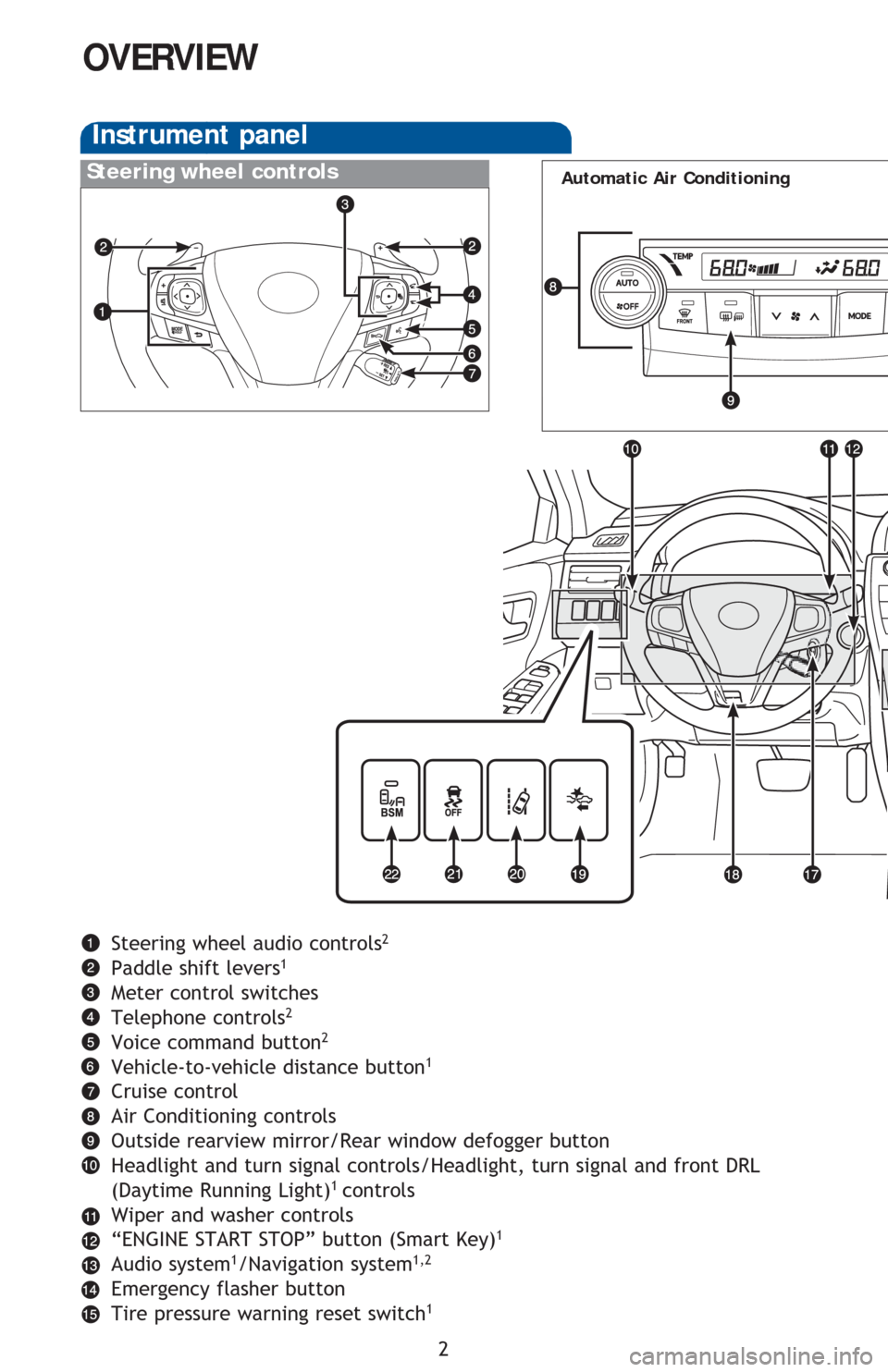
Instrument panel
Steering wheel audio controls2
Paddle shift levers1
Meter control switches
Telephone controls2
Voice command button2
Vehicle-to-vehicle distance button1
Cruise control
Air Conditioning controls
Outside rearview mirror/Rear window defogger button
Headlight and turn signal controls/Headlight, turn signal and front DRL
(Daytime Running Light)
1 controls
Wiper and washer controls
“ENGINE START STOP” button (Smart Key)
1
Audio system1/Navigation system1,2
Emergency flasher button
Tire pressure warning reset switch1
Steering wheel controlsAutomatic Air Conditioning
Page 23 of 48
OVERVIEW
FEATURES/OPERATIONS
SAFETY AND EMERGENCY FEATURES
21
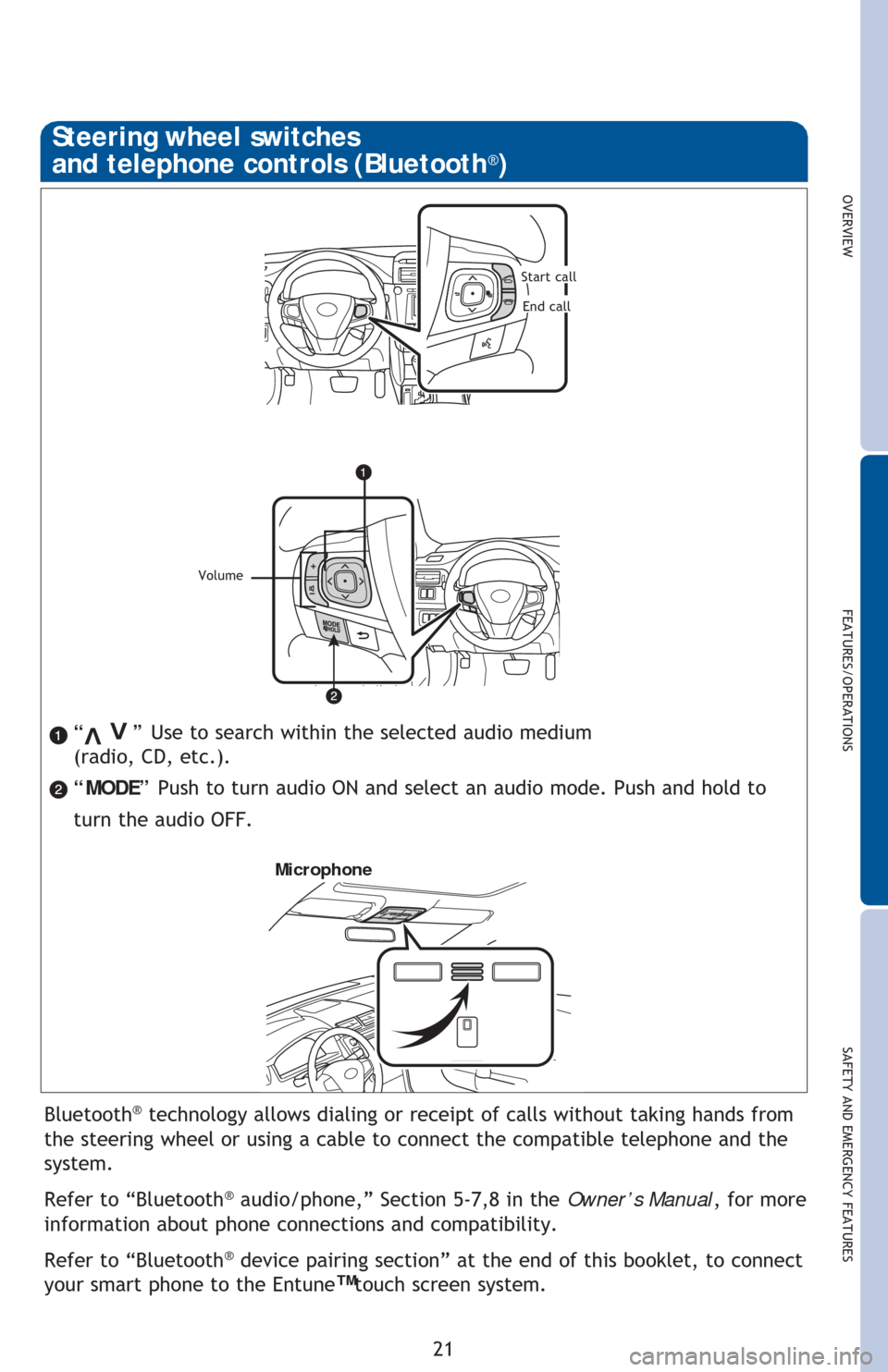
“ ” Use to search within the selected audio medium
(radio, CD, etc.).
“MODE” Push to turn audio ON and select an audio mode. Push and hold to
turn the audio OFF.>
>
Bluetooth® technology allows dialing or receipt of calls without taking hands from
the steering wheel or using a cable to connect the compatible telephone and the
system.
Refer to “Bluetooth
® audio/phone,” Section 5-7,8 in the Owner’s Manual, for more
information about phone connections and compatibility.
Refer to “Bluetooth
® device pairing section” at the end of this booklet, to connect
your smart phone to the Entune
™ touch screen system.
Microphone
Steering wheel switches
and telephone controls (Bluetooth®)
Volume
Start call
End call
Page 24 of 48
22
FEATURES/OPERATIONS
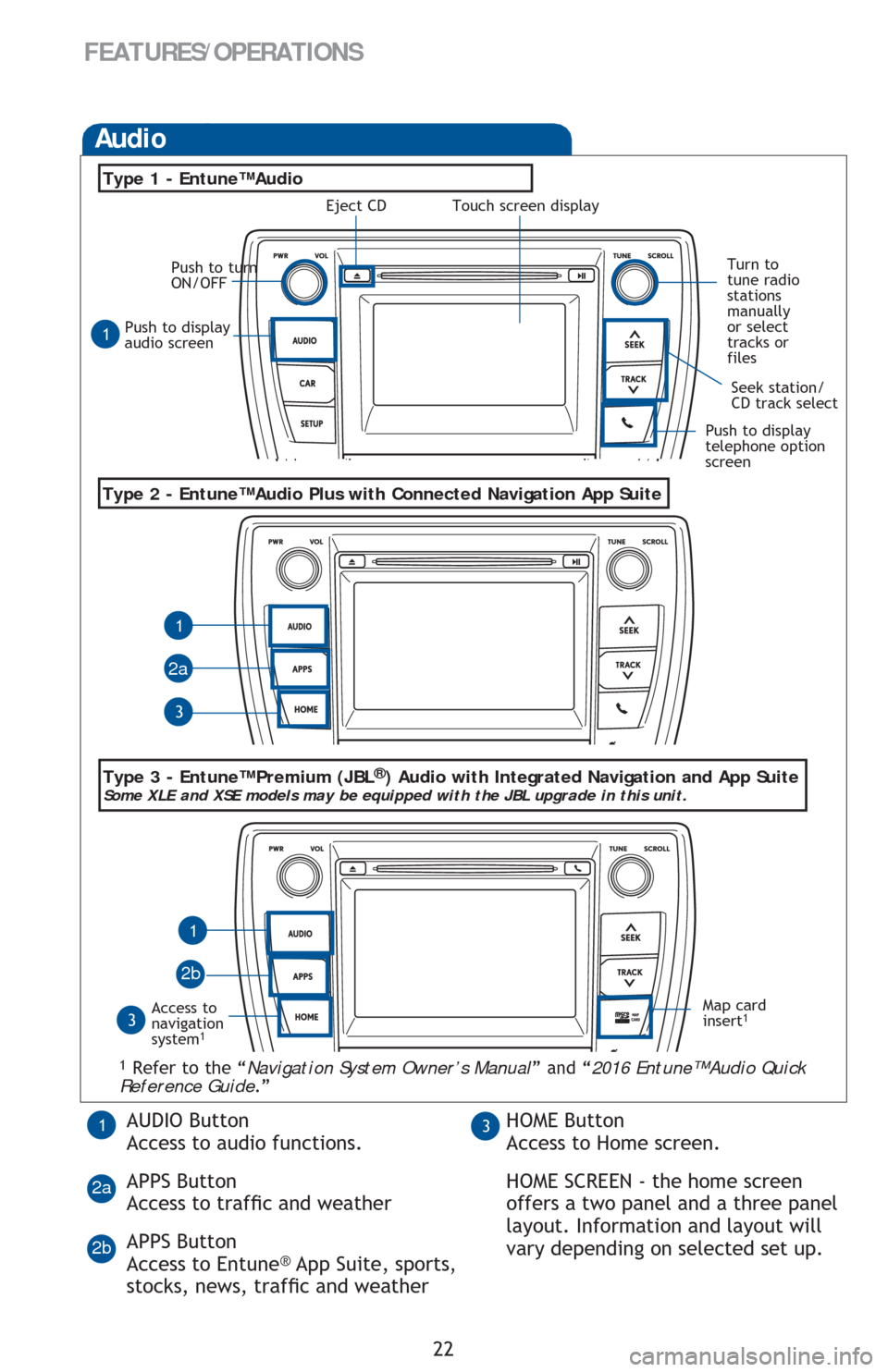
Push to display
audio screen
Seek station/
CD track select
Audio
Eject CD
Push to turn
ON/OFF
Turn to
tune radio
stations
manually
or select
tracks or
files
Access to
navigation
system
1
Type 2 - Entune™ Audio Plus with Connected Navigation App Suite
Type 1 - Entune™ Audio
1 Refer to the “Navigation System Owner’s Manual” and “2016 Entune™ Audio Quick
Reference Guide.”
Map card
insert1
1
1
1
3
3
2a
2b
Push to display
telephone option
screen
AUDIO Button
Access to audio functions.
APPS Button
Access to trafÀc and weather
APPS Button
Access to Entune
® App Suite, sports,
stocks, news, trafÀc and weather
13HOME Button
Access to Home screen.
HOME SCREEN - the home screen
offers a two panel and a three panel
layout. Information and layout will
vary depending on selected set up.
2a
2b
Type 3 - Entune™ Premium (JBL®) Audio with Integrated Navigation and App SuiteSome XLE and XSE models may be equipped with the JBL upgrade in this unit.
Touch screen display
Page 25 of 48
OVERVIEWFEATURES/OPERATIONS
SAFETY AND EMERGENCY FEATURES
23
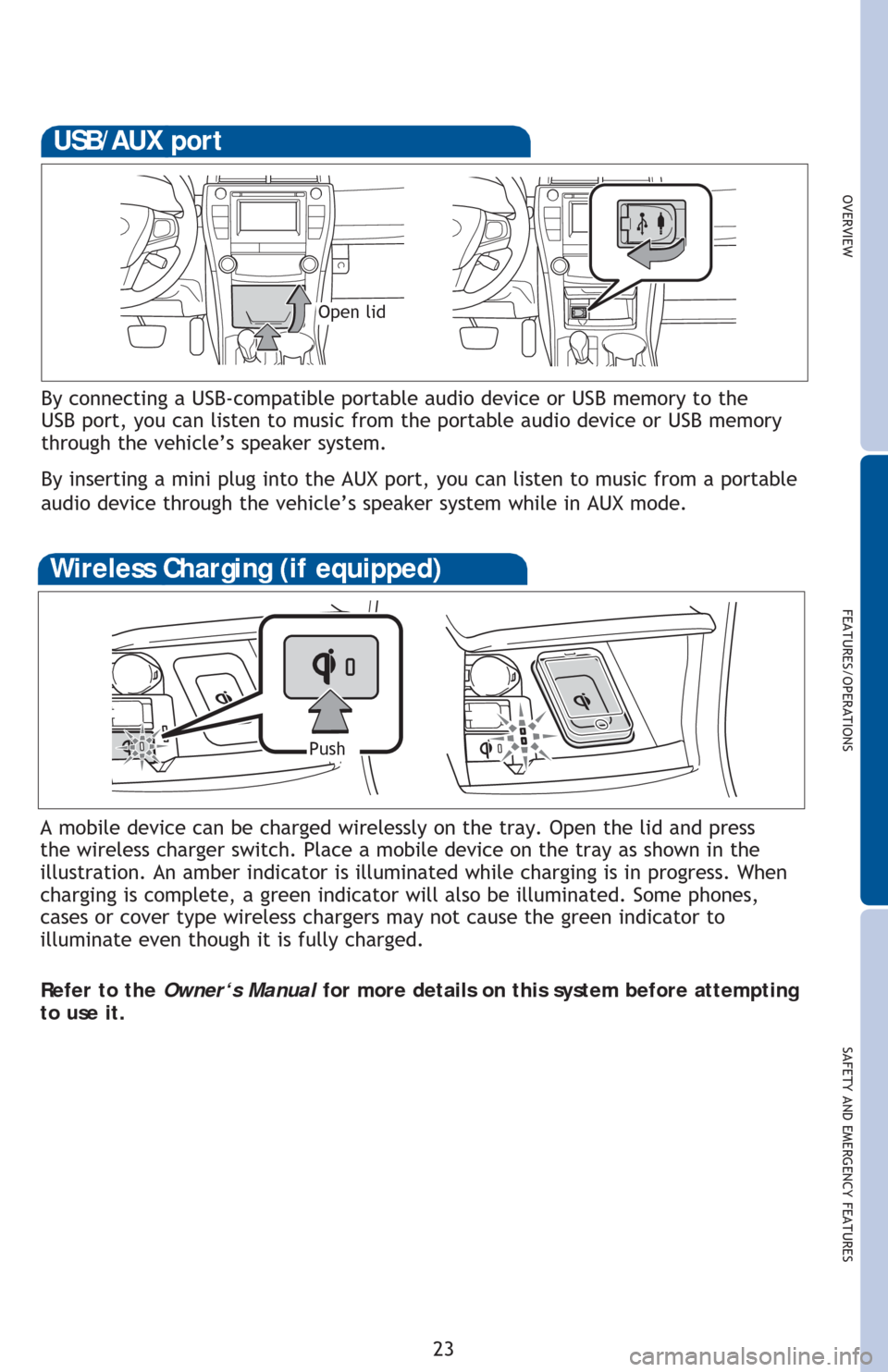
By connecting a USB-compatible portable audio device or USB memory to the
USB port, you can listen to music from the portable audio device or USB memory
through the vehicle’s speaker system.
By inserting a mini plug into the AUX port, you can listen to music from a portable
audio device through the vehicle’s speaker system while in AUX mode.
USB/AUX port
Open lid
A mobile device can be charged wirelessly on the tray. Open the lid and press
the wireless charger switch. Place a mobile device on the tray as shown in the
illustration. An amber indicator is illuminated while charging is in progress. When
charging is complete, a green indicator will also be illuminated. Some phones,
cases or cover type wireless chargers may not cause the green indicator to
illuminate even though it is fully charged.
Refer to the Owner‘s Manual for more details on this system before attempting
to use it.
Wireless Charging (if equipped)
Push
Page 29 of 48
OVERVIEW
FEATURES/OPERATIONS
SAFETY AND EMERGENCY FEATURES
27
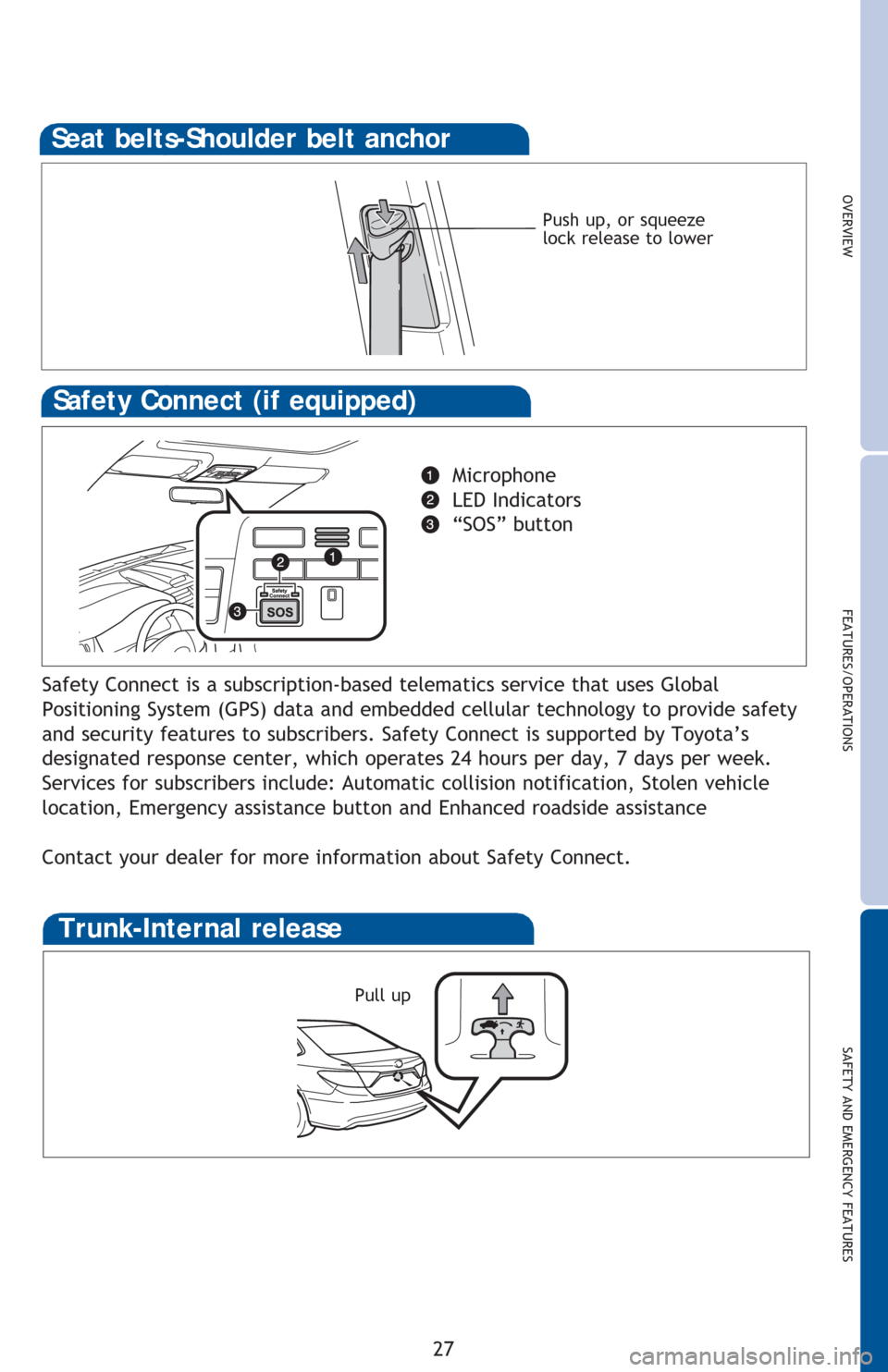
Push up, or squeeze
lock release to lower
Seat belts-Shoulder belt anchor
Safety Connect (if equipped)
Microphone
LED Indicators
“SOS” button
Safety Connect is a subscription-based telematics service that uses Global
Positioning System (GPS) data and embedded cellular technology to provide safety
and security features to subscribers. Safety Connect is supported by Toyota’s
designated response center, which operates 24 hours per day, 7 days per week.
Services for subscribers include: Automatic collision notification, Stolen vehicle
location, Emergency assistance button and Enhanced roadside assistance
Contact your dealer for more information about Safety Connect.
Trunk-Internal release
Pull up
Page 36 of 48
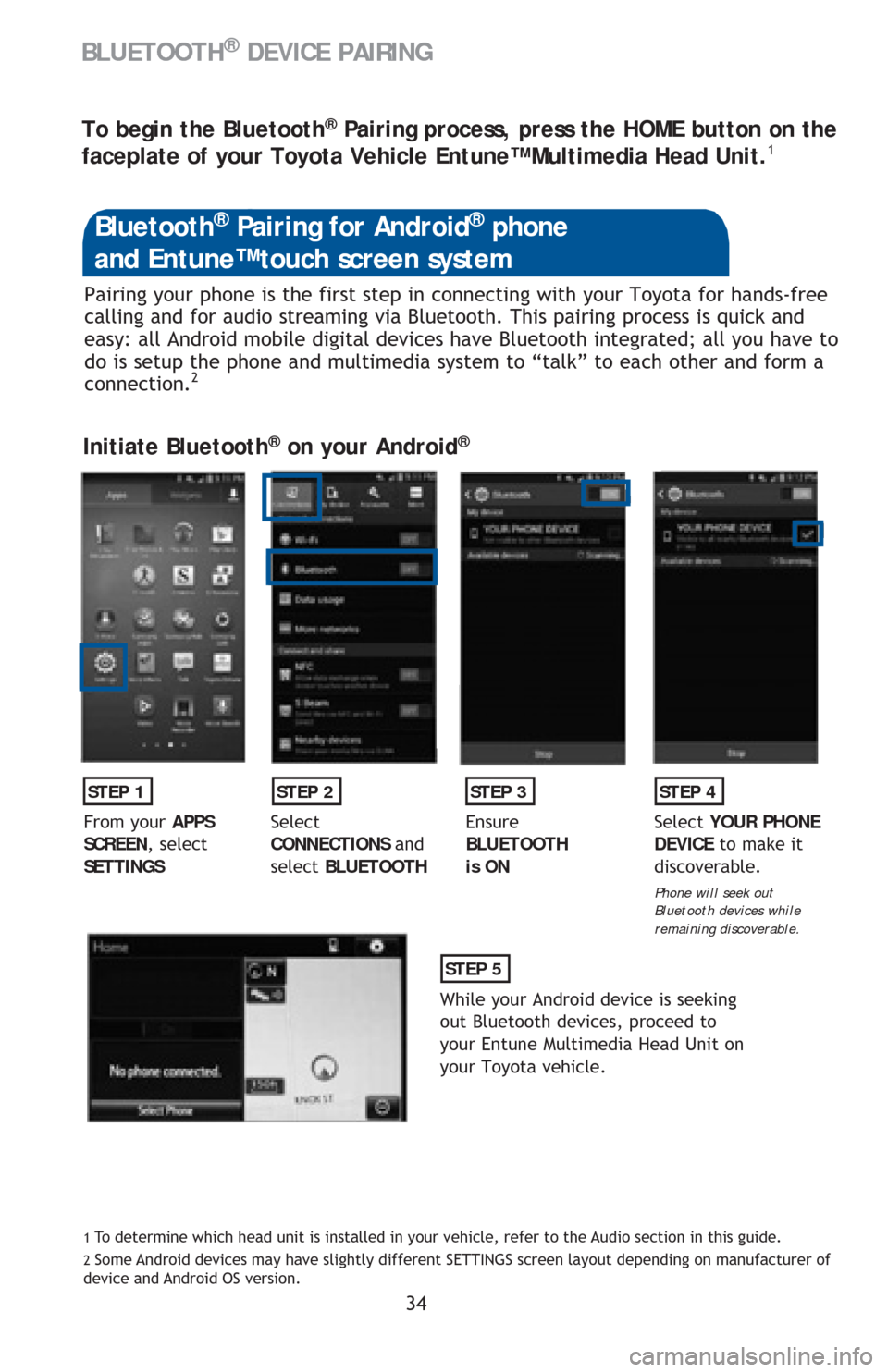
34 Pairing your phone is the first step in connecting with your Toyota for hands-free
calling and for audio streaming via Bluetooth. This pairing process is quick and
easy: all Android mobile digital devices have Bluetooth integrated; all you have to
do is setup the phone and multimedia system to “talk” to each other and form a
connection.
2
Initiate Bluetooth® on your Android®
STEP 1STEP 2STEP 3STEP 4
From your APPS
SCREEN, select
SETTINGSSelect
CONNECTIONS and
select BLUETOOTHEnsure
BLUETOOTH
is ONSelect YOUR PHONE
DEVICE to make it
discoverable.
Phone will seek out
Bluetooth devices while
remaining discoverable.
STEP 5
While your Android device is seeking
out Bluetooth devices, proceed to
your Entune Multimedia Head Unit on
your Toyota vehicle.
Bluetooth® Pairing for Android® phone
and Entune™ touch screen system
1 To determine which head unit is installed in your vehicle, refer to the Audio section in this guide. 2 Some Android devices may have slightly different SETTINGS screen layout depending on manufacturer of
device and Android OS version.
To begin the Bluetooth® Pairing process, press the HOME button on the
faceplate of your Toyota Vehicle Entune™ Multimedia Head Unit.1
BLUETOOTH® DEVICE PAIRING
Page 37 of 48
35
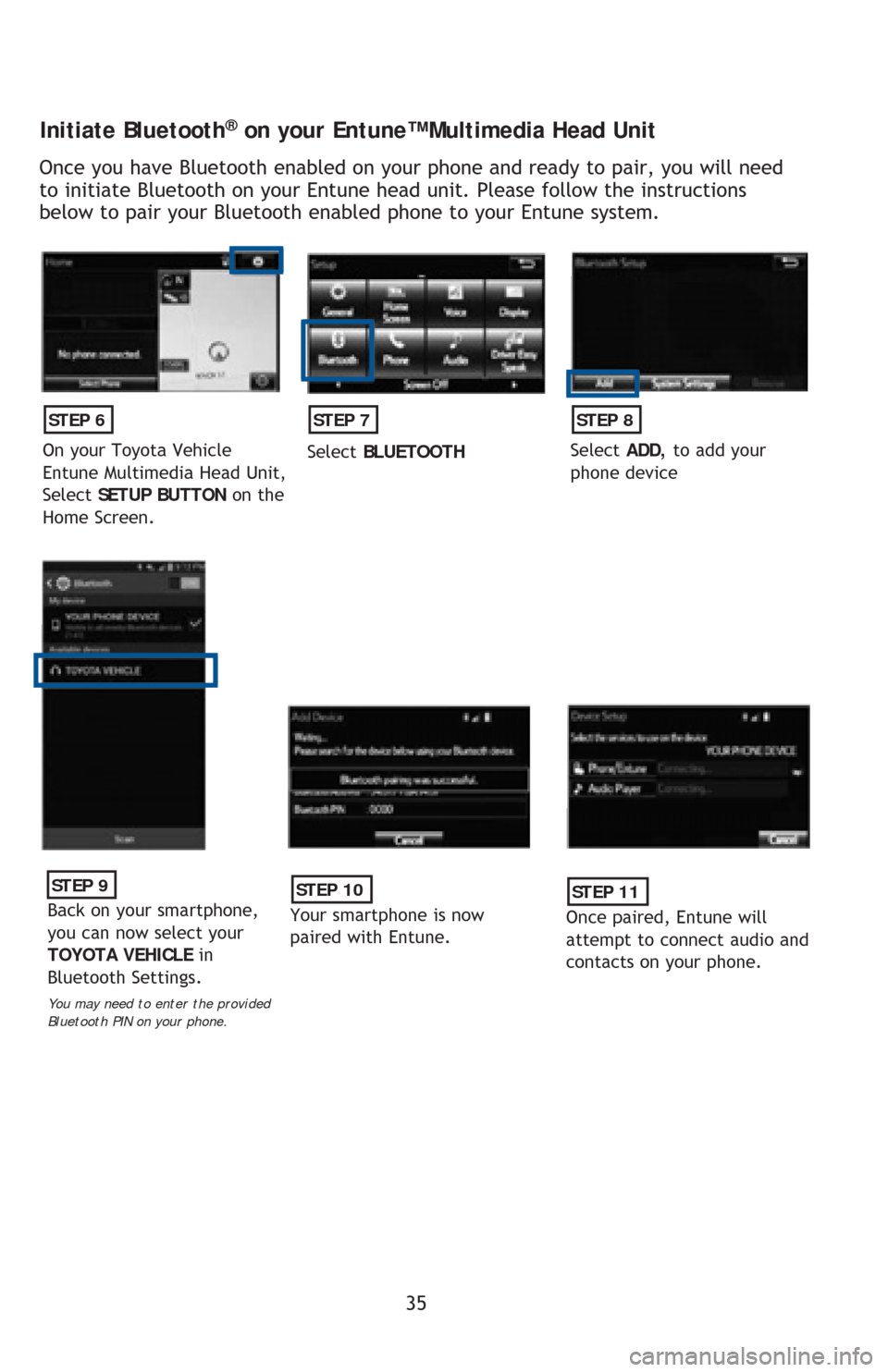
Initiate Bluetooth® on your Entune™ Multimedia Head Unit
Once you have Bluetooth enabled on your phone and ready to pair, you will need
to initiate Bluetooth on your Entune head unit. Please follow the instructions
below to pair your Bluetooth enabled phone to your Entune system.
STEP 6
On your Toyota Vehicle
Entune Multimedia Head Unit,
Select SETUP BUTTON on the
Home Screen.
STEP 7
Select BLUETOOTH
STEP 8
Select ADD, to add your
phone device
STEP 9
Back on your smartphone,
you can now select your
TOYOTA VEHICLE in
Bluetooth Settings.
You may need to enter the provided
Bluetooth PIN on your phone.
STEP 10
Your smartphone is now
paired with Entune.
STEP 11
Once paired, Entune will
attempt to connect audio and
contacts on your phone.
Page 38 of 48
36
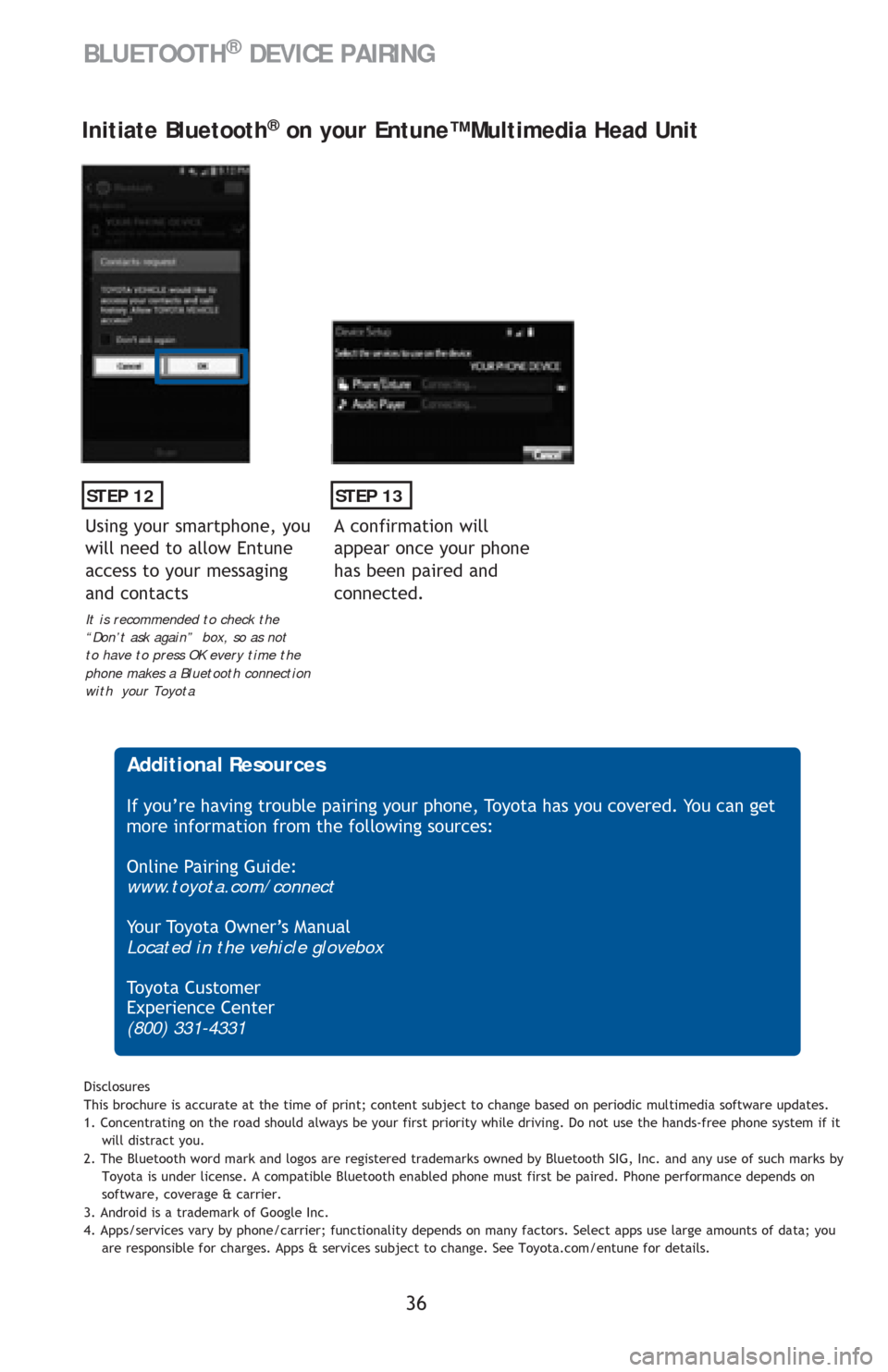
STEP 12
Initiate Bluetooth® on your Entune™ Multimedia Head Unit
A confirmation will
appear once your phone
has been paired and
connected.
STEP 13
Additional Resources
If you’re having trouble pairing your phone, Toyota has you covered. You can get
more information from the following sources:
Online Pairing Guide:
www.toyota.com/connect
Your Toyota Owner’s Manual
Located in the vehicle glovebox
To y o t a C u s t o m e r
Experience Center
(800) 331-4331
Disclosures
This brochure is accurate at the time of print; content subject to change based on periodic multimedia software updates.
1. Concentrating on the road should always be your first priority while driving. Do not use the hands-free phone system if it
will distract you.
2. The Bluetooth word mark and logos are registered trademarks owned by Bluetooth SIG, Inc. and any use of such marks by
Toyota is under license. A compatible Bluetooth enabled phone must first be paired. Phone performance depends on
software, coverage & carrier.
3. Android is a trademark of Google Inc.
4. Apps/services vary by phone/carrier; functionality depends on many factors. Select apps use large amounts of data; you
are responsible for charges. Apps & services subject to change. See Toyota.com/entune for details.
Using your smartphone, you
will need to allow Entune
access to your messaging
and contacts
It is recommended to check the
“Don’t ask again” box, so as not
to have to press OK every time the
phone makes a Bluetooth connection
with your Toyota
BLUETOOTH® DEVICE PAIRING
Page 39 of 48
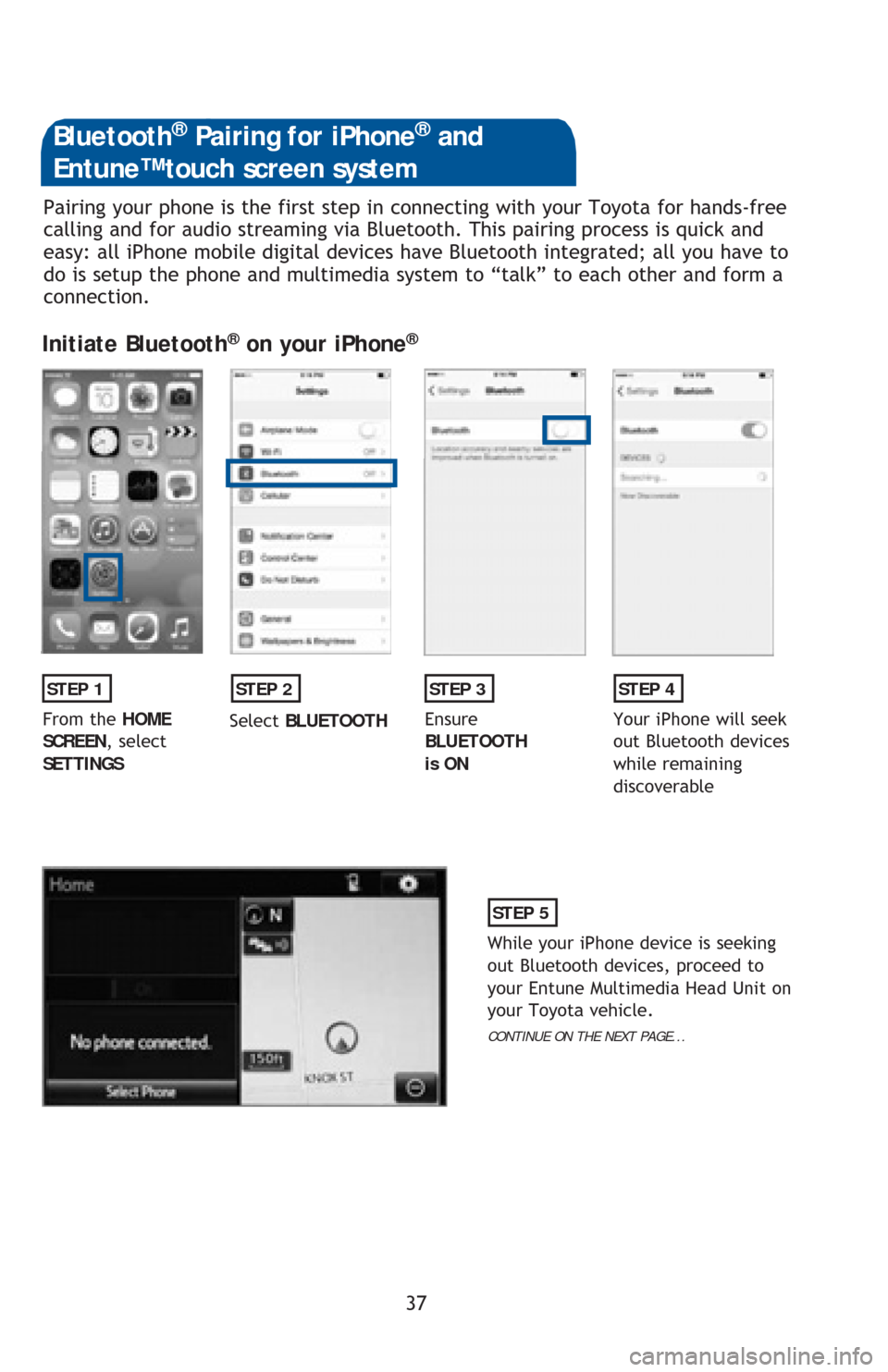
37 Pairing your phone is the first step in connecting with your Toyota for hands-free
calling and for audio streaming via Bluetooth. This pairing process is quick and
easy: all iPhone mobile digital devices have Bluetooth integrated; all you have to
do is setup the phone and multimedia system to “talk” to each other and form a
connection.
Initiate Bluetooth® on your iPhone®
STEP 1STEP 2STEP 3STEP 4
From the HOME
SCREEN, select
SETTINGSSelect BLUETOOTHEnsure
BLUETOOTH
is ONYour iPhone will seek
out Bluetooth devices
while remaining
discoverable
STEP 5
While your iPhone device is seeking
out Bluetooth devices, proceed to
your Entune Multimedia Head Unit on
your Toyota vehicle.
CONTINUE ON THE NEXT PAGE...
Bluetooth® Pairing for iPhone® and
Entune™ touch screen system