customization TOYOTA CAMRY 2017 XV50 / 9.G User Guide
[x] Cancel search | Manufacturer: TOYOTA, Model Year: 2017, Model line: CAMRY, Model: TOYOTA CAMRY 2017 XV50 / 9.GPages: 568, PDF Size: 13.15 MB
Page 336 of 568
■
Ventilation and air conditioning odors
●To let fresh air in, set the air conditioning system to the outside air mo\
de.
â")
3366-1. Using the air conditioning system and defogger
CAMRY_U (OM33C64U)■
Ventilation and air conditioning odors
●To let fresh air in, set the air conditioning system to the outside air mo\
de.
● During use, various odors from inside and outside the vehicle may enter into
and accumulate in the air conditioning system. This may then cause odor to
be emitted from the vents.
● To reduce potential odors from occurring:
•
U.S.A and Puerto Rico: This vehicle is equipped with a deodorizing charcoal
air filter. This filter s hould be inspected and replaced according to the mainte-
nance schedule. (Air conditioning filter:
P. 418)
• It is recommended that the air conditioning system be set to outside air mode prior to turning the vehicle off.
• The start timing of the blower may be delayed for a short period of time
immediately after the air conditioning system is started in automatic
mode.
■ Air conditioning filter
P. 418
■ Customization
Settings (e.g. air conditioning setting) can be changed.
(Customizable features P. 530)
WARNING
■To prevent the windshield from fogging up
● Do not use during cool air operation in extremely humid weather.
The difference between the temperature of the outside air and that of the
windshield can cause the outer surface of the windshield to fog up, block-
ing your vision.
■ To prevent burns
Do not touch the rear view mirror surf aces when the outside rear view mirror
defoggers are on.
NOTICE
■ To prevent battery discharge
Do not leave the air conditioning system on longer than necessary when the
engine is stopped.
● Do not place anything on the instrument
panel which may cover the air outlets.
Otherwise, air flow may be obstructed,
preventing the windshield defoggers
from defogging.
Page 486 of 568
4868-2. Steps to take in an emergency
CAMRY_U (OM33C64U)
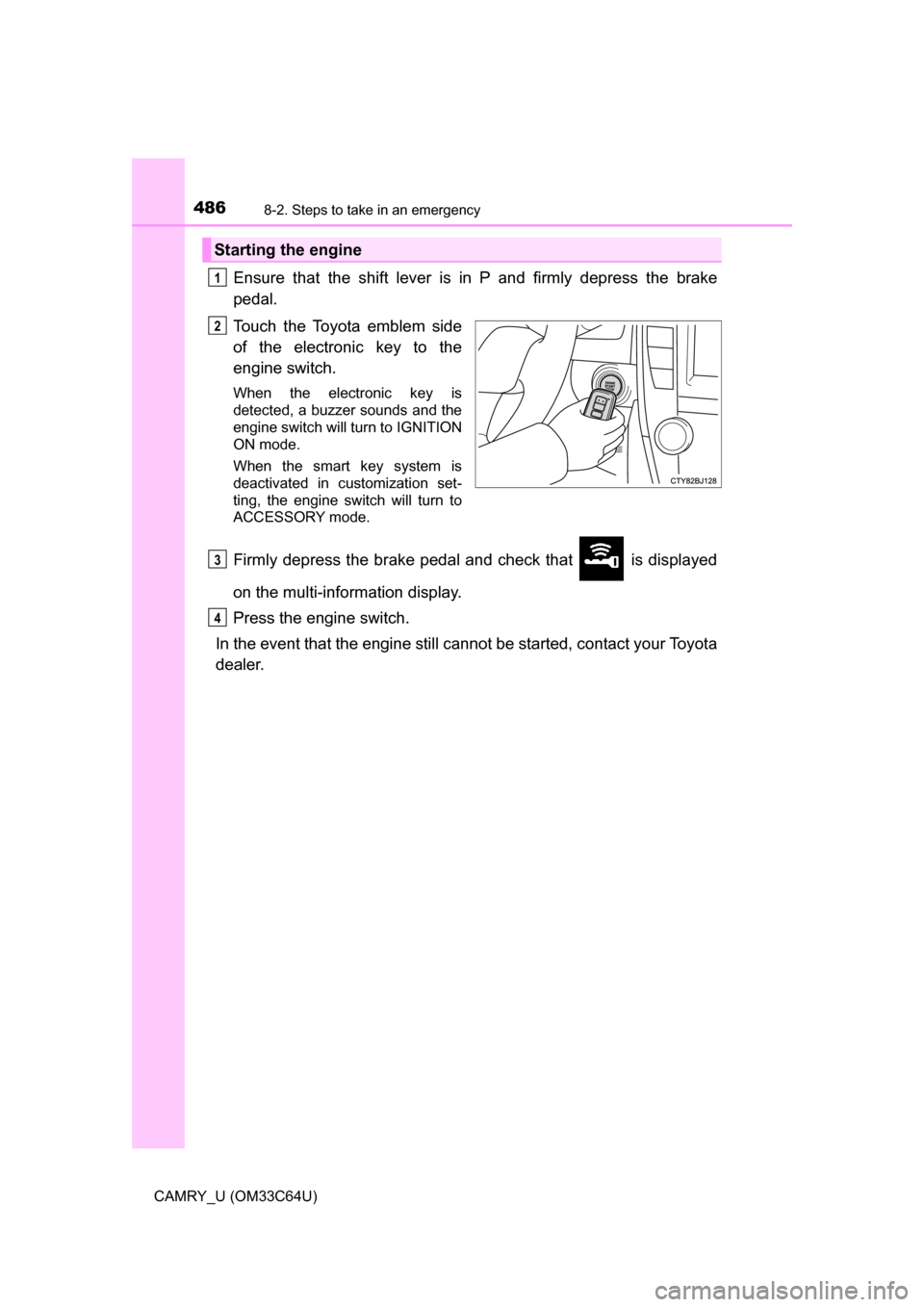
Ensure that the shift lever is in P and firmly depress the brake
pedal.
Touch the Toyota emblem side
of the electronic key to the
engine switch.
When the electronic key is
detected, a buzzer sounds and the
engine switch will turn to IGNITION
ON mode.
When the smart key system is
deactivated in customization set-
ting, the engine switch will turn to
ACCESSORY mode.
Firmly depress the brake pedal and check that is displayed
on the multi-information display.
Press the engine switch.
In the event that the engine still ca nnot be started, contact your Toyota
dealer.
Starting the engine
1
2
3
4
Page 497 of 568
497
9Vehicle specifications
CAMRY_U (OM33C64U)9-1. Specifications
Maintenance data (fuel, oil level, etc.) .......... 498
Fuel information ................ 507
Tire information ................. 510
9-2. Customization Customizable features ...... 523
9-3. Items to initialize Items to initialize ............... 532
Page 523 of 568
523
9
Vehicle specifications
CAMRY_U (OM33C64U)
9-2. Customization
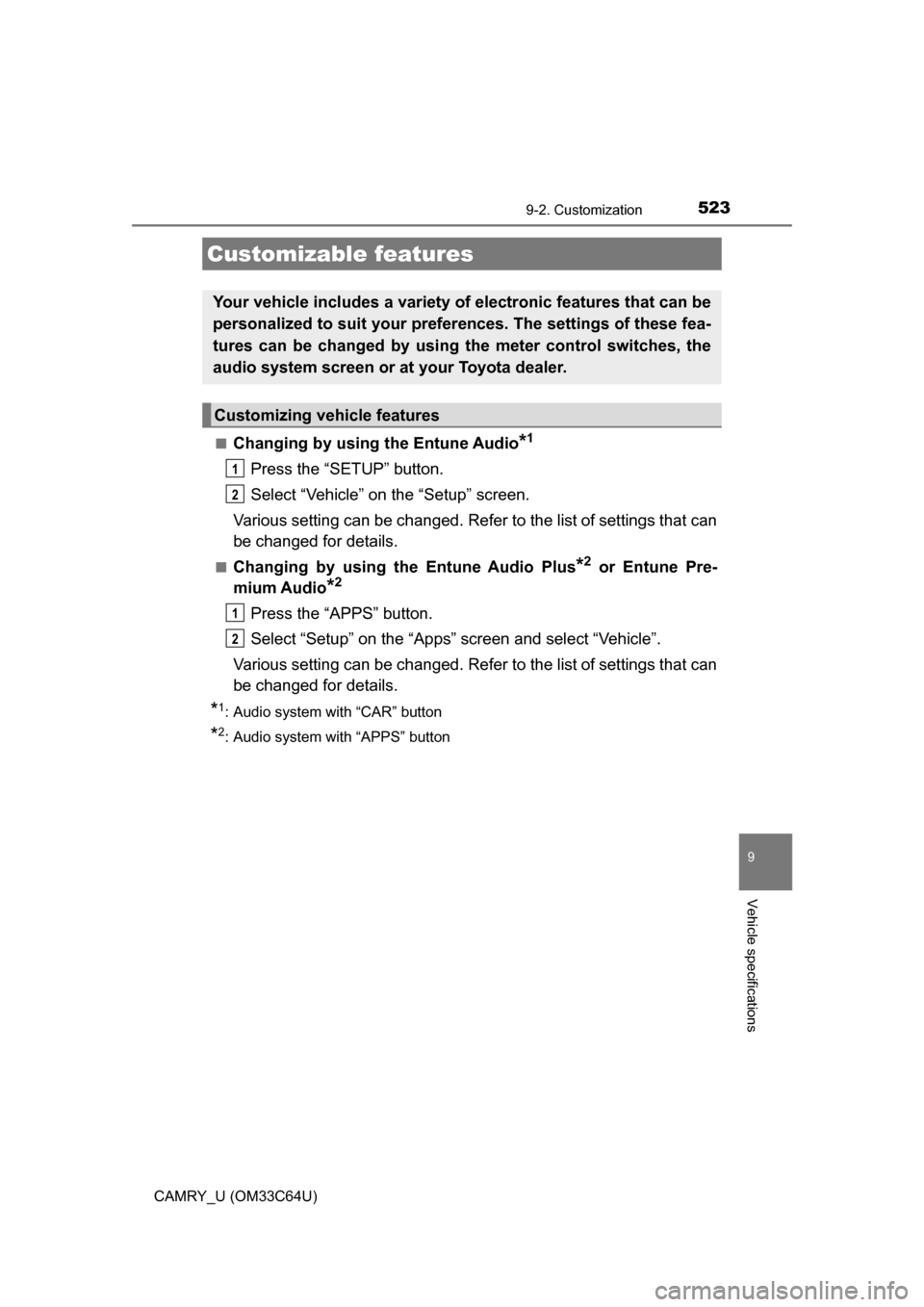
■Changing by using the Entune Audio*1
Press the “SETUP” button.
Select “Vehicle” on the “Setup” screen.
Various setting can be changed. Refer to the list of settings that can
be changed for details.
■Changing by using th e Entune Audio Plus*2 or Entune Pre-
mium Audio
*2
Press the “APPS” button.
Select “Setup” on the “Apps” screen and select “Vehicle”.
Various setting can be changed. Refer to the list of settings that can
be changed for details.
*1: Audio system with “CAR” button
*2: Audio system with “APPS” button
Customizable features
Your vehicle includes a variety of electronic features that can be
personalized to suit your prefer ences. The settings of these fea-
tures can be changed by using the meter control switches, the
audio system screen or at your Toyota dealer.
Customizing vehicle features
1
2
1
2
Page 524 of 568
5249-2. Customization
CAMRY_U (OM33C64U)
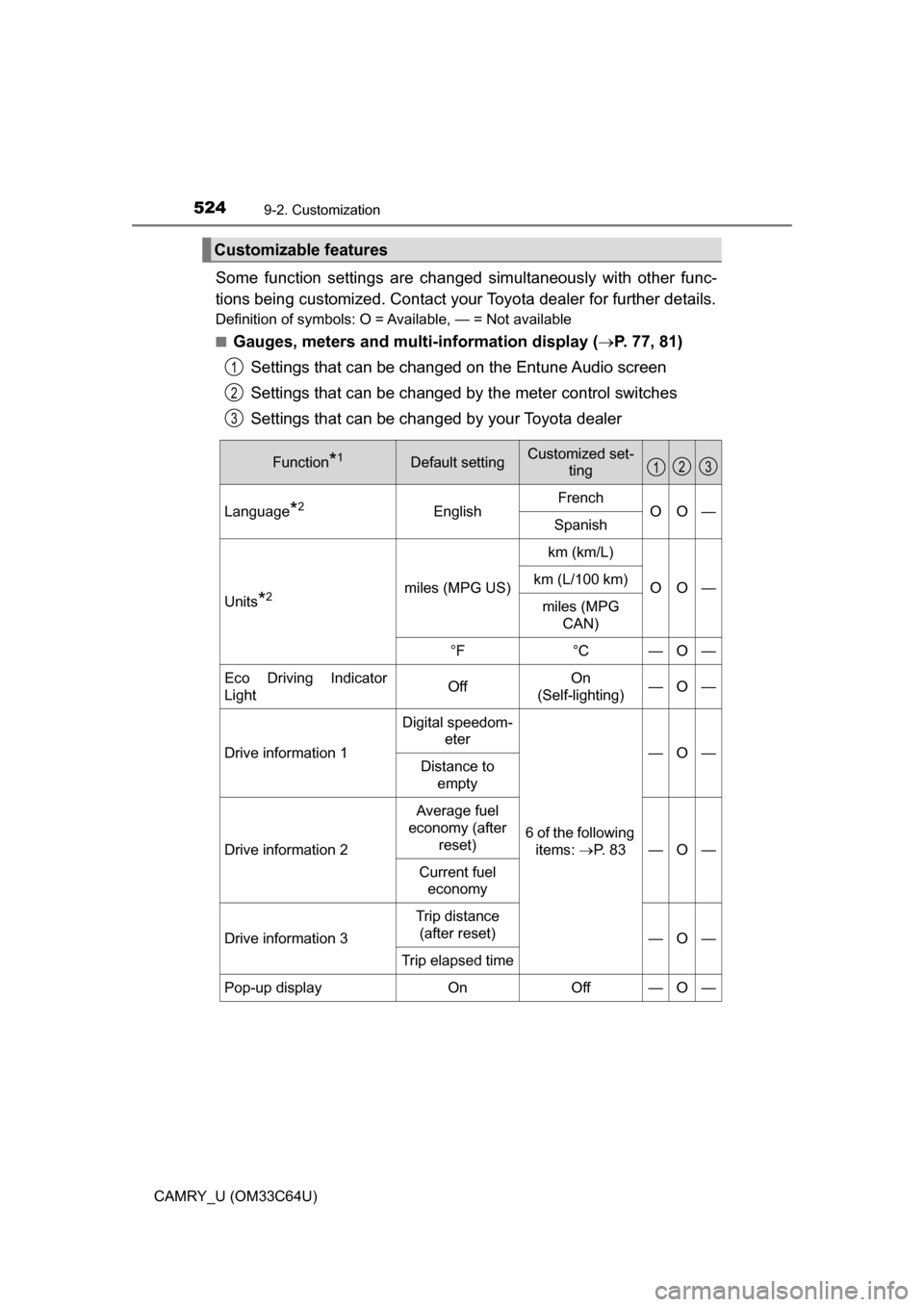
Some function settings are changed simultaneously with other func-
tions being customized. Contact your Toyota dealer for further details.
Definition of symbols: O = Available, — = Not available
■
Gauges, meters and mult i-information display (P. 77, 81)
Settings that can be changed on the Entune Audio screen
Settings that can be changed by the meter control switches
Settings that can be changed by your Toyota dealer
Customizable features
1
2
3
Function*1Default settingCustomized set- ting
Language*2EnglishFrenchOO—Spanish
Units*2miles (MPG US)
km (km/L)
OO—km (L/100 km)
miles (MPG CAN)
°F°C—O—
Eco Driving Indicator
LightOffOn
(Self-lighting)—O—
Drive information 1
Digital speedom- eter
6 of the following items: P. 8 3
—O—Distance to empty
Drive information 2
Average fuel
economy (after reset)
—O—
Current fuel economy
Drive information 3
Trip distance (after reset)
—O—
Trip elapsed time
Pop-up displayOnOff—O—
123
Page 525 of 568
5259-2. Customization
9
Vehicle specifications
CAMRY_U (OM33C64U)
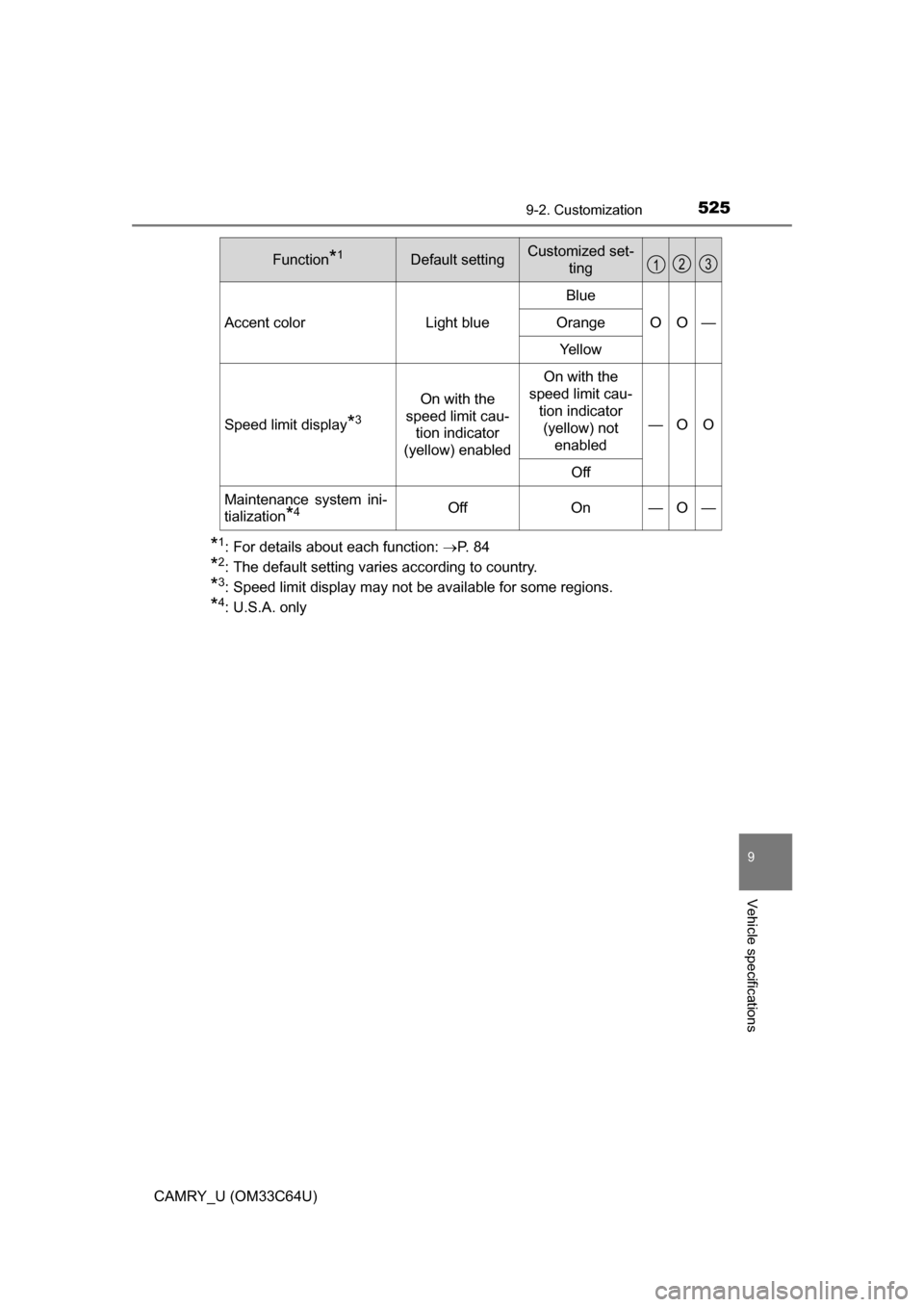
*1: For details about each function: P. 8 4
*2: The default setting varies according to country.
*3: Speed limit display may not be available for some regions.
*4: U.S.A. only
Accent colorLight blue
Blue
OO—Orange
Yellow
Speed limit display*3
On with the
speed limit cau- tion indicator
(yellow) enabled
On with the
speed limit cau-
tion indicator (yellow) not enabled
—OO
Off
Maintenance system ini-
tialization
*4OffOn—O—
Function*1Default settingCustomized set- ting123
Page 526 of 568
5269-2. Customization
CAMRY_U (OM33C64U)
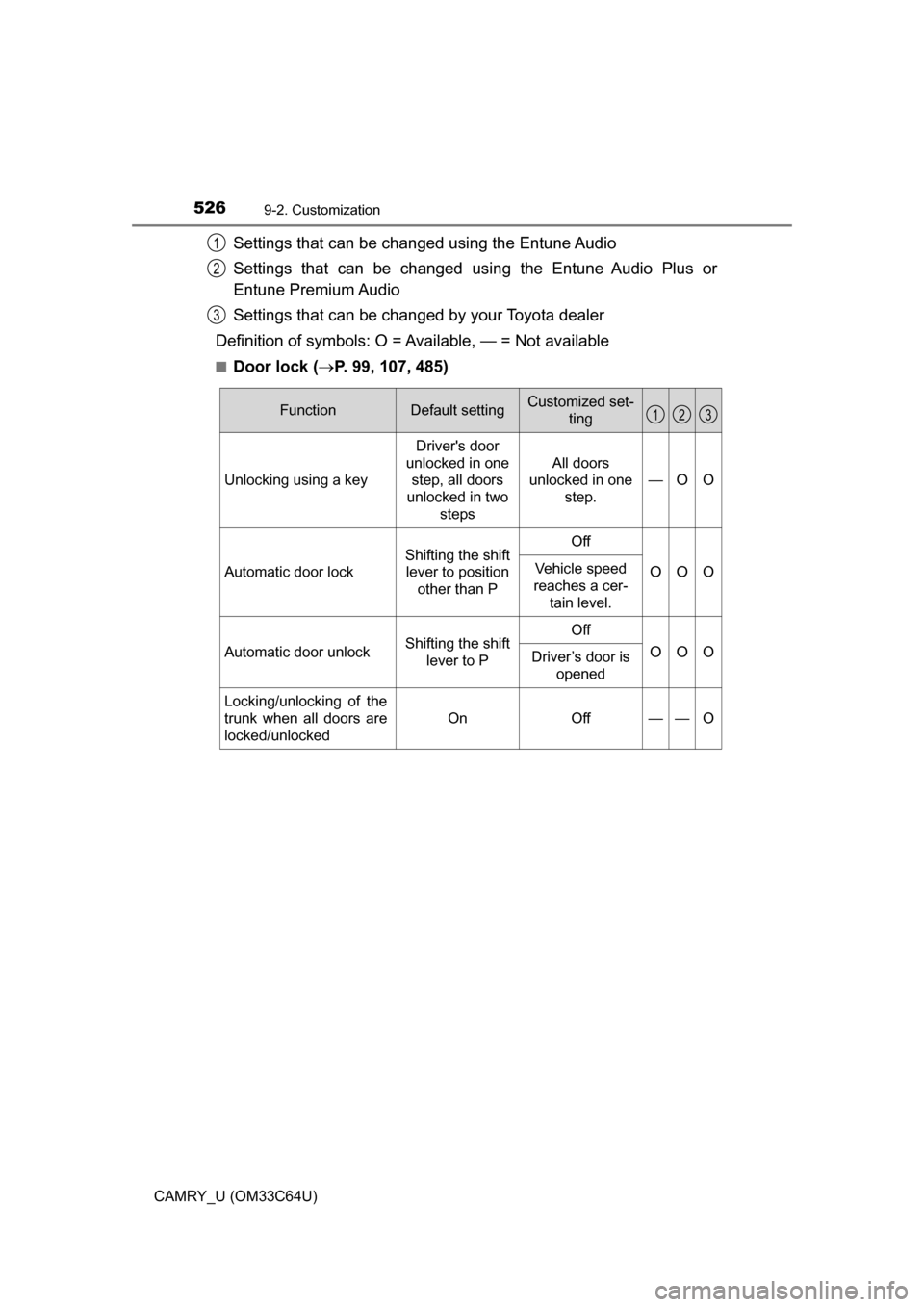
Settings that can be changed using the Entune Audio
Settings that can be changed using the Entune Audio Plus or
Entune Premium Audio
Settings that can be changed by your Toyota dealer
Definition of symbols: O = Av ailable, — = Not available
■Door lock (P. 99, 107, 485)
1
2
3
FunctionDefault settingCustomized set-
ting
Unlocking using a key Driver's door
unlocked in one step, all doors
unlocked in two steps All doors
unlocked in one
step. —O O
Automatic door lock
Shifting the shift
lever to position other than POff
OOOVehicle speed
reaches a cer- tain level.
Automatic door unlockShifting the shift lever to POff
OOODriver’s door is
opened
Locking/unlocking of the
trunk when all doors are
locked/unlocked
OnOff——O
123
Page 527 of 568
5279-2. Customization
9
Vehicle specifications
CAMRY_U (OM33C64U)■
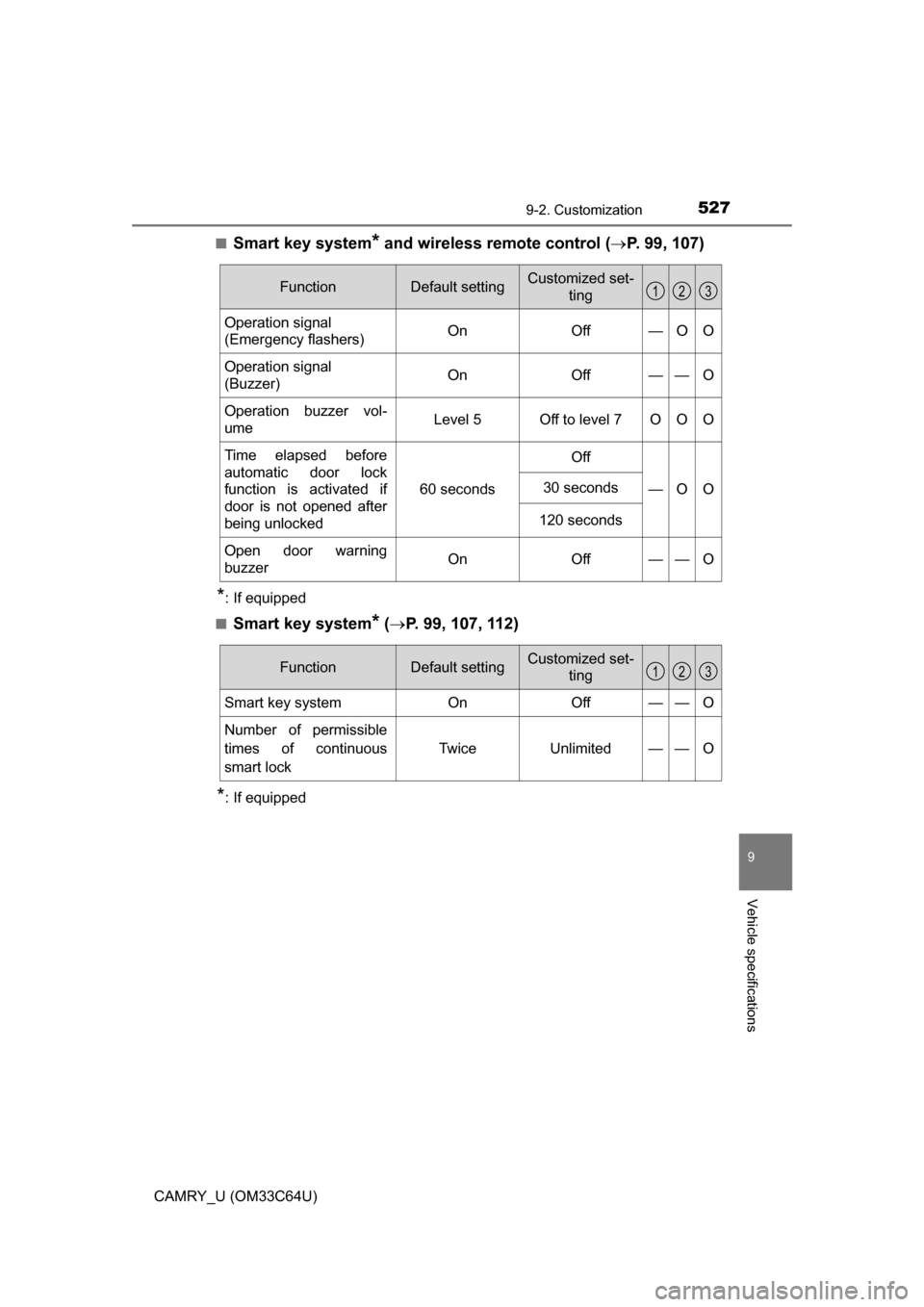
Smart key system* and wireless remote control (
P. 99, 107)
*: If equipped
■
Smart key system* ( P. 99, 107, 112)
*: If equipped
FunctionDefault settingCustomized set-
ting
Operation signal
(Emergency flashers) On Off — O O
Operation signal
(Buzzer) On Off — — O
Operation buzzer vol-
ume Level 5 Off to level 7 O O O
Time elapsed before
automatic door lock
function is activated if
door is not opened after
being unlocked 60 seconds
Off
—O O
30 seconds
120 seconds
Open door warning
buzzerOnOff — —O
123
FunctionDefault settingCustomized set-ting
Smart key systemOnOff——O
Number of permissible
times of continuous
smart lock Twice Unlimited — — O
123
Page 528 of 568
5289-2. Customization
CAMRY_U (OM33C64U)■
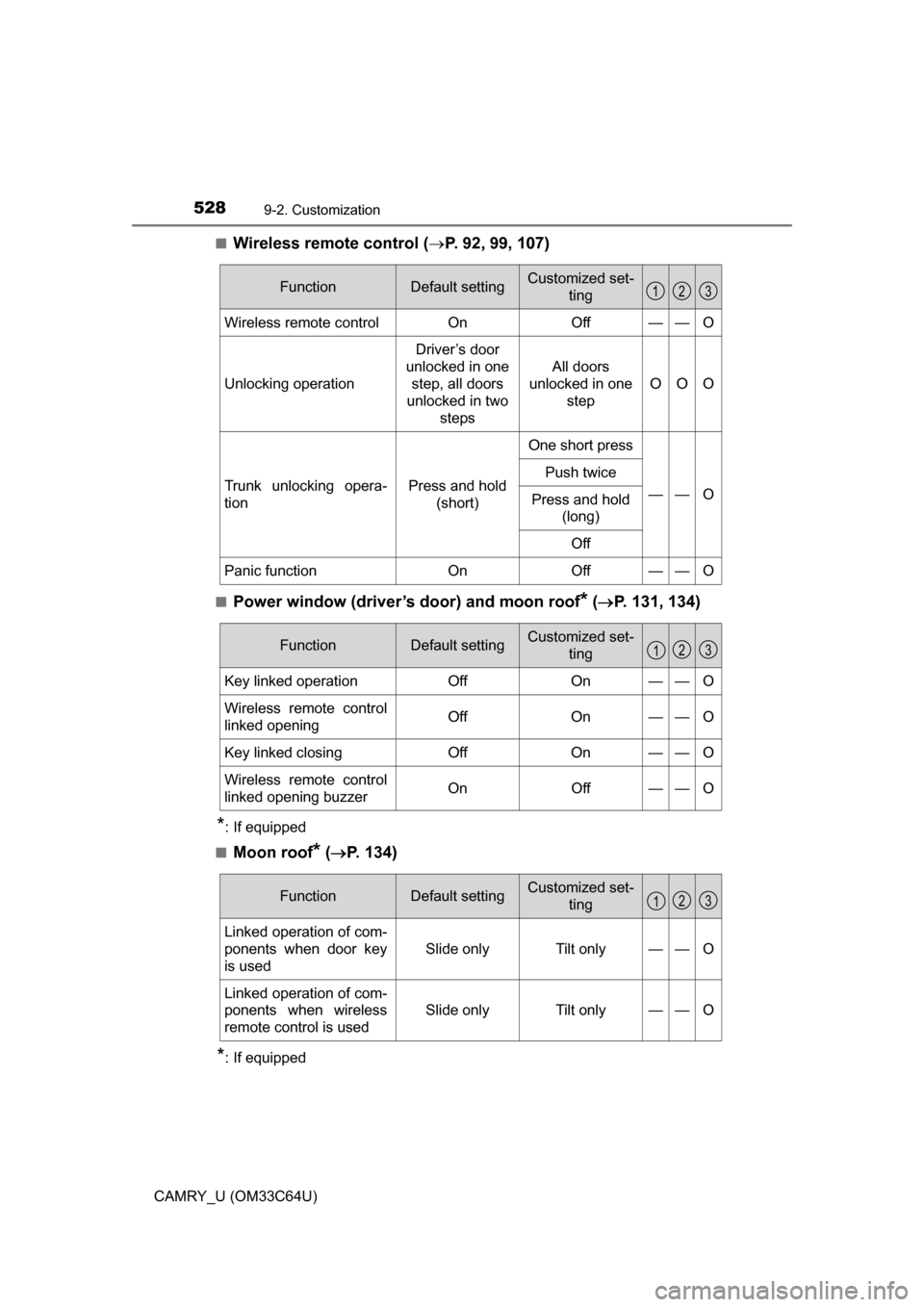
Wireless remote control (
P. 92, 99, 107)
■Power window (driver’s door) and moon roof* ( P. 131, 134)
*: If equipped
■
Moon roof* ( P. 134)
*: If equipped
FunctionDefault settingCustomized set-
ting
Wireless remote controlOnOff——O
Unlocking operation
Driver’s door
unlocked in one step, all doors
unlocked in two
steps
All doors
unlocked in one step
OOO
Trunk unlocking opera-
tionPress and hold (short)
One short press
——O
Push twice
Press and hold (long)
Off
Panic functionOnOff——O
123
FunctionDefault settingCustomized set- ting
Key linked operationOffOn——O
Wireless remote control
linked openingOffOn——O
Key linked closingOffOn——O
Wireless remote control
linked opening buzzerOnOff——O
123
FunctionDefault settingCustomized set-ting
Linked operation of com-
ponents when door key
is used
Slide onlyTilt only——O
Linked operation of com-
ponents when wireless
remote control is used
Slide onlyTilt only——O
123
Page 529 of 568
5299-2. Customization
9
Vehicle specifications
CAMRY_U (OM33C64U)■
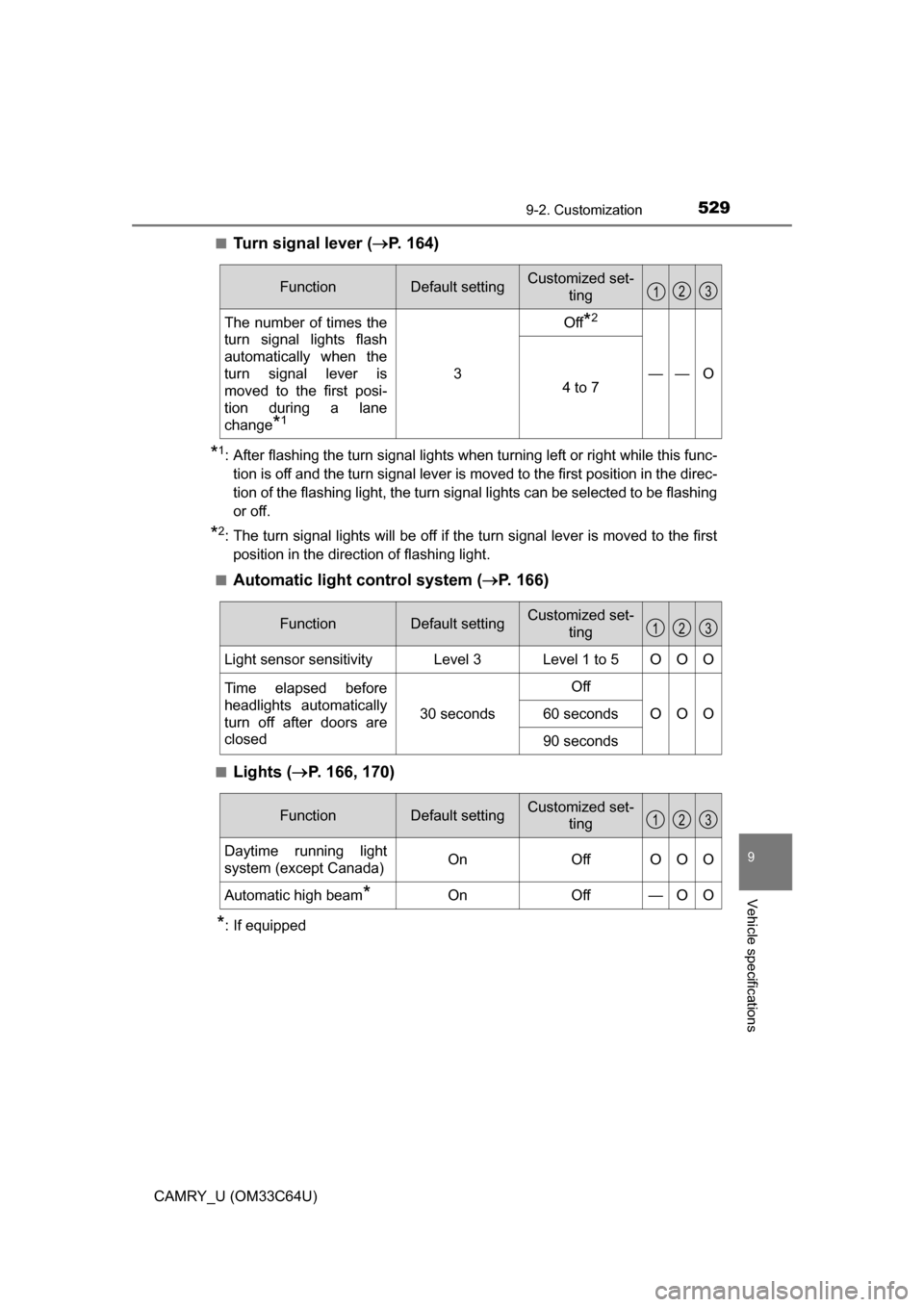
Turn signal lever (
P. 164)
*1: After flashing the turn signal lights when turning left or right while this func-
tion is off and the turn signal lever is moved to the first position in the direc-
tion of the flashing light, the turn signal lights can be selected to be flashing
or off.
*2: The turn signal lights will be off if the turn signal lever is moved to the firstposition in the direction of flashing light.
■
Automatic light control system ( P. 166)
■Lights ( P. 166, 170)
*: If equipped
FunctionDefault settingCustomized set-
ting
The number of times the
turn signal lights flash
automatically when the
turn signal lever is
moved to the first posi-
tion during a lane
change
*1
3
Off*2
——O4 to 7
123
FunctionDefault settingCustomized set-
ting
Light sensor sensitivityLevel 3Level 1 to 5OOO
Time elapsed before
headlights automatically
turn off after doors are
closed
30 seconds
Off
OOO60 seconds
90 seconds
123
FunctionDefault settingCustomized set-ting
Daytime running light
system (except Canada)OnOffOOO
Automatic high beam*OnOff—OO
123