customization TOYOTA CAMRY 2017 XV50 / 9.G Owners Manual
[x] Cancel search | Manufacturer: TOYOTA, Model Year: 2017, Model line: CAMRY, Model: TOYOTA CAMRY 2017 XV50 / 9.GPages: 568, PDF Size: 13.15 MB
Page 7 of 568
7
1
9 8 6 5
4
3
2
CAMRY_U (OM33C64U)
10
7
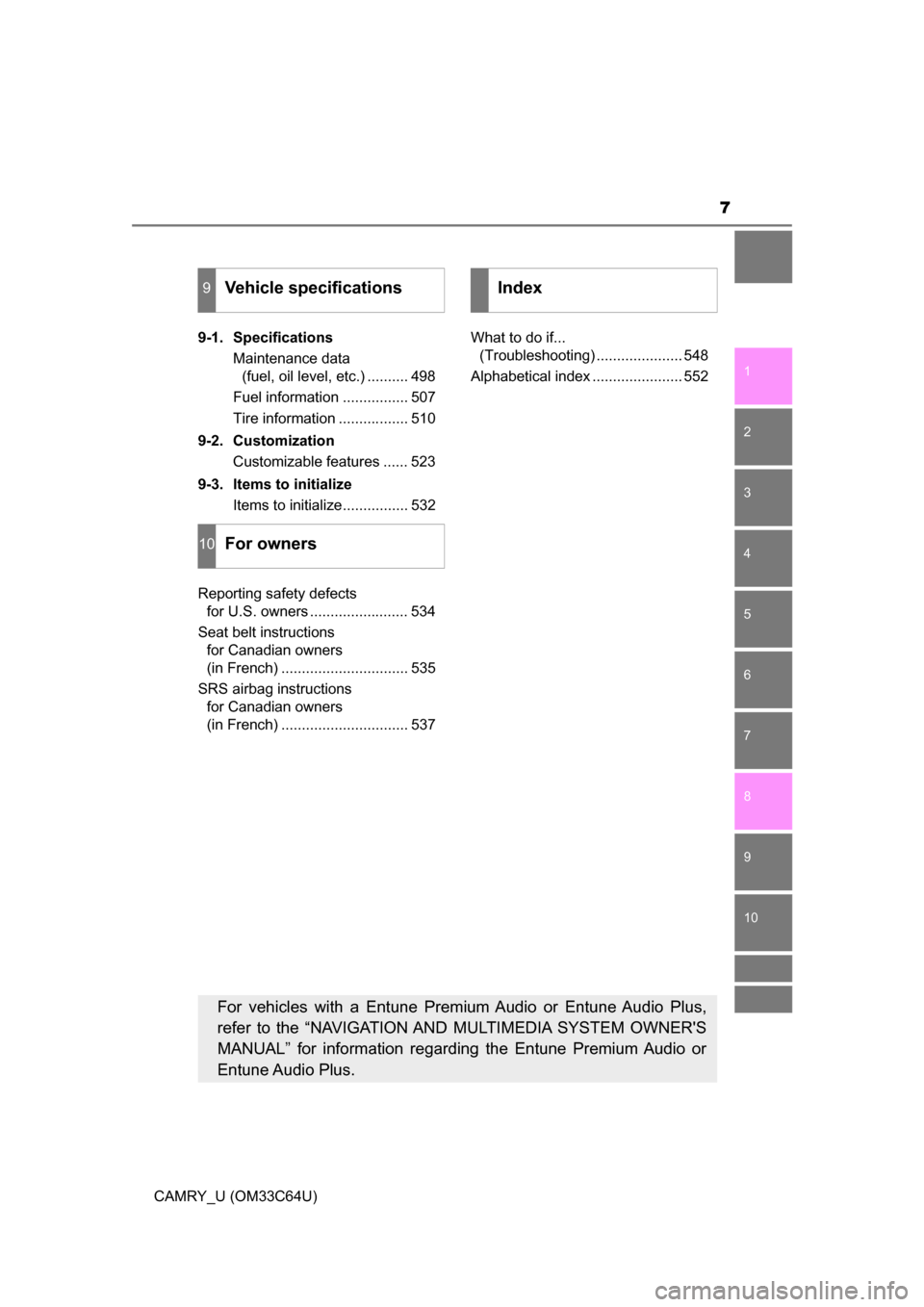
9-1. SpecificationsMaintenance data (fuel, oil level, etc.) .......... 498
Fuel information ................ 507
Tire information ................. 510
9-2. Customization Customizable features ...... 523
9-3. Items to initialize Items to initialize................ 532
Reporting safety defects for U.S. owners ........................ 534
Seat belt instructions for Canadian owners
(in French) ............................... 535
SRS airbag instructions for Canadian owners
(in French) ............................... 537 What to do if...
(Troubleshooting) ..................... 548
Alphabetical index ...................... 552
9Vehicle specifications
10For owners
Index
For vehicles with a Entune Premium Audio or Entune Audio Plus,
refer to the “NAVIGATION AND MULTIMEDIA SYSTEM OWNER'S
MANUAL” for information regarding the Entune Premium Audio or
Entune Audio Plus.
Page 97 of 568
973-1. Key information
3
Operation of each component
CAMRY_U (OM33C64U)■
Confirmation of the registered key number (vehicles with a smart key
system)
The number of keys already registered to the vehicle can be confirmed. Ask
your Toyota dealer for details.
■ If a wrong key is used (vehicles with a smart key system)
The key cylinder rotates freely to isolate inside mechanism.
■ Customization that can be co nfigured at Toyota dealer
Settings (e. g. smart key system) can be changed.
(Customizable features: P. 523)
■ Certification for the wireless remote control (vehicles without a smart
key system)
U.S.A.
FCC ID: HYQ23AAC
FCC ID: HYQ23AAN
FCC ID: HYQ12BDM
NOTE:
This device complies with Part 15 of the FCC Rules. Operation is subject to
the following two conditions: (1) this device may not cause harmful interfer-
ence, and (2) this device must accept any interference received, including
interference that may cause undesired operation.
FCC WARNING:
Changes or modifications not expressly approved by the party responsible for
compliance could void the user's authority to operate the equipment.
Canada
NOTE:
This device complies with Industry Canada licence-exempt RSS standard(s).
Operation is subject to the following two conditions: (1) this device may not
cause interference, and (2) this device must accept any interference, includ-
ing interference that may cause undesired operation of the device.
■ Certification for wireless remote control (vehicles with a smart key sys-
tem)
P. 1 1 8
Page 105 of 568
1053-2. Opening, closing and locking the doors
3
Operation of each component
CAMRY_U (OM33C64U)
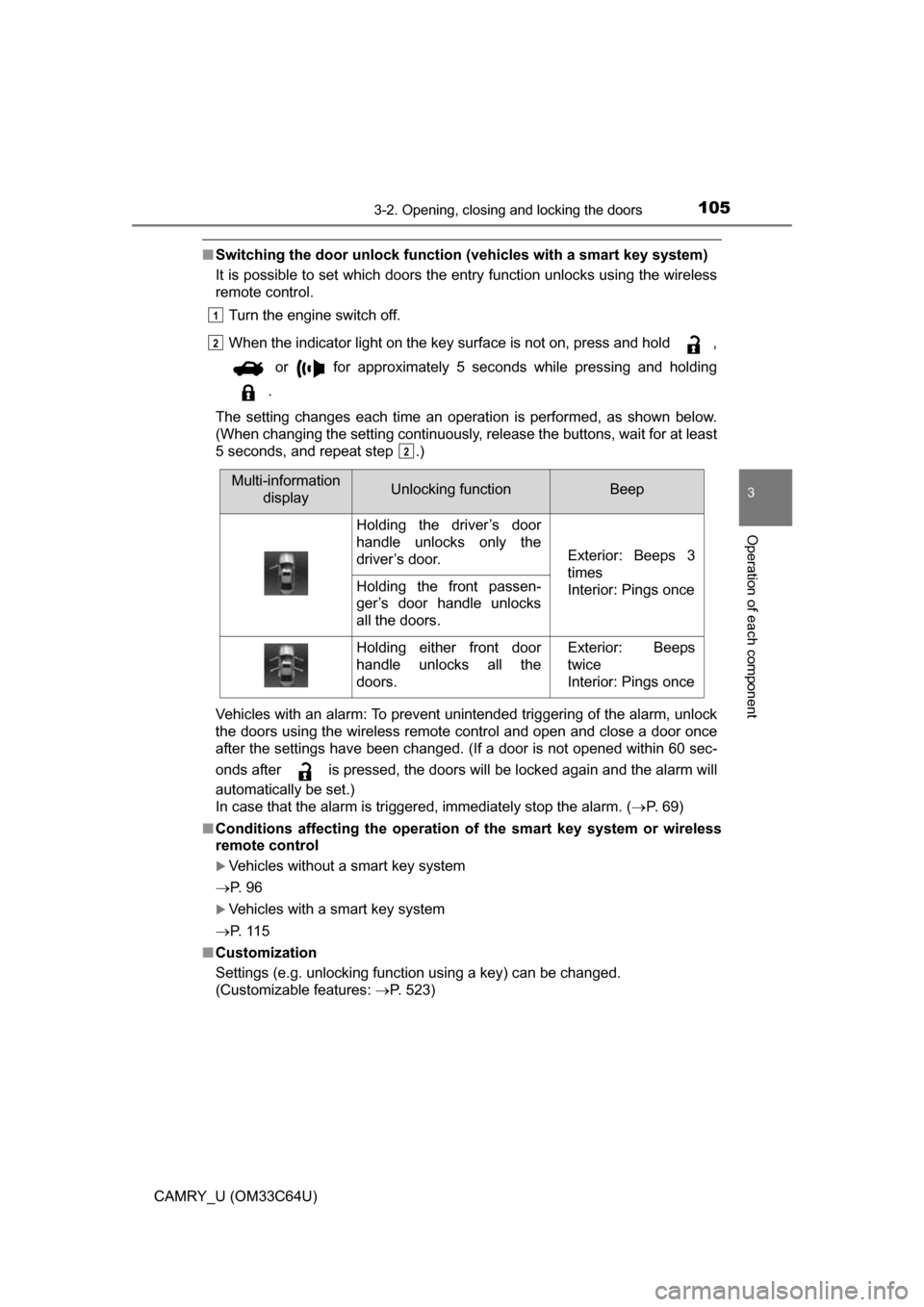
■Switching the door unlock functi on (vehicles with a smart key system)
It is possible to set which doors the entry function unlocks using the wireless
remote control.
Turn the engine switch off.
When the indicator light on the key surface is not on, press and hold ,
or for approximately 5 seconds while pressing and holding
.
The setting changes each time an operation is performed, as shown below.
(When changing the setting continuously, release the buttons, wait for at least
5 seconds, and repeat step .)
Vehicles with an alarm: To prevent unintended triggering of the alarm, unlock
the doors using the wireless remote control and open and close a door once
after the settings have been changed. (If a door is not opened within 6\
0 sec-
onds after is pressed, the doors will be locked again and the alarm will
automatically be set.)
In case that the alarm is triggered, immediately stop the alarm. ( P. 69)
■ Conditions affecting the operation of the smart key system or wireless
remote control
Vehicles without a smart key system
P. 9 6
Vehicles with a smart key system
P. 1 1 5
■ Customization
Settings (e.g. unlocking function using a key) can be changed.
(Customizable features: P. 523)
1
2
2
Multi-information
displayUnlocking functionBeep
Holding the driver’s door
handle unlocks only the
driver’s door.
Exterior: Beeps 3
times
Interior: Pings once
Holding the front passen-
ger’s door handle unlocks
all the doors.
Holding either front door
handle unlocks all the
doors.Exterior: Beeps
twice
Interior: Pings once
Page 117 of 568
1173-2. Opening, closing and locking the doors
3
Operation of each component
CAMRY_U (OM33C64U)●
If the electronic key is inside the vehicle and a door handle becomes wet
during a car wash, a message may be shown on the multi-information dis-
play and a buzzer will sound outside the vehicle. To turn off the alarm, lock
all the doors.
● The lock sensor may not work properly if it comes into contact with ice,
snow, mud, etc. Clean the lock sensor and attempt to operate it again.
● If there is another electronic key in the detection area, it may take slightly
longer to unlock the doors after the door handle is gripped.
● A sudden handle operation or a handle operation immediately after entering
the effective range may prevent the doors from being unlocked. Touch the
door unlock sensor and check that the doors are unlocked before pulling the
door handle again.
■ When the vehicle is not driven for extended periods
●To prevent theft of the vehicle, do not leave the electronic key within 6 ft. (2
m) of the vehicle.
● The smart key system can be deactivated in advance. ( P. 523)
■ To operate the system properly
Make sure to carry the electronic key when operating the system. Do not get
the electronic key too close to the vehicle when operating the system from the
outside of the vehicle.
Depending on the position and holding condition of the electronic key, the key
may not be detected correctly and the system may not operate properly. (The
alarm may go off accidentally, or the door lock prevention function may not
operate.)
■ If the smart key system do es not operate properly
● Locking and unlocking the doors: Use the mechanical key. ( P. 485)
● Starting the engine: P. 486
■ Customization
Settings (e. g. smart key system) can be changed.
(Customizable features: P. 523)
■ If the smart key system has been deactivated in a customized setting
●Locking and unlocking the doors and opening the trunk:
Use the wireless remote control or mechanical key. ( P. 108, 485)
● Starting the engine and changing engine switch modes: P. 486
● Stopping the engine: P. 155
Page 132 of 568
1323-5. Opening and closing the windows
CAMRY_U (OM33C64U)■
Operating the power windows a fter turning the engine off
Vehicles without a smart key system
The power windows can be operated for approximately 45 seconds even
after the engine switch is turned to the “ACC” or “LOCK” position. They can-
not, however, be operated once either front door is opened.
Vehicles with a smart key system
The power windows can be operated for approximately 45 seconds even
after the engine switch is turned to ACCESSORY mode or turned off. They
cannot, however, be operated once either front door is opened.
■ Jam protection function (front door windows)
If an object becomes caught between the window and the window frame, win-
dow travel is stopped and the window is opened slightly.
■ When the power window does not close normally (front door windows)
If the jam protection function is operating abnormally and a window cannot be
closed, perform the following operations using the power window switch on
the relevant door.
●Vehicles without a smart key system: After stopping the vehicle, the window
can be closed by holding the power window switch in the one-touch closing
position while the engine switch is turned to the “ON” position.
Vehicles with a smart key system: After stopping the vehicle, the window
can be closed by holding the power window switch in the one-touch closing
position while the engine switch is turned to IGNITION ON mode.
● If the window still cannot be closed even by carrying out the operation as
explained above, initialize the function by performing the following proce-
dure.
Hold the power window switch in the one-touch closing position. Continue
holding the switch for a further 6 seconds after the window has closed.
Hold the power window switch in the one-touch opening position. Con-
tinue holding the switch for a further 2 seconds after the window has
opened completely.
Hold the power window switch in the one-touch closing position once
again. Continue holding the switch for a further 2 seconds after the win\
-
dow has closed.
If you release the switch while the window is moving, start again from t\
he
beginning.
If the window continues to close but then re-open slightly even after perform-
ing the above procedure correctly, have the vehicle inspected by your Toyota
dealer.
■ Customization
Settings (e.g. key linked operation) can be changed.
(Customizable features: P. 523)
1
2
3
Page 136 of 568
1363-5. Opening and closing the windows
CAMRY_U (OM33C64U)■
When the moon roof do es not close normally
Perform the following procedure:
● If the moon roof closes but then re-opens slightly
Stop the vehicle.
Press and hold the “CLOSE” switch.
*1
The moon roof will close, reopen and pause for approximately 10 sec-
onds.
*2 Then it will close again, tilt up and pause for approximately 1 sec-
ond. Finally, it will tilt down, open and close.
Check to make sure that the moon roof is completely closed and then
release the switch.
● If the moon roof tilts down but then tilts back up
Stop the vehicle.
Press and hold the “UP” switch
*1 until the moon roof moves into the tilt
up position and stops.
Release the “UP” switch once and then press and hold the “UP” switch
again.
*1
The moon roof will pause for approximately 10 seconds in the tilt up posi-
tion.
*2 Then it will adjust slightly and pause for approximately 1 second.
Finally, it will tilt down, open and close.
Check to make sure that the moon roof is completely closed and then
release the switch.
*1: If the switch is released at the incorrect time, the procedure will have to
be performed again from the beginning.
*2: If the switch is released after the above mentioned 10 second pause,automatic operation will be disabled. In that case, press and hold the
open/close switch in the close position or press and hold the “UP” switch.
The moon roof will tilt up and pause for approximately 1 second. Then it
will tilt down, open and close. Check to make sure that the moon roof is
completely closed and then release the switch.
If the moon roof does not fully close even after performing the above proce-
dure correctly, have the vehicle inspected by your Toyota dealer.
■ Moon roof open warning buzzer
The buzzer sounds and a message is shown on the multi-information display
in the instrument cluster when the engine switch is turned off and the driver's
door is opened with the moon roof open.
■ Customization
Settings (e.g. key linked operation) can be changed.
(Customizable features: P. 523)
1
2
3
1
2
3
4
Page 164 of 568
1644-2. Driving procedures
CAMRY_U (OM33C64U)
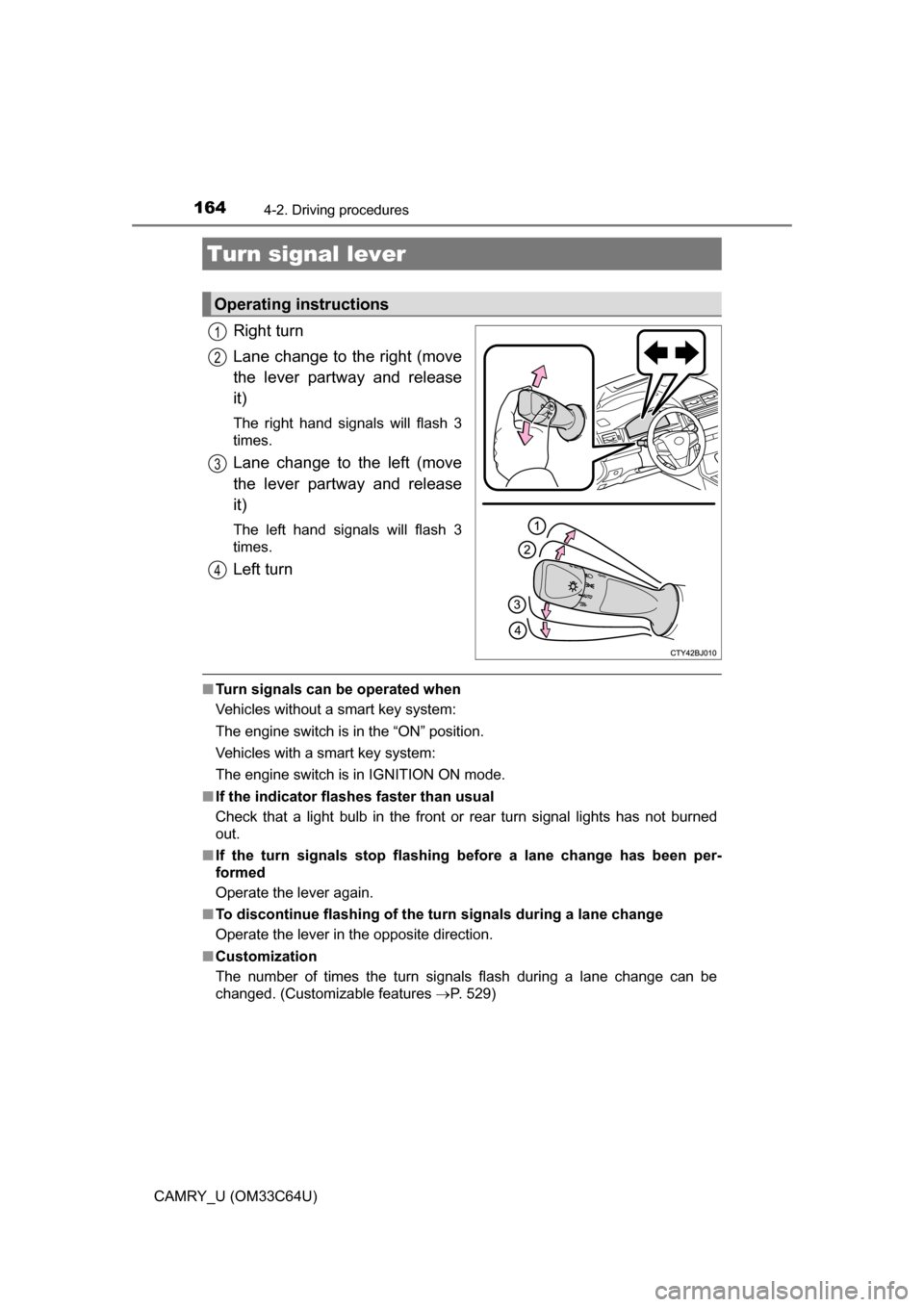
Right turn
Lane change to the right (move
the lever partway and release
it)
The right hand signals will flash 3
times.
Lane change to the left (move
the lever partway and release
it)
The left hand signals will flash 3
times.
Left turn
■Turn signals can be operated when
Vehicles without a smart key system:
The engine switch is in the “ON” position.
Vehicles with a smart key system:
The engine switch is in IGNITION ON mode.
■ If the indicator flashes faster than usual
Check that a light bulb in the front or rear turn signal lights has not burned
out.
■ If the turn signals stop flashing before a lane change has been per-
formed
Operate the lever again.
■ To discontinue flashing of the turn signals during a lane change
Operate the lever in the opposite direction.
■ Customization
The number of times the turn signals flash during a lane change can be
changed. (Customizable features P. 529)
Turn signal lever
Operating instructions
1
2
3
4
Page 169 of 568
1694-3. Operating the lights and wipers
4
Driving
CAMRY_U (OM33C64U)■
Battery-saving function
In the following conditions, the remaining lights will go off automatically after
20 minutes in order to prevent the vehicle battery from being discharged:
●The headlights and/or tail lights are on.
● Vehicles without a smart key system:
The engine switch is in the “ACC” or “LOCK” position.
Vehicles with a smart key system:
The engine switch is in ACCESSORY mode or turned off.
This function will be canceled in any of the following situations:
● Vehicles without a smart key system:
When the engine switch is turned to the “ON” position.
Vehicles with a smart key system:
When the engine switch is turned to IGNITION ON mode.
● When the light switch is operated
● When a door or the trunk is opened or closed
■ Customization
Settings (e.g. light sensor sensitivity) can be changed.
(Customizable features: P. 529)
NOTICE
■To prevent battery discharge
Do not leave the lights on longer than necessary when the engine is not
running.
Page 174 of 568
1744-3. Operating the lights and wipers
CAMRY_U (OM33C64U)■
If a warning message for the Automa tic High Beam is shown on the
multi-information display
It may indicate a malfunction in the system. Contact your Toyota dealer.
■ Customization
The Automatic High Beam can be deactivated.
(Customizable features: P. 529)
WARNING
■Limitations of the Automatic High Beam
Do not rely on the Automatic High Beam. Always drive safely, taking care to
observe your surroundings and turning high beam on or off manually if nec-
essary.
Page 249 of 568
249
5
Audio system
CAMRY_U (OM33C64U)
5-2.Setup
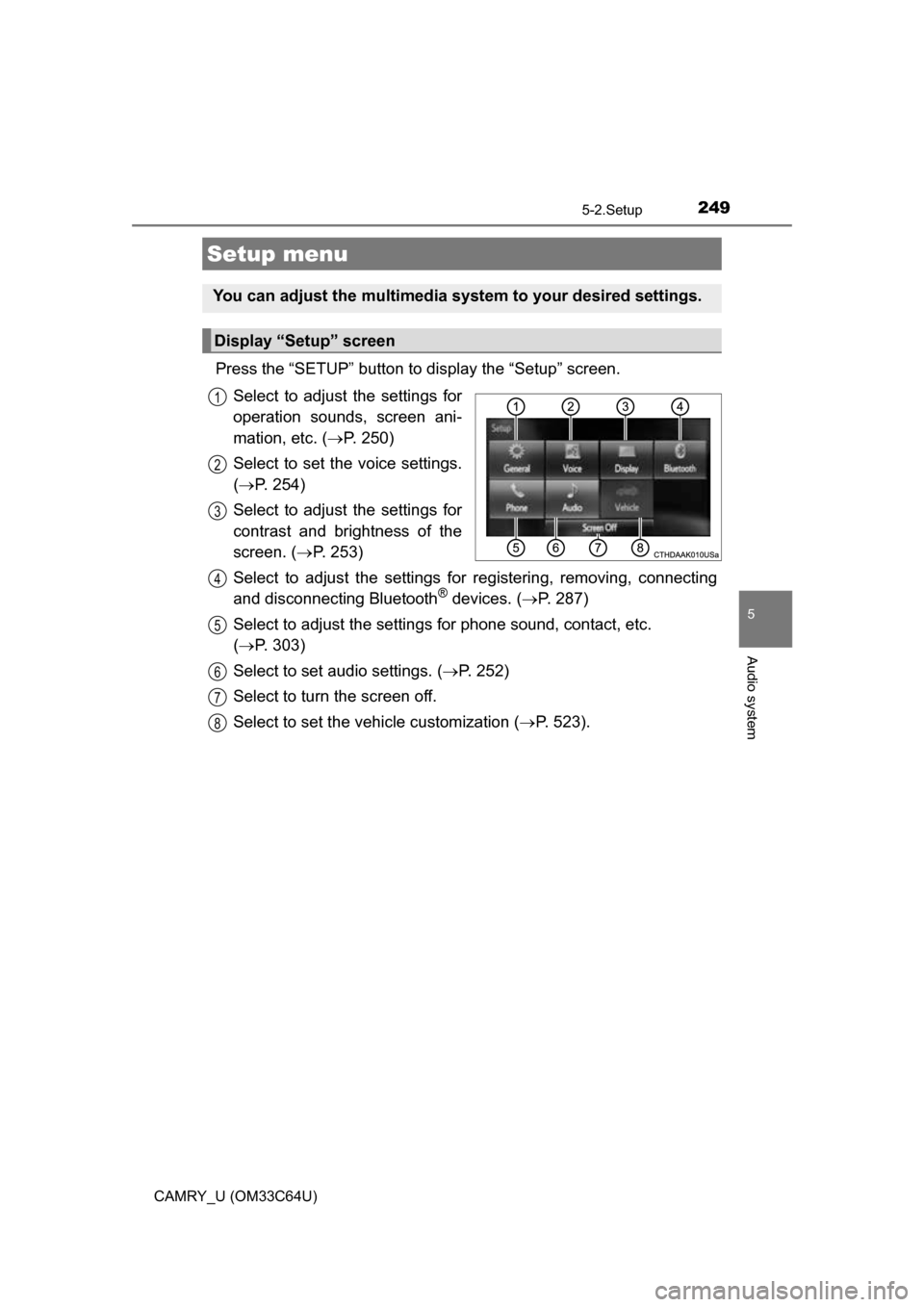
Press the “SETUP” button to display the “Setup” screen.Select to adjust the settings for
operation sounds, screen ani-
mation, etc. ( P. 250)
Select to set the voice settings.
( P. 254)
Select to adjust the settings for
contrast and brightness of the
screen. ( P. 253)
Select to adjust the settings for registering, removing, connecting
and disconnecting Bluetooth
® devices. ( P. 287)
Select to adjust the settings fo r phone sound, contact, etc.
( P. 303)
Select to set audio settings. ( P. 252)
Select to turn the screen off.
Select to set the vehicle customization ( P. 523).
Setup menu
You can adjust the multimedia system to your desired settings.
Display “Setup” screen
1
2
3
4
5
6
7
8