ignition TOYOTA CAMRY 2018 Owners Manual (in English)
[x] Cancel search | Manufacturer: TOYOTA, Model Year: 2018, Model line: CAMRY, Model: TOYOTA CAMRY 2018Pages: 612, PDF Size: 10.63 MB
Page 3 of 612

3
1
8 7 5 4
3
2
CAMRY_U (01999-06139)
9
6
4-2. Driving proceduresEngine (ignition) switch (vehicles without a
smart key system) ........... 198
Engine (ignition) switch (vehicles with a smart
key system) ..................... 200
Automatic transmission ..... 205
Turn signal lever................ 211
Parking brake .................... 212
Electric parking brake........ 213
Brake Hold ........................ 217
4-3. Operating the lights and wipers
Headlight switch ................ 219
Automatic High Beam ....... 223
Windshield wipers and washer ............................ 227
4-4. Refueling Opening the fuel tank cap .................................. 231
4-5. Using the driving support systems
Toyota Safety Sense P ..... 235
PCS (Pre-Collision System) ........................... 242
LDA (Lane Departure Alert with steering
control) ............................ 253
Dynamic radar cruise control with full-speed
range ............................... 263
Dynamic radar cruise control ............................. 276
Cruise control .................... 289
Driving assist systems....... 294 BSM (Blind Spot
Monitor) ........................... 300
• BSM function ................. 304
• RCTA function ............... 306
Rear Camera Detection Function........................... 310
Intuitive parking assist ....... 314
Intelligent Clearance Sonar (ICS) ..................... 322
Driving mode select switches........................... 343
4-6. Driving tips Winter driving tips .............. 345
5-1. Using the air conditioning system and defogger
Manual air conditioning system ............................. 350
Automatic air conditioning system (without “SYNC”
button) ............................. 355
Automatic air conditioning system (with “SYNC”
button) ............................. 361
Seat heaters ...................... 369
5-2. Using the interior lights Interior lights list................. 370
• Interior lights.................. 371
• Personal lights............... 372
5Interior features
Page 71 of 612
71
1
For safety and security
CAMRY_U (01999-06139)
1-3. Theft deterrent system
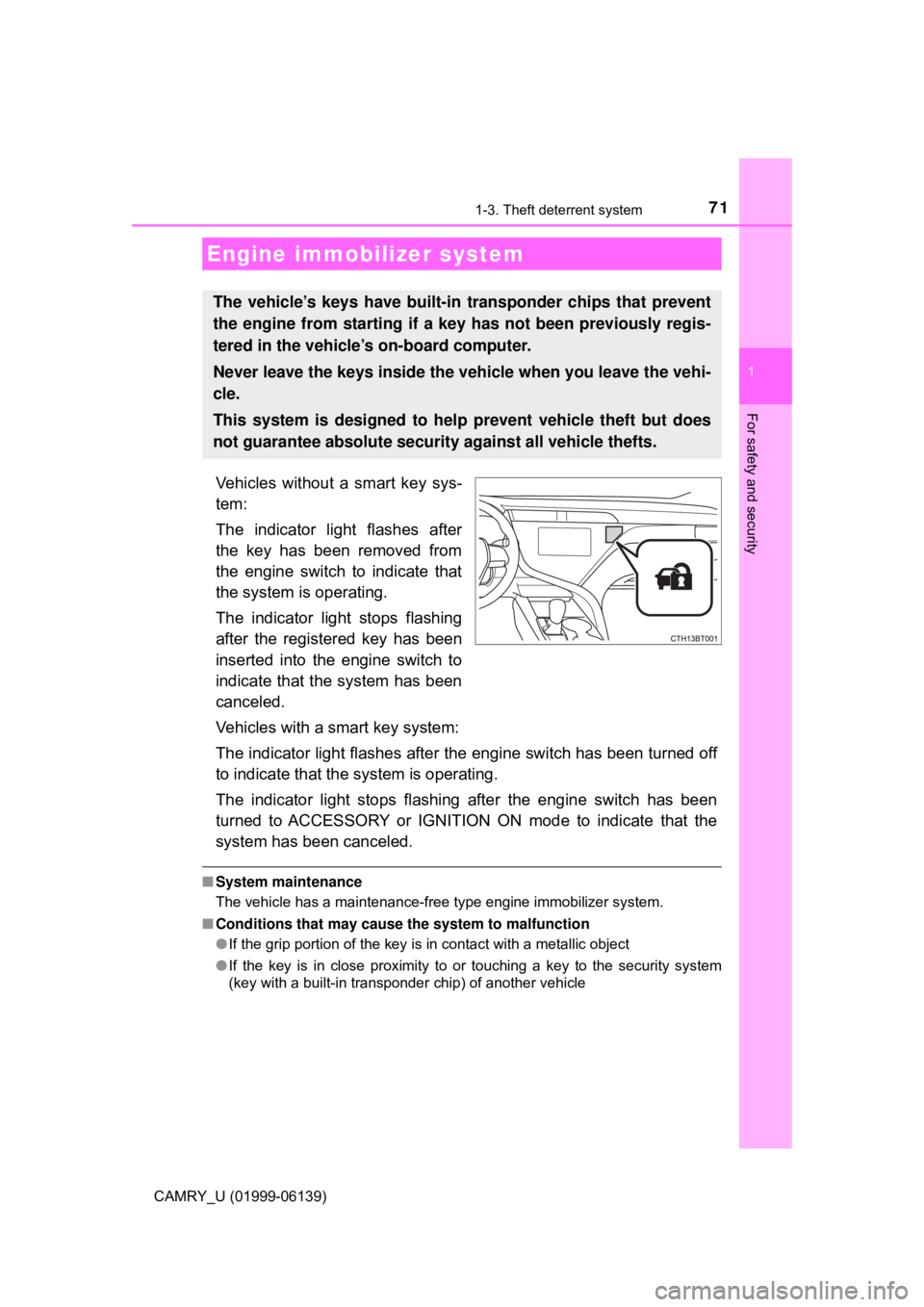
Vehicles without a smart key sys-
tem:
The indicator light flashes after
the key has been removed from
the engine switch to indicate that
the system is operating.
The indicator light stops flashing
after the registered key has been
inserted into the engine switch to
indicate that the system has been
canceled.
Vehicles with a smart key system:
The indicator light flashes after the engine switch has been turned off
to indicate that the system is operating.
The indicator light stops flashing after the engine switch has been
turned to ACCESSORY or IGNITION ON mode to indicate that the
system has been canceled.
■ System maintenance
The vehicle has a maintenance-free type engine immobilizer system.
■ Conditions that may cause the system to malfunction
●If the grip portion of the key is in contact with a metallic object
● If the key is in close proximity to or touching a key to the security system
(key with a built-in transponder chip) of another vehicle
Engine immobilizer system
The vehicle’s keys have built-in transponder chips that prevent
the engine from starting if a key has not been previously regis-
tered in the vehicle’s on-board computer.
Never leave the keys inside the vehicle when you leave the vehi-
cle.
This system is designed to help prevent vehicle theft but does
not guarantee absolute security against all vehicle thefts.
Page 75 of 612

751-3. Theft deterrent system
1
For safety and security
CAMRY_U (01999-06139)
Do one of the following to deactivate or stop the alarm:
Vehicles without a smart key system
● Unlock the doors.
● Open the trunk using the wireless remote control.
● Turn the engine switch to the “ACC” or “ON” position, or start the
engine. (The alarm will be deactivated or stopped after a few sec-
onds.)
Vehicles with a smart key system
● Unlock the doors.
● Open the trunk using the entry function or wireless remote control.
● Turn the engine switch to ACCESSORY or IGNITION ON mode, or
start the engine. (The alarm will be deactivated or stopped after a
few seconds.)
■ System maintenance
The vehicle has a maintenance-free type alarm system.
■ Items to check before locking the vehicle
To prevent unexpected triggering of the alarm and vehicle theft, make sure of
the following:
●Nobody is in the vehicle.
● The windows and moon roof or panoramic moon roof are closed before the
alarm is set.
● No valuables or other personal items are left in the vehicle.
Deactivating or stopping the alarm
Page 80 of 612
802. Instrument cluster
CAMRY_U (01999-06139)
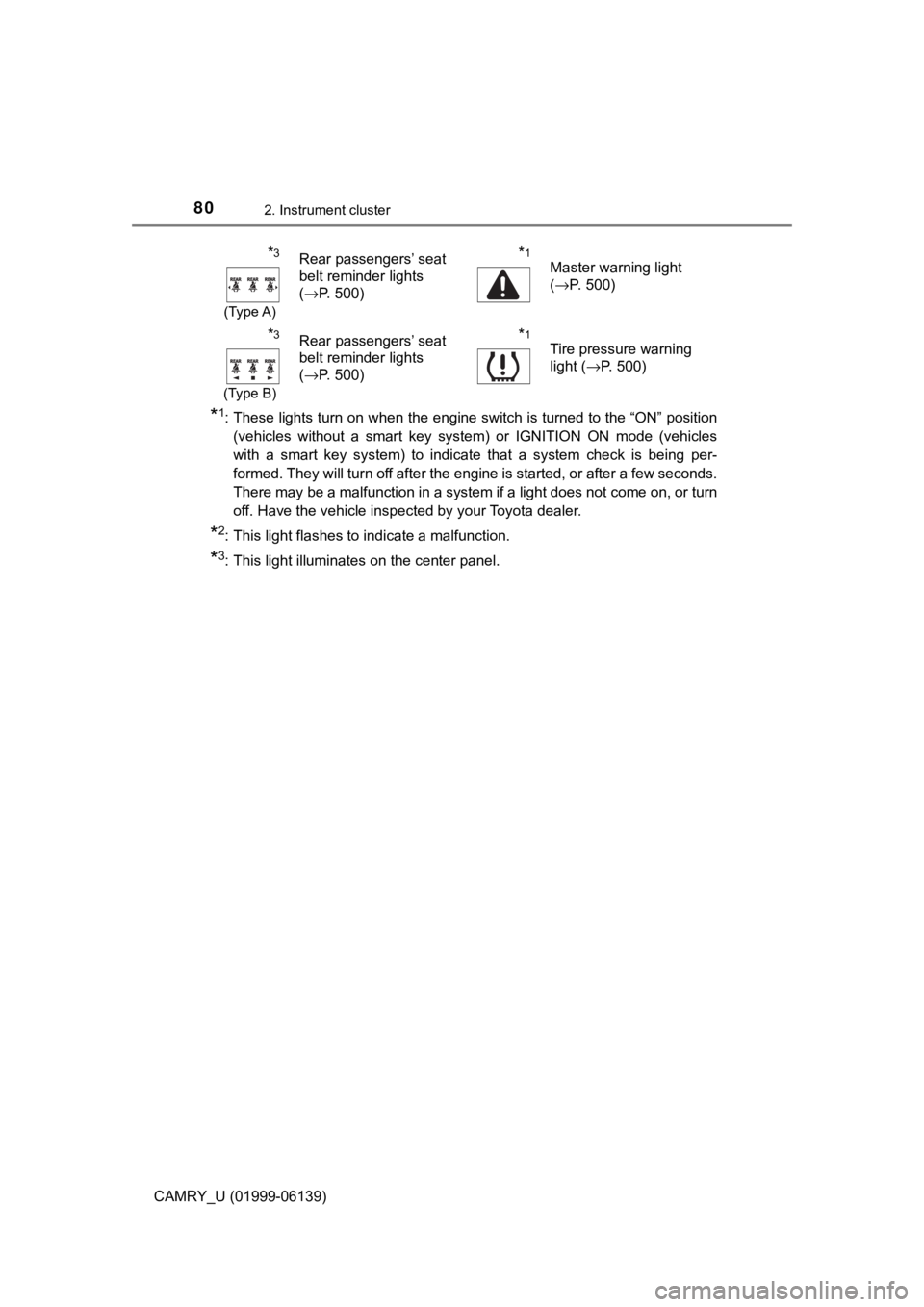
*1: These lights turn on when the engine switch is turned to the “ON” position(vehicles without a smart key system) or IGNITION ON mode (vehicles
with a smart key system) to indicate that a system check is being per-
formed. They will turn off after the engine is started, or after a few seconds.
There may be a malfunction in a system if a light does not come on, or turn
off. Have the vehicle inspected by your Toyota dealer.
*2: This light flashes to indicate a malfunction.
*3: This light illuminates on the center panel.
*3
(Type A)
Rear passengers’ seat
belt reminder lights
(→P. 500)*1
Master warning light
(→P. 500)
*3
(Type B)
Rear passengers’ seat
belt reminder lights
(→P. 500)*1
Tire pressure warning
light ( →P. 500)
Page 83 of 612

832. Instrument cluster
2
Instrument cluster
CAMRY_U (01999-06139)
*1: These lights turn on when the engine switch is turned to the “ON” position(vehicles without a smart key system) or IGNITION ON mode (vehicles
with a smart key system) to indicate that a system check is being per-
formed. They will turn off after the engine is started, or after a few seconds.
There may be a malfunction in a system if a light does not come on, or turn
off. Have the vehicle inspected by your Toyota dealer.
*2: This light does not turn on when the system is disabled.
*3: This light turns on when the system is off.
*4: This light flashes to indicate that the system is operating.
*5: These indicators will illuminate in the following situations to indicate that
the system initial check is being performed:
• When the BSM function or RCTA function is enabled and the engine switch is turned to the “ON” position (vehicles without a smart key sys-
tem) or IGNITION ON mode (vehicles with a smart key system).
• When the engine switch is in the “ON” position (vehicles without a smart
key system) or IGNITION ON mode (vehicles with a smart key system)
and the BSM function is enabled.
• When the engine switch is in the “ON” position (vehicles without a smart
key system) or IGNITION ON mode (vehicles with a smart key system)
and the RCTA function is enabled. (At this time, a buzzer will also
sound.)
The indicators will turn off after a few seconds. If the indicators do not
illuminate or turn off, or if a buzzer does not sound when the RCTA func-
tion is enabled, the system may be malfunctioning. Have the vehicle
inspected by your Toyota dealer.
*6: This light illuminates on the outside rear view mirrors.
*7: This light illuminates on the center panel.
*8: When the outside temperature is approximately 37°F (3°C) or lower, this
indicator will flash for approximately 10 seconds, then stay on.
WARNING
■ If a safety system warning light does not come on
Should a safety system light such as the ABS and SRS warning lights not
come on when you start the engine, this could mean that these systems are
not available to help protect you in an accident, which could result in death
or serious injury. Have the vehicle inspected by your Toyota dealer immedi-
ately if this occurs.
Page 86 of 612

862. Instrument cluster
CAMRY_U (01999-06139)
■The meters and display illuminate when
Vehicles without a smart key system
The engine switch is in the “ON” position.
Vehicles with a smart key system
The engine switch is in IGNITION ON mode.
■ Brightness of the meters (day mode and night mode)
●The brightness of the meters is changed between day mode and night
mode.
• Day mode: When the tail lights are off or when the tail lights are on but
the surrounding area is bright
• Night mode: When the tail lights are on and the surrounding area is dark
● When in night mode, the brightness will be reduced slightly unless the
meters are set to the maximum brightness level.
■ Outside temperature display
In the following situations, the correct outside temperature may not be \
dis-
played, or the display may take longer than normal to change:
●When stopped, or driving at low speeds (less than 16 mph [25 km/h])
● When the outside temperature has changed suddenly (at the entrance/exit
of a garage, tunnel, etc.)
● When “ − −” or “E” is displayed, the system may be malfunctioning.
Take your vehicle to your Toyota dealer.
NOTICE
■ To prevent damage to the engine and its components
● Do not let the indicator needle of the tachometer enter the red zone, which
indicates the maximum engine speed.
● The engine may be overheating if the engine coolant temperature gauge is
in the red zone (H). In this case, immediately stop the vehicle in a safe
place, and check the engine after it has cooled completely. (→ P. 534)
Page 97 of 612
972. Instrument cluster
2
Instrument cluster
CAMRY_U (01999-06139)
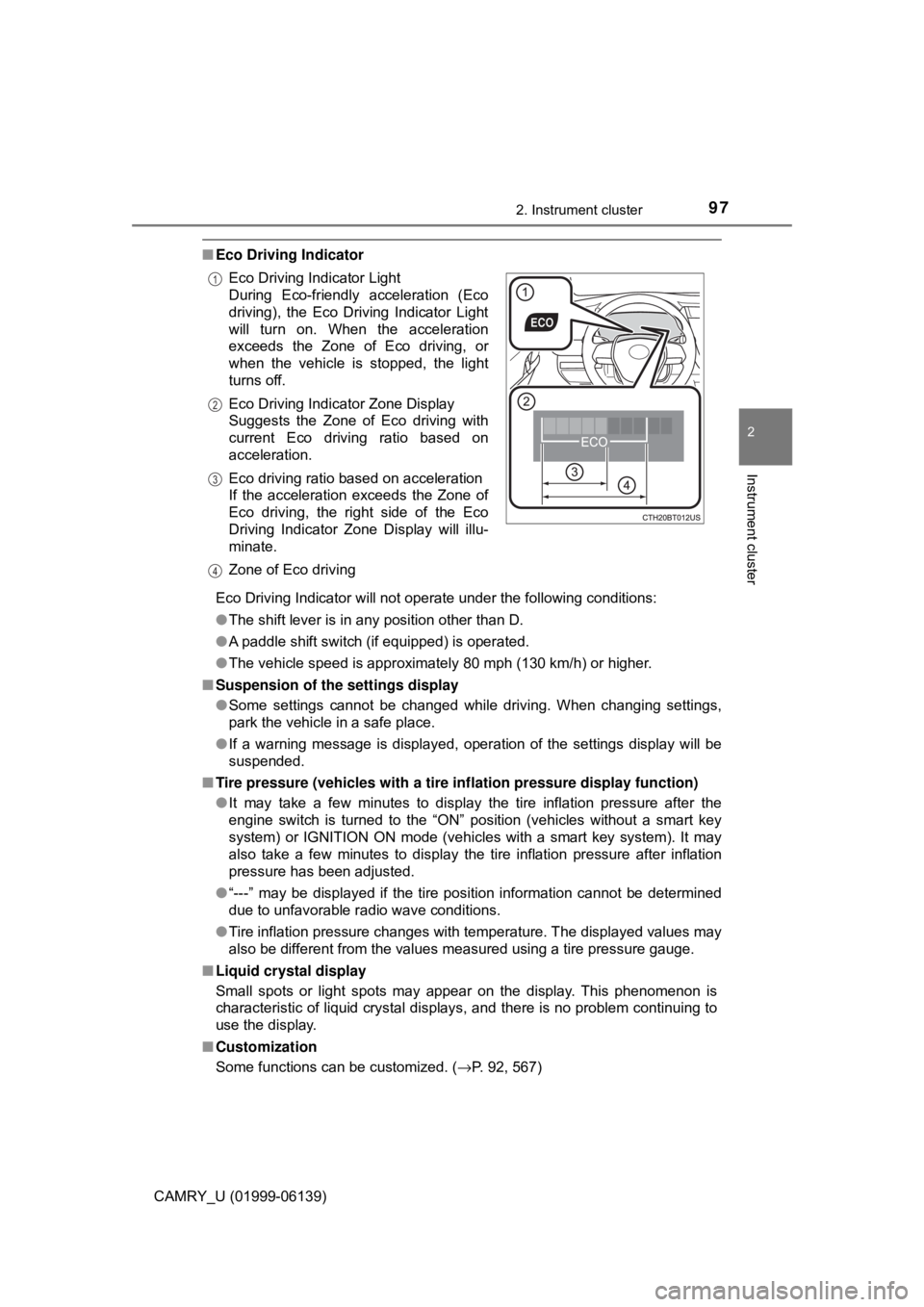
■Eco Driving Indicator
Eco Driving Indicator will not operate under the following conditions:
●The shift lever is in any position other than D.
● A paddle shift switch (if equipped) is operated.
● The vehicle speed is approximately 80 mph (130 km/h) or higher.
■ Suspension of the settings display
●Some settings cannot be changed while driving. When changing settings,
park the vehicle in a safe place.
● If a warning message is displayed, operation of the settings display will be
suspended.
■ Tire pressure (vehicles with a tire inflation pressure display function)
● It may take a few minutes to display the tire inflation pressure after the
engine switch is turned to the “ON” position (vehicles without a smart key
system) or IGNITION ON mode (vehicles with a smart key system). It may
also take a few minutes to display the tire inflation pressure after inflation
pressure has been adjusted.
● “---” may be displayed if the tire position information cannot be determined
due to unfavorable radio wave conditions.
● Tire inflation pressure changes with temperature. The displayed values may
also be different from the values measured using a tire pressure gauge.
■ Liquid crystal display
Small spots or light spots may appear on the display. This phenomenon is
characteristic of liquid crystal displays, and there is no problem continuing to
use the display.
■ Customization
Some functions can be customized. ( →P. 92, 567)
Eco Driving Indicator Light
During Eco-friendly acceleration (Eco
driving), the Eco Driving Indicator Light
will turn on. When the acceleration
exceeds the Zone of Eco driving, or
when the vehicle is stopped, the light
turns off.
Eco Driving Indicator Zone Display
Suggests the Zone of Eco driving with
current Eco driving ratio based on
acceleration.
Eco driving ratio based on acceleration
If the acceleration exceeds the Zone of
Eco driving, the right side of the Eco
Driving Indicator Zone Display will illu-
minate.
Zone of Eco driving
1
2
3
4
Page 111 of 612
1112. Instrument cluster
2
Instrument cluster
CAMRY_U (01999-06139)
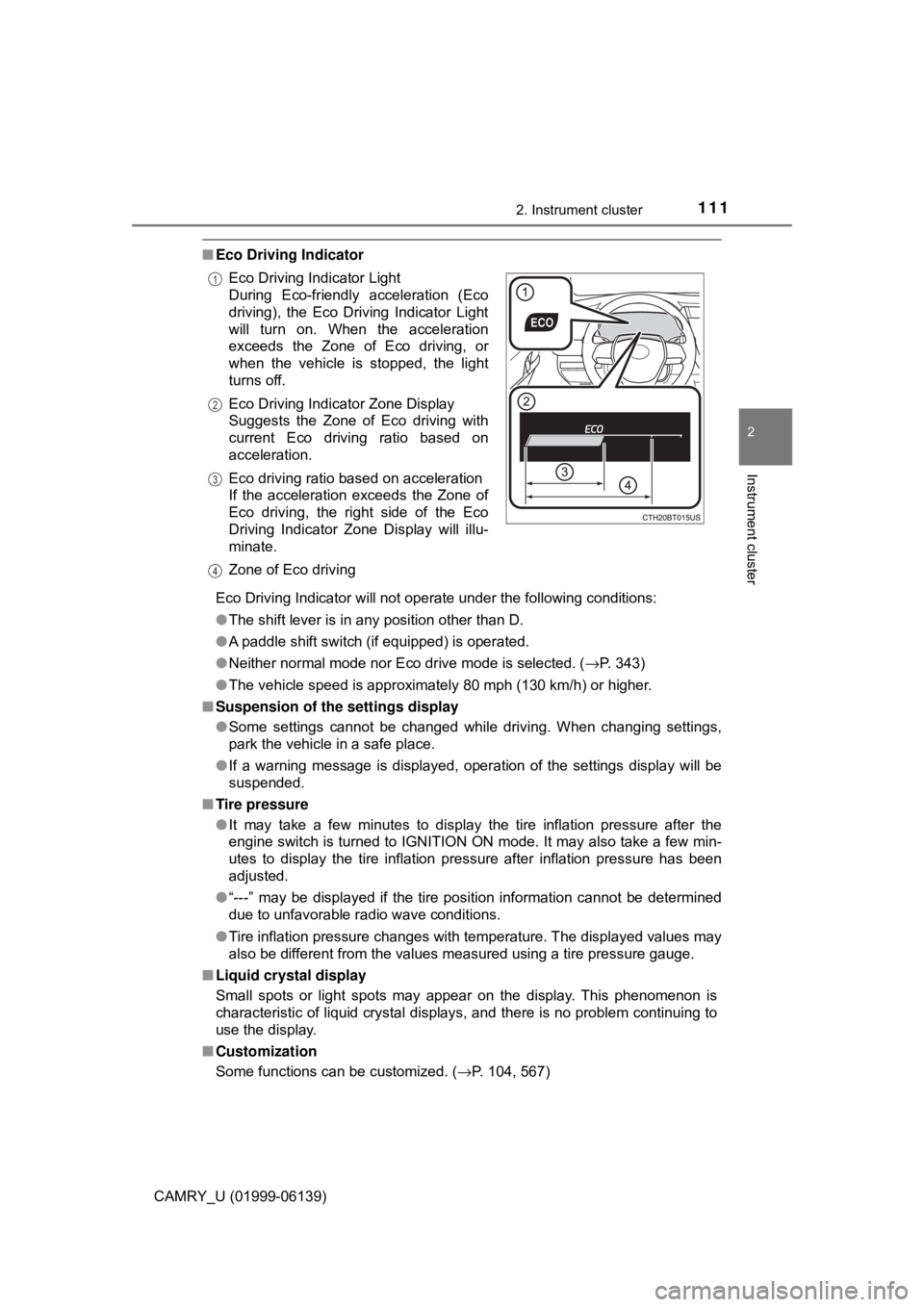
■Eco Driving Indicator
Eco Driving Indicator will not operate under the following conditions:
●The shift lever is in any position other than D.
● A paddle shift switch (if equipped) is operated.
● Neither normal mode nor Eco drive mode is selected. ( →P. 343)
● The vehicle speed is approximately 80 mph (130 km/h) or higher.
■ Suspension of the settings display
●Some settings cannot be changed while driving. When changing settings,
park the vehicle in a safe place.
● If a warning message is displayed, operation of the settings display will be
suspended.
■ Tire pressure
●It may take a few minutes to display the tire inflation pressure after the
engine switch is turned to IGNITION ON mode. It may also take a few min-
utes to display the tire inflation pressure after inflation pressure has been
adjusted.
● “---” may be displayed if the tire position information cannot be determined
due to unfavorable radio wave conditions.
● Tire inflation pressure changes with temperature. The displayed values may
also be different from the values measured using a tire pressure gauge.
■ Liquid crystal display
Small spots or light spots may appear on the display. This phenomenon is
characteristic of liquid crystal displays, and there is no problem continuing to
use the display.
■ Customization
Some functions can be customized. ( →P. 104, 567)
Eco Driving Indicator Light
During Eco-friendly acceleration (Eco
driving), the Eco Driving Indicator Light
will turn on. When the acceleration
exceeds the Zone of Eco driving, or
when the vehicle is stopped, the light
turns off.
Eco Driving Indicator Zone Display
Suggests the Zone of Eco driving with
current Eco driving ratio based on
acceleration.
Eco driving ratio based on acceleration
If the acceleration exceeds the Zone of
Eco driving, the right side of the Eco
Driving Indicator Zone Display will illu-
minate.
Zone of Eco driving
1
2
3
4
Page 117 of 612

1172. Instrument cluster
2
Instrument cluster
CAMRY_U (01999-06139)
Displays the following items in the appropriate situation:
■Warning/Message
●Alert from the LDA (Lane Departure Alert with steering control)
● Dynamic radar cruise control with full-speed range
● message
Displayed when a suggestion/advice pop-up display is displayed on the
multi-information display. ( →P. 11 0 )
● message
Displayed when a warning message is displayed on the multi-informa-
tion display. ( →P. 507)
● Outside temperature
Displayed in the following situations:
• When the engine switch is turned to IGNITION ON mode
• When the low outside temperature indicator is flashing
Displayed content is the same as that displayed on the multi-information
display. For details, refer to the explanation of the outside temperature
display on the multi-information display. ( →P. 84)
■
Hands-free system status
Displayed when the hands-free system is operated.
■
Audio system operation status
Displayed when the audio system is operated.
Information display area
Page 118 of 612

1182. Instrument cluster
CAMRY_U (01999-06139)
■Head-up display
The head-up display may seem dark or hard to see when viewed through
sunglasses, especially polarized sunglasses.
Adjust the brightness of the head-up display or remove your sunglasses.
■ Display brightness
The brightness of the head-up display can be adjusted on of the multi-
information display. Also, it is automatically adjusted according to the ambient
brightness.
■ Enabling/disabling of the head-up display
If the head-up display is disabled, it will remain disabled when the engine
switch is turned off then back to IGNITION ON mode.
■ Street name display (vehicles with a navigation system)
Only street names which are included in the map data will be displayed.
WARNING
■Before using the head-up display
● Check that the position and brightness of the head-up display image does
not interfere with safe driving. Incorrect adjustment of the image’s position
or brightness may obstruct the driver’s view and lead to an accident,
resulting in death or serious injury.
● Do not continuously look at the head-up display while driving as you may
fail to see pedestrians, objects on the road, etc. ahead of the vehicle.\
■ Caution for changing settings of the head-up display
As the engine needs to be running while changing the settings of the head-
up display, ensure that the vehicle is parked in a place with adequate venti-
lation. In a closed area such as a garage, exhaust gases including harmful
carbon monoxide (CO) may collect and enter the vehicle. This may lead to
death or a serious health hazard.