brightness TOYOTA CAMRY 2018 Owners Manual (in English)
[x] Cancel search | Manufacturer: TOYOTA, Model Year: 2018, Model line: CAMRY, Model: TOYOTA CAMRY 2018Pages: 612, PDF Size: 13.73 MB
Page 85 of 612
852. Instrument cluster
2
Instrument cluster
CAMRY_U (01999-06122)
Tachometer
Displays the engine speed in revolutions per minute
Shift position (→P. 205)
Outside temperature
Displays the outside temperature within the range of -40°F (-40°C) to
122°F (50°C). Low outside temperature indicator comes on when the
ambient temperature is 37°F (3°C) or lower.
Multi-information display
Presents the driver with a variety of vehicle data (→P. 87, 99)
Displays warning messages in case of a malfunction (→P. 507)
Speedometer
Fuel gauge
Odometer and trip meter (→P. 96, 110)
Engine coolant temperature gauge
Displays the engine coolant temperature
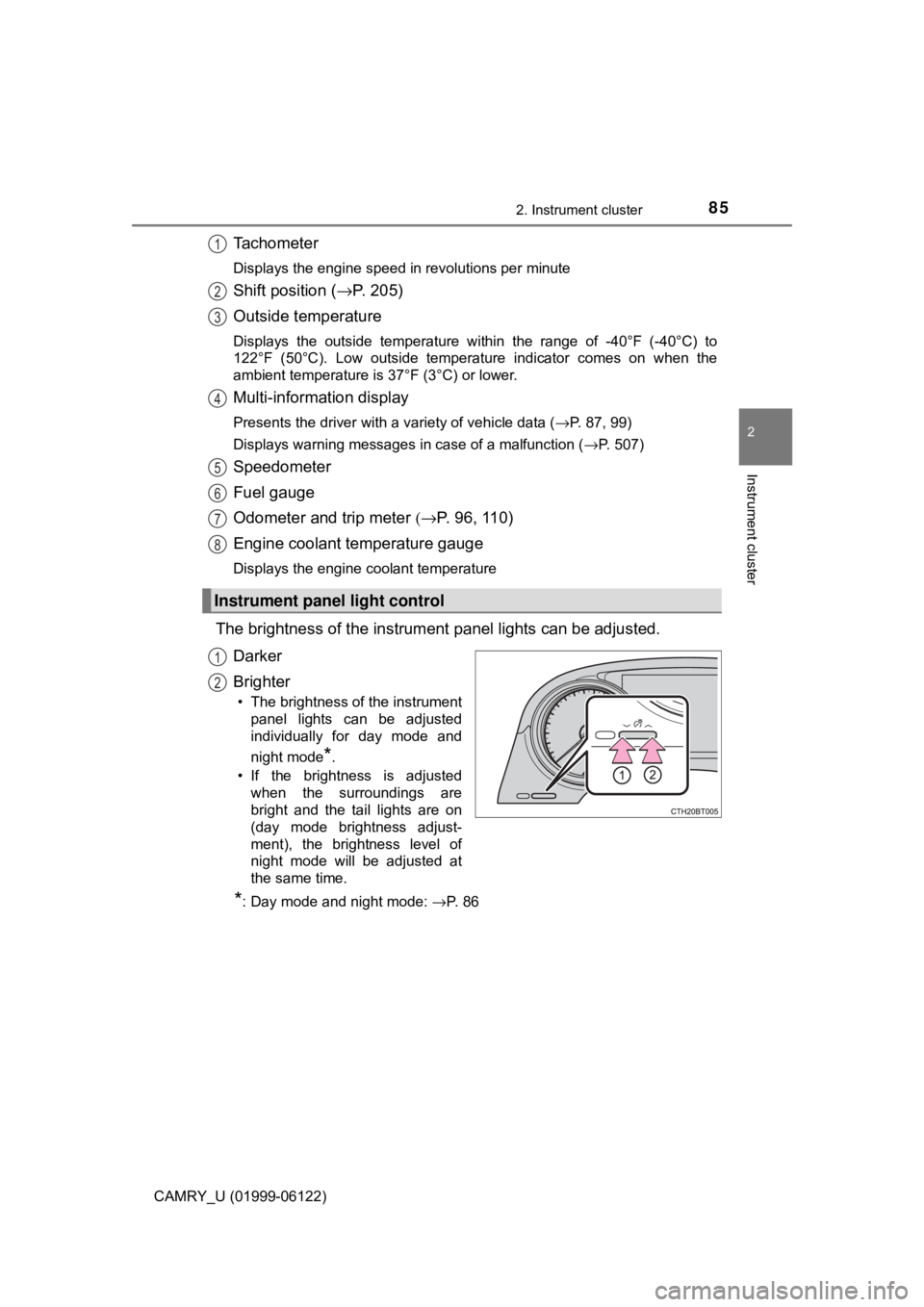
The brightness of the instrument panel lights can be adjusted.
Darker
Brighter
• The brightness of the instrument
panel lights can be adjusted
individually for day mode and
night mode
*.
• If the brightness is adjusted
when the surroundings are
bright and the tail lights are on
(day mode brightness adjust-
ment), the brightness level of
night mode will be adjusted at
the same time.
*: Day mode and night mode: →P. 8 6
Instrument panel light control
1
2
3
4
5
6
7
8
1
2
Page 86 of 612
862. Instrument cluster
CAMRY_U (01999-06122)
■The meters and display illuminate when
Vehicles without a smart key system
The engine switch is in the “ON” position.
Vehicles with a smart key system
The engine switch is in IGNITION ON mode.
■Brightness of the meters (day mode and night mode)
●The brightness of the meters is changed between day mode and night
mode.
• Day mode: When the tail lights are off or when the tail lights are on but
the surrounding area is bright
• Night mode: When the tail lights are on and the surrounding area is dark
●When in night mode, the brightness will be reduced slightly unless the
meters are set to the maximum brightness level.
■Outside temperature display
In the following situations, the correct outside temperature may not be dis-
played, or the display may take longer than normal to change:
●When stopped, or driving at low speeds (less than 16 mph [25 km/h])
●When the outside temperature has changed suddenly (at the entrance/exit
of a garage, tunnel, etc.)
●When “− −” or “E” is displayed, the system may be malfunctioning.
Take your vehicle to your Toyota dealer.
NOTICE
■To prevent damage to the engine and its components
●Do not let the indicator needle of the tachometer enter the red zone, which
indicates the maximum engine speed.
●The engine may be overheating if the engine coolant temperature gauge is
in the red zone (H). In this case, immediately stop the vehicle in a safe
place, and check the engine after it has cooled completely. (→P. 534)
Page 94 of 612
942. Instrument cluster
CAMRY_U (01999-06122)■
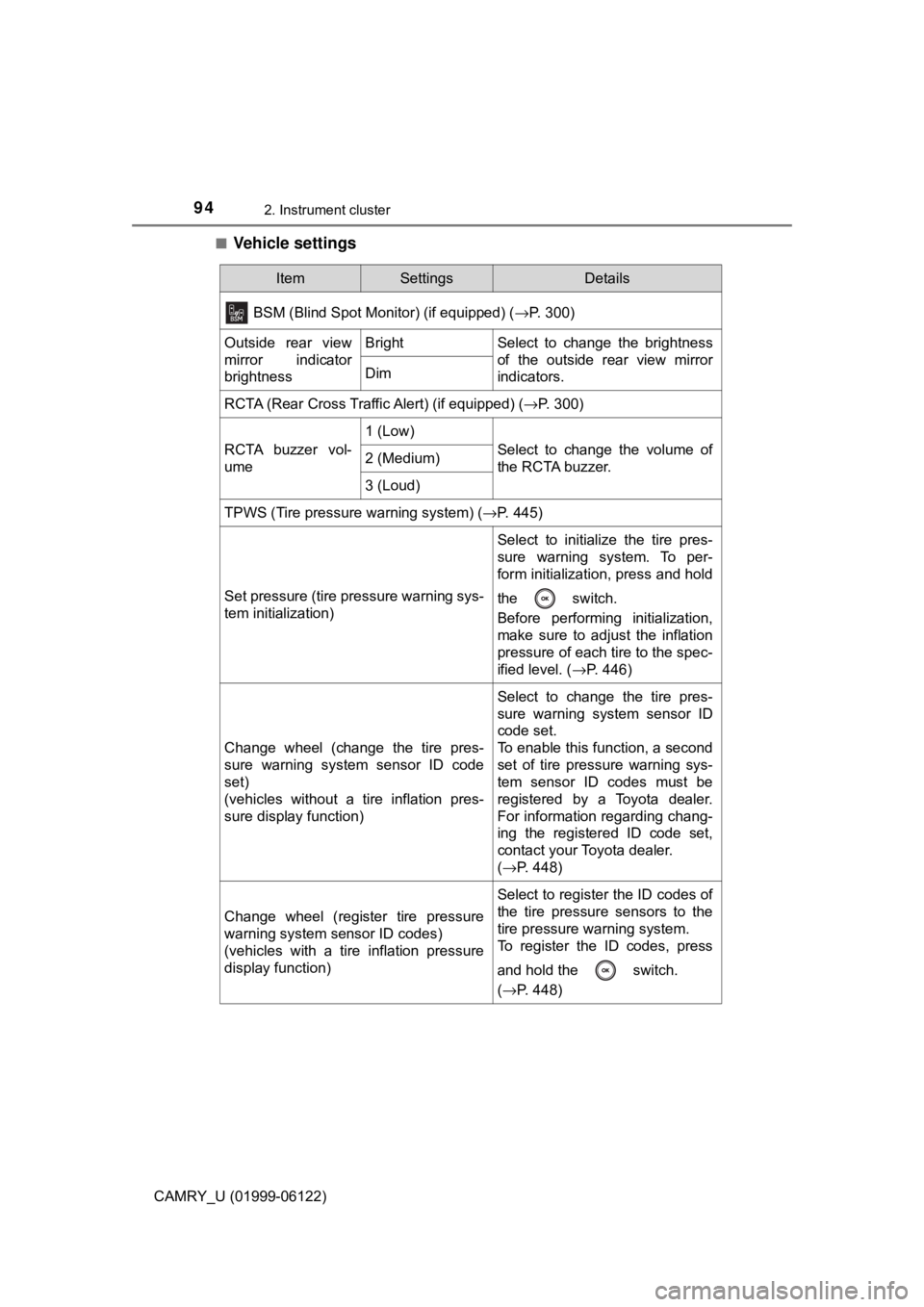
Vehicle settings
ItemSettingsDetails
BSM (Blind Spot Monitor) (if equipped) (→P. 300)
Outside rear view
mirror indicator
brightnessBrightSelect to change the brightness
of the outside rear view mirror
indicators.
Dim
RCTA (Rear Cross Traffic Alert) (if equipped) (→P. 300)
RCTA buzzer vol-
ume
1 (Low)
Select to change the volume of
the RCTA buzzer.2 (Medium)
3 (Loud)
TPWS (Tire pressure warning system) (→P. 445)
Set pressure (tire pressure warning sys-
tem initialization)
Select to initialize the tire pres-
sure warning system. To per-
form initialization, press and hold
the switch.
Before performing initialization,
make sure to adjust the inflation
pressure of each tire to the spec-
ified level. (→P. 446)
Change wheel (change the tire pres-
sure warning system sensor ID code
set)
(vehicles without a tire inflation pres-
sure display function)
Select to change the tire pres-
sure warning system sensor ID
code set.
To enable this function, a second
set of tire pressure warning sys-
tem sensor ID codes must be
registered by a Toyota dealer.
For information regarding chang-
ing the registered ID code set,
contact your Toyota dealer.
(→P. 448)
Change wheel (register tire pressure
warning system sensor ID codes)
(vehicles with a tire inflation pressure
display function)
Select to register the ID codes of
the tire pressure sensors to the
tire pressure warning system.
To register the ID codes, press
and hold the switch.
(→P. 448)
Page 95 of 612
952. Instrument cluster
2
Instrument cluster
CAMRY_U (01999-06122)■
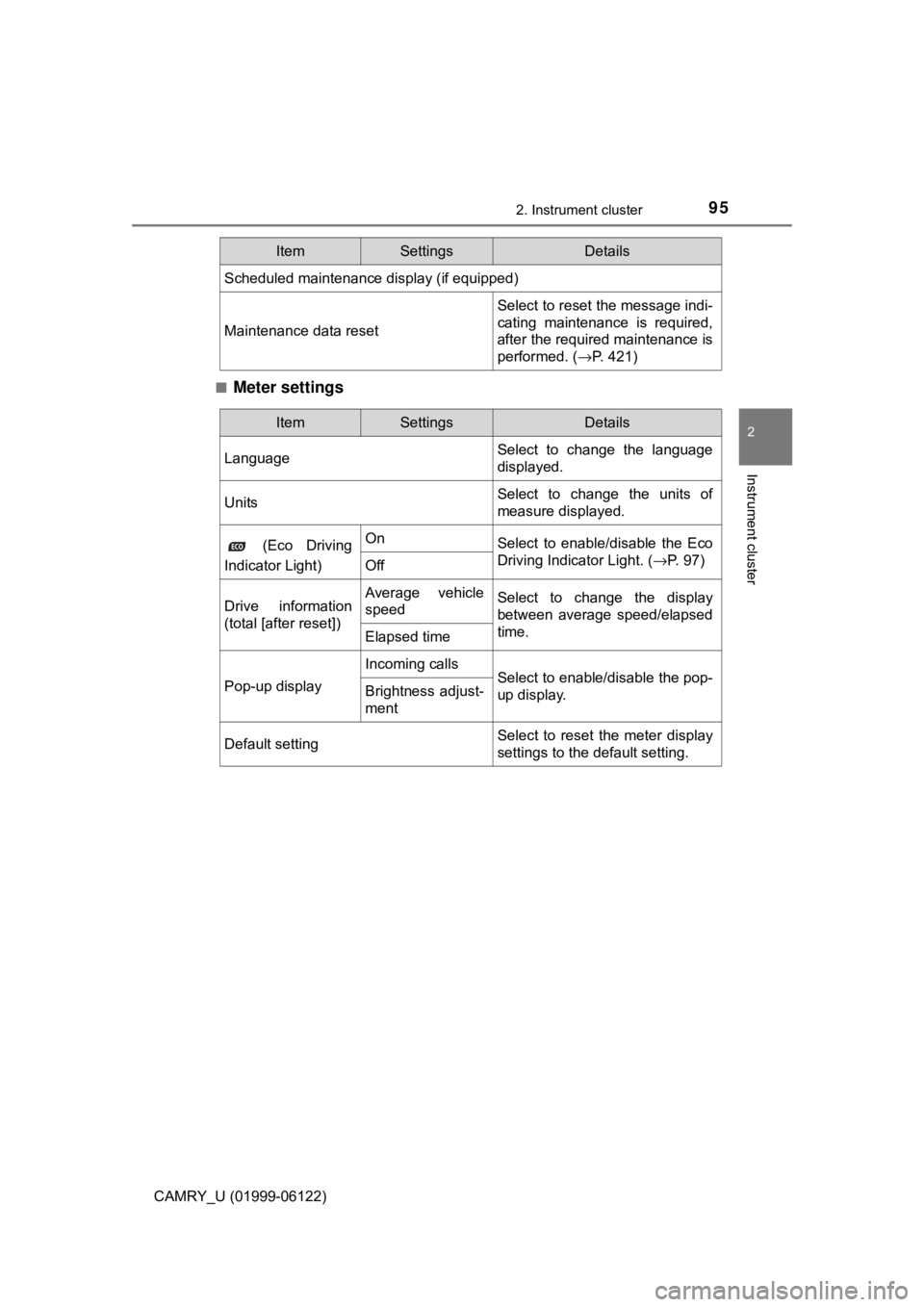
Meter settings
Scheduled maintenance display (if equipped)
Maintenance data reset
Select to reset the message indi-
cating maintenance is required,
after the required maintenance is
performed. (→P. 421)
ItemSettingsDetails
ItemSettingsDetails
LanguageSelect to change the language
displayed.
UnitsSelect to change the units of
measure displayed.
(Eco Driving
Indicator Light)OnSelect to enable/disable the Eco
Driving Indicator Light. (→P. 97)
Off
Drive information
(total [after reset])Average vehicle
speedSelect to change the display
between average speed/elapsed
time.
Elapsed time
Pop-up display
Incoming callsSelect to enable/disable the pop-
up display.Brightness adjust-
ment
Default settingSelect to reset the meter display
settings to the default setting.
Page 105 of 612
1052. Instrument cluster
2
Instrument cluster
CAMRY_U (01999-06122)■
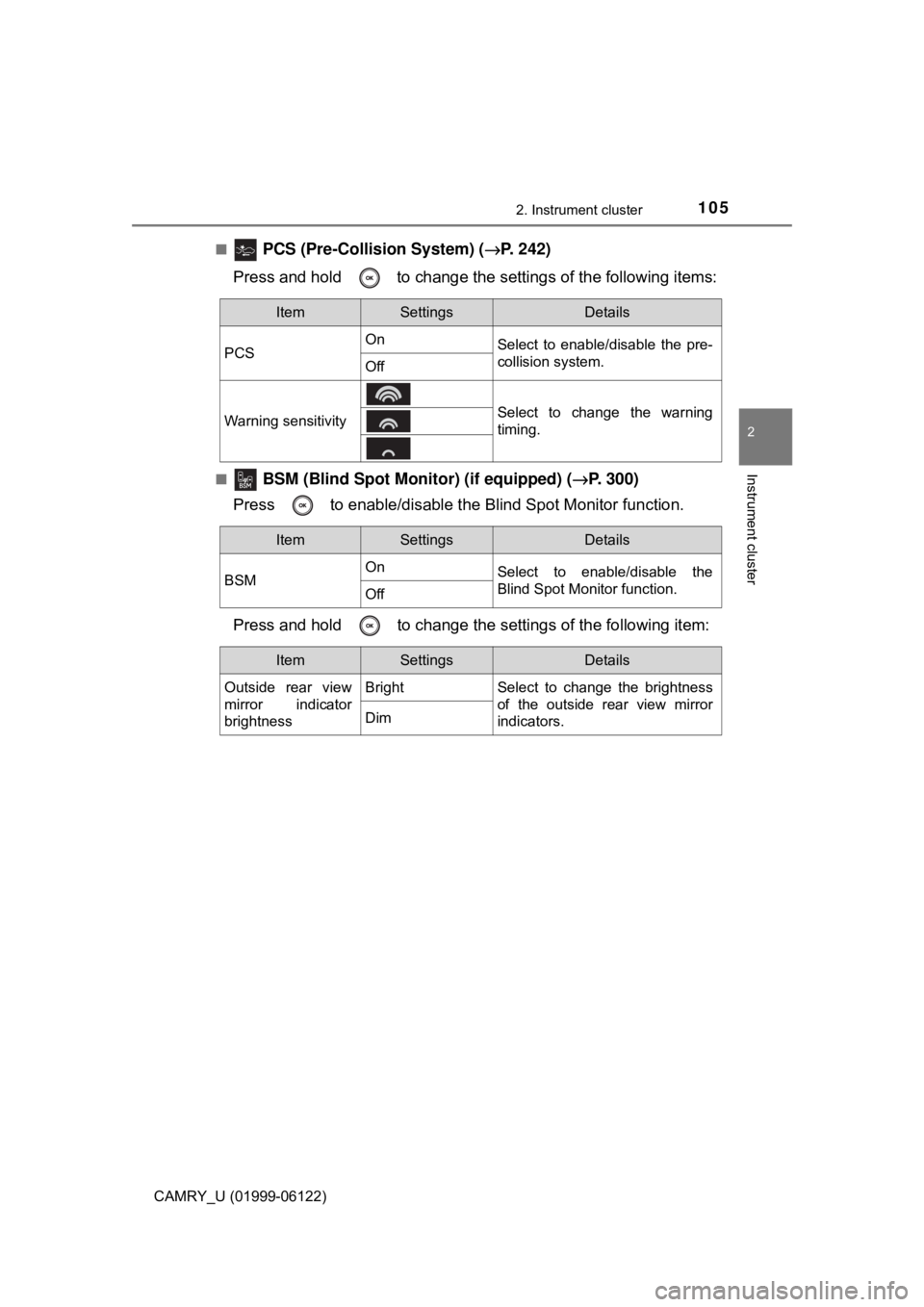
PCS (Pre-Collision System) (→P. 242)
Press and hold to change the settings of the following items:
■ BSM (Blind Spot Monitor) (if equipped) (→P. 300)
Press to enable/disable the Blind Spot Monitor function.
Press and hold to change the settings of the following item:
ItemSettingsDetails
PCSOn
Select to enable/disable the pre-
collision system.
Off
Warning sensitivitySelect to change the warning
timing.
ItemSettingsDetails
BSMOn
Select to enable/disable the
Blind Spot Monitor function.
Off
ItemSettingsDetails
Outside rear view
mirror indicator
brightnessBright Select to change the brightness
of the outside rear view mirror
indicators.
Dim
Page 107 of 612
1072. Instrument cluster
2
Instrument cluster
CAMRY_U (01999-06122)■
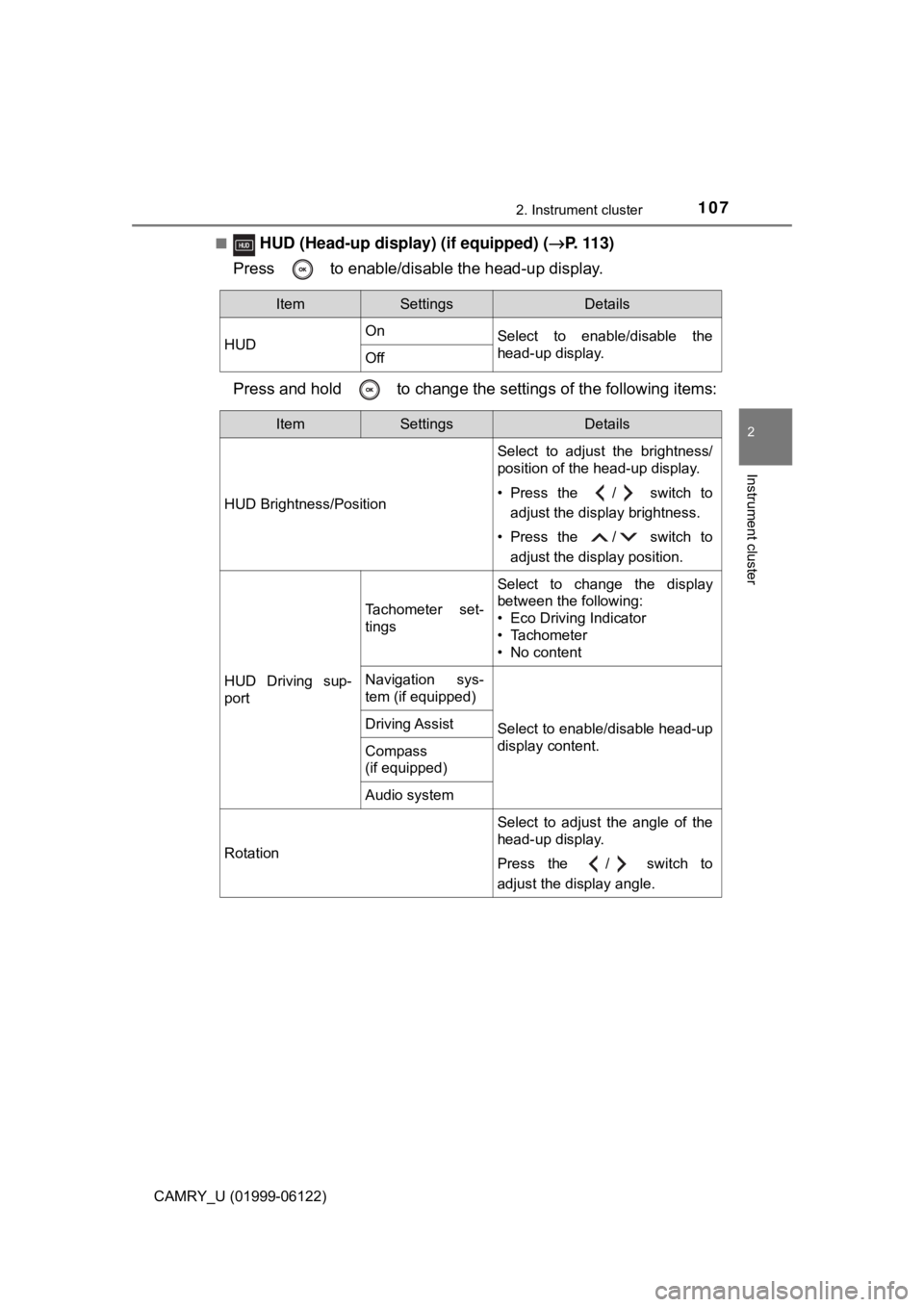
HUD (Head-up display) (if equipped) (→P. 1 1 3 )
Press to enable/disable the head-up display.
Press and hold to change the settings of the following items:
ItemSettingsDetails
HUDOn
Select to enable/disable the
head-up display.
Off
ItemSettingsDetails
HUD Brightness/PositionSelect to adjust the brightness/
position of the head-up display.
• Press the / switch to
adjust the display brightness.
• Press the / switch to
adjust the display position.
HUD Driving sup-
port
Tachometer set-
tings
Select to change the display
between the following:
• Eco Driving Indicator
• Tachometer
• No content
Navigation sys-
tem (if equipped)
Select to enable/disable head-up
display content.Driving Assist
Compass
(if equipped)
Audio system
RotationSelect to adjust the angle of the
head-up display.
Press the / switch to
adjust the display angle.
Page 109 of 612
1092. Instrument cluster
2
Instrument cluster
CAMRY_U (01999-06122)■
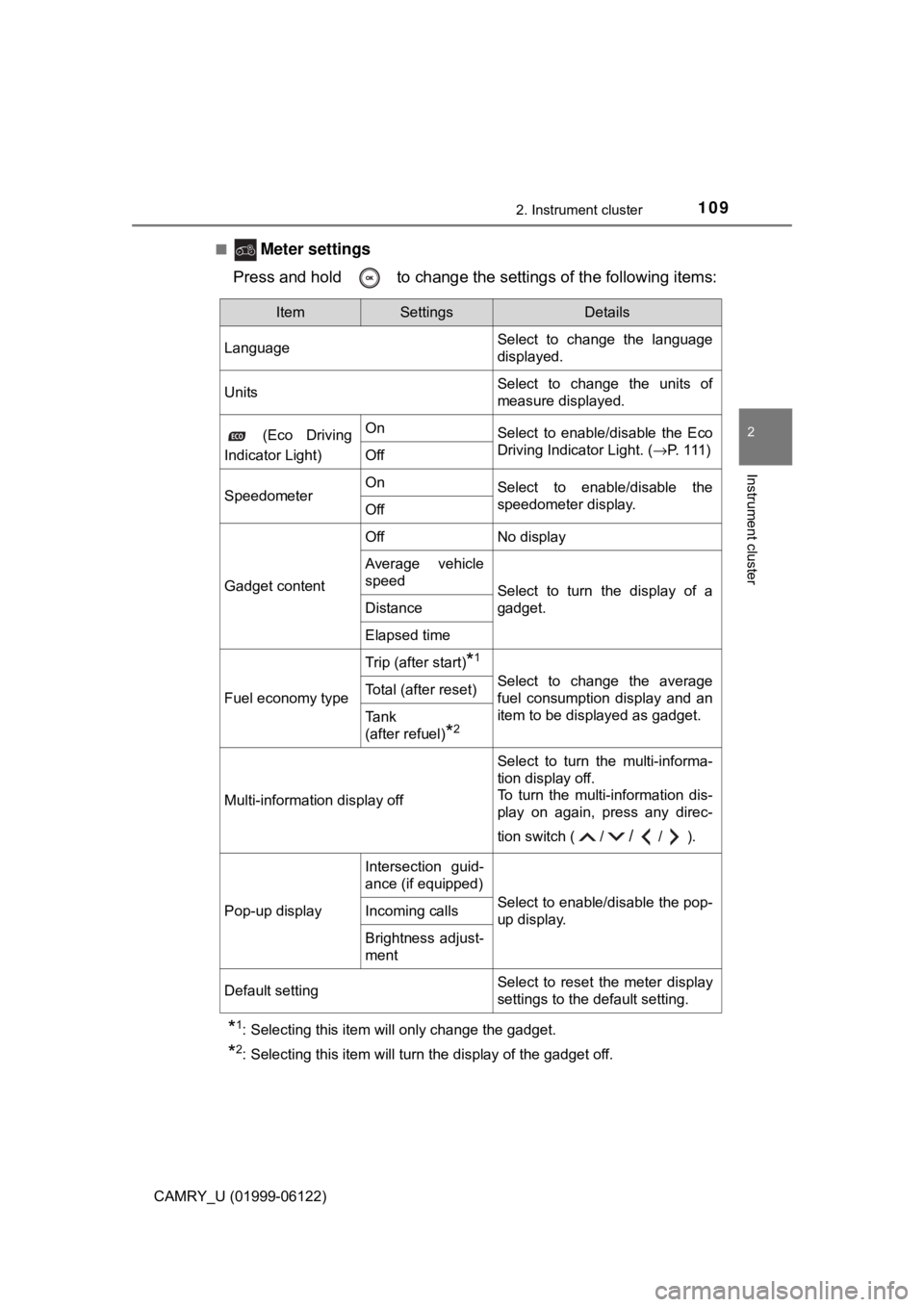
Meter settings
Press and hold to change the settings of the following items:
*1: Selecting this item will only change the gadget.
*2: Selecting this item will turn the display of the gadget off.
ItemSettingsDetails
LanguageSelect to change the language
displayed.
UnitsSelect to change the units of
measure displayed.
(Eco Driving
Indicator Light)OnSelect to enable/disable the Eco
Driving Indicator Light. (→P. 1 1 1 )
Off
SpeedometerOnSelect to enable/disable the
speedometer display.
Off
Gadget content
OffNo display
Average vehicle
speed
Select to turn the display of a
gadget.
Distance
Elapsed time
Fuel economy type
Trip (after start)*1
Select to change the average
fuel consumption display and an
item to be displayed as gadget.Total (after reset)
Tank
(after refuel)
*2
Multi-information display off
Select to turn the multi-informa-
tion display off.
To turn the multi-information dis-
play on again, press any direc-
tion switch ( /
//).
Pop-up display
Intersection guid-
ance (if equipped)
Select to enable/disable the pop-
up display.Incoming calls
Brightness adjust-
ment
Default settingSelect to reset the meter display
settings to the default setting.
Page 114 of 612
1142. Instrument cluster
CAMRY_U (01999-06122)
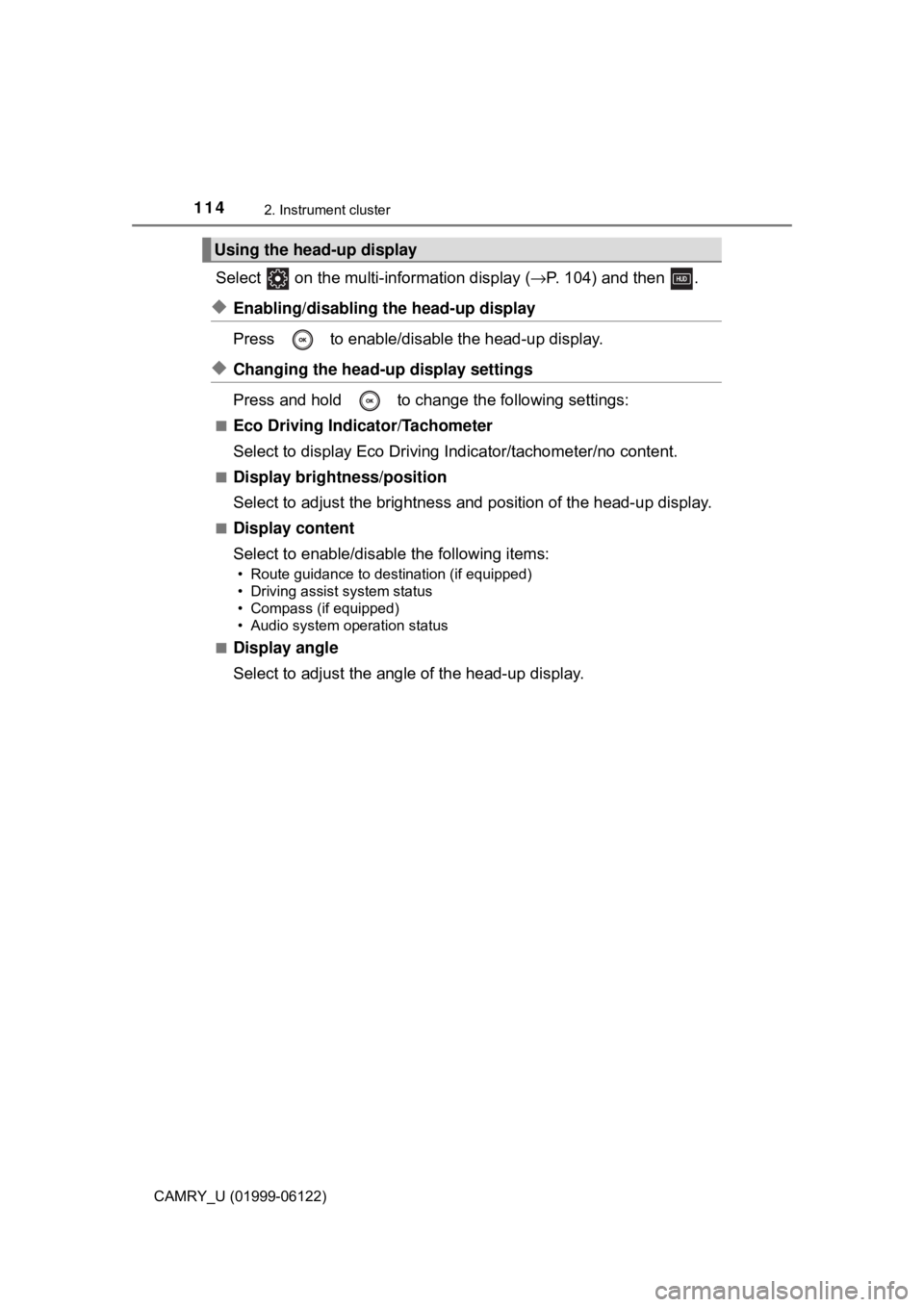
Select on the multi-information display (→P. 104) and then .
◆Enabling/disabling the head-up display
Press to enable/disable the head-up display.
◆Changing the head-up display settings
Press and hold to change the following settings:
■Eco Driving Indicator/Tachometer
Select to display Eco Driving Indicator/tachometer/no content.
■Display brightness/position
Select to adjust the brightness and position of the head-up display.
■Display content
Select to enable/disable the following items:
• Route guidance to destination (if equipped)
• Driving assist system status
• Compass (if equipped)
• Audio system operation status
■
Display angle
Select to adjust the angle of the head-up display.
Using the head-up display
Page 118 of 612

1182. Instrument cluster
CAMRY_U (01999-06122)
■Head-up display
The head-up display may seem dark or hard to see when viewed through
sunglasses, especially polarized sunglasses.
Adjust the brightness of the head-up display or remove your sunglasses.
■Display brightness
The brightness of the head-up display can be adjusted on of the multi-
information display. Also, it is automatically adjusted according to the ambient
brightness.
■Enabling/disabling of the head-up display
If the head-up display is disabled, it will remain disabled when the engine
switch is turned off then back to IGNITION ON mode.
■Street name display (vehicles with a navigation system)
Only street names which are included in the map data will be displayed.
WARNING
■Before using the head-up display
●Check that the position and brightness of the head-up display image does
not interfere with safe driving. Incorrect adjustment of the image’s position
or brightness may obstruct the driver’s view and lead to an accident,
resulting in death or serious injury.
●Do not continuously look at the head-up display while driving as you may
fail to see pedestrians, objects on the road, etc. ahead of the vehicle.
■Caution for changing settings of the head-up display
As the engine needs to be running while changing the settings of the head-
up display, ensure that the vehicle is parked in a place with adequate venti-
lation. In a closed area such as a garage, exhaust gases including harmful
carbon monoxide (CO) may collect and enter the vehicle. This may lead to
death or a serious health hazard.
Page 167 of 612
1673-4. Adjusting the steering wheel and mirrors
3
Operation of each component
CAMRY_U (01999-06122)
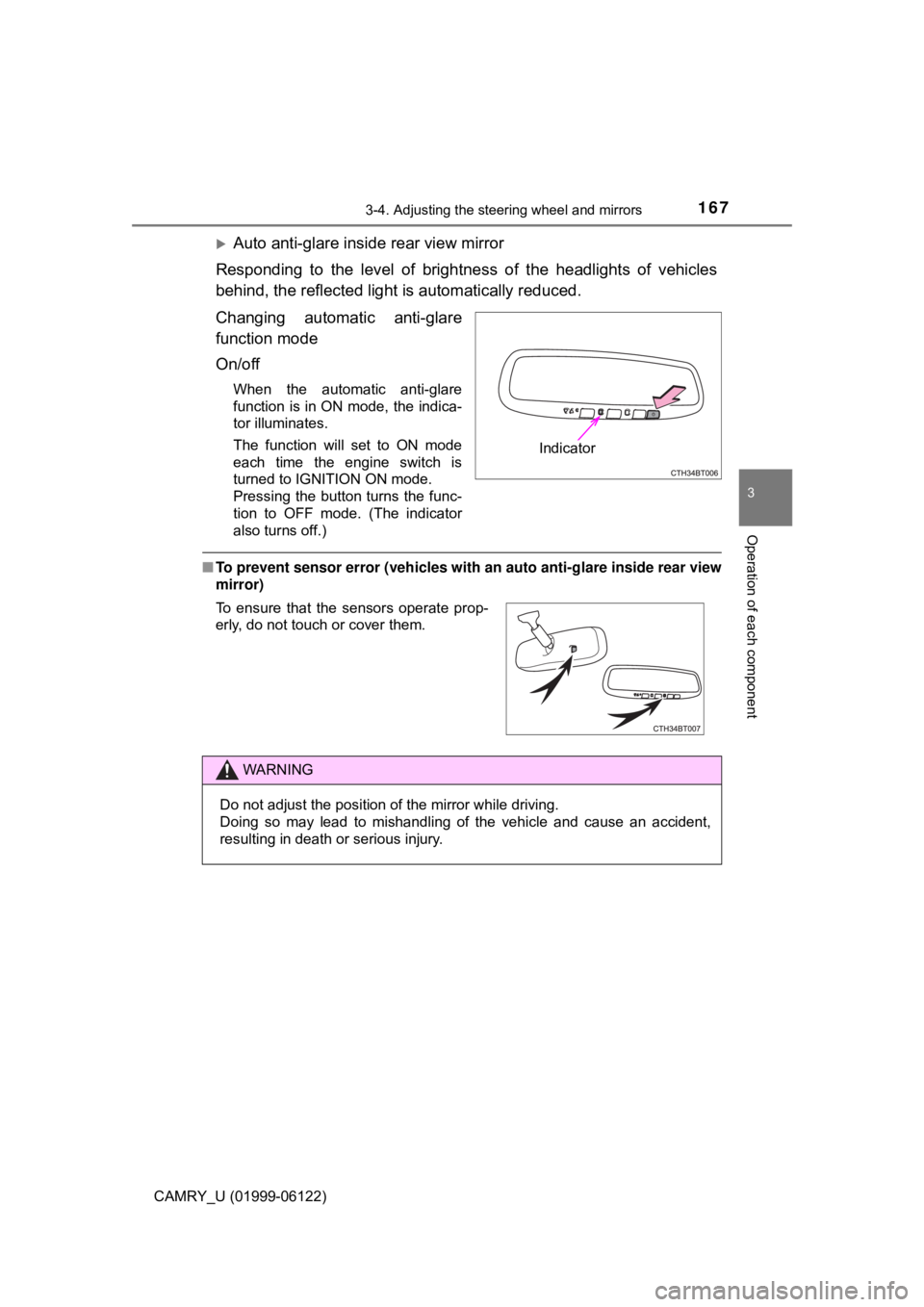
Auto anti-glare inside rear view mirror
Responding to the level of brightness of the headlights of vehicles
behind, the reflected light is automatically reduced.
Changing automatic anti-glare
function mode
On/off
When the automatic anti-glare
function is in ON mode, the indica-
tor illuminates.
The function will set to ON mode
each time the engine switch is
turned to IGNITION ON mode.
Pressing the button turns the func-
tion to OFF mode. (The indicator
also turns off.)
■To prevent sensor error (vehicles with an auto anti-glare inside rear view
mirror)
Indicator
To ensure that the sensors operate prop-
erly, do not touch or cover them.
WARNING
Do not adjust the position of the mirror while driving.
Doing so may lead to mishandling of the vehicle and cause an accident,
resulting in death or serious injury.