steering TOYOTA CAMRY 2019 Accessories, Audio & Navigation (in English)
[x] Cancel search | Manufacturer: TOYOTA, Model Year: 2019, Model line: CAMRY, Model: TOYOTA CAMRY 2019Pages: 354, PDF Size: 8.08 MB
Page 197 of 354
197
3. PANORAMIC VIEW MONITOR
PERIPHERAL MONITORING SYSTEM
6
1Shift the shift lever to the “R” position.
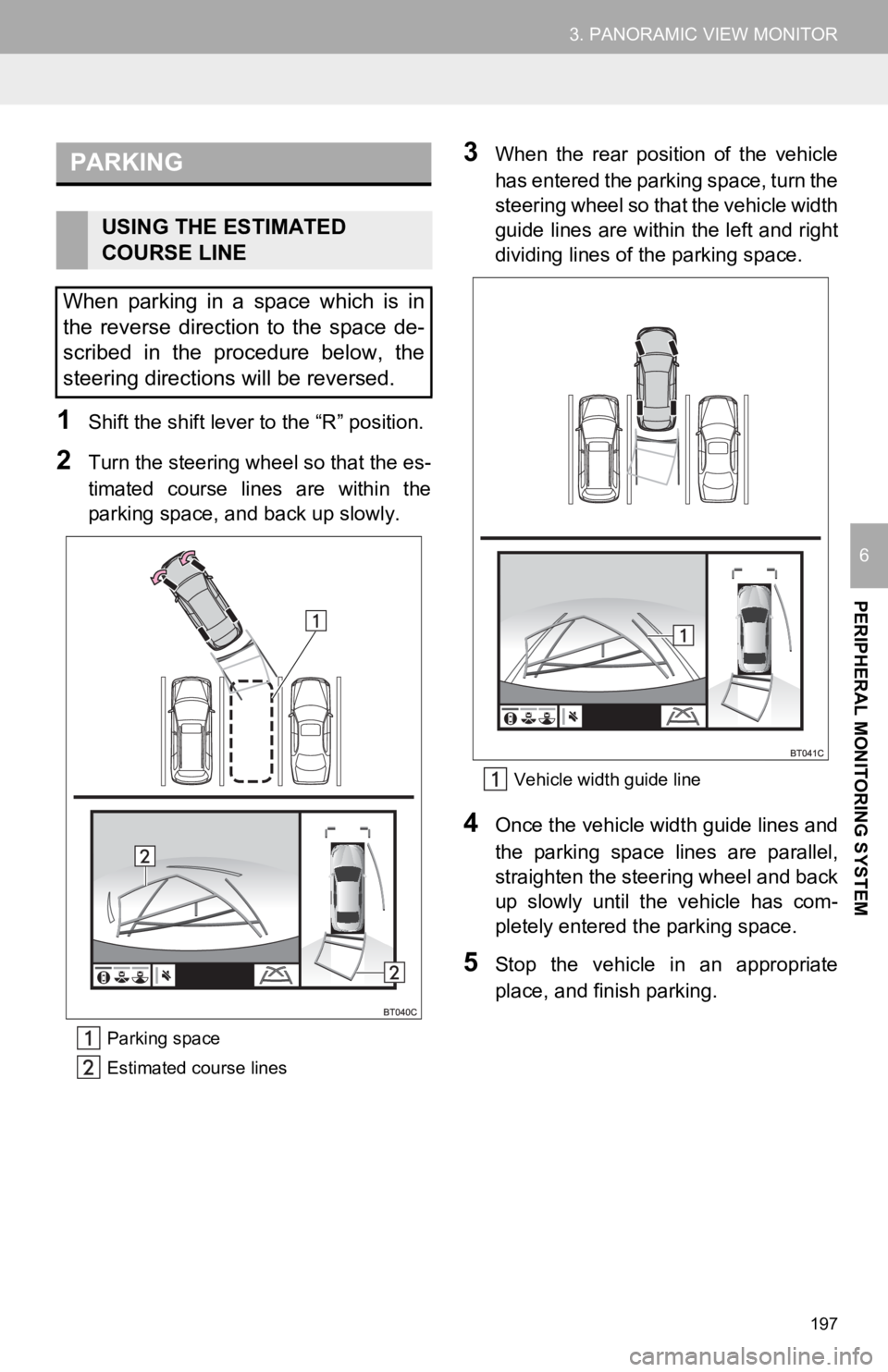
2Turn the steering wheel so that the es-
timated course lines are within the
parking space, and back up slowly.
Parking space
Estimated course lines
3When the rear position of the vehicle
has entered the parking space, turn the
steering wheel so that the vehicle width
guide lines are within the left and right
dividing lines of the parking space.
Vehicle width guide line
4Once the vehicle width guide lines and
the parking space lines are parallel,
straighten the steering wheel and back
up slowly until the vehicle has com-
pletely entered the parking space.
5Stop the vehicle in an appropriate
place, and finish parking.
PARKING
USING THE ESTIMATED
COURSE LINE
When parking in a space which is in
the reverse direction to the space de-
scribed in the procedure below, the
steering directions will be reversed.
Page 198 of 354
198
3. PANORAMIC VIEW MONITOR
1Shift the shift lever to the “R” position.
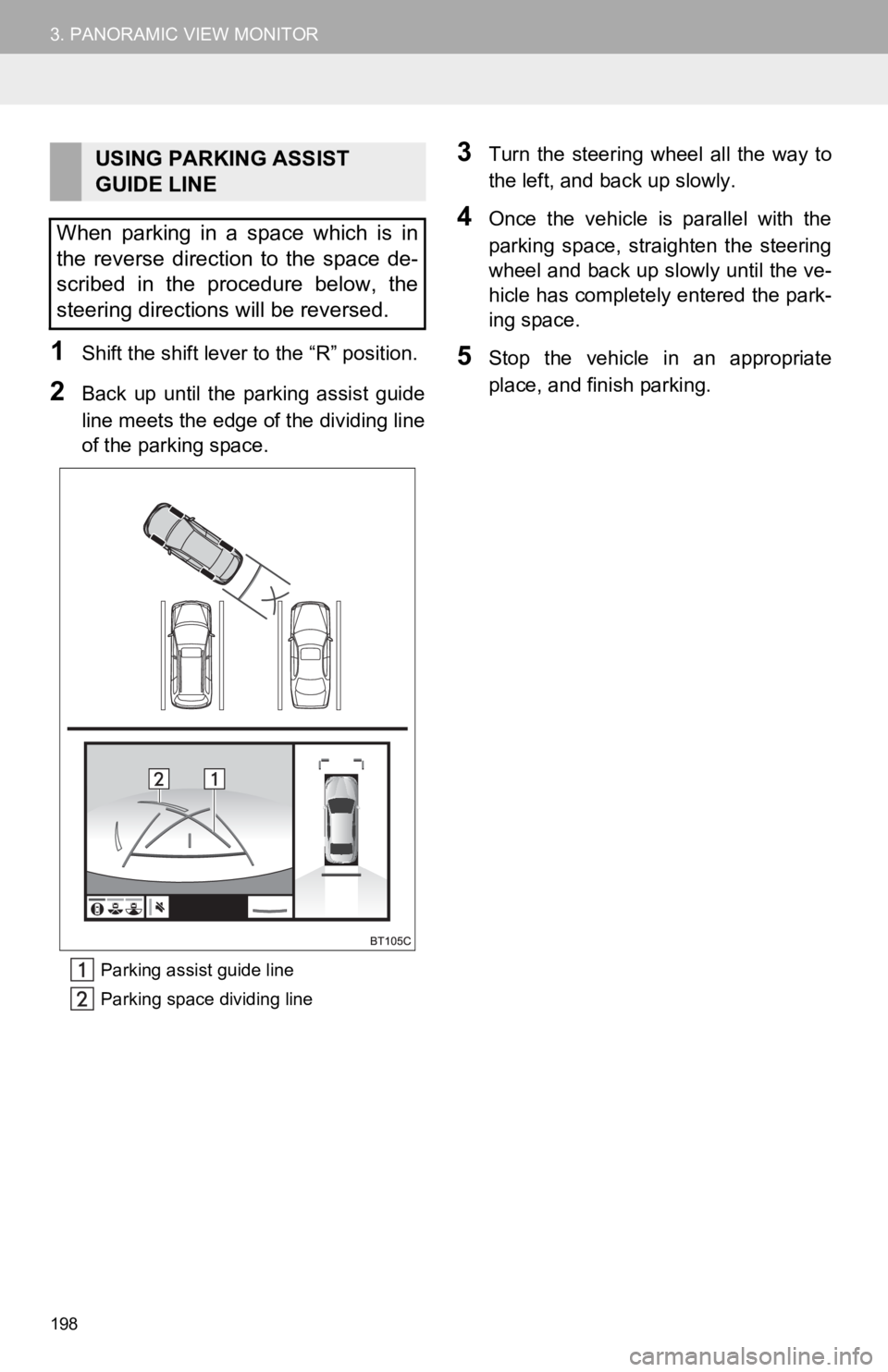
2Back up until the parking assist guide
line meets the edge o f the dividing line
of the parking space.
Parking assist guide line
Parking space dividing line
3Turn the steering wheel all the way to
the left, and back up slowly.
4Once the vehicle is parallel with the
parking space, straighten the steering
wheel and back up slowly until the ve-
hicle has completely entered the park-
ing space.
5Stop the vehicle in an appropriate
place, and finish parking.
USING PARKING ASSIST
GUIDE LINE
When parking in a space which is in
the reverse direction to the space de-
scribed in the procedure below, the
steering directions will be reversed.
Page 211 of 354
211
3. PANORAMIC VIEW MONITOR
PERIPHERAL MONITORING SYSTEM
6
9. THINGS YOU SHOULD KNOW
If you notice any of the following symptoms, refer to the likely cause and the
solution, and re-check.
If the symptom is not resolved by the solution, have the vehicl e inspected by
your Toyota dealer.
IF YOU NOTICE ANY SYMPTOMS
SymptomLikely causeSolution
The image is difficult to see
The vehicle is in a dark
area
The temperature around
the lens is either high or low
The outside temperature is
low
There are water droplets on
the camera
It is raining or humid
Foreign matter (mud etc.) is
adhering to the camera
Sunlight or headlights are
shining directly into the
camera
The vehicle is under fluo-
rescent lights, sodium
lights, mercury lights etc.
Back up while visually check-
ing the vehicle’s surround-
ings. (Use the monitor again
once conditions have been
improved.)
The procedure for adjusting
the picture quality of the pan-
oramic view monitor system
is the same as the procedure
for adjusting the screen.
( P.41)
The image is blurry
Dirt or foreign matter (such as
water droplets, snow, mud
etc.) is adhering to the cam-
era.Flush the camera with a large
quantity of water and wipe the
camera lens clean with a soft
and wet cloth.
The image is out of alignment
The camera or surrounding
area has received a strong
impact.Have the vehicle inspected by
your Toyota dealer.
The guide lines are very far
out of alignment
The camera position is out of
alignment.Have the vehicle inspected by
your Toyota dealer.
The vehicle is tilted. (There
is a heavy load on the vehi-
cle, tire pressure is low due
to a tire puncture, etc.)
The vehicle is used on an
incline.If this happens due to these
causes, it does not indicate a
malfunction.
Back up while visually check-
ing the vehicle’s surround-
ings.
The estimated course lines
move even though the steer-
ing wheel is straightThere is a malfunction in the
signals being output by the
steering sensor.Have the vehicle inspected by
your Toyota dealer.
Page 212 of 354

212
3. PANORAMIC VIEW MONITOR
Guide lines are not displayedThe trunk is open.
Close the trunk.
If this does not resolve the
symptom, have the vehicle in-
spected by your Toyota deal-
er.
is displayed
12-volt battery has been
reinstalled.
The steering wheel has been
moved while the 12-volt
battery was being reinstalled.
12-volt battery power is low.
The steering sensor has
been reinstalled.
There is a malfunction in
the signals being output by
the steering sensor.
Have the vehicle inspected by
your Toyota dealer.
The panoramic view display
cannot be magnifiedThe Intuitive parking assist
may be malfunctioning or
dirty.Follow the correction proce-
dures for malfunctions of the
Intuitive parking assist. (Refer
to “OWNER’S MANUAL”)
The See-through view/Mov-
ing view cannot be displayed
PRODUCT LICENSE
SymptomLikely causeSolution
2018
Page 215 of 354
215
1. PHONE OPERATION (HANDS-FREE SYSTEM FOR CELLULAR PHONES)
PHONE
7
2. SOME BASICS
The hands-free system enables calls
to be made and received without hav-
ing to take your hands off the steering
wheel.
This system supports Bluetooth
®.
Bluetooth® is a wireless data system
that enables cellular phones to be used
without being connected by a cable or
placed in a cradle.
The operating procedure of the phone
is explained here.
When an Apple CarPlay connection is
established, phone functions will be
performed by Apple CarPlay instead of
the hands-free system.
WA R N I N G
● While driving, do not operate a cellular
phone.
● Your audio unit is fitted with Bluetooth
®
antennas. People with implantable car-
diac pacemakers, cardiac resynchroni-
zation therapy-pacemakers or
implantable cardioverter defibrillators
should maintain a reasonable distance
between themselves and the Bluetooth
®
antennas. The radio waves may affect
the operation of such devices.
● Before using Bluetooth
® devices, users
of any electrical medical device other
than implantable cardiac pacemakers,
cardiac resynchronization therapy-pace-
makers or implantable cardioverter
defibrillators should consult the manu-
facturer of the device for information
about its operation under the influence
of radio waves. Radio waves could have
unexpected effects on the operation of
such medical devices.
NOTICE
● Do not leave your cellular phone in the
vehicle. The temperature inside may rise
to a level that could damage the phone.
INFORMATION
●This system is not guaranteed to oper-
ate with all Bluetooth® devices.
● If your cellular phone does not support
Bluetooth
®, this system cannot function.
● In the following conditions, the system
may not function:
• The cellular phone is turned off.
• The current position is outside the
communication area.
• The cellular phone is not connected.
• The cellular phone has a low battery.
● When using the hands-free system or
Bluetooth
® audio and Wi-Fi® Hotspot
functions at the same time, the following
problems may occur:
• The Bluetooth
® connection may be
cut.
• Noise may be heard on the Bluetooth
®
audio playback.
• A noise may be heard during phone calls.
● Bluetooth
® uses the 2.4 GHz frequency
band. If both a Wi-Fi® connection and
Bluetooth® connection are being used
simultaneously, each connection may be
affected.
● If a Bluetooth
® device is attempting to
connect to the vehicle while another
device is connected as a Bluetooth
®
audio device or connected using the
hands-free system or Wi-Fi® Hotspot
function, the communication speed may
decrease or malfunctions may occur,
such as image distortion or audio skip-
ping. If a Bluetooth
® device is connected
to the system, the interference it may
cause will be reduced. When carrying a
device with its Bluetooth
® connection
enabled, make sure to register it to the
system and connect it or disable its
Bluetooth
® function.
● When a device is connected via
Bluetooth
®, the Bluetooth® icon on the
status bar will be displayed in blue.
( P.20)
Page 216 of 354
216
1. PHONE OPERATION (HANDS-FREE SYSTEM FOR CELLULAR PHONES)
Registering an add itional device
1Display the phone top screen.
(P.214)
2Select “Select Device” .
3Select “Add Device” .
When another Bluetooth® device is con-
nected, a confirmation screen will be dis-
played. To disconnect the Bluetooth
®
device, select “Yes”.
4Follow the steps in “REGISTERING A
Bluetooth
® PHONE FOR THE FIRST
TIME” from “STEP 5”. ( P.44)
Selecting a registered device
1Display the phone top screen.
(P.214)
2Select “Select Device” .
3Select the desired device to be con-
nected.
4Check that a confirmation screen is
displayed when the connection is com-
plete.
If an error message is displayed, follow
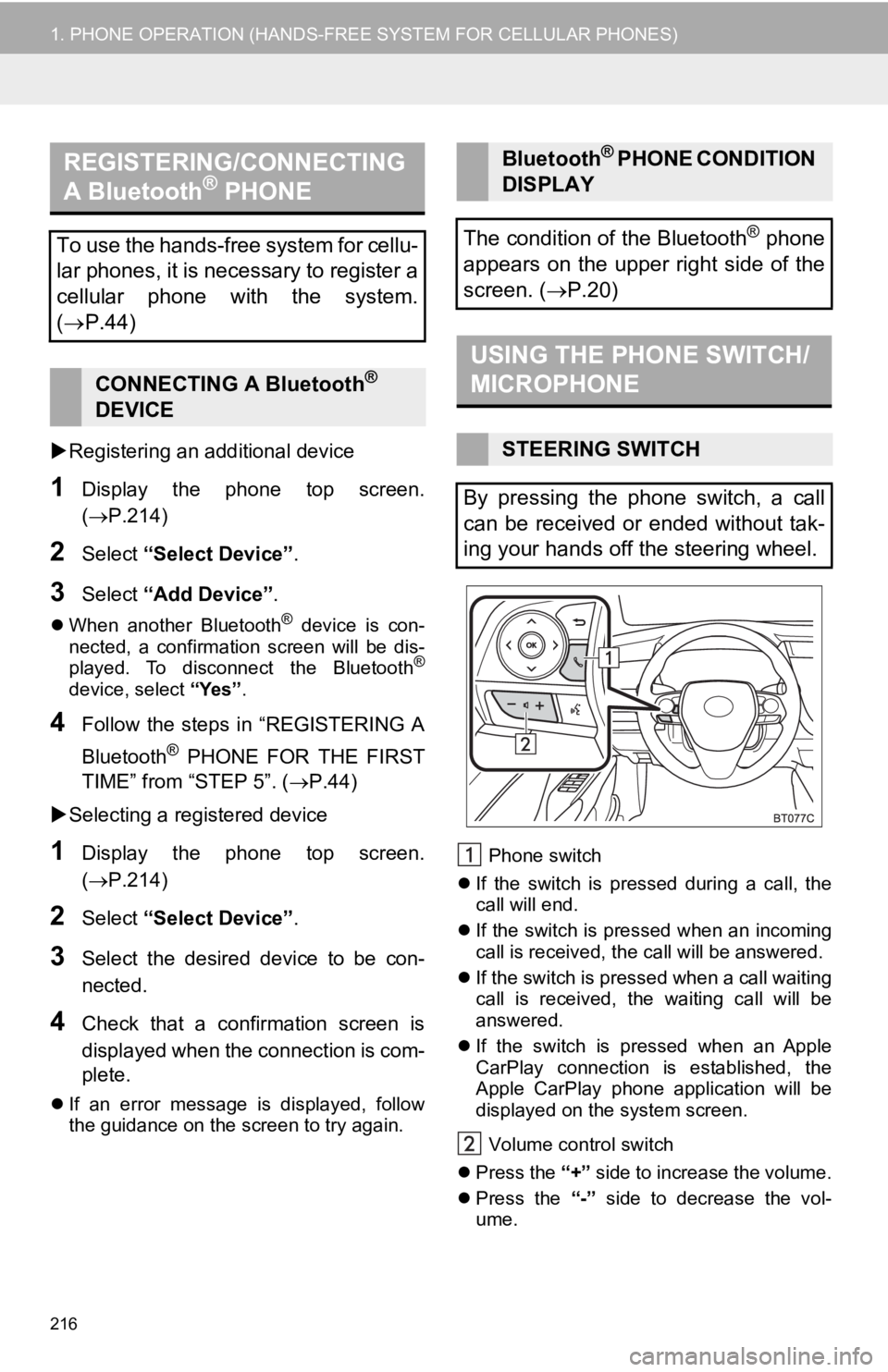
the guidance on the screen to try again. Phone switch
If the switch is pressed during a call, the
call will end.
If the switch is pressed when an incoming
call is received, the call will be answered.
If the switch is pressed when a call waiting
call is received, the waiting call will be
answered.
If the switch is pressed when an Apple
CarPlay connection is established, the
Apple CarPlay phone application will be
displayed on t he system screen.
Volume control switch
Press the “+” side to increase the volume.
Press the “-” side to decrease the vol-
ume.
REGISTERING/CONNECTING
A Bluetooth® PHONE
To use the hands-free system for cellu-
lar phones, it is necessary to register a
cellular phone with the system.
( P.44)
CONNECTING A Bluetooth®
DEVICE
Bluetooth® PHONE CONDITION
DISPLAY
The condition of the Bluetooth
® phone
appears on the upper right side of the
screen. ( P.20)
USING THE PHONE SWITCH/
MICROPHONE
STEERING SWITCH
By pressing the phone switch, a call
can be received or ended without tak-
ing your hands off the steering wheel.
Page 222 of 354
222
1. PHONE OPERATION (HANDS-FREE SYSTEM FOR CELLULAR PHONES)
1Display the phone top screen.
(P.214)
2Select “Keypad” and enter the phone
number.
3Select or press the switch on
the steering wheel.
4Check that the “Dialing...” screen is
displayed.
1Display the home screen. ( P.36)
2Select the desired contact.
3Check that the “Dialing...” screen is
displayed.
1Select and hold the screen button to
add a contact.
2Select the desired contact.
3Select the desired number.
BY KEYPAD
INFORMATION
●Depending on the type of Bluetooth®
phone being connected, it may be nec-
essary to perform additional steps on
the phone.
BY HOME SCREEN
REGISTERING A NEW
CONTACT
INFORMATION
●If there is no contact in the contacts list,
the contacts cannot be registered at the
home screen.
● The contact cannot be registered at the
home screen while driving.
Page 223 of 354
223
1. PHONE OPERATION (HANDS-FREE SYSTEM FOR CELLULAR PHONES)
PHONE
7
4. RECEIVING A CALL USING THE Bluetooth® HANDS-FREE SYSTEM
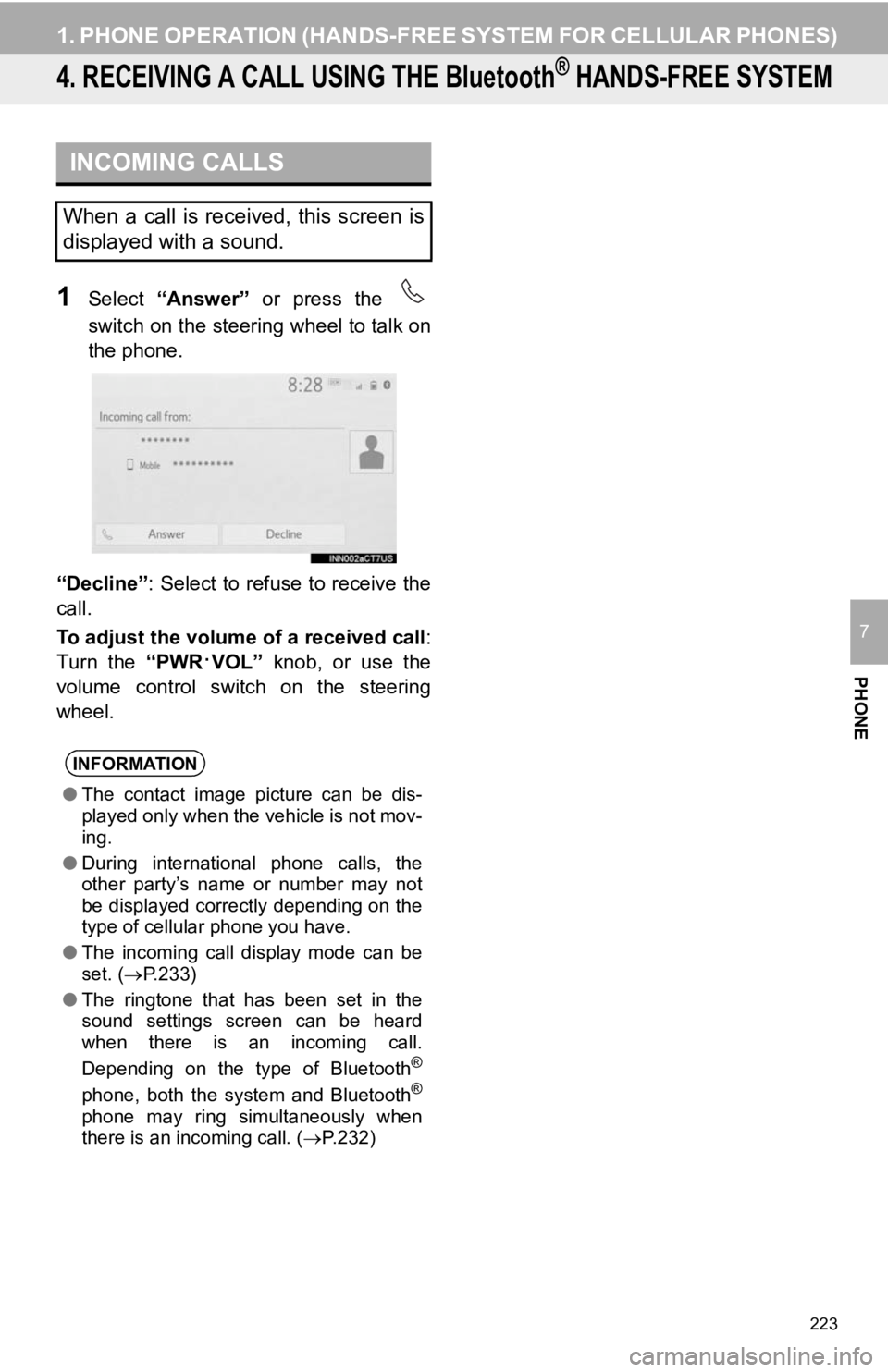
1Select “Answer” or press the
switch on the steering wheel to talk on
the phone.
“Decline”: Select to refuse to receive the
call.
To adjust the volume of a received call :
Turn the “PWR
·VOL” knob, or use the
volume control switch on the steering
wheel.
INCOMING CALLS
When a call is received, this screen is
displayed with a sound.
INFORMATION
● The contact image picture can be dis-
played only when the vehicle is not mov-
ing.
● During international phone calls, the
other party’s name or number may not
be displayed correctly depending on the
type of cellular phone you have.
● The incoming call display mode can be
set. ( P.233)
● The ringtone that has been set in the
sound settings screen can be heard
when there is an incoming call.
Depending on the type of Bluetooth
®
phone, both the system and Bluetooth®
phone may ring simultaneously when
there is an incoming call. ( P.232)
Page 226 of 354
226
1. PHONE OPERATION (HANDS-FREE SYSTEM FOR CELLULAR PHONES)
1Select “Answer” or press the
switch on the steering wheel to start
talking with the other party.
“Decline” : Select to refuse to receive the
call.
■CHANGING PARTIES
1Select “Swap Calls” .
Each time “Swap Calls” is selected
during an interrupted call, the party who is
on hold will be switched.
INCOMING CALL WAITING
When a call is interrupted by a third
party while talking, the incoming call
screen is displayed.
INFORMATION
● This function may not be available
depending on the type of cellular phone.
Page 228 of 354
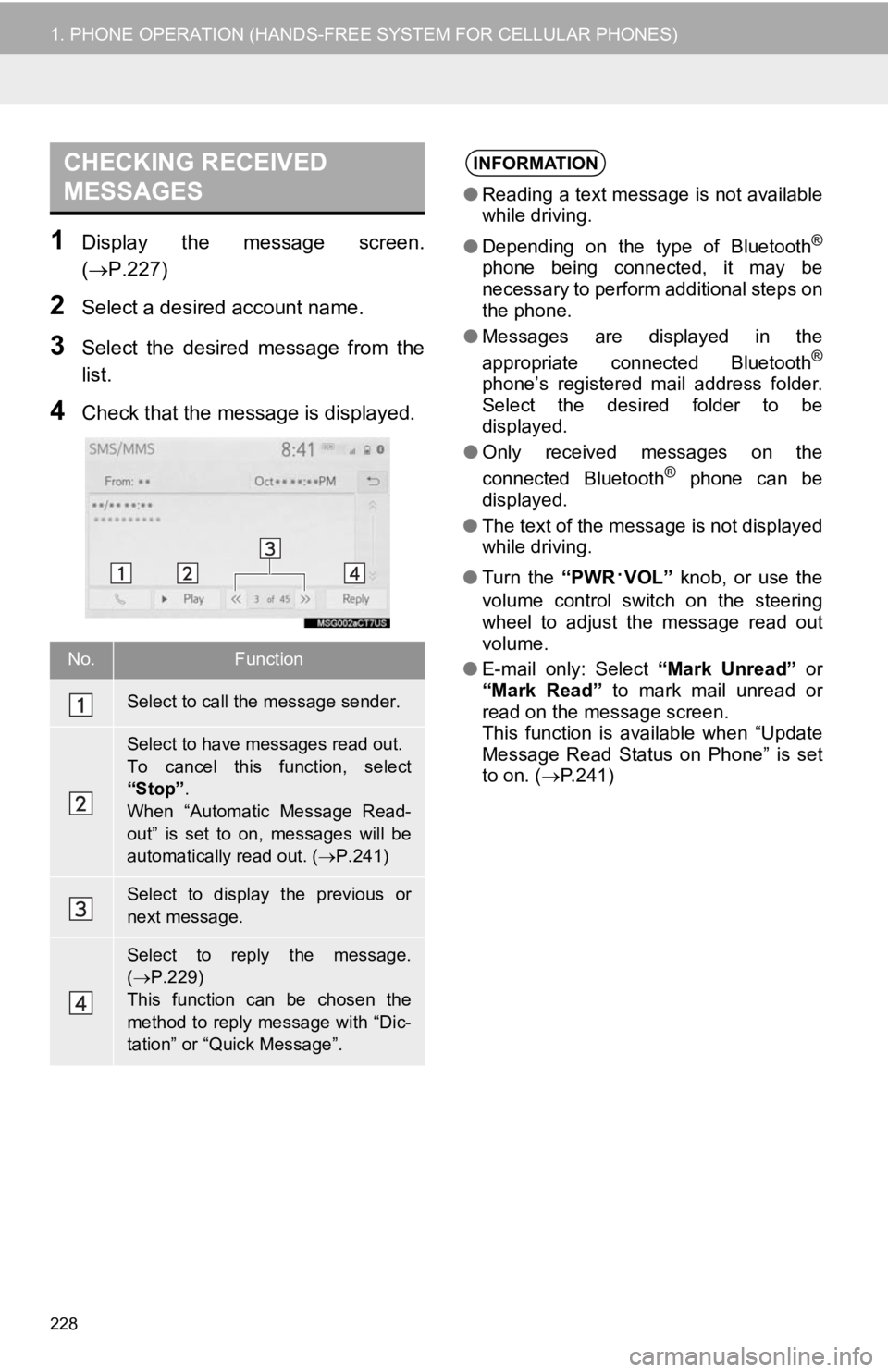
228
1. PHONE OPERATION (HANDS-FREE SYSTEM FOR CELLULAR PHONES)
1Display the message screen.
(P.227)
2Select a desired account name.
3Select the desired message from the
list.
4Check that the message is displayed.
CHECKING RECEIVED
MESSAGES
No.Function
Select to call the message sender.
Select to have messages read out.
To cancel this function, select
“Stop”.
When “Automatic Message Read-
out” is set to on, messages will be
automatically read out. (P.241)
Select to display the previous or
next message.
Select to reply the message.
( P.229)
This function can be chosen the
method to reply message with “Dic-
tation” or “Quick Message”.
INFORMATION
● Reading a text message is not available
while driving.
● Depending on the type of Bluetooth
®
phone being connected, it may be
necessary to perform additional steps on
the phone.
● Messages are displayed in the
appropriate connected Bluetooth
®
phone’s registered mail address folder.
Select the desired folder to be
displayed.
● Only received messages on the
connected Bluetooth
® phone can be
displayed.
● The text of the message is not displayed
while driving.
● Turn the “PWR
·VOL” knob, or use the
volume control switch on the steering
wheel to adjust the message read out
volume.
● E-mail only: Select “Mark Unread” or
“Mark Read” to mark mail unread or
read on the message screen.
This function is available when “Update
Message Read Status on Phone” is set
to on. ( P.241)