lock TOYOTA CAMRY 2022 User Guide
[x] Cancel search | Manufacturer: TOYOTA, Model Year: 2022, Model line: CAMRY, Model: TOYOTA CAMRY 2022Pages: 664, PDF Size: 11.3 MB
Page 44 of 664
441-1. For safe use
CAMRY_U
■If the SRS airbags deploy (inflate)
●Slight abrasions, burns, bruising etc., may be sustained from S RS airbags,
due to the extremely high speed deployment (inflation) by hot gases.
● A loud noise and white powder will be emitted.
● Parts of the airbag module (steering wheel hub, airbag cover and inflator) as
well as the front seats, parts of the front and rear pillars, and roof side rails,
may be hot for several minutes. The airbag itself may also be h ot.
● The windshield may crack.
● All of the doors will be unlocked. ( P. 154)
● The brakes and stop lights will be controlled automatically. ( P. 322)
● The interior lights will turn on automatically. ( P. 408)
● The emergency flashers will turn on automatically. ( P. 516)
● Fuel supply to the engine will be stopped. ( P. 527)
WARNING
■Modification and disposal of SRS airbag system components
Do not dispose of your vehicle or perform any of the following modifications
without consulting your Toyota dealer. The SRS airbags may malfunction or
deploy (inflate) accidentally, causing death or serious injury.
● Installation, removal, disassembly and repair of the SRS airbags
● Repairs, modifications, removal or replacement of the steering wheel,
instrument panel, dashboard, seats or seat upholstery, front, side and rear
pillars, roof side rails, front door panels, front door trims or front door
speakers
● Modifications to the front door panel (such as making a hole in it)
● Repairs or modifications of the front fender, front bumper, or side of the
occupant compartment
● Installation of a grille guard (bull bars, kangaroo bar, etc.), snow plows,
winches or roof luggage carrier
● Modifications to the vehicle’s suspension system
● Installation of electronic devices such as mobile two-way radio s and CD
players
● Modifications to your vehicle for a person with a physical disability
Page 55 of 664
55
1
For safety and security
CAMRY_U
1-2. Child safety
●It is recommended that children sit in the rear seats to avoid acci-
dental contact wit h the shift lever, wiper switch etc.
● Use the rear door child-protector lock or the window lock switc h to
avoid children opening the door while driving or operating the
power window accidentally.
● Do not let small children operate equipment which may catch or
pinch body parts, such as the power window, hood, trunk, seats etc.
Riding with children
Observe the following precautions when children are in the vehi -
cle.
Use a child restraint system appropriate for the child, until the
child becomes large enough to properly wear the vehicle’s seat
belt.
WARNING
Never leave children unattended in the vehicle, and never allow children to
have or use the key.
Children may be able to start the vehicle or shift the vehicle into neutral.
There is also a danger that children may injure themselves by playing with
the windows, the moon roof or panoramic moon roof, or other features of
the vehicle. In addition, heat build-up or extremely cold tempe ratures inside
the vehicle can be fatal to children.
Page 63 of 664
631-2. Child safety
1
For safety and security
CAMRY_U
A child restraint system for a small child or baby must itself be prop-
erly restrained on the seat with the lap portion of the lap/shoulder belt.
◆Installing child restraint system using a seat belt (child
restraint lock function belt)
Install the child restraint system in accordance to the operati on
manual enclosed with the child restraint system.
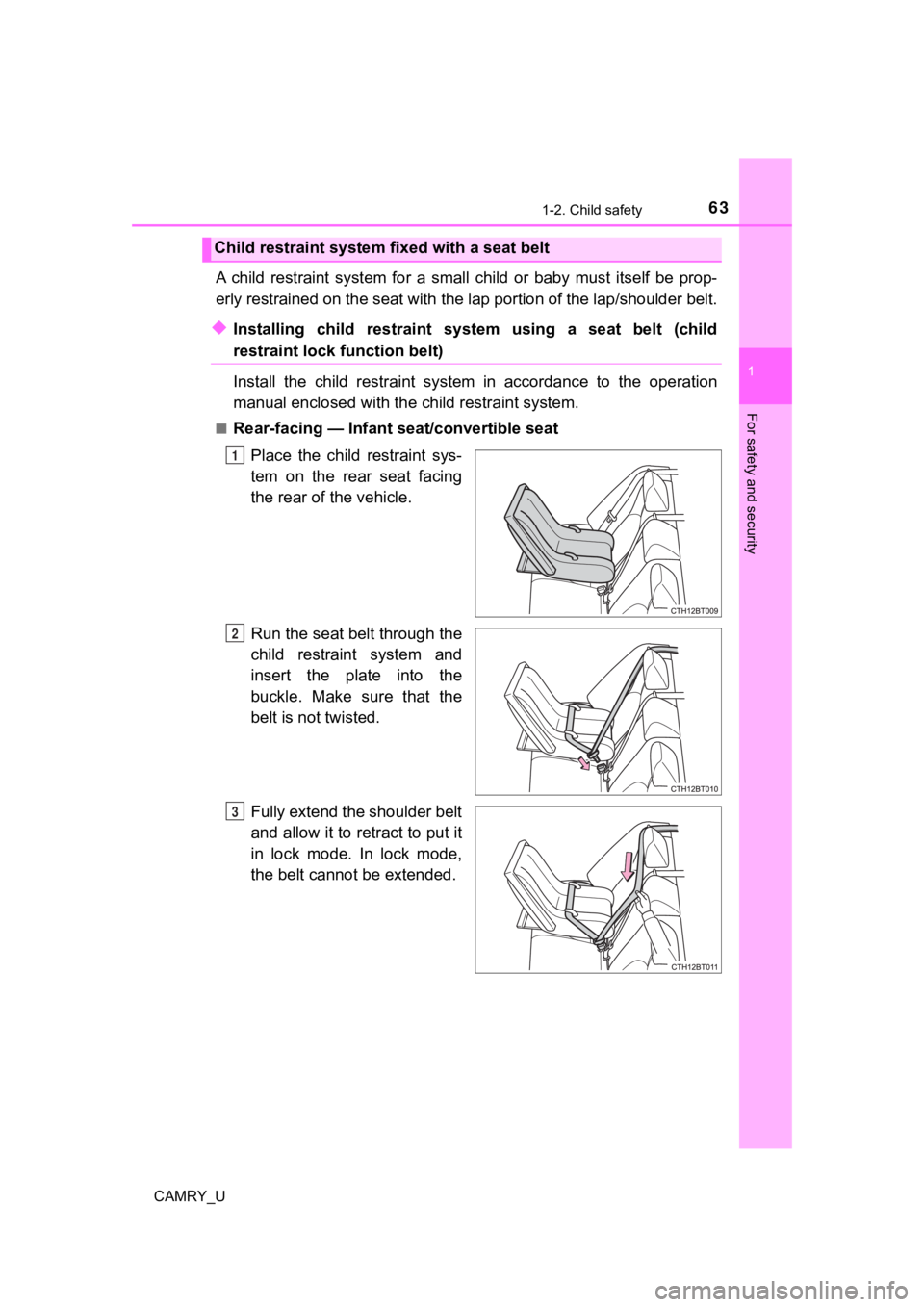
■Rear-facing — Infant seat/convertible seat
Place the child restraint sys-
tem on the rear seat facing
the rear of the vehicle.
Run the seat belt through the
child restraint system and
insert the plate into the
buckle. Make sure that the
belt is not twisted.
Fully extend the shoulder belt
and allow it to retract to put it
in lock mode. In lock mode,
the belt cannot be extended.
Child restraint system fixed with a seat belt
1
2
3
Page 65 of 664
651-2. Child safety
1
For safety and security
CAMRY_U
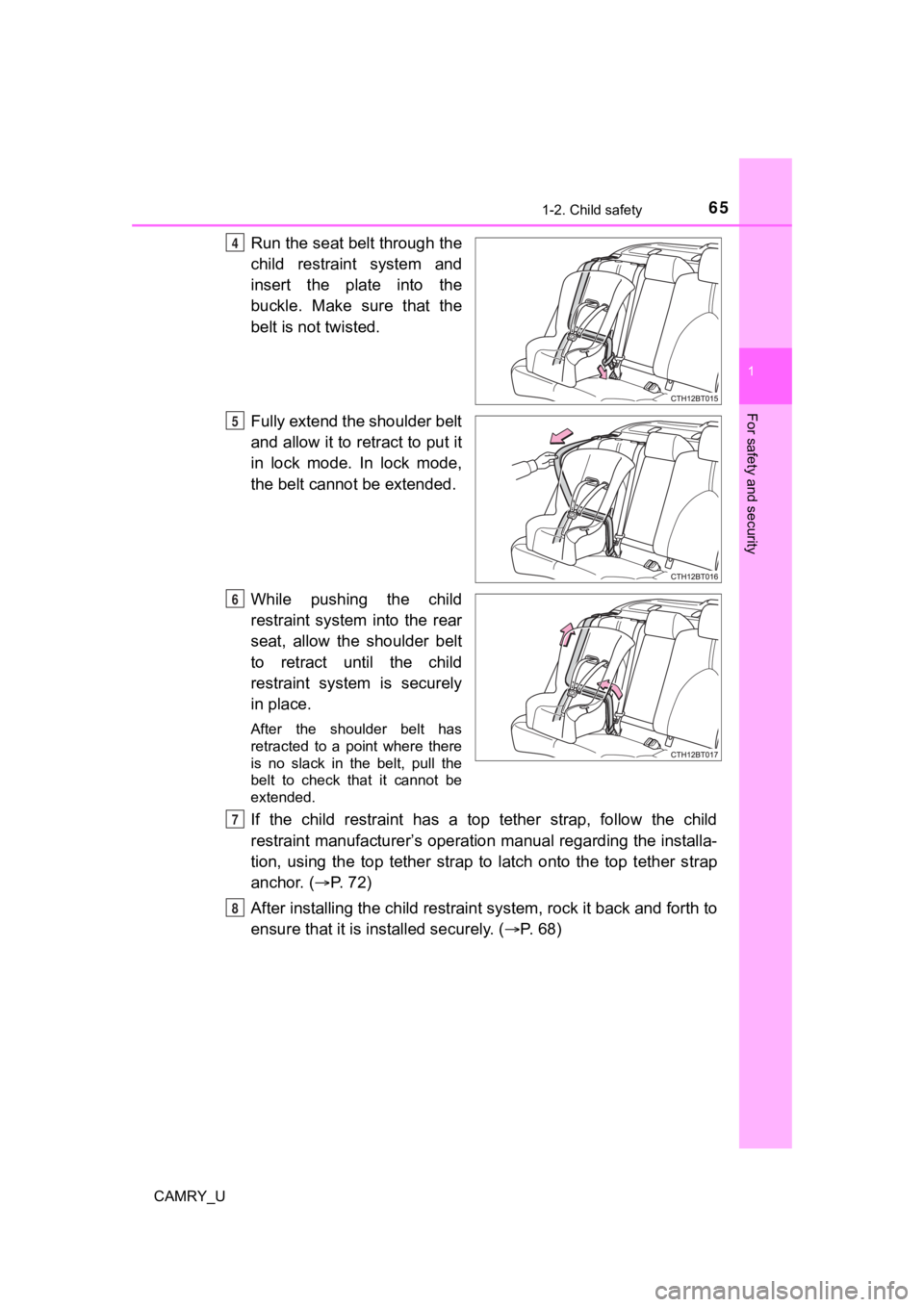
Run the seat belt through the
child restraint system and
insert the plate into the
buckle. Make sure that the
belt is not twisted.
Fully extend the shoulder belt
and allow it to retract to put it
in lock mode. In lock mode,
the belt cannot be extended.
While pushing the child
restraint system into the rear
seat, allow the shoulder belt
to retract until the child
restraint system is securely
in place.
After the shoulder belt has
retracted to a point where there
is no slack in the belt, pull the
belt to check that it cannot be
extended.
If the child restraint has a top tether strap, follow the child
restraint manufacturer’s operation manual regarding the installa-
tion, using the top tether strap to latch onto the top tether s trap
anchor. ( P. 7 2 )
After installing the child restrai nt system, rock it back and forth to
ensure that it is in stalled securely. ( P. 68)
4
5
6
7
8
Page 68 of 664
681-2. Child safety
CAMRY_U
WARNING
■When installing a child restraint system
Observe the following precautions.
Failure to do so may result in death or serious injury.
● Do not allow children to play with the seat belt. If the seat b elt becomes
twisted around a child’s neck, it may lead to choking or other serious inju-
ries that could result in death.
If this occurs and the buckle cannot be unfastened, scissors should be
used to cut the belt.
● Ensure that the belt and plate are securely locked and the seat belt is not
twisted.
● Shake the child restraint system left and right, and forward and backward
to ensure that it has been securely installed.
● After securing a child restraint system, never adjust the seat.
● When a booster seat is installed, always ensure that the should er belt is
positioned across the center of the child’s shoulder. The belt should be
kept away from the child’s neck, but not so that it could fall off the child’s
shoulder.
● Follow all installation instructions provided by the child restraint system
manufacturer.
● When securing some types of child restraint systems in rear seats, it may
not be possible to properly use the seat belts in positions next to the child
restraint without interfering with it or affecting seat belt ef fectiveness. Be
sure your seat belt fits snugly across your shoulder and low on your hips. If
it does not, or if it interferes with the child restraint, move to a different
position. Failure to do so may result in death or serious injur y.
■ When installing a booster seat
To prevent the belt from going into ALR lock mode, do not fully extend the
shoulder belt. ALR mode causes the belt to tighten only. This c ould cause
injury or discomfort to the child. ( P. 32)
■ Do not use a seat belt extender
If a seat belt extender is used when installing a child restraint system, the
seat belt will not securely hold the child restraint system, which could cause
death or serious injury to the child or other passengers in the event of sud-
den braking, sudden swerving or an accident.
Page 82 of 664
821-4. Theft deterrent system
CAMRY_U
The alarm uses light and sound to give an alert when an intrusion is
detected.
The alarm is triggered in the following situations when the ala rm is
set:
Vehicles without a smart key system
● A locked door is unlocked or opened in any way other than using
the wireless remote control or key. (The doors will lock again auto-
matically.)
● The trunk is opened in any way other than using the wireless
remote control.
● The hood is opened.
Vehicles with a smart key system
● A locked door is unlocked or opened in any way other than using
the entry function, wireless remote control or mechanical key. (The
doors will lock aga in automatically.)
● The trunk is opened in any way other than using the entry funct ion
or wireless remote control.
● The hood is opened.
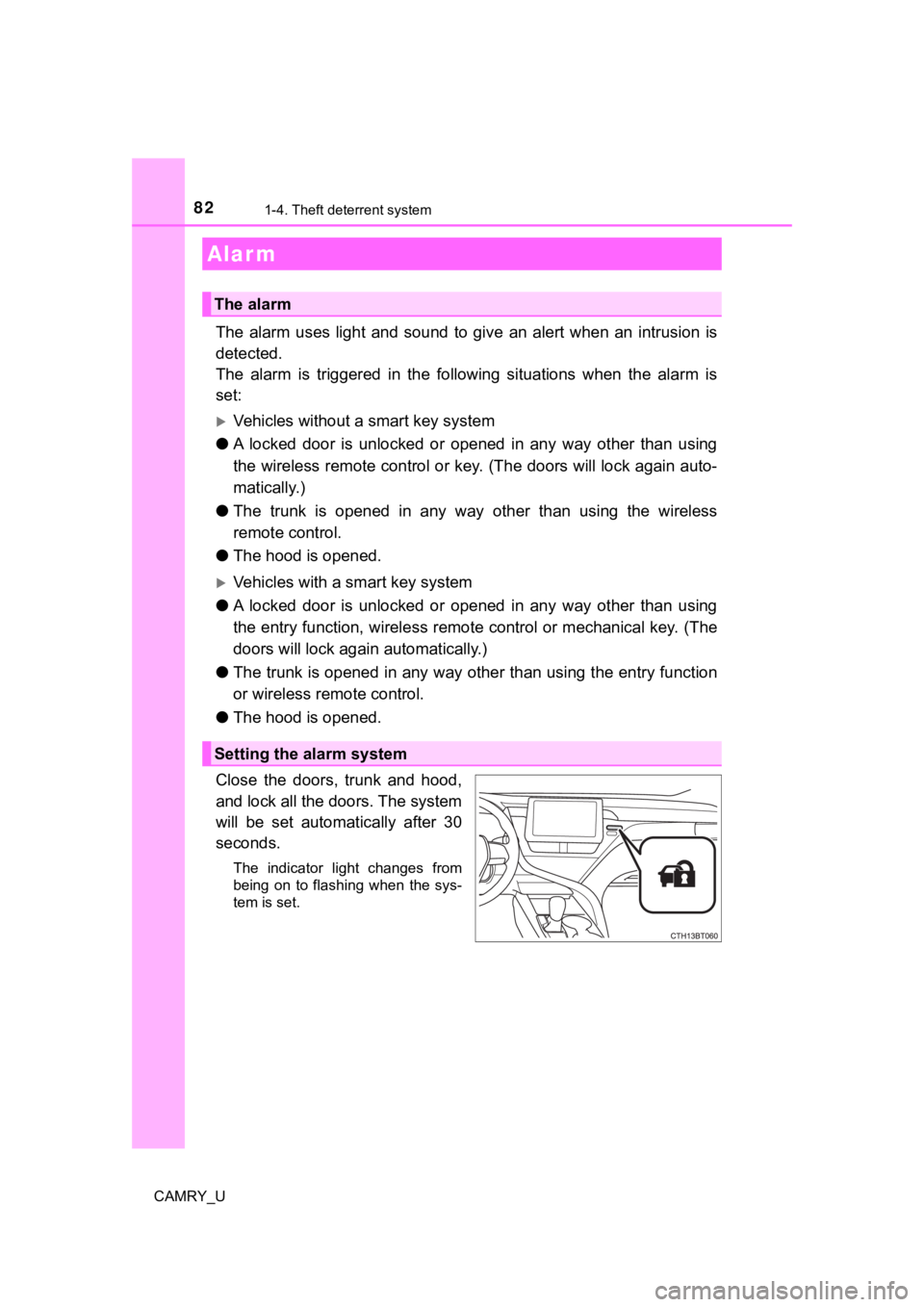
Close the doors, trunk and hood,
and lock all the doors. The system
will be set automatically after 30
seconds.
The indicator light changes from
being on to flashing when the sys-
tem is set.
Alar m
The alarm
Setting the alarm system
Page 83 of 664
831-4. Theft deterrent system
1
For safety and security
CAMRY_U
Do one of the following to deactivate or stop the alarm:
Vehicles without a smart key system
● Unlock the doors.
● Open the trunk using the wi reless remote control.
● Turn the engine switch to the “ACC” or “ON” position, or start the
engine. (The alarm will be deact ivated or stopped after a few sec-
onds.)
Vehicles with a smart key system
● Unlock the doors.
● Open the trunk using the entry function or w ireless remote control.
● Turn the engine switch to ACCESSORY or IGNITION ON mode, or
start the engine. (The alarm will be deactivated or stopped after a
few seconds.)
■ System maintenance
The vehicle has a maintenance-free type alarm system.
■ Items to check before locking the vehicle
To prevent unexpected triggering of the alarm and vehicle theft , make sure of
the following:
● Nobody is in the vehicle.
● The windows and moon roof or panoramic moon roof are closed before the
alarm is set.
● No valuables or other personal items are left in the vehicle.
Deactivating or stopping the alarm
Page 84 of 664
841-4. Theft deterrent system
CAMRY_U■
Triggering of the alarm
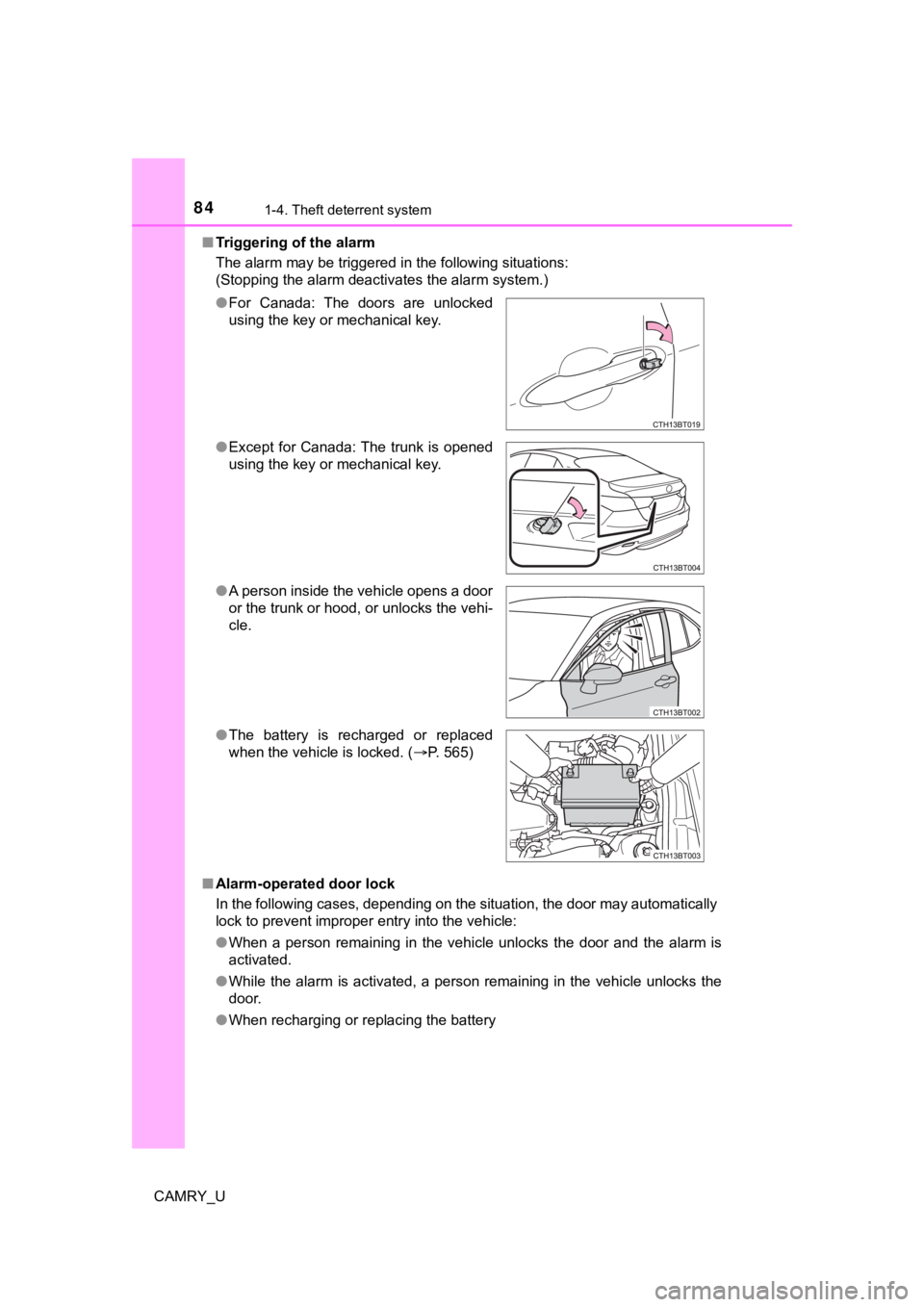
The alarm may be triggered in the following situations:
(Stopping the alarm deactivates the alarm system.)
■ Alarm-operated door lock
In the following cases, depending on the situation, the door ma y automatically
lock to prevent improper entry into the vehicle:
● When a person remaining in the vehicle unlocks the door and the alarm is
activated.
● While the alarm is activated, a person remaining in the vehicle unlocks the
door.
● When recharging or replacing the battery
●
For Canada: The doors are unlocked
using the key or mechanical key.
● Except for Canada: The trunk is opened
using the key or mechanical key.
● A person inside the vehicle opens a door
or the trunk or hood, or unlocks the vehi-
cle.
● The battery is recharged or replaced
when the vehicle is locked. ( P. 565)
Page 98 of 664
982. Instrument cluster
CAMRY_U
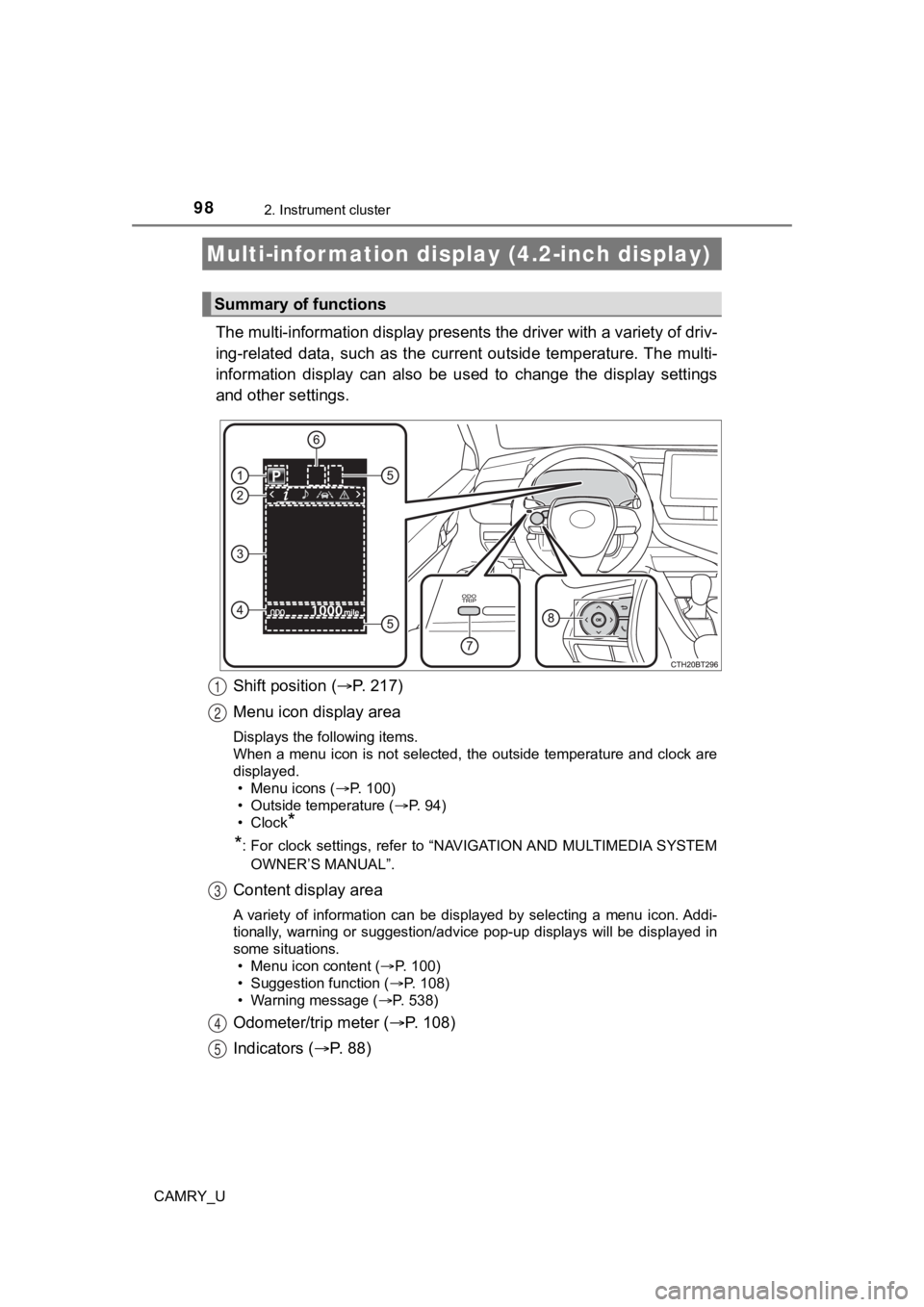
The multi-information display presents the driver with a variety of driv-
ing-related data, such as the cur rent outside temperature. The multi-
information display can also be used to change the display sett ings
and other settings.
Shift position ( P. 2 1 7 )
Menu icon display area
Displays the following items.
When a menu icon is not selected, the outside temperature and c lock are
displayed. • Menu icons ( P. 100)
• Outside temperature ( P. 94)
•Clock
*
*
: For clock settings, refer to “NAVIGATION AND MULTIMEDIA SYSTEM
OWNER’S MANUAL”.
Content display area
A variety of information can be displayed by selecting a menu i con. Addi-
tionally, warning or suggestion/advice pop-up displays will be displayed in
some situations.
• Menu icon content ( P. 1 0 0 )
• Suggestion function ( P. 108)
• Warning message ( P. 538)
Odometer/trip meter ( P. 108)
Indicators ( P. 88)
Multi-infor mation display (4.2-inch display)
Summary of functions
1
2
3
4
5
Page 111 of 664
1112. Instrument cluster
2
Instrument cluster
CAMRY_U
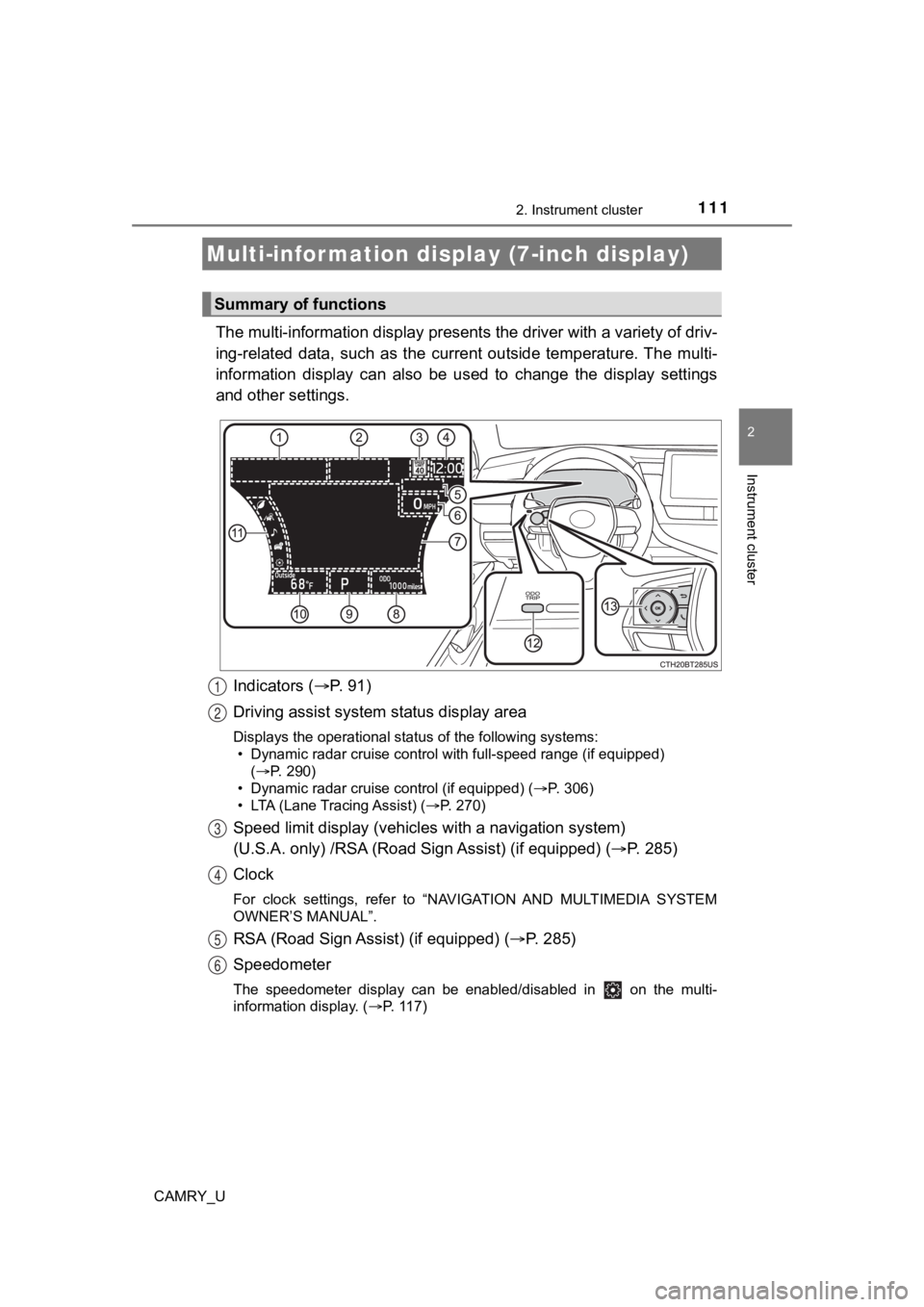
The multi-information display presents the driver with a variety of driv-
ing-related data, such as the cur rent outside temperature. The multi-
information display can also be used to change the display sett ings
and other settings.
Indicators ( P. 91)
Driving assist system status display area
Displays the operational status of the following systems:
• Dynamic radar cruise control with full-speed range (if equippe d)
( P. 290)
• Dynamic radar cruise control (if equipped) ( P. 306)
• LTA (Lane Tracing Assist) ( P. 270)
Speed limit display (vehicles with a navigation system)
(U.S.A. only) /RSA (Road Sign Assist) (if equipped) ( P. 285)
Clock
For clock settings, refer to “NAVIGATION AND MULTIMEDIA SYSTEM
OWNER’S MANUAL”.
RSA (Road Sign Assist) (if equipped) ( P. 285)
Speedometer
The speedometer display can be enabled/disabled in on the mult i-
information display. ( P. 117)
Multi-infor mation disp lay (7-inch display)
Summary of functions
1
2
3
4
5
6