ignition TOYOTA CAMRY 2022 Owner's Manual
[x] Cancel search | Manufacturer: TOYOTA, Model Year: 2022, Model line: CAMRY, Model: TOYOTA CAMRY 2022Pages: 664, PDF Size: 11.3 MB
Page 189 of 664

1893-5. Opening and closing the windows
3
Operation of each component
CAMRY_U■
Closing both the panoramic moon roof and electronic sunshade
Slide the
switch forward.
The electronic sunshade will close to the half-open position an d pause. The
panoramic moon roof will then fully close. Then the electronic sunshade will
fully close.
■ When the panoramic moon roof or electronic sunshade does not close
normally
Perform the following procedure:
Stop the vehicle.
Turn the engine switch to IGNITION ON mode.
Slide and hold the switch or switch forward. Continue pressing
the switch for approximately 10 seconds after the panoramic moo n roof or
electronic sunshade closes and reopens. The panoramic moon roof and
electronic sunshade will start to close.
*
Check that the panoramic moon roof and electronic sunshade are fully
closed and release the switch.
*: If the switch is released at the incorrect time, the procedure will have to be
performed again from the beginning.
If the panoramic moon roof or electronic sunshade does not fully close even
after performing the above procedure correctly, have the vehicle inspected by
your Toyota dealer.
■ Alarm
The alarm may be triggered if the alarm is set and the panorami c moon roof is
closed using the door lock linked panoramic moon roof operation function.
( P. 83)
■ Panoramic moon roof open warning buzzer
A buzzer sounds and a message is shown on the multi-information display in
the instrument cluster when the engine switch is turned off and the driver’s
door is opened with the panoramic moon roof open.
■ Customization
Some functions can be customized. ( P. 606)
1
2
3
4
Page 193 of 664

193
4Driving
CAMRY_U4-1. Before driving
Driving the vehicle ............. 194
Cargo and luggage ........... 203
Vehicle load limits ............. 206
Trailer towing..................... 207
Dinghy towing ................... 208
4-2. Driving procedures Engine (ignition) switch (vehicles without a
smart key system) ........... 209
Engine (ignition) switch (vehicles with a
smart key system) ........... 211
Automatic transmission ..... 217
Turn signal lever................ 223
Parking brake .................... 224
Electric parking brake........ 225
Brake Hold ........................ 229
4-3. Operating the lights and wipers
Headlight switch ................ 231
AHB (Automatic High Beam) ............................. 236
Windshield wipers and washer ............................ 240
4-4. Refueling Opening the fuel tank cap .................................. 244
4-5. Using the driving support systems
Toyota Safety Sense 2.5+...................... 248 PCS (Pre-Collision
System)........................... 254
LTA (Lane Tracing Assist) ............................. 270
RSA (Road Sign Assist) .... 285
Dynamic radar cruise control with full-speed
range............................... 290
Dynamic radar cruise control ............................. 306
Driving assist systems ...... 322
BSM (Blind Spot Monitor)........................... 330
• BSM function ................ 333
Intuitive parking assist....... 336
RCTA (Rear Cross Traffic Alert) ............................... 345
• RCTA function .............. 347
RCD (Rear Camera Detection) ....................... 354
PKSB (Parking Support Brake) ............................. 360
Parking Support Brake function (static
objects) ........................... 368
Parking Support Brake function (rear-crossing
vehicles).......................... 372
Driving mode select switches .......................... 375
4-6. Driving tips Winter driving tips ............. 377
Page 209 of 664
209
4
Driving
CAMRY_U
4-2. Driving procedures
Check that the parking brake is set.
Check that the shift lever is in P.
Firmly depress the brake pedal.
Turn the engine switch to the “START” position and start the
engine.
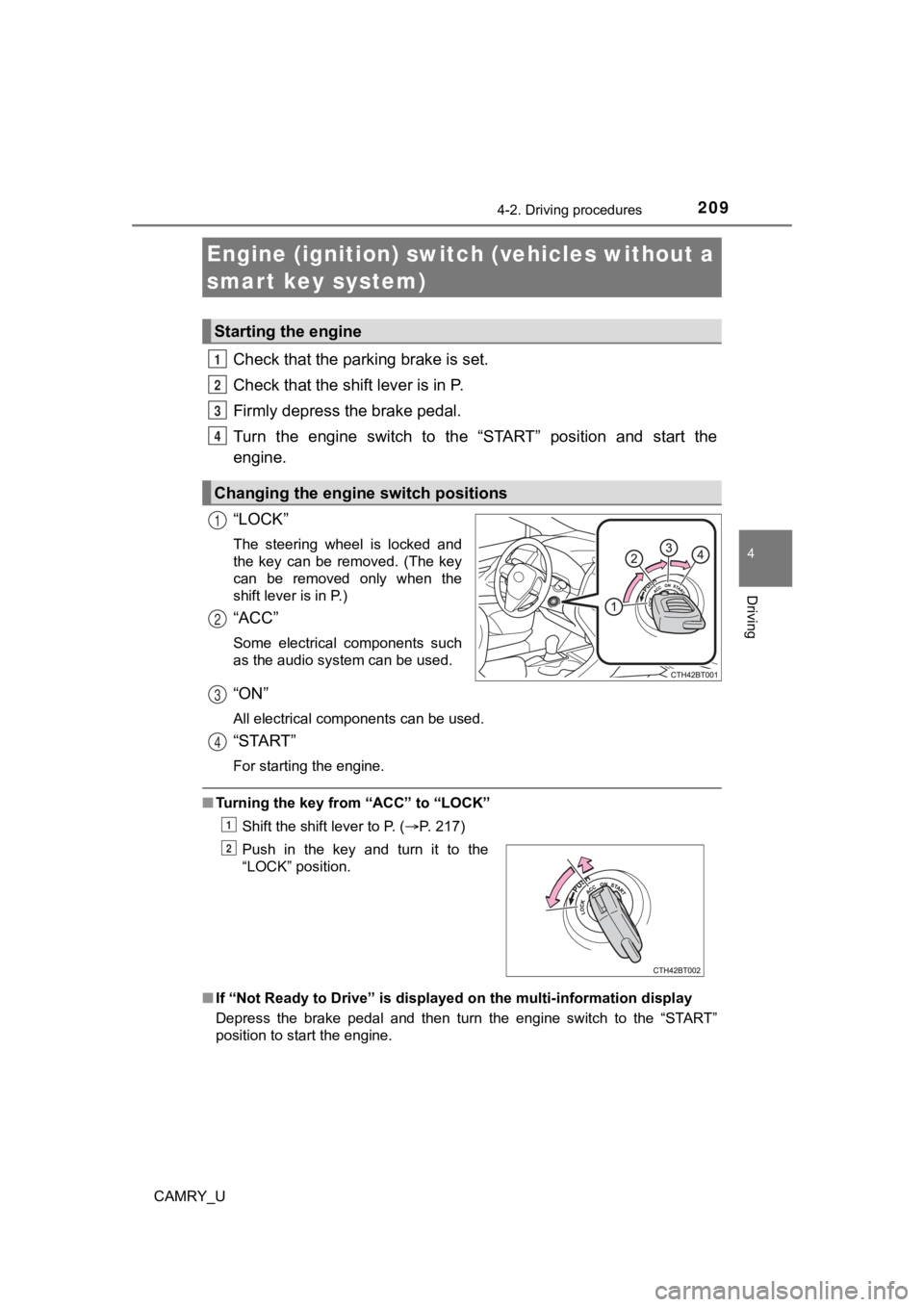
“LOCK”
The steering wheel is locked and
the key can be removed. (The key
can be removed only when the
shift lever is in P.)
“ACC”
Some electrical components such
as the audio system can be used.
“ON”
All electrical components can be used.
“START”
For starting the engine.
■ Turning the key from “ACC” to “LOCK”
Shift the shift lever to P. ( P. 217)
■ If “Not Ready to Drive” is displayed on the multi-information d isplay
Depress the brake pedal and then turn the engine switch to the “START”
position to start the engine.
Engine (ignition) switch (vehicles without a
smart key system)
Starting the engine
Changing the engine switch positions
1
2
3
4
1
2
Push in the key and turn it to the
“LOCK” position.
3
4
1
2
Page 211 of 664
2114-2. Driving procedures
4
Driving
CAMRY_U
Check that the parking brake is set.
Check that the shift lever is in P.
Firmly depress the brake pedal.
and a message will be displayed on the multi-information display.
If it is not displayed, the engine cannot be started.
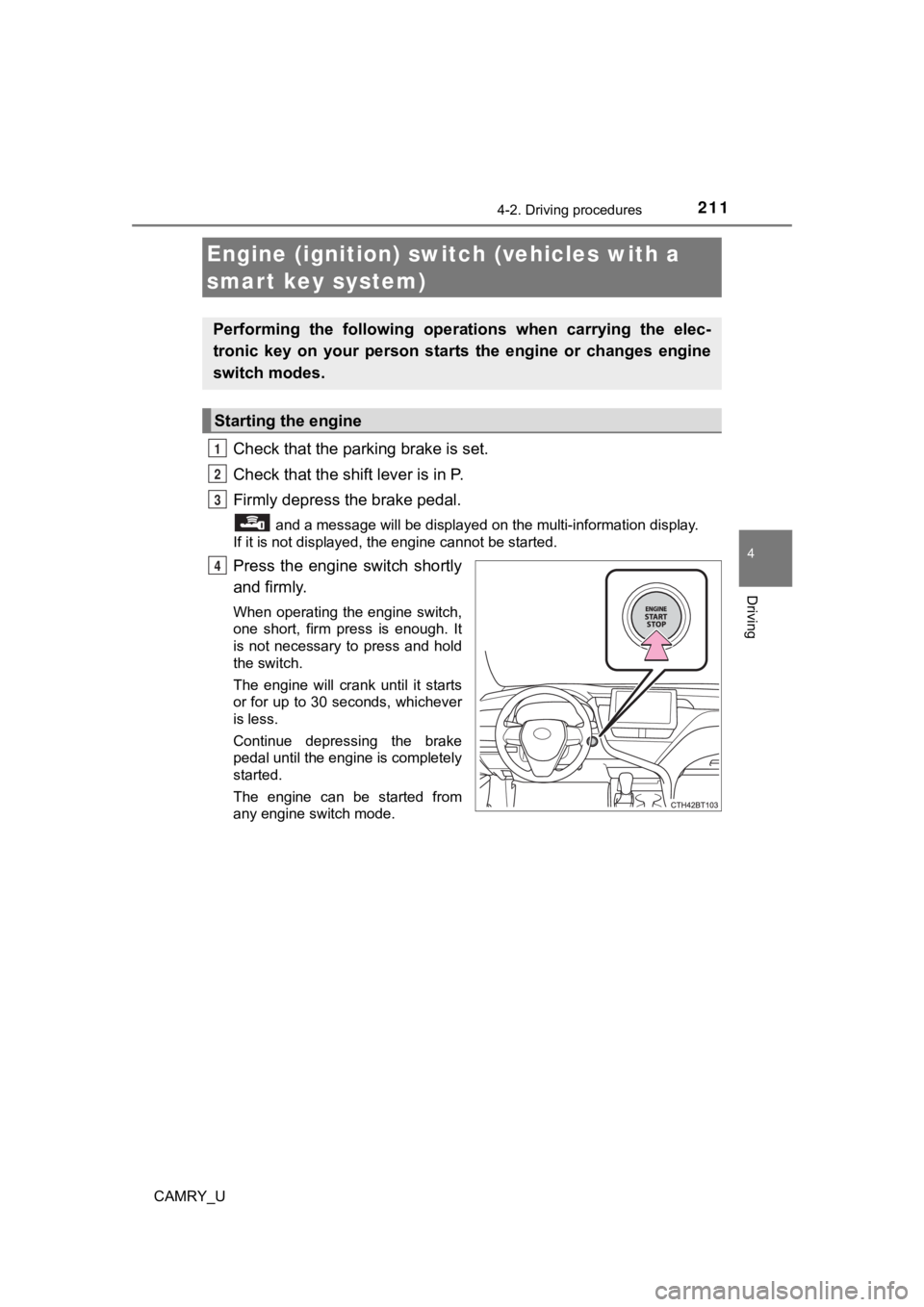
Press the engine switch shortly
and firmly.
When operating the engine switch,
one short, firm press is enough. It
is not necessary to press and hold
the switch.
The engine will crank until it starts
or for up to 30 seconds, whichever
is less.
Continue depressing the brake
pedal until the engine is completely
started.
The engine can be started from
any engine switch mode.
Engine (ignition) switch (vehicles with a
smart key system)
Performing the following opera tions when carrying the elec-
tronic key on your person starts the engine or changes engine
switch modes.
Starting the engine
1
2
3
4
Page 213 of 664
2134-2. Driving procedures
4
Driving
CAMRY_U
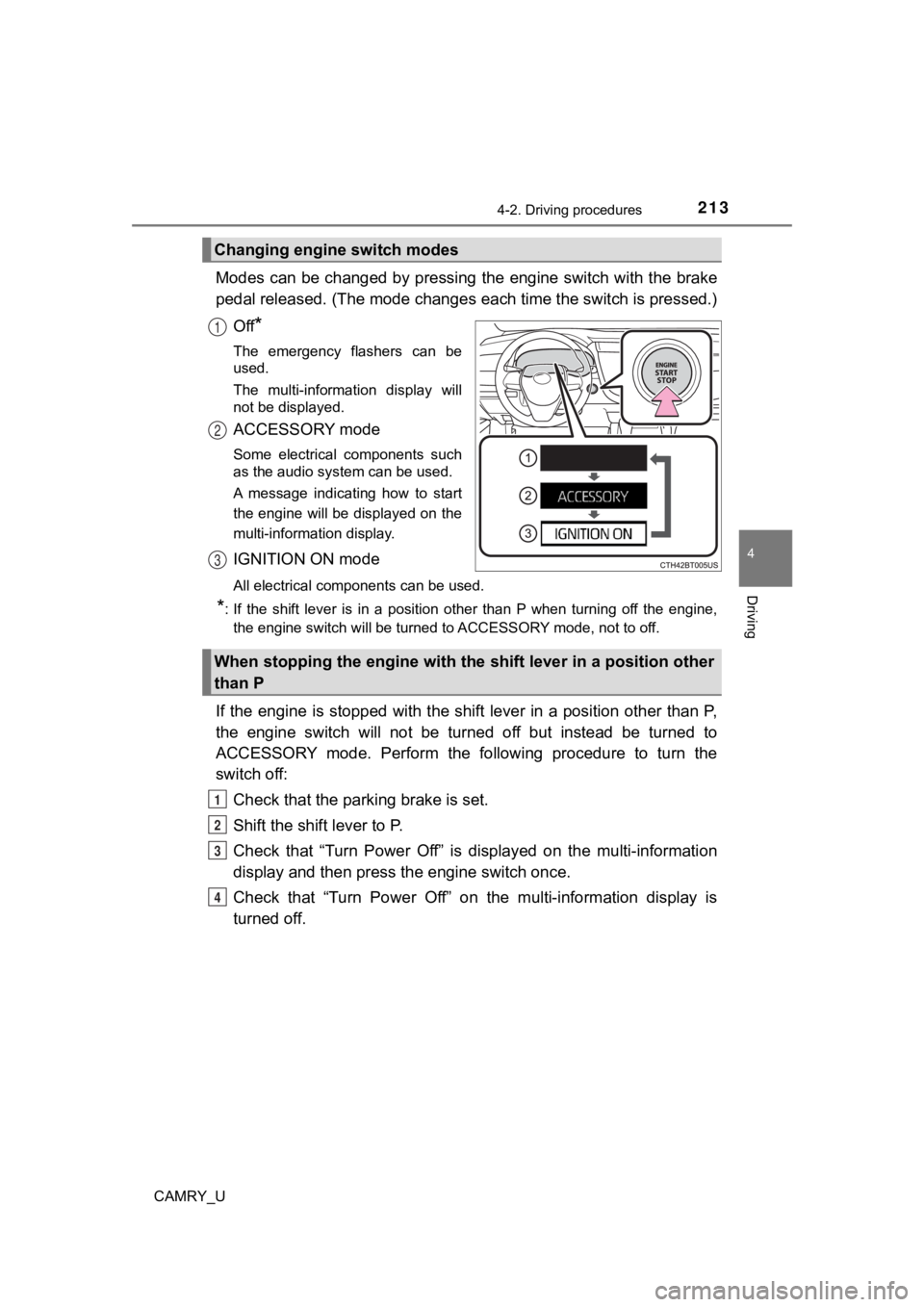
Modes can be changed by pressing the engine switch with the brake
pedal released. (The mode changes each time the switch is pressed.)
Off
*
The emergency flashers can be
used.
The multi-information display will
not be displayed.
ACCESSORY mode
Some electrical components such
as the audio system can be used.
A message indicating how to start
the engine will be displayed on the
multi-information display.
IGNITION ON mode
All electrical components can be used.
*: If the shift lever is in a position other than P when turning off the engine, the engine switch will be turned to ACCESSORY mode, not to off.
If the engine is stopped with the shift lever in a position oth er than P,
the engine switch will not be turned off but instead be turned to
ACCESSORY mode. Perform the following procedure to turn the
switch off:
Check that the park ing brake is set.
Shift the shift lever to P.
Check that “Turn Power Off” is displayed on the multi-informati on
display and then press the engine switch once.
Check that “Turn Power Off” on the multi-information display is
turned off.
Changing engine switch modes
1
2
3
When stopping the engine with the shift lever in a position other
than P
1
2
3
4
Page 214 of 664
2144-2. Driving procedures
CAMRY_U
■Auto power off function
If the vehicle is left in ACCESSORY mode for more than 20 minut es or IGNI-
TION ON mode (with the engine is not running) for more than an hour with
the shift lever in P, the engine switch will automatically turn off. However, this
function cannot entirely prevent battery discharge. Do not leav e the vehicle
with the engine switch in ACCESSORY or IGNITION ON mode for lon g peri-
ods of time when the engine is not running.
■ Electronic key battery depletion
P. 145
■ Conditions affecting operation
P. 163
■ Notes for the entry function
P. 164
■ If the engine does not start
●The engine immobilizer system may not have been deactivated. ( P. 80)
Contact your Toyota dealer.
● Check that the shift lever is securely set in P. The engine may not start if the
shift lever is displaced out of P.
■ Steering lock
After turning the engine switch off and opening and closing the doors, the
steering wheel will be locked due to the steering lock function. Operating the
engine switch again automatically cancels the steering lock.
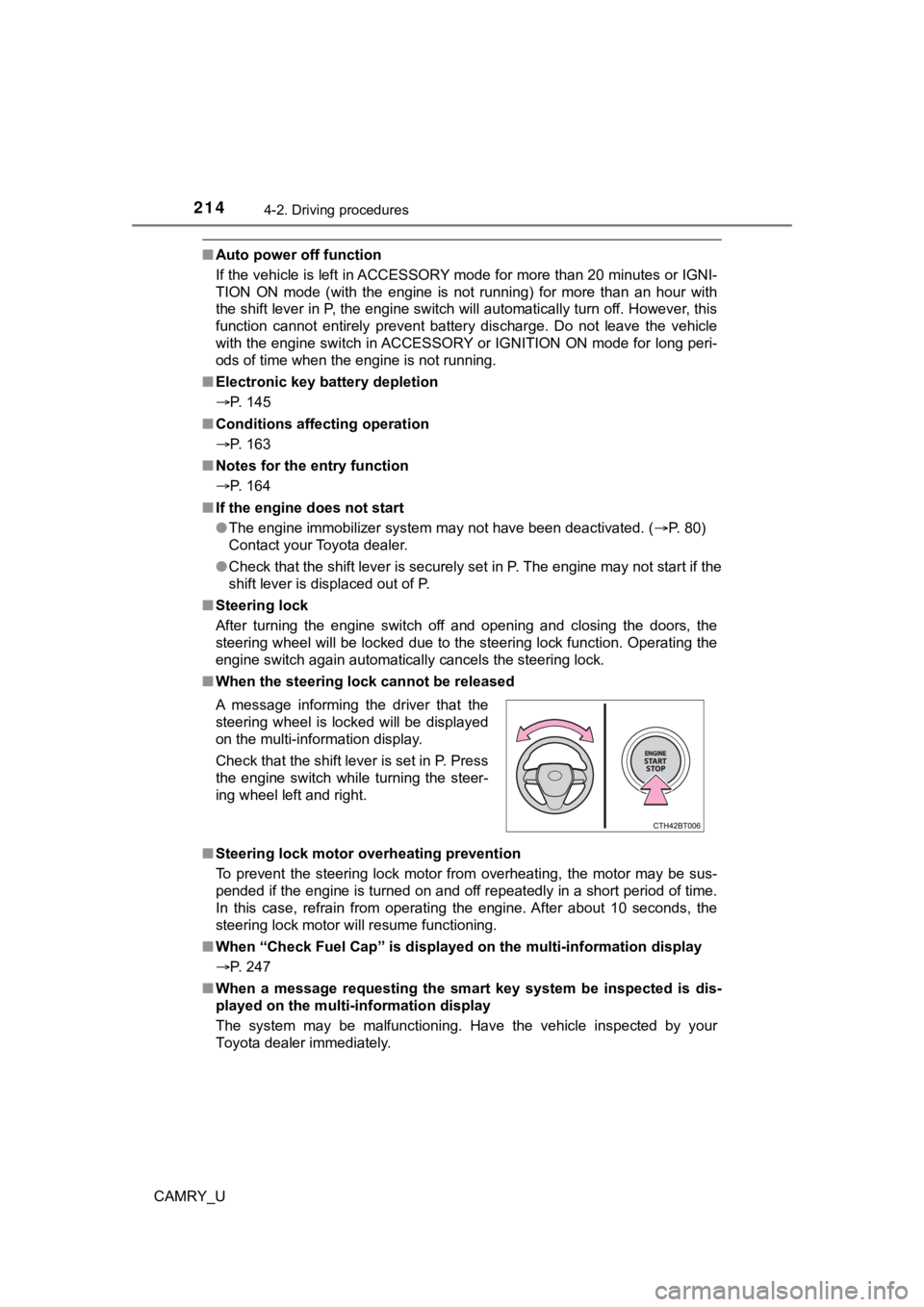
■ When the steering lock cannot be released
■ Steering lock motor overheating prevention
To prevent the steering lock motor from overheating, the motor may be sus-
pended if the engine is turned on and off repeatedly in a short period of time.
In this case, refrain from operating the engine. After about 10 seconds, the
steering lock motor will resume functioning.
■ When “Check Fuel Cap” is displayed on the multi-information display
P. 247
■ When a message requesting the smart key system be inspected is dis-
played on the multi-information display
The system may be malfunctioning. Have the vehicle inspected by your
Toyota dealer immediately. A message informing the driver that the
steering wheel is locked will be displayed
on the multi-information display.
Check that the shift lever is set in P. Press
the engine switch while turning the steer-
ing wheel left and right.
Page 216 of 664

2164-2. Driving procedures
CAMRY_U
WARNING
■When parking
Exhaust gases include harmful carbon monoxide (CO), which is co lorless
and odorless. Observe the following precautions.
Failure to do so may cause exhaust gases to enter the vehicle a nd may
lead to an accident caused by light-headedness, or may lead to death or a
serious health hazard.
● If the vehicle is in a poorly ventilated area or a closed area, such as a
garage, stop the engine.
● Do not leave the vehicle with the engine running for a long time. If such a
situation cannot be avoided, park the vehicle in an open space and ensure
that exhaust fumes do not enter the vehicle interior.
● Do not leave the engine running in an area with snow build-up, or where it
is snowing. If snowbanks build up around the vehicle while the engine is
running, exhaust gases may collect and enter the vehicle.
NOTICE
■ To prevent battery discharge
● Do not leave the engine switch in ACCESSORY or IGNITION ON mode
for long periods of time without the engine running.
● Do not stop the engine when the shift lever is in a position ot her than P. If
the engine is stopped in another shift lever position, the engine switch will
not be turned off but instead be turned to ACCESSORY mode. If t he vehi-
cle is left in ACCESSORY mode, battery discharge may occur.
■ When starting the engine
● Do not race a cold engine.
● If the engine becomes difficult to start or stalls frequently, have your vehi-
cle checked by your Toyota dealer immediately.
■ Symptoms indicating a malf unction with the engine switch
If the engine switch seems to be operating somewhat differently than usual,
such as the switch sticking slightly, there may be a malfunction. Contact
your Toyota dealer immediately.
Page 217 of 664
2174-2. Driving procedures
4
Driving
CAMRY_U
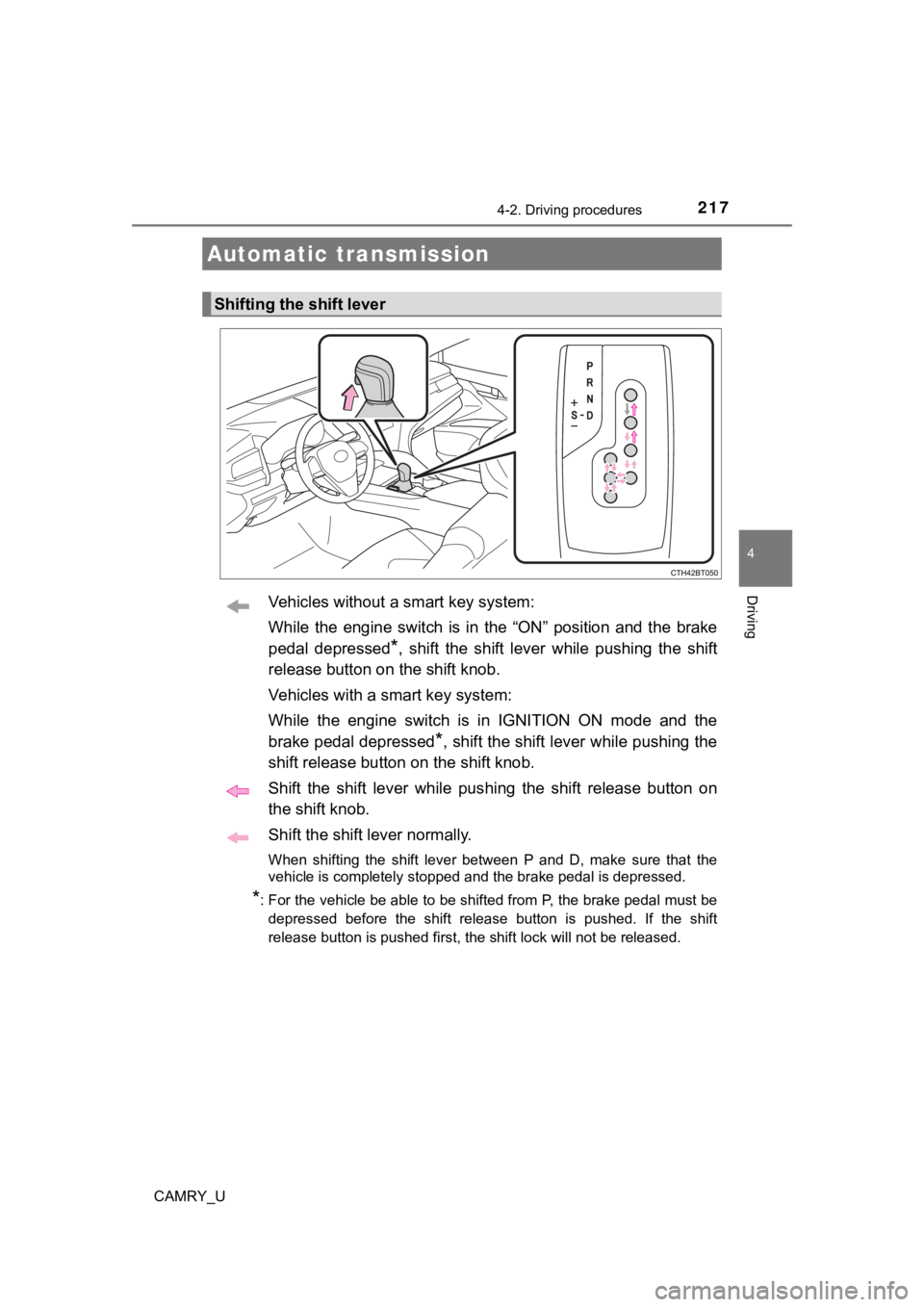
Vehicles without a smart key system:
While the engine switch is in the “ON” position and the brake
pedal depressed
*, shift the shift lever while pushing the shift
release button on the shift knob.
Vehicles with a smart key system:
While the engine switch is in IGNITION ON mode and the
brake pedal depressed
*, shift the shift lever while pushing the
shift release button on the shift knob.
Shift the shift lever while pushing the shift release button on
the shift knob.
Shift the shift lever normally.
When shifting the shift lever between P and D, make sure that t he
vehicle is completely stopped and the brake pedal is depressed.
*: For the vehicle be able to be shifted from P, the brake pedal must be
depressed before the shift release button is pushed. If the shift
release button is pushed first, the shift lock will not be rele ased.
Automatic transmission
Shifting the shift lever
Page 220 of 664

2204-2. Driving procedures
CAMRY_U
■Automatic deactivation of shift range selection in the D positi on (vehi-
cles with paddle shift switches)
Shift range selection in the D position will be deactivated in the following situ-
ations:
● The “+” paddle shift switch is held down for a period of time
● When the vehicle comes to a stop
● If the accelerator pedal is depressed for more than a certain p eriod of time
● When the shift lever is shifted to a position other than D
■ S mode
●When the shift range is 7 or lower, holding the shift lever toward “+” sets the
shift range to 8.
● To prevent the engine from over-revving, upshifting may automat ically
occur.
● To protect the automatic transmission, a function is adopted that automati-
cally selects a higher shift range when the fluid temperature i s high.
■ Downshift restriction warning buzzer (S mode or paddle shifting )
To help ensure safety and driving performance, downshifting ope ration may
sometimes be restricted. In some circumstances, downshifting ma y not be
possible even when the shift lever or paddle shift switches are operated. (A
buzzer will sound twice.)
■ When driving with dynamic radar cruise control with full-speed range or
dynamic radar cruise control activated
Even when performing the following actions with the intent of e nabling engine
braking, engine braking will not occur because dynamic radar cr uise control
with full speed range or dynamic r adar cruise control will not be canceled.
● While driving in D or S mode, downshifting to 7, 6, 5 or 4. (
P. 290, 306)
● When switching the driving mode to sport mode while driving in the D posi-
tion. (
P. 375)
■ Restraining sudden start (Drive-start Control)
P. 195
■ Shift lock system
The shift lock system is a system to prevent accidental operation of the shift
lever in starting.
The shift lever can be shifted from P only when the engine switch is in the
“ON” position (vehicles without a smart key system) or IGNITION ON mode
(vehicles with a smart key system), the brake pedal is depresse d and the shift
release button is pushed.
Page 223 of 664
2234-2. Driving procedures
4
Driving
CAMRY_U
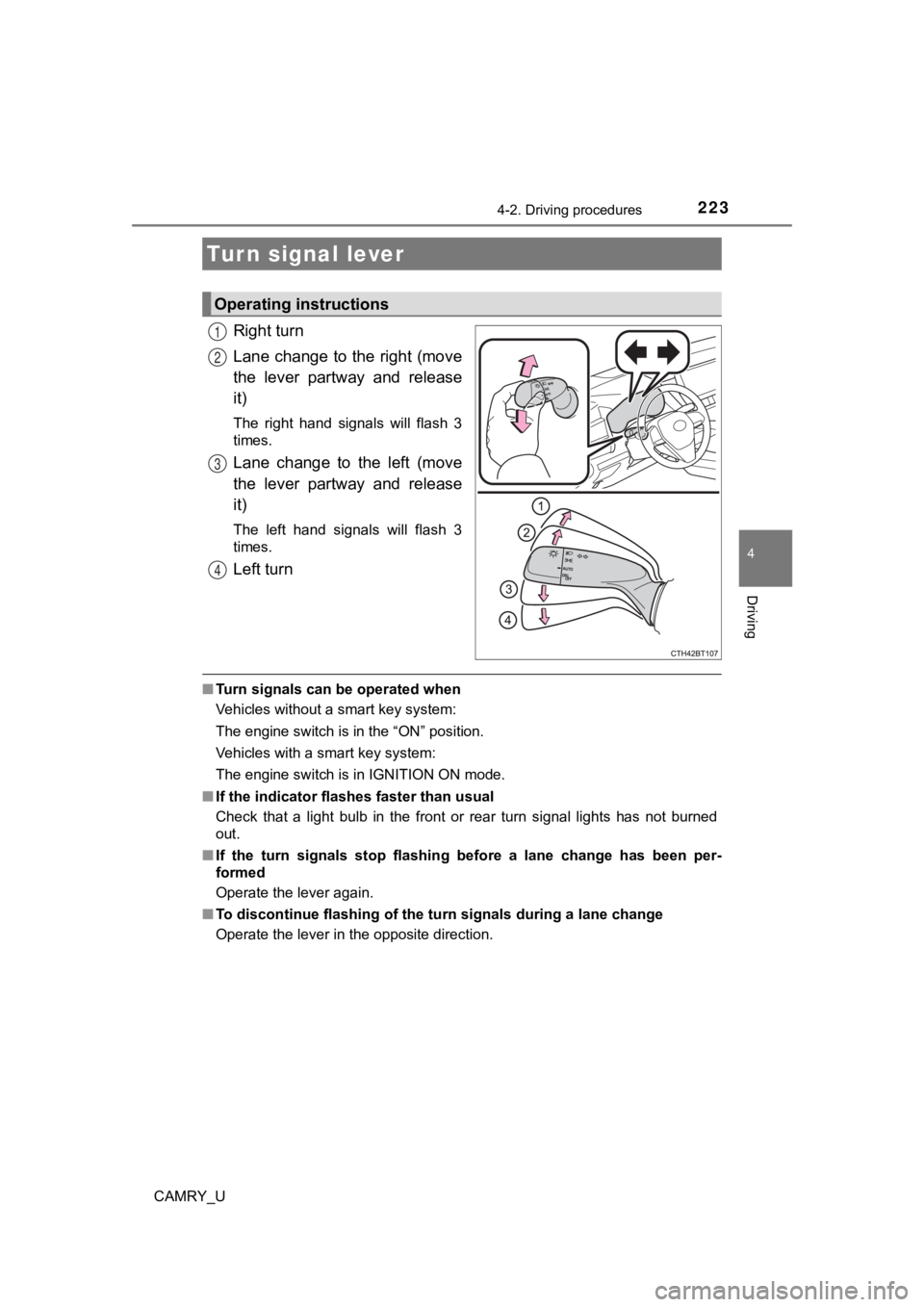
Right turn
Lane change to the right (move
the lever partway and release
it)
The right hand signals will flash 3
times.
Lane change to the left (move
the lever partway and release
it)
The left hand signals will flash 3
times.
Left turn
■Turn signals can be operated when
Vehicles without a smart key system:
The engine switch is in the “ON” position.
Vehicles with a smart key system:
The engine switch is in IGNITION ON mode.
■ If the indicator flashes faster than usual
Check that a light bulb in the front or rear turn signal lights has not burned
out.
■ If the turn signals stop flashing before a lane change has been per-
formed
Operate the lever again.
■ To discontinue flashing of the turn signals during a lane chang e
Operate the lever in the opposite direction.
Turn signal lever
Operating instructions
1
2
3
4