mirror TOYOTA CAMRY 2022 Owner's Manual
[x] Cancel search | Manufacturer: TOYOTA, Model Year: 2022, Model line: CAMRY, Model: TOYOTA CAMRY 2022Pages: 664, PDF Size: 11.3 MB
Page 239 of 664
2394-3. Operating the lights and wipers
4
Driving
CAMRY_U●
In the following situations the system may not be able to correctly detect the
surrounding brightness level. This may cause the low beams to r emain on
or the high beams to flash or dazzle pedestrians or vehicles ah ead. In such
a case, it is necessary to manually switch between the high and low beams.
• When driving in inclement weather (heavy rain, snow, fog, sand storms,
etc.)
• When the windshield is obscured by fog, mist, ice, dirt, etc.
• When the windshield is cracked or damaged
• When the front camera is deformed or dirty
• When the temperature of the front camera is extremely high
• When the surrounding brightness level is equal to that of head lights, tail
lights or fog lights
• When headlights or tail lights of vehicles ahead are turned off, dirty,
changing color, or not aimed properly
• When the vehicle is hit by water, snow, dust, etc. from a prec eding vehi-
cle
• When driving through an area of intermittently changing brightness and darkness
• When frequently and repeatedly driving ascending/descending roads, or
roads with rough, bumpy or uneven surfaces (such as stone-paved
roads, gravel roads, etc.)
• When frequently and repeatedly taking curves or driving on a w inding
road
• When there is a highly reflective object ahead of the vehicle, such as a sign or mirror
• When the back of a preceding vehicle is highly reflective, suc h as a con-
tainer on a truck
• When the vehicle's headlights are damaged or dirty, or are not aimed
properly
• When the vehicle is listing or titling due to a flat tire, a trailer being towed,
etc.
• When the headlights are changed between the high beams and low beams repeatedly in an abnormal manner
• When the driver believes that the high beams may be flashing or dazzling pedestrians or other drivers
■ Temporarily lowering sensor sensitivity
The sensitivity of the sensor can be temporarily lowered.
Turn the engine switch off while the following conditions are m et.
• The headlight switch is in the or position.
• The headlight switch lever is in the original position.
Turn the engine switch to the “ON” position (vehicles without a smart key
system) or IGNITION ON mode (vehicles with a smart key system).
Within 60 seconds after , repeat pushing the headlight switch lever to the
high beam position then pulling it to the original position qui ckly 10 times,
then leave the lever in the original position.
1
2
32
Page 251 of 664
2514-5. Using the driving support systems
4
Driving
CAMRY_U
WARNING
●Do not subject the front camera to a strong impact.
● Do not change the installation position or direction of the front camera or
remove it.
● Do not disassemble the front camera.
● Do not modify any components of the vehicle around the front ca mera
(inside rear view mirror, etc.) or ceiling.
● Do not attach any accessories to the hood, front grille or front bumper that
may obstruct the front camera. Contact your Toyota dealer for details.
● If a surfboard or other long object is to be mounted on the roo f, make sure
that it will not obstruct the front camera.
● Do not modify the headlights or other lights.
Page 330 of 664
3304-5. Using the driving support systems
CAMRY_U
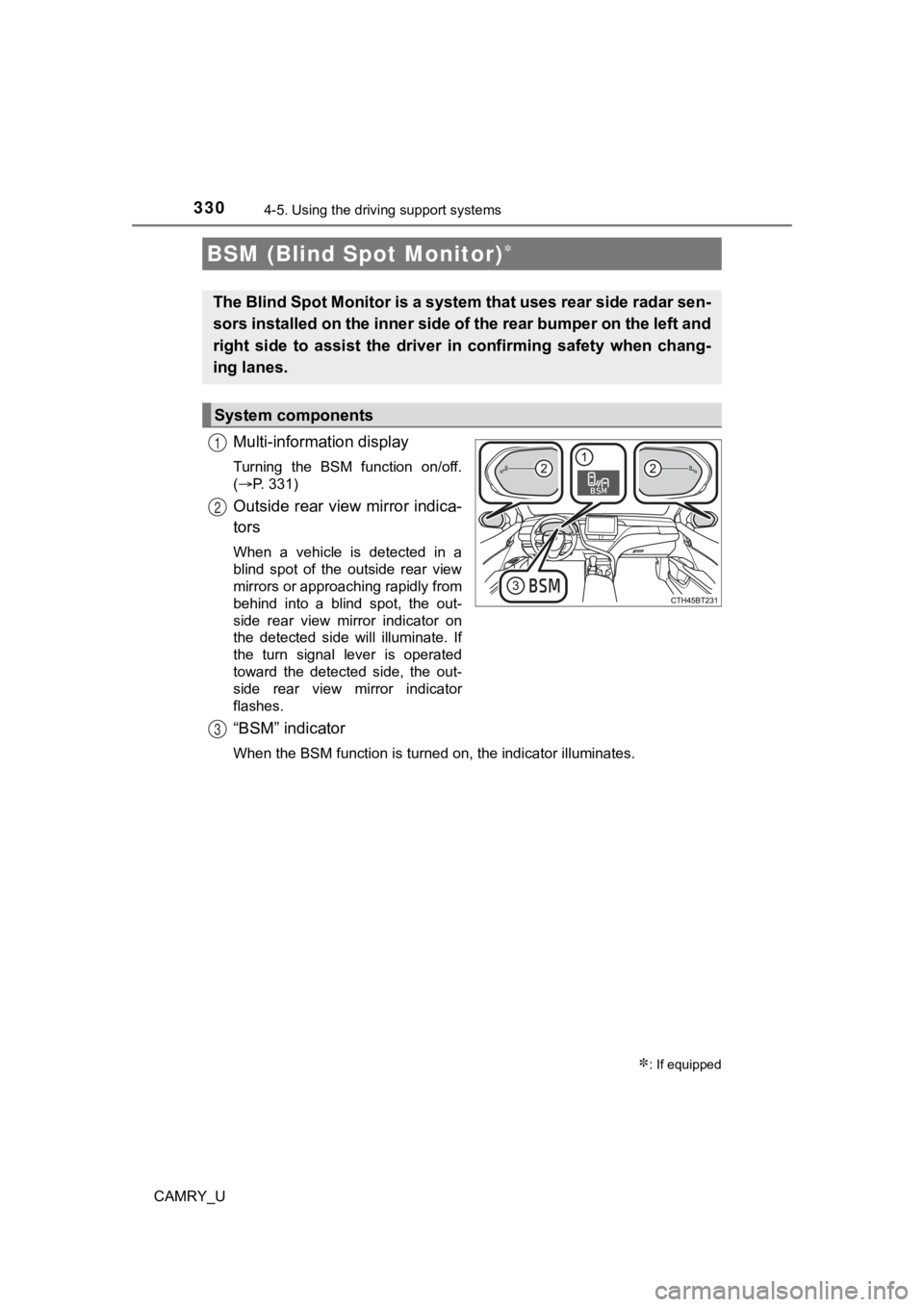
Multi-information display
Turning the BSM function on/off.
(P. 331)
Outside rear view mirror indica-
tors
When a vehicle is detected in a
blind spot of the outside rear view
mirrors or approaching rapidly from
behind into a blind spot, the out-
side rear view mirror indicator on
the detected side will illuminate. If
the turn signal lever is operated
toward the detected side, the out-
side rear view mirror indicator
flashes.
“BSM” indicator
When the BSM function is turned on, the indicator illuminates.
BSM (Blind Spot Monitor)
: If equipped
The Blind Spot Monitor is a system that uses rear side radar se n-
sors installed on the inner side of the rear bumper on the left and
right side to assist the driver in confirming safety when chang-
ing lanes.
System components
1
2
3
Page 331 of 664
3314-5. Using the driving support systems
4
Driving
CAMRY_U
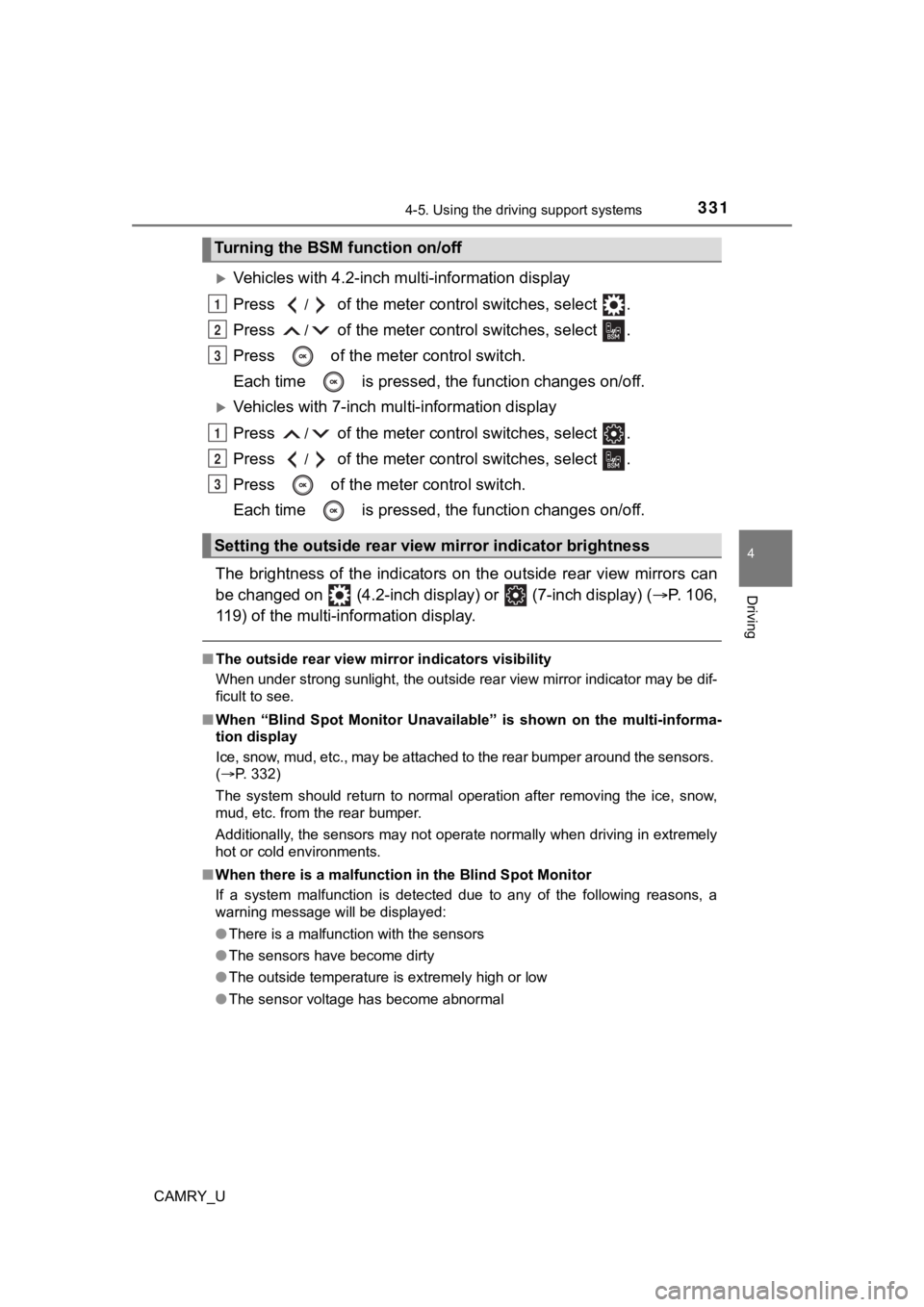
Vehicles with 4.2-inch multi-information display
Press
/ of the meter control switches, select .
Press
/ of the meter control switches, select .
Press of the meter control switch.
Each time is pressed, t he function changes on/off.
Vehicles with 7-inch multi-information display
Press
/ of the meter control switches, select .
Press
/ of the meter control switches, select .
Press of the meter control switch.
Each time is pressed, t he function changes on/off.
The brightness of the indicators on the outside rear view mirro rs can
be changed on (4.2-inch display) or
(7-inch display) ( P. 106,
119) of the multi-information display.
■ The outside rear view mirror indicators visibility
When under strong sunlight, the outside rear view mirror indica tor may be dif-
ficult to see.
■ When “Blind Spot Monitor Unavailable” is shown on the multi-inf orma-
tion display
Ice, snow, mud, etc., may be attached to the rear bumper around the sensors.
( P. 332)
The system should return to normal operation after removing the ice, snow,
mud, etc. from the rear bumper.
Additionally, the sensors may not operate normally when driving in extremely
hot or cold environments.
■ When there is a malfunction in the Blind Spot Monitor
If a system malfunction is detected due to any of the following reasons, a
warning message will be displayed:
●There is a malfunction with the sensors
● The sensors have become dirty
● The outside temperature is extremely high or low
● The sensor voltage has become abnormal
Turning the BSM function on/off
Setting the outside rear view mirror indicator brightness
1
2
3
1
2
3
Page 333 of 664
3334-5. Using the driving support systems
4
Driving
CAMRY_U
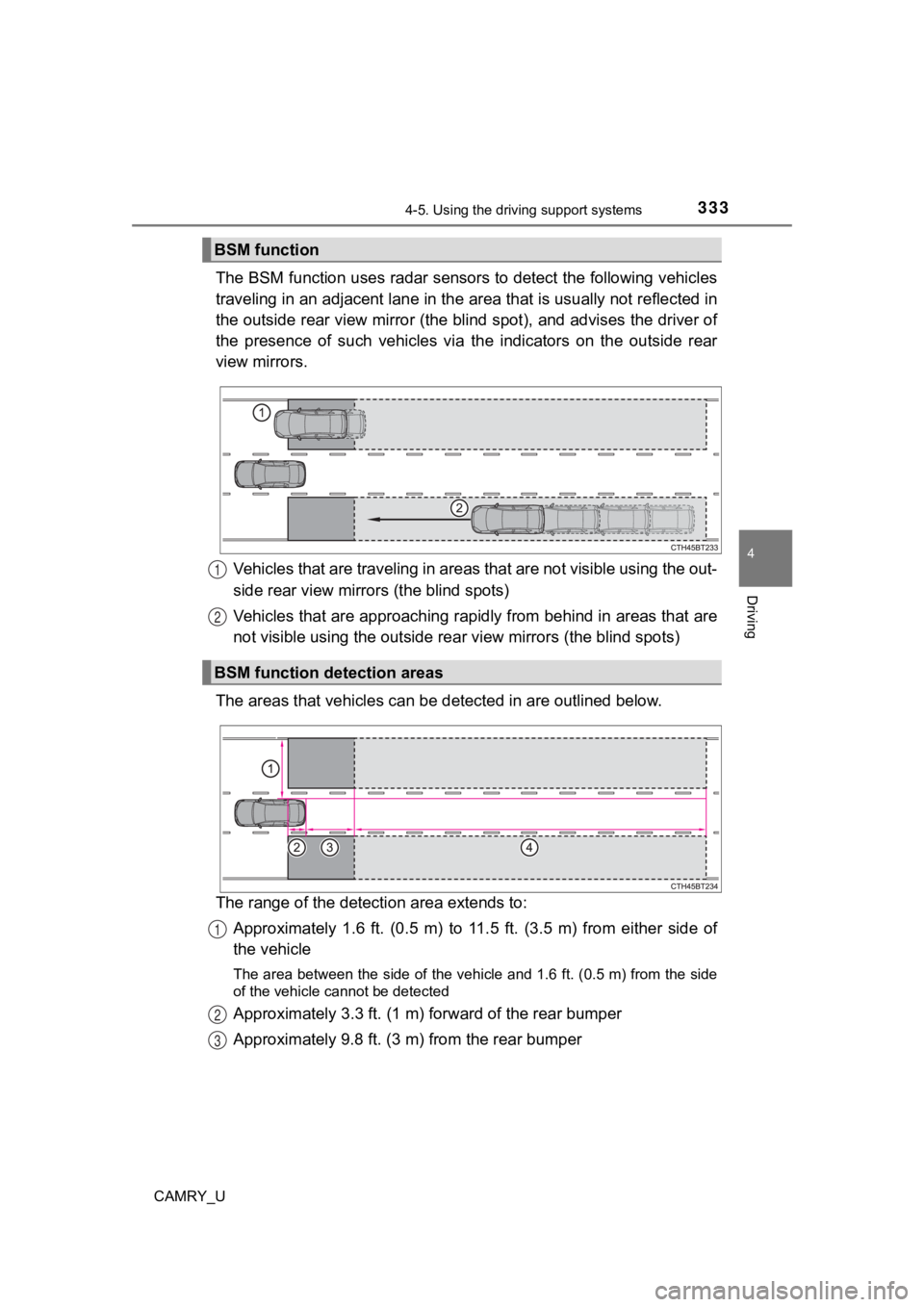
The BSM function uses radar sensors to detect the following vehicles
traveling in an adjacent lane in the area that is usually not r eflected in
the outside rear view mirror (the blind spot), and advises the driver of
the presence of such vehicles via the indicators on the outside rear
view mirrors.
Vehicles that are traveling in areas that are not visible using the out-
side rear view mirrors (the blind spots)
Vehicles that are approaching rapidly from behind in areas that are
not visible using the outside re ar view mirrors (the blind spots)
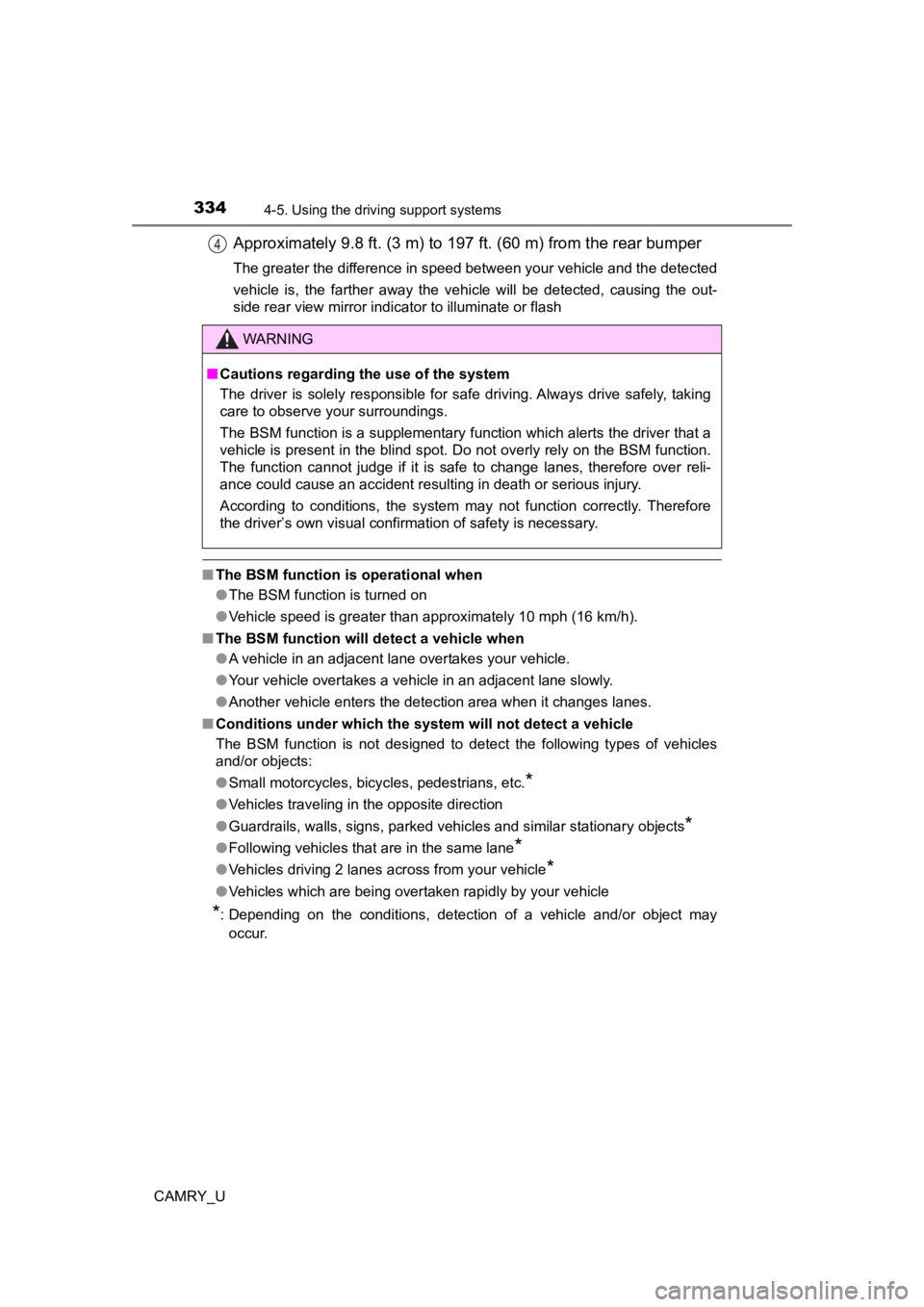
The areas that vehicles can be detected in are outlined below.
The range of the detecti on area extends to:
Approximately 1.6 ft. (0.5 m) to 11.5 ft. (3.5 m) from either s ide of
the vehicle
The area between the side of the vehicle and 1.6 ft. (0.5 m) fr om the side
of the vehicle cannot be detected
Approximately 3.3 ft. (1 m) f orward of the rear bumper
Approximately 9.8 ft. (3 m) from the rear bumper
BSM function
BSM function detection areas
1
2
1
2
3
Page 334 of 664
3344-5. Using the driving support systems
CAMRY_U
Approximately 9.8 ft. (3 m) to 19 7 ft. (60 m) from the rear bumper
The greater the difference in speed between your vehicle and the detected
vehicle is, the farther away the vehicle will be detected, causing the out-
side rear view mirror indicator to illuminate or flash
■The BSM function is operational when
●The BSM function is turned on
● Vehicle speed is greater than approximately 10 mph (16 km/h).
■ The BSM function will detect a vehicle when
●A vehicle in an adjacent lane overtakes your vehicle.
● Your vehicle overtakes a vehicle in an adjacent lane slowly.
● Another vehicle enters the detection area when it changes lanes.
■ Conditions under which the system will not detect a vehicle
The BSM function is not designed to detect the following types of vehicles
and/or objects:
● Small motorcycles, bicycles, pedestrians, etc.
*
●Vehicles traveling in the opposite direction
● Guardrails, walls, signs, parked vehicles and similar stationary objects
*
●Following vehicles that are in the same lane*
●Vehicles driving 2 lanes across from your vehicle*
●Vehicles which are being overtaken rapidly by your vehicle
*: Depending on the conditions, detection of a vehicle and/or object may
occur.
4
WARNING
■ Cautions regarding the use of the system
The driver is solely responsible for safe driving. Always drive safely, taking
care to observe your surroundings.
The BSM function is a supplementary function which alerts the driver that a
vehicle is present in the blind spot. Do not overly rely on the BSM function.
The function cannot judge if it is safe to change lanes, theref ore over reli-
ance could cause an accident resulting in death or serious inju r y.
According to conditions, the system may not function correctly. Therefore
the driver’s own visual confirmation of safety is necessary.
Page 345 of 664
3454-5. Using the driving support systems
4
Driving
CAMRY_U
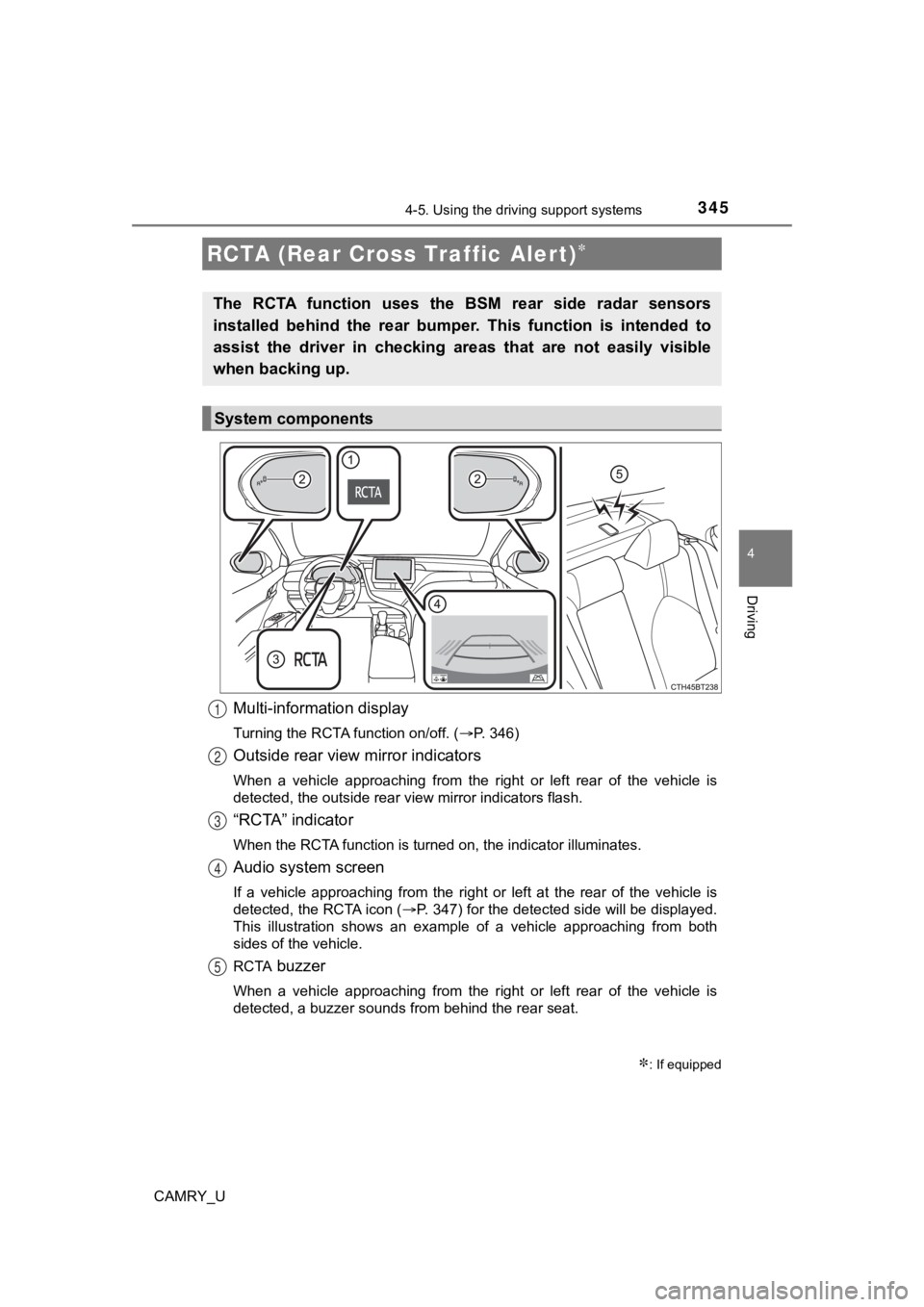
Multi-information display
Turning the RCTA function on/off. (P. 346)
Outside rear view mirror indicators
When a vehicle approaching from the right or left rear of the vehicle is
detected, the outside rear view mirror indicators flash.
“RCTA” indicator
When the RCTA function is turned on, the indicator illuminates.
Audio system screen
If a vehicle approaching from the right or left at the rear of the vehicle is
detected, the RCTA icon ( P. 347) for the detected side will be displayed.
This illustration shows an example of a vehicle approaching fro m both
sides of the vehicle.
RCTA
buzzer
When a vehicle approaching from the right or left rear of the vehicle is
detected, a buzzer sounds from behind the rear seat.
RCTA (Rear Cross Traffic Alert)
: If equipped
The RCTA function uses the BSM rear side radar sensors
installed behind the rear bumpe r. This function is intended to
assist the driver in checking areas that are not easily visible
when backing up.
System components
1
2
3
4
5
Page 346 of 664
3464-5. Using the driving support systems
CAMRY_U
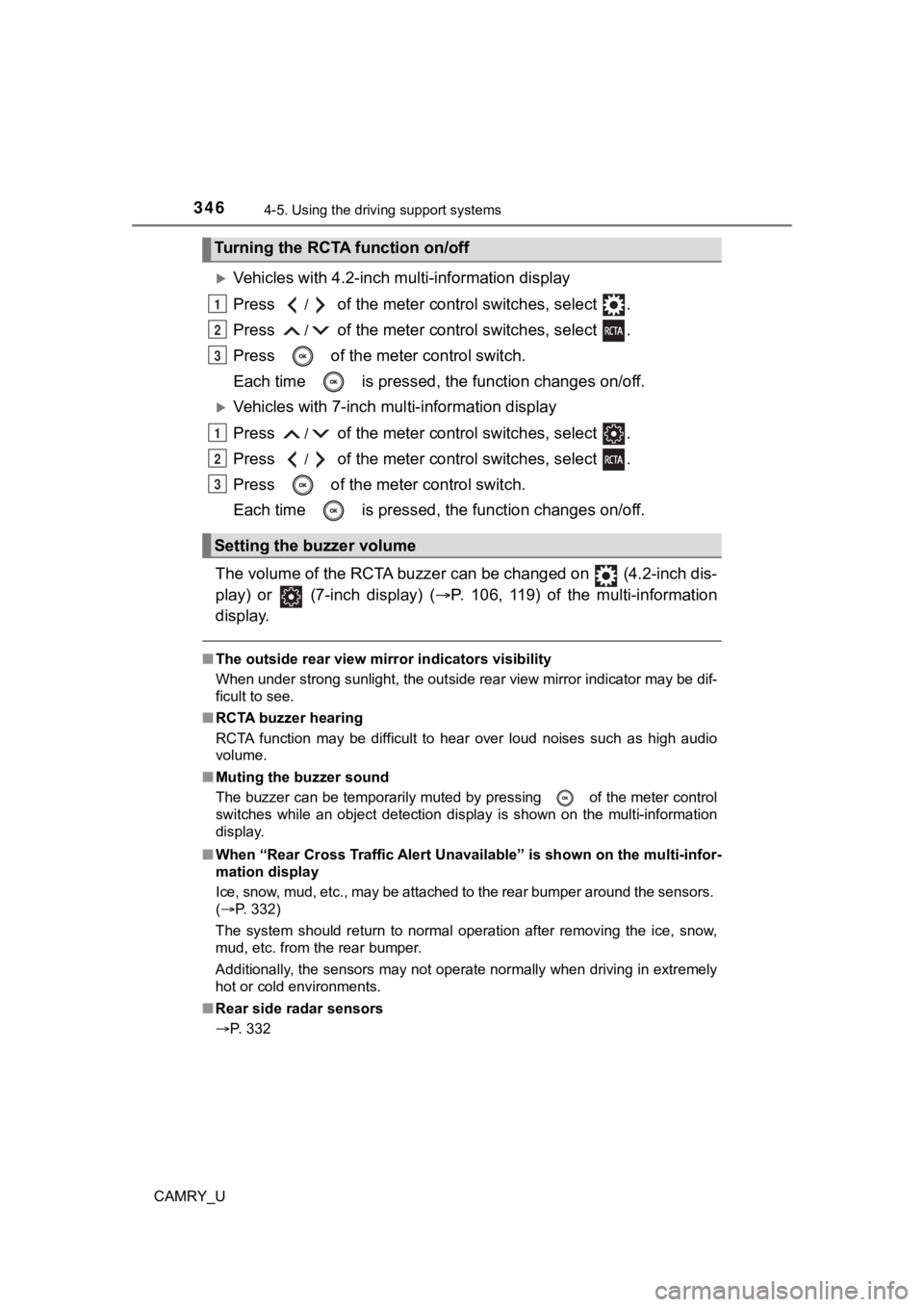
Vehicles with 4.2-inch m ulti-information display
Press
/ of the meter control switches, select .
Press
/ of the meter control switches, select .
Press of the meter control switch.
Each time is pressed, t he function changes on/off.
Vehicles with 7-inch multi-information display
Press
/ of the meter control switches, select .
Press
/ of the meter control switches, select .
Press of the meter control switch.
Each time is pressed, t he function changes on/off.
The volume of the RCTA buzzer can be changed on (4.2-inch dis-
play) or (7-inch display) ( P. 106, 119) of the multi-information
display.
■ The outside rear view mirror indicators visibility
When under strong sunlight, the outside rear view mirror indica tor may be dif-
ficult to see.
■ RCTA buzzer hearing
RCTA function may be difficult to hear over loud noises such as high audio
volume.
■ Muting the buzzer sound
The buzzer can be temporarily muted by pressing
of the meter control
switches while an object detection display is shown on the mult i-information
display.
■ When “Rear Cross Traffic Alert Unavailable” is shown on the mul ti-infor-
mation display
Ice, snow, mud, etc., may be attached to the rear bumper around the sensors.
( P. 332)
The system should return to normal operation after removing the ice, snow,
mud, etc. from the rear bumper.
Additionally, the sensors may not operate normally when driving in extremely
hot or cold environments.
■ Rear side radar sensors
P. 332
Turning the RCTA function on/off
Setting the buzzer volume
1
2
3
1
2
3
Page 347 of 664
3474-5. Using the driving support systems
4
Driving
CAMRY_U
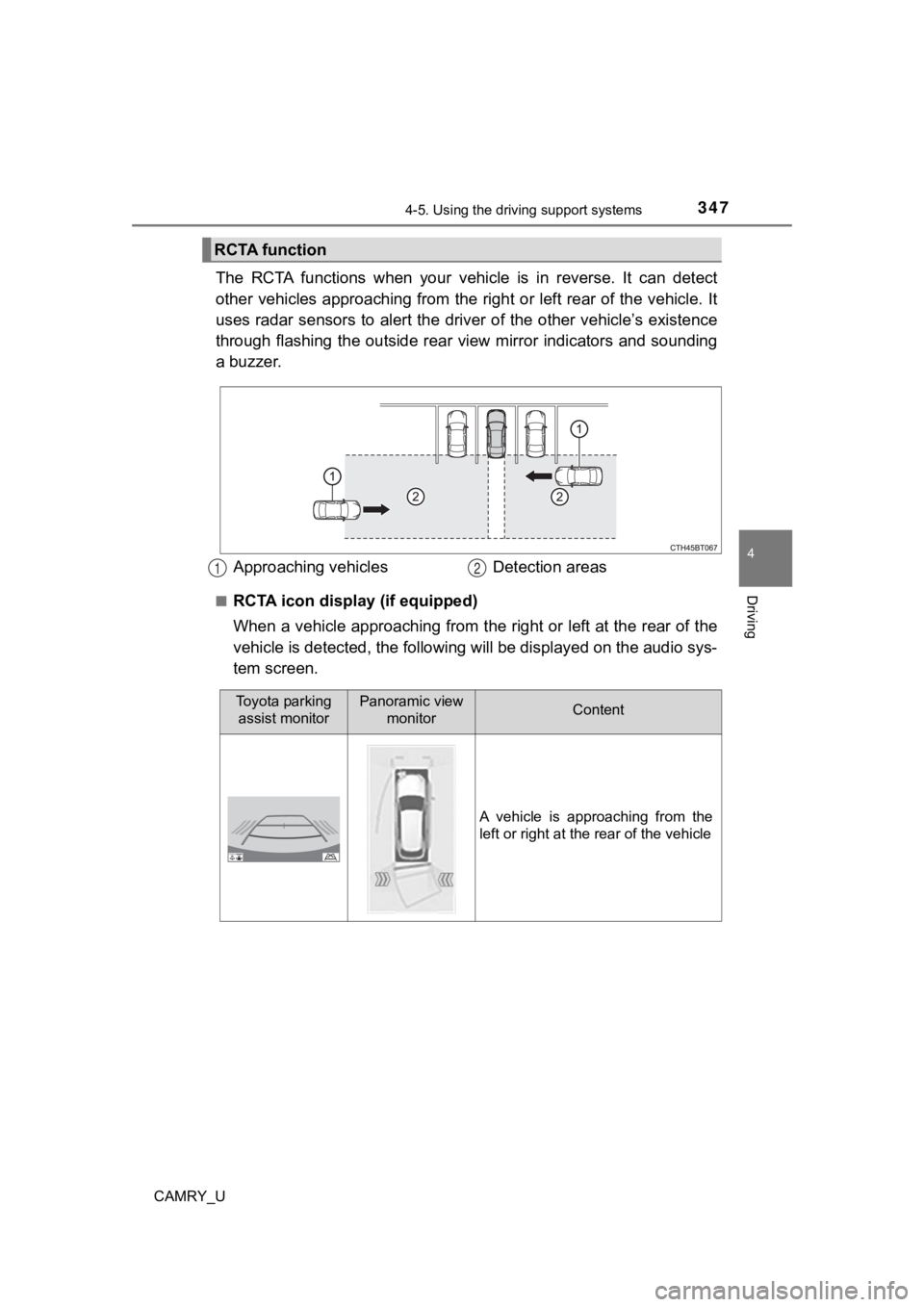
The RCTA functions when your vehicle is in reverse. It can detect
other vehicles approaching from the right or left rear of the v ehicle. It
uses radar sensors to alert the driver of the other vehicle’s existence
through flashing the outside rear view mirror indicators and so unding
a buzzer.
■RCTA icon displa y (if equipped)
When a vehicle approaching from the right or left at the rear o f the
vehicle is detected, the following will be displayed on the aud io sys-
tem screen.
RCTA function
Approaching vehicles Detection areas12
Toyota parking
assist monitorPanoramic view monitorContent
A vehicle is approaching from the
left or right at the rear of the vehicle
Page 381 of 664
381
5Interior features
CAMRY_U5-1. Using the air conditioning
system and defogger
Manual air conditioning system............................. 382
Automatic air conditioning system (without “SYNC”
button) ............................. 387
Automatic air conditioning system (with “SYNC”
button) ............................. 394
Heated steering wheel/ seat heaters/
seat ventilators ................ 402
5-2. Using the interior lights Interior lights list ................ 405
• Interior lights ................. 406
• Personal lights .............. 407
5-3. Using the storage features
List of storage features ..... 409
• Glove box...................... 410
• Console box .................. 410
• Coin holder ................... 410
• Bottle holders ................ 411
• Cup holders .................. 412
• Auxiliary boxes.............. 413
• Open tray ...................... 414
Trunk features ................... 415 5-4. Other interior features
Other interior features ....... 416
• Sun visors ..................... 416
• Vanity mirrors................ 416
• Power outlet .................. 417
• USB charging ports....... 418
• Wireless charger ........... 420
• Armrest ......................... 430
• Assist grips ................... 430
• Coat hooks.................... 431
Garage door opener.......... 432