ECU TOYOTA CAMRY 2022 Repair Manual
[x] Cancel search | Manufacturer: TOYOTA, Model Year: 2022, Model line: CAMRY, Model: TOYOTA CAMRY 2022Pages: 664, PDF Size: 11.3 MB
Page 495 of 664
4956-3. Do-it-yourself maintenance
CAMRY_U
6
Maintenance and care
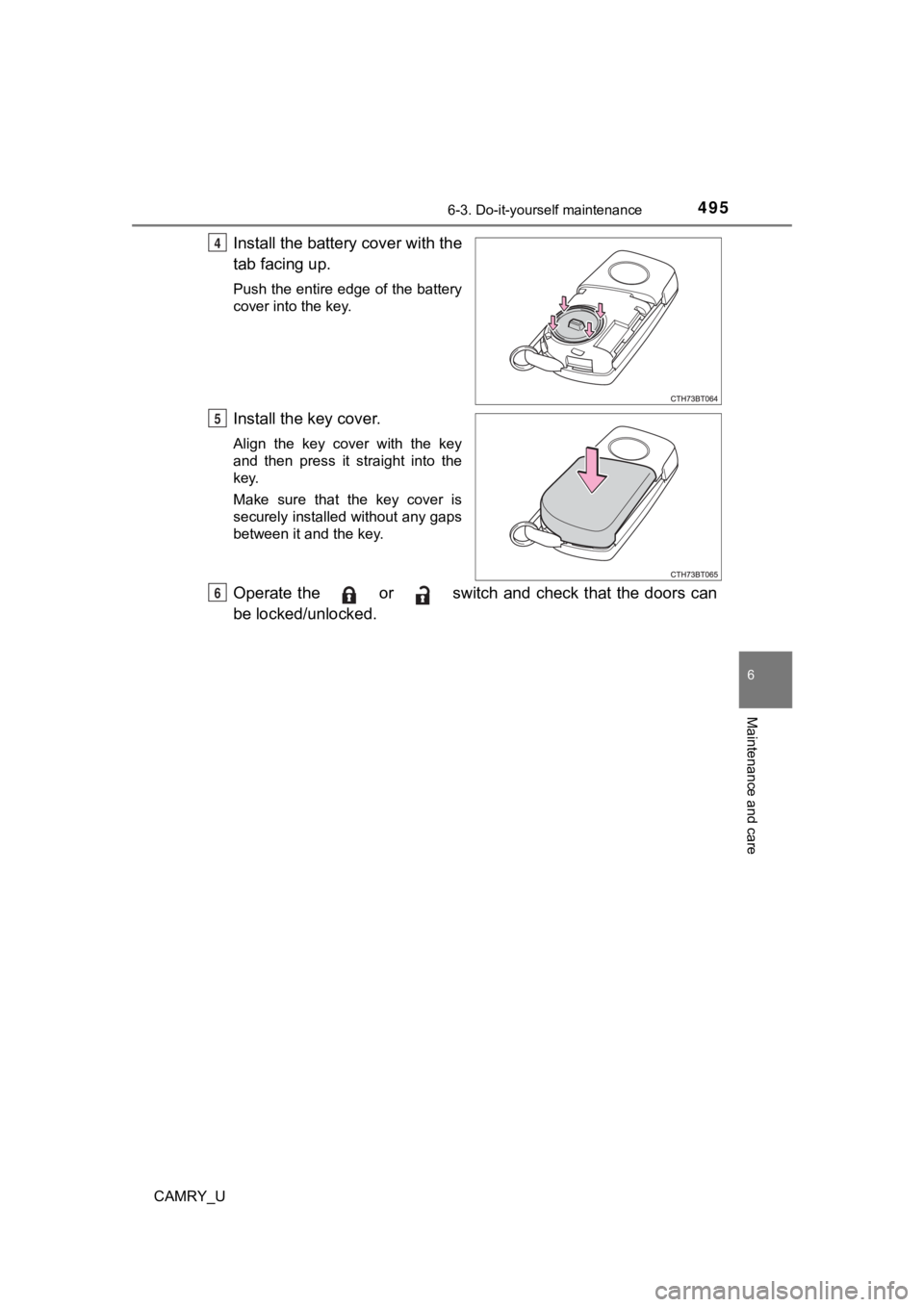
Install the battery cover with the
tab facing up.
Push the entire edge of the battery
cover into the key.
Install the key cover.
Align the key cover with the key
and then press it straight into the
key.
Make sure that the key cover is
securely installed without any gaps
between it and the key.
Operate the or switch and check that the doors can
be locked/unlocked.
4
5
6
Page 513 of 664

5136-3. Do-it-yourself maintenance
CAMRY_U
6
Maintenance and care
WARNING
■Replacing light bulbs
● Turn off the lights. Do not attempt to replace the bulb immediately after
turning off the lights.
The bulbs become very hot and may cause burns.
● Do not touch the glass portion of the light bulb with bare hand s. When it is
unavoidable to hold the glass portion, use and hold with a clea n dry cloth
to avoid getting moisture and oils on the bulb.
Also, if the bulb is scratched or dropped, it may blow out or crack.
● Fully install light bulbs and any parts used to secure them. Failure to do so
may result in heat damage, fire, or water entering the headligh t unit. This
may damage the headlights or cause condensation to build up on the lens.
■ To prevent damage or fire
Make sure bulbs are fully seated and locked.
Page 517 of 664
5177-1. Essential information
7
When trouble arises
CAMRY_U
Steadily step on the brake pedal with both feet and firmly depress it.
Do not pump the brake pedal repeatedly as this will increase th e effort
required to slow the vehicle.
Shift the shift lever to N.
If the shift lever is shifted to N
After slowing down, stop the vehi cle in a safe place by the road.
Stop the engine.
If the shift lever cann ot be shifted to N
Keep depressing the brake pedal with both feet to reduce vehicl e
speed as much as possible.
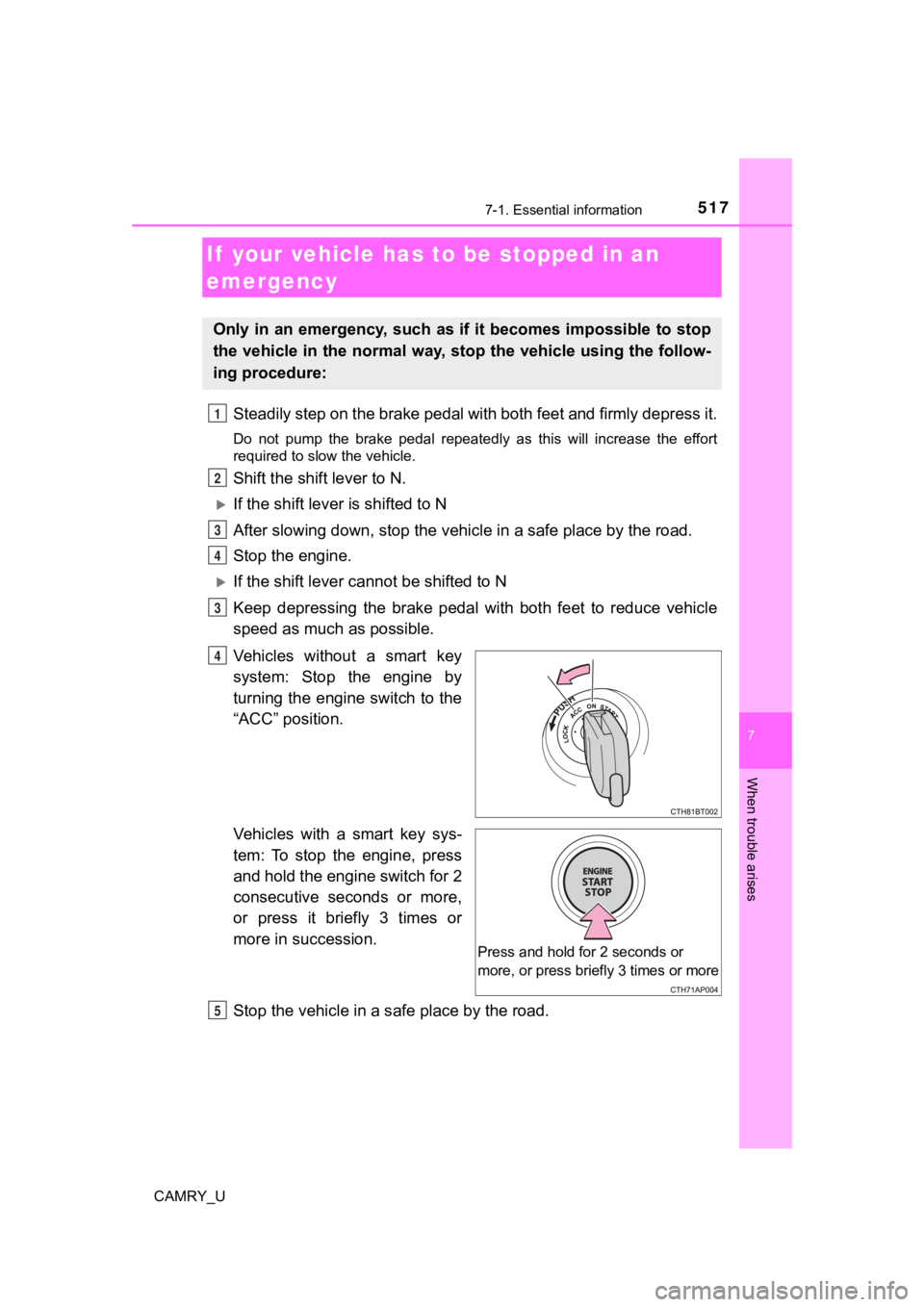
Vehicles without a smart key
system: Stop the engine by
turning the engine switch to the
“ACC” position.
Vehicles with a smart key sys-
tem: To stop the engine, press
and hold the engine switch for 2
consecutive seconds or more,
or press it briefly 3 times or
more in succession.
Stop the vehicle in a s afe place by the road.
If your vehicle has to be stopped in an
emergency
Only in an emergency, such as if it becomes impossible to stop
the vehicle in the normal way, st op the vehicle using the follow-
ing procedure:
1
2
3
4
3
4
Press and hold for 2 seconds or
more, or press briefly 3 times or more
R
Page 522 of 664
5227-2. Steps to take in an emergency
CAMRY_U
The following may indicate a problem with your transmission. Contact
your Toyota dealer or commercial towing service before towing.
● The engine is running but t he vehicle does not move.
● The vehicle makes an abnormal sound.
NOTICE
■To prevent damage to the vehicle when towing using a wheel-lift type
truck
● Vehicles without a smart key system: Do not tow the vehicle from the rear
when the engine switch is in the “LOCK” position or the key is removed.
The steering lock mechanism is not strong enough to hold the front wheels
straight.
● Vehicles with a smart key system: Do not tow the vehicle from the rear
when the engine switch is off. The steering lock mechanism is n ot strong
enough to hold the front wheels straight.
● When raising the vehicle, ensure adequate ground clearance for towing at
the opposite end of the raised vehicle. Without adequate clearance, the
vehicle could be damaged while being towed.
■ To prevent damage to the vehicle when towing with a sling-type truck
Do not tow with a sling-type truck, either from the front or re a r.
■ To prevent damage to the vehicle during emergency towing
Do not secure cables or chains to the suspension components.
■ Recreational towing (behind motor home, etc.)
P. 208
Situations when it is necessary to contact dealers before towing
Page 533 of 664

5337-2. Steps to take in an emergency
CAMRY_U
7
When trouble arises
■SRS warning light
This warning light system monitors the airbag sensor assembly, front impact
sensors, side impact sensors (front door), side impact sensors (front), side
impact sensors (rear), driver's seat position sensor, driver’s seat belt buckle
switch, front passenger occupant classification system (ECU and sensors),
“AIRBAG ON” indicator light, “A IRBAG OFF” indicator light, seat belt preten-
sioners, airbags, interconnecting wiring and power sources. (P. 3 8 )
■ Front passenger detection sensor, seat belt reminder and warnin g
buzzer
● If luggage is placed on the front passenger seat, the front pas senger detec-
tion sensor may cause the warning light to flash and the warnin g buzzer to
sound even if a passenger is not sitting in the seat.
● If a cushion is placed on the seat, the sensor may not detect a passenger,
and the warning light may not operate properly.
■ If the malfunction indicator lamp comes on while driving
First check the following:
●Is the fuel tank empty?
If it is, fill the fuel tank immediately.
● Is the fuel tank cap loose?
If it is, tighten it securely.
The light will go off after several driving trips.
If the light does not go off even after several trips, contact your Toyota dealer
as soon as possible.
■ Electric power steering system wa rning light (warning buzzer)
When the battery charge becomes insufficient or the voltage tem porarily
drops, the electric power steering system warning light may com e on and the
warning buzzer may sound.
Page 547 of 664
5477-2. Steps to take in an emergency
CAMRY_U
7
When trouble arises
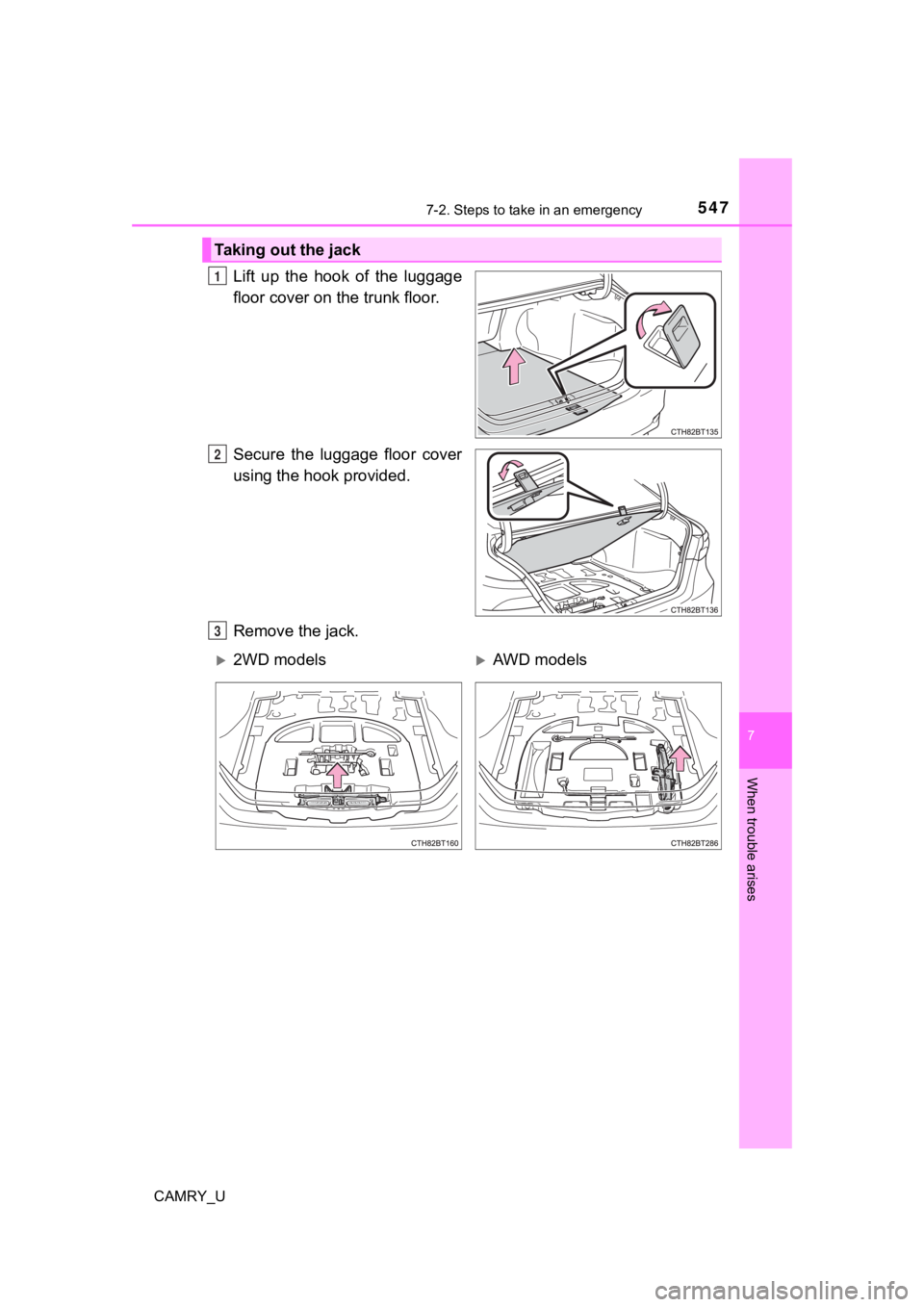
Lift up the hook of the luggage
floor cover on the trunk floor.
Secure the luggage floor cover
using the hook provided.
Remove the jack.
Taking out the jack
1
2
3
2WD modelsAWD models
Page 548 of 664
5487-2. Steps to take in an emergency
CAMRY_U
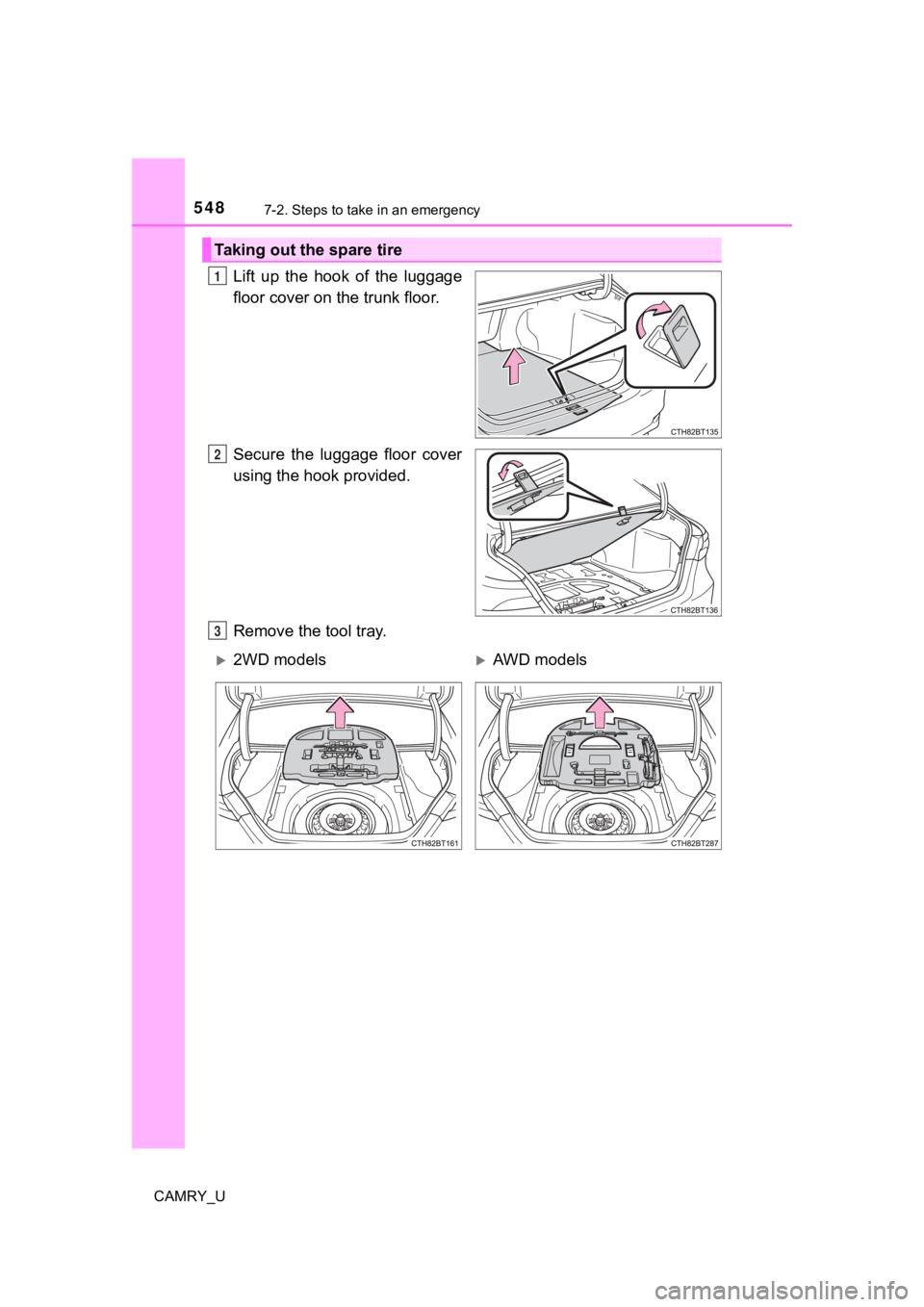
Lift up the hook of the luggage
floor cover on the trunk floor.
Secure the luggage floor cover
using the hook provided.
Remove the tool tray.
Taking out the spare tire
1
2
3
2WD modelsAWD models
Page 549 of 664
5497-2. Steps to take in an emergency
CAMRY_U
7
When trouble arises
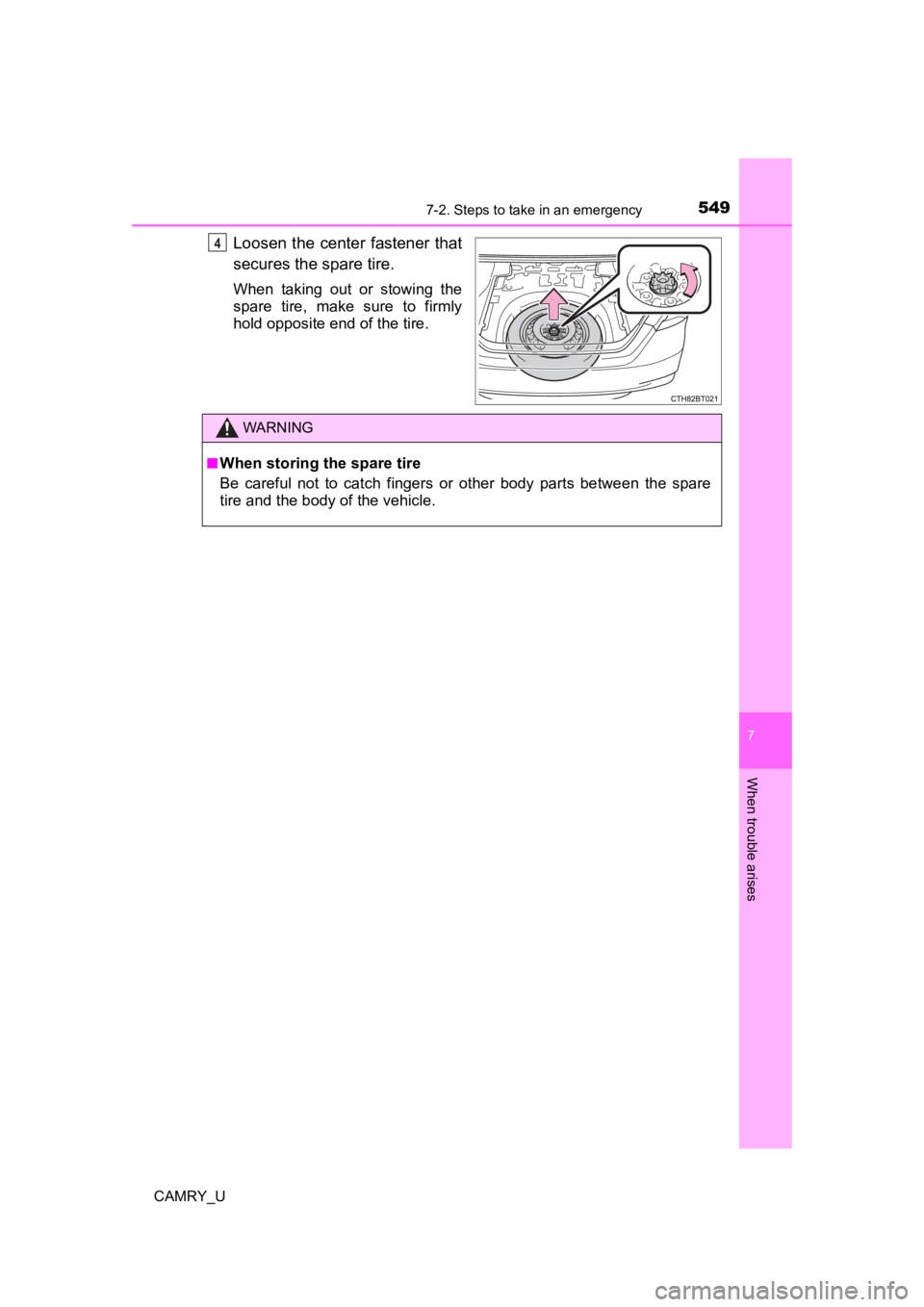
Loosen the center fastener that
secures the spare tire.
When taking out or stowing the
spare tire, make sure to firmly
hold opposite end of the tire.
4
WARNING
■When storing the spare tire
Be careful not to catch fingers or other body parts between the spare
tire and the body of the vehicle.
Page 555 of 664

5557-2. Steps to take in an emergency
CAMRY_U
7
When trouble arises
WARNING
■When using the compact spare tire
●Remember that the compact spare tire provided is specifically
designed for use with your vehicle. Do not use your compact spare tire
on another vehicle.
●Do not use more than one compact spare tires simultaneously.
●Replace the compact spare tire with a standard tire as soon as possi-
ble.
●Avoid sudden acceleration, abrupt steering, sudden braking and shift-
ing operations that cause sudden engine braking.
■When the compact spa re tire is attached
The vehicle speed may not be co rrectly detected, and the following sys-
tems may not operate correctly:
Also, not only can the following systems not be utilized fully, but they may
actually negatively affect the drive-train components:
• Dynamic Torque Control AWD system
*
*:If equipped
■Speed limit when using the compact spare tire
Do not drive at speeds in excess of 50 mph (80 km/h) when a com pact
spare tire is installed on the vehicle.
The compact spare tire is not designed for driving at high spee ds. Fail-
ure to observe this precaution may lead to an accident causing death or
serious injury.
■After using the tools and jack
Before driving, make sure all t he tools and jack are securely i n place in
their storage location to reduce the possibility of personal in jury during a
collision or sudden braking.
• ABS & Brake assist
• VSC
• TRAC
• EPS
• AHB (Automatic High Beam)
• Dynamic radar cruise control*
• Dynamic radar cruise control
with full-speed range
*
• LTA (Lane Tracing Assist)
• PCS (Pre-Collision System)
• Tire pressure warning system
• BSM (Blind Spot Monitor)*
• Intuitive parking assist*
• PKSB (Parking Support
Brake)
*
• Rear view monitor system*
• Toyota parking assist monitor*
• Panoramic view monitor*
• Navigation system*
Page 564 of 664

5647-2. Steps to take in an emergency
CAMRY_U
Start the engine of the second vehicle. Increase the engine speed
slightly and maintain at that lev el for approximately 5 minutes to
recharge the batter y of your vehicle.
Vehicles with a smart key syst em: Open and close any of the doo rs
of your vehicle with the engine switch off.
Vehicles without a smart key system:
Maintain the engine speed of the second vehicle and turn the
engine switch to the “ON” posit ion, then start the vehicle's engine.
Vehicles with a smart key system:
Maintain the engine speed of the second vehicle and turn the
engine switch to IGNITION ON mode, then start the vehicle's
engine.
Once the vehicle’s engine has st arted, remove the jumper cables in
the exact reverse order from which they were connected.
Once the engine starts, have the vehicle inspected at your Toyota
dealer as soon as possible.
■ Starting the engine when t he battery is discharged
The engine cannot be started by push-starting.
■ To prevent battery discharge
●Turn off the headlights and the audio system while the engine is off.
● Turn off any unnecessary electrical components when the vehicle is running
at a low speed for an extended period, such as in heavy traffic .
■ When the battery is removed or discharged
●Information stored in the ECU is cleared. When the battery is d epleted, have
the vehicle inspected at your Toyota dealer.
● Some systems may require initialization. (→P. 614)
■ When removing the battery terminals
When the battery terminals are removed, the information stored in the ECU is
cleared. Before removing the battery terminals, contact your Toyota dealer.
■ Charging the battery
The electricity stored in the battery will discharge gradually even when the
vehicle is not in use, due to natural discharge and the draining effects of cer-
tain electrical appliances. If the vehicle is left for a long t ime, the battery may
discharge, and the engine may be unable to start. (The battery recharges
automatically during driving.)
5
6
7
8