lock TOYOTA CAMRY 2022 Repair Manual
[x] Cancel search | Manufacturer: TOYOTA, Model Year: 2022, Model line: CAMRY, Model: TOYOTA CAMRY 2022Pages: 664, PDF Size: 11.3 MB
Page 210 of 664
2104-2. Driving procedures
CAMRY_U■
When “Check Fuel Cap” is displayed on the multi-information dis play
P. 247
■ If the engine does not start
The engine immobilizer system may not have been deactivated. ( P. 80)
Contact your Toyota dealer.
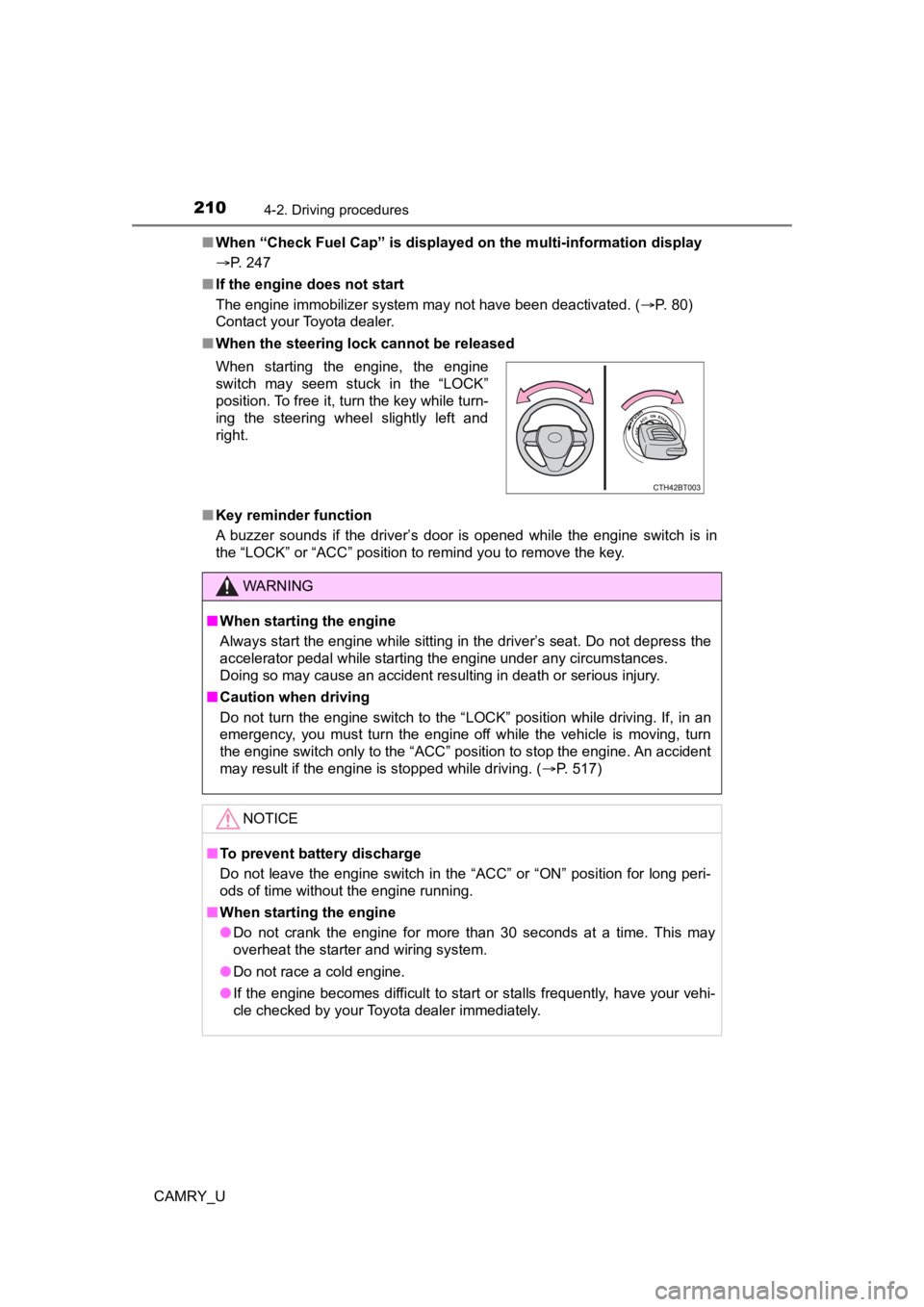
■ When the steering lock cannot be released
■ Key reminder function
A buzzer sounds if the driver’s door is opened while the engine switch is in
the “LOCK” or “ACC” position to remind you to remove the key. When starting the engine, the engine
switch may seem stuck in the “LOCK”
position. To free it, turn the key while turn-
ing the steering wheel slightly left and
right.
WARNING
■ When starting the engine
Always start the engine while sitting in the driver’s seat. Do not depress the
accelerator pedal while starting the engine under any circumsta nces.
Doing so may cause an accident resulting in death or serious in jury.
■ Caution when driving
Do not turn the engine switch to the “LOCK” position while driving. If, in an
emergency, you must turn the engine off while the vehicle is moving, turn
the engine switch only to the “ACC” position to stop the engine . An accident
may result if the engine is stopped while driving. ( P. 517)
NOTICE
■To prevent battery discharge
Do not leave the engine switch in the “ACC” or “ON” position fo r long peri-
ods of time without the engine running.
■ When starting the engine
● Do not crank the engine for more than 30 seconds at a time. This may
overheat the starter and wiring system.
● Do not race a cold engine.
● If the engine becomes difficult to start or stalls frequently, have your vehi-
cle checked by your Toyota dealer immediately.
Page 212 of 664

2124-2. Driving procedures
CAMRY_U
Stop the vehicle.
Set the parking brake (P. 224, 225), and shift the shift lever to P.
Press the engine switch.
Driving-related data will be displayed on the multi-information display.
■Automatic engine shut off feature
●The vehicle is equipped with a feature that automatically shuts off the
engine when the shift lever is in P with the engine running for an extended
period.
● The engine will automatically shut off after approximately 1 hour if it has
been left running while the shift lever is in P.
● The timer for the automatic engine shut off feature will reset if the brake
pedal is depressed or if the shift lever is in a position other than P.
● After the vehicle is parked, if the door is locked with the door lock switch
(P. 151) from the inside or the mechanical key ( P. 559) from the outside,
the automatic engine shut off feature will be disabled. The tim er for the auto-
matic engine shut off feature will be re-enabled if the driver’ s door is
opened.
Stopping the engine
1
2
3
Page 214 of 664
2144-2. Driving procedures
CAMRY_U
■Auto power off function
If the vehicle is left in ACCESSORY mode for more than 20 minut es or IGNI-
TION ON mode (with the engine is not running) for more than an hour with
the shift lever in P, the engine switch will automatically turn off. However, this
function cannot entirely prevent battery discharge. Do not leav e the vehicle
with the engine switch in ACCESSORY or IGNITION ON mode for lon g peri-
ods of time when the engine is not running.
■ Electronic key battery depletion
P. 145
■ Conditions affecting operation
P. 163
■ Notes for the entry function
P. 164
■ If the engine does not start
●The engine immobilizer system may not have been deactivated. ( P. 80)
Contact your Toyota dealer.
● Check that the shift lever is securely set in P. The engine may not start if the
shift lever is displaced out of P.
■ Steering lock
After turning the engine switch off and opening and closing the doors, the
steering wheel will be locked due to the steering lock function. Operating the
engine switch again automatically cancels the steering lock.
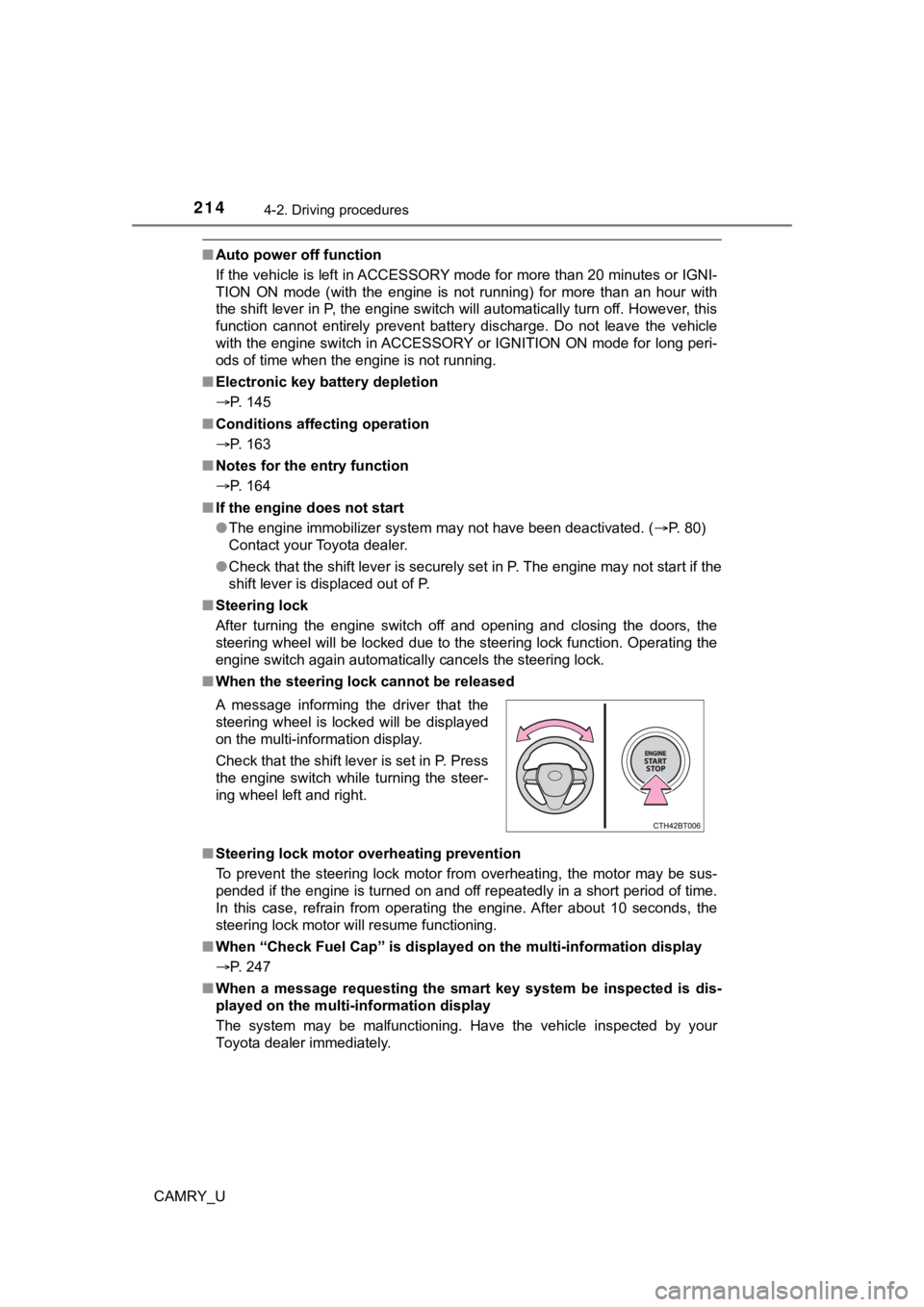
■ When the steering lock cannot be released
■ Steering lock motor overheating prevention
To prevent the steering lock motor from overheating, the motor may be sus-
pended if the engine is turned on and off repeatedly in a short period of time.
In this case, refrain from operating the engine. After about 10 seconds, the
steering lock motor will resume functioning.
■ When “Check Fuel Cap” is displayed on the multi-information display
P. 247
■ When a message requesting the smart key system be inspected is dis-
played on the multi-information display
The system may be malfunctioning. Have the vehicle inspected by your
Toyota dealer immediately. A message informing the driver that the
steering wheel is locked will be displayed
on the multi-information display.
Check that the shift lever is set in P. Press
the engine switch while turning the steer-
ing wheel left and right.
Page 215 of 664

2154-2. Driving procedures
4
Driving
CAMRY_U■
If the electronic key battery is depleted
P. 494
■ Operation of the engine switch
●If the switch is not pressed shortly and firmly, the engine swi tch mode may
not change or the engine may not start.
● If attempting to restart the engine immediately after turning t he engine
switch off, the engine may not start in some cases. After turning the engine
switch off, wait a few seconds before restarting the engine.
■ If the smart key system has been d eactivated in a customized setting
P. 559
WARNING
■ When starting the engine
Always start the engine while sitting in the driver’s seat. Do not depress the
accelerator pedal while starting the engine under any circumsta nces.
Doing so may cause an accident resulting in death or serious in jury.
■ Caution while driving
If engine failure occurs while the vehicle is moving, do not lock or open the
doors until the vehicle reaches a safe and complete stop. Activation of the
steering lock in this circumstance may lead to an accident, res ulting in
death or serious injury.
■ Stopping the engine in an emergency
● If you want to stop the engine in an emergency while driving the vehicle,
press and hold the engine switch for more than 2 seconds, or press it
briefly 3 times or more in succession. ( P. 517)
However, do not touch the engine switch while driving except in an emer-
gency. Turning the engine off while driving will not cause loss of steering
or braking control, but the power assist to these systems will be lost. This
will make it more difficult to steer and brake, so you should pull over and
stop the vehicle as soon as it is safe to do so.
● If the engine switch is operated while the vehicle is running, a warning
message will be shown on the multi-information display and a buzzer
sounds.
● When restarting the engine after it was turned off while drivin g, shift the
shift lever to N and press the engine switch.
Page 217 of 664
2174-2. Driving procedures
4
Driving
CAMRY_U
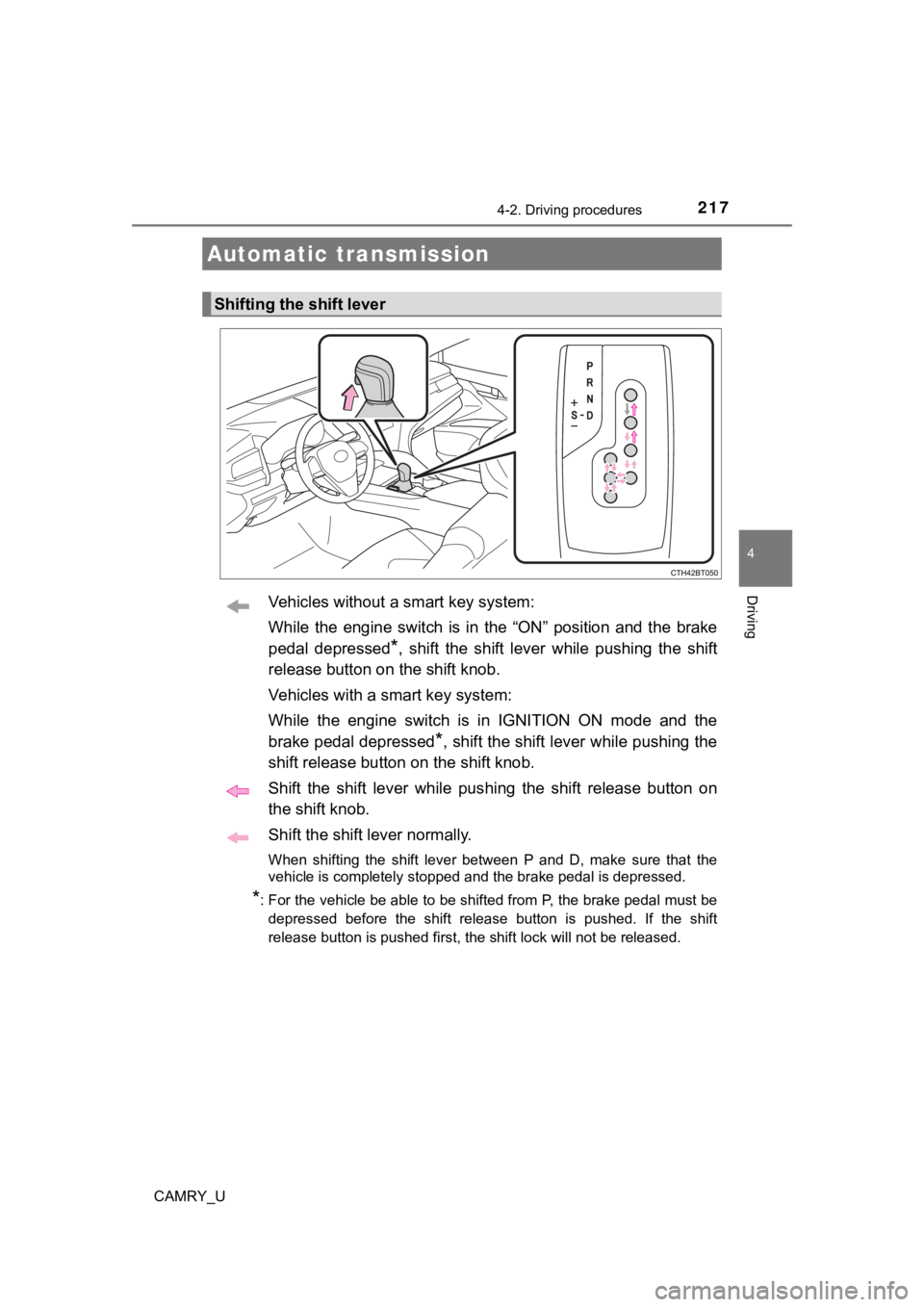
Vehicles without a smart key system:
While the engine switch is in the “ON” position and the brake
pedal depressed
*, shift the shift lever while pushing the shift
release button on the shift knob.
Vehicles with a smart key system:
While the engine switch is in IGNITION ON mode and the
brake pedal depressed
*, shift the shift lever while pushing the
shift release button on the shift knob.
Shift the shift lever while pushing the shift release button on
the shift knob.
Shift the shift lever normally.
When shifting the shift lever between P and D, make sure that t he
vehicle is completely stopped and the brake pedal is depressed.
*: For the vehicle be able to be shifted from P, the brake pedal must be
depressed before the shift release button is pushed. If the shift
release button is pushed first, the shift lock will not be rele ased.
Automatic transmission
Shifting the shift lever
Page 220 of 664

2204-2. Driving procedures
CAMRY_U
■Automatic deactivation of shift range selection in the D positi on (vehi-
cles with paddle shift switches)
Shift range selection in the D position will be deactivated in the following situ-
ations:
● The “+” paddle shift switch is held down for a period of time
● When the vehicle comes to a stop
● If the accelerator pedal is depressed for more than a certain p eriod of time
● When the shift lever is shifted to a position other than D
■ S mode
●When the shift range is 7 or lower, holding the shift lever toward “+” sets the
shift range to 8.
● To prevent the engine from over-revving, upshifting may automat ically
occur.
● To protect the automatic transmission, a function is adopted that automati-
cally selects a higher shift range when the fluid temperature i s high.
■ Downshift restriction warning buzzer (S mode or paddle shifting )
To help ensure safety and driving performance, downshifting ope ration may
sometimes be restricted. In some circumstances, downshifting ma y not be
possible even when the shift lever or paddle shift switches are operated. (A
buzzer will sound twice.)
■ When driving with dynamic radar cruise control with full-speed range or
dynamic radar cruise control activated
Even when performing the following actions with the intent of e nabling engine
braking, engine braking will not occur because dynamic radar cr uise control
with full speed range or dynamic r adar cruise control will not be canceled.
● While driving in D or S mode, downshifting to 7, 6, 5 or 4. (
P. 290, 306)
● When switching the driving mode to sport mode while driving in the D posi-
tion. (
P. 375)
■ Restraining sudden start (Drive-start Control)
P. 195
■ Shift lock system
The shift lock system is a system to prevent accidental operation of the shift
lever in starting.
The shift lever can be shifted from P only when the engine switch is in the
“ON” position (vehicles without a smart key system) or IGNITION ON mode
(vehicles with a smart key system), the brake pedal is depresse d and the shift
release button is pushed.
Page 221 of 664
2214-2. Driving procedures
4
Driving
CAMRY_U■
If the shift lever cannot be shifted from P
First, check whether the brake pedal is being depressed.
If the shift lever cannot be shifted even though the brake peda l is depressed
and the shift release button is pushed, there may be a problem with the shift
lock system. Have the vehicle inspected by your Toyota dealer i mmediately.
The following steps may be used as an emergency measure to ensu re that
the shift lever can be shifted.
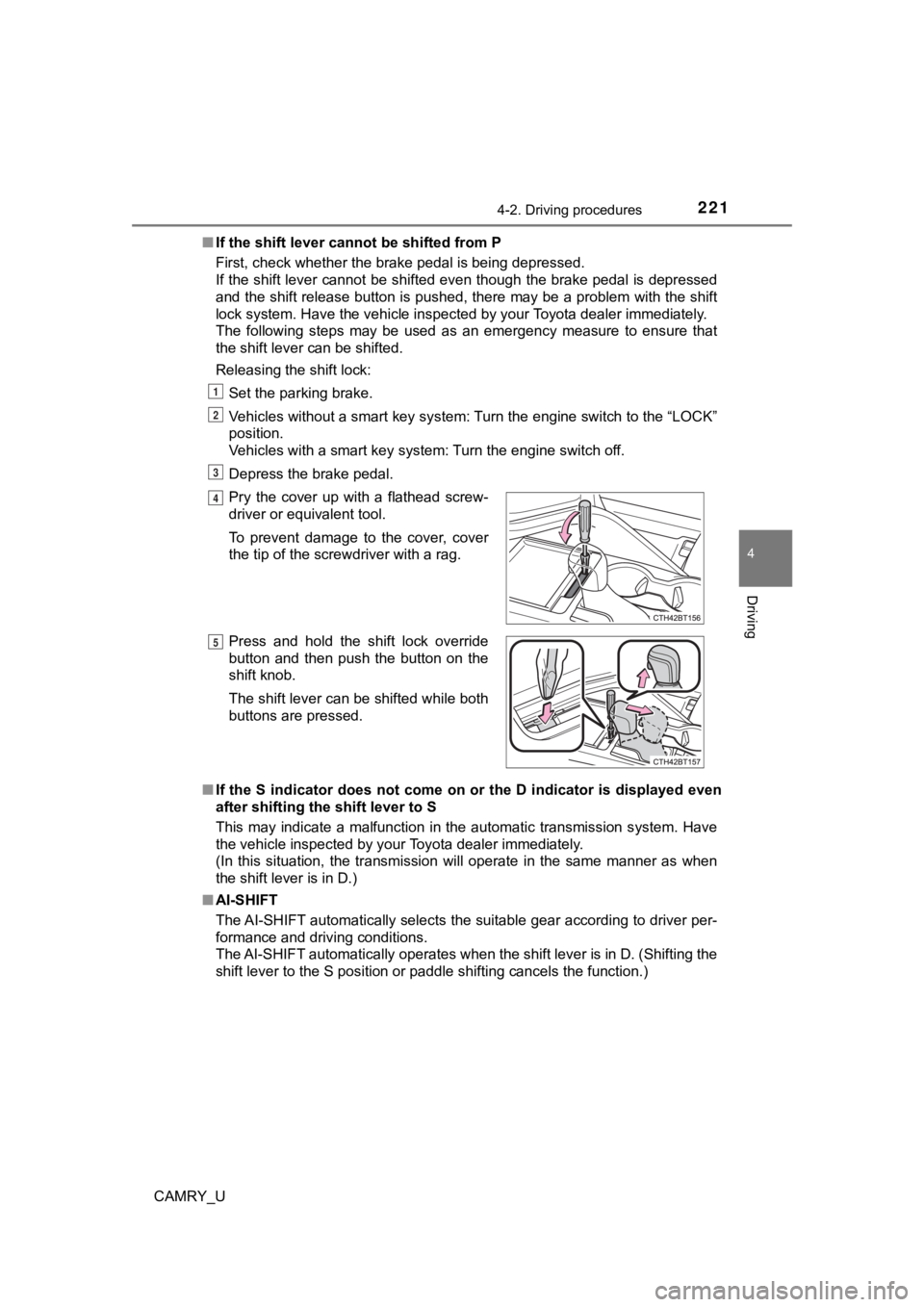
Releasing the shift lock:
Set the parking brake.
Vehicles without a smart key system: Turn the engine switch to the “LOCK”
position.
Vehicles with a smart key system: Turn the engine switch off.
Depress the brake pedal.
■ If the S indicator does not come on or the D indicator is displayed even
after shifting the shift lever to S
This may indicate a malfunction in the automatic transmission s ystem. Have
the vehicle inspected by your Toyota dealer immediately.
(In this situation, the transmission will operate in the same m anner as when
the shift lever is in D.)
■ AI-SHIFT
The AI-SHIFT automatically selects the suitable gear according to driver per-
formance and driving conditions.
The AI-SHIFT automatically operates when the shift lever is in D. (Shifting the
shift lever to the S position or paddle shifting cancels the fu nction.)
Pry the cover up with a flathead screw-
driver or equivalent tool.
To prevent damage to the cover, cover
the tip of the screwdriver with a rag.
Press and hold the shift lock override
button and then push the button on the
shift knob.
The shift lever can be shifted while both
buttons are pressed.
1
2
3
4
5
Page 222 of 664

2224-2. Driving procedures
CAMRY_U
WARNING
■When driving on slippery road surfaces
Do not accelerate or shift gears suddenly.
Sudden changes in engine braking may cause the vehicle to spin or skid,
resulting in an accident.
■ To prevent an accident when releasing the shift lock
Before pressing the shift lock override button, make sure to se t the parking
brake and depress the brake pedal.
If the accelerator pedal is accidentally depressed instead of t he brake pedal
when the shift lock override button is pressed and the shift le ver is shifted
out of P, the vehicle may suddenly start, possibly leading to an accident
resulting in death or serious injury.
Page 233 of 664
2334-3. Operating the lights and wipers
4
Driving
CAMRY_U
■Daytime running light system
●Type A:
The daytime running lights illuminate using the same lights as the headlights
and illuminate darker than the headlights.
Type B:
The daytime running lights illuminate using the same lights as the parking
lights and illuminate brighter than the parking lights.
● To make your vehicle more visible to other drivers during dayti me driving,
the daytime running lights turn on automatically when all of the following
conditions are met. (The daytime running lights are not designe d for use at
night.)
• The engine is running
• The parking brake is released
• The headlight switch is in the or
* position
*: When the surroundings are bright
The daytime running lights remain on after they illuminate, even if the parking
brake is set again.
● For U.S.A.: Daytime running lights can be turned off by operati ng the switch.
● Compared to turning on the headlights, the daytime running ligh t system
offers greater durability and consumes less electricity, so it can help improve
fuel economy.
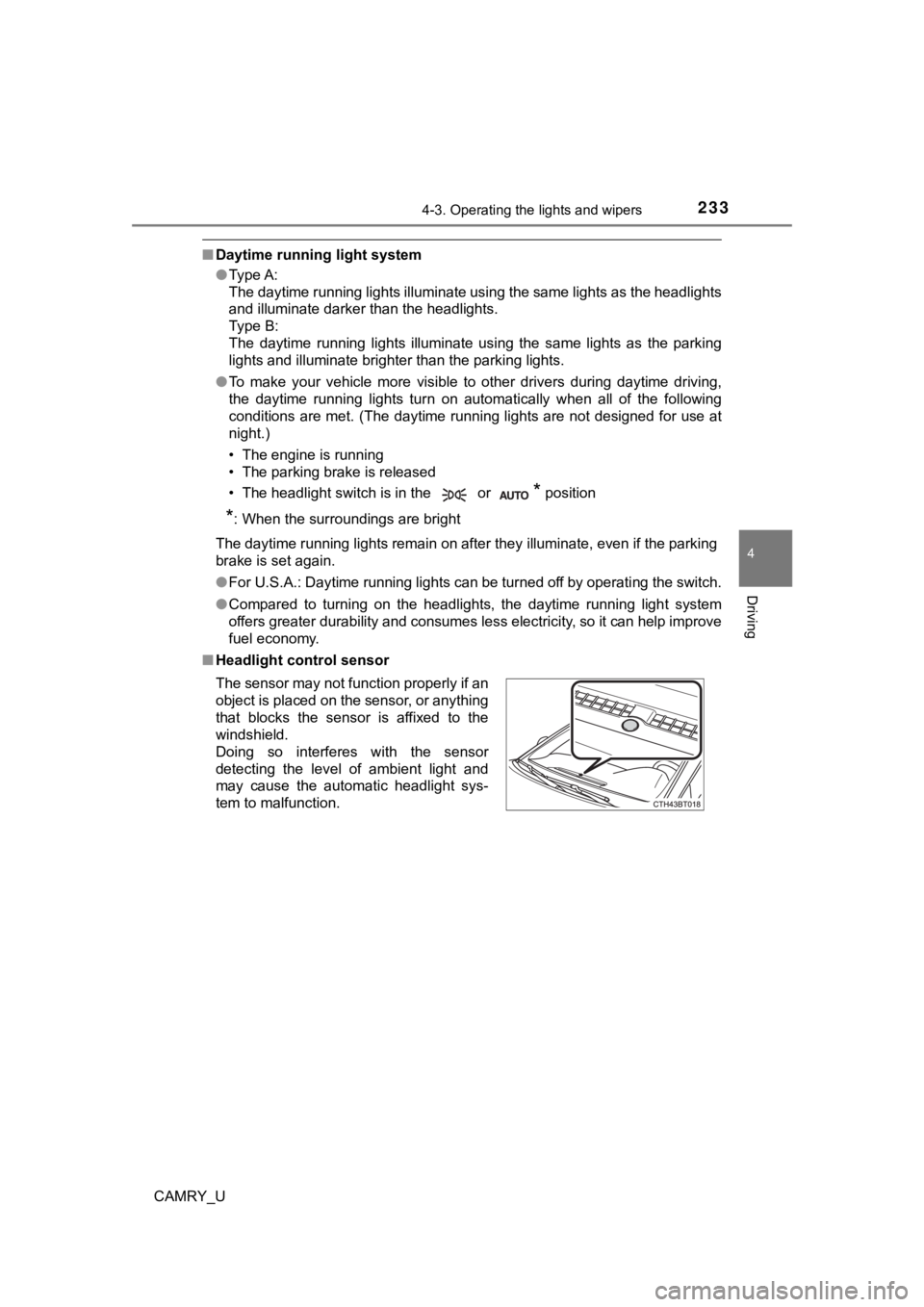
■ Headlight control sensor
The sensor may not function properly if an
object is placed on the sensor, or anything
that blocks the sensor is affixed to the
windshield.
Doing so interferes with the sensor
detecting the level of ambient light and
may cause the automatic headlight sys-
tem to malfunction.
Page 234 of 664

2344-3. Operating the lights and wipers
CAMRY_U■
Automatic light off system
Vehicles without a smart key system
● When the headlights are on: The headlights and tail lights turn off 30 sec-
onds after the engine switch is turned to the “ACC” or “LOCK” p osition and a
door is opened and closed. (The lights turn off immediately if on the
key is pressed twice after all the doors are closed.)
● When only the tail lights are on: The tail lights turn off automatically if the
engine switch is turned to the “ACC” or “LOCK” position and the driver’s
door is opened.
To turn the lights on again, turn the engine switch to “ON” pos ition, or turn the
light switch off once and then back to or .
If any of the doors or trunk lid is kept open, the lights automatically turn off
after 20 minutes.
Vehicles with a smart key system
● When the headlights are on: The headlights and tail lights turn off 30 sec-
onds after the engine switch is turned to ACCESSORY mode or tur ned off
and a door is opened and closed. (The lights turn off immediate ly if
on the key is pressed twice after all the doors are closed.)
● When only the tail lights are on: The tail lights turn off automatically if the
engine switch is turned to ACCESSORY mode or turned off and the driver’s
door is opened.
To turn the lights on again, turn the engine switch to IGNITION ON mode, or
turn the light switch off once and then back to or .
If any of the doors or trunk lid is kept open, the lights automatically turn off
after 20 minutes.
■ Light reminder buzzer (except when the light switch is in )
Vehicles without a smart key system:
A buzzer sounds when the engine switch is turned to the “LOCK” or “ACC”
position and the driver's door is opened with the key removed f rom the engine
switch while the lights are turned on.
Vehicles with a smart key system:
A buzzer sounds when the engine switch is turned off or turned to ACCES-
SORY mode and the driver's door is opened while the lights are turned on.