battery TOYOTA CAMRY HV 2009 Owner's Manual
[x] Cancel search | Manufacturer: TOYOTA, Model Year: 2009, Model line: CAMRY HV, Model: TOYOTA CAMRY HV 2009Pages: 444, PDF Size: 6.46 MB
Page 136 of 444
136 2-1. Driving procedures
■When in heavy traffic
If the shift lever is in N, the hybrid battery (traction battery) will not be
charged. To help prevent the battery from discharging, avoid putting the shift
lever in N for an extended period of time.
■ If the shift lever cannot be shifted from P
→P. 380
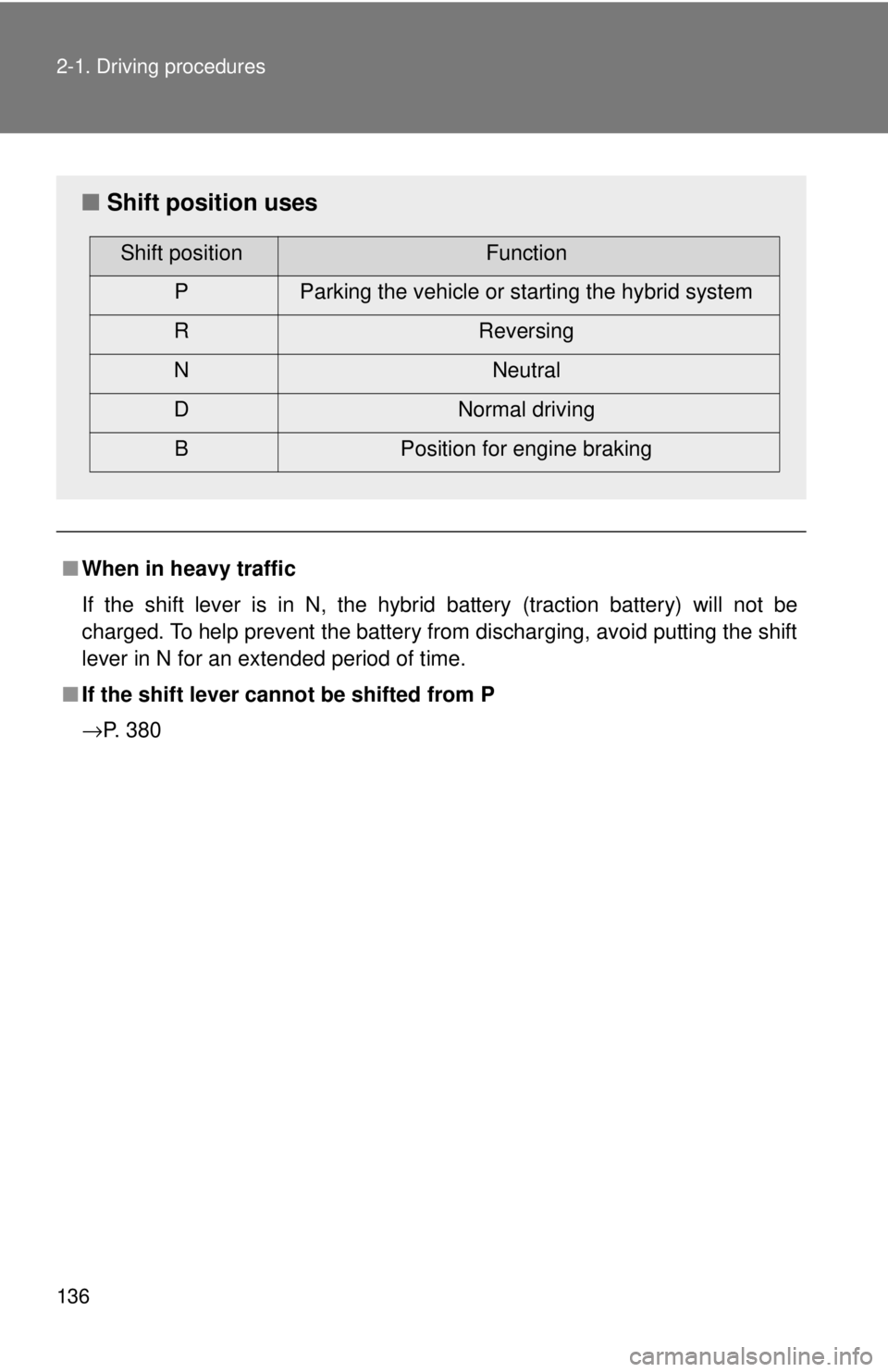
■ Shift position uses
Shift positionFunction
P Parking the vehicle or starting the hybrid system
R Reversing
N Neutral
D Normal driving
B Position for engine braking
Page 152 of 444

152 2-3. Operating the lights and wipers
NOTICE
■To prevent the 12-volt battery from being discharged
Do not leave the lights on longer than necessary when the hybrid system is
off.
Page 166 of 444
166
2-5. Driving information
Winter driving tips
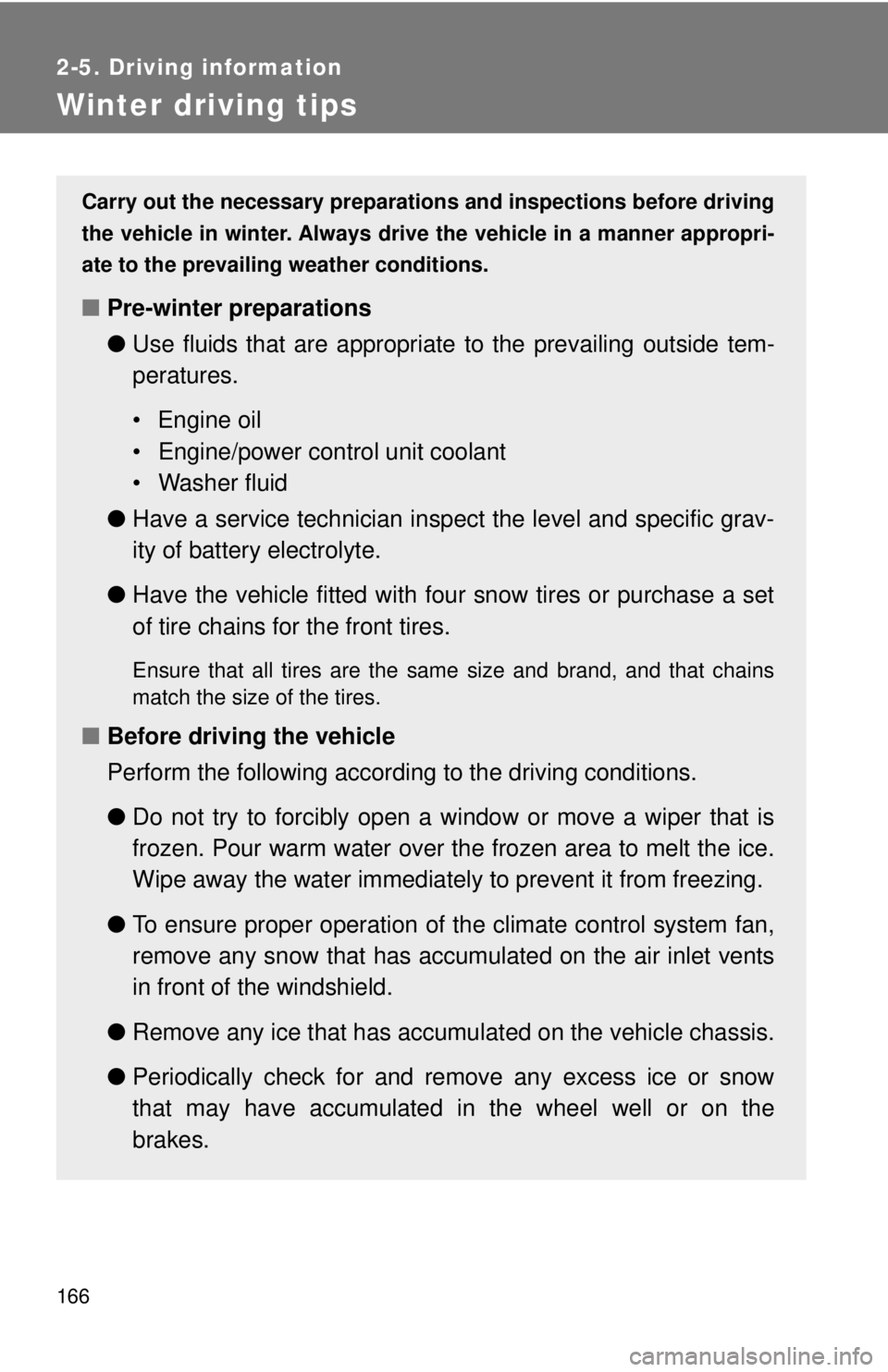
Carry out the necessary preparations and inspections before driving
the vehicle in winter. Always drive the vehicle in a manner appropri-
ate to the prevailing weather conditions.
■ Pre-winter preparations
●Use fluids that are appropriate to the prevailing outside tem-
peratures.
• Engine oil
• Engine/power control unit coolant
• Washer fluid
● Have a service technician inspect the level and specific grav-
ity of battery electrolyte.
● Have the vehicle fitted with four snow tires or purchase a set
of tire chains for the front tires.
Ensure that all tires are the same size and brand, and that chains
match the size of the tires.
■Before driving the vehicle
Perform the following according to the driving conditions.
●Do not try to forcibly open a window or move a wiper that is
frozen. Pour warm water over the frozen area to melt the ice.
Wipe away the water immediately to prevent it from freezing.
● To ensure proper operation of th e climate control system fan,
remove any snow that has accumulated on the air inlet vents
in front of the windshield.
● Remove any ice that has accumu lated on the vehicle chassis.
● Periodically check for and remove any excess ice or snow
that may have accumulated in the wheel well or on the
brakes.
Page 174 of 444
174
3-1. Using the air conditioning system and defogger
Automatic air conditioning system
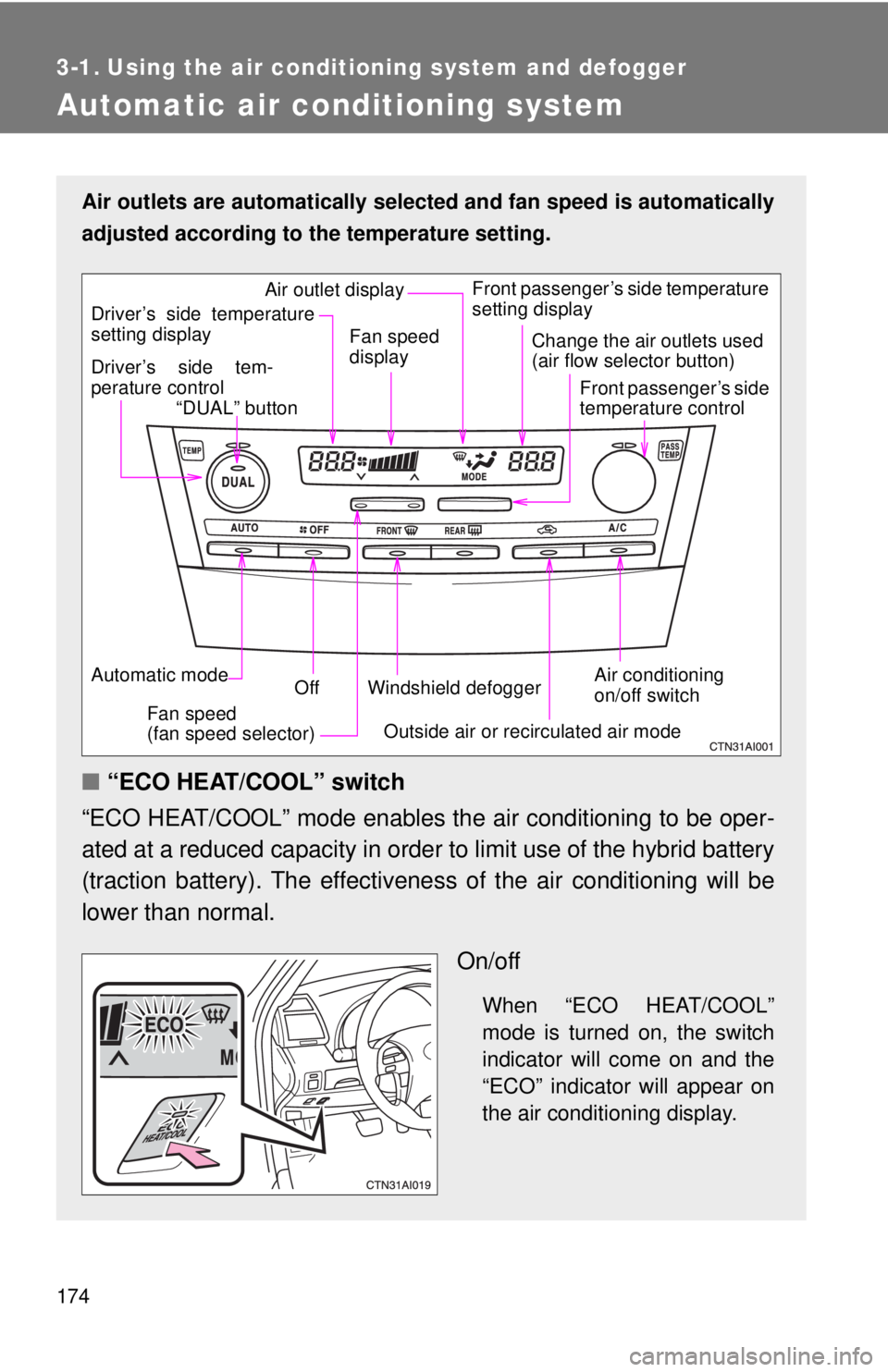
Air outlets are automatically selected and fan speed is automatically
adjusted according to the temperature setting.
■“ECO HEAT/COOL” switch
“ECO HEAT/COOL” mode enables the air conditioning to be oper-
ated at a reduced capacity in order to limit use of the hybrid battery
(traction battery). The effectivene ss of the air conditioning will be
lower than normal.
On/off
When “ECO HEAT/COOL”
mode is turned on, the switch
indicator will come on and the
“ECO” indicator will appear on
the air conditioning display.
Air conditioning
on/off switch
Front passenger’s side temperature
setting display
Driver’s side tem-
perature control “DUAL” button
Automatic mode Off
Driver’s side temperature
setting display
Fan speed
(fan speed selector) Outside air or recirculated air mode
Fan speed
display
Change the air outlets used
(air flow selector button)
Front passenger’s side
temperature control
Windshield defogger
Air outlet display
Page 180 of 444
180 3-1. Using the air conditioning system and defogger
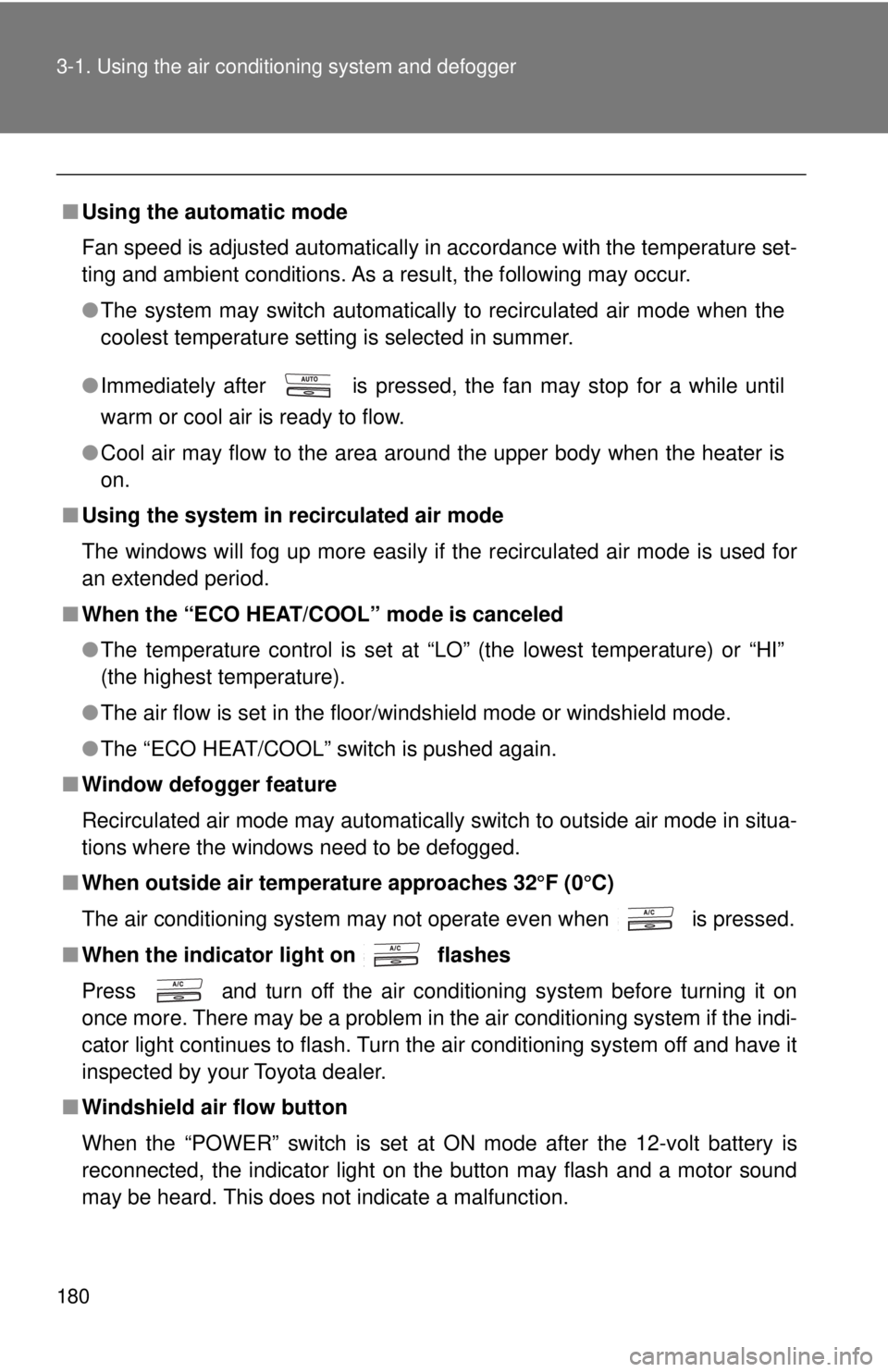
■Using the automatic mode
Fan speed is adjusted automatically in accordance with the temperature set-
ting and ambient conditions. As a result, the following may occur.
●The system may switch automatically to recirculated air mode when the
coolest temperature setting is selected in summer.
● Immediately after
is pressed, the fan may stop for a while until
warm or cool air is ready to flow.
● Cool air may flow to the area around the upper body when the heater is
on.
■ Using the system in recirculated air mode
The windows will fog up more easily if the recirculated air mode is used for
an extended period.
■ When the “ECO HEAT/COOL” mode is canceled
●The temperature control is set at “LO” (the lowest temperature) or “HI”
(the highest temperature).
● The air flow is set in the floor/windshield mode or windshield mode.
● The “ECO HEAT/COOL” switch is pushed again.
■ Window defogger feature
Recirculated air mode may automatically switch to outside air mode in situa-
tions where the windows need to be defogged.
■ When outside air temperat ure approaches 32°F (0°C)
The air conditioning system may not operate even when
is pressed.
■ When the indicator light on flashes
Press
and turn off the air conditioning system before turning it on
once more. There may be a problem in the air conditioning system if the indi-
cator light continues to flash. Turn the air conditioning system off and have it
inspected by your Toyota dealer.
■ Windshield air flow button
When the “POWER” switch is set at ON mode after the 12-volt battery is
reconnected, the indicator light on the button may flash and a motor sound
may be heard. This does not indicate a malfunction.
Page 181 of 444
181
3-1. Using the air conditioning system
and defogger
3
Interior features
■Plasmacluster *
This air conditioning system adopts plasmacluster technology, which helps
to keep good air quality in the cabin by emitting positive and negative ions
through the driver's side vent.
A slight noise may be heard during operation. This is not a malfunction. Also,
static electricity may be discharged near the driver's side vent due to the
high voltage used to operate the system.
To clean the drive's side vent, turn the system off and wipe the vent using a
soft cloth.
*Plasmacluster technology is manufactured under license from the SHARP
Corporation.
“Plasmacluster ” is a trademark of the SHARP Corporation.
CAUTION
■ To prevent the windshield from fogging up
Do not use during cool air operation in extremely humid weather.
The difference between the temperature of the outside air and that of the
windshield can cause the outer surface of the windshield to fog up, blocking
your vision.
■ Plasmacluster
Do not disassemble or repair the system because it contains high voltage
parts. Call your Toyota dealer if the system needs repair.
NOTICE
■ To prevent the 12-volt battery from being discharged
Do not leave the air conditioning system on longer than necessary when the
hybrid system is off.
■ To prevent damage to the Plasmacluster
Do not insert anything into the driver's side vent, attach anything to it, or use
sprays around the drive's side vent. These things may cause the system not
to work properly.
Page 185 of 444

185
3-2. Using the audio system
3
Interior features
NOTICE
■
To prevent the 12-volt battery from being discharged
Do not leave the audio system on longer than necessary with the hybrid sys-
tem off.
■ To avoid damaging the audio system
Take care not to spill drinks or other fluids over the audio system.
Page 189 of 444
189
3-2. Using the audio system
3
Interior features
■
When the 12-volt battery is disconnected
Station presets are erased.
■ Reception sensitivity
Maintaining perfect radio reception at all times is difficult due to the continu-
ally changing position of the antenna, differences in signal strength and sur-
rounding objects, such as trains, transmitters, etc.
■ XM
® Satellite Radio
An XM
® Satellite Radio is a tuner designed exclusively to receive broadcasts
provided under a separate subscription. Availability is limited to the 48 con-
tiguous states and 10 Canadian provinces.
● XM
® subscriptions
For detailed information about XM® Satellite Radio or to subscribe:
U.S.A. ⎯
Visit on the web at www.xmradio.com
or call 1-800-967-2346.
Canada ⎯
Visit on the web at www.xmradio.ca
or call 1-877-438-9677.
● Radio ID
You will need the radio ID when activating XM
® service or reporting a
problem. Select “CH000” using , and the receiver's 8-character ID
number will appear.
● Satellite tuner
The tuner supports only Audio Services (Music and Talk) and the accom-
panying Text Information of XM
® Satellite Radio.
*: Terms and services provided by XM® Satellite Radio are subject to change
without notice.
Page 213 of 444
213
3
Interior features
3-3. Using the hands-free phone system (for cellular phone)
Hands-free phone system (for cellular phone) features (CD player with changer only)
■Conditions affecting operation
The hands-free phone system may not operate normally in the following situ-
ations:
●The cellular phone is turned off, or located outside the service area.
● The cellular phone has a low battery.
● The cellular phone is not connected to the system.
● The cellular phone is behind the seat or in the glove box, or metal mate-
rial covers or touches the phone.
■ When transferring ownership of the vehicle
Be sure to initialize the system to prevent personal data from being improp-
erly accessed.
■ Required profiles for the cellular phone
●HFP (Hands Free Profile) Ver. 1.0
● OPP (Object Push Profile) Ver. 1.1
This system supports Bluetooth®, which allows you to make or
receive calls without using cables to connect a cellular phone and
the system, and without oper ating the cellular phone.
Owners of models equipped with a navigation system should refer to
the “Navigation System Owner's Manual”.
TitlePage
Using the hands-free phone system P. 216
Making a phone call P. 224
Setting a cellular phone P. 228
Security and system setup P. 233
Using the phone book P. 237
Page 244 of 444
244
3-4. Using the interior lights
Interior lights list
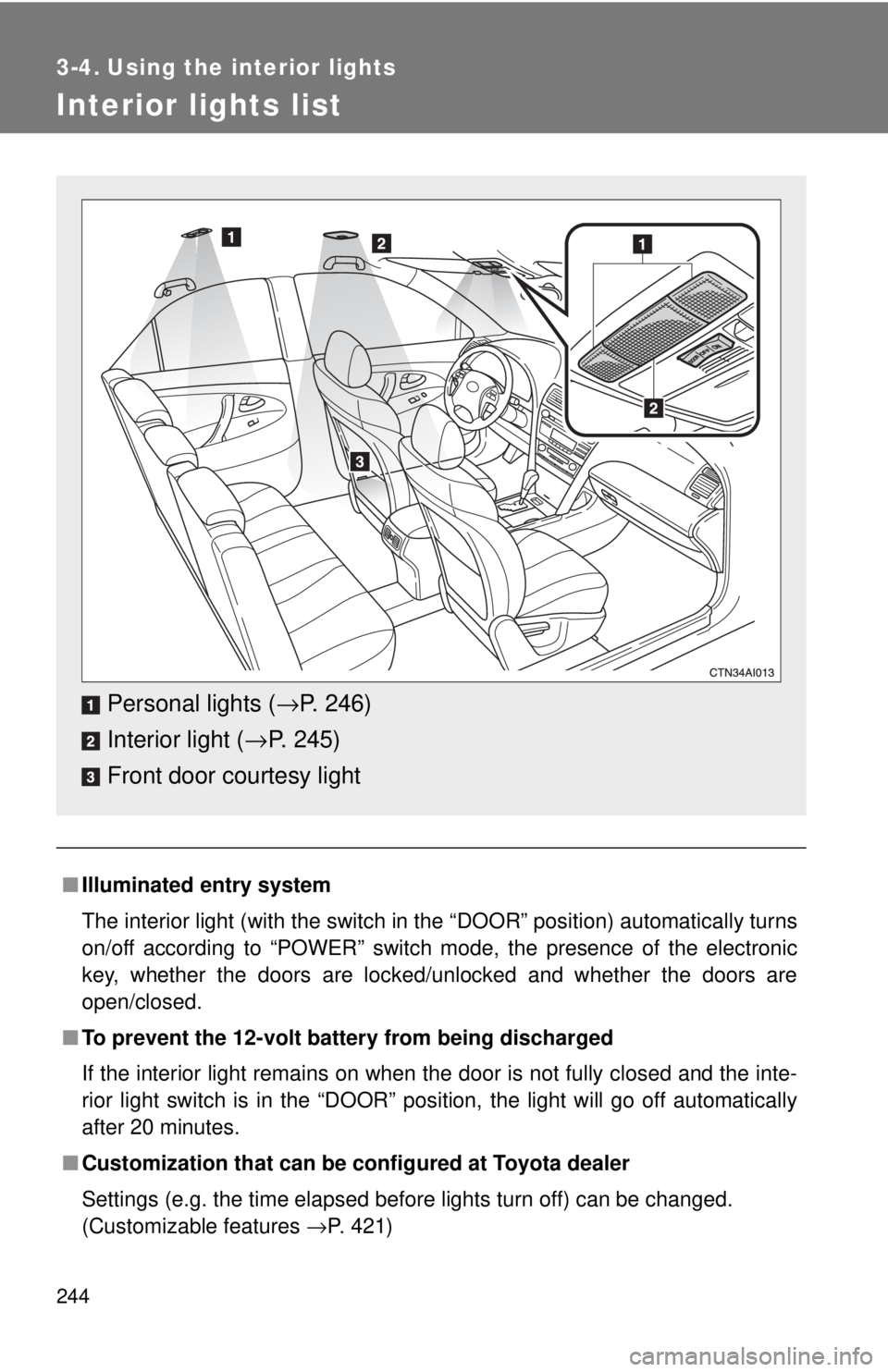
■Illuminated entry system
The interior light (with the switch in the “DOOR” position) automatically turns
on/off according to “POWER” switch mode, the presence of the electronic
key, whether the doors are locked/unlocked and whether the doors are
open/closed.
■ To prevent the 12-volt battery from being discharged
If the interior light remains on when the door is not fully closed and the inte-
rior light switch is in the “DOOR” position, the light will go off automatically
after 20 minutes.
■ Customization that can be co nfigured at Toyota dealer
Settings (e.g. the time elapsed before lights turn off) can be changed.
(Customizable features →P. 421)
Personal lights (→P. 246)
Interior light ( →P. 245)
Front door courtesy light