window TOYOTA CAMRY HV 2009 Owner's Manual
[x] Cancel search | Manufacturer: TOYOTA, Model Year: 2009, Model line: CAMRY HV, Model: TOYOTA CAMRY HV 2009Pages: 444, PDF Size: 6.46 MB
Page 172 of 444
172
3-1. Using the air conditioning system
and defogger ................ 174
Automatic air conditioning system ........................... 174
Rear window and outside rear view mirror
defoggers ....................... 182
3-2. Using the audio system .......................... 183
Audio system types .......... 183
Using the radio ................. 186
Using the CD player ......... 192
Playing MP3 and WMA discs ..................... 199
Optimal use of the audio system.................. 207
Using the AUX adapter .... 210
Using the steering wheel audio switches ............... 211
Page 180 of 444
180 3-1. Using the air conditioning system and defogger
■Using the automatic mode
Fan speed is adjusted automatically in accordance with the temperature set-
ting and ambient conditions. As a result, the following may occur.
●The system may switch automatically to recirculated air mode when the
coolest temperature setting is selected in summer.
● Immediately after
is pressed, the fan may stop for a while until
warm or cool air is ready to flow.
● Cool air may flow to the area around the upper body when the heater is
on.
■ Using the system in recirculated air mode
The windows will fog up more easily if the recirculated air mode is used for
an extended period.
■ When the “ECO HEAT/COOL” mode is canceled
●The temperature control is set at “LO” (the lowest temperature) or “HI”
(the highest temperature).
● The air flow is set in the floor/windshield mode or windshield mode.
● The “ECO HEAT/COOL” switch is pushed again.
■ Window defogger feature
Recirculated air mode may automatically switch to outside air mode in situa-
tions where the windows need to be defogged.
■ When outside air temperat ure approaches 32°F (0°C)
The air conditioning system may not operate even when
is pressed.
■ When the indicator light on flashes
Press
and turn off the air conditioning system before turning it on
once more. There may be a problem in the air conditioning system if the indi-
cator light continues to flash. Turn the air conditioning system off and have it
inspected by your Toyota dealer.
■ Windshield air flow button
When the “POWER” switch is set at ON mode after the 12-volt battery is
reconnected, the indicator light on the button may flash and a motor sound
may be heard. This does not indicate a malfunction.
Page 182 of 444
182
3-1. Using the air conditioning system and defogger
Rear window and outside rear view mirror defoggers
■Outside rear view mirror defoggers (if equipped)
Turning the rear window defogger on will turn the outside rear view mirror
defoggers on.
CAUTION
■Outside rear view mirror defoggers (if equipped)
The surfaces of the outside rear view mirrors become hot. Do not touch
them to prevent from burning yourself.
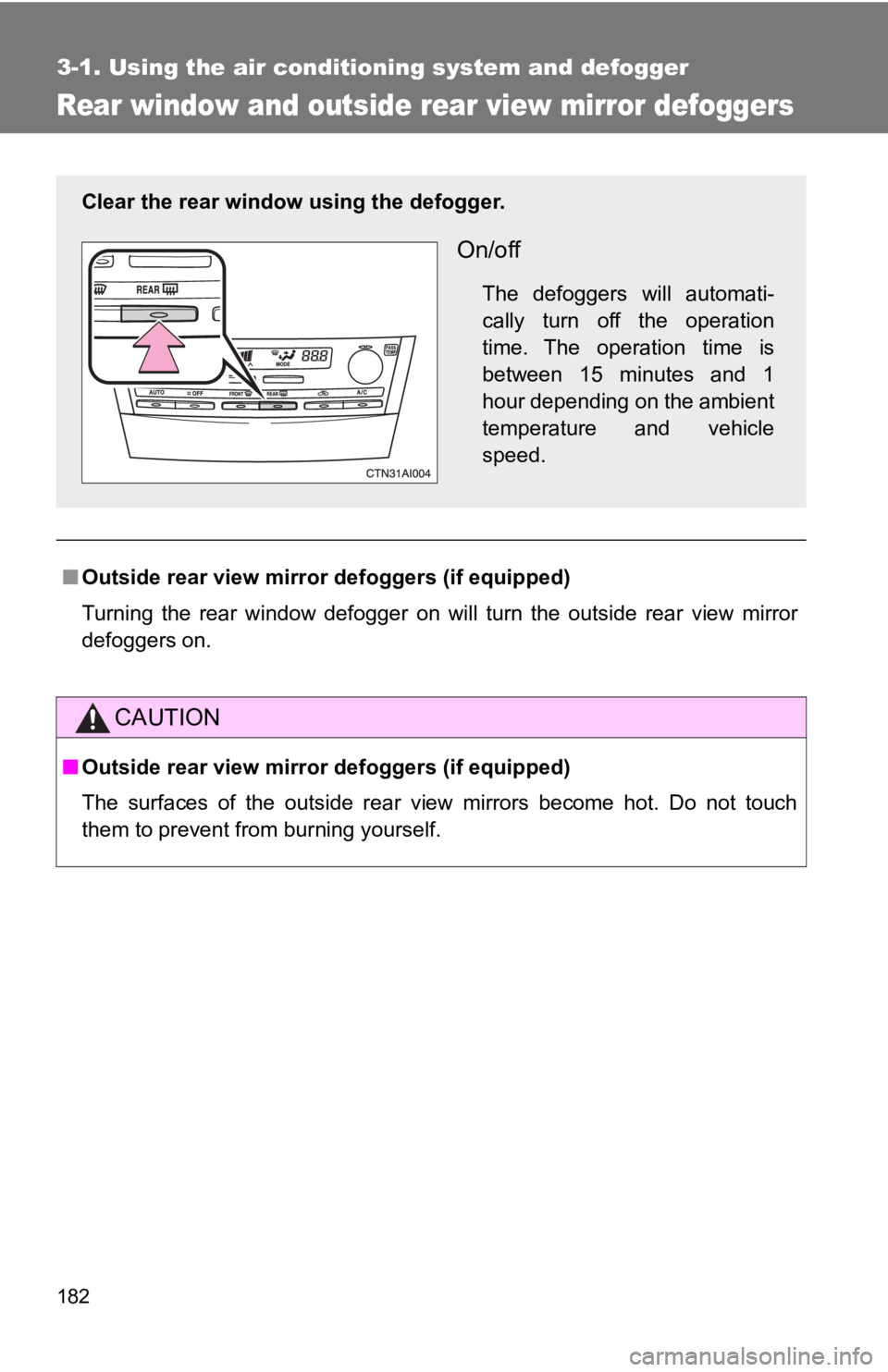
Clear the rear window using the defogger.
On/off
The defoggers will automati-
cally turn off the operation
time. The operation time is
between 15 minutes and 1
hour depending on the ambient
temperature and vehicle
speed.
Page 203 of 444
203
3-2. Using the audio system
3
Interior features
■
MP3 and WMA files
MP3 (MPEG Audio LAYER3) is a standard audio compression format.
Files can be compressed to approximately 1/10 of their original size by using
MP3 compression.
WMA (Windows Media
TM Audio) is a Microsoft audio compression format.
This format compresses audio data to a size smaller than that of the MP3
format.
There is a limit to the MP3 and WMA file standards and to the media/formats
recorded by them that can be used.
● MP3 file compatibility
• Compatible standards
MP3 (MPEG1 LAYER3, MPEG2 LSF LAYER3)
• Compatible sampling frequencies MPEG1 LAYER3: 32, 44.1, 48 (kHz)
MPEG2 LSF LAYER3: 16, 22.05, 24 (kHz)
• Compatible bit rates MPEG1 LAYER3: 64, 80, 96, 112, 128, 160, 192, 224, 256, 320 (kbps)
MPEG2 LSF LAYER3: 64, 80, 96, 112, 128, 144, 160 (kbps)
* Compatible with VBR
• Compatible channel modes: stereo, joint stereo, dual channel and monaural
● WMA file compatibility
• Compatible standards
WMA Ver. 7, 8, 9
• Compatible sampling frequencies 32, 44.1, 48 (kHz)
• Compatible bit rates Ver. 7, 8: CBR 48, 64, 80, 96, 128, 160, 192 (kbps)
Ver. 9: CBR 48, 64, 80, 96, 128, 160, 192, 256, 320 (kbps)
* Only compatible with 2-channel playback
Page 205 of 444
205
3-2. Using the audio system
3
Interior features
●
ID3 and WMA tags
ID3 tags can be added to MP3 files, making it possible to record the track
title and artist name, etc.
The system is compatible with ID3 Ver. 1.0, 1.1, and Ver. 2.2, 2.3 ID3 tags.
(The number of characters is based on ID3 Ver. 1.0 and 1.1.)
WMA tags can be added to WMA files, making it possible to record the
track title and artist name in the same way as with ID3 tags.
● MP3 and WMA playback
When a disc containing MP3 or WMA files is inserted, all files on the disc
are first checked. Once the file check is finished, the first MP3 or WMA file
is played. To make the file check finish more quickly, we recommend you
do not write in any files other than MP3 or WMA files or create any unnec-
essary folders.
If the discs contain a mixture of music data and MP3 or WMA format data,
only music data can be played.
● Extensions
If the file extensions .mp3 and .wma are used for files other than MP3 and
WMA files, they will be mistakenly recognized and played as MP3 and
WMA files. This may result in large amounts of interference and damage
to the speakers.
● Playback
• To play MP3 files with steady sound quality, we recommend a fixed bit
rate of 128 kbps and a sampling frequency of 44.1 kHz.
• CD-R or CD-RW playback may not be possible in some instances, depending on the characteristics of the disc.
• There is a wide variety of freeware and other encoding software for MP3 and WMA files on the market, and depending on the status of the
encoding and the file format, poor sound quality or noise at the start of
playback may result. In some cases, playback may not be possible at
all.
• When files other than MP3 or WMA files are recorded on a disc, it may take more time to recognize the disc. In some cases, playback may not
be possible at all.
• Microsoft, Windows, and Windows Media are the registered trade- marks of Microsoft Corporation in the U.S. and other countries.
Page 274 of 444
274
4-1. Maintenance and care
Cleaning and protecting the vehicle exterior
■Automatic car washes
●Fold the mirrors back before washing the vehicle.
● Brushes used in automatic car washes may scratch the vehicle surface
and harm your vehicle’s paint.
■ High pressure car washes
●Do not allow the nozzles of the car wash to come within close proximity
of the windows.
● Before car wash, check that the fuel filler door on your vehicle is closed
properly.
■ Aluminum wheels
Remove any dirt immediately by using a neutral detergent. Do not use har\
d
brushes or abrasive cleaners. Do not use strong or harsh chemical cleaners.
Use the same mild detergent and wax as used on the paint.
■ Bumpers and side moldings
Do not scrub with abrasive cleaners.
Perform the following to protect the vehicle and maintain it in prime
condition.
● Working from top to bottom, liber ally apply water to the vehicle
body, wheel wells and underside of the vehicle to remove any
dirt and dust.
Wash the vehicle body using a sponge or soft cloth, such as a
chamois.
● For hard-to-remove marks, use car wash soap and rinse thor-
oughly with water.
● Wipe away any water.
● Wax the vehicle when the waterproof coating deteriorates.
If water does not bead on a clean surface, apply wax when the vehicle
body is cool.
Page 277 of 444
277
4-1. Maintenance and care
4
Maintenance and care
■
Cleaning the inside of the rear window
Do not use glass cleaner to clean the rear window, as this may cause dam-
age to the rear window defogger heater wires or antenna. Use a cloth damp-
ened with lukewarm water to gently wipe the window clean. Wipe the
window in strokes running parallel to the heater wires or antenna.
■ Caring for leather areas
Toyota recommends cleaning the interior of the vehicle at least twice a year
to maintain the quality of the vehicle's interior.
■ Shampooing the carpets
There are several commercial foaming-type cleaners available. Use a
sponge or brush to apply the foam. Rub in overlapping circles. Do not apply
water. Excellent results are obtained by keeping the carpet as dry as possi-
ble.
■ Seat belts
Clean with mild soap and lukewarm water using a cloth or sponge. Also
check the belts periodically for excessive wear, fraying or cuts.
CAUTION
■Water in the vehicle
●Do not splash or spill liquid on the floor, hybrid battery (traction battery) air
vents or in the trunk.
Doing so may cause the hybrid battery, electrical components, etc. to mal-
function or catch fire.
● Do not get any of the SRS components or wiring in the vehicle interior wet.
(→ P. 89)
Electrical malfunction may cause the airbags to deploy or not function
properly, resulting in death or severe injury.
Page 278 of 444

278 4-1. Maintenance and care
NOTICE
■Cleaning detergents
Do not use organic substances such as benzene or gasoline, acidic or alka-
line solutions, dye, bleach or other detergent. Doing so may discolor the
vehicle interior or cause streaks or damage to painted surfaces.
■ Preventing damage to leather surfaces
Observe the following precautions to avoid damage to and deterioration of
leather surfaces.
●Remove any dust or dirt on leather surfaces immediately.
● Do not expose the vehicle to direct sunlight for extended periods of time.
Park the vehicle in the shade, especially during summer.
● Do not place items made of vinyl, plastic, or that contain wax, on the
upholstery, as they may stick to the leather surface if the vehicle interior
heats up significantly.
■ Water on the floor
Do not wash the vehicle floor with water.
Vehicle systems such as the audio system may be damaged if water comes
into contact with electrical components under the floor of the vehicle, and
may also cause the body to rust.
■ Cleaning the inside of the rear window
Be careful not to scratch or damage the heater wires or antenna.
Page 330 of 444

330 4-3. Do-it-yourself maintenance
20 EFI NO.310 AFuel tank system, multiport fuel
injection system/sequential multi-
port fuel injection system
21 IGCT No.2 10 A Hybrid system ECU, motor genera-
tor ECU
22 INV W/P 15 AHybrid system ECU, hybrid battery
(traction battery), DC/DC converter,
multiport fuel injection system/
sequential multiport fuel injection
system
23 S-HORN 7.5 A No circuit
24 A/F 20 A No circuit
25 MPX-B 10 A Gauges and meters
26 EFI NO.1 10 A Smart key system
27 HORN 10 A Horns
28 H-LP(RL) 15 A Right-hand headlight (low beam)
29 H-LP(LL) 15 A Left-hand headlight (low beam)
30 H-LP(RH) 15 A Right-hand headlight (high beam)
31 H-LP(LH) 15 A Left-hand headlight (high beam)
32 HTR 50 A Air conditioning system
33 HTR SUB2 50 A PTC heater
34 HTR SUB1 50 A PTC heater
35 RR DEF 50 ARear window defogger, “MIR HTR”
fuse
36 CDS FAN 40 A Electric cooling fan
37 RDI FAN 40 A Electric cooling fan
FuseAmpereCircuit
Page 332 of 444
332 4-3. Do-it-yourself maintenance
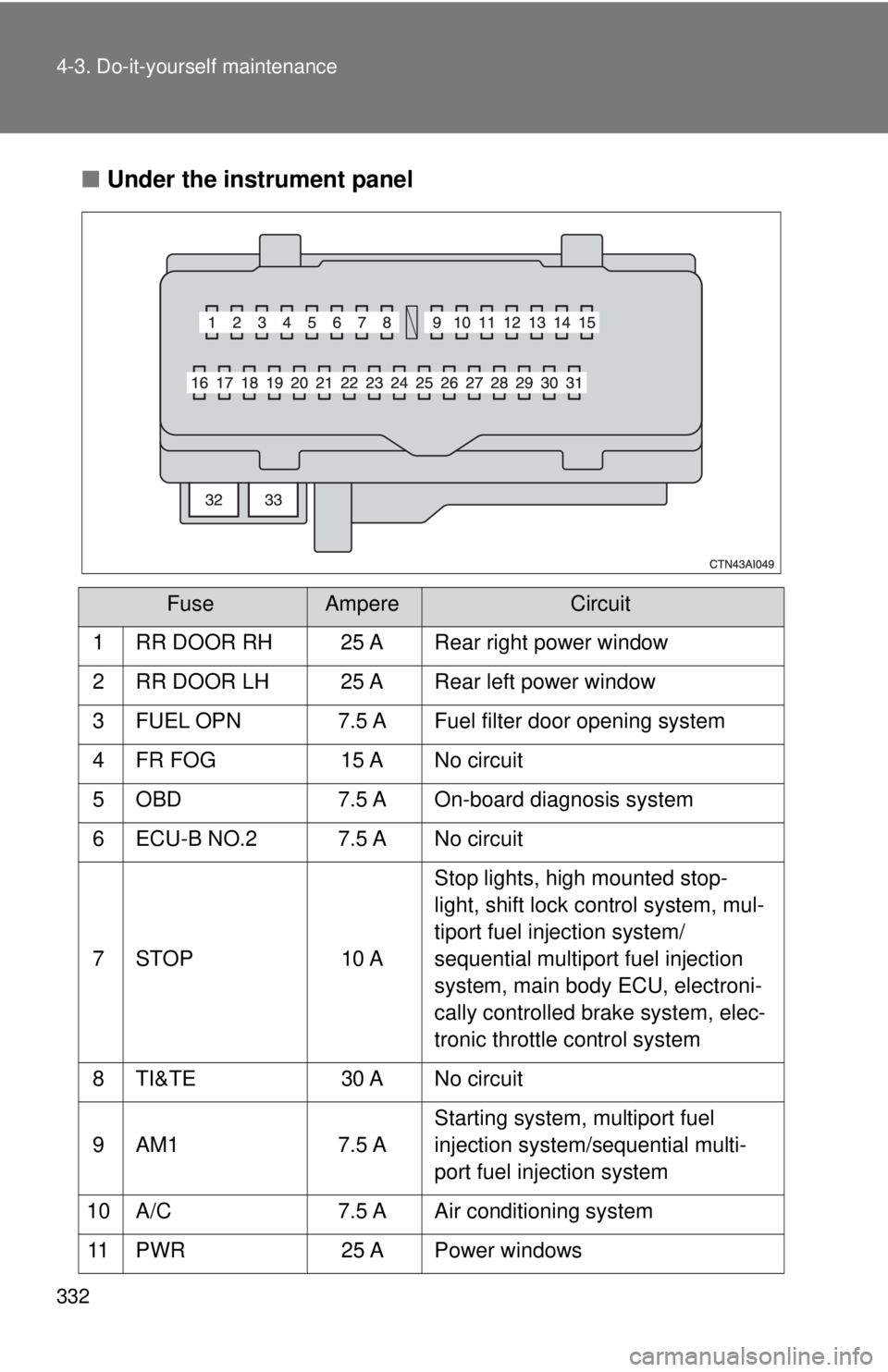
■Under the instrument panel
FuseAmpereCircuit
1 RR DOOR RH 25 A Rear right power window
2 RR DOOR LH 25 A Rear left power window
3 FUEL OPN 7.5 A Fuel filter door opening system
4 FR FOG 15 A No circuit
5 OBD 7.5 A On-board diagnosis system
6 ECU-B NO.2 7.5 A No circuit
7 STOP 10 A Stop lights, high mounted stop-
light, shift lock control system, mul-
tiport fuel injection system/
sequential multiport fuel injection
system, main body ECU, electroni-
cally controlled brake system, elec-
tronic throttle control system
8 TI&TE 30 A No circuit
9 AM1 7.5 A Starting system, multiport fuel
injection system/sequential multi-
port fuel injection system
10 A/C 7.5 A Air conditioning system
11 PWR 25 A Power windows