reset TOYOTA CAMRY HV 2009 Owners Manual
[x] Cancel search | Manufacturer: TOYOTA, Model Year: 2009, Model line: CAMRY HV, Model: TOYOTA CAMRY HV 2009Pages: 444, PDF Size: 6.46 MB
Page 12 of 444
12
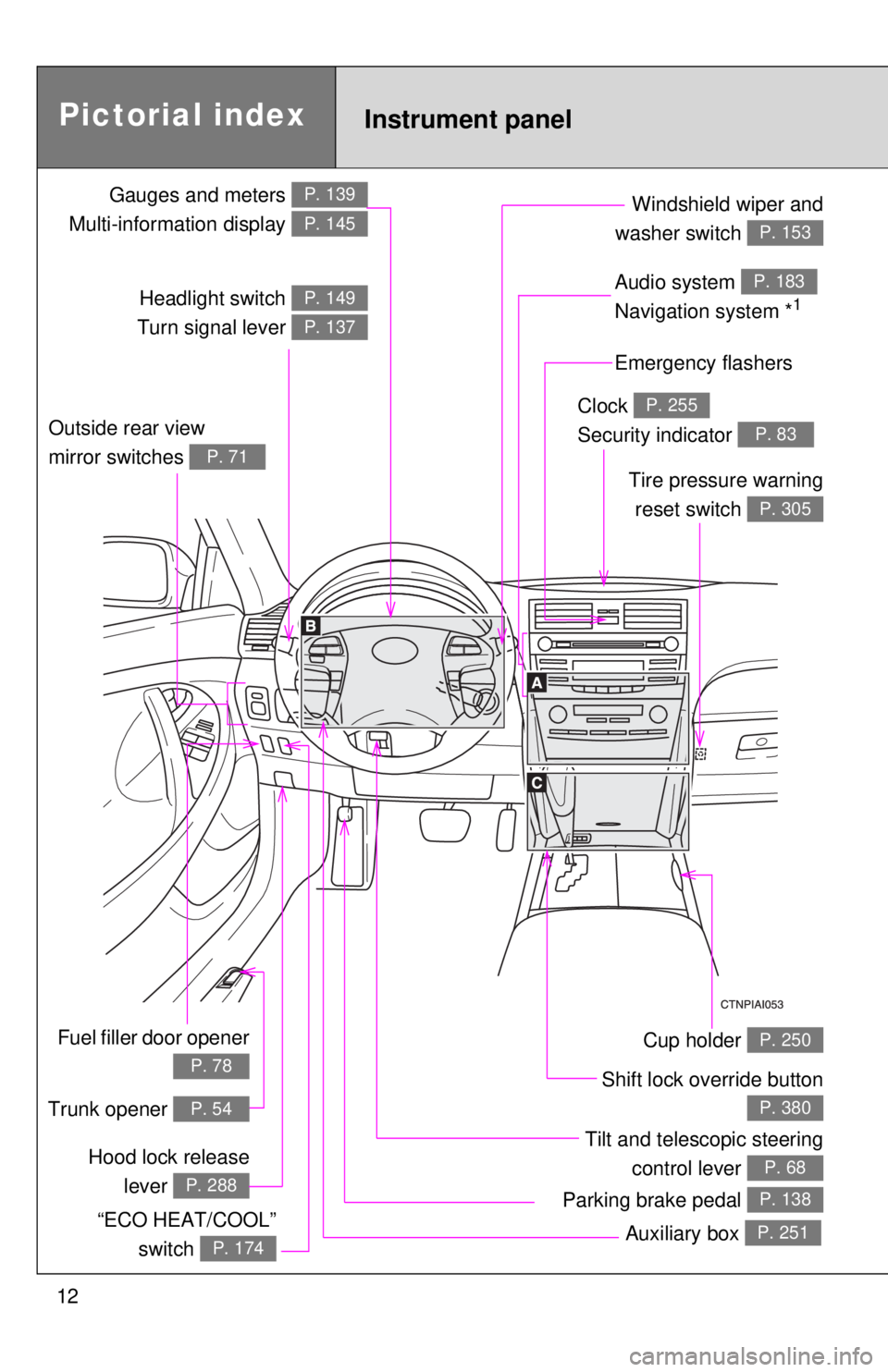
Gauges and meters
Multi-information display P. 139
P. 145
Tilt and telescopic steering control lever
P. 68Hood lock releaselever
P. 288
Pictorial index
Fuel filler door opener
P. 78
Headlight switch
Turn signal lever P. 149
P. 137
Instrument panel
Audio system
Navigation system *1
P. 183
Windshield wiper and
washer switch
P. 153
Clock
Security indicator P. 255
P. 83Outside rear view
mirror switches
P. 71
Tire pressure warning reset switch
P. 305
Auxiliary box P. 251
Cup holder P. 250
Parking brake pedal P. 138
Trunk opener P. 54
“ECO HEAT/COOL” switch
P. 174
Emergency flashers
Shift lock override button
P. 380
Page 29 of 444
29
1-1. Hybrid system
1
Before driving
■
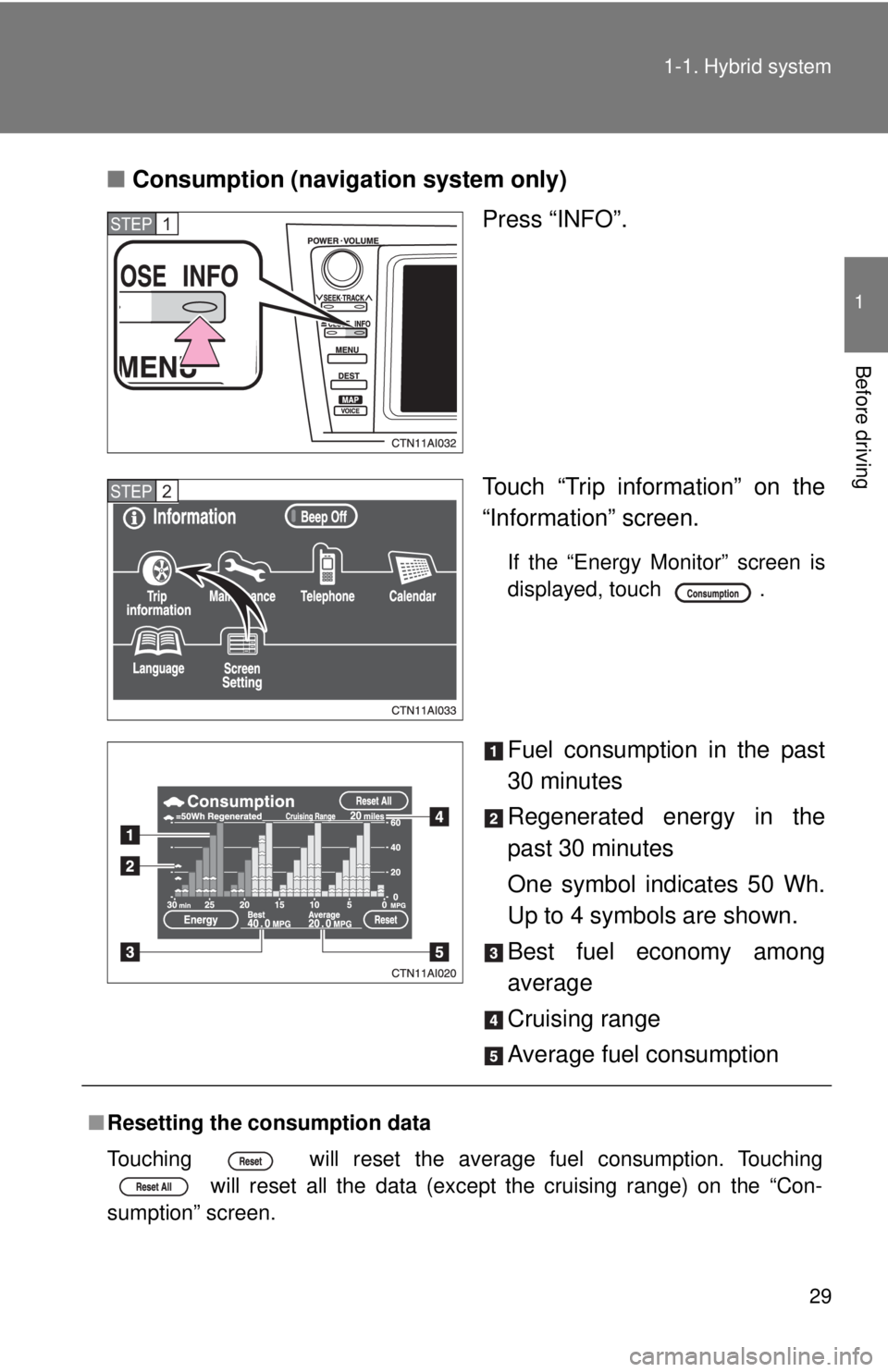
Consumption (navigation system only)
Press “INFO”.
Touch “Trip information” on the
“Information” screen.
If the “Energy Monitor” screen is
displayed, touch .
Fuel consumption in the past
30 minutes
Regenerated energy in the
past 30 minutes
One symbol indicates 50 Wh.
Up to 4 symbols are shown.
Best fuel economy among
average
Cruising range
Average fuel consumption
STEP1
STEP2
■Resetting the consumption data
Touching will reset the average fuel consumption. Touching
will reset all the data (except the cruising range) on the “Con-
sumption” screen.
Page 139 of 444
139
2
When driving
2-2. Instrument cluster
Gauges and meters
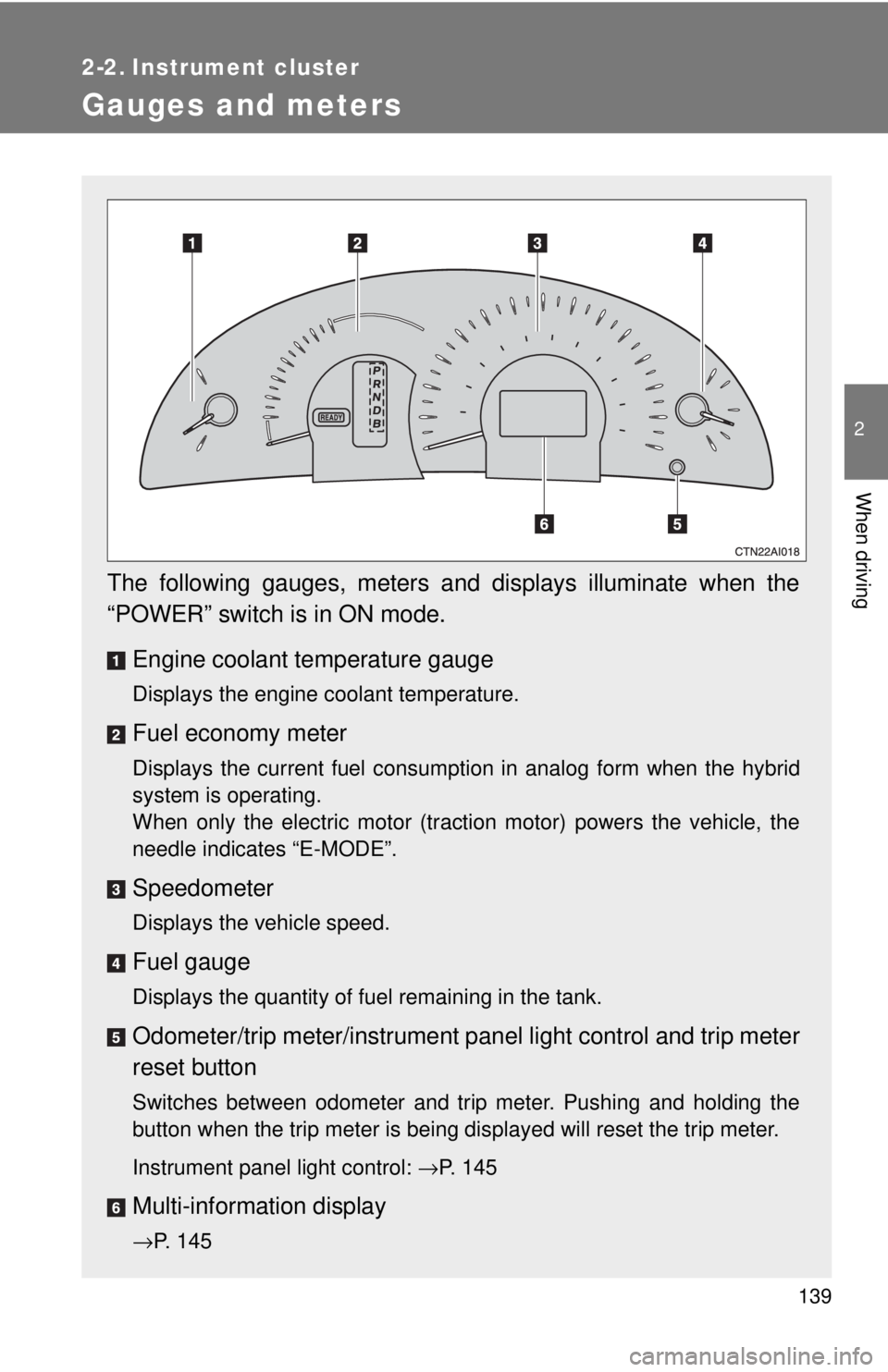
The following gauges, meters and displays illuminate when the
“POWER” switch is in ON mode.Engine coolant temperature gauge
Displays the engine coolant temperature.
Fuel economy meter
Displays the current fuel consumption in analog form when the hybrid
system is operating.
When only the electric motor (traction motor) powers the vehicle, the
needle indicates “E-MODE”.
Speedometer
Displays the vehicle speed.
Fuel gauge
Displays the quantity of fuel remaining in the tank.
Odometer/trip meter/instrument pa nel light control and trip meter
reset button
Switches between odometer and trip meter. Pushing and holding the
button when the trip meter is being displayed will reset the trip meter.
Instrument panel light control: →P. 145
Multi-informat ion display
→P. 145
Page 145 of 444
145
2-2. Instrument cluster
2
When driving
Multi-information display
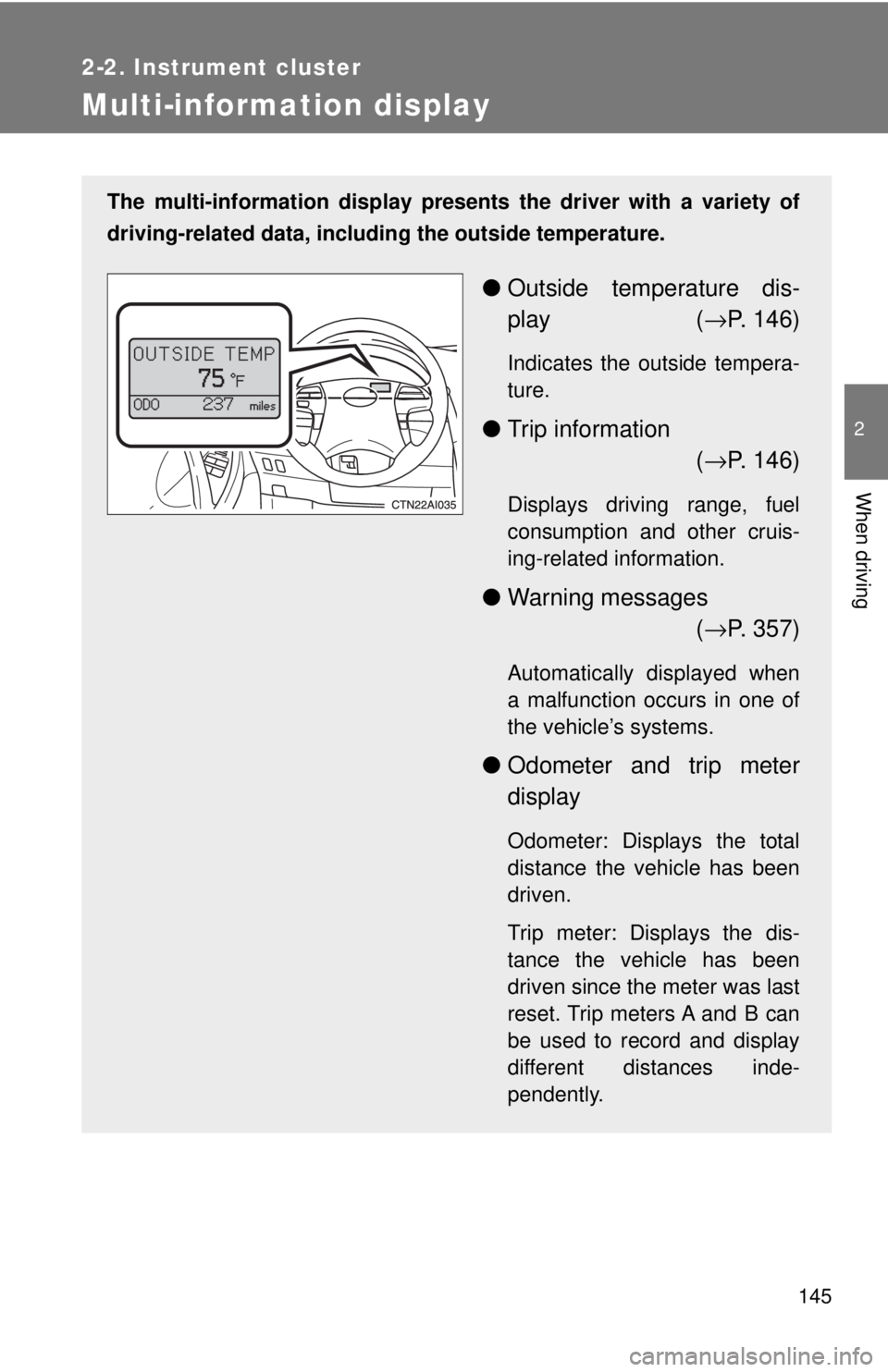
The multi-information display presents the driver with a variety of
driving-related data, including the outside temperature.
● Outside temperature dis-
play ( →P. 146)
Indicates the outside tempera-
ture.
● Trip information
(→ P. 146)
Displays driving range, fuel
consumption and other cruis-
ing-related information.
● Warning messages
(→ P. 357)
Automatically displayed when
a malfunction occurs in one of
the vehicle’s systems.
● Odometer and trip meter
display
Odometer: Displays the total
distance the vehicle has been
driven.
Trip meter: Displays the dis-
tance the vehicle has been
driven since the meter was last
reset. Trip meters A and B can
be used to record and display
different distances inde-
pendently.
Page 156 of 444
156 2-4. Using other driving systems
■Fine adjustment of the set speed
Adjustment of the set speed by approximately 1.0 mph (1.6 km/h) can be
made by lightly pressing the lever up or down and releasing it.
■ Cruise control can be set when
●The shift lever is in D.
● Vehicle speed is between approximately 25 mph and 125 mph (40 km/h
and 200 km/h).
■ Accelerating
The vehicle can be accelerated normally.
■ Automatic cruise control cancellation
The set speed is automatically canceled in any of the following situations.
●Actual vehicle speed falls more than 10 mph (16 km/h) below the preset
vehicle speed.
At this time, the memorized set speed is not retained.
● Actual vehicle speed is below 25 mph (40 km/h).
● VSC is activated.
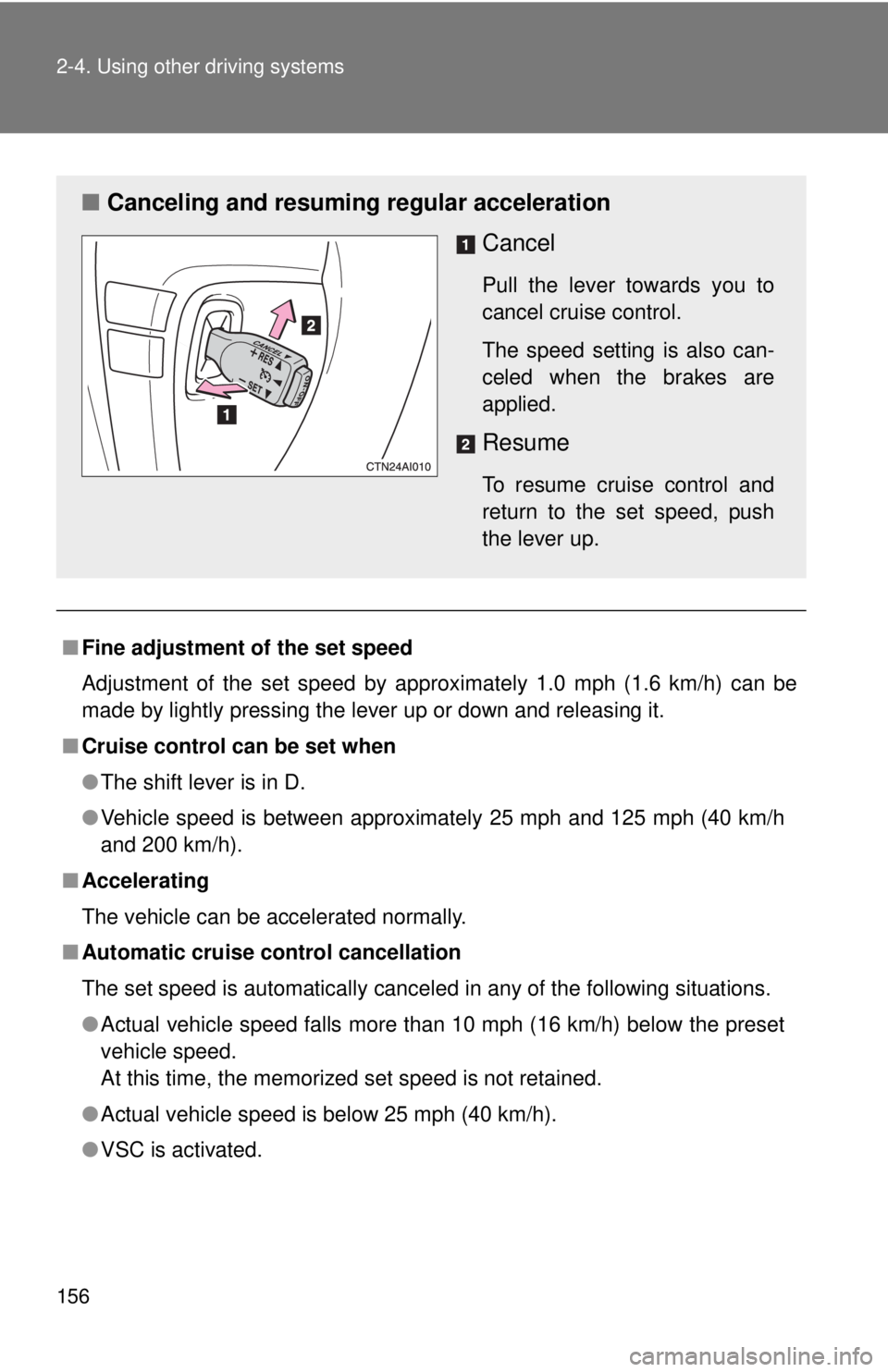
■ Canceling and resuming regular acceleration
Cancel
Pull the lever towards you to
cancel cruise control.
The speed setting is also can-
celed when the brakes are
applied.
Resume
To resume cruise control and
return to the set speed, push
the lever up.
Page 186 of 444
186
3-2. Using the audio system
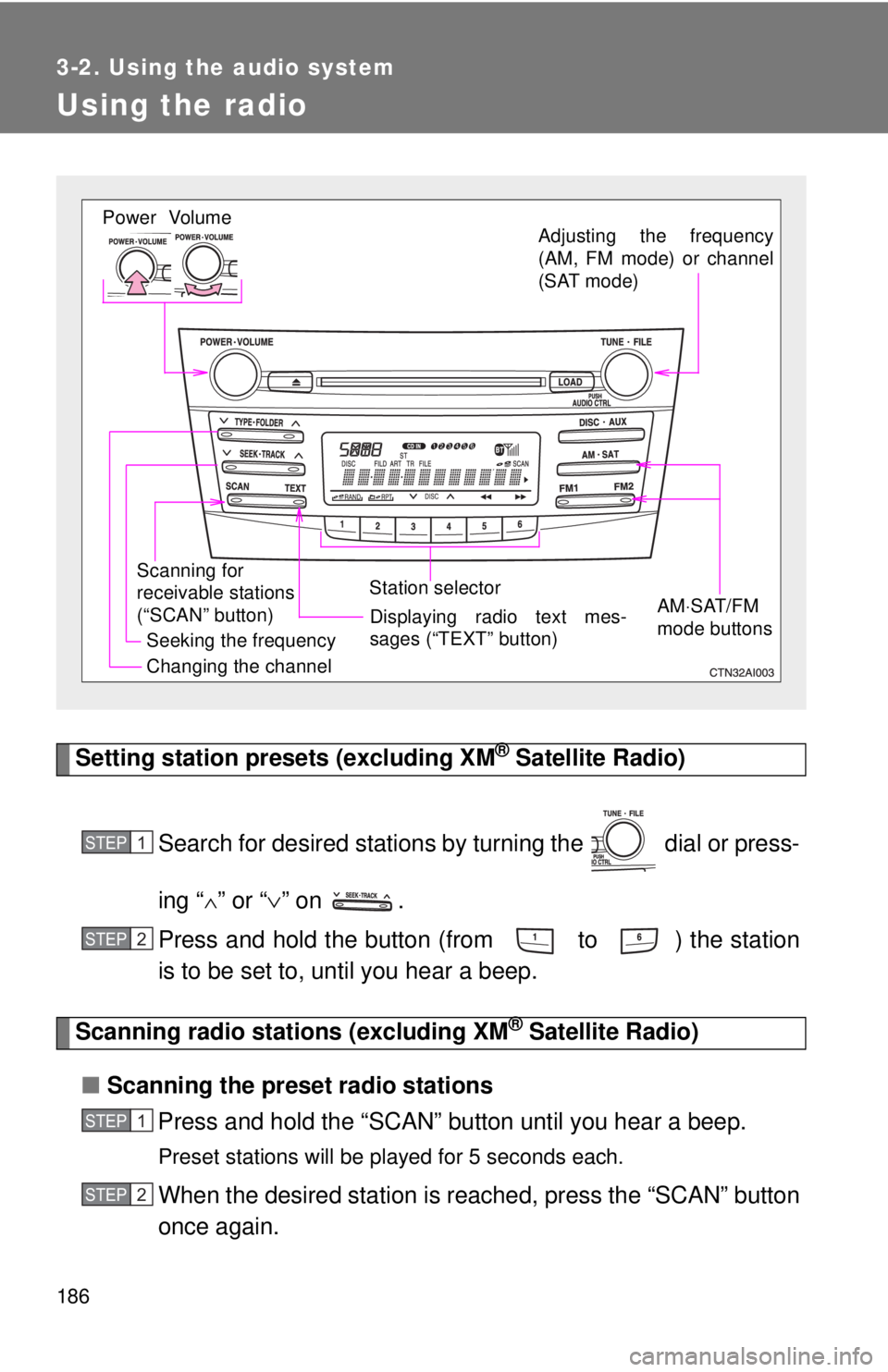
Using the radio
Setting station presets (excluding XM® Satellite Radio)
Search for desired stations by turning the dial or press-
ing “
∧” or “ ∨” on .
Press and hold the button (from to ) the station
is to be set to, until you hear a beep.
Scanning radio stations (excluding XM® Satellite Radio)
■ Scanning the preset radio stations
Press and hold the “SCAN” button until you hear a beep.
Preset stations will be played for 5 seconds each.
When the desired station is r eached, press the “SCAN” button
once again.
Vol um e
Scanning for
receivable stations
(“SCAN” button) Station selector
Seeking the frequency Adjusting the frequency
(AM, FM mode) or channel
(SAT mode)
AM⋅SAT/FM
mode buttonsPower
Displaying radio text mes-
sages (“TEXT” button)
Changing the channel
STEP1
STEP2
STEP1
STEP2
Page 187 of 444
187
3-2. Using the audio system
3
Interior features
■
Scanning all radio stations within range
Press
the “SCAN” button.
All stations with reception will be played for 5 seconds each.
When the desired station is r eached, press the “SCAN” button
once again.
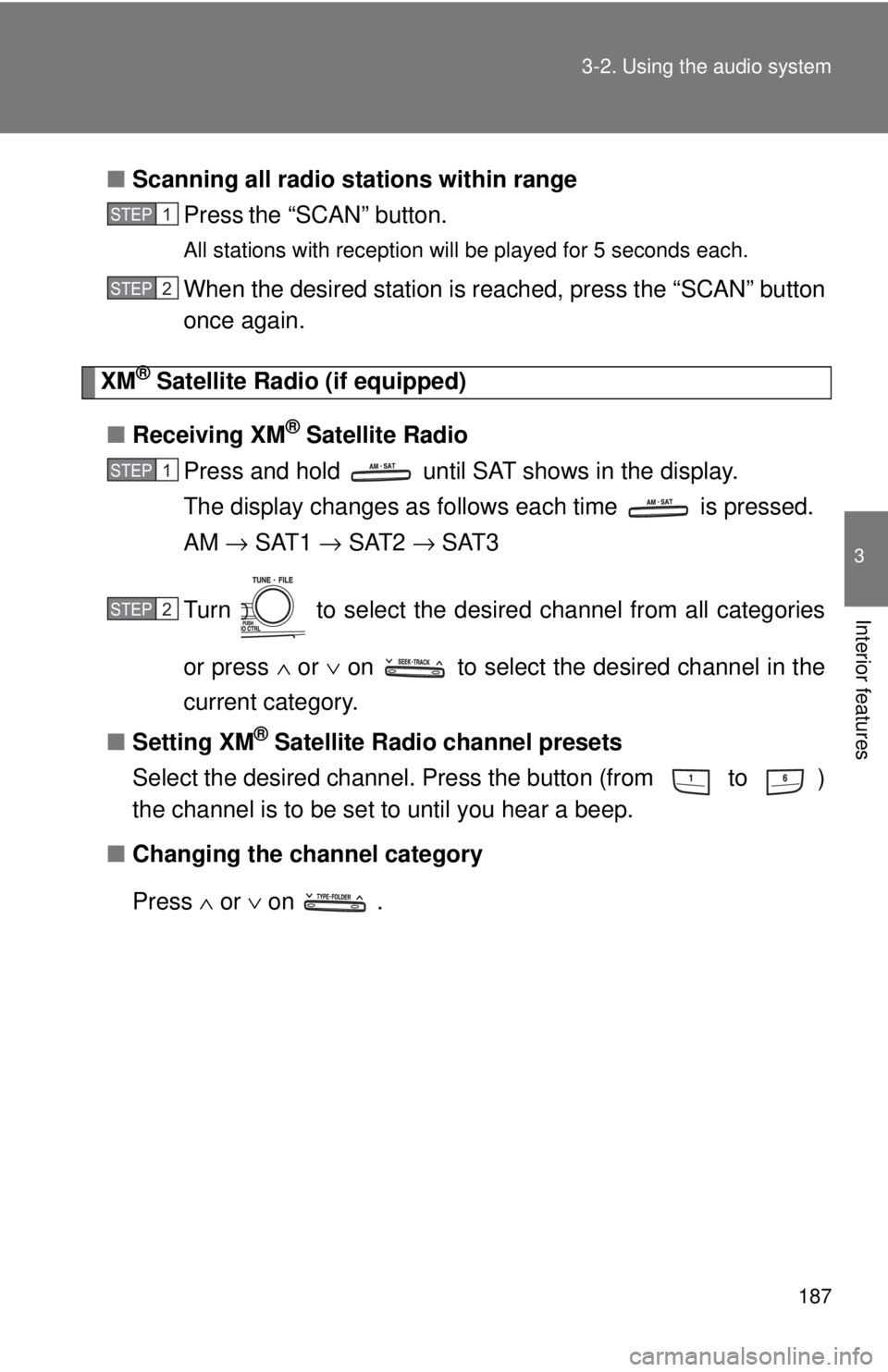
XM® Satellite Radio (if equipped)
■ Receiving XM
® Satellite Radio
Press and hold until SAT shows in the display.
The display changes as follows each time is pressed.
AM → SAT1 → SAT2 → SAT3
Turn to select the desired channel from all categories
or press ∧ or ∨ on to select the desired channel in the
current category.
■ Setting XM
® Satellite Radio channel presets
Select the desired channel. Press the button (from
to )
the channel is to be set to until you hear a beep.
■ Changing the channel category
Press ∧ or ∨ on .
STEP1
STEP2
STEP1
STEP2
Page 188 of 444
188 3-2. Using the audio system
■Scanning XM® Satellite Radio channels
● Scanning channels in the current category
Press the “SCAN” button.
When the desired channel is reached, press the “SCAN”button again.
● Scanning preset channels
Press and hold the “SCAN” button until you hear a beep.
When the desired channel is reached, press the “SCAN”button again.
■ Displaying text information
Press the “TEXT” button.
The display will show up to 10 characters.
The display changes as follows each time the button is pressed.
●CH NAME
● TITLE (SONG/PROGRAM TITLE)
● NAME (ARTIST NAME/FEATURE)
● CH NUMBER
STEP1
STEP2
STEP1
STEP2
Page 189 of 444
189
3-2. Using the audio system
3
Interior features
■
When the 12-volt battery is disconnected
Station presets are erased.
■ Reception sensitivity
Maintaining perfect radio reception at all times is difficult due to the continu-
ally changing position of the antenna, differences in signal strength and sur-
rounding objects, such as trains, transmitters, etc.
■ XM
® Satellite Radio
An XM
® Satellite Radio is a tuner designed exclusively to receive broadcasts
provided under a separate subscription. Availability is limited to the 48 con-
tiguous states and 10 Canadian provinces.
● XM
® subscriptions
For detailed information about XM® Satellite Radio or to subscribe:
U.S.A. ⎯
Visit on the web at www.xmradio.com
or call 1-800-967-2346.
Canada ⎯
Visit on the web at www.xmradio.ca
or call 1-877-438-9677.
● Radio ID
You will need the radio ID when activating XM
® service or reporting a
problem. Select “CH000” using , and the receiver's 8-character ID
number will appear.
● Satellite tuner
The tuner supports only Audio Services (Music and Talk) and the accom-
panying Text Information of XM
® Satellite Radio.
*: Terms and services provided by XM® Satellite Radio are subject to change
without notice.
Page 212 of 444
212 3-2. Using the audio system
Selecting a radio stationPress the “MODE” switch to select the radio mode.
Press the “ ∨ ∧” switch to select a preset station.
To scan for receivable stations, press and hold the switch until you
hear a beep.
Selecting a track/file
Press the “MODE” switch to select the CD mode.
Press the “ ∨ ∧” switch to select the desired track/file.
Selecting a folder (CD player without changer only)
Press the “MODE” switch to select the CD mode.
Press and hold the “ ∨ ∧” switch until you hear a beep.
Selecting a disc in the CD player (CD player with changer only)
Press the “MODE” switch to select the CD mode.
Press and hold the “ ∨ ∧” switch until you hear a beep.
CAUTION
■To reduce the risk of an accident
Exercise care when operating the audio switches on the steering wheel.
STEP1
STEP2
STEP1
STEP2
STEP1
STEP2
STEP1
STEP2