lock TOYOTA CAMRY HV 2011 Manual PDF
[x] Cancel search | Manufacturer: TOYOTA, Model Year: 2011, Model line: CAMRY HV, Model: TOYOTA CAMRY HV 2011Pages: 508, PDF Size: 8.76 MB
Page 303 of 508

303
3-7. Other interior features
3
Interior features
Clock
■The clock is displayed when
The “POWER” switch is in ACCESSORY or ON mode.
Adjusts the hour.
Adjusts the minutes.
Page 313 of 508

313
3-7. Other interior features
3
Interior features
Garage door opener
The garage door opener (HomeLink Universal Transceiver) is manufac-
tured under license from HomeLink.
Programming HomeLink (for U.S. owners)
To ensure correct programming into the HomeLink
, install a new
battery in the hand-held transmitter prior to programming. Failure to
install a new battery into the hand-held transmitte r will affect both the
range and accuracy of the HomeLink
in your vehicle.
The battery side of the hand-held transmitter must be pointed away
from the HomeLink
during the programming process.
The HomeLink
compatible transceiver in your vehicle has 3 buttons
which can be programmed to operate 3 different devices. Refer to the
programming method below appropriate for the device.
Buttons
Indicator
The garage door opener can be programmed to operate garage
doors, gates, entry doors, door locks, home lighting systems, secu-
rity systems, and other devices.
: If equipped
Page 316 of 508
316 3-7. Other interior features
When the indicator light on the HomeLink compatible trans-
ceiver starts to flash rapidly, release the buttons.
Test the operation of HomeLink
by pressing the newly pro-
grammed button. Check to see if the gate/device operates
correctly.
Repeat the steps above to program another device for each of
the remaining HomeLink
buttons.
■ Programming other devices
To program other devices such as home security systems, home
door locks or lighting, contact your authorized Toyota dealer for
assistance.
■ Reprogramming a button
The individual HomeLink
buttons cannot be erased but can be
reprogrammed. To reprogram a bu tton, follow the “Programming”
instructions.
Operating HomeLink
Press the appropriate HomeLink button. The HomeLink indicator
light on the HomeLink transceiver should turn on.
HomeLink continues to send a signal for up to 20 seconds as long as the
button is pressed.
Erasing the entire HomeLink memory (all three programs)
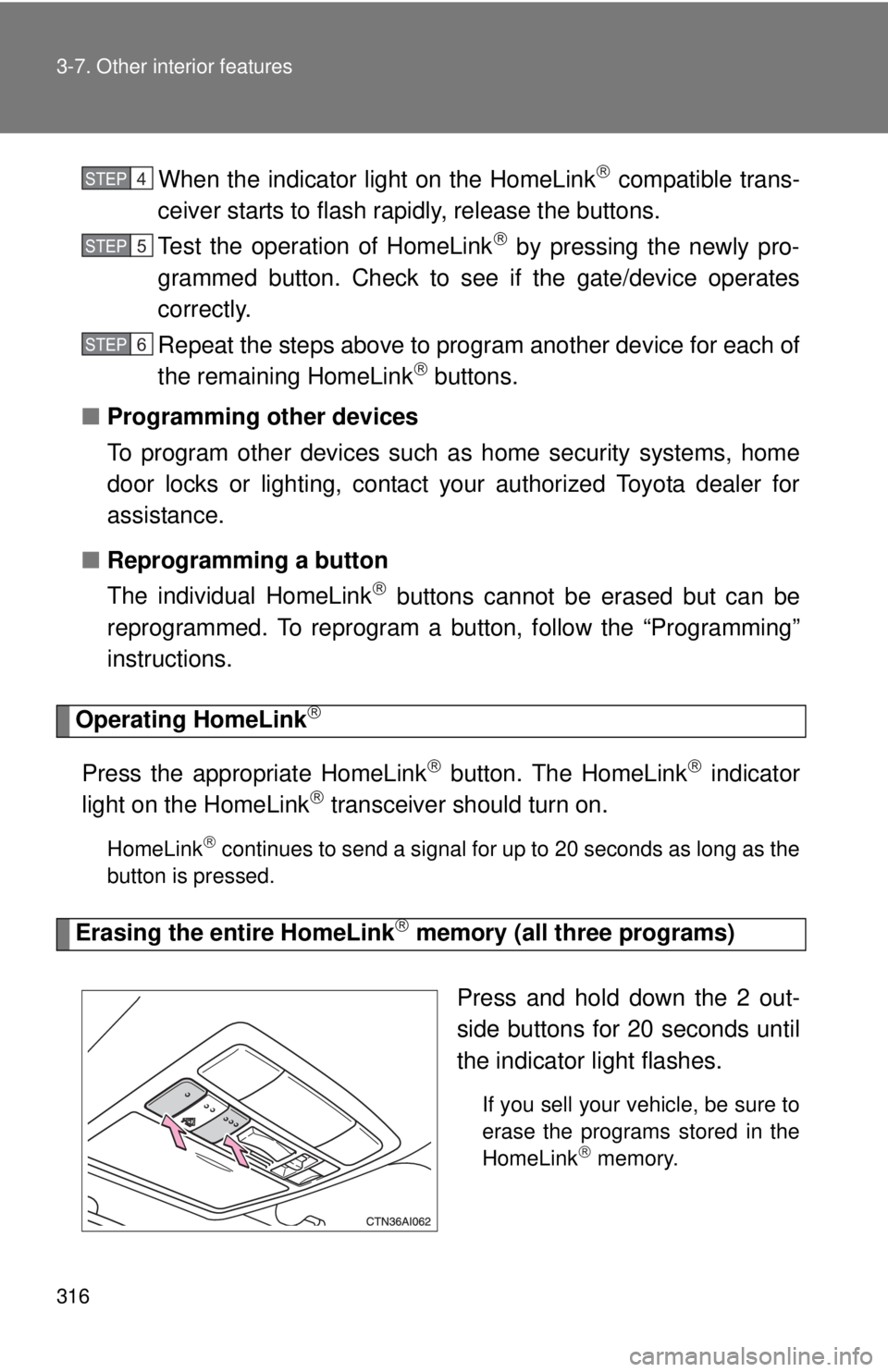
Press and hold down the 2 out-
side buttons for 20 seconds until
the indicator light flashes.
If you sell your vehicle, be sure to
erase the programs stored in the
HomeLink
memory.
STEP4
STEP5
STEP6
Page 321 of 508

321
3-7. Other interior features
3
Interior features
■
Circling calibration
Stop the vehicle in a place where it is safe to drive in a circle.
Press and hold “AUTO” for 9
seconds.
C appears on the compass dis-
play.
Drive the vehicle at 5 mph (8 km/
h) or less in a circle until a direc-
tion is displayed.
If there is not enough space to
drive in a circle, drive around the
block until the direction is dis-
played.
STEP1
STEP2
STEP3
■Conditions unfavorable for correct operation
The compass may not show the correct direction in the following situations:
●The vehicle is stopped immediately after turning.
● The vehicle is on an inclined surface.
● The vehicle is in a place where the earth's magnetic field is subject to
interference by artificial magnetic fields (underground car park/parking
lot, under a steel tower, between buildings, roof car park/parking lot, near
an intersection, near a large vehicle, etc.).
● The vehicle has become magnetized.
(There is a magnet or metal object near the anti-glare inside rear view
mirror.)
● The 12-volt battery has been disconnected.
● A door is open.
Page 331 of 508
331
4-2. Maintenance
4
Maintenance and care
General maintenance
Engine compartment
Trunk
ItemsCheck points
Brake fluid At the correct level? ( P. 348)
Engine/power control unit coolant At the correct level? ( P. 346)
Engine oil At the correct level? ( P. 342)
Exhaust system No fumes or strange sounds?
Radiator/condenser/hoses Not blocked with foreign matter?
(
P. 348)
Washer fluid At the correct level? (P. 349)
ItemsCheck points
12-volt battery Check the connections.
(P. 350)
Listed below are the general maintenance items that should be
performed at the intervals specified in the “Owner’s Warranty
Information Booklet” or “Owner’s Manual Supplement/Scheduled
Maintenance Guide”. It is recomme nded that any problem you notice
should be brought to the attention of your Toyota dealer or qualified
service shop for advice.
Page 332 of 508

332 4-2. Maintenance
Vehicle interior
ItemsCheck points
Accelerator pedal • Moves smoothly (without uneven
pedal effort or catching)?
Transmission “Park” mechanism • Can the vehicle be held securely
on an incline with the shift lever in
P?
Brake pedal • Moves smoothly?
• Does it have appropriate clear-
ance and correct amount of free
play?
Brakes • Not pull to one side when
applied?
• Loss of brake effectiveness?
• Spongy feeling brake pedal?
• Pedal almost touches floor?
Head restraints • Move smoothly and lock
securely?
Indicators/buzzers • Function properly?
Lights • Do all the lights come on?
Parking brake • Moves smoothly?
• Can hold the vehicle securely on
an incline?
Seat belts • Does the seat belt system oper-
ate smoothly?
• Are the belts undamaged?
Seats • Do the seat controls operate
properly?
Steering wheel • Moves smoothly?
• Has correct free play?
• No strange noises?
Page 333 of 508

333
4-2. Maintenance
4
Maintenance and care
Vehicle exterior
ItemsCheck points
Door/trunk • Operate smoothly?
Engine hood • The lock system works properly?
Fluid leaks • Is there any leakage after park-
ing?
Tires • Inflation pressure is correct?
• Tire surfaces not worn or dam-
aged?
• Tires rotated according to the maintenance schedule?
• Wheel nuts are not loose?
CAUTION
■ If the hybrid system is running
Turn the hybrid system off and ensure that there is adequate ventilation
before performing maintenance checks.
Page 338 of 508
338
4-3. Do-it-yourself maintenance
Hood
CAUTION
■Pre-driving check
Check that the hood is fully closed and locked.
If the hood is not locked properly, it may open while the vehicle is in motion
and cause an accident, which may result in death or serious injury.
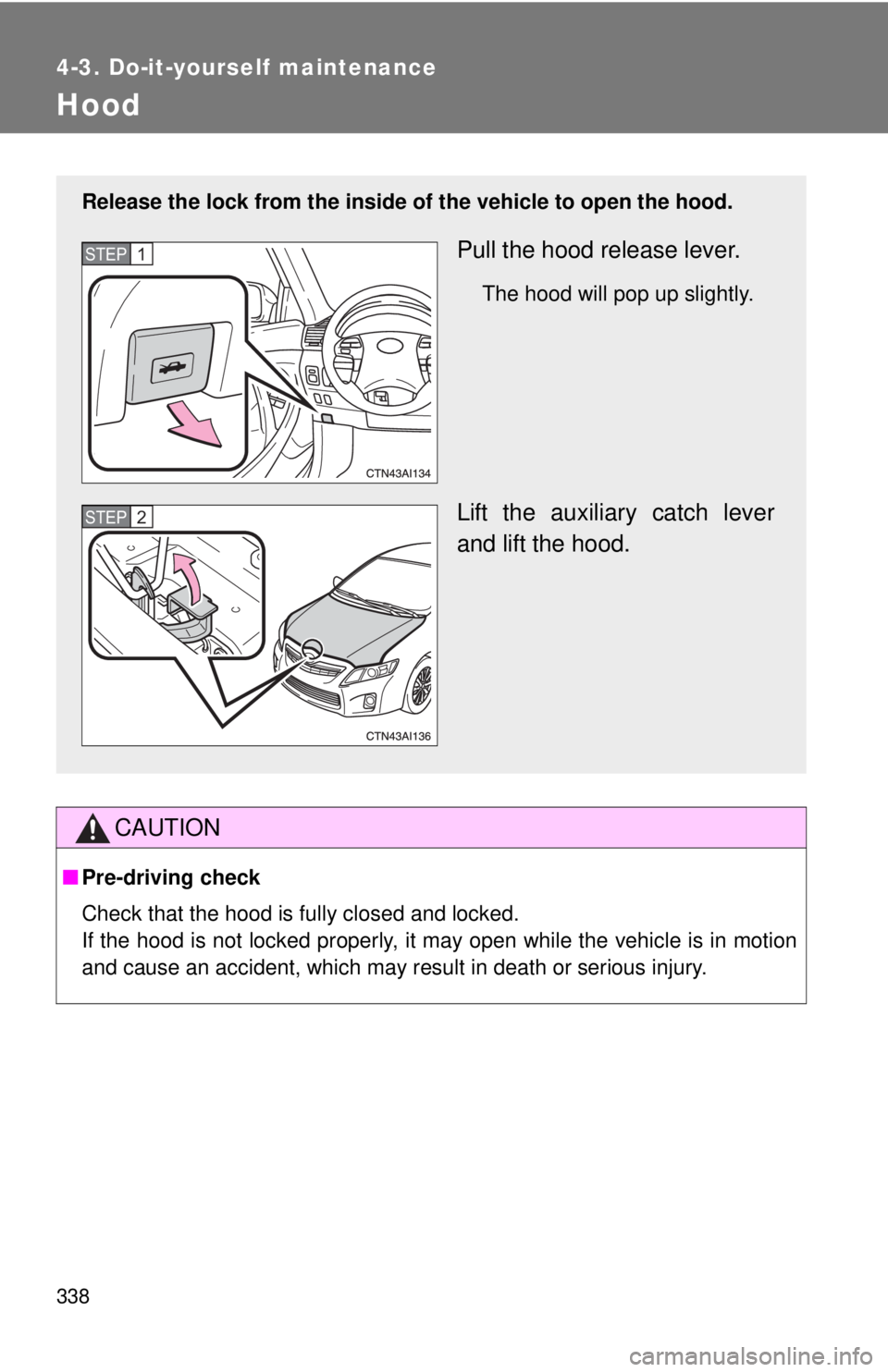
Release the lock from the inside of the vehicle to open the hood.
Pull the hood release lever.
The hood will pop up slightly.
Lift the auxiliary catch lever
and lift the hood.
STEP1
STEP2
Page 343 of 508
343
4-3. Do-it-yourself maintenance
4
Maintenance and care
■
Adding engine oil
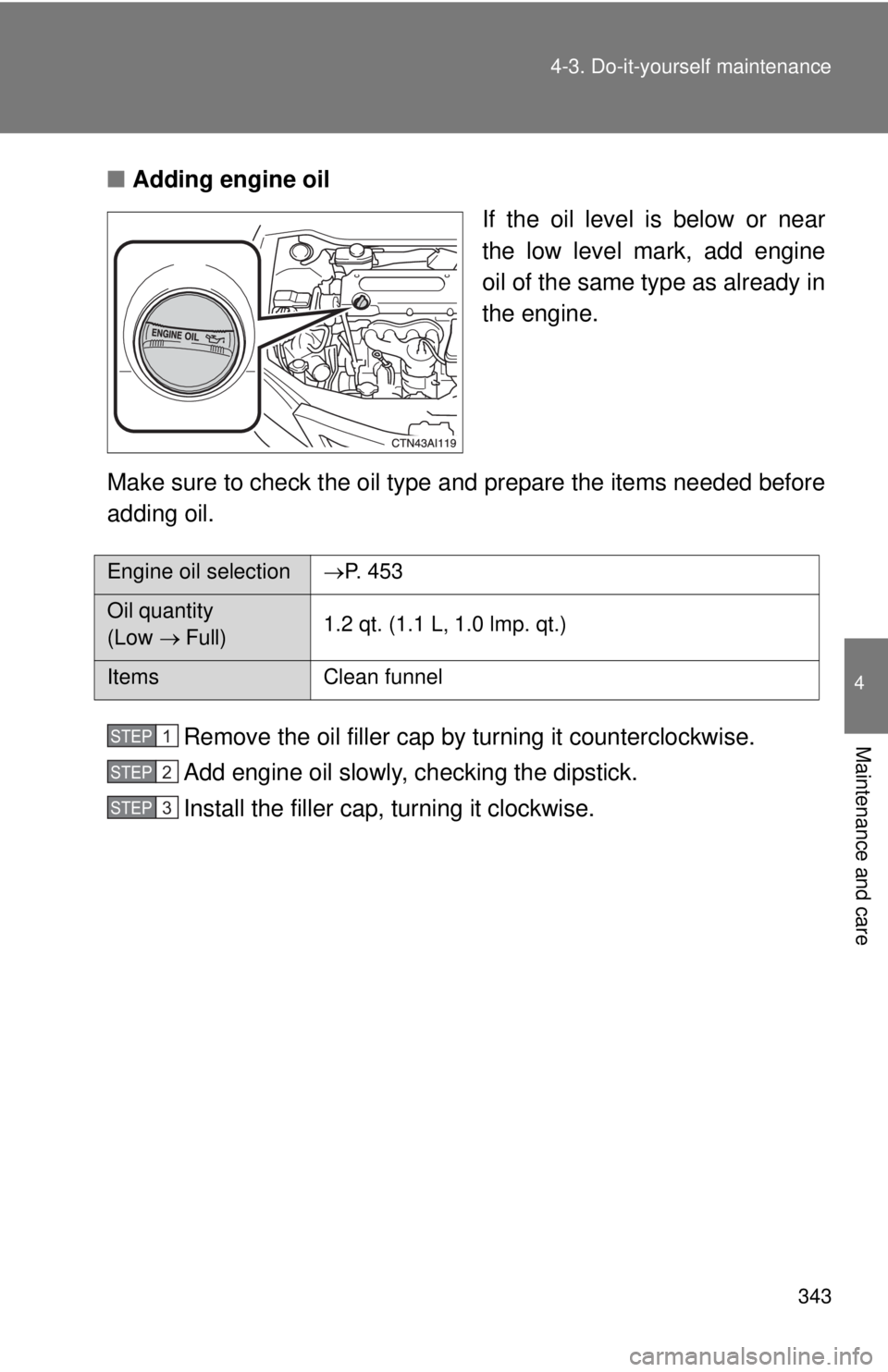
If the oil level is below or near
the low level mark, add engine
oil of the same type as already in
the engine.
Make sure to check the oil type and prepare the items needed before
adding oil.
Remove the oil filler cap by turning it counterclockwise.
Add engine oil slowly, checking the dipstick.
Install the filler cap, turning it clockwise.
Engine oil selection P. 453
Oil quantity
(Low Full) 1.2 qt. (1.1 L, 1.0 lmp. qt.)
Items
Clean funnel
STEP1
STEP2
STEP3
Page 378 of 508
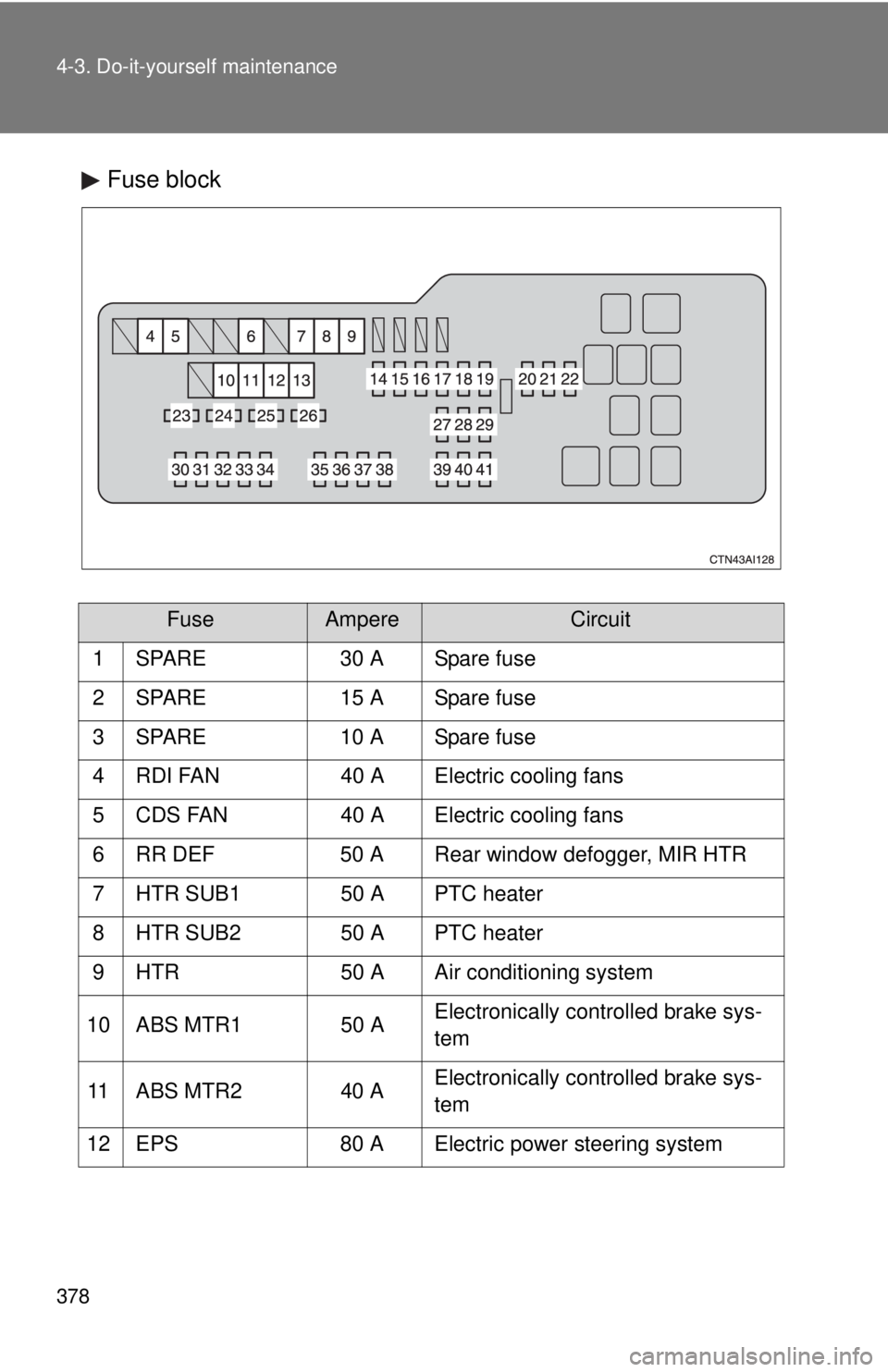
378 4-3. Do-it-yourself maintenance
Fuse block
FuseAmpereCircuit
1 SPARE 30 A Spare fuse
2 SPARE 15 A Spare fuse
3 SPARE 10 A Spare fuse
4 RDI FAN 40 A Electric cooling fans
5 CDS FAN 40 A Electric cooling fans
6 RR DEF 50 A Rear window defogger, MIR HTR
7 HTR SUB1 50 A PTC heater
8 HTR SUB2 50 A PTC heater
9 HTR 50 A Air conditioning system
10 ABS MTR1 50 A Electronically controlled brake sys-
tem
11 ABS MTR2 40 A Electronically controlled brake sys-
tem
12 EPS 80 A Electric power steering system