ECU TOYOTA CAMRY HV 2012 Owner's Manual
[x] Cancel search | Manufacturer: TOYOTA, Model Year: 2012, Model line: CAMRY HV, Model: TOYOTA CAMRY HV 2012Pages: 536, PDF Size: 6.29 MB
Page 154 of 536

154 2-1. Driving procedures
CAUTION
■When the vehicle is stopped
●Do not depress the accelerator pedal unnecessarily.
If the vehicle is in any gear other than P or N, the vehicle may accelerate
suddenly and unexpectedly, causing an accident.
● Do not leave the vehicle with the hybrid system on for a long time.
If such a situation cannot be avoided, park the vehicle in an open space
and check that exhaust fumes do not enter the vehicle interior.
● In order to prevent accidents due to the vehicle rolling away, always keep
depressing the brake pedal while the “READY” indicator is on. Apply the
parking brake as necessary.
● If the vehicle is stopped on an incline, in order to prevent accidents caused
by the vehicle rolling forward or backward, always depress the brake pedal
and securely apply the parking brake as needed.
● Avoid revving or racing the engine.
Running the engine at high speed while the vehicle is stopped may cause
the exhaust system to overheat, which could result in a fire if combustible
material is nearby.
Page 157 of 536

157
2-1. Driving procedures
2
When driving
CAUTION
■
When braking
●When the brakes are wet, drive more cautiously.
Braking distance increases when the brakes are wet, and this may cause
one side of the vehicle to brake differently than the other side. Also the
parking brake may not securely hold the vehicle.
● If the electronically controlled brake system does not operate, do not fol-
low other vehicles closely and avoid hills or sharp turns that require brak-
ing.
In this case, braking is still possible, but the brake pedal should be
depressed more firmly than usual. Also, the braking distance will increase.
● The brake system consists of 2 individual hydraulic systems; if one of the
systems fails, the others will still operate. In this case, the brake pedal
should be depressed more firmly than usual and the braking distance will
increase. If this happens, do not continue to drive the vehicle. If the brake
system warning light (red indicator) comes on together with the buzzer
sound while driving, immediately stop the vehicle in a safe place and con-
tact your Toyota dealer.
NOTICE
■When driving the vehicle
●Do not depress the accelerator and brake pedals at the same time during
driving, as this may restrain driving torque.
● Do not use the accelerator pedal or depress the accelerator and brake
pedals at the same time to hold the vehicle on a hill.
■ When parking the vehicle
Always shift the shift lever to P. Failure to do so may cause the vehicle to
move or the vehicle may accelerate suddenly if the accelerator pedal is acci-
dentally depressed.
Page 163 of 536
163
2-1. Driving procedures
2
When driving
■
Note for the entry function
P. 6 1
■ If the hybrid system does not start
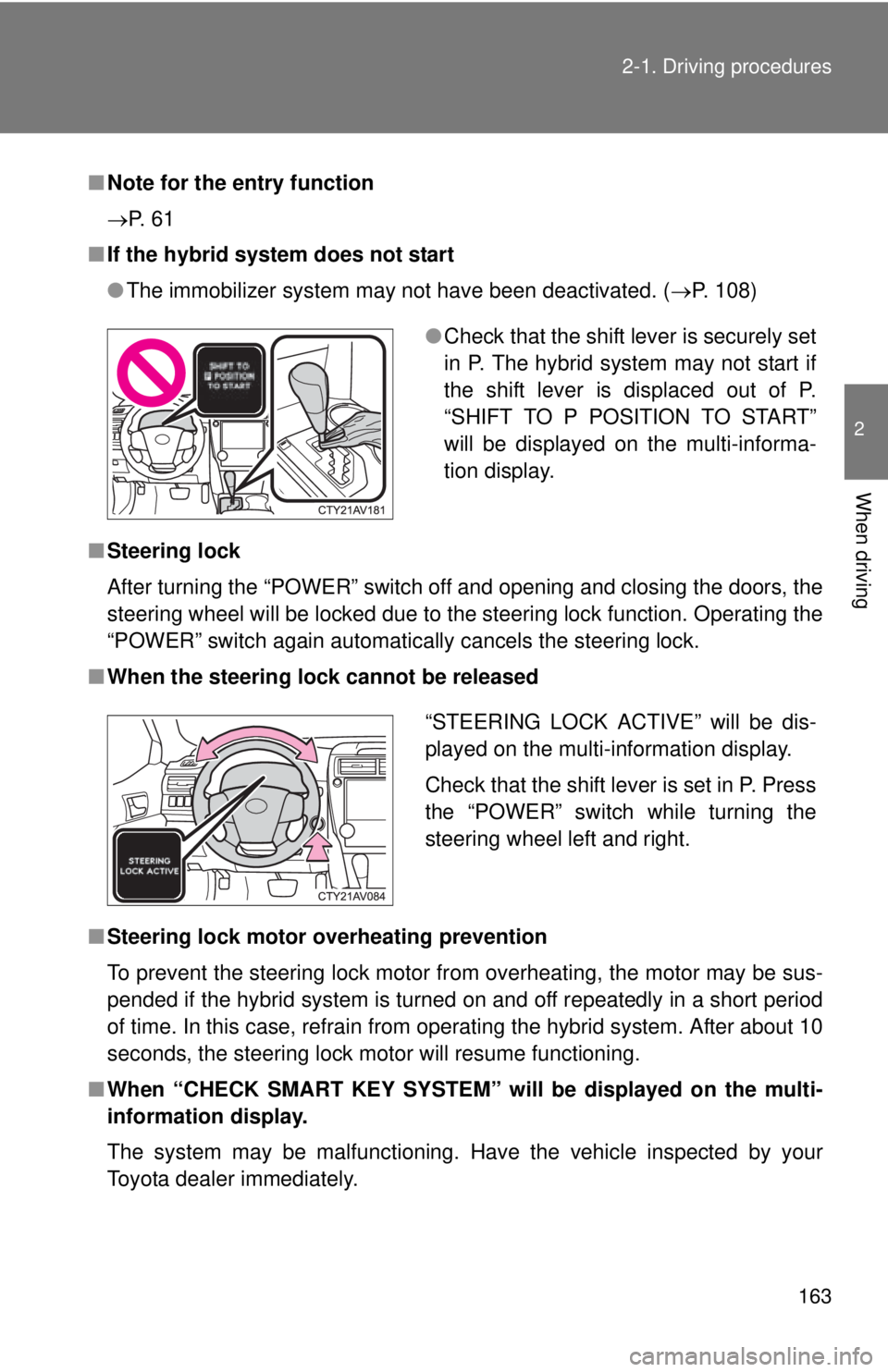
●The immobilizer system may not have been deactivated. ( P. 108)
■ Steering lock
After turning the “POWER” switch off and opening and closing the doors, the
steering wheel will be locked due to the steering lock function. Operating the
“POWER” switch again automatically cancels the steering lock.
■ When the steering lock cannot be released
■ Steering lock motor overheating prevention
To prevent the steering lock motor from overheating, the motor may be sus-
pended if the hybrid system is turned on and off repeatedly in a short period
of time. In this case, refrain from operating the hybrid system. After about 10
seconds, the steering lock motor will resume functioning.
■ When “CHECK SMAR T KEY SYSTEM” will be displayed on the multi-
information display.
The system may be malfunctioning. Have the vehicle inspected by your
Toyota dealer immediately.
● Check that the shift lever is securely set
in P. The hybrid system may not start if
the shift lever is displaced out of P.
“SHIFT TO P POSITION TO START”
will be displayed on the multi-informa-
tion display.
“STEERING LOCK ACTIVE” will be dis-
played on the multi-information display.
Check that the shift lever is set in P. Press
the “POWER” switch while turning the
steering wheel left and right.
Page 173 of 536
173
2-1. Driving procedures
2
When driving
Hor n
■After adjusting the steering wheel
Make sure that the steering wheel is securely locked.
The horn may not sound if the steering wheel is not securely locked.
(P. 92)
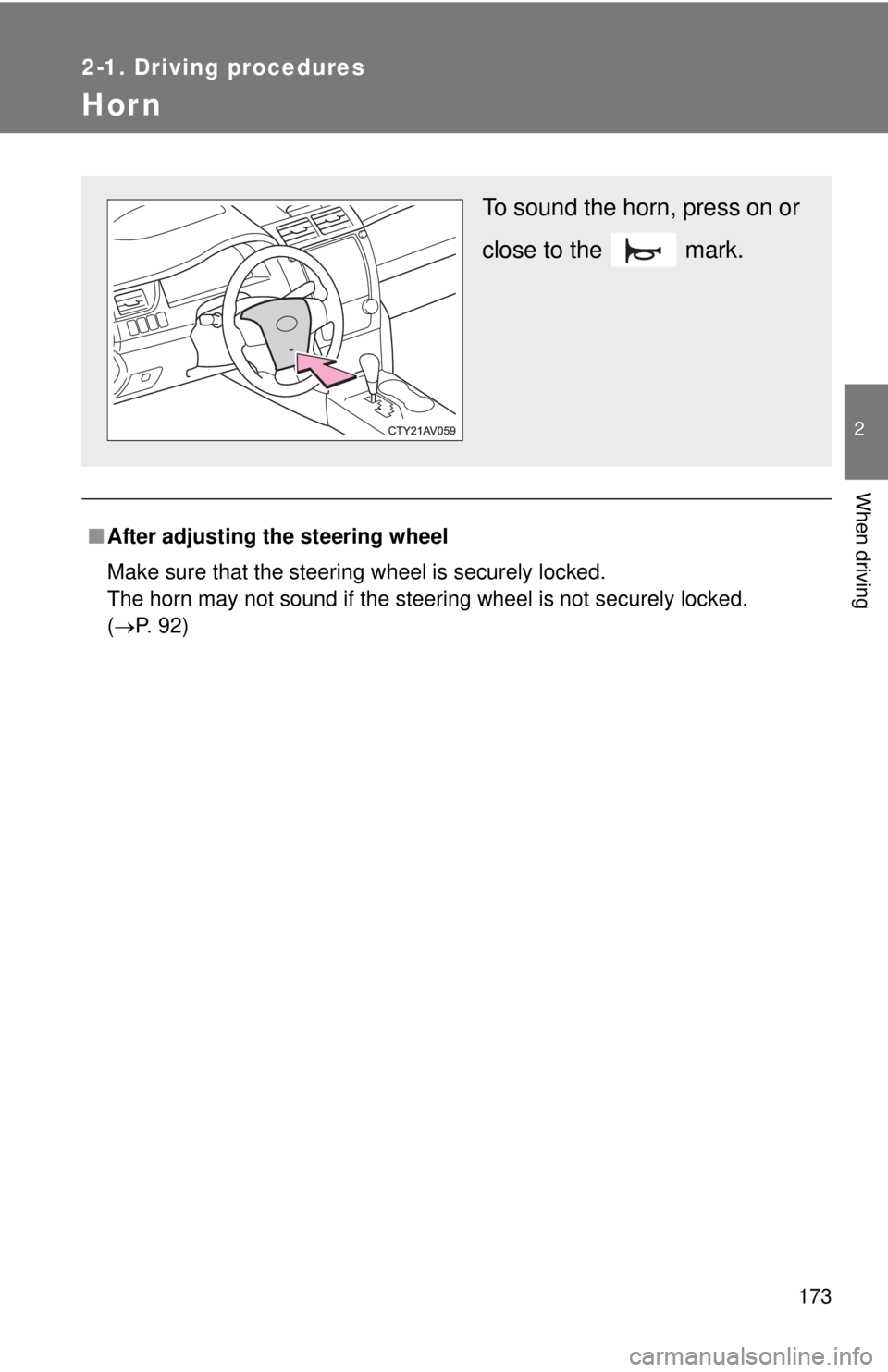
To sound the horn, press on or
close to the mark.
Page 182 of 536
182 2-2. Instrument cluster
■Indicators
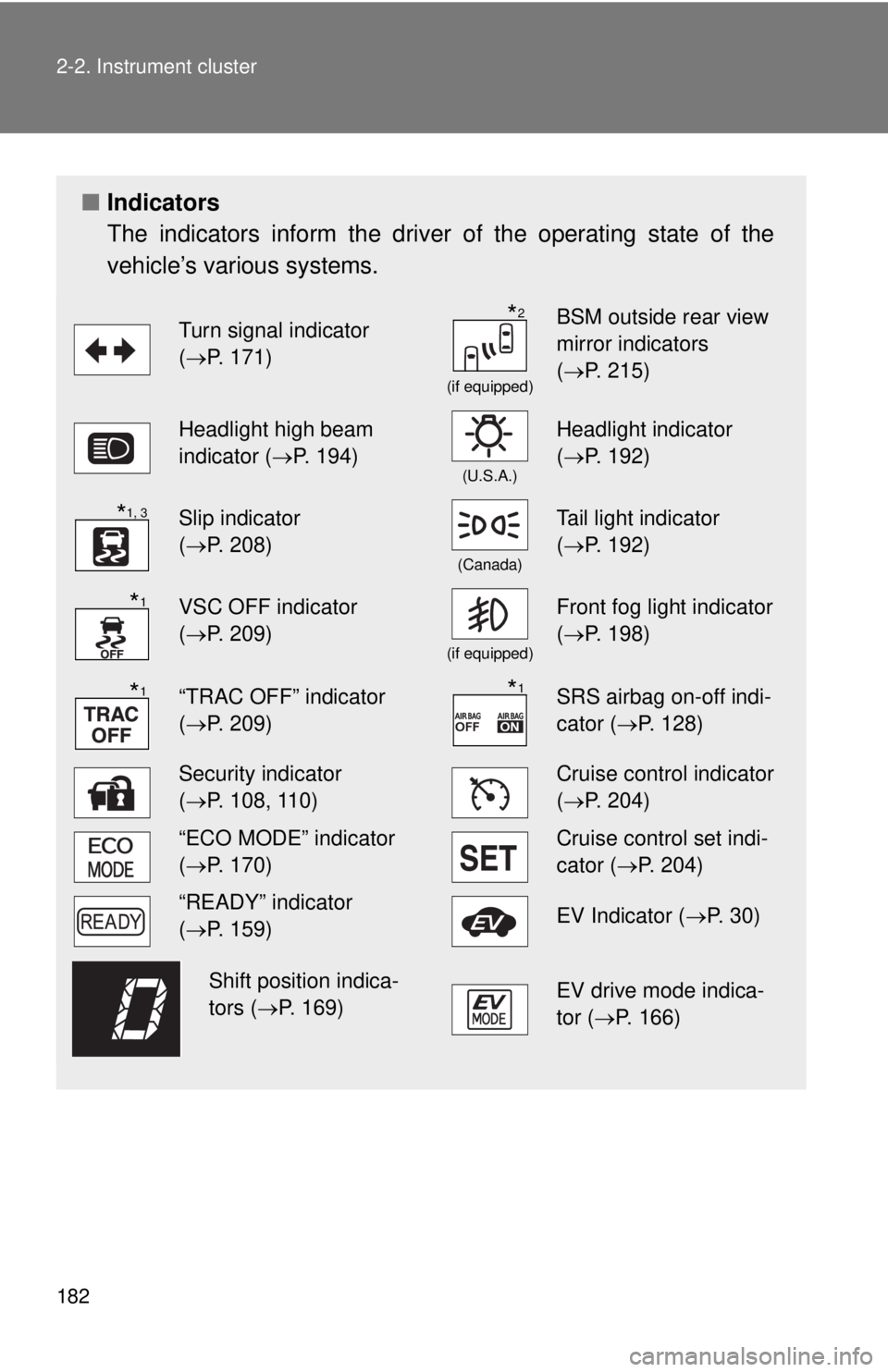
The indicators inform the driver of the operating state of the
vehicle’s various systems.
Turn signal indicator
(P. 171)
(if equipped)
BSM outside rear view
mirror indicators
( P. 215)
Headlight high beam
indicator ( P. 194)
(U.S.A.)
Headlight indicator
(P. 192)
Slip indicator
(P. 208)
(Canada)
Tail light indicator
( P. 192)
VSC OFF indicator
(P. 209)
(if equipped)
Front fog light indicator
( P. 198)
“TRAC OFF” indicator
(P. 209)SRS airbag on-off indi-
cator (P. 128)
Security indicator
(P. 108, 110)Cruise control indicator
( P. 204)
“ECO MODE” indicator
(P. 170)Cruise control set indi-
cator (P. 204)
“READY” indicator
(P. 159)EV Indicator ( P. 3 0 )
EV drive mode indica-
tor (P. 166)
*2
*1, 3
*1
*1*1
Shift position indica-
tors (P. 169)
Page 198 of 536
198
2-3. Operating the lights and wipers
Fog light switch
: If equipped
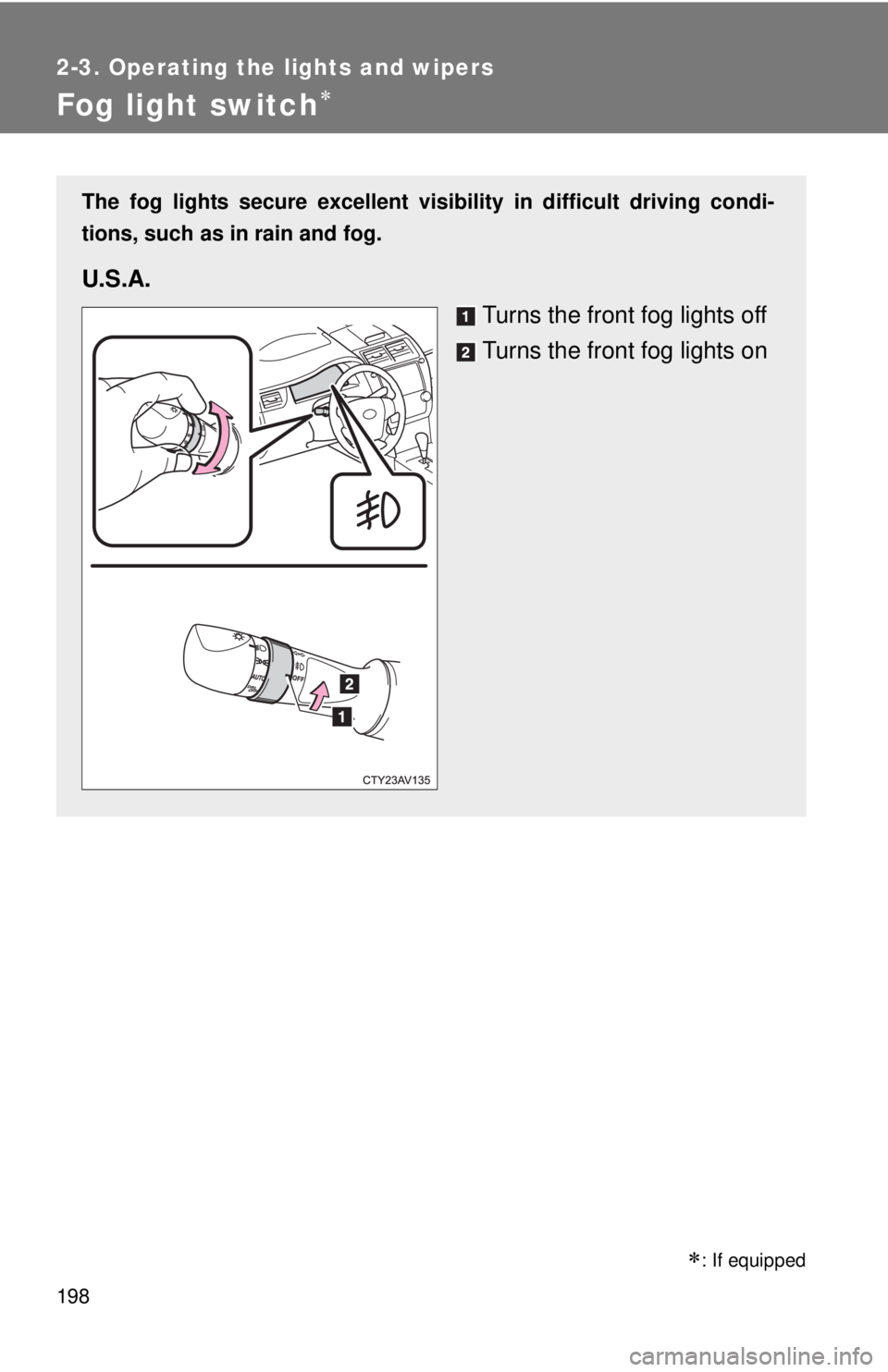
The fog lights secure excellent visibility in difficult driving condi-
tions, such as in rain and fog.
U.S.A.
Turns the front fog lights off
Turns the front fog lights on
Page 217 of 536

217
2-4. Using other
driving systems
2
When driving
■Conditions under which the Blind Spot Monitor will not detect a vehicle
The Blind Spot Monitor is not designed to detect the following types of vehi-
cles and/or objects:
●Small motorcycles, bicycles, pedestrians etc.*
● Vehicles traveling in the opposite direction
● Guardrails, walls, signs, parked vehicles and similar stationary objects*
● Following vehicles that are in the same lane*
● Vehicles driving 2 lanes across from your vehicle*
*: Depending on conditions, detection of a vehicle and/or object may occur \
■ Conditions under which the Blind Spot Monitor may not function cor-
rectly
●The Blind Spot Monitor may not detect vehicles correctly in the following
conditions:
• During bad weather such as heavy rain, fog, snow etc.
• When ice or mud etc. is attached to the rear bumper
• When driving on a road surface that is wet due to rain, standing water
etc.
• When there is a significant difference in speed between your vehicle and the vehicle that enters the detection area
• When a vehicle is in the detection area from a stop and remains in the detection area as your vehicle accelerates
• When driving up or down consecutive steep inclines, such as hills, a dip in the road etc.
• When multiple vehicles approach with only a small gap between each vehicle
• When vehicle lanes are wide, and the vehicle in the next lane is too far away from your vehicle
• When the vehicle that enters the detection area is traveling at about the same speed as your vehicle
• When there is a significant difference in height between your vehicle and the vehicle that enters the detection area.
• Directly after the BSM switch is set to on.
Page 220 of 536

220
2-5. Driving information
Cargo and luggage
Capacity and distributionCargo capacity depends on the total weight of the occupants.
(Cargo capacity) = (Total load capacity) - (Total weight of occupants)
Steps for Determining Correct Load Limit
(1)Locate the statement “The co mbined weight of occupants and
cargo should never exceed XXX kg or XXX lbs.” on your vehicle's
placard.
(2)Determine the combined weight of the driver and passengers that
will be riding in your vehicle.
(3)Subtract the combined weight of the driver and passengers from XXX kg or XXX lbs.
(4)The resulting figure equals the available amount of cargo and lug- gage load capacity.
For example, if the “XXX” amount equals 1400 lbs. and there will
be five 150 lb passengers in your vehicle, the amount of available
cargo and luggage load capacity is 650 lbs. (1400 - 750 (5 150) =
650 lbs.)
(5)Determine the combined weight of luggage and cargo being loaded on the vehicle. That weight may not safely exceed the avail-
able cargo and luggage load capacity calculated in Step 4.
Take notice of the following information about storage precau-
tions, cargo capacity and load:
● Stow cargo and luggage in the trunk whenever possible.
● Be sure all items are secured in place.
● To maintain vehicle balance while driving, position luggage
evenly within the luggage compartment.
● For better fuel economy, do no t carry unnecessary weight.
Page 222 of 536

222 2-5. Driving information
CAUTION
■Things that must not be carried in the trunk
The following things may cause a fire if loaded in the trunk:
●Receptacles containing gasoline
●Aerosol cans
■Storage precautions
Observe the following precautions.
Failure to do so may result in death or serious injury.
●Stow cargo and luggage in the trunk whenever possible.
●To prevent cargo and luggage from sliding forward during braking, do
not stack anything in the enlarged trunk. Keep cargo and luggage low,
as close to the floor as possible.
●When you fold down the rear seat, long items should not be place
directly behind the front seats.
●Never allow anyone to ride in the enlarged trunk. It is not designed for
passengers. They should ride in their seats with their seat belts prop-
erly fastened. Otherwise, they are much more likely to suffer death or
serious bodily injury, in the event of sudden braking, sudden swerving
or an accident.
●Do not place cargo or luggage in or on the following locations as the
item may get under the brake or accelerator pedal and prevent the
pedals from being depressed properly , block the driver’s vision, or hit
the driver or passengers, causing an accident:
• At the feet of the driver
• On the front passenger or rear seats (when stacking items)
• On the package tray
• On the instrument panel
• On the dashboard
●Secure all items in the occupant compartment, as they may shift and
injure someone during sudden braking, sudden swerving or an acci-
dent.
Page 309 of 536
309
3-5. Other interior features
3
Interior features
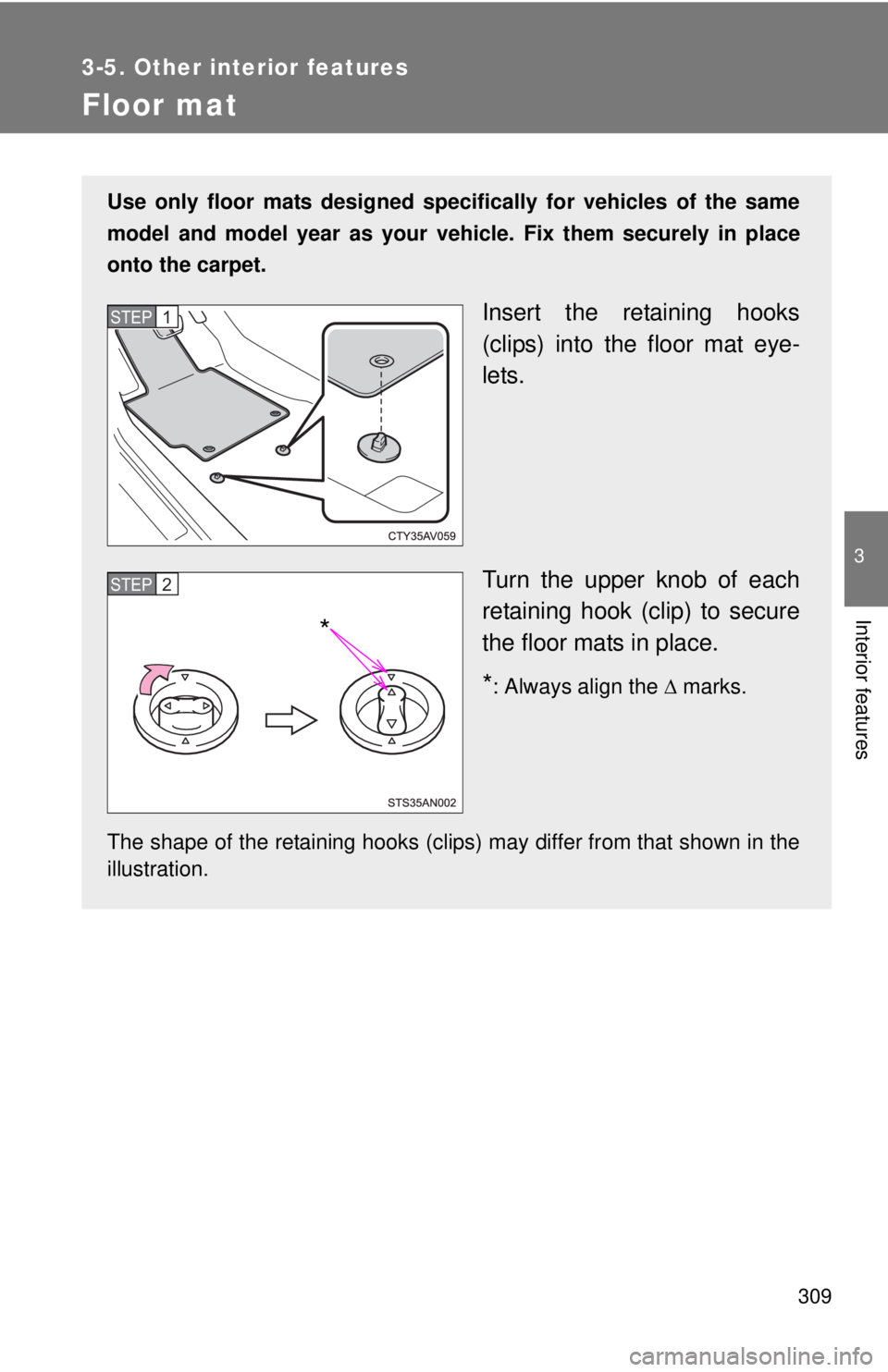
Floor mat
Use only floor mats designed specifically for vehicles of the same
model and model year as your vehicle. Fix them securely in place
onto the carpet.
Insert the retaining hooks
(clips) into the floor mat eye-
lets.
Turn the upper knob of each
retaining hook (clip) to secure
the floor mats in place.
*: Always align the marks.
The shape of the retaining hooks (clips) may differ from that shown in the
illustration.
STEP1
*
STEP2