ECU TOYOTA CAMRY HV 2012 Owner's Guide
[x] Cancel search | Manufacturer: TOYOTA, Model Year: 2012, Model line: CAMRY HV, Model: TOYOTA CAMRY HV 2012Pages: 536, PDF Size: 6.29 MB
Page 310 of 536
310 3-5. Other interior features
CAUTION
Observe the following precautions.
Failure to do so may cause the driver's floor mat to slip, possibly interfering
with the pedals while driving. An unexpectedly high speed may result or it may
become difficult to stop the vehicle, leading to a serious accident.
■When installing the driver's floor mat
●Do not use floor mats designed for other models or different model year
vehicles, even if they are Toyota Genuine floor mats.
● Only use floor mats designed for the driver's seat.
● Always install the floor mat securely using the retaining hooks (clips) pro-
vided.
● Do not use two or more floor mats on top of each other.
● Do not place the floor mat bottom-side up or upside-down.
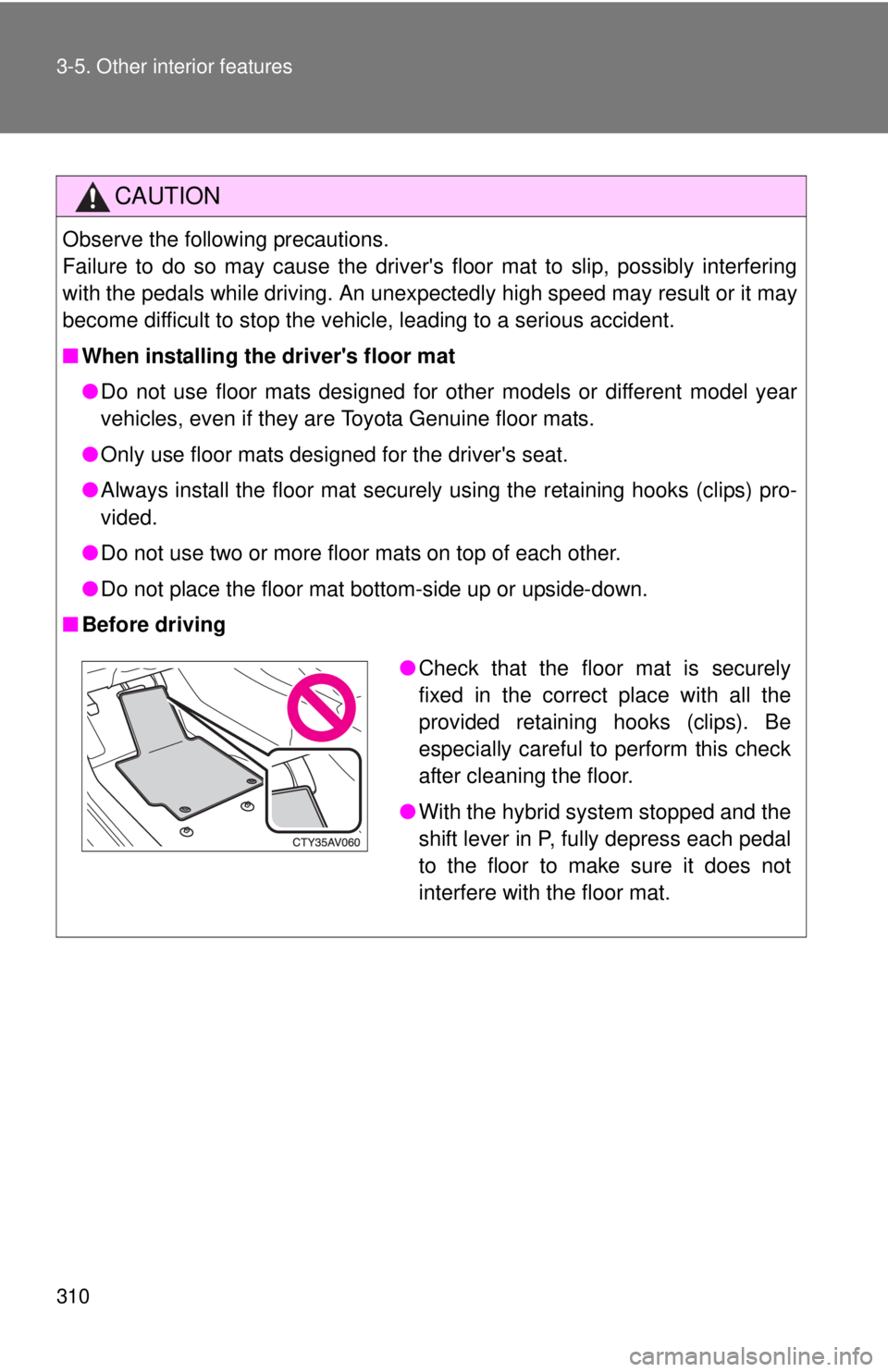
■ Before driving
●Check that the floor mat is securely
fixed in the correct place with all the
provided retaining hooks (clips). Be
especially careful to perform this check
after cleaning the floor.
● With the hybrid system stopped and the
shift lever in P, fully depress each pedal
to the floor to make sure it does not
interfere with the floor mat.
Page 313 of 536
313
3-5. Other interior features
3
Interior features
Garage door opener
The garage door opener (HomeLink Universal Transceiver) is manufac-
tured under license from HomeLink.
Programming HomeLink (for U.S. owners)
The HomeLink
compatible transceiver in your vehicle has 3 buttons
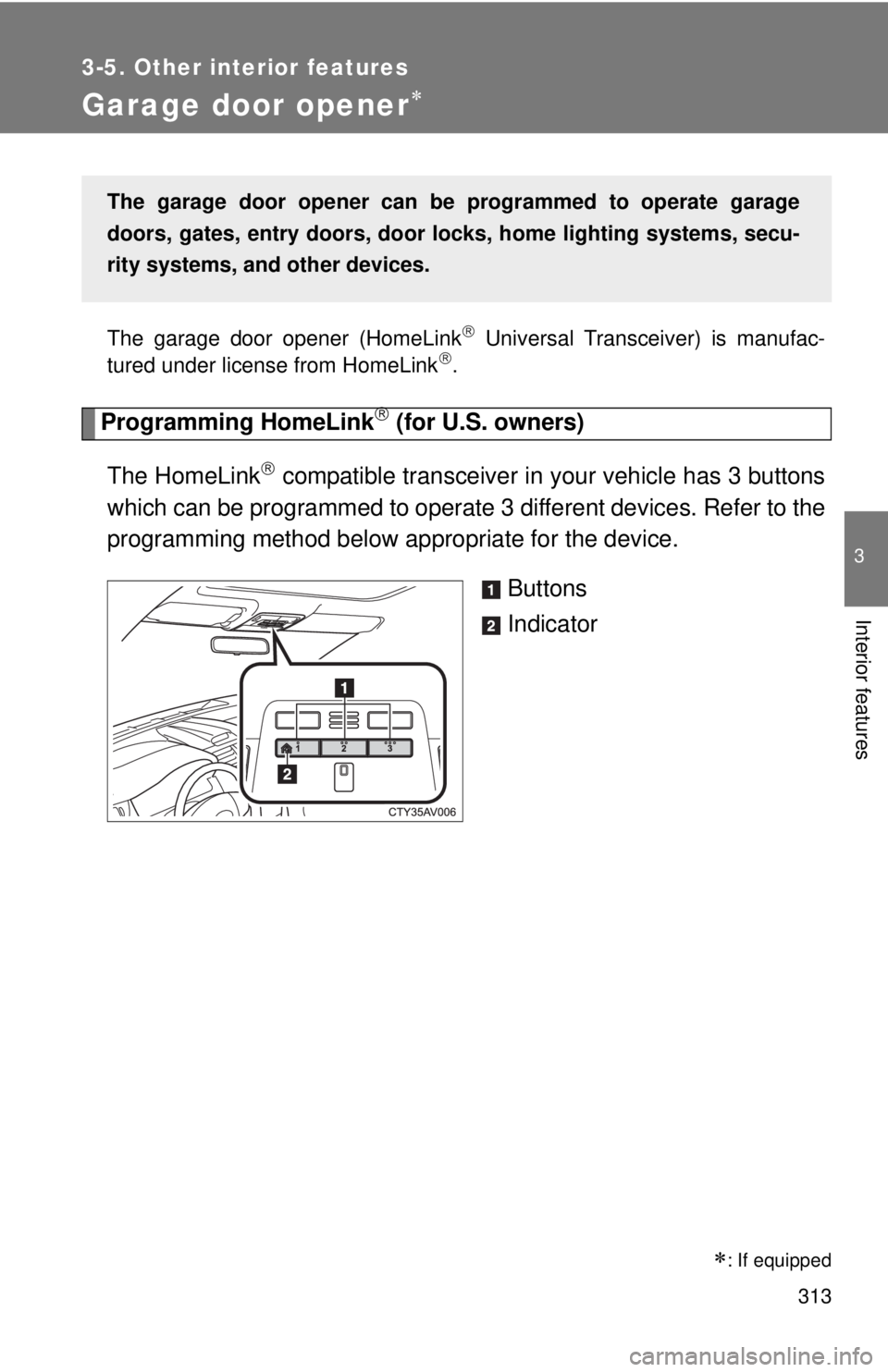
which can be programmed to operate 3 different devices. Refer to the
programming method below appropriate for the device.
Buttons
Indicator
The garage door opener can be programmed to operate garage
doors, gates, entry doors, door locks, home lighting systems, secu-
rity systems, and other devices.
: If equipped
Page 316 of 536
316 3-5. Other interior features
Press and hold the vehicle’s programmed HomeLink button
for 2 seconds and then releas e it. Repeat this step once
again. The garage door may open.
If the garage door opens, the programming process is complete. If
the door does not open, press and release the button a third time.
This third press and release will complete the programming process
by opening the garage door.
The ceiling mounted garage door opener motor should now recog-
nize the HomeLink
signal and operate the garage door.
Repeat the steps above to prog ram another rolling code sys-
tem for any of the remaining HomeLink buttons.
■ Programming an entry gate (for U.S. owners)/Programming a
device in the Canadian market
Place the remote control transmitter 1 to 3 in. (25 to 75 mm)
away from the HomeLink
buttons.
Keep the HomeLink indicator light in view while programming.
Press and hold the selected HomeLink button.
Repeatedly press and release (cycle) the remote control
transmitter for 2 seconds each until step 4 is completed.
When the HomeLink
indicator light starts to flash rapidly,
release the buttons.
Test the HomeLink
operation by pressing the newly pro-
grammed button. Check to see if the gate/device operates
correctly.
Repeat the steps above to program another device for any of
the remaining HomeLink
buttons.
■ Programming other devices
To program other devices such as home security systems, home
door locks or lighting, contact y our Toyota dealer for assistance.
■ Reprogramming a button
The individual HomeLink
buttons cannot be erased but can be
reprogrammed. To reprogram a button, follow the “Reprogramming
a HomeLink
button” instructions.
STEP3
STEP4
STEP1
STEP2
STEP3
STEP4
STEP5
STEP6
Page 323 of 536
323
3-5. Other interior features
3
Interior features
CAUTION
■
While driving the vehicle
Do not adjust the display. Adjust the display only when the vehicle is
stopped.
■ When doing the circling calibration
Secure a wide space, and watch out for people and vehicles in the vicinity.
Do not violate any local traffic rules while performing circling calibration.
NOTICE
■To avoid compass malfunctions
Do not place magnets or any metal objects near the inside rear view mirror.
Doing this may cause the compass sensor to malfunction.
■ To ensure normal operation of the compass
●Do not perform a circling calibration of the compass in a place where the
earth's magnetic field is subject to interference by artificial magnetic fields.
● During calibration, do not operate electric systems (moon roof, power win-
dows, etc.) as they may interfere with the calibration.
Page 324 of 536
324
3-5. Other interior features
Safety Connect
Safety Connect is a subscription-based telematics service that uses
Global Positioning System (GPS) data and embedded cellular tech-
nology to provide safety and security features to subscribers. Safety
Connect is supported by Toyota ’s designated response center,
which operates 24 hours per day, 7 days per week.
Safety Connect service is available by subscription on select,
telematics hardware-equipped vehicles.
By using the Safety Connect servi ce, you are agreeing to be bound
by the Telematics Subscription Serv ice Agreement and its Terms and
Conditions, as in effect and amende d from time to time, a current
copy of which is available at Toyota.com. All use of the Safety Con-
nect service is subject to such then-applicable Terms and Condi-
tions.
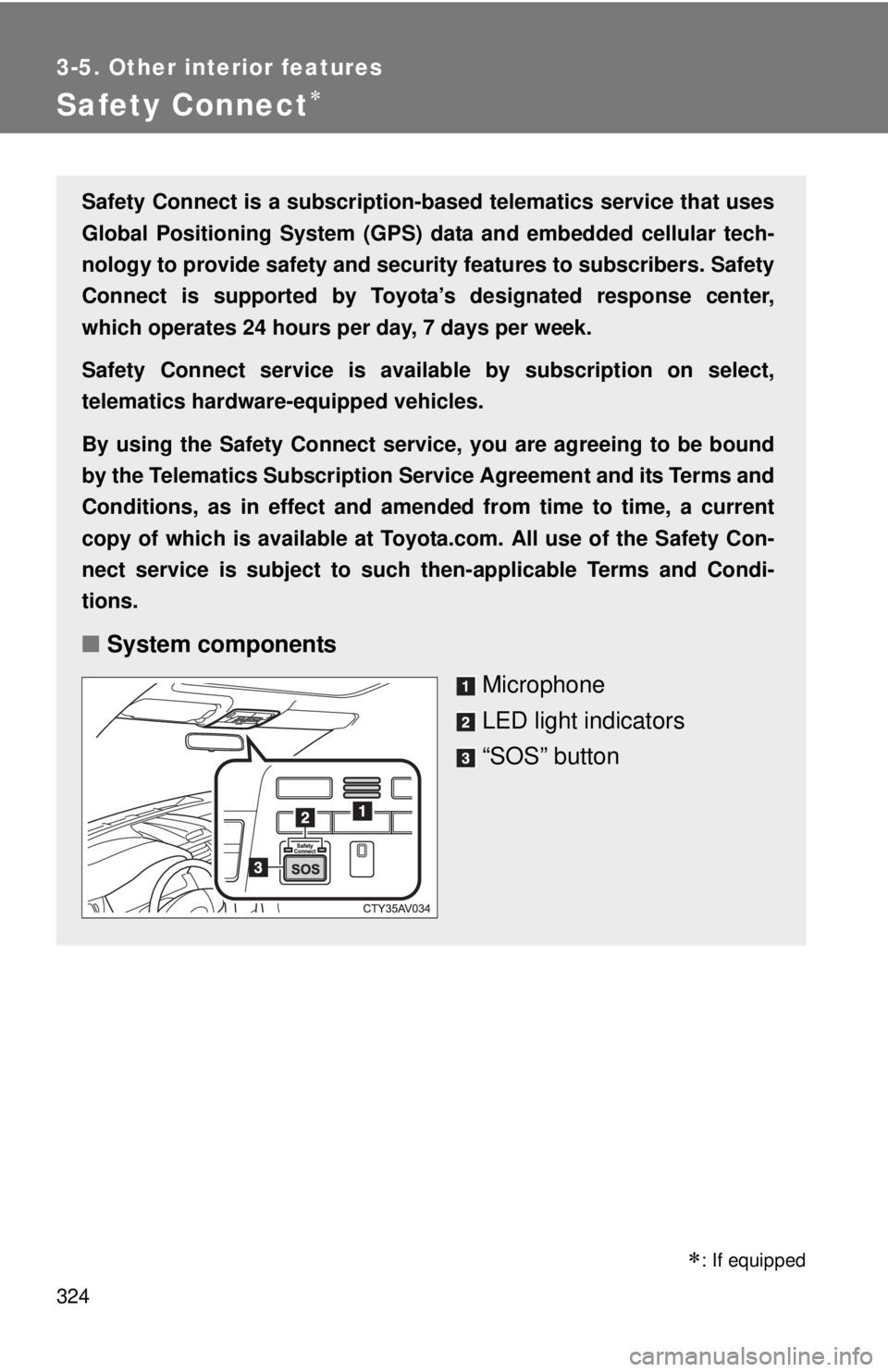
■ System components
Microphone
LED light indicators
“SOS” button
: If equipped
Page 341 of 536
341
4-2. Maintenance
4
Maintenance and care
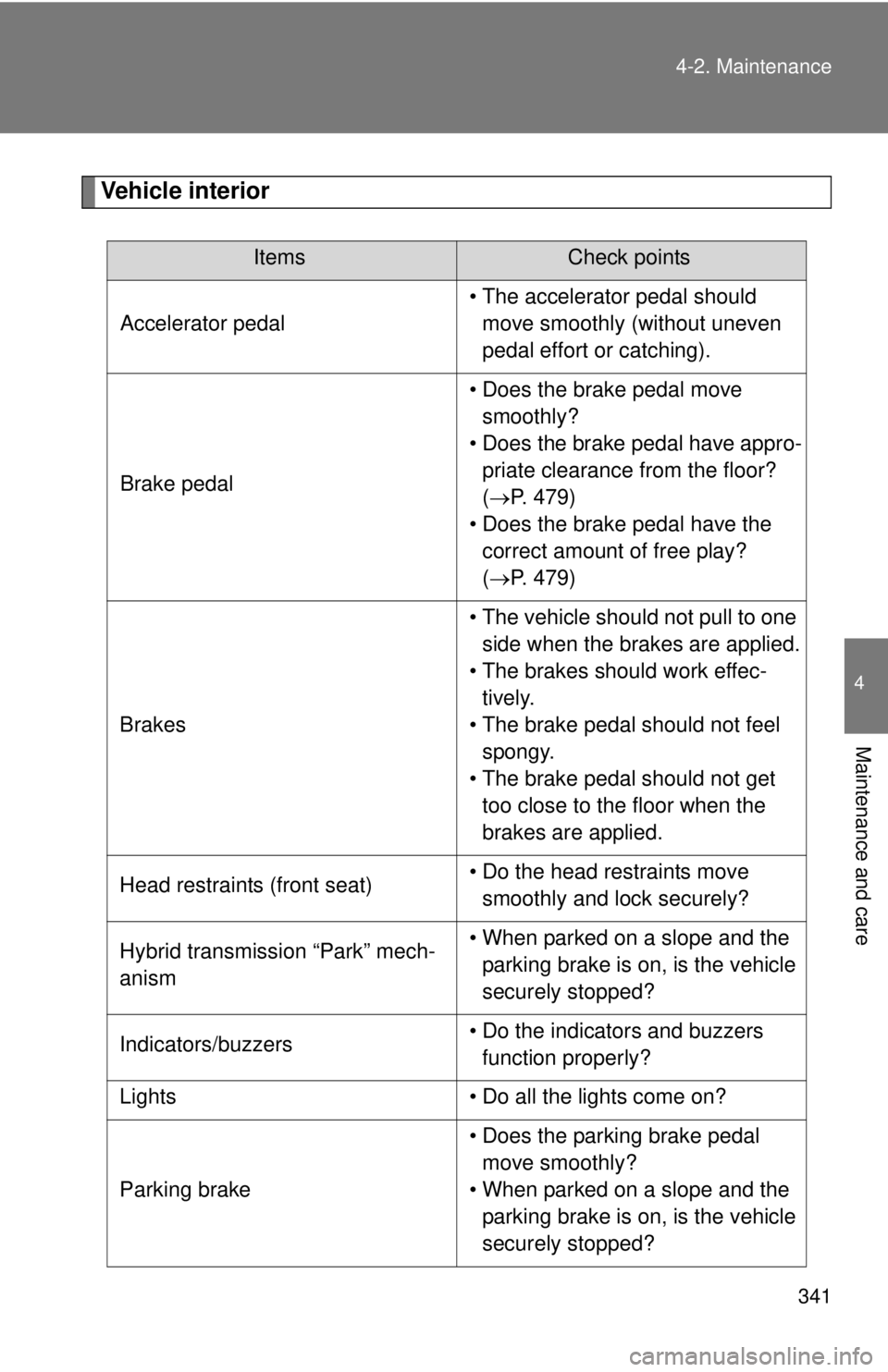
Vehicle interior
ItemsCheck points
Accelerator pedal • The accelerator pedal should
move smoothly (without uneven
pedal effort or catching).
Brake pedal • Does the brake pedal move
smoothly?
• Does the brake pedal have appro- priate clearance from the floor?
(P. 479)
• Does the brake pedal have the correct amount of free play?
(P. 479)
Brakes • The vehicle should not pull to one
side when the brakes are applied.
• The brakes should work effec- tively.
• The brake pedal should not feel spongy.
• The brake pedal should not get too close to the floor when the
brakes are applied.
Head restraints (front seat) • Do the head restraints move
smoothly and lock securely?
Hybrid transmission “Park” mech-
anism • When parked on a slope and the
parking brake is on, is the vehicle
securely stopped?
Indicators/buzzers • Do the indicators and buzzers
function properly?
Lights • Do all the lights come on?
Parking brake • Does the parking brake pedal
move smoothly?
• When parked on a slope and the parking brake is on, is the vehicle
securely stopped?
Page 361 of 536
361
4-3. Do-it-yourself maintenance
4
Maintenance and care
12-volt batter y
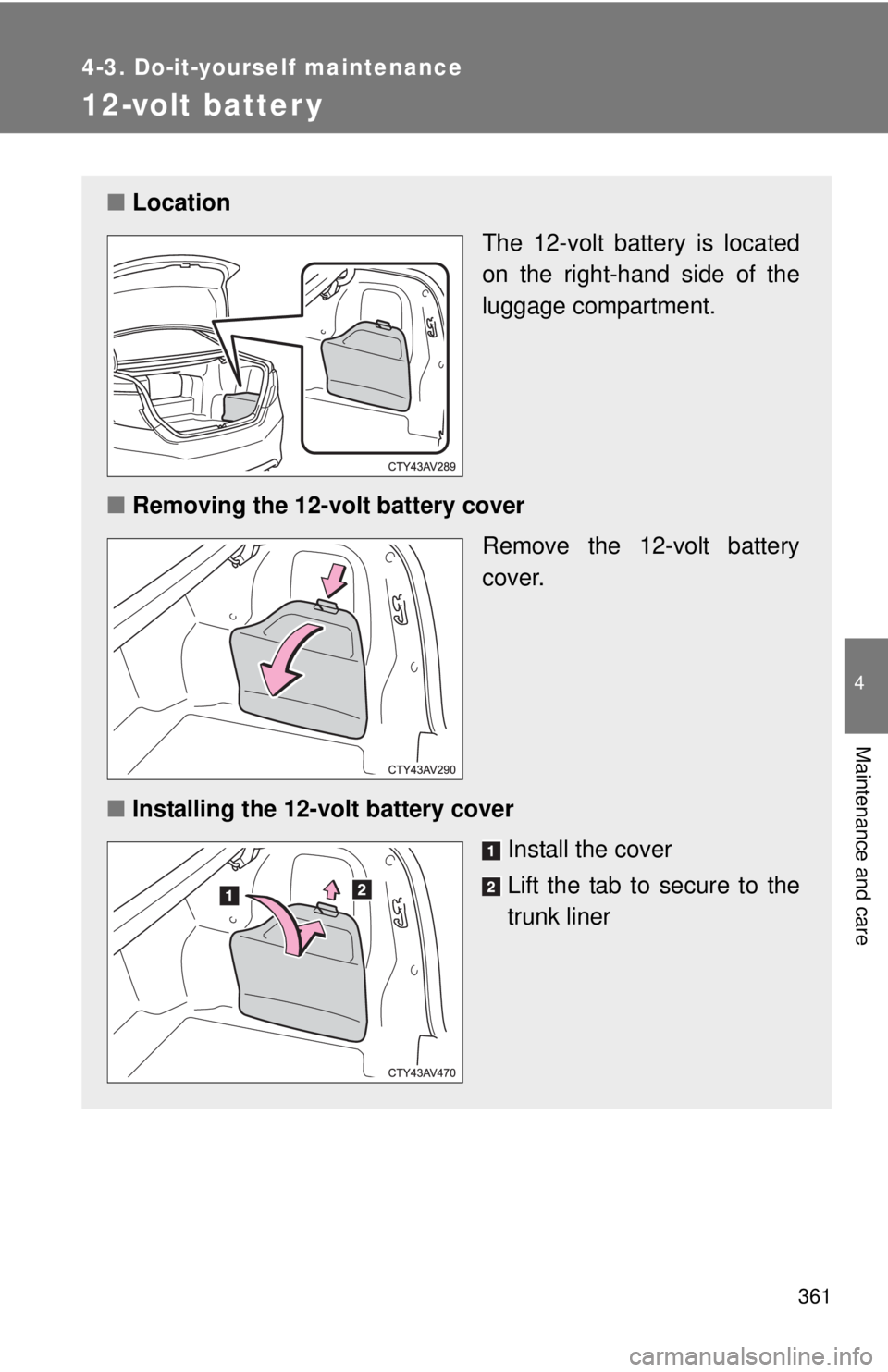
■Location
The 12-volt battery is located
on the right-hand side of the
luggage compartment.
■ Removing the 12-volt battery cover
Remove the 12-volt battery
cover.
■ Installing the 12-volt battery cover
Install the cover
Lift the tab to secure to the
trunk liner
Page 388 of 536

388 4-3. Do-it-yourself maintenance
13 R/B NO.250 A IGCT-MAIN, INV W/PMP
14 EPS 80 A Electric power steering
15 S-HORN 7.5 A S-HORN
16 DEICER 15 A No circuit
17 HORN 10 A Horns
18 EFI NO.2 15 AMultiport fuel injection system/
sequential multiport fuel injection
system
19 EFI NO.3 7.5 AMultiport fuel injection system/
sequential multiport fuel injection
system
20 INJ 7.5 AMultiport fuel injection system/
sequential multiport fuel injection
system
21 ECU-IG2 NO.3 7.5 A Multiport fuel injection system/
sequential multiport fuel injection
system, steering lock system,
hybrid system
22 IGN 15 A Starter system
23 D/L-AM2 20 A No circuit
24 IG2-MAIN 25 AIGN, INJ, METER-IG2, ECU-IG2
NO.3, A/B, ECU-IG2 NO.2, ECU-
IG2 NO.1
25 DC/DC-S 7.5 A Hybrid system
26 MAYDAY 5 A MAYDAY
27 TURN&HAZ 15 A Turn signal lights, emergency
flashers, gauge and meters
28 STRG LOCK 10 A Steering lock system
29 AMP 15 A Audio system
30 H-LP LH-LO 15 A
*1
Left-hand headlight (low beam)
20 A*2
FuseAmpereCircuit
Page 389 of 536
389
4-3. Do-it-yourself maintenance
4
Maintenance and care
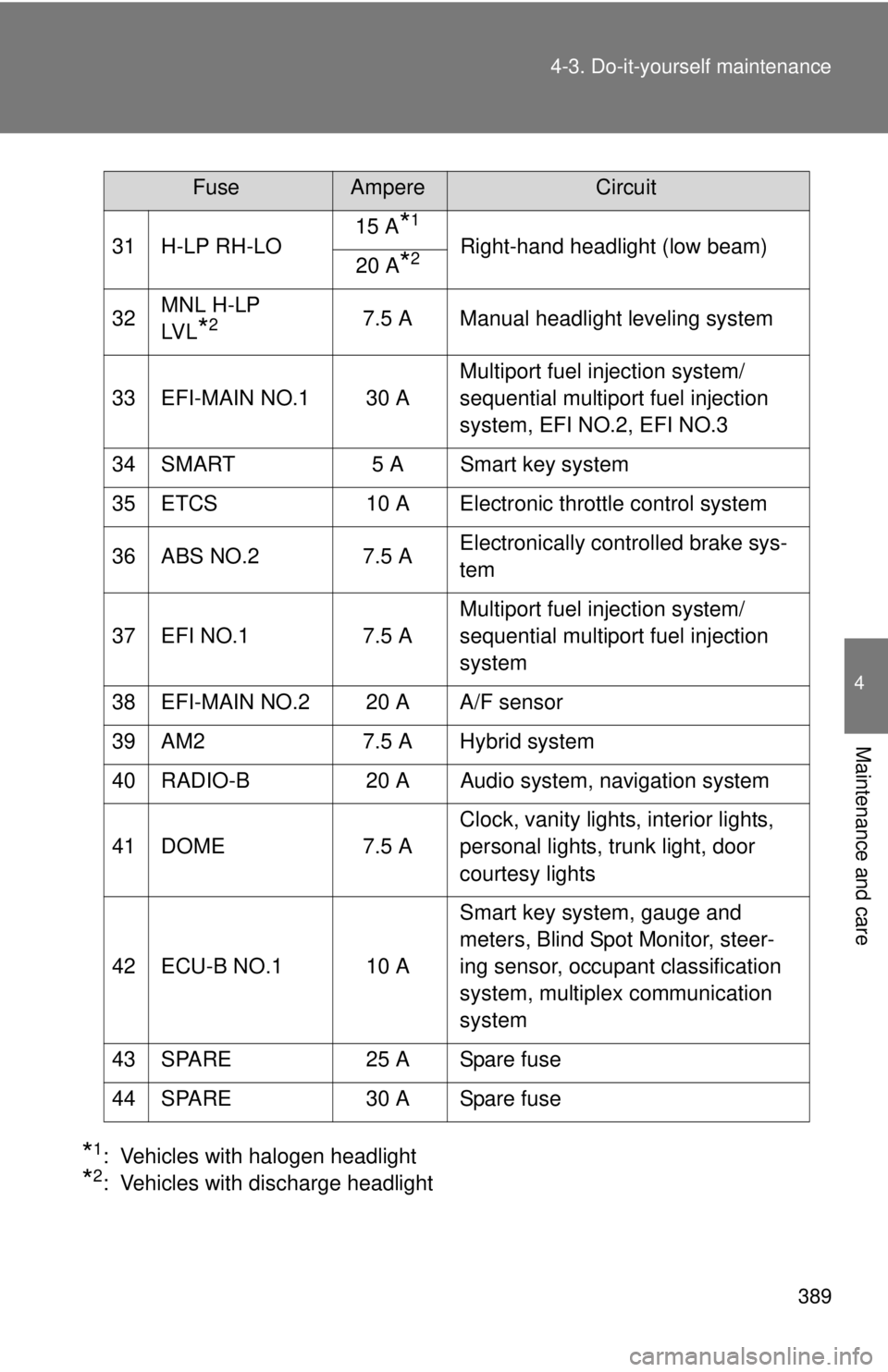
*1: Vehicles with halogen headlight
*2: Vehicles with discharge headlight
31 H-LP RH-LO
15 A
*1
Right-hand headlight (low beam)
20 A*2
32 MNL H-LP
LV L*27.5 A Manual headlight leveling system
33 EFI-MAIN NO.1 30 A Multiport fuel injection system/
sequential multiport fuel injection
system, EFI NO.2, EFI NO.3
34 SMART 5 A Smart key system
35 ETCS 10 A Electronic throttle control system
36 ABS NO.2 7.5 A Electronically controlled brake sys-
tem
37 EFI NO.1 7.5 A Multiport fuel injection system/
sequential multiport fuel injection
system
38 EFI-MAIN NO.2 20 A A/F sensor
39 AM2 7.5 A Hybrid system
40 RADIO-B 20 A Audio system, navigation system
41 DOME 7.5 A Clock, vanity lights, interior lights,
personal lights, trunk light, door
courtesy lights
42 ECU-B NO.1 10 A Smart key system, gauge and
meters, Blind Spot Monitor, steer-
ing sensor, occupant classification
system, multiplex communication
system
43 SPARE 25 A Spare fuse
44 SPARE 30 A Spare fuse
FuseAmpereCircuit
Page 391 of 536
391
4-3. Do-it-yourself maintenance
4
Maintenance and care
■
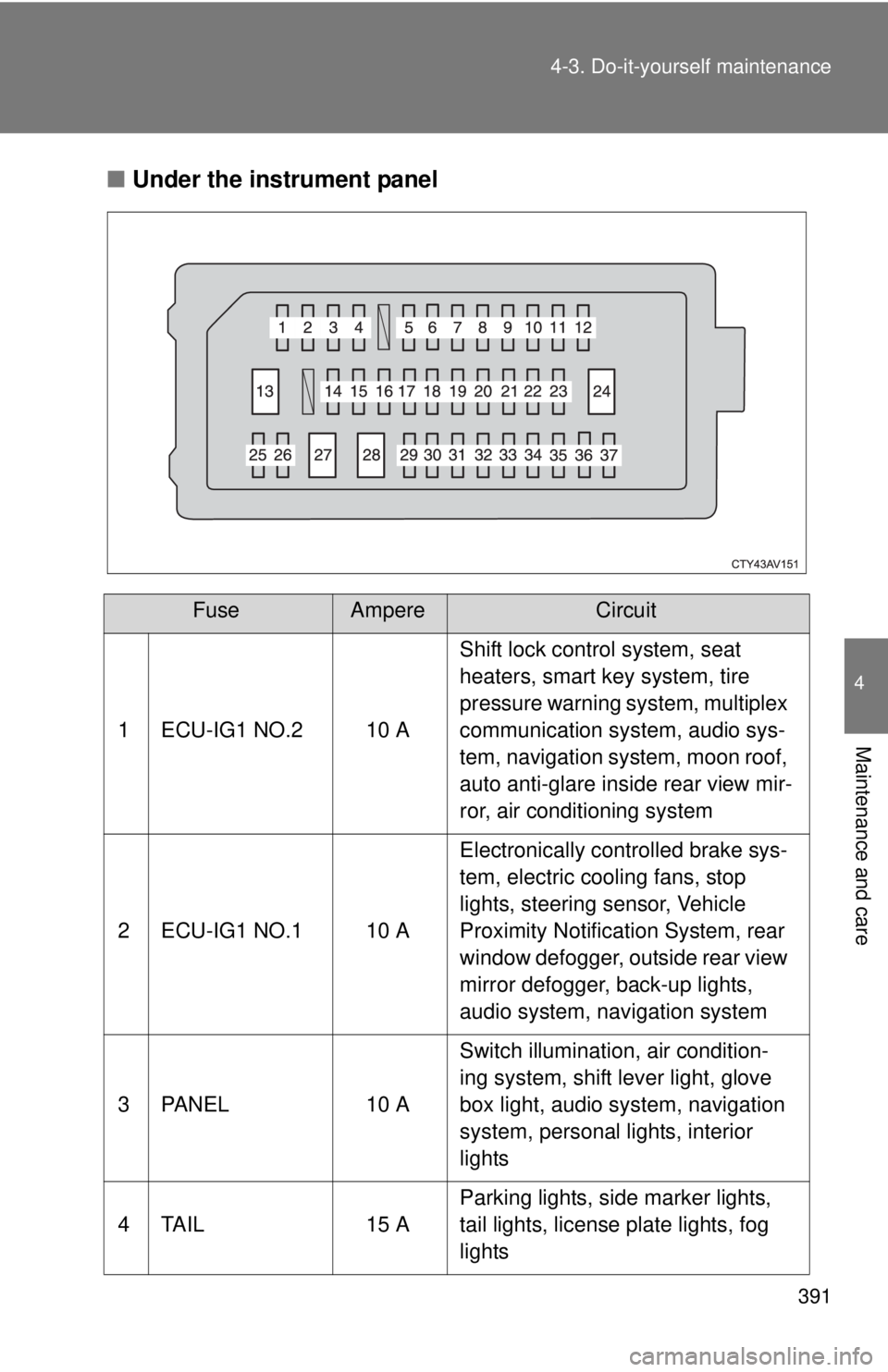
Under the instrument panel
FuseAmpereCircuit
1 ECU-IG1 NO.2 10 A Shift lock control system, seat
heaters, smart key system, tire
pressure warning system, multiplex
communication system, audio sys-
tem, navigation system, moon roof,
auto anti-glare inside rear view mir-
ror, air conditioning system
2 ECU-IG1 NO.1 10 A Electronically controlled brake sys-
tem, electric cooling fans, stop
lights, steering sensor, Vehicle
Proximity Notification System, rear
window defogger, outside rear view
mirror defogger, back-up lights,
audio system, navigation system
3 PANEL 10 A Switch illumination, air condition-
ing system, shift lever light, glove
box light, audio system, navigation
system, personal lights, interior
lights
4 TAIL 15 A Parking lights, side marker lights,
tail lights, license plate lights, fog
lights