audio TOYOTA CAMRY HV 2012 Owner's Manual
[x] Cancel search | Manufacturer: TOYOTA, Model Year: 2012, Model line: CAMRY HV, Model: TOYOTA CAMRY HV 2012Pages: 536, PDF Size: 6.29 MB
Page 161 of 536
161
2-1. Driving procedures
2
When driving
■
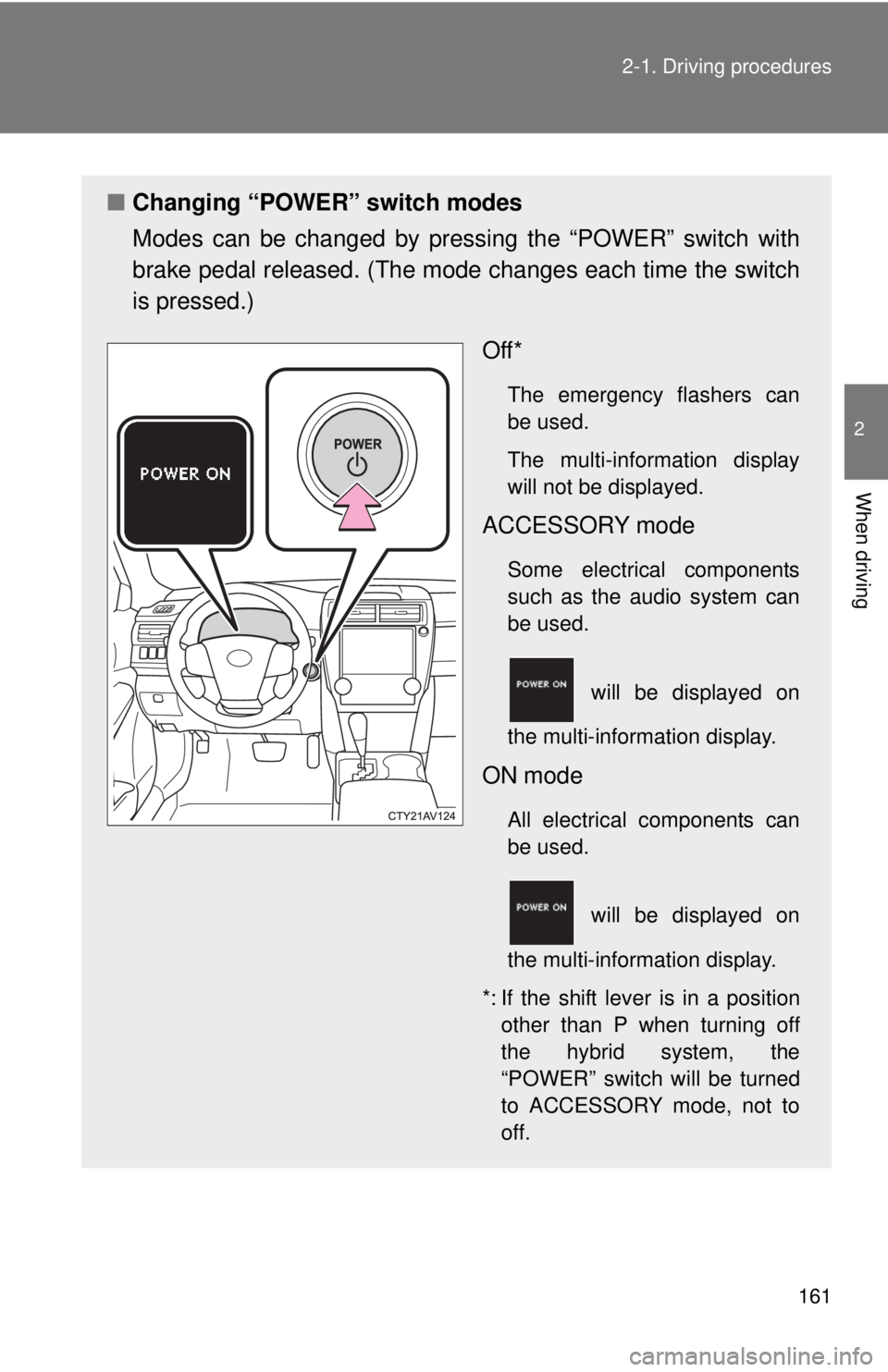
Changing “POWER” switch modes
Modes can be changed by pres sing the “POWER” switch with
brake pedal released. (The mode changes each time the switch
is pressed.)
Off*
The emergency flashers can
be used.
The multi-information display
will not be displayed.
ACCESSORY mode
Some electrical components
such as the audio system can
be used.
will be displayed on
the multi-information display.
ON mode
All electrical components can
be used.
will be displayed on
the multi-information display.
*: If the shift lever is in a position other than P when turning off
the hybrid system, the
“POWER” switch will be turned
to ACCESSORY mode, not to
off.
Page 231 of 536
Interior features3
231
3-1. Using the air conditioning system and defogger
Automatic air conditioning system ....... 232
Rear window and outside rear view mirror
defoggers ....................... 239
3-2. Using the audio system Audio system types .......... 240
Using the radio ................. 246
Using the CD player ......... 249
Playing back MP3 and WMA discs ..................... 255
Operating an iPod ............ 262
Operating a USB memory .......................... 270
Optimal use of the audio system ........................... 278
Using the AUX port .......... 281
Using the steering wheel audio switches ..... 283
3-3. Using the interior lights Interior lights list ............... 286
• Interior lights .................. 287
• Personal lights ............... 288 3-4. Using the storage features
List of storage features .... 289
• Glove box....................... 290
• Console box ................... 291
• Coin holder .................... 292
• Bottle holders ................. 293
• Cup holders ................... 294
• Auxiliary boxes ............... 296
3-5. Other interior features Sun visors ........................ 298
Vanity mirrors ................... 299
Clock ................................ 300
Outside temperature display............................ 301
Ashtray ............................. 302
Power outlets ................... 303
Seat heaters..................... 305
Armrest ............................ 307
Coat hooks ....................... 308
Floor mat .......................... 309
Trunk features .................. 311
Garage door opener......... 313
Compass .......................... 320
Safety Connect ................ 324
Page 240 of 536
240
3-2. Using the audio system
Audio system types
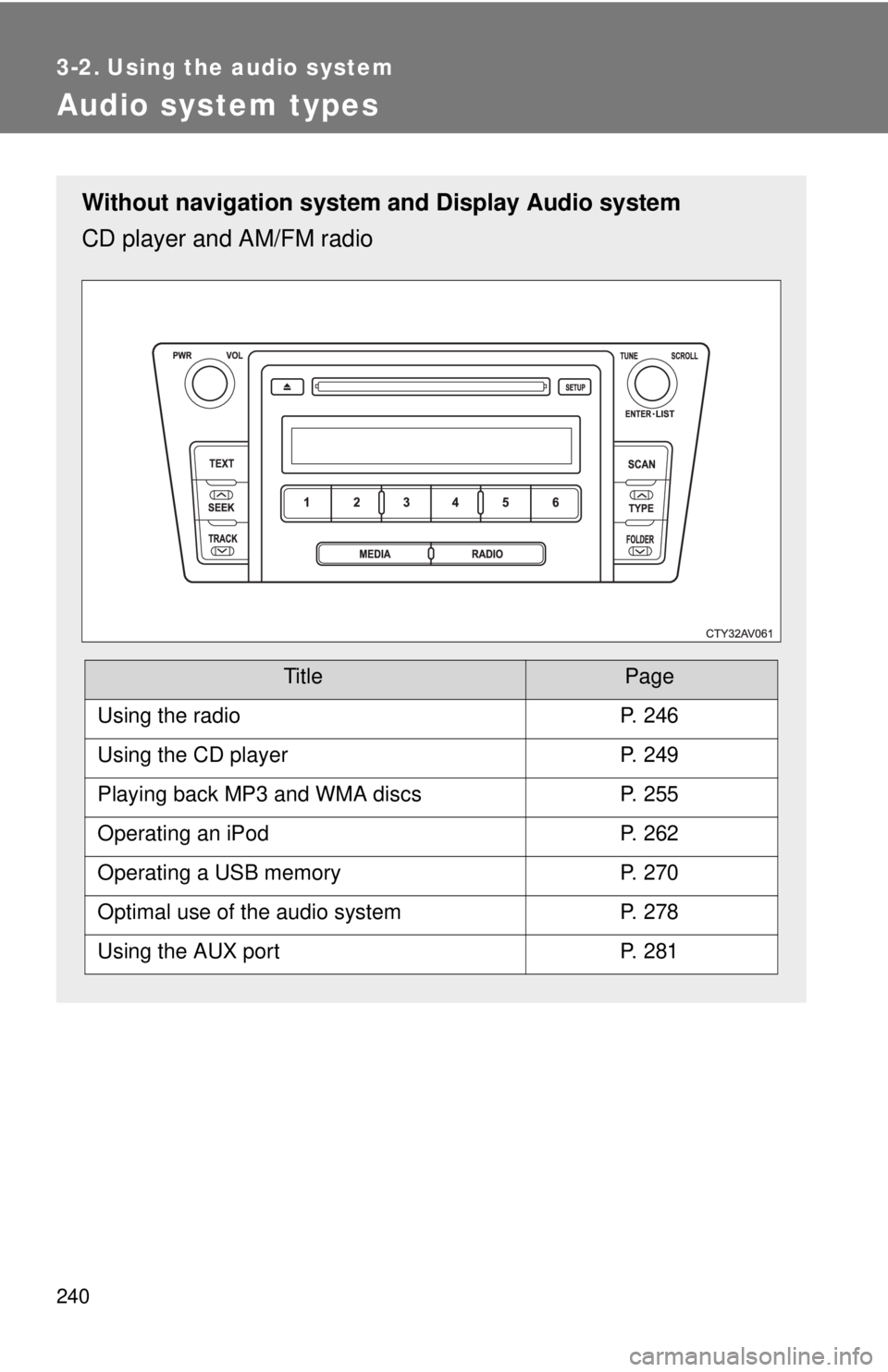
Without navigation system and Display Audio system
CD player and AM/FM radio
TitlePage
Using the radioP. 246
Using the CD playerP. 249
Playing back MP3 and WMA discsP. 255
Operating an iPodP. 262
Operating a USB memoryP. 270
Optimal use of the audio systemP. 278
Using the AUX portP. 281
Page 241 of 536
241
3-2. Using the audio system
3
Interior features
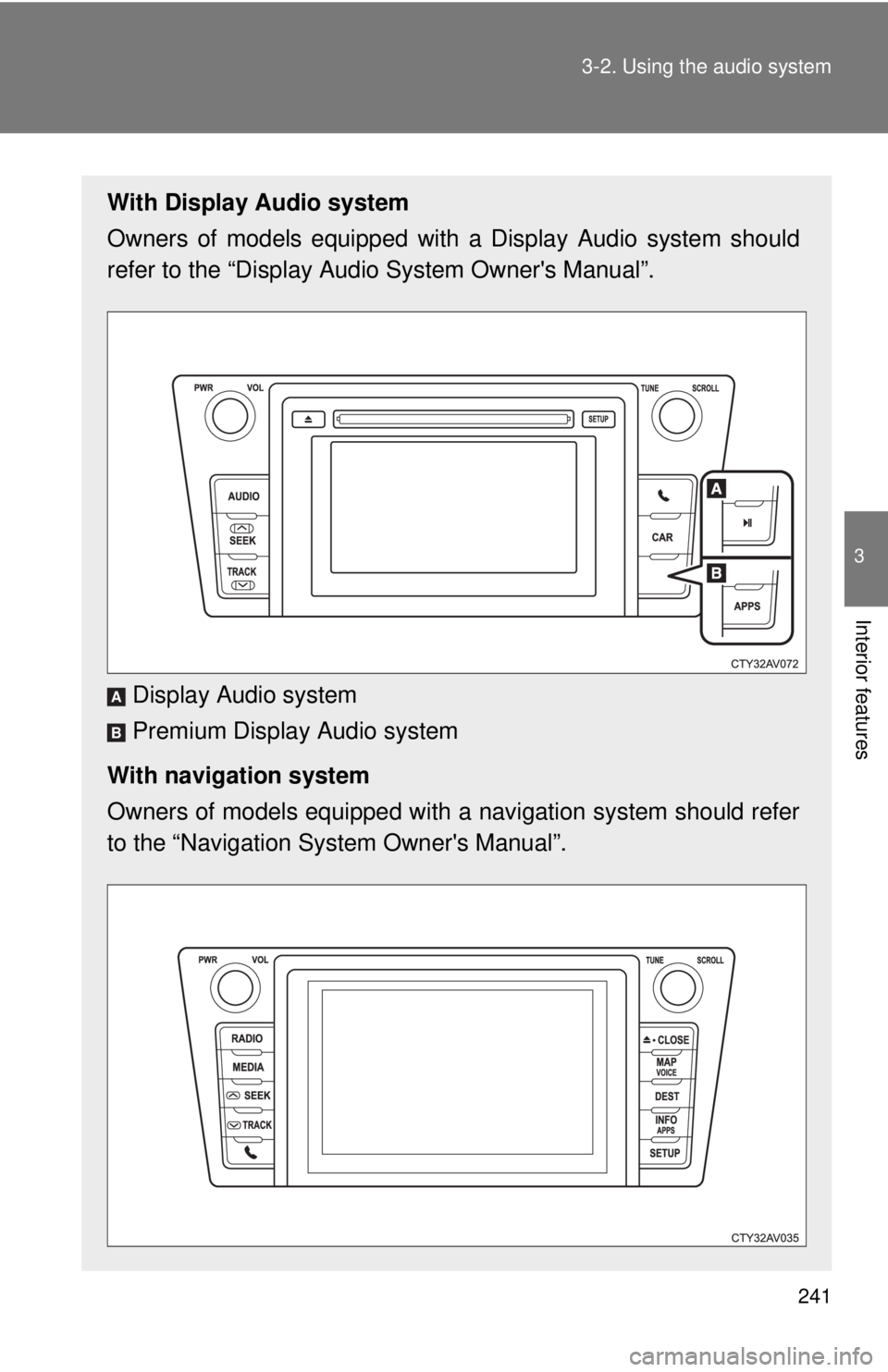
With Display Audio system
Owners of models equipped with
a Display Audio system should
refer to the “Display Audio System Owner's Manual”.
Display Audio system
Premium Display Audio system
With navigation system
Owners of models equipped with a navigation system should refer
to the “Navigation Sy stem Owner's Manual”.
A
B
Page 242 of 536
242 3-2. Using the audio system
■About Bluetooth® (with Display Audio system)
The Bluetooth wordmark and logo are owned by Bluetooth SIG. and permis-
sion has been granted to use the trademark of the licensee Panasonic Cor-
poration/Pioneer Corporation. Other trademarks and trade names are
owned by various different owners.
CAUTION
■ Certifications for the Bluetooth (with Display Audio system)
FCC ID: ACJ932CQ-US70G0
IC ID: 216J-CQUS70G0
FCC ID: AJDK032
IC ID: 775E-K032
● FCC WARNING:
Changes or modifications not expressly approved by the party responsible
for compliance could void the user's authority to operate the equipment.\
● Part 15 of the FCC Rules & Industry Canada licence-exempt RSS stan-
dard(s)
• Properly shielded a grounded cables and connectors must be used for
connection to host computer and/or peripherals in order to meet FCC
emission limits.
• This transmitter must not be co-located or operated in conjunction with any other antenna or transmitter.
• This device complies with Part 15 of FCC Rules and Industry Canada licence-exempt RSS standard(s). Operation is subject to the following
two conditions: (1) this device may not cause interference, and (2) this
device must accept any interference, including interference that may
cause undesired operation of this device.
• Le présent appareil est conforme aux la partie 15 des règles de la FCC et CNR d’Industrie Canada applicables aux appareils radio exempts de
licence. L’exploitation est autorisée aux deux conditions suivantes : (1)
l’appareil ne doit pas produire de brouillage, et (2) l’utilisateur de
l’appareil doit accepter tout brouillage radioélectrique subi, même si le
brouillage est susceptible d’en compromettre le fonctionnement.
Page 243 of 536
243
3-2. Using the audio system
3
Interior features
CAUTION
• This equipment complies with FCC/IC radiation exposure limits set
forth for an uncontrolled environment and meets the FCC radio fre-
quency (RF) Exposure Guidelines in Supplement C to OET65 and
RSS-102 of the IC radio frequency (R F) Exposure rules. This equip-
ment has very low levels of RF energy that it deemed to comply without
maximum permissive exposure evaluat ion (MPE). But it is desirable
that it should be installed and operated keeping the radiator at least 20
cm or more away from person’s body (excluding extremities: hands,
wrists, feet and ankles).
• Cet équipement est conforme aux limites d’exposition aux rayonnements énoncées pour un environnement non contrôlé et
respecte les règles les radioélectriques (RF) de la FCC lignes
directrices d’exposition dans le Supplément C à OET65 et d’exposition
aux fréquences radioélectriques (RF) CNR-102 de l’IC. Cet
équipement émet une énergie RF très faible qui est considérée
conforme sans évaluation de l’exposition maximale autorisée.
Cependant, cet équipement doit être installé et utilisé en gardant une
distance de 20 cm ou plus entre le dispositif rayonnant et le corps (à
l’exception des extrémités : mains, poignets, pieds et chevilles).
• Under Industry Canada regulations, this radio transmitter may only operate using an antenna of a type and maximum (or lesser) gain
approved for the transmitter by Industry Canada. To reduce potential
radio interference to other users, the antenna type and its gain should
be so chosen that the equivalent isotropically radiated power (e.i.r.p.) is
not more than that necessary for successful communication.
• Conformément à la réglementation d’Industrie Canada, le présent émetteur radio peut fonctionner avec une antenne d’un type et d’un
gain maximal (ou inférieur) approuvé pour l’émetteur par Industrie
Canada. Dans le but de réduire les risques de brouillage
radioélectrique à l’intention des autres utilisateurs, il faut \
choisir le type
d’antenne et son gain de sorte que la puissance isotrope rayonnée
équivalente (p.i.r.e.) ne dépasse pas l’intensité nécessaire à
l’établissement d’une communication satisfaisante.
Page 244 of 536
244 3-2. Using the audio system
CAUTION
●Laser products
• Do not take this unit apart or attempt to make any changes yourself.
This is an intricate unit that uses a laser pickup to retrieve information
from the surface of compact discs. The laser is carefully shielded so
that its rays remain inside the cabinet. Therefore, never try to disas-
semble the player or alter any of its parts since you may be exposed to
laser rays and dangerous voltages.
• This product utilizes a laser. Use of controls or adjustments or performance of procedures other
than those specified herein may result in hazardous radiation expo-
sure.
THE USE OF OPTICAL INSTRUMENTS WITH THIS PRODUCT WILL
INCREASE EYE HAZARD.
Page 245 of 536
245
3-2. Using the audio system
3
Interior features
NOTICE
■
To prevent 12-volt battery discharge
Do not leave the audio system on longer than necessary when the hybrid
system is off.
■ To avoid damaging the audio system
Take care not to spill drinks or other fluids over the audio system.
Page 246 of 536
246
3-2. Using the audio system
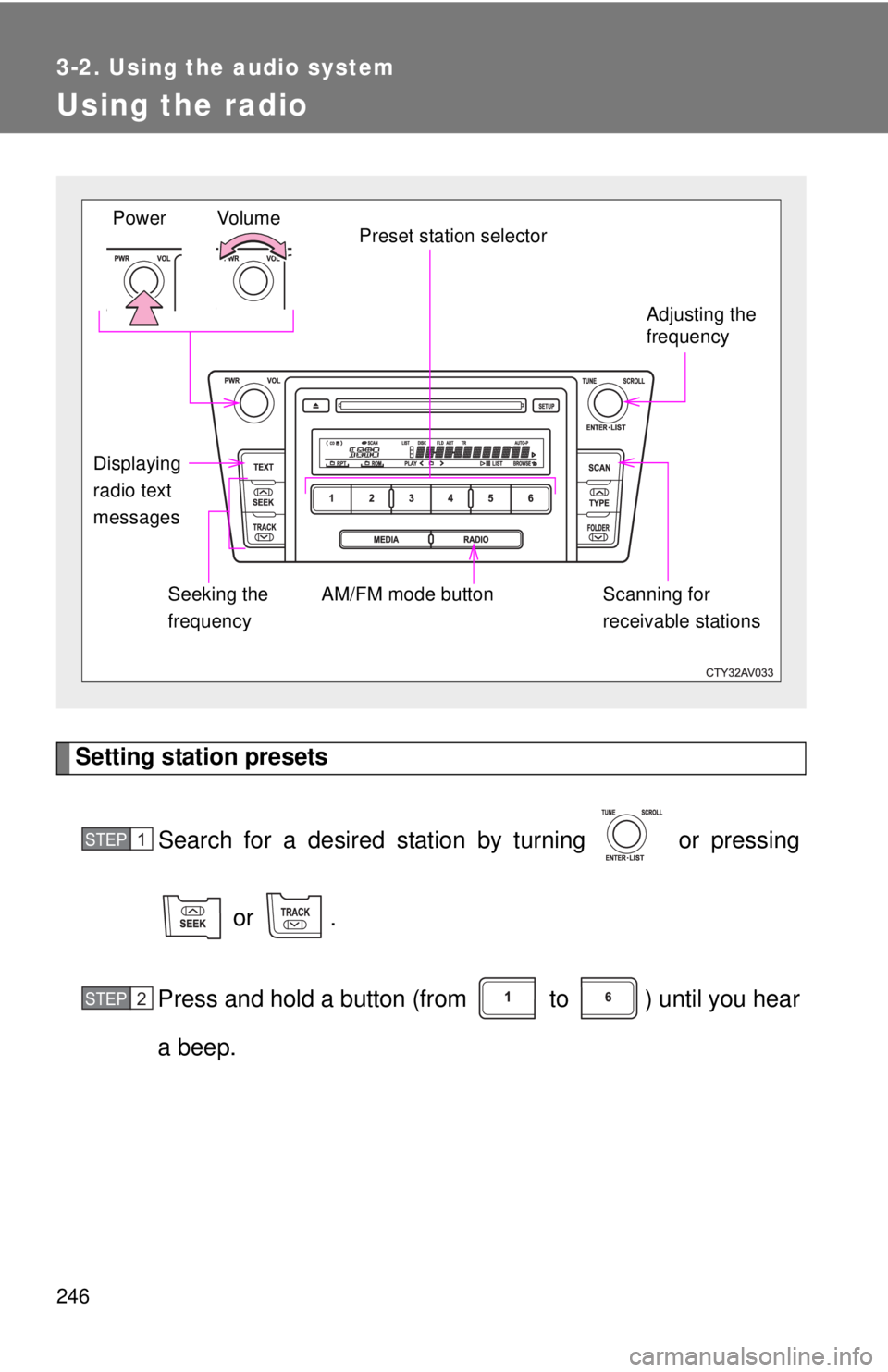
Using the radio
Setting station presetsSearch for a desired station by turning or pressing
or .
Press and hold a button (from to ) until you hear
a beep.
Vo lu m e Preset station selector
Seeking the
frequency Adjusting the
frequency
AM/FM mode button
Power
Displaying
radio text
messages Scanning for
receivable stations
STEP1
STEP2
Page 247 of 536
247
3-2. Using the audio system
3
Interior features
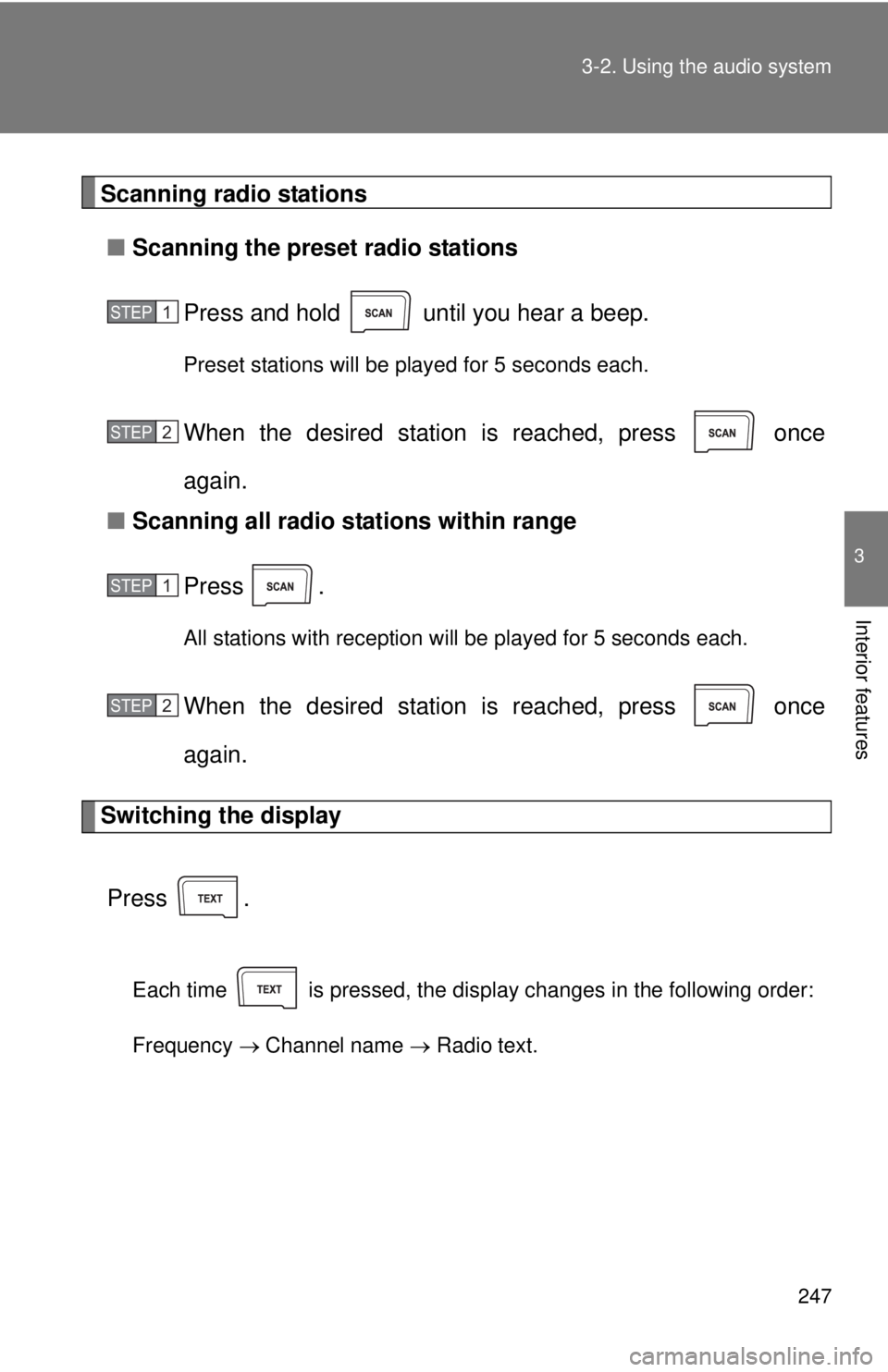
Scanning radio stations
■ Scanning the preset radio stations
Press and hold until you hear a beep.
Preset stations will be played for 5 seconds each.
When the desired station is reached, press once
again.
■ Scanning all radio stations within range
Press
.
All stations with reception will be played for 5 seconds each.
When the desired station is reached, press once
again.
Switching the display
Press .
Each time is pressed, the display changes in the following order:
Frequency Channel name Radio text.
STEP1
STEP2
STEP1
STEP2