audio TOYOTA CAMRY HV 2012 Repair Manual
[x] Cancel search | Manufacturer: TOYOTA, Model Year: 2012, Model line: CAMRY HV, Model: TOYOTA CAMRY HV 2012Pages: 536, PDF Size: 6.29 MB
Page 278 of 536
278
3-2. Using the audio system
Optimal use of the audio system
Using the audio control function■ Changing sound quality modes
Press .
Turn to select “SOUND”.
Press .
Turn to select the desired mode.
“BAS”, “TRE”, “FAD”, “BAL”, or “ASL”
Press .
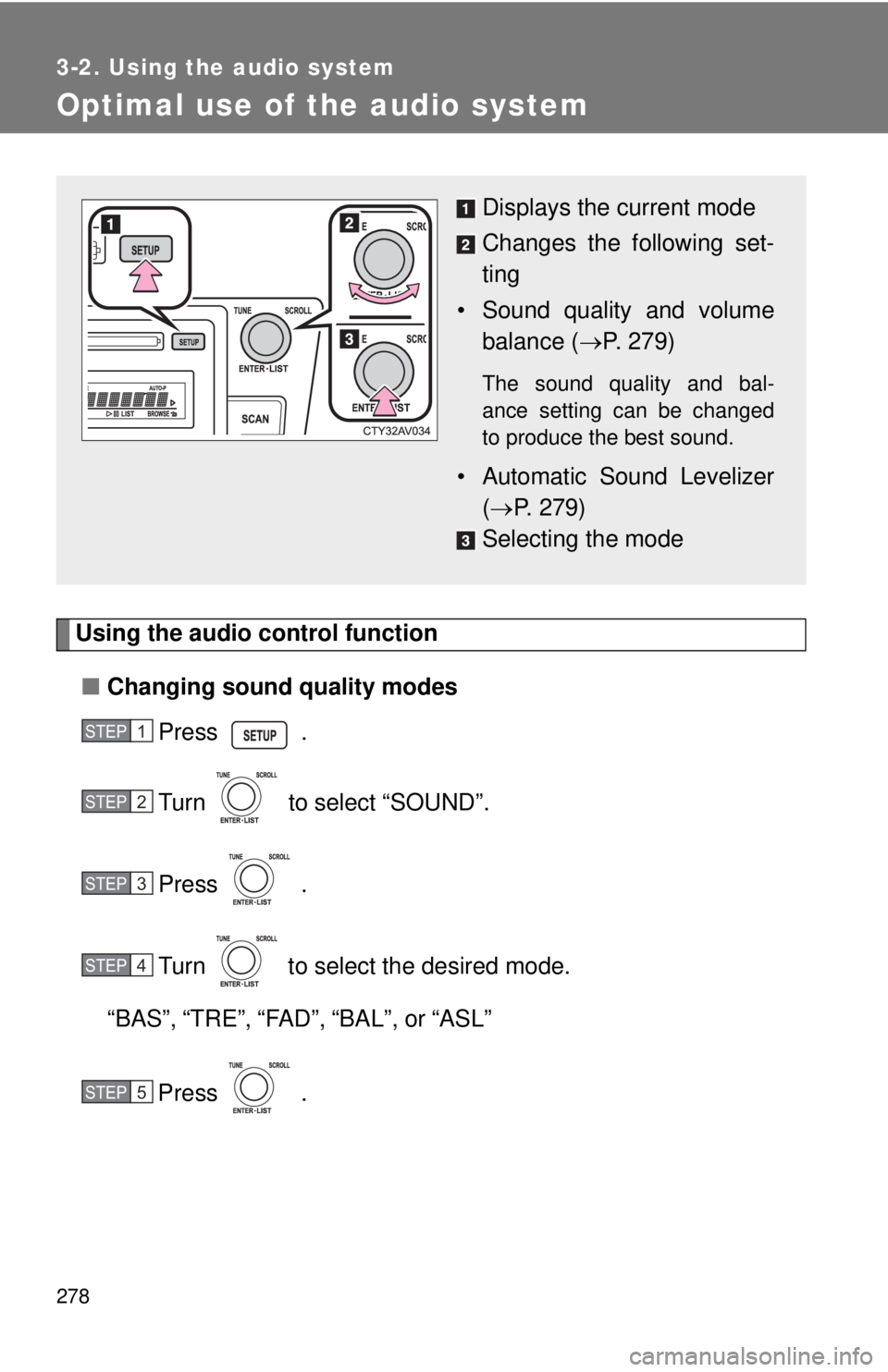
Displays the current mode
Changes the following set-
ting
• Sound quality and volume balance ( P. 279)
The sound quality and bal-
ance setting can be changed
to produce the best sound.
• Automatic Sound Levelizer
( P. 279)
Selecting the mode
STEP1
STEP2
STEP3
STEP4
STEP5
Page 279 of 536
279
3-2. Using the audio system
3
Interior features
■
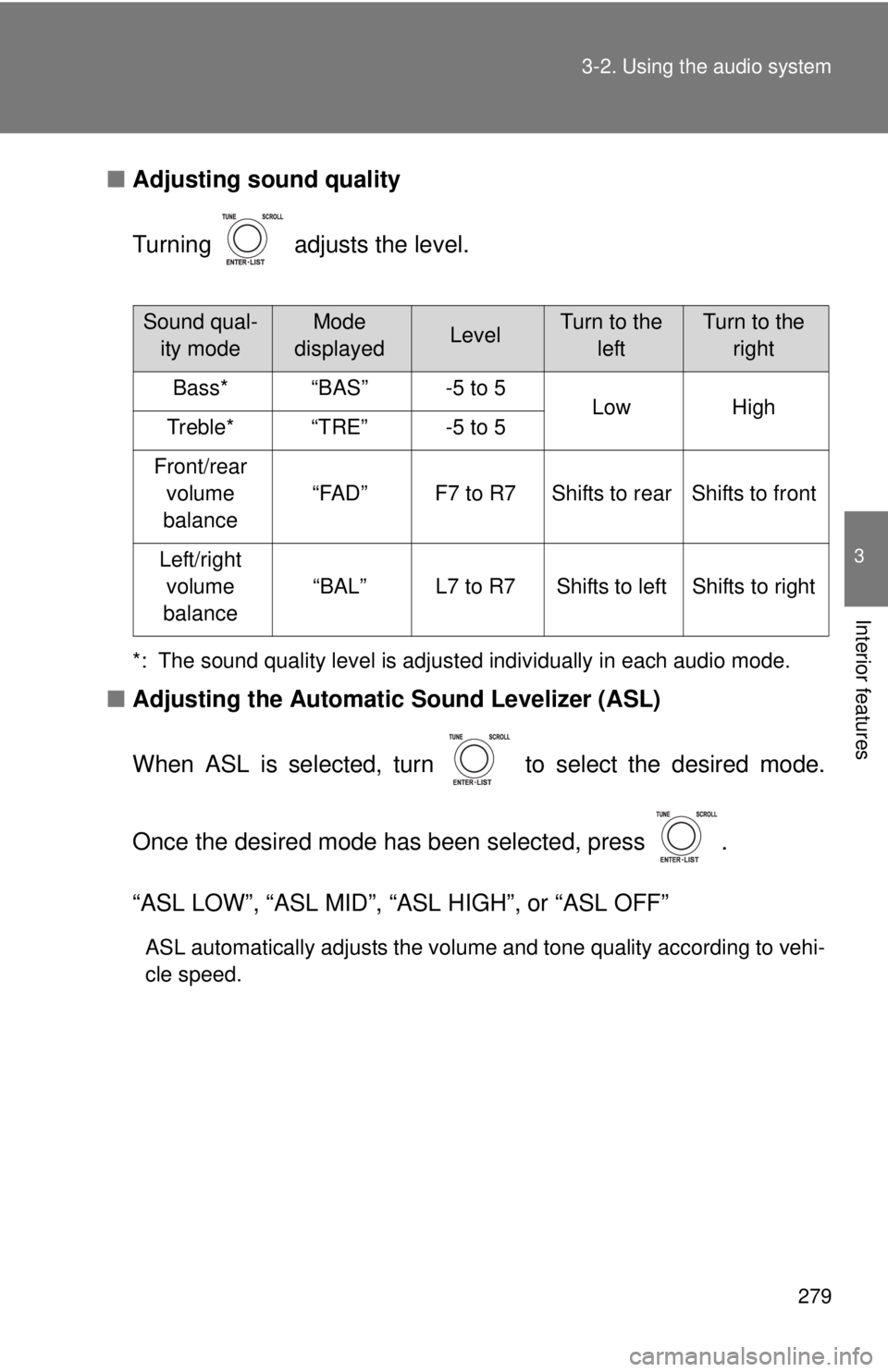
Adjusting sound quality
Turning adjusts the level.
*: The sound quality level is adjusted individually in each audio mode.
■Adjusting the Automatic Sound Levelizer (ASL)
When ASL is selected, turn to select the desired mode.
Once the desired mode has been selected, press .
“ASL LOW”, “ASL MID”, “ASL HIGH”, or “ASL OFF”
ASL automatically adjusts the volume and tone quality according to vehi-
cle speed.
Sound qual- ity modeMode
displayedLevelTurn to the leftTurn to the right
Bass*“BAS”-5 to 5LowHighTreble*“TRE”-5 to 5
Front/rear volume
balance
“FAD”F7 to R7Shifts to rearShifts to front
Left/right volume
balance
“BAL”L7 to R7Shifts to leftShifts to right
Page 280 of 536

280 3-2. Using the audio system
■Trademark owned by SRS Labs, Inc.
The audio systems utilize SRS FOCUS
® and SRS TruBass® audio
enhancement technologies, under license from SRS Labs, Inc., in all modes
except AM radio mode.
FOCUS, TruBass, SRS and
symbol are trademarks of SRS Labs,
Inc.
FOCUS and TruBass technologies are incorporated under license from
SRS Labs, Inc.
TruBass
® enhances the perception of bass frequencies to provide deep, rich
bass response from any size speaker.
SRS FOCUS
® raises the audio image from non-optimally placed speakers
up to the natural listening height at ear level.
Page 281 of 536
281
3-2. Using the audio system
3
Interior features
Using the AUX port
■Operating portable audio devices connected to the audio system
The volume can be adjusted using the vehicle's audio controls. All other
adjustments must be made on the portable audio device itself.
■ When using a portable audio devi ce connected to the power outlet
Noise may occur during playback. Use the power source of the portable
audio device.
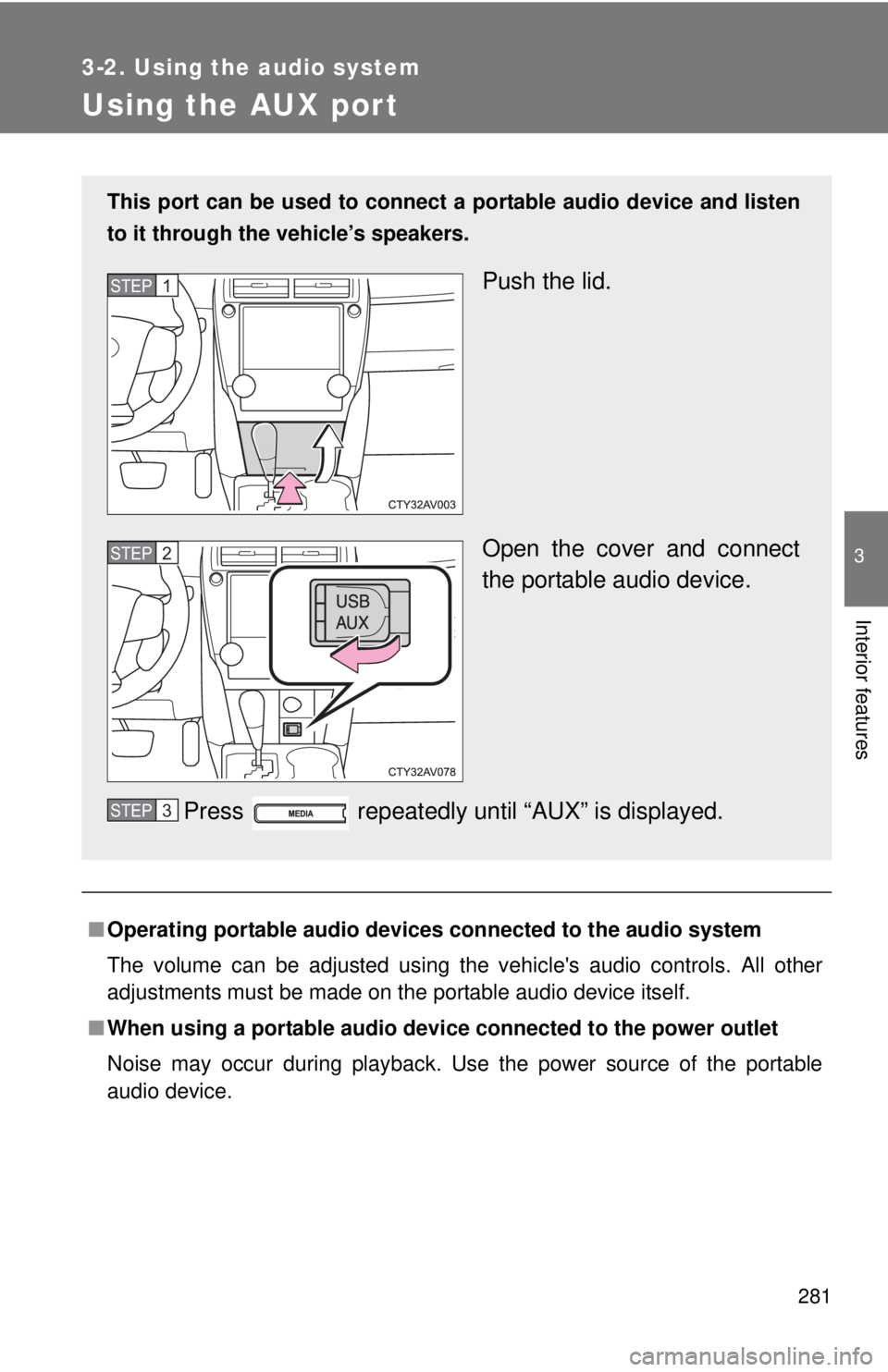
This port can be used to connect a portable audio device and listen
to it through the vehicle’s speakers.
Push the lid.
Open the cover and connect
the portable audio device.
Press repeatedly until “AUX” is displayed.STEP1
STEP2
STEP3
Page 282 of 536

282 3-2. Using the audio system
NOTICE
■If the auxiliary box lid cannot be fully closed
Depending on the size and shape of the portable audio device that is con-
nected to the system, the auxiliary box lid may not close fully. In this case, do
not forcibly close the lid as this may damage the portable audio device or the
terminal, etc.
Page 283 of 536
283
3-2. Using the audio system
3
Interior features
Using the steering wheel audio switches
Turning on the powerPress when the audio system is turned off.
Changing the audio source
Press when the audio system is turned on. The audio source
changes as follows each time is pressed.
AM FM1 FM2 CD mode iPod or USB memory mode AUX
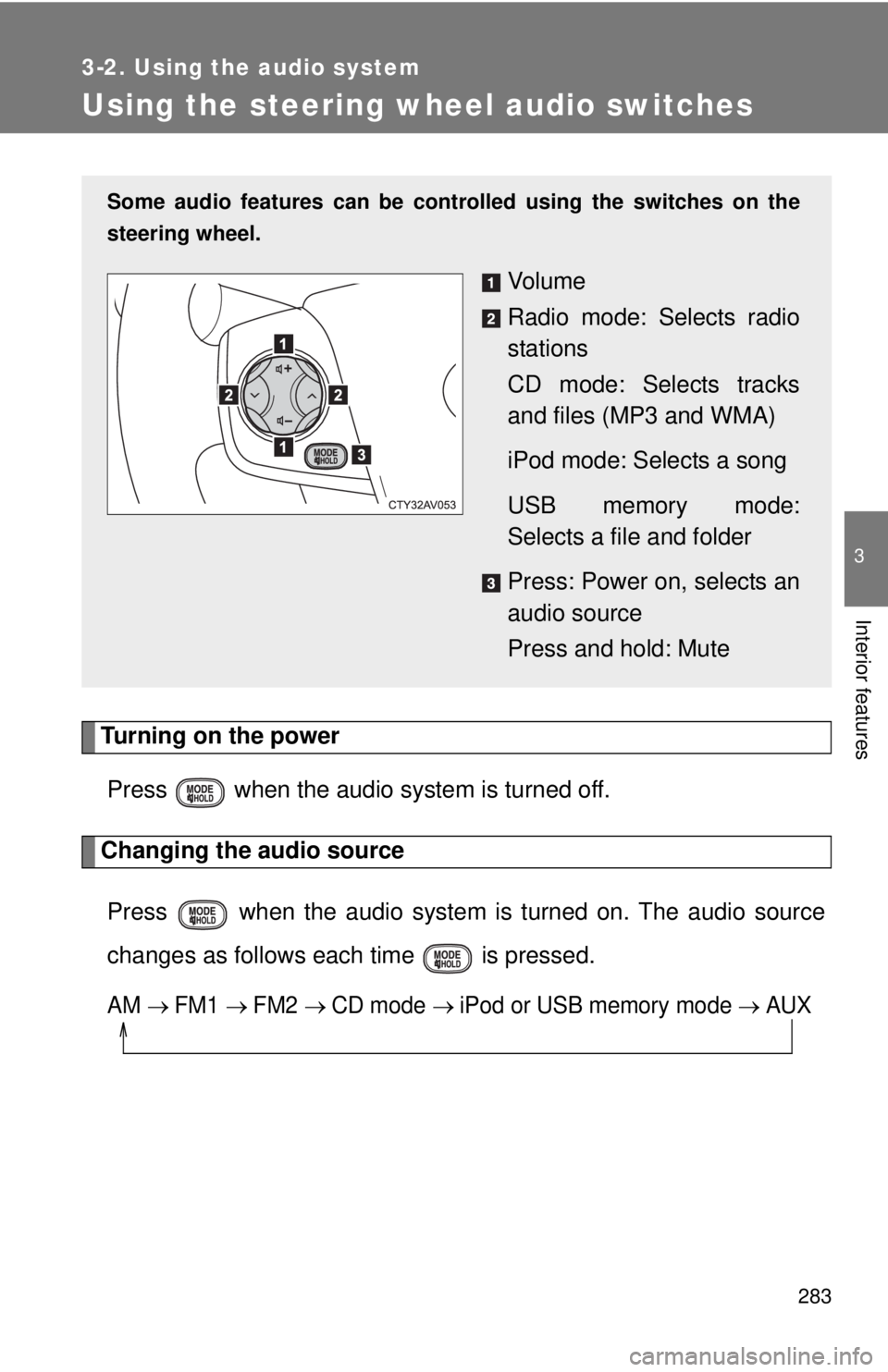
Some audio features can be cont rolled using the switches on the
steering wheel.
Vo l u m e
Radio mode: Selects radio
stations
CD mode: Selects tracks
and files (MP3 and WMA)
iPod mode: Selects a song
USB memory mode:
Selects a file and folder
Press: Power on, selects an
audio source
Press and hold: Mute
Page 284 of 536
284 3-2. Using the audio system
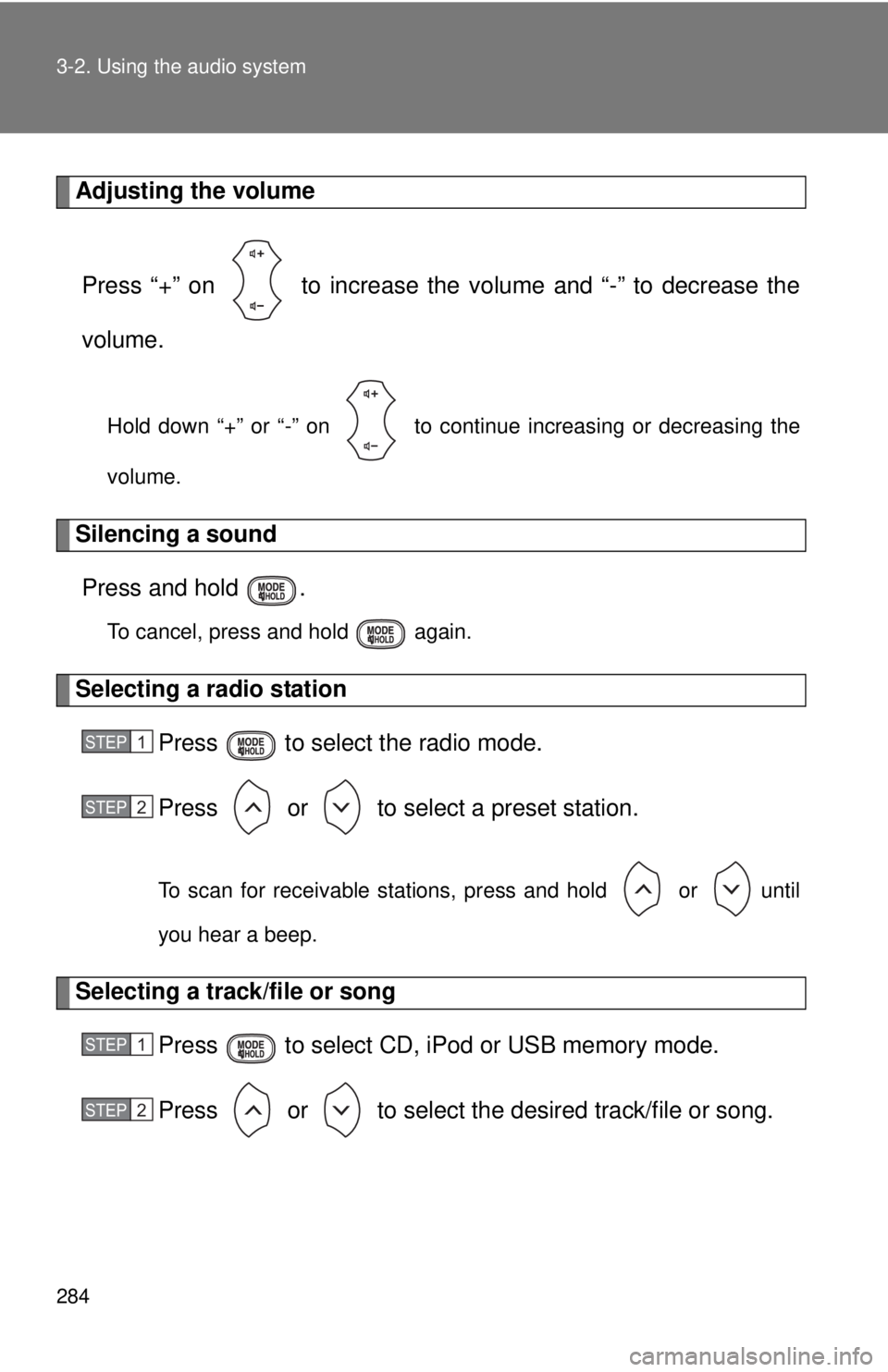
Adjusting the volumePress “+” on to increase the vo lume and “-” to decrease the
volume.
Hold down “+” or “-” on to continue increasing or decreasing the
volume.
Silencing a sound Press and hold .
To cancel, press and hold again.
Selecting a radio station Press to select the radio mode.
Press or to select a preset station.
To scan for receivable stations, press and hold or until
you hear a beep.
Selecting a track/file or songPress to select CD, iPod or USB memory mode.
Press or to select the desired track/file or song.
STEP1
STEP2
STEP1
STEP2
Page 285 of 536

285
3-2. Using the audio system
3
Interior features
Selecting a folder (MP3 and WMA or USB memory)
Press to select CD or USB memory mode.
Press and hold or until you hear a beep.
CAUTION
■To reduce the risk of an accident
Exercise care when operating the audio switches on the steering wheel.
STEP1
STEP2
Page 337 of 536

337
4-1. Maintenance and care
4
Maintenance and care
NOTICE
■
Cleaning detergents
●Do not use the following types of detergent, as they may discolor the vehi-
cle interior or cause streaks or damage to painted surfaces:
• Non-seat portions: Organic substances such as benzene or gasoline,
alkaline or acidic solutions, dye, and bleach
• Seats: Alkaline or acidic solutions, such as thinner, benzene, and alco- hol
● Do not use polish wax or polish cleaner. The instrument panel's or other
interior part’s painted surface may be damaged.
■ Preventing damage to leather surfaces
Observe the following precautions to avoid damage to and deterioration o\
f
leather surfaces:
●Remove any dust or dirt from leather surfaces immediately.
● Do not expose the vehicle to direct sunlight for extended periods of time.
Park the vehicle in the shade, especially during summer.
● Do not place items made of vinyl, plastic, or containing wax on the uphol-
stery, as they may stick to the leather surface if the vehicle interior heats
up significantly.
■ Water on the floor
Do not wash the vehicle floor with water.
Vehicle systems such as the audio system may be damaged if water comes
into contact with electrical components such as the audio system above or
under the floor of the vehicle. Water may also cause the body to rust.
■ Cleaning the inside of the rear window
●Do not use glass cleaner to clean the rear window, as this may cause
damage to the rear window defogger heater wires or antenna. Use a cloth
dampened with lukewarm water to gently wipe the window clean. Wipe the
window in strokes running parallel to the heater wires or antenna.
● Be careful not to scratch or damage the heater wires or antenna.
Page 388 of 536

388 4-3. Do-it-yourself maintenance
13 R/B NO.250 A IGCT-MAIN, INV W/PMP
14 EPS 80 A Electric power steering
15 S-HORN 7.5 A S-HORN
16 DEICER 15 A No circuit
17 HORN 10 A Horns
18 EFI NO.2 15 AMultiport fuel injection system/
sequential multiport fuel injection
system
19 EFI NO.3 7.5 AMultiport fuel injection system/
sequential multiport fuel injection
system
20 INJ 7.5 AMultiport fuel injection system/
sequential multiport fuel injection
system
21 ECU-IG2 NO.3 7.5 A Multiport fuel injection system/
sequential multiport fuel injection
system, steering lock system,
hybrid system
22 IGN 15 A Starter system
23 D/L-AM2 20 A No circuit
24 IG2-MAIN 25 AIGN, INJ, METER-IG2, ECU-IG2
NO.3, A/B, ECU-IG2 NO.2, ECU-
IG2 NO.1
25 DC/DC-S 7.5 A Hybrid system
26 MAYDAY 5 A MAYDAY
27 TURN&HAZ 15 A Turn signal lights, emergency
flashers, gauge and meters
28 STRG LOCK 10 A Steering lock system
29 AMP 15 A Audio system
30 H-LP LH-LO 15 A
*1
Left-hand headlight (low beam)
20 A*2
FuseAmpereCircuit