warning TOYOTA CAMRY HV 2012 Owner's Manual
[x] Cancel search | Manufacturer: TOYOTA, Model Year: 2012, Model line: CAMRY HV, Model: TOYOTA CAMRY HV 2012Pages: 536, PDF Size: 6.29 MB
Page 185 of 536
185
2-2. Instrument cluster
2
When driving
Multi-information display
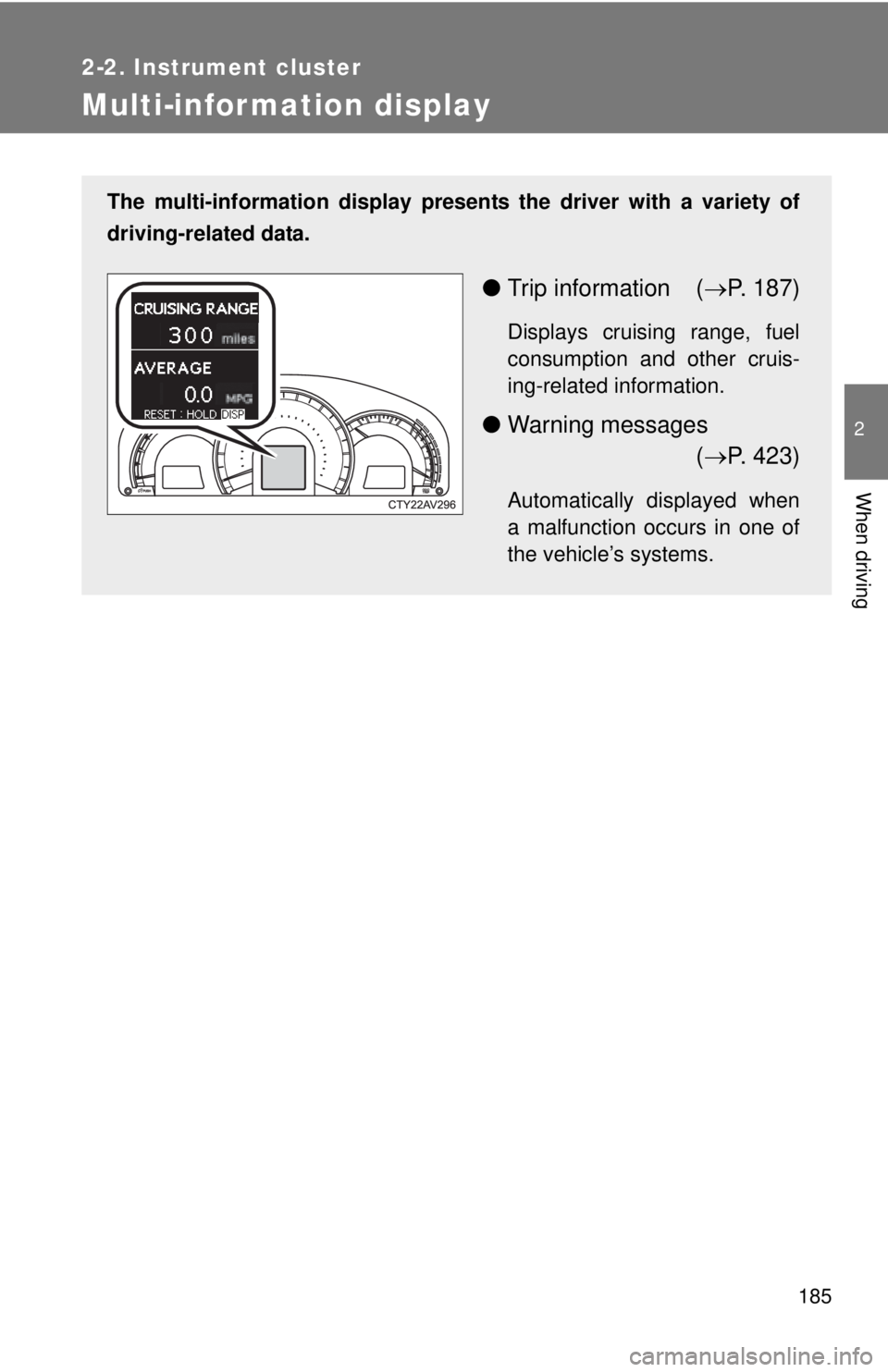
The multi-information display presents the driver with a variety of
driving-related data.
● Trip information ( P. 187)
Displays cruising range, fuel
consumption and other cruis-
ing-related information.
● Warning messages
( P. 423)
Automatically displayed when
a malfunction occurs in one of
the vehicle’s systems.
Page 218 of 536
218 2-4. Using other driving systems
●Instances of the Blind Spot Monitor unnecessarily detecting a vehicle
and/or object may increase under the following conditions:
• When there is only a short distance between your vehicle and a guard-
rail, wall etc.
• When there is only a short distance between your vehicle and a follow- ing vehicle.
• When vehicle lanes are narrow and a vehicle driving 2 lanes across from your vehicle enters the detection area
■ The outside rear view mirror indicators visibility
When under strong sunlight, the outside rear view mirror indicator may be
difficult to see.
■ When there is a malfunction in the system
If a system malfunction is detected due to any of the following reasons,
warning messages will be displayed: ( P. 425)
● There is a malfunction with the sensors
● The sensors have become dirty
● The outside temperature is extremely high or low
● The sensor voltage has become abnormal
■ Certification for the BSM
FCC ID: OAYBSDTX
This device complies with part 15 of the FCC Rules. Operation is subject to
the following three conditions:
(1) This device may not cause harmful interference.
(2) This device must accept any interference received, including interference
that may cause undesired operation.
(3) This device may only work when the vehicle is in operation pursuant to § 15.252 (a) (4).
FCC WARNING
Changes or modifications not expressly approved by the party responsible
for compliance could void the user’s authority to operate the equipment.
Page 228 of 536

228 2-5. Driving information
NOTICE
■Repairing or replacing snow tires
Request repairs or replacement of snow tires from Toyota dealers or legiti-
mate tire retailers.
This is because the removal and attachment of snow tires affects the opera-
tion of the tire pressure warning valves and transmitters.
■ Fitting tire chains
The tire pressure warning valves and transmitters may not function correctly\
when tire chains are fitted.
Page 242 of 536
242 3-2. Using the audio system
■About Bluetooth® (with Display Audio system)
The Bluetooth wordmark and logo are owned by Bluetooth SIG. and permis-
sion has been granted to use the trademark of the licensee Panasonic Cor-
poration/Pioneer Corporation. Other trademarks and trade names are
owned by various different owners.
CAUTION
■ Certifications for the Bluetooth (with Display Audio system)
FCC ID: ACJ932CQ-US70G0
IC ID: 216J-CQUS70G0
FCC ID: AJDK032
IC ID: 775E-K032
● FCC WARNING:
Changes or modifications not expressly approved by the party responsible
for compliance could void the user's authority to operate the equipment.\
● Part 15 of the FCC Rules & Industry Canada licence-exempt RSS stan-
dard(s)
• Properly shielded a grounded cables and connectors must be used for
connection to host computer and/or peripherals in order to meet FCC
emission limits.
• This transmitter must not be co-located or operated in conjunction with any other antenna or transmitter.
• This device complies with Part 15 of FCC Rules and Industry Canada licence-exempt RSS standard(s). Operation is subject to the following
two conditions: (1) this device may not cause interference, and (2) this
device must accept any interference, including interference that may
cause undesired operation of this device.
• Le présent appareil est conforme aux la partie 15 des règles de la FCC et CNR d’Industrie Canada applicables aux appareils radio exempts de
licence. L’exploitation est autorisée aux deux conditions suivantes : (1)
l’appareil ne doit pas produire de brouillage, et (2) l’utilisateur de
l’appareil doit accepter tout brouillage radioélectrique subi, même si le
brouillage est susceptible d’en compromettre le fonctionnement.
Page 318 of 536

318 3-5. Other interior features
■Before programming
●Install a new battery in the remote control transmitter.
● The battery side of the remote control transmitter must be pointed away
from the HomeLink
button.
■ To prevent 12-volt battery discharge
HomeLink
will turn off if a door has not been opened and closed for 20 min-
utes or the “POWER” switch is left turned off. (After which programming can-
not be completed.) Open and close a door or turn the “POWER” switch to
ACCESSORY mode to turn HomeLink
on. We recommend programming
while the “POWER” switch is in ACCESSORY mode.
■ Certification for the garage door opener
U.S.A.
FCC ID: CB2051AHL4/CB251AHL4NR
NOTE:
This device complies with Part 15 of the FCC Rules. Operation is subject to
the following two conditions: (1) this device may not cause harmful interfer-
ence, and (2) this device must accept any interference received, including
interference that may cause undesired operation.
FCC WARNING:
Changes or modifications not expressly approved by the party responsible
for compliance could void the user's authority to operate the equipment.
Canada
NOTE:
Operation is subject to the following two conditions: (1) this device may not
cause interference, and (2) this device must accept any interference, includ-
ing interference that may cause undesired operation of the device.
■ When support is necessary
Visit on the web at www.homelink.com
or call 1-800-355-3515.
Page 330 of 536

330 3-5. Other interior features
■Certification for Safety Connect
FCC ID: O9EGTM1
FCC ID: O6Y-CDMRF101
NOTE:
This device complies with Part 15 of the FCC Rules. Operation is subject to
the following two conditions: (1) This device may not cause harmful interfer-
ence, and (2) this device must accept any interference received, including
interference that may cause undesired operation.
FCC WARNING:
Changes or modifications not expressly approved by the party responsible
for compliance could void the user's authority to operate the equipment.
Page 359 of 536
359
4-3. Do-it-yourself maintenance
4
Maintenance and care
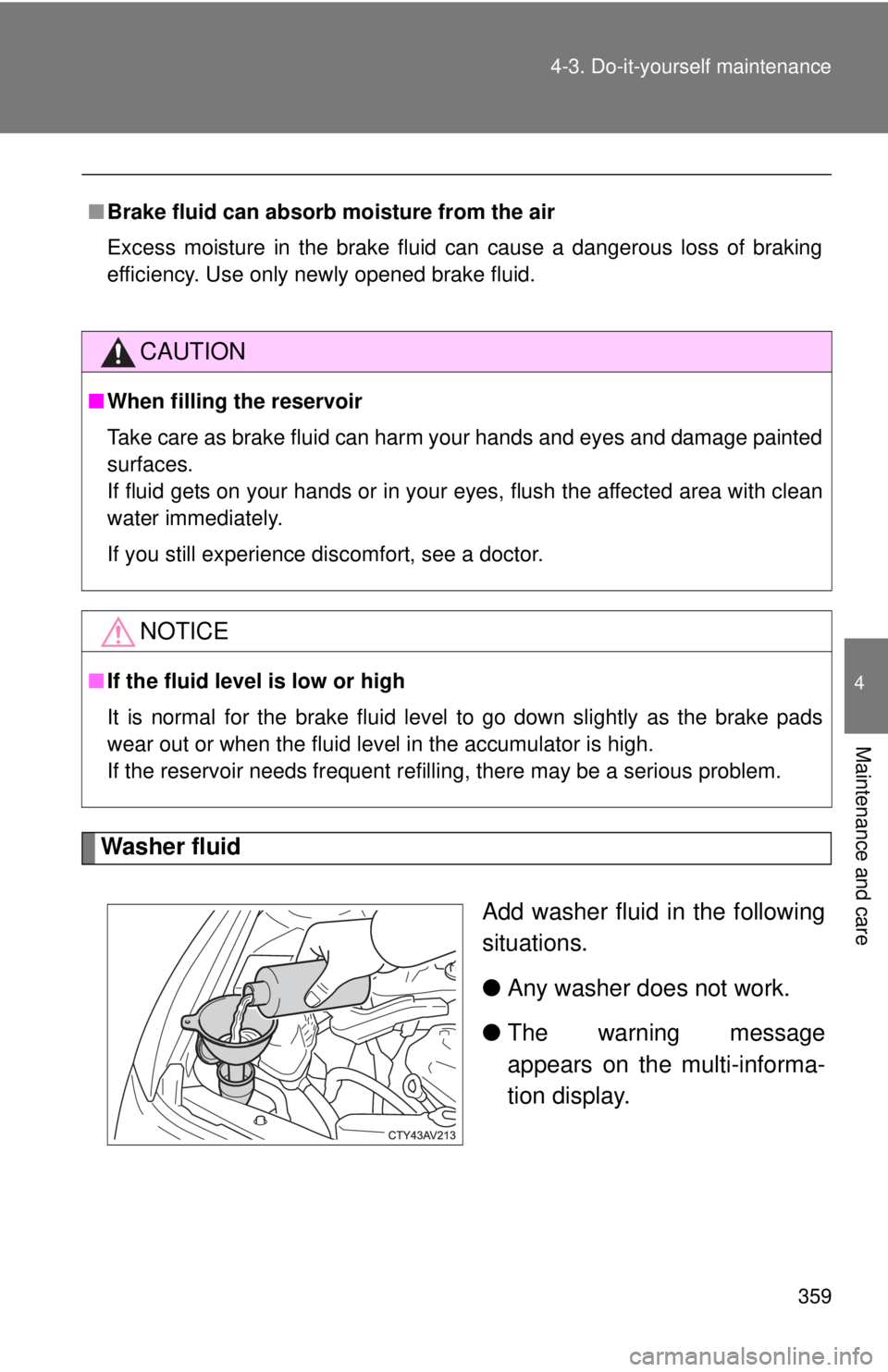
Washer fluid
Add washer fluid in the following
situations.
●Any washer does not work.
● The warning message
appears on the multi-informa-
tion display.
■Brake fluid can absorb moisture from the air
Excess moisture in the brake fluid can cause a dangerous loss of braking
efficiency. Use only newly opened brake fluid.
CAUTION
■When filling the reservoir
Take care as brake fluid can harm your hands and eyes and damage painted
surfaces.
If fluid gets on your hands or in your eyes, flush the affected area with clean
water immediately.
If you still experience discomfort, see a doctor.
NOTICE
■If the fluid level is low or high
It is normal for the brake fluid level to go down slightly as the brake pads
wear out or when the fluid level in the accumulator is high.
If the reservoir needs frequent refilling, there may be a serious proble\
m.
Page 365 of 536
365
4-3. Do-it-yourself maintenance
4
Maintenance and care
Tires
Replace or rotate tires in accordance with maintenance sched-
ules and treadwear.
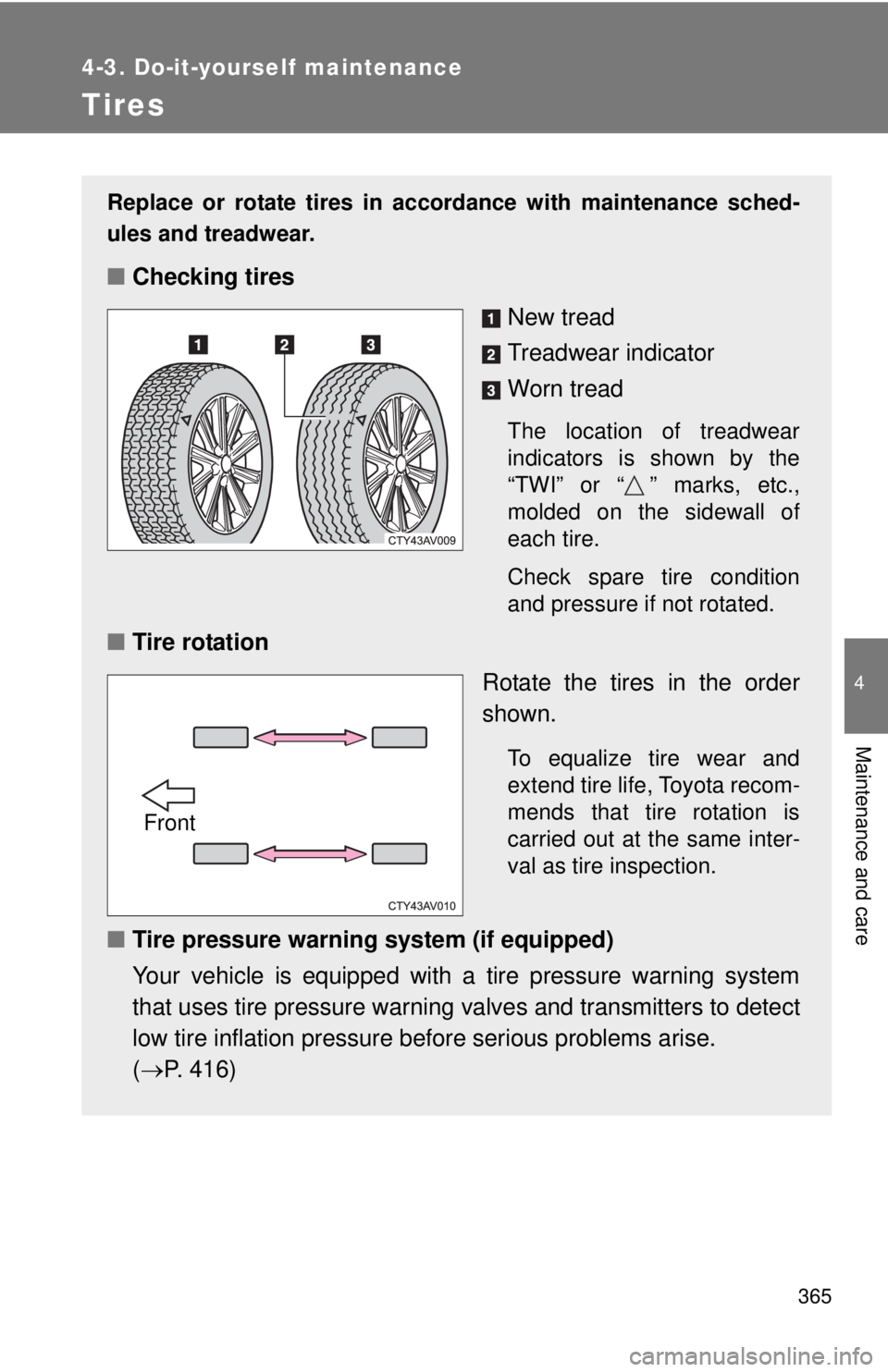
■Checking tires
New tread
Treadwear indicator
Worn tread
The location of treadwear
indicators is shown by the
“TWI” or “ ” marks, etc.,
molded on the sidewall of
each tire.
Check spare tire condition
and pressure if not rotated.
■Tire rotation
Rotate the tires in the order
shown.
To equalize tire wear and
extend tire life, Toyota recom-
mends that tire rotation is
carried out at the same inter-
val as tire inspection.
■Tire pressure warning system (if equipped)
Your vehicle is equipped with a tire pressure warning system
that uses tire pressure warning valves and transmitters to detect
low tire inflation pressure before serious problems arise.
( P. 416)
Front
Page 366 of 536
366 4-3. Do-it-yourself maintenance
Installing tire pressure warning valves and transmittersWhen replacing tires or wheels, tire pressure warning valves and
transmitters must also be installed.
When new tire pressure warning valves and transmitters are
installed, new ID codes must be regi stered in the tire pressure warn-
ing computer and the tire pressure warning system must be initial-
ized. Have tire pressure warning valve and transmitter ID codes
registered by your Toyota dealer. ( P. 367)
■ The tire pressure warning system must be initialized in the fol-
lowing circumstances:
●When the tire inflation pres sure is changed such as when
changing travelling speed or load weight
● When changing the tire size
When the tire pressure warning syst em is initialized, the current tire
inflation pressure is set as the benchmark pressure.
■ How to initialize the tire pressure warning system
Park the vehicle in a safe pl ace and turn the “POWER” switch
off.
Initialization cannot be performed while the vehicle is moving.
Adjust the tire inflation pressure to the specified cold tire infla-
tion pressure level. ( P. 480)
Make sure to adjust the tire pressure to the specified cold tire
inflation pressure level. The ti re pressure warning system will
operate based on this pressure level.
Turn the “POWER” switch to ON mode.
STEP1
STEP2
STEP3
Page 367 of 536
367
4-3. Do-it-yourself maintenance
4
Maintenance and care
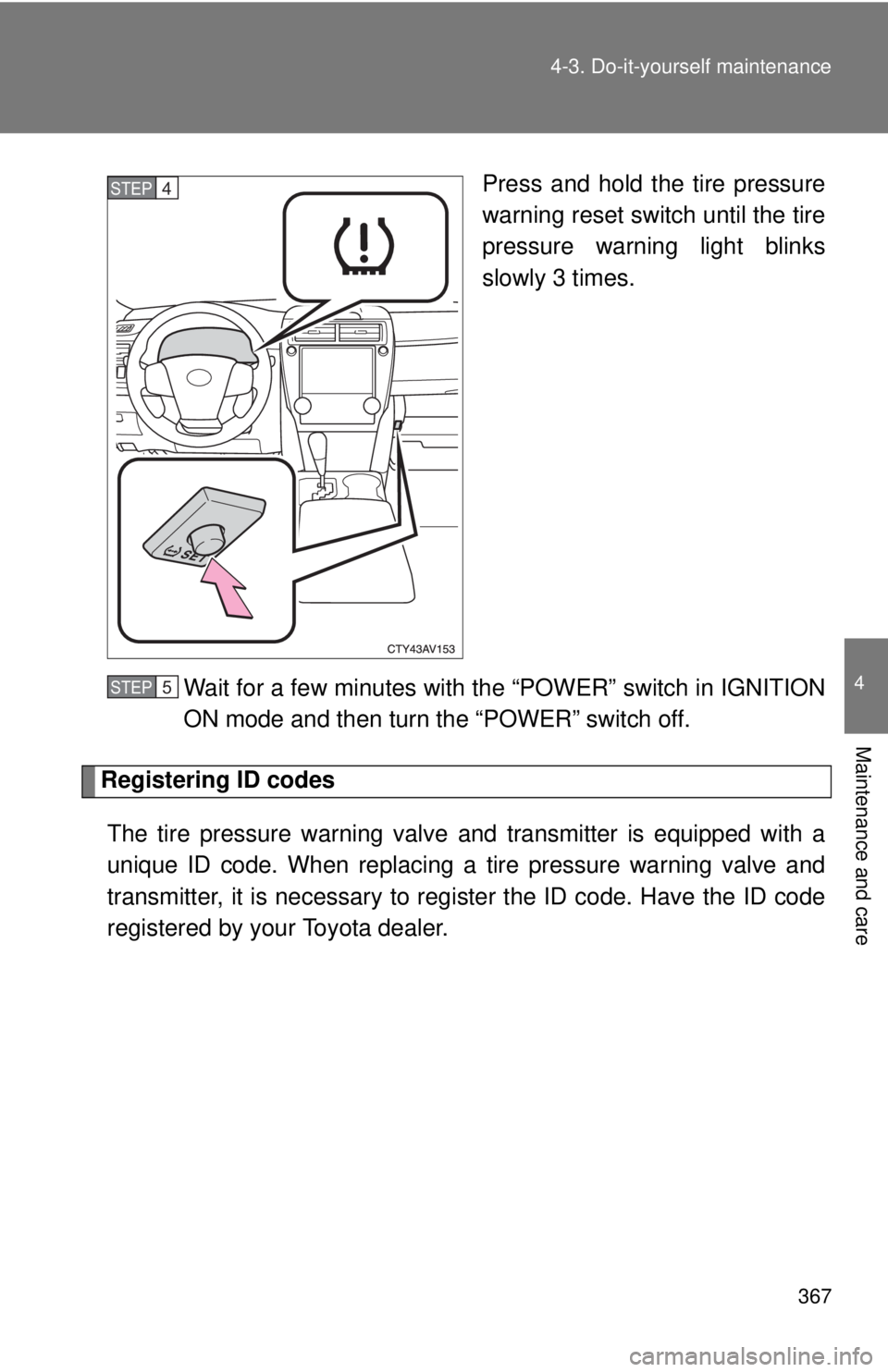
Press and hold the tire pressure
warning reset switch until the tire
pressure warning light blinks
slowly 3 times.
Wait for a few minutes with the “POWER” switch in IGNITION
ON mode and then turn the “POWER” switch off.
Registering ID codes The tire pressure warning valve and transmitter is equipped with a
unique ID code. When replacing a tire pressure warning valve and
transmitter, it is necessary to regi ster the ID code. Have the ID code
registered by your Toyota dealer.
STEP4
STEP5