phone TOYOTA CAMRY HYBRID 2010 XV40 / 8.G Owner's Guide
[x] Cancel search | Manufacturer: TOYOTA, Model Year: 2010, Model line: CAMRY HYBRID, Model: TOYOTA CAMRY HYBRID 2010 XV40 / 8.GPages: 497, PDF Size: 9.63 MB
Page 264 of 497
263
3-4. Using the hand
s-free phone system (for cellular phone)
3
Interior features
Operating the system by using a voice command
By following voice guidance inst ructions output from the speaker,
voice commands enable to the operation of the hands-free phone
system without the need to check the display or operate .
■ Operation procedure when using a voice command
Press the talk switch and follo w voice guidance instructions.
■ Auxiliary commands when using a voice command
The following auxiliary commands can be used when operating the
system using a voice command:
Cancel: Exits the hands-free phone system
Repeat: Repeats the previous voice guidance instruction
Go back: Returns to the previous procedure
Help: Reads aloud the function summary if a help comment is
registered for the selected function
Using the hands-free phone system for the first time
Before using the hands-free phone system, it is necessary to register
a cellular phone in the system. Th e phone registration mode will be
entered automatically when starting the system with no cellular
phone registered. Follow the procedure below to register a cellular
phone:
Press the off-hook switch or the talk switch.
The introductory guidance and phone name registration instructions
are heard.
STEP1
Page 265 of 497
264 3-4. Using the hands-free phone system (for cellular phone)
Select “Pair Phone” using a voice command or .
Register a phone name by either of the following methods.
a. Select “Record Name” by using , and say a name to
be registered.
b. Press the talk switch and say a name to be registered.
A voice guidance instruction to confirm the input is heard.
Select “Confirm” by using a voice command or .
Registration to the hans-free phone system only
Select “Phone Only” using a voice command or .
Registration to the hans-free phone system and Bluetooth
® audio
system at a same time
Select “Internal Audio (Int. Audio)” using a voice command or
.
Select “Confirm” by using a voice command or .
A passkey is displayed and heard, and a voice guidance instruction
for inputting the passkey into the cellular phone is heard. Input the passkey into the cellular phone.
Refer to the manual that comes with the cellular phone for the oper-
ation of the phone.
Guidance for registration completion is heard.
STEP2
STEP3
STEP4
STEP5
STEP5
STEP6
STEP7
Page 266 of 497
265
3-4. Using the hand
s-free phone system (for cellular phone)
3
Interior features
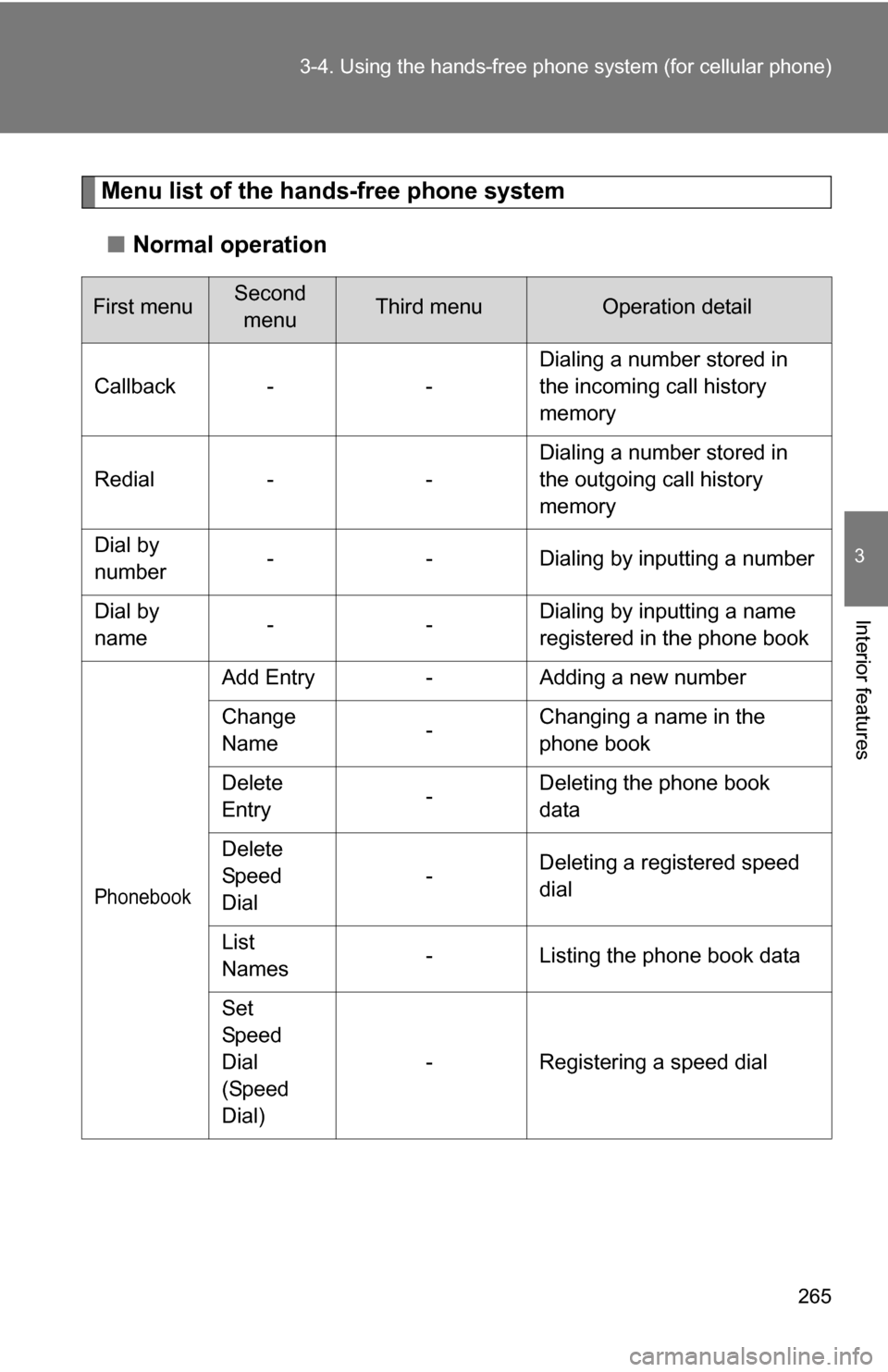
Menu list of the hands-free phone system
■ Normal operation
First menuSecond
menuThird menuOperation detail
Callback - - Dialing a number stored in
the incoming call history
memory
Redial - - Dialing a number stored in
the outgoing call history
memory
Dial by
number - - Dialing by inputting a number
Dial by
name -- Dialing by inputting a name
registered in the phone book
Phonebook
Add Entry
-Adding a new number
Change
Name -Changing a name in the
phone book
Delete
Entry -Deleting the phone book
data
Delete
Speed
Dial -
Deleting a registered speed
dial
List
Names -
Listing the phone book data
Set
Speed
Dial
(Speed
Dial) -
Registering a speed dial
Page 267 of 497
266 3-4. Using the hands-free phone system (for cellular phone)
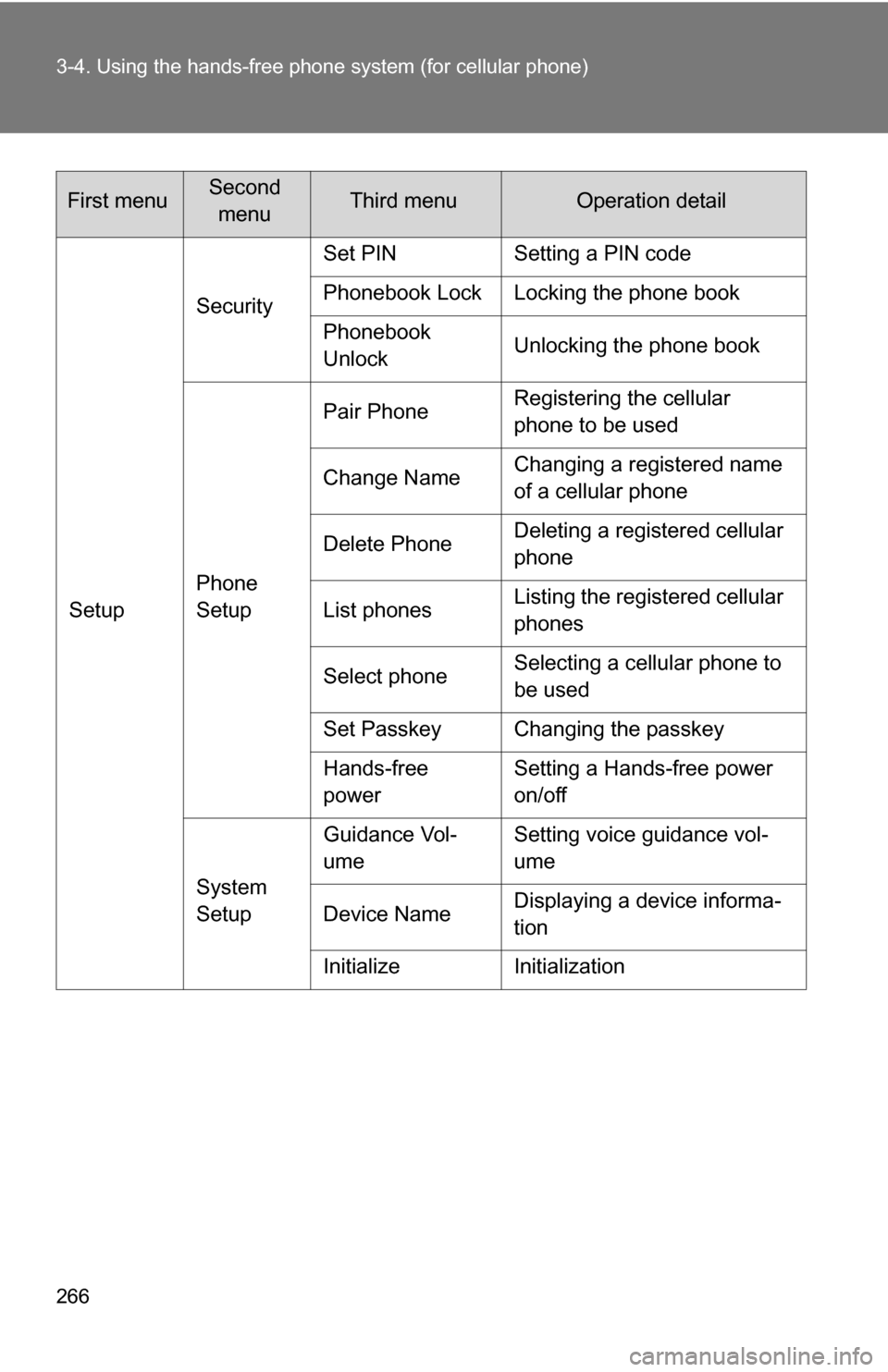
SetupSecurity
Set PIN Setting a PIN code
Phonebook Lock Locking the phone book
Phonebook
Unlock
Unlocking the phone book
Phone
Setup Pair Phone
Registering the cellular
phone to be used
Change Name Changing a registered name
of a cellular phone
Delete Phone Deleting a registered cellular
phone
List phones Listing the registered cellular
phones
Select phone Selecting a cellular phone to
be used
Set Passkey Changing the passkey
Hands-free
power Setting a Hands-free power
on/off
System
Setup Guidance Vol-
ume
Setting voice guidance vol-
ume
Device Name Displaying a device informa-
tion
Initialize Initialization
First menuSecond menuThird menuOperation detail
Page 268 of 497
267
3-4. Using the hand
s-free phone system (for cellular phone)
3
Interior features
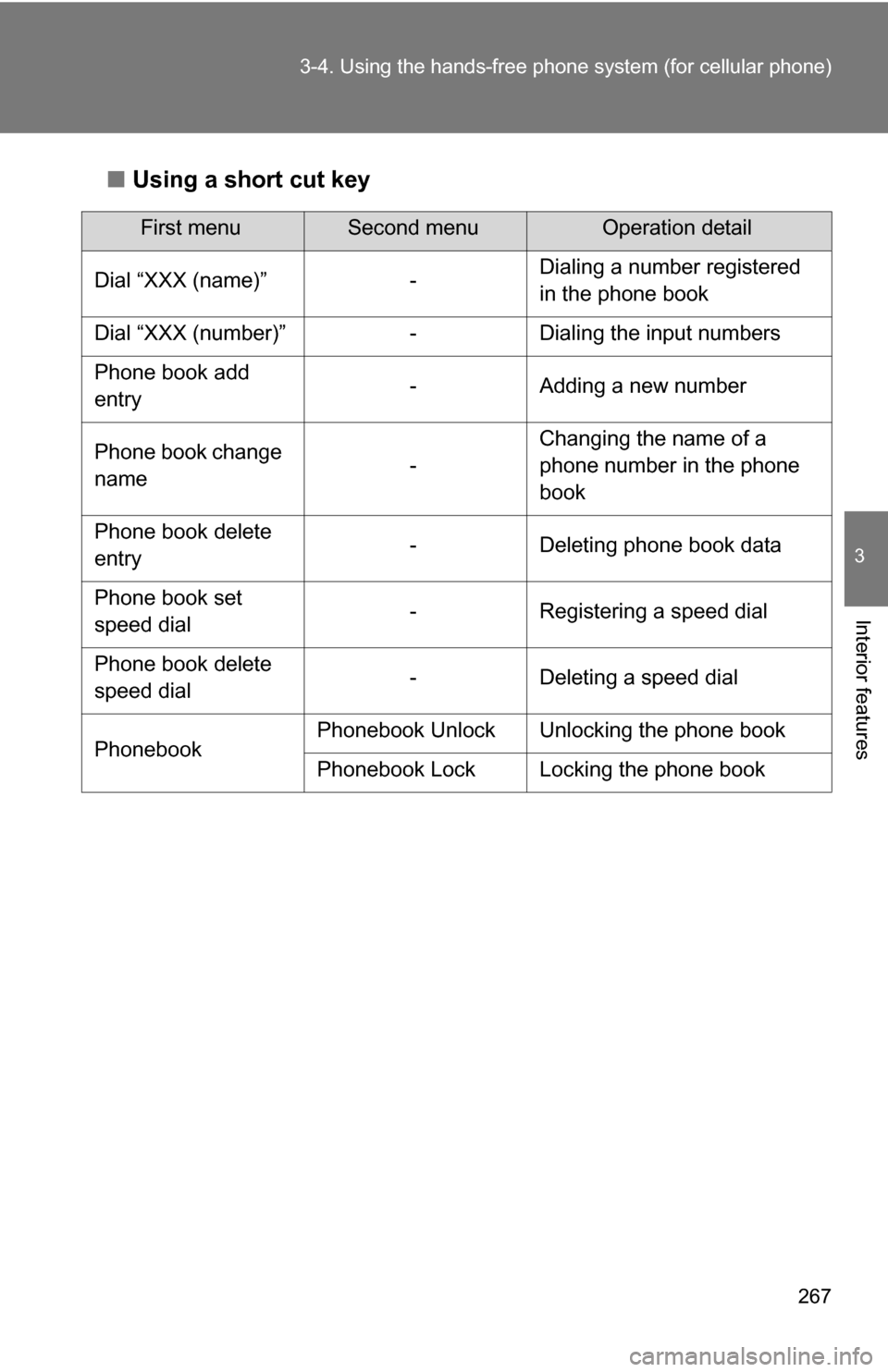
■Using a short cut key
First menuSecond menuOperation detail
Dial “XXX (name)” - Dialing a number registered
in the phone book
Dial “XXX (number)” - Dialing the input numbers
Phone book add
entry - Adding a new number
Phone book change
name -Changing the name of a
phone number in the phone
book
Phone book delete
entry - Deleting phone book data
Phone book set
speed dial - Registering a speed dial
Phone book delete
speed dial - Deleting a speed dial
Phonebook Phonebook Unlock Unlocking the phone book
Phonebook Lock Locking the phone book
Page 269 of 497
268 3-4. Using the hands-free phone system (for cellular phone)
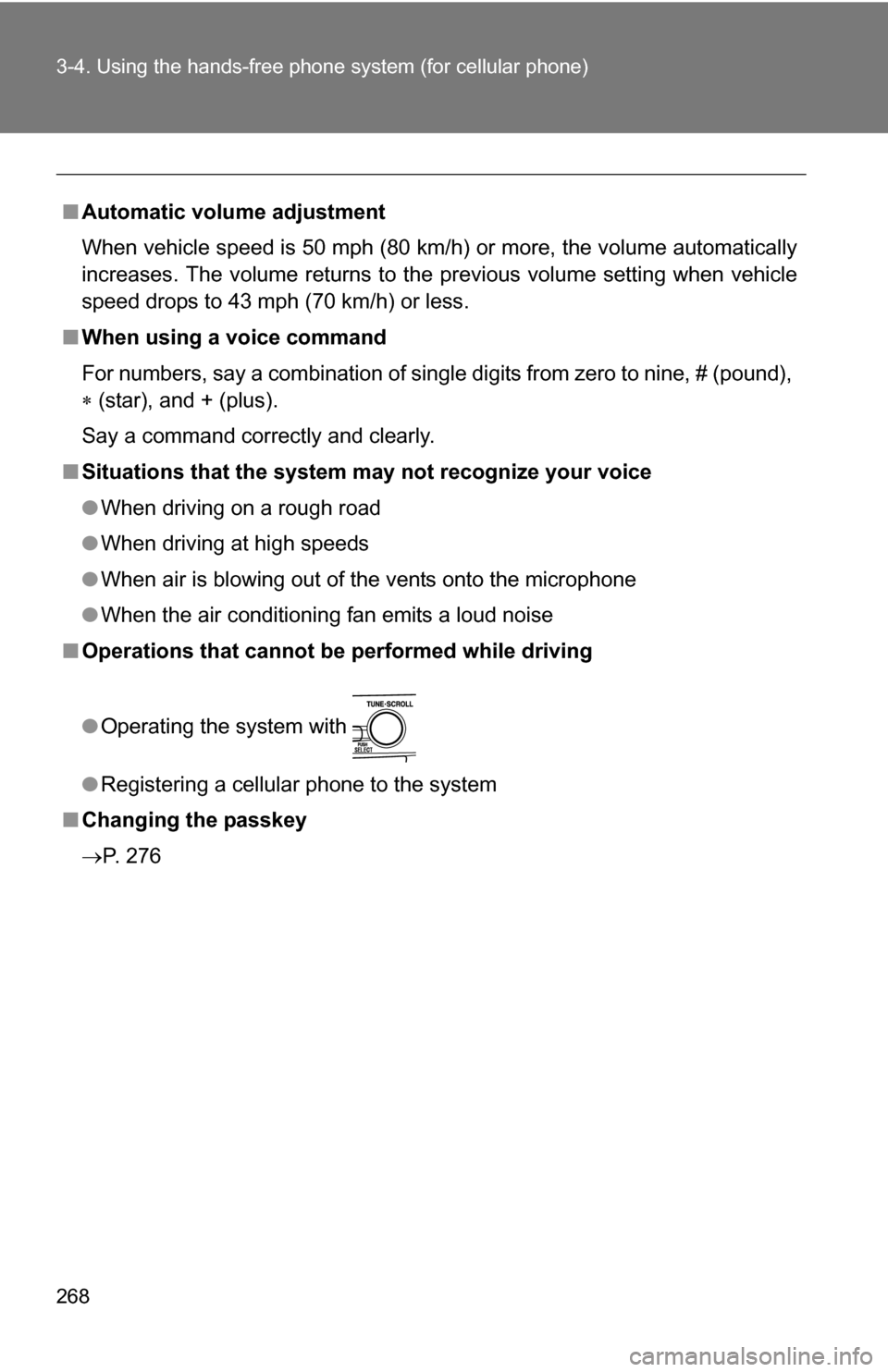
■Automatic volume adjustment
When vehicle speed is 50 mph (80 km/h) or more, the volume automatically
increases. The volume returns to the previous volume setting when vehicle
speed drops to 43 mph (70 km/h) or less.
■ When using a voice command
For numbers, say a combination of single digits from zero to nine, # (pound),
(star), and + (plus).
Say a command correctly and clearly.
■ Situations that the system ma y not recognize your voice
● When driving on a rough road
● When driving at high speeds
● When air is blowing out of the vents onto the microphone
● When the air conditioning fan emits a loud noise
■ Operations that cannot be performed while driving
● Operating the system with
● Registering a cellular phone to the system
■ Changing the passkey
P. 276
Page 270 of 497
269
3-4. Using the hands-free phone system (for cellular phone)
3
Interior features
Making a phone call
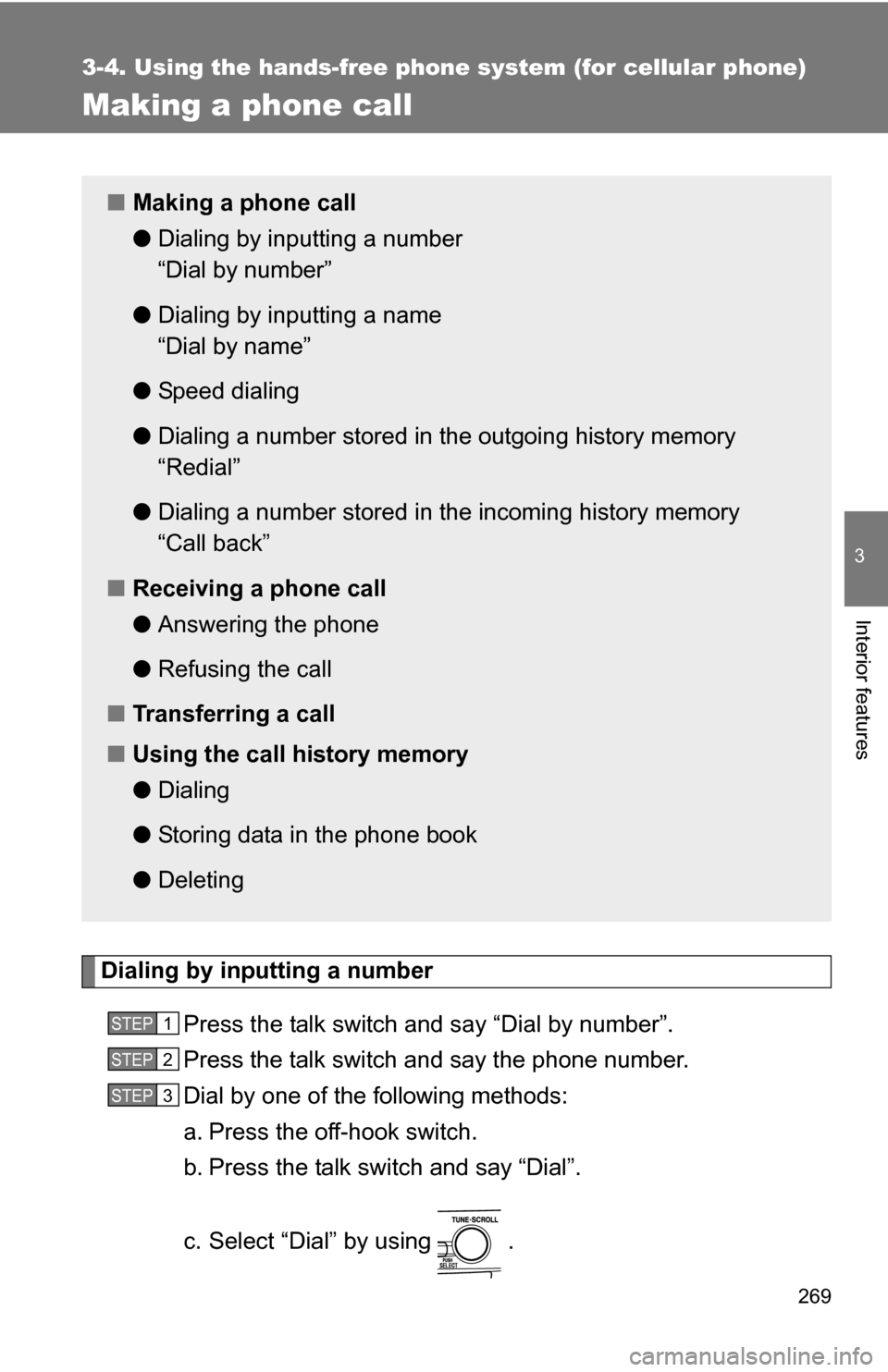
Dialing by inputting a numberPress the talk switch and say “Dial by number”.
Press the talk switch and say the phone number.
Dial by one of the following methods:
a. Press the off-hook switch.
b. Press the talk switch and say “Dial”.
c. Select “Dial” by using .
■Making a phone call
●Dialing by inputting a number
“Dial by number”
● Dialing by inputting a name
“Dial by name”
● Speed dialing
● Dialing a number stored in the outgoing history memory
“Redial”
● Dialing a number stored in the incoming history memory
“Call back”
■ Receiving a phone call
●Answering the phone
● Refusing the call
■ Transferring a call
■ Using the call history memory
●Dialing
● Storing data in the phone book
● Deleting
STEP1
STEP2
STEP3
Page 271 of 497
270 3-4. Using the hands-free phone system (for cellular phone)
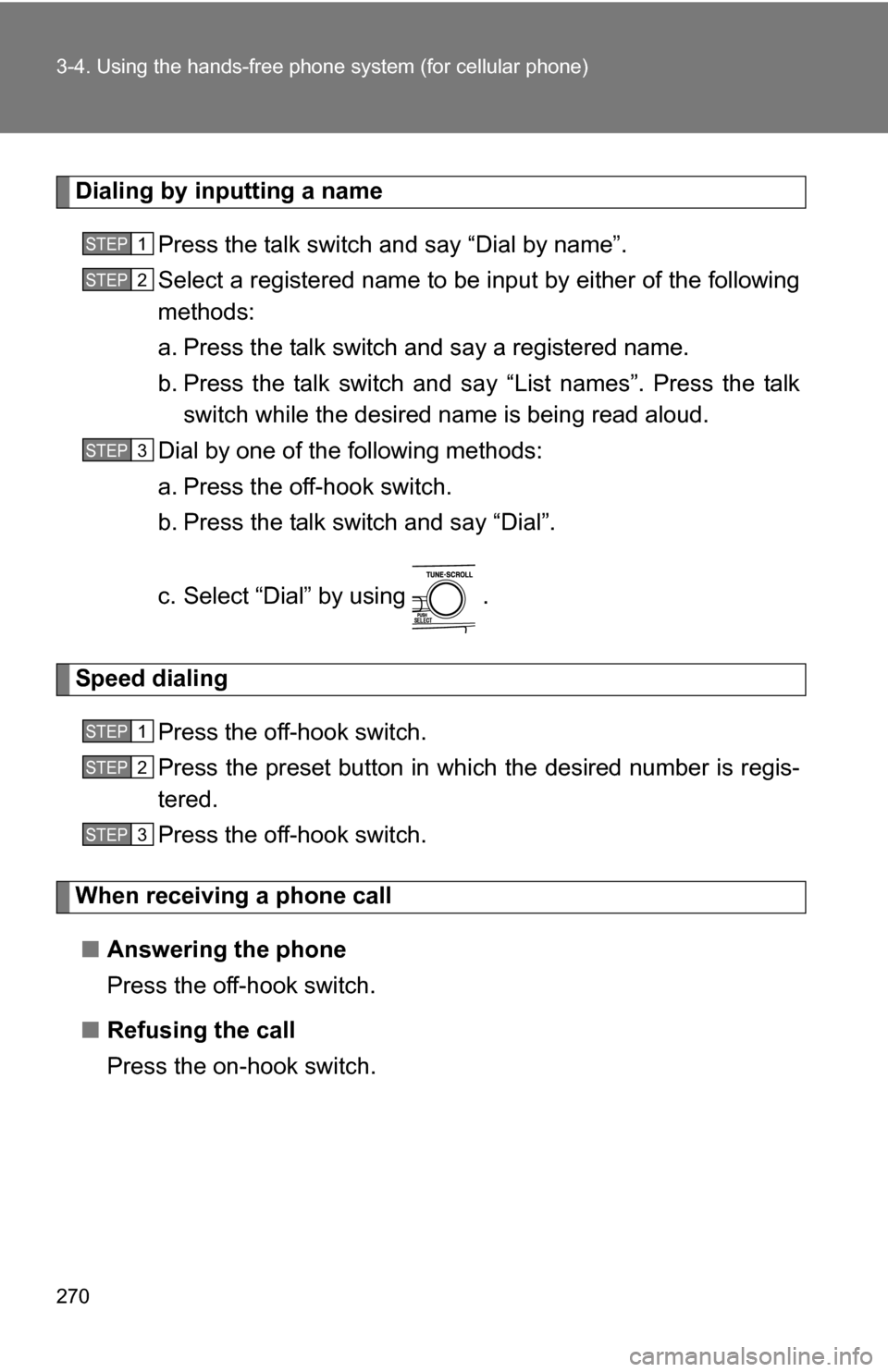
Dialing by inputting a name
Press the talk switch and say “Dial by name”.
Select a registered name to be input by either of the following
methods:
a. Press the talk switch and say a registered name.
b. Press the talk switch and sa y “List names”. Press the talk
switch while the desired name is being read aloud.
Dial by one of the following methods:
a. Press the off-hook switch.
b. Press the talk switch and say “Dial”.
c. Select “Dial” by using .
Speed dialing
Press the off-hook switch.
Press the preset button in which the desired number is regis-
tered.
Press the off-hook switch.
When receiving a phone call■ Answering the phone
Press the off-hook switch.
■ Refusing the call
Press the on-hook switch.
STEP1
STEP2
STEP3
STEP1
STEP2
STEP3
Page 272 of 497
271
3-4. Using the hand
s-free phone system (for cellular phone)
3
Interior features
Transferring a call
A call can be transferred between the cellular phone and system
while dialing, receiving a call, or during a call. Use one of the follow-
ing methods:
a. Operate the cellular phone.
Refer to the manual that comes with the cellular phone for the oper-
ation of the phone.
b. Press the off-hook switch*1.
c. Press the talk switch and say “Call Transfer”
*2.
*1: This operation can be performed only when transferring a call from the cellular phone to the system during a call.
*2: While the vehicle is in motion , a call cannot be transferred from
the system to the cellular phone.
Using the call history memory
Follow the procedure below to use a number stored in the call history
memory: Press the talk switch and say “Redial” (when using a number
stored in the outgoing call history memory) or “Call back”
(when using a number stored in the incoming call history
memory).
Select the number by either of the following methods:
a. Say “Previous” or “Go back” until the desired number is dis-
played.
b. Select the desired number by using .
STEP1
STEP2
Page 273 of 497
272 3-4. Using the hands-free phone system (for cellular phone)
The following operations can be performed:
Dialing: Press the off-hook switch or select “Dial” by using a voice
command or .
Storing the number in the phone book: Select “Store” by using a
voice command or .
Deleting: Select “Delete” by using a voice command or .
■Call history
Up to 5 numbers can be stored in each of the outgoing and incoming call his-
tory memories.
■ When talking on the phone
●Do not talk simultaneously with the other party.
● Keep the volume of the received voice down. Otherwise, voice echo will
increase.