light TOYOTA CAMRY HYBRID 2014 XV50 / 9.G User Guide
[x] Cancel search | Manufacturer: TOYOTA, Model Year: 2014, Model line: CAMRY HYBRID, Model: TOYOTA CAMRY HYBRID 2014 XV50 / 9.GPages: 612, PDF Size: 7.26 MB
Page 44 of 612
44 1-1. Hybrid system
The image is example only, and may vary slightly from actual conditions.
Trip Information screenAudio system with “CAR” button
Display the “Trip Information” screen. ( P. 41)
If the “Energy Monitor” or “Past Record” screen is displayed, touch “Trip
Information”.
Audio system with “APPS” button
Display the “Trip Information” screen. ( P. 42)
If “Energy Monitor” screen is displayed, touch “Fuel Consumption”.
If “Past Record” screen is displayed, touch “Trip Information”.
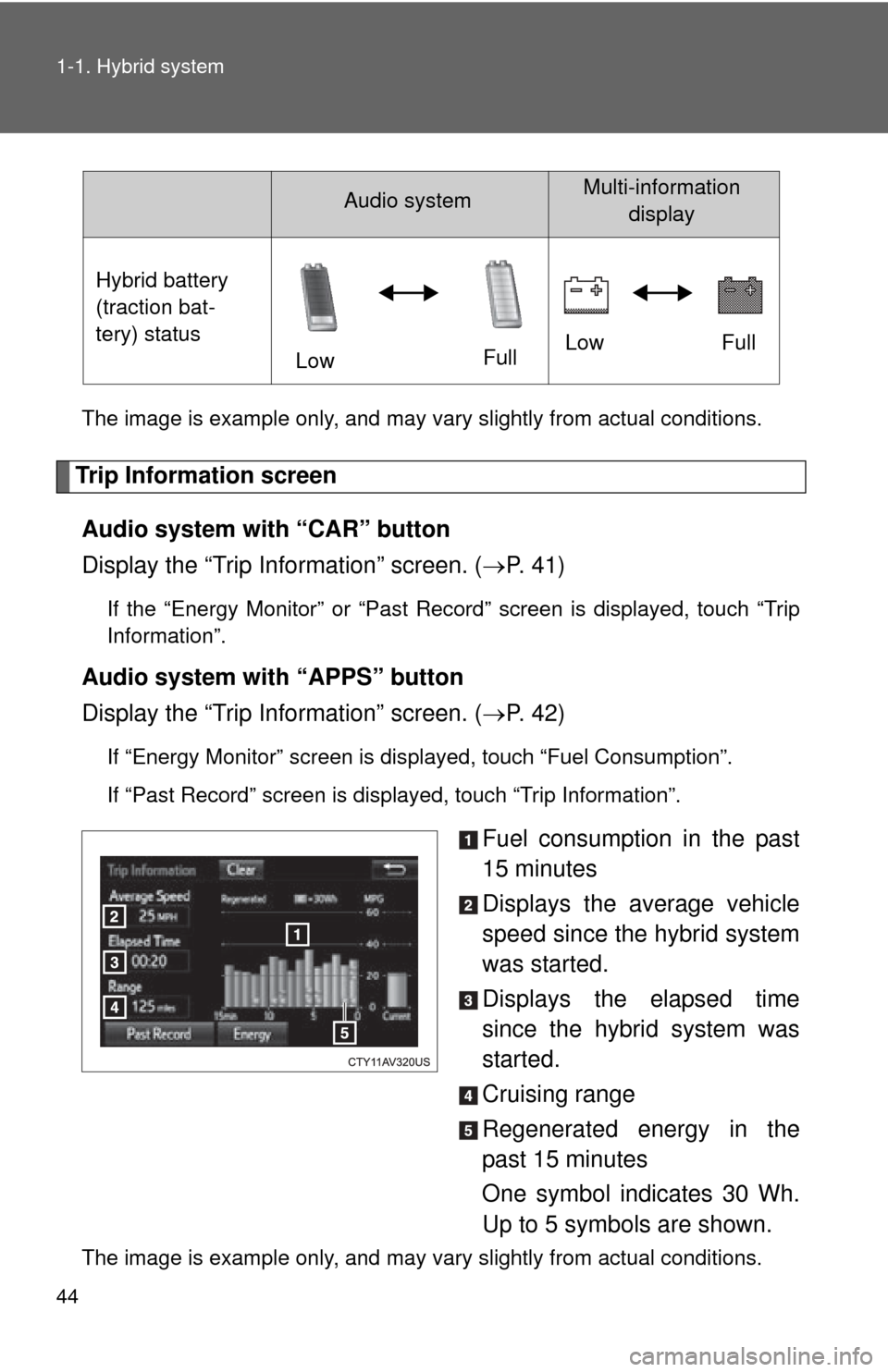
Fuel consumption in the past
15 minutes
Displays the average vehicle
speed since the hybrid system
was started.
Displays the elapsed time
since the hybrid system was
started.
Cruising range
Regenerated energy in the
past 15 minutes
One symbol indicates 30 Wh.
Up to 5 symbols are shown.
The image is example only, and may vary slightly from actual conditions.Hybrid battery
(traction bat-
tery) status
LowFullLow
Full
Audio systemMulti-information
display
Page 45 of 612
45
1-1. Hybrid system
1
Before driving
Past record screen
Audio system with “CAR” button
Display the “Past Record” screen. ( P. 41)
If the “Energy Monitor” or “Trip Information” screen is displayed, touch
“Past Record”.
Audio system with “APPS” button
Display the “Past Record” screen. ( P. 42)
If “Energy Monitor” screen is displayed, touch “Fuel Consumption”.
If “Trip Information” screen is displayed, touch “Past Record”.
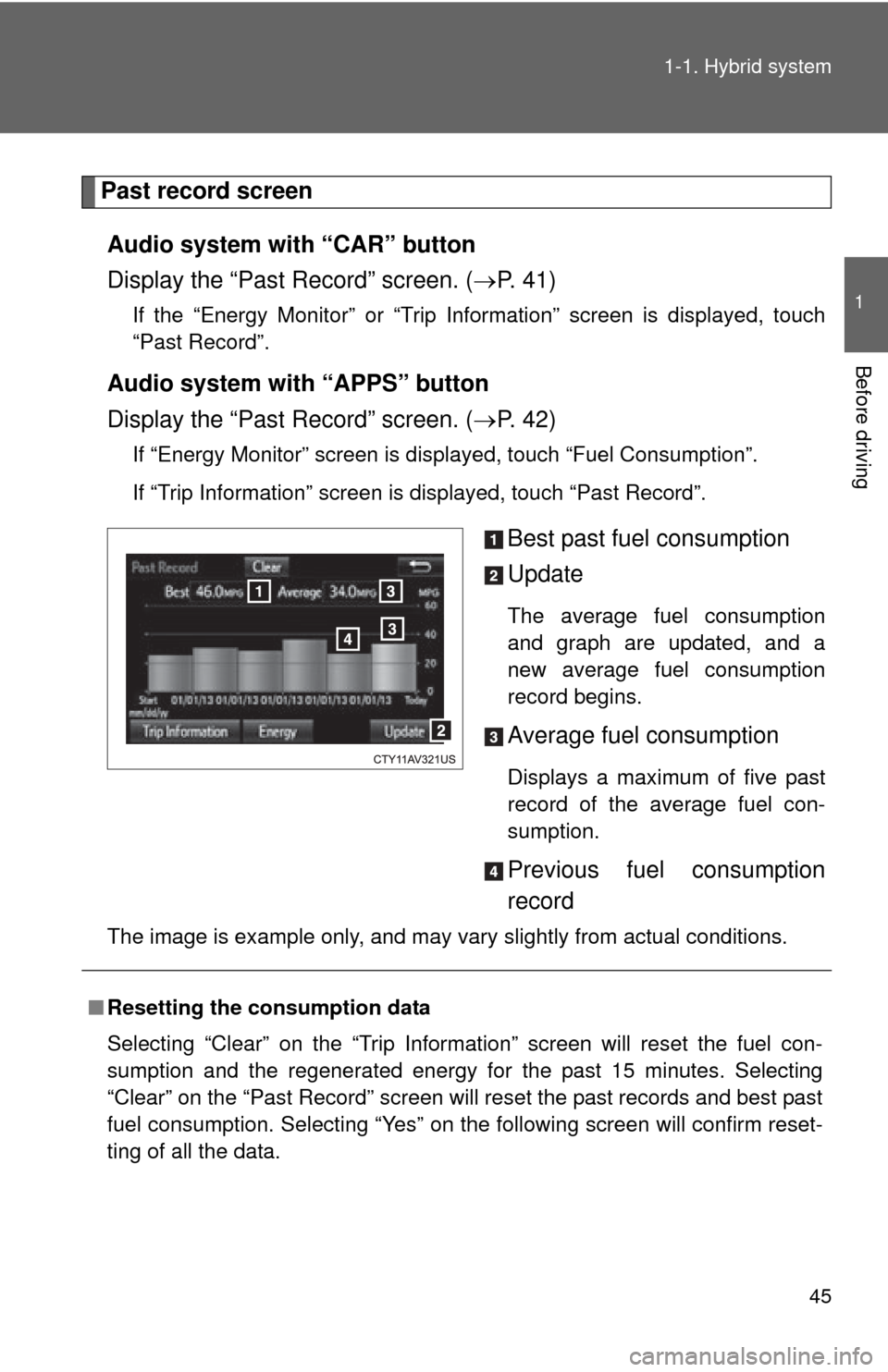
Best past fuel consumption
Update
The average fuel consumption
and graph are updated, and a
new average fuel consumption
record begins.
Average fuel consumption
Displays a maximum of five past
record of the average fuel con-
sumption.
Previous fuel consumption
record
The image is example only, and may vary slightly from actual conditions.
■Resetting the consumption data
Selecting “Clear” on the “Trip Information” screen will reset the fuel con-
sumption and the regenerated energy for the past 15 minutes. Selecting
“Clear” on the “Past Record” screen will reset the past records and best past
fuel consumption. Selecting “Yes” on the following screen will confirm reset-
ting of all the data.
Page 46 of 612
46
1-1. Hybrid system
Hybrid vehicle driving tips
For economical and ecological driving, pay attention to the following
points:
■ Using Eco drive mode
(P. 169)
■ Use of the Hybrid System Indicator
More Eco-friendly driving is possible by keeping the Hybrid System
Indicator needle within the Eco area.
■When braking the vehicle
Make sure to operate the brakes gently and in good time. A greater
amount of electrical energy can be retained when slowing down.
■Delays
Repeated acceleration and deceleration, as well as long waits at traffic
lights, will lead to bad fuel consumption. Check traffic reports before
leaving and avoid delays as much as possible. When encountering a
delay, gently release the brake pedal to allow the vehicle to move for-
ward slightly while avoiding overuse of the accelerator pedal. Doing so
can help control excessive gasoline consumption.
■Highway driving
Control your speed and keep at a constant speed. Also, before stop-
ping at a toll booth or similar, allow plenty of time to release the acceler-
ator and gently apply the brakes. A greater amount of electrical energy
can be retained when slowing down.
■Air conditioning
Use the air conditioning only when necessary. Doing so can help con-
trol excessive gasoline consumption.
In summer: In high temperatures, use the recirculated air mode. Doing
so will help to reduce the burden on the air conditioning and reduce fuel
consumption as well.
In winter: Because the gasoline engine will not automatically cut out
until the gasoline engine and the interior of the vehicle are warm, it will
consume fuel. Also, fuel consumption can be improved by avoiding
overuse of the heater.
Page 56 of 612
56 1-3. Opening, closing and locking the doors and trunk
■Security feature
If a door is not opened within approximately 60 seconds after the vehicle is
unlocked, the security feature automatically locks the vehicle again. (How-
ever, depending on the location of the electronic key, the key may be
detected as being in the vehicle. In this case, vehicle may be unlocked.\
)
■ Switching the door unlock function
It is possible to set which doors the entry function unlocks using the wireless
remote control.
Turn the “POWER” switch off.
When the indicator light on the key surface is not on, press and
hold , , or for about 5 seconds while pressing and
holding .
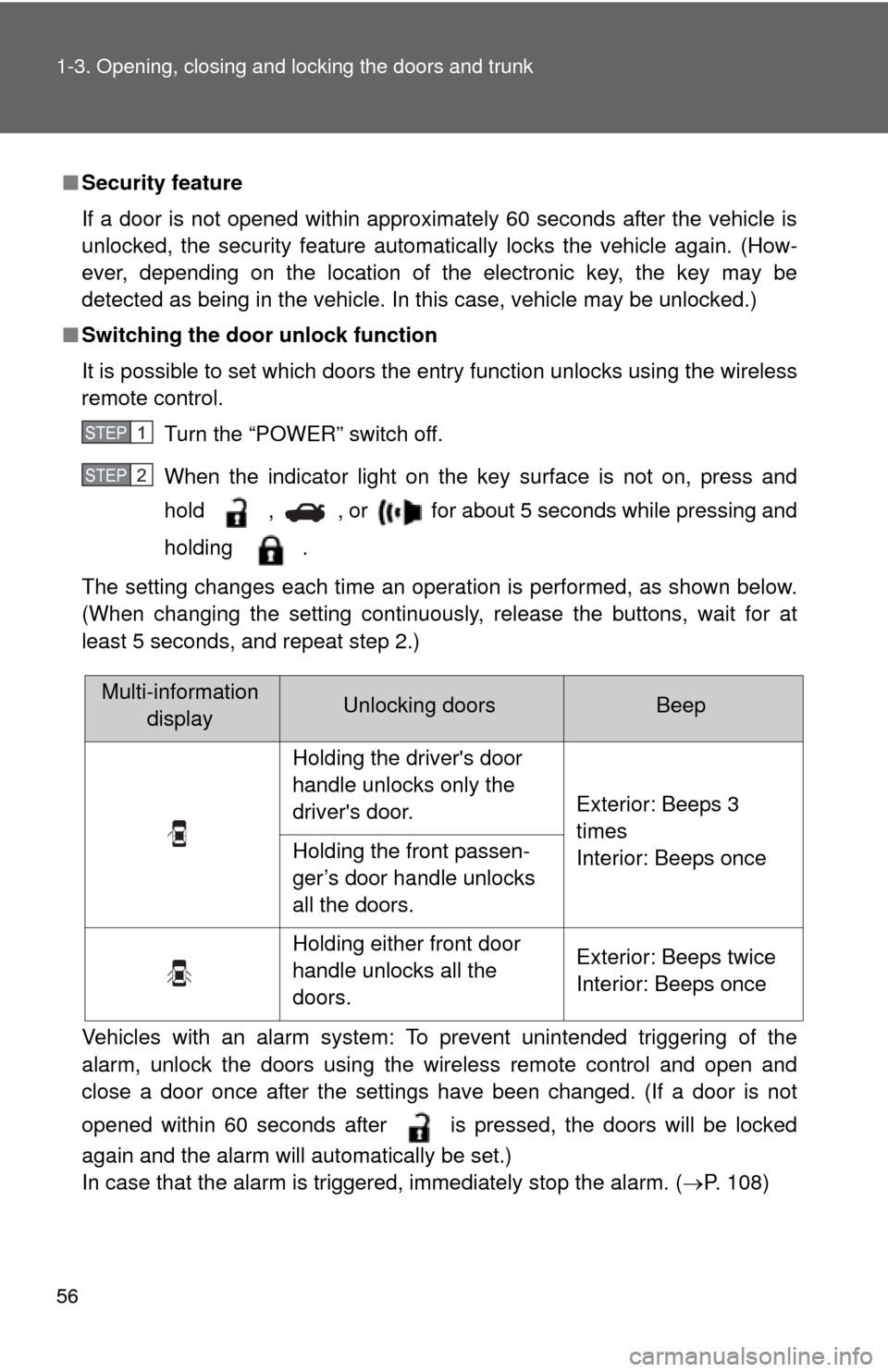
The setting changes each time an operation is performed, as shown below.
(When changing the setting continuously, release the buttons, wait for at
least 5 seconds, and repeat step 2.)
Vehicles with an alarm system: To prevent unintended triggering of the
alarm, unlock the doors using the wireless remote control and open and
close a door once after the settings have been changed. (If a door is not
opened within 60 seconds after is pressed, the doors will be locked
again and the alarm will automatically be set.)
In case that the alarm is triggered, immediately stop the alarm. (P. 108)
STEP1
STEP2
Multi-information displayUnlocking doorsBeep
Holding the driver's door
handle unlocks only the
driver's door. Exterior: Beeps 3
times
Interior: Beeps once
Holding the front passen-
ger’s door handle unlocks
all the doors.
Holding either front door
handle unlocks all the
doors. Exterior: Beeps twice
Interior: Beeps once
Page 60 of 612

60 1-3. Opening, closing and locking the doors and trunk
■Notes for locking the doors
●Touching the door lock sensor while wearing gloves may delay or prevent
lock operation. Remove the gloves and touch the lock sensor again.
● When the lock operation is performed using the lock sensor, recognition
signals will be shown up to two consecutive times. After this, no recogni-
tion signals will be given.
● If the door handle becomes wet while the electronic key is within the
effective range, the door may lock and unlock repeatedly. In that case,
follow the following correction procedures to wash the vehicle:
• Place the electronic key in a location 6 ft. (2 m) or more away from the
vehicle. (Take care to ensure that the key is not stolen.)
• Set the electronic key to battery-saving mode to disable the smart key system. ( P. 57)
● If the electronic key is inside the vehicle and a door handle becomes wet
during a car wash, a message may be shown on the multi-information
display and a buzzer will sound outside the vehicle. To turn off the alarm,
lock all the doors.
● The lock sensor may not work properly if it comes into contact with ice,
snow, mud, etc. Clean the lock sensor and attempt to operate it again.
■ Notes for the unlocking function
●A sudden approach to the effective range or door handle may prevent the
doors from being unlocked. In this case, return the door handle to the
original position and check that the doors unlock before pulling the door
handle again.
● Gripping the door handle when wearing a glove may not unlock the door.
Remove the gloves and touch the sensor on the back of the handle
again.
● If the door handle becomes wet while the electronic key is within the
effective range, the door may lock and unlock repeatedly. In that case,
follow the following correction procedures to wash the vehicle:
• Place the electronic key in a location 6 ft. (2 m) or more away from the
vehicle. (Take care to ensure that the key is not stolen.)
• Set the electronic key to battery-saving mode to disable the smart key system. ( P. 57)
● If there is another electronic key in the detection area, it may take slightly
longer to unlock the doors after the door handle is gripped.
Page 65 of 612
65
1-3. Opening, closing and locking the doors and trunk
1
Before driving
■
Operation signals
Doors: A buzzer sounds and the emergency flashers flash to indicate that
the doors have been locked/unlocked.
(Locked: Once; Unlocked: Twice)
Trunk: A buzzer sounds to indicate that the trunk has been unlocked.
Driver’s window and moon roof: A buzzer sounds to indicate that the driver’s window and moon roof are opening.
■ Door lock buzzer
If an attempt to lock the doors is made when a door is not fully closed, a
buzzer sounds continuously. Fully close the door to stop the buzzer, and lock
the vehicle once more.
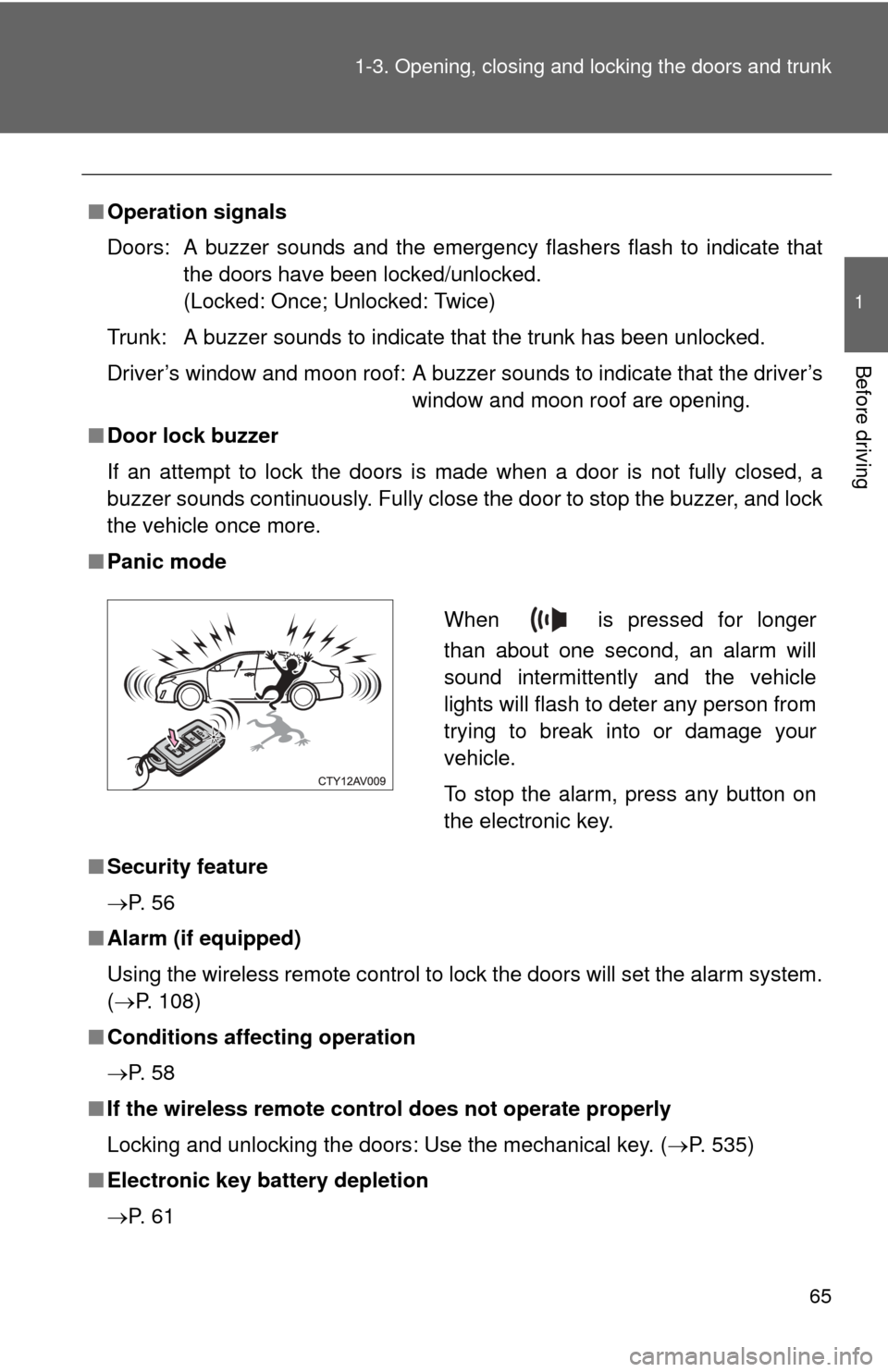
■ Panic mode
■ Security feature
P. 5 6
■ Alarm (if equipped)
Using the wireless remote control to lock the doors will set the alarm system.
(P. 108)
■ Conditions affecting operation
P. 5 8
■ If the wireless remote control does not operate properly
Locking and unlocking the doors: Use the mechanical key. ( P. 535)
■ Electronic key battery depletion
P. 6 1
When is pressed for longer
than about one second, an alarm will
sound intermittently and the vehicle
lights will flash to deter any person from
trying to break into or damage your
vehicle.
To stop the alarm, press any button on
the electronic key.
Page 73 of 612
73
1-3. Opening, closing and locking the doors and trunk
1
Before driving
■
Trunk light
The trunk light turns on when the trunk is opened.
■ Function to prevent the trunk being locked with the electronic key
inside
● When all doors are being locked, closing the trunk lid with the electronic
key left inside the trunk will sound an alarm.
In this case, the trunk lid can be opened using the entry function.
● Even when the spare electronic key is put in the trunk with all the doors
locked, the key confinement prevention function can be activated so the
trunk can be opened. In order to prevent theft, take all electronic keys
with you when leaving the vehicle.
● Even when the electronic key is put in the trunk with all the doors are
locked, the key may not be detected depending on the places and the
surrounding radio wave conditions. In this case, the key confinement pre-
vention function cannot be activated, causing the doors to lock when the
trunk is closed. Make sure to check where the key is before closing the
trunk.
● The key confinement prevention function cannot be activated if any one
of the doors is unlocked. In this case, open the trunk using the trunk
opener.
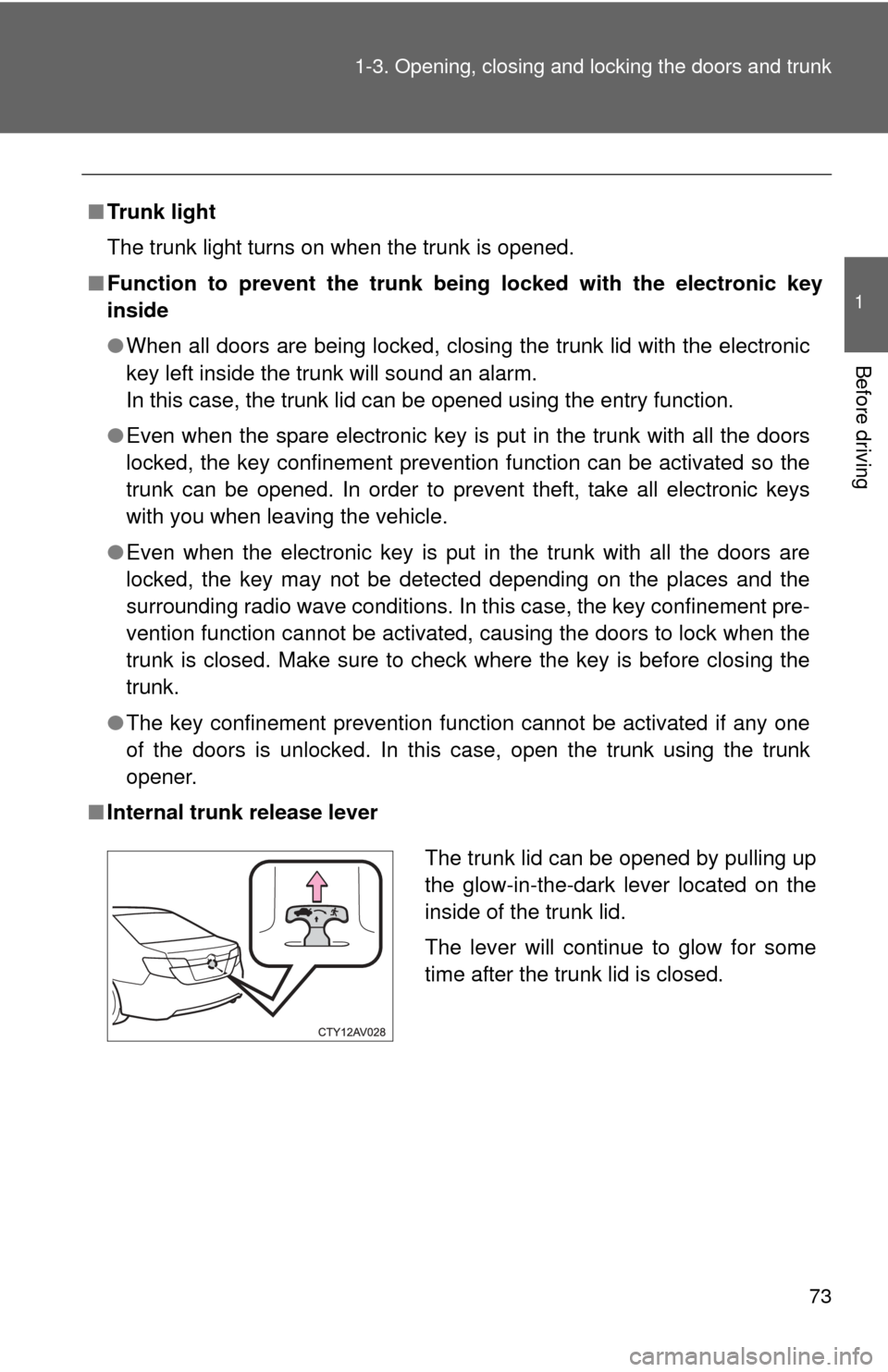
■ Internal trunk release lever
The trunk lid can be opened by pulling up
the glow-in-the-dark lever located on the
inside of the trunk lid.
The lever will continue to glow for some
time after the trunk lid is closed.
Page 75 of 612
75
1-3. Opening, closing and locking the doors and trunk
1
Before driving
CAUTION
■
Using the trunk
Observe the following precautions.
Failure to do so may cause parts of the body to be caught, resulting in seri-
ous injury.
●Remove any heavy loads, such as snow and ice, from the trunk lid before
opening it. Failure to do so may cause the trunk lid to suddenly shut again
after it is opened.
● When opening or closing the trunk lid, thoroughly check to make sure the
surrounding area is safe.
● If anyone is in the vicinity, make sure they are safe and let them know that
the trunk is about to open or close.
● Use caution when opening or closing the trunk lid in windy weather as it
may move abruptly in strong wind.
● Do not attach any accessories other than genuine Toyota parts to the trunk
lid. Such additional weight on the trunk lid may cause the lid to suddenly
shut again after it is opened.
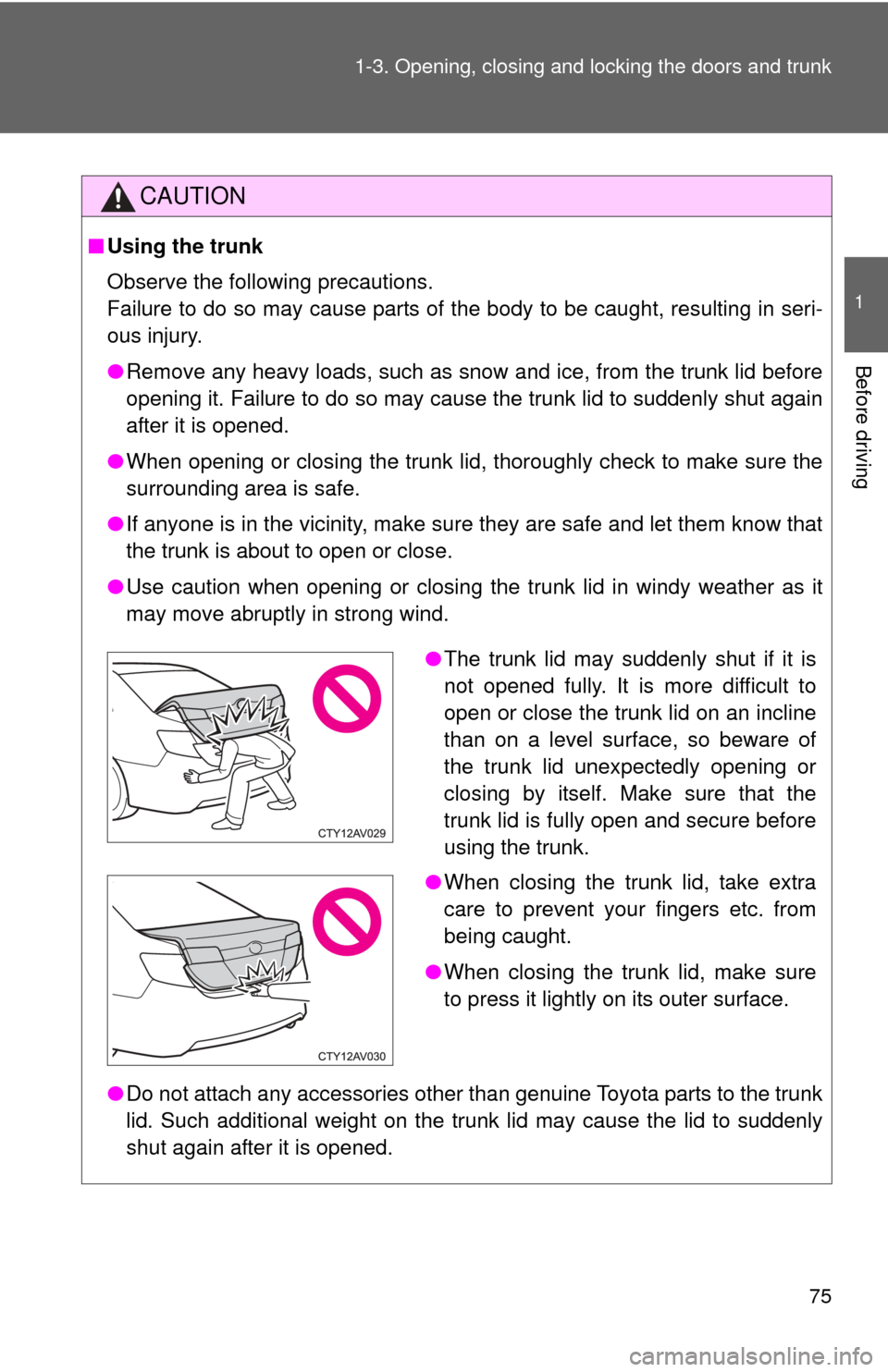
●The trunk lid may suddenly shut if it is
not opened fully. It is more difficult to
open or close the trunk lid on an incline
than on a level surface, so beware of
the trunk lid unexpectedly opening or
closing by itself. Make sure that the
trunk lid is fully open and secure before
using the trunk.
● When closing the trunk lid, take extra
care to prevent your fingers etc. from
being caught.
● When closing the trunk lid, make sure
to press it lightly on its outer surface.
Page 85 of 612
85
1-4. Adjustable components (s
eats, mirrors, steering wheel)
1
Before driving
■Emergency locking retractor (ELR)
The retractor will lock the belt during a sudden stop or on impact. It may also
lock if you lean forward too quickly. A slow, easy motion will allow the belt to
extend so that you can move around fully.
■ Automatic locking retractor (ALR)
When a passenger's shoulder belt is completely extended and then
retracted even slightly, the belt is locked in that position and cannot be
extended. This feature is used to hold the child restraint system (CRS) firmly.
To free the belt again, fully retract the belt and then pull the belt out once
more. ( P. 135)
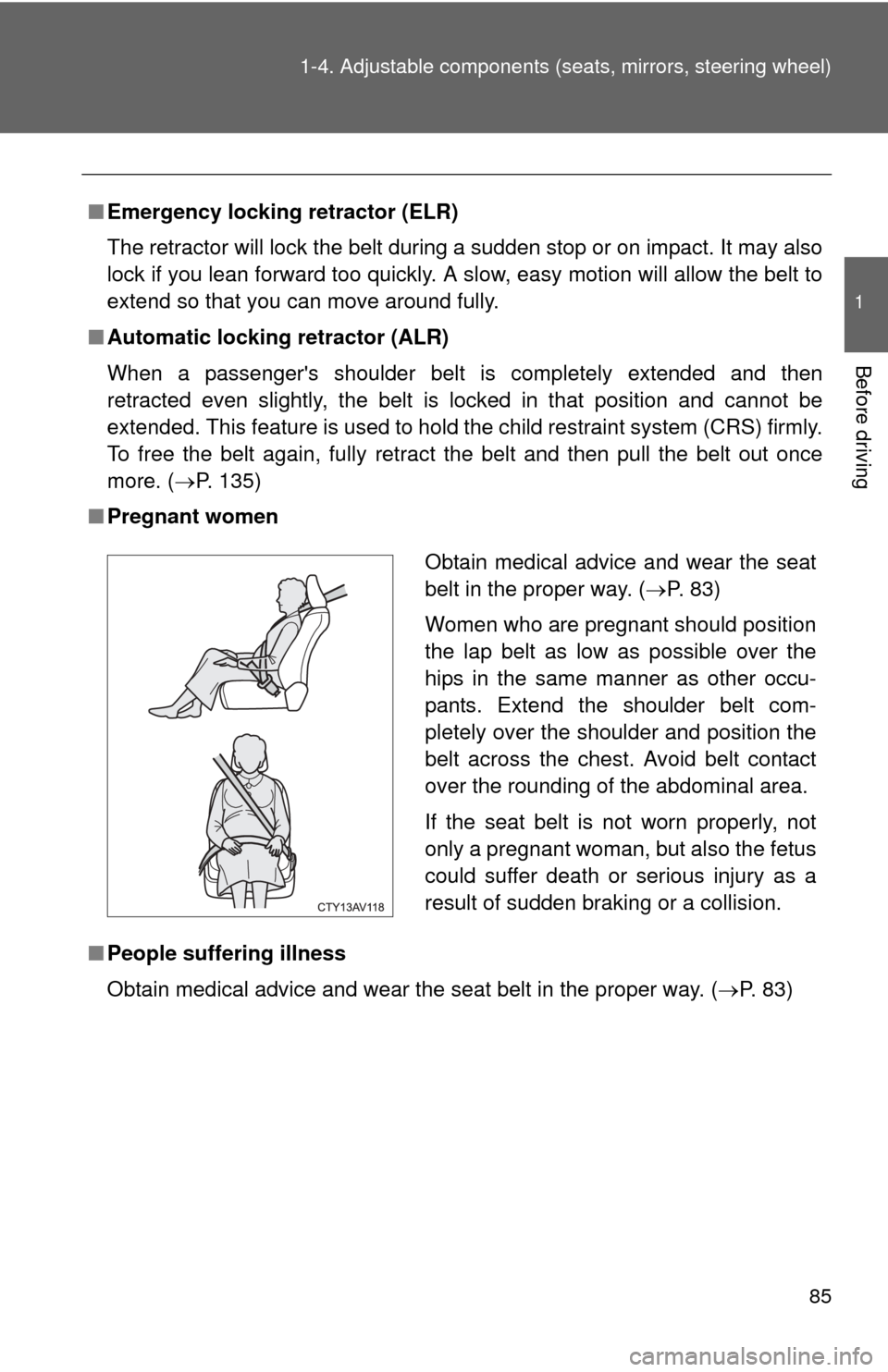
■ Pregnant women
■ People suffering illness
Obtain medical advice and wear the seat belt in the proper way. ( P. 83)
Obtain medical advice and wear the seat
belt in the proper way. ( P. 83)
Women who are pregnant should position
the lap belt as low as possible over the
hips in the same manner as other occu-
pants. Extend the shoulder belt com-
pletely over the shoulder and position the
belt across the chest. Avoid belt contact
over the rounding of the abdominal area.
If the seat belt is not worn properly, not
only a pregnant woman, but also the fetus
could suffer death or serious injury as a
result of sudden braking or a collision.
Page 87 of 612

87
1-4. Adjustable components (s
eats, mirrors, steering wheel)
1
Before driving
CAUTION
Observe the following precautions to reduce the risk of injury in the event of
sudden braking, sudden swerving or an accident.
Failure to do so may cause death or serious injury.
■Wearing a seat belt
●Ensure that all passengers wear a seat belt.
● Always wear a seat belt properly.
● Each seat belt should be used by one person only. Do not use a seat belt
for more than one person at once, including children.
● Toyota recommends that children be seated in the rear seat and always
use a seat belt and/or an appropriate child restraint system.
● To achieve a proper seating position, do not recline the seat more than
necessary. The seat belt is most effective when the occupants are sitting
up straight and well back in the seats.
● Do not wear the shoulder belt under your arm.
● Always wear your seat belt low and snug across your hips.
■ When children are in the vehicle
Do not allow children to play with the seat belt. If the seat belt becomes
twisted around a child’s neck, it may lead to choking or other serious injuries
that could result in death.
If this occurs and the buckle cannot be unfastened, scissors should be used
to cut the belt.
■ Seat belt pretensioners
●Do not place anything, such as a cushion, on the front passenger's seat.
Doing so will disperse the passenger's weight, which prevents the sensor
from detecting the passenger's weight properly. As a result, the seat belt
pretensioner for the front passenger's seat may not activate in the event of
a collision.
● If the pretensioner has activated, the SRS warning light will come on. In
that case, the seat belt cannot be used again and must be replaced at
your Toyota dealer.