power steering TOYOTA CAMRY HYBRID 2014 XV50 / 9.G Owners Manual
[x] Cancel search | Manufacturer: TOYOTA, Model Year: 2014, Model line: CAMRY HYBRID, Model: TOYOTA CAMRY HYBRID 2014 XV50 / 9.GPages: 612, PDF Size: 7.26 MB
Page 2 of 612

TABLE OF CONTENTSIndex
2
1-1. Hybrid systemHybrid system ...................... 30
Hybrid system precautions ........................ 35
Energy monitor/ consumption screen ........... 41
Hybrid vehicle driving tips .... 46
1-2. Key information Keys ..................................... 48
1-3. Opening, closing and locking the doors and
trunk
Smart key system................. 51
Wireless remote control ....... 64
Doors.................................... 67
Trunk .................................... 72
1-4. Adjustable components (seats, mirrors,
steering wheel)
Front seats ........................... 76
Rear seats ............................ 79
Head restraints ..................... 81
Seat belts ............................. 83
Steering wheel ..................... 90
Anti-glare inside rear view mirror.......................... 91
Outside rear view mirrors ..... 93 1-5. Opening and closing
the windows and
moon roof
Power windows..................... 95
Moon roof ............................. 98
1-6. Refueling Opening the fuel tank cap .................................... 102
1-7. Theft deterrent system Immobilizer system ............. 106
Alarm .................................. 108
1-8. Safety information Correct driving posture ....... 111
SRS airbags ....................... 113
Front passenger occupant classification system ......... 125
Child restraint systems ....... 131
Installing child restraints ..... 135
2-1. Driving procedures Driving the vehicle .............. 146
Power (ignition) switch........ 157
EV drive mode .................... 165
Hybrid transmission ............ 168
Turn signal lever ................. 170
Parking brake ..................... 172
Horn .................................... 173
1Before driving
2When driving
Page 4 of 612

TABLE OF CONTENTSIndex
4
Registering a Bluetooth®
audio player for the
first time ........................... 298
Registering a Bluetooth
®
phone for the first time ..... 299
Registering a Bluetooth
®
device ............................... 300
Connecting a Bluetooth
®
device ............................... 303
Displaying a Bluetooth
®
device details ................... 306
Detailed Bluetooth
®
system settings ................ 308
Listening to Bluetooth
®
audio ................................ 310
Using a Bluetooth
®
phone ............................... 312
Making a call ...................... 314
Receiving a call .................. 318
Speaking on the phone ...... 319
Bluetooth
® phone
message function ............. 323
Using the steering wheel switches ........................... 328
Bluetooth
® phone
settings ............................. 329
Contact/Call history settings ............................. 331
What to do if... (Troubleshooting) ............. 342
Bluetooth
®.......................... 346
Voice command system ..... 350
Rear view monitor system .............................. 353 3-3. Using the interior lights
Interior lights list.................. 364
• Interior lights ..................... 365
• Personal lights .................. 366
3-4. Using the storage features
List of storage features ....... 367
• Glove box ......................... 368
• Console box ..................... 369
• Coin holder ....................... 370
• Bottle holders ................... 371
• Cup holders ...................... 372
• Auxiliary boxes ................. 374
3-5. Other interior features Sun visors ........................... 376
Vanity mirrors ..................... 377
Clock................................... 378
Outside temperature display .............................. 379
Ashtray ............................... 380
Power outlets ...................... 381
Seat heaters ....................... 383
Armrest ............................... 385
Assist grips ......................... 386
Coat hooks ......................... 387
Floor mat ............................ 388
Trunk features .................... 390
Garage door opener ........... 391
Compass ............................ 398
Safety Connect ................... 402
Page 15 of 612
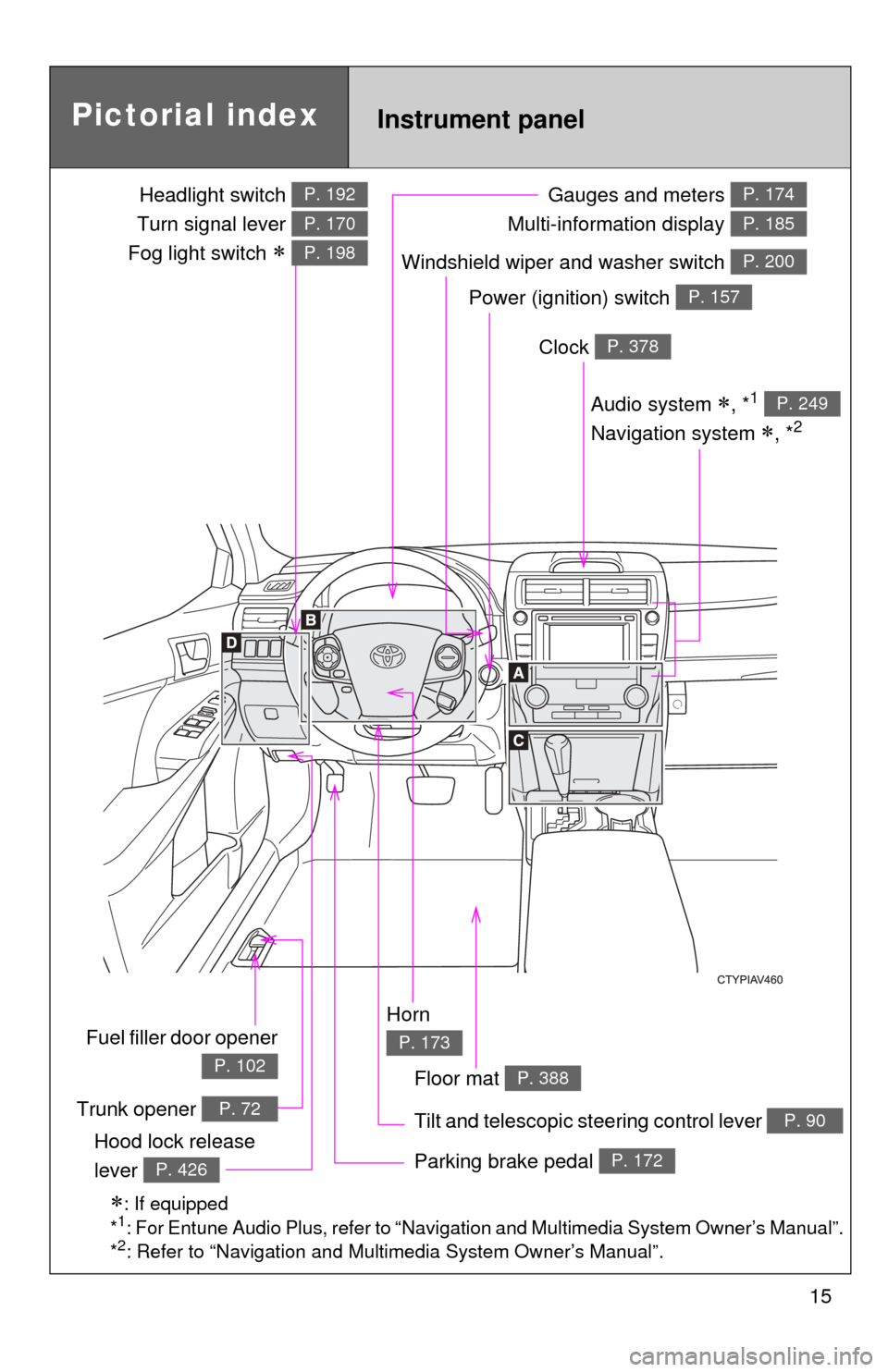
15
Power (ignition) switch P. 157
Gauges and meters
Multi-information display P. 174
P. 185
Tilt and telescopic steering control lever P. 90
Pictorial index
Trunk opener P. 72
Headlight switch
Turn signal lever
Fog light switch
P. 192
P. 170
P. 198
Instrument panel
Audio system , *1
Navigation system
, *2
P. 249
Windshield wiper and washer switch P. 200
Clock P. 378
Parking brake pedal P. 172Hood lock release
lever
P. 426
Fuel filler door opener
P. 102
Horn
P. 173
: If equipped
*1: For Entune Audio Plus, refer to “Navigation and Multimedia System Owner’s Manual”.
*2: Refer to “Navigation and Multimedia System Owner’s Manual”.
Floor mat P. 388
Page 29 of 612
Before driving1
29
1-1. Hybrid systemHybrid system .................... 30
Hybrid system precautions ...................... 35
Energy monitor/ consumption screen......... 41
Hybrid vehicle driving tips........................ 46
1-2. Key information Keys ................................... 48
1-3. Opening, closing and locking the doors and trunk
Smart key system .............. 51
Wireless remote control ..... 64
Doors ................................. 67
Trunk .................................. 72
1-4. Adjustable components (seats, mirrors,
steering wheel)
Front seats ......................... 76
Rear seats.......................... 79
Head restraints................... 81
Seat belts ........................... 83
Steering wheel ................... 90
Anti-glare inside rear view mirror ................ 91
Outside rear view mirrors.............................. 93 1-5. Opening and closing the
windows and moon roof
Power windows .................. 95
Moon roof ........................... 98
1-6. Refueling Opening the fuel tank cap .................. 102
1-7. Theft deterrent system Immobilizer system .......... 106
Alarm................................ 108
1-8. Safety information Correct driving posture..... 111
SRS airbags ..................... 113
Front passenger occupant classification
system ........................... 125
Child restraint systems..... 131
Installing child restraints ........................ 135
Page 42 of 612
42 1-1. Hybrid system
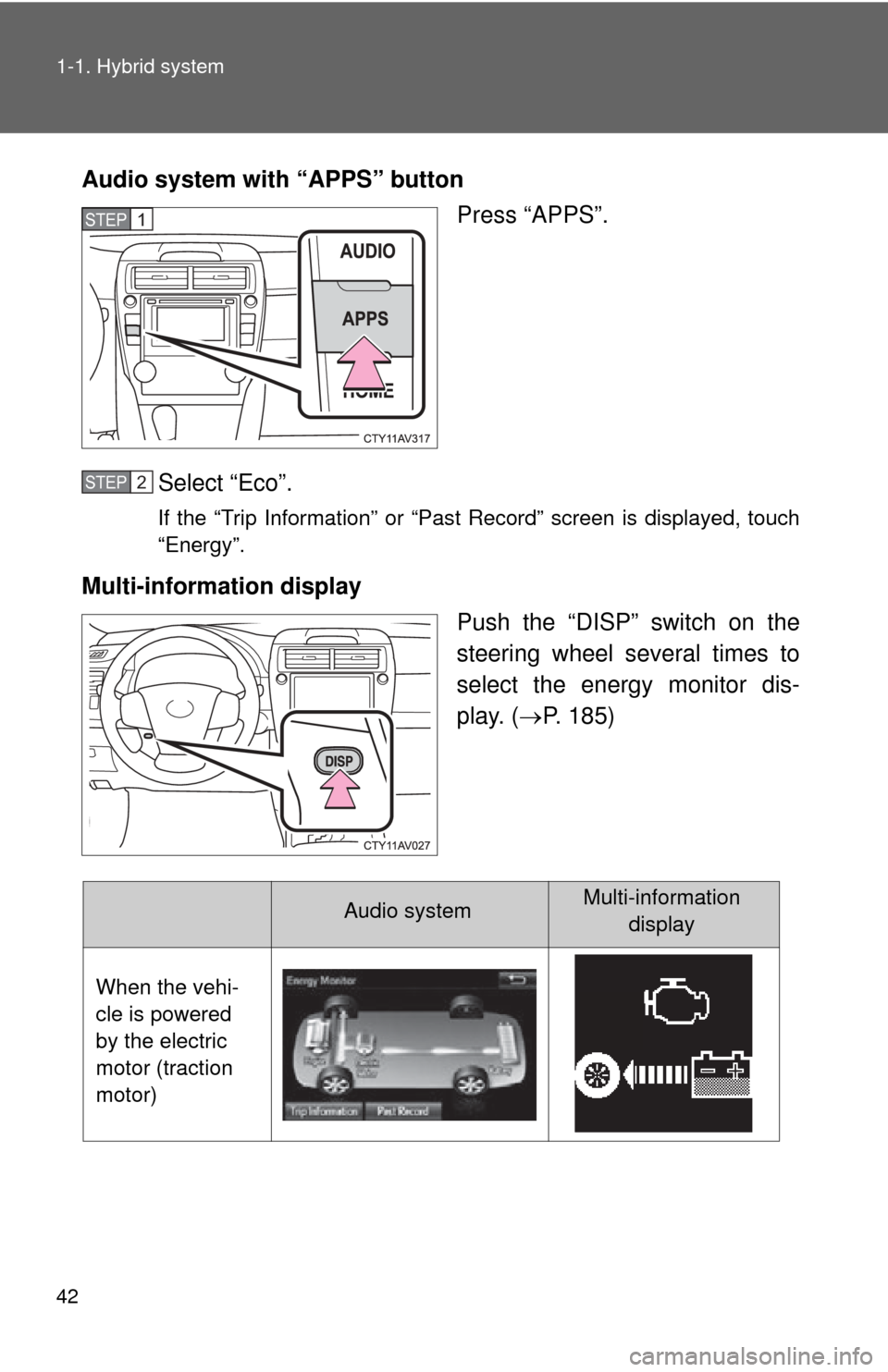
Audio system with “APPS” buttonPress “APPS”.
Select “Eco”.
If the “Trip Information” or “Past Record” screen is displayed, touch
“Energy”.
Multi-information display Push the “DISP” switch on the
steering wheel several times to
select the energy monitor dis-
play. (P. 185)
STEP1
STEP2
Audio systemMulti-information
display
When the vehi-
cle is powered
by the electric
motor (traction
motor)
Page 77 of 612
77
1-4. Adjustable components (s
eats, mirrors, steering wheel)
1
Before driving
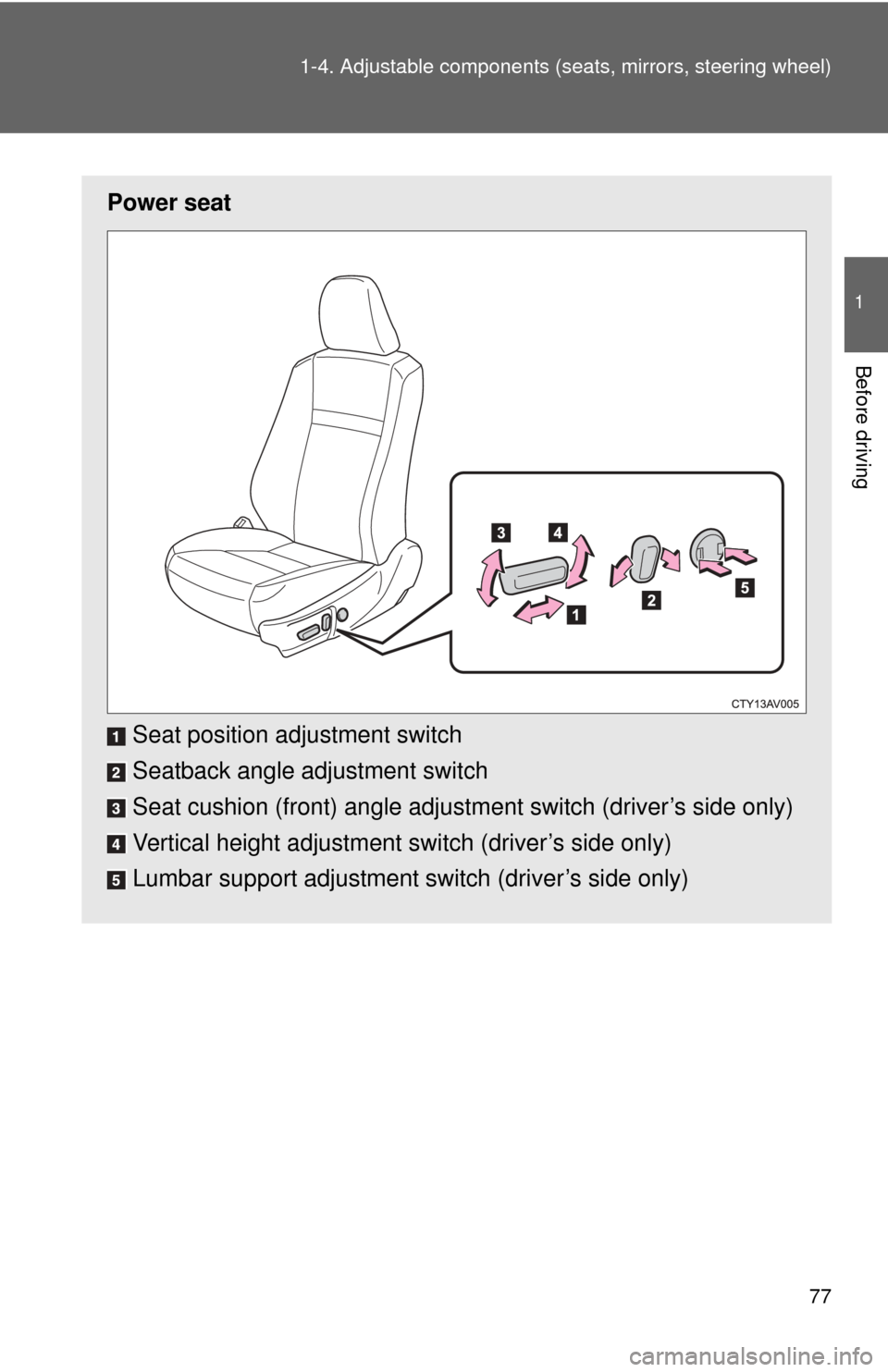
Power seat
Seat position adjustment switch
Seatback angle adjustment switch
Seat cushion (front) angle adjustment switch (driver’s side only)
Vertical height adjustment switch (driver’s side only)
Lumbar support adjustment switch (driver’s side only)
Page 91 of 612
91
1
1-4. Adjustable components (seats, mirrors, steering wheel)
Before driving
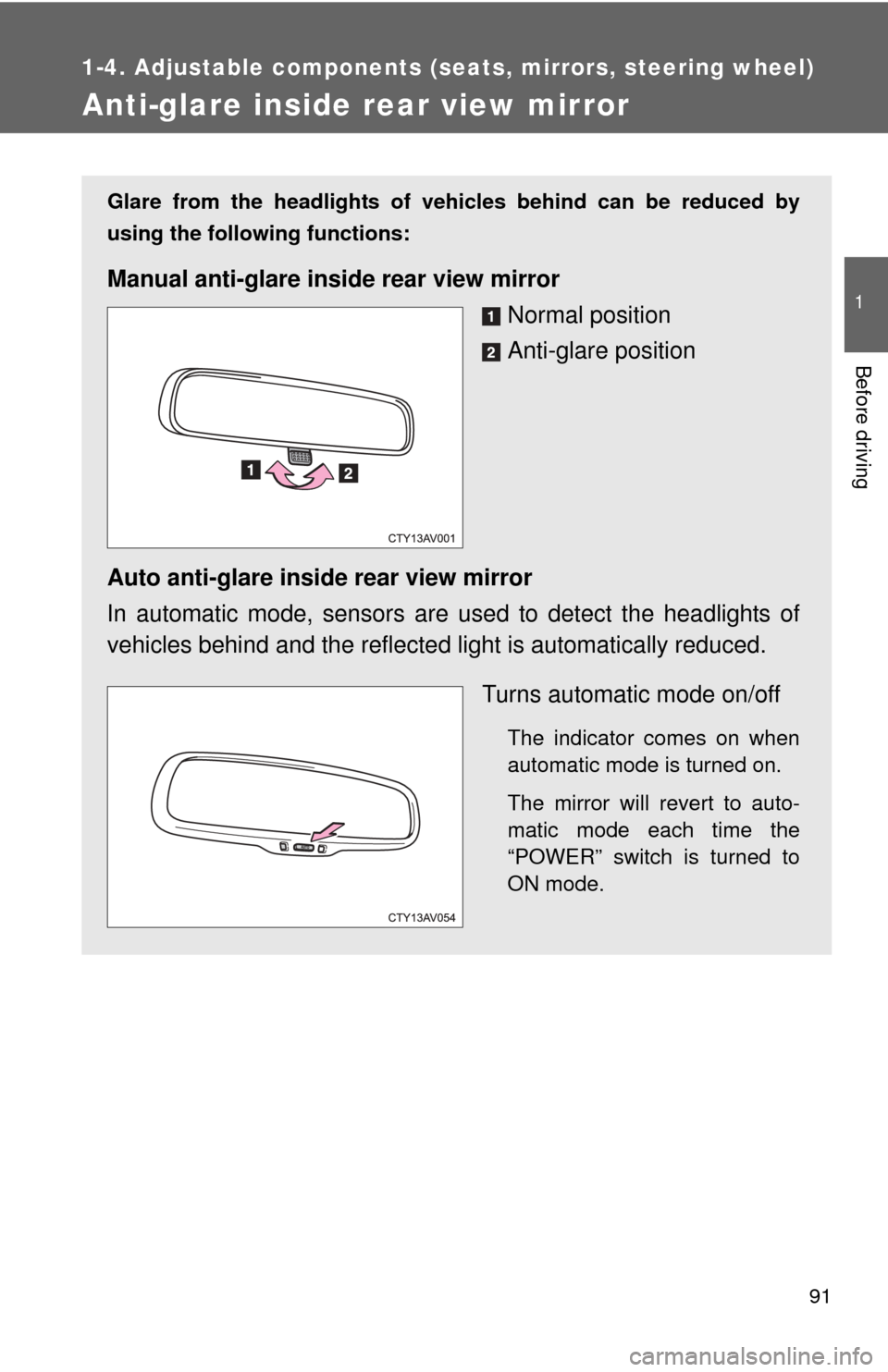
Anti-glare inside rear view mirror
Glare from the headlights of vehicles behind can be reduced by
using the following functions:
Manual anti-glare inside rear view mirrorNormal position
Anti-glare position
Auto anti-glare inside rear view mirror
In automatic mode, sensors are used to detect the headlights of
vehicles behind and the reflecte d light is automatically reduced.
Turns automatic mode on/off
The indicator comes on when
automatic mode is turned on.
The mirror will revert to auto-
matic mode each time the
“POWER” switch is turned to
ON mode.
Page 94 of 612

94 1-4. Adjustable components (seats, mirrors, steering wheel)
■Mirror angle can be adjusted when
The “POWER” switch is in ACCESSORY or ON mode.
■ When the mirrors are fogged up (vehicles with mirror defoggers)
Turn on the mirror defoggers to defog the mirrors. ( P. 248)
CAUTION
■When driving the vehicle
Observe the following precautions while driving.
Failure to do so may result in loss of control of the vehicle and cause an
accident, resulting in death or serious injury.
●Do not adjust the mirrors while driving.
● Do not drive with the mirrors folded.
● Both the driver and passenger side mirrors must be extended and properly
adjusted before driving.
■ When a mirror is moving
To avoid personal injury and mirror malfunction, be careful not to get your
hand caught by the moving mirror.
■ When the mirror defogg ers are operating (vehicles with mirror defog-
gers)
Do not touch the rear view mirror surfaces, as they can become very hot and
burn you.
Page 150 of 612

150 2-1. Driving procedures
CAUTION
●Do not shift the shift lever to P while the vehicle is moving.
Doing so can damage the transmission and may result in a loss of vehicle\
control.
● Do not shift the shift lever to R while the vehicle is moving forward.
Doing so can damage the transmission and may result in a loss of vehicle\
control.
● Do not shift the shift lever to D while the vehicle is moving backward.
Doing so can damage the transmission and may result in a loss of vehicle\
control.
● Moving the shift lever to N while the vehicle is moving will disengage the
hybrid system. Engine braking is not available with the hybrid system dis-
engaged.
● During normal driving, do not turn off the hybrid system. Turning the hybrid
system off while driving will not cause loss of steering or braking control,
however, power assist to the steering will be lost. This will make it more
difficult to steer smoothly, so you should pull over and stop the vehicle as
soon as it is safe to do so.
In the event of an emergency, such as if it becomes impossible to stop the
vehicle in the normal way: P. 548
● Use engine braking (downshift) to maintain a safe speed when driving
down a steep hill.
Using the brakes continuously may cause the brakes to overheat and lose
effectiveness. ( P. 168)
● Do not adjust the position of the steering wheel, the seat, or the inside or
outside rear view mirrors while driving.
Doing so may result in a loss of vehicle control that can cause accidents,
resulting in death or serious injury.
● Always check that all passengers' arms, heads or other parts of their body
are not outside the vehicle, as this may result in death or serious injury.
Page 156 of 612

156 2-1. Driving procedures
NOTICE
■Avoiding damage to vehicle parts
●Do not turn the steering wheel fully in either direction and hold it there for
an extended period of time.
Doing so may damage the power steering motor.
● When driving over bumps in the road, drive as slowly as possible to avoid
damaging the wheels, underside of the vehicle, etc.
■ If you get a flat tire while driving
A flat or damaged tire may cause the following situations. Hold the steering
wheel firmly and gradually depress t he brake pedal to slow down and stop
the vehicle in a safe place.
● It may be difficult to control your vehicle.
● The vehicle will make abnormal sounds or vibrations.
● The vehicle will behave abnormally.
Information on what to do in case of a flat tire ( P. 519)
■ When encountering flooded roads
Do not drive on a road that has flooded after heavy rain etc. Doing so may
cause the following serious damage to the vehicle:
●Engine stalling
● Short in electrical components
● Engine damage caused by water immersion
In the event that you drive on a flooded road and the vehicle is flooded, be
sure to have your Toyota dealer check the following:
● Brake function
● Changes in quantity and quality of oil and fluid used for the engine, hybrid
transmission, etc.
● Lubricant condition for the bearings and suspension joints (where possi-
ble), and the function of all joints, bearings, etc.