brake TOYOTA CAMRY HYBRID 2016 XV50 / 9.G Owner's Manual
[x] Cancel search | Manufacturer: TOYOTA, Model Year: 2016, Model line: CAMRY HYBRID, Model: TOYOTA CAMRY HYBRID 2016 XV50 / 9.GPages: 572, PDF Size: 7.25 MB
Page 168 of 572
1684-2. Driving procedures
CAMRY_HV_U (OM33C35U)
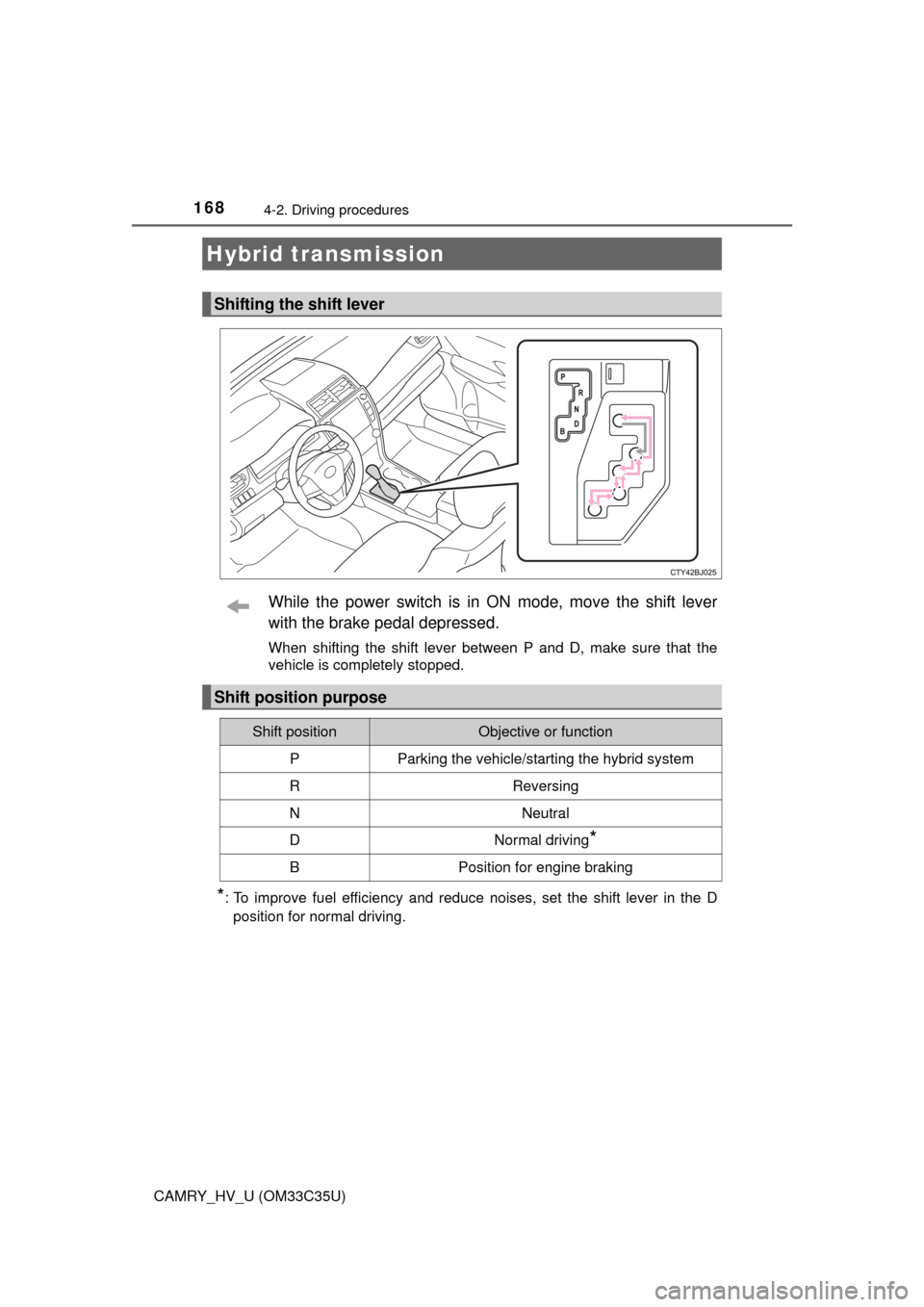
While the power switch is in ON mode, move the shift lever
with the brake pedal depressed.
When shifting the shift lever between P and D, make sure that the
vehicle is completely stopped.
*: To improve fuel efficiency and reduce noises, set the shift lever in the Dposition for normal driving.
Hybrid transmission
Shifting the shift lever
Shift position purpose
Shift positionObjective or function
PParking the vehicle/starting the hybrid system
RReversing
NNeutral
DNormal driving*
BPosition for engine braking
Page 171 of 572
1714-2. Driving procedures
4
Driving
CAMRY_HV_U (OM33C35U)
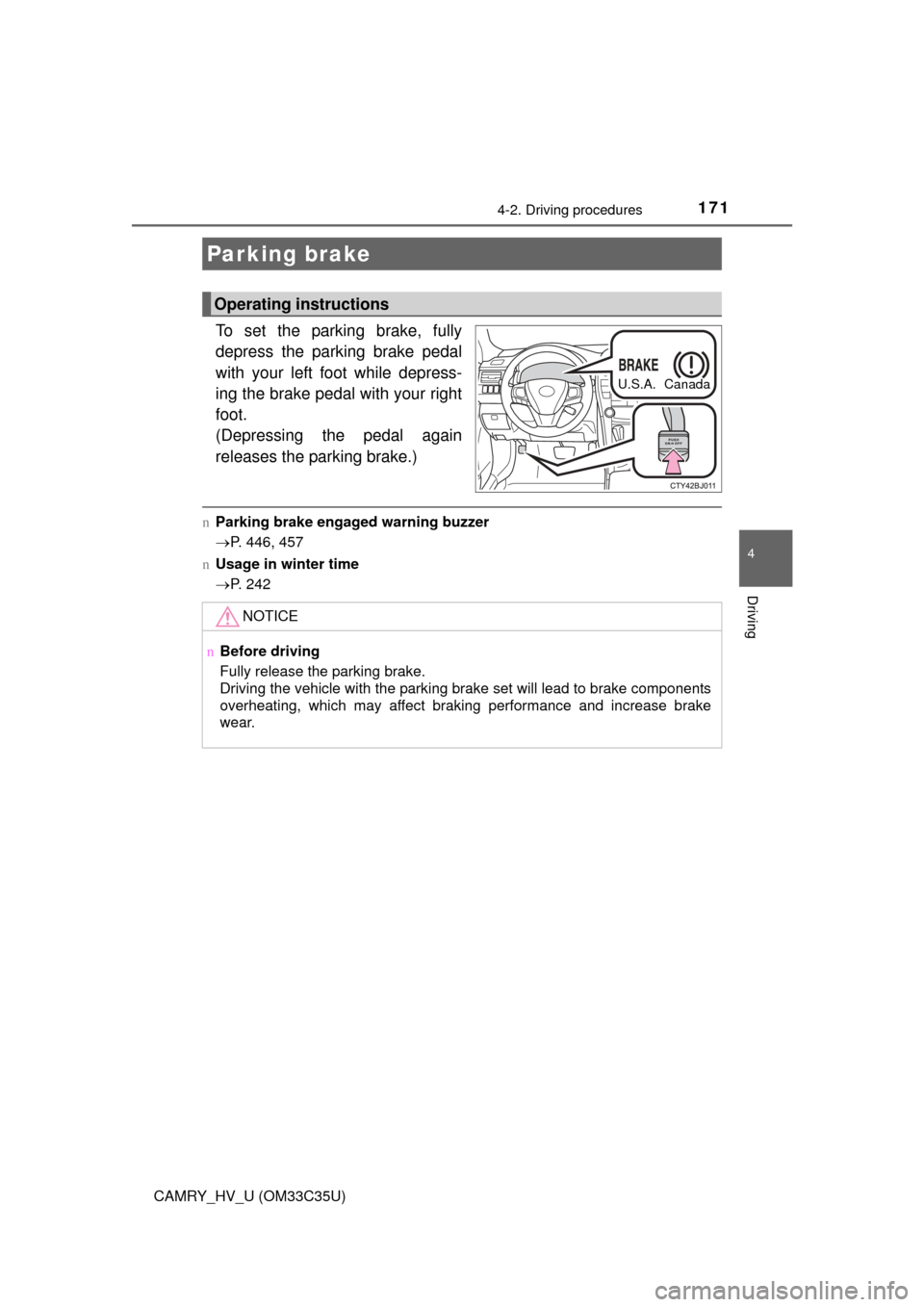
To set the parking brake, fully
depress the parking brake pedal
with your left foot while depress-
ing the brake pedal with your right
foot.
(Depressing the pedal again
releases the parking brake.)
nParking brake engaged warning buzzer
P. 446, 457
n Usage in winter time
P. 242
Parking brake
Operating instructions
U.S.A. Canada
NOTICE
nBefore driving
Fully release the parking brake.
Driving the vehicle with the parking brake set will lead to brake components
overheating, which may affect braking performance and increase brake
wear.
Page 173 of 572
1734-3. Operating the lights and wipers
4
Driving
CAMRY_HV_U (OM33C35U)
nDaytime running light system
lVehicles with halogen daytime running lights:
To make your vehicle more visible to other drivers during daytime driving,
the daytime running lights turn on automatically whenever the hybrid system
is started and the parking brake is released with the headlight switch in the
“AUTO” position. (Illuminate darker than headlight high beams.) Daytime
running lights are not designed for use at night.
Vehicles with LED daytime running lights:
To make your vehicle more visible to other drivers during daytime driving,
the daytime running lights turn on automatically whenever the hybrid system
is started and the parking brake is released with the headlight switch in the
“AUTO” position. (Illuminate brighter than parking lights.) Daytime running
lights are not designed for use at night.
U.S.A.: Daytime running lights can be turned off by operating the switch.
Canada: Daytime running lights are turned on even when the headlight
switch is in position.
l Compared to turning on the headlights, the daytime running light system
offers greater durability and consumes less electricity, so it can help improve
fuel economy.
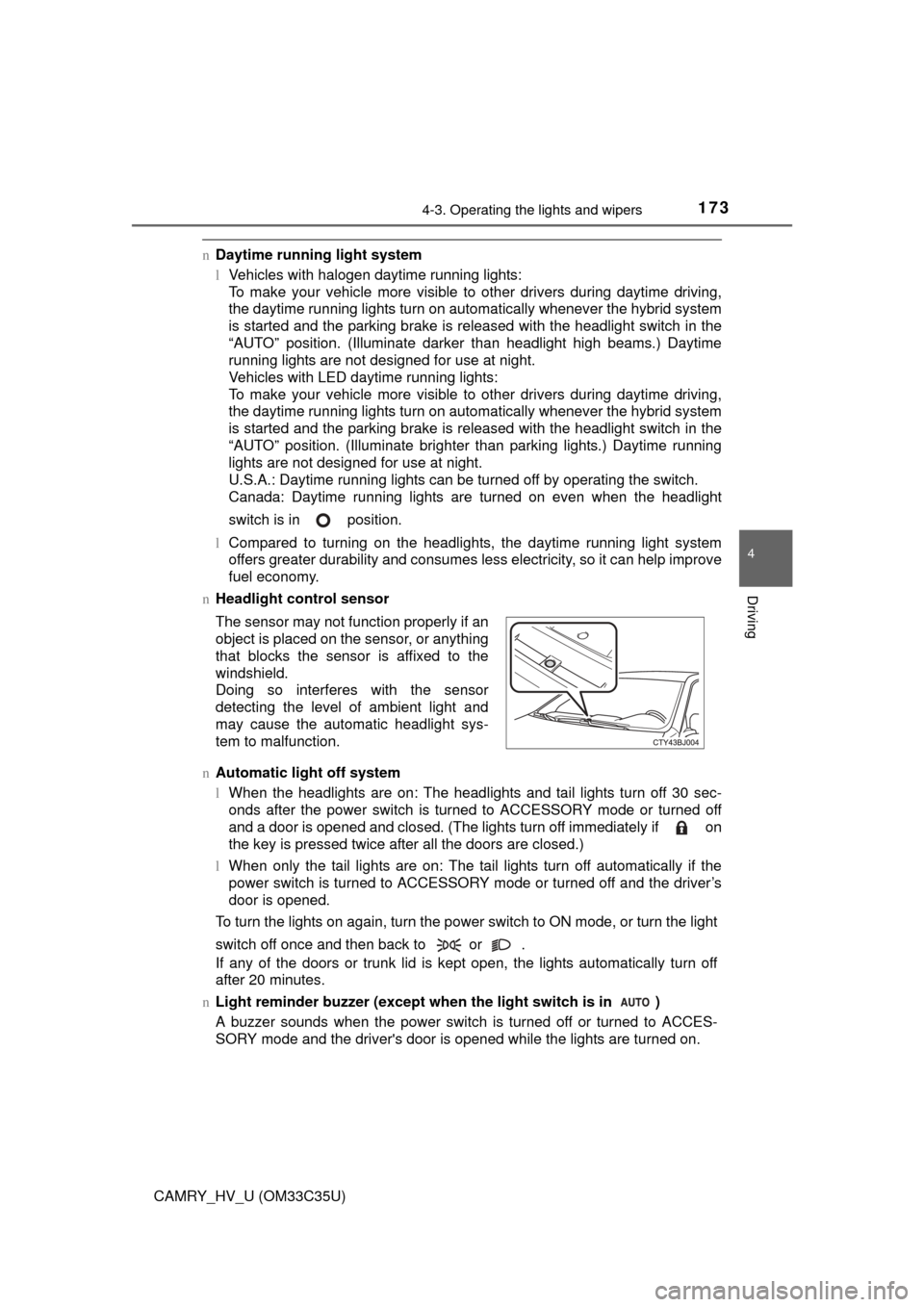
n Headlight control sensor
n Automatic light off system
lWhen the headlights are on: The headlights and tail lights turn off 30 sec-
onds after the power switch is turned to ACCESSORY mode or turned off
and a door is opened and closed. (The lights turn off immediately if on
the key is pressed twice after all the doors are closed.)
l When only the tail lights are on: The tail lights turn off automatically if the
power switch is turned to ACCESSORY mode or turned off and the driver’s
door is opened.
To turn the lights on again, turn the power switch to ON mode, or turn the light
switch off once and then back to or .
If any of the doors or trunk lid is kept open, the lights automatically turn off
after 20 minutes.
n Light reminder buzzer (except when the light switch is in )
A buzzer sounds when the power switch is turned off or turned to ACCES-
SORY mode and the driver's door is opened while the lights are turned on. The sensor may not function properly if an
object is placed on the sensor, or anything
that blocks the sensor is affixed to the
windshield.
Doing so interferes with the sensor
detecting the level of ambient light and
may cause the automatic headlight sys-
tem to malfunction.
Page 186 of 572
1864-5. Using the driving support systems
CAMRY_HV_U (OM33C35U)
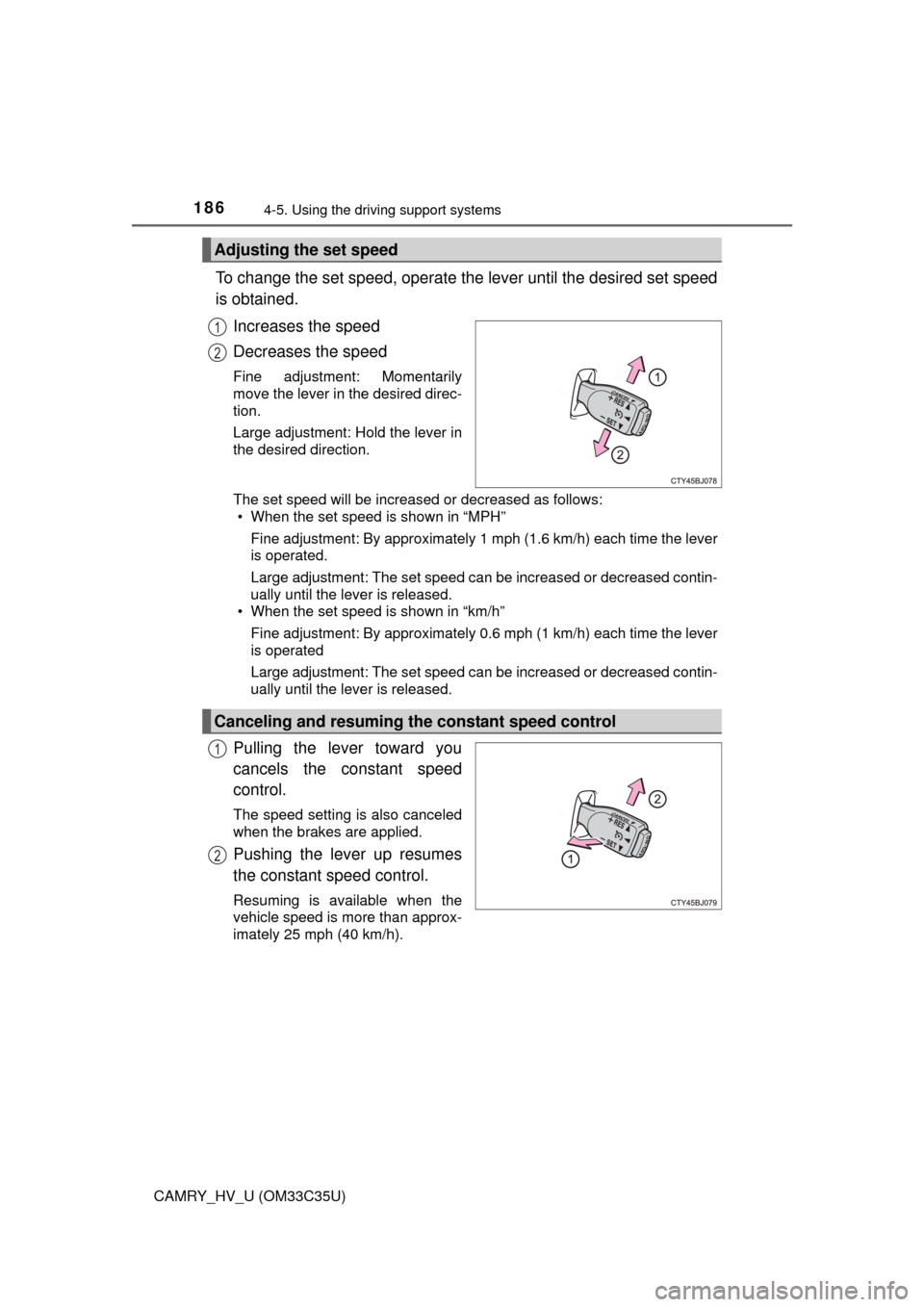
To change the set speed, operate the lever until the desired set speed
is obtained.
Increases the speed
Decreases the speed
Fine adjustment: Momentarily
move the lever in the desired direc-
tion.
Large adjustment: Hold the lever in
the desired direction.
The set speed will be increased or decreased as follows:• When the set speed is shown in “MPH”
Fine adjustment: By approximately 1 mph (1.6 km/h) each time the lever
is operated.
Large adjustment: The set speed can be increased or decreased contin-
ually until the lever is released.
• When the set speed is shown in “km/h”
Fine adjustment: By approximately 0.6 mph (1 km/h) each time the lever
is operated
Large adjustment: The set speed can be increased or decreased contin-
ually until the lever is released.
Pulling the lever toward you
cancels the constant speed
control.
The speed setting is also canceled
when the brakes are applied.
Pushing the lever up resumes
the constant speed control.
Resuming is available when the
vehicle speed is more than approx-
imately 25 mph (40 km/h).
Adjusting the set speed
1
2
Canceling and resuming the constant speed control
1
2
Page 192 of 572
1924-5. Using the driving support systems
CAMRY_HV_U (OM33C35U)
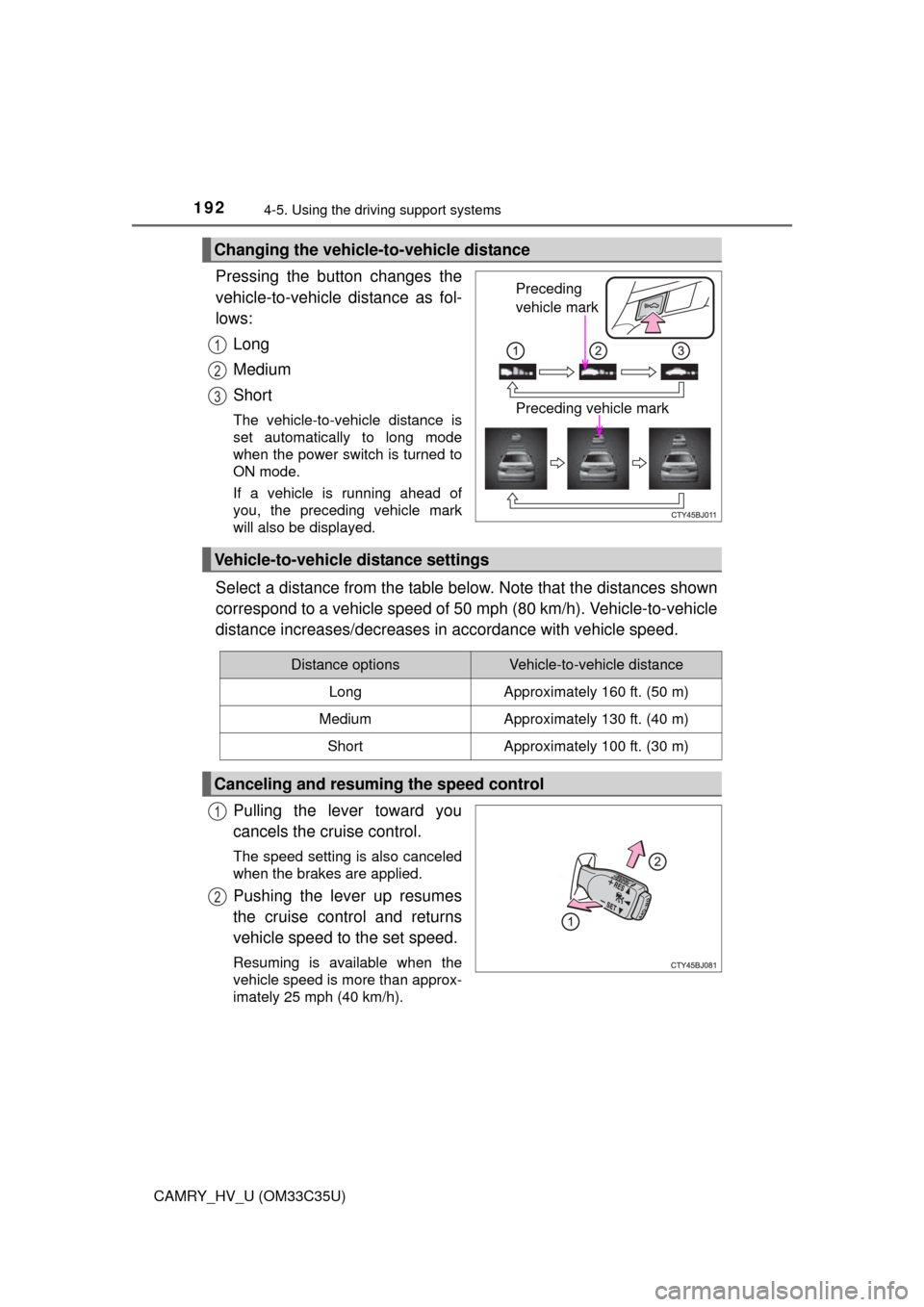
Pressing the button changes the
vehicle-to-vehicle distance as fol-
lows:
Long
Medium
Short
The vehicle-to-vehicle distance is
set automatically to long mode
when the power switch is turned to
ON mode.
If a vehicle is running ahead of
you, the preceding vehicle mark
will also be displayed.
Select a distance from the table below. Note that the distances shown
correspond to a vehicle speed of 50 mph (80 km/h). Vehicle-to-vehicle
distance increases/decreases in accordance with vehicle speed.
Pulling the lever toward you
cancels the cruise control.
The speed setting is also canceled
when the brakes are applied.
Pushing the lever up resumes
the cruise control and returns
vehicle speed to the set speed.
Resuming is available when the
vehicle speed is more than approx-
imately 25 mph (40 km/h).
Changing the vehicle-to-vehicle distance
Preceding
vehicle mark
Preceding vehicle mark
1
2
3
Vehicle-to-vehicle distance settings
Distance optionsVehicle-to-vehicle distance
LongApproximately 160 ft. (50 m)
MediumApproximately 130 ft. (40 m)
ShortApproximately 100 ft. (30 m)
Canceling and resuming the speed control
1
2
Page 193 of 572
1934-5. Using the driving support systems
4
Driving
CAMRY_HV_U (OM33C35U)
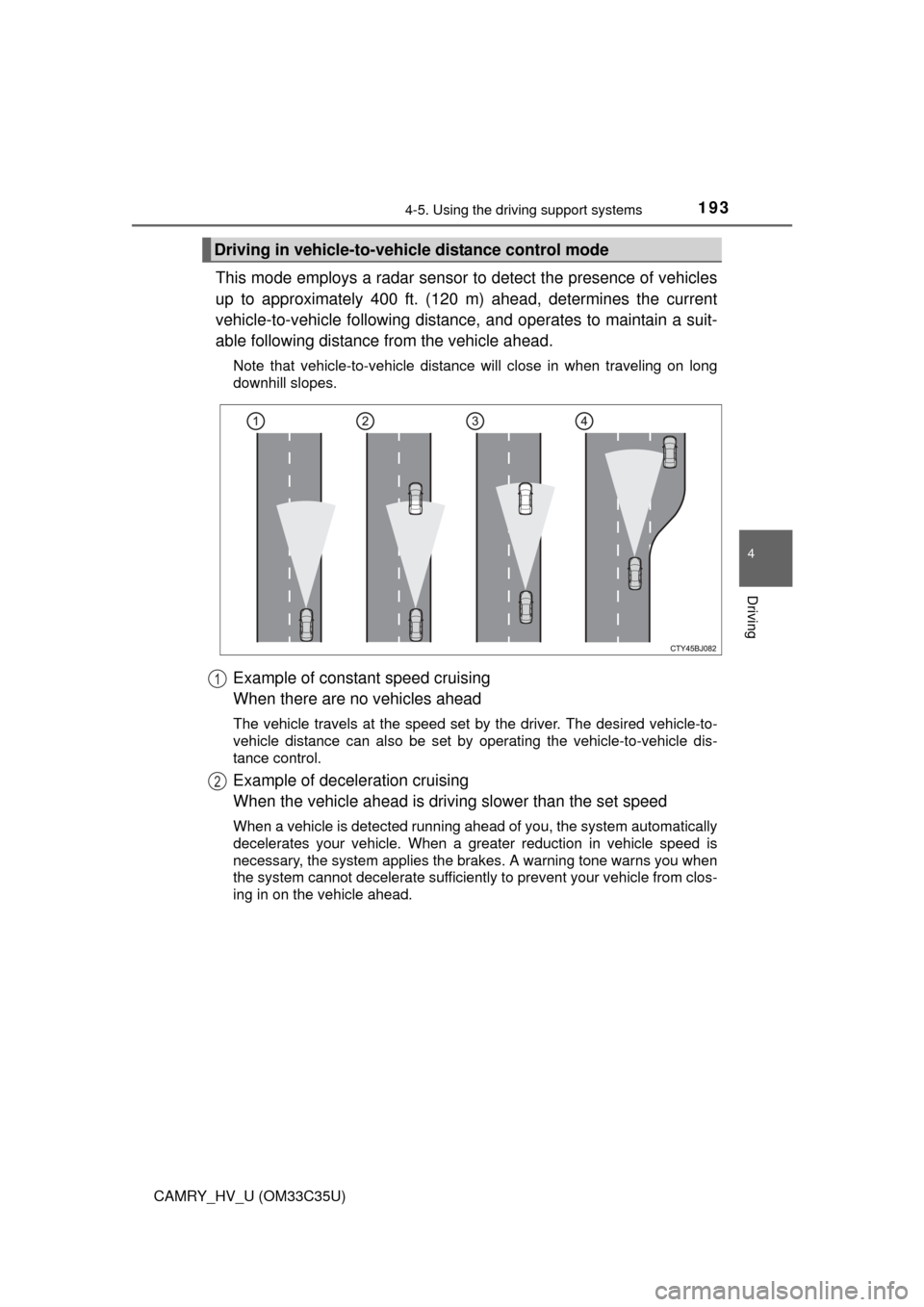
This mode employs a radar sensor to detect the presence of vehicles
up to approximately 400 ft. (120 m) ahead, determines the current
vehicle-to-vehicle following distance, and operates to maintain a suit-
able following distance from the vehicle ahead.
Note that vehicle-to-vehicle distance will close in when traveling on long
downhill slopes.
Example of constant speed cruising
When there are no vehicles ahead
The vehicle travels at the speed set by the driver. The desired vehicle-to-
vehicle distance can also be set by operating the vehicle-to-vehicle dis-
tance control.
Example of deceleration cruising
When the vehicle ahead is drivi ng slower than the set speed
When a vehicle is detected running ahead of you, the system automatically
decelerates your vehicle. When a greater reduction in vehicle speed is
necessary, the system applies the brakes. A warning tone warns you when
the system cannot decelerate sufficiently to prevent your vehicle from clos-
ing in on the vehicle ahead.
Driving in vehicle-to-vehicle distance control mode
1
2
Page 194 of 572
1944-5. Using the driving support systems
CAMRY_HV_U (OM33C35U)
Example of follow-up cruising
When following a vehicle driving slower than the set speed
The system continues follow-up cruising while adjusting for changes in the
speed of the vehicle ahead in order to maintain the vehicle-to-vehicle dis-
tance set by the driver.
Example of acceleration
When there are no longer any vehi cles ahead driving slower than
the set speed
The system accelerates until the set speed is reached. The system then
returns to constant speed cruising.
When your vehicle is too close to a vehicle ahead, and sufficient auto-
matic deceleration via the cruise control is not possible, the display
will flash and the buzzer will sound to alert the driver. An example of
this would be if another driver cuts in front of you while you are follow-
ing a vehicle. Apply the brakes to ensure an appropriate vehicle-to-
vehicle distance.
nWarnings may not occur when
In the following instances, there is a possibility that the warnings will
not occur:
l When the speed of the vehicle ahead matches or exceeds your
vehicle speed
l When the vehicle ahead is traveling at an extremely slow speed
l Immediately after the crui se control speed was set
l At the instant the accelerator is applied
Approach warning
3
4
Page 198 of 572

1984-5. Using the driving support systems
CAMRY_HV_U (OM33C35U)
WARNING
nBefore using dynamic radar cruise control
Do not overly rely on vehicle-to-vehicle distance control.
Be aware of the set speed. If automatic deceleration/acceleration is not
appropriate, adjust the vehicle speed, as well as the distance between your
vehicle and vehicles ahead by applying the brakes etc.
n Cautions regarding the driving assist systems
Observe the following precautions.
Failure to do so may cause an accident resulting in death or serious injury.
lAssisting the driver to measure following distance
The dynamic radar cruise control is only intended to help the driver in
determining the following distance between the driver’s own vehicle and a
designated vehicle traveling ahead. It is not a mechanism that allows care-
less or inattentive driving, and it is not a system that can assist the driver in
low-visibility conditions. It is still necessary for driver to pay close attention
to the vehicle’s surroundings.
l Assisting the driver to judge proper following distance
The dynamic radar cruise control determines whether the following dis-
tance between the driver’s own vehicle and a designated vehicle traveling
ahead is appropriate or not. It is not capable of making any other type of
judgement. Therefore, it is absolutely necessary for the driver to remain
vigilant and to determine whether or not there is a possibility of danger in
any given situation.
l Assisting the driver to operate the vehicle
The dynamic radar cruise control has no capability to prevent or avoid a
collision with a vehicle traveling ahead. Therefore, if there is ever any dan-
ger, the driver must take immediate and direct control of the vehicle and
act appropriately in order to ensure the safety of all involved.
n To avoid inadvertent cr uise control activation
Switch the cruise control off using the “ON-OFF” button when not in use.
Page 199 of 572
1994-5. Using the driving support systems
4
Driving
CAMRY_HV_U (OM33C35U)
WARNING
nSituations unsuitable for dynamic radar cruise control
Do not use dynamic radar cruise control in any of the following situations.
Doing so may result in inappropriate speed control and could cause an acci-
dent resulting in death or serious injury.
lRoads where there are pedestrians, cyclers, etc.
l In heavy traffic
l On roads with sharp bends
l On winding roads
l On slippery roads, such as those covered with rain, ice or snow
l On steep downhills, or where there are sudden changes between sharp up
and down gradients
Vehicle speed may exceed the set speed when driving down a steep hill.
l At entrances to expressways and highways
l When weather conditions are bad enough that they may prevent the sen-
sors from detecting correctly (fog, snow, sandstorm, heavy rain, etc.)
l When an approach warning buzzer is heard often
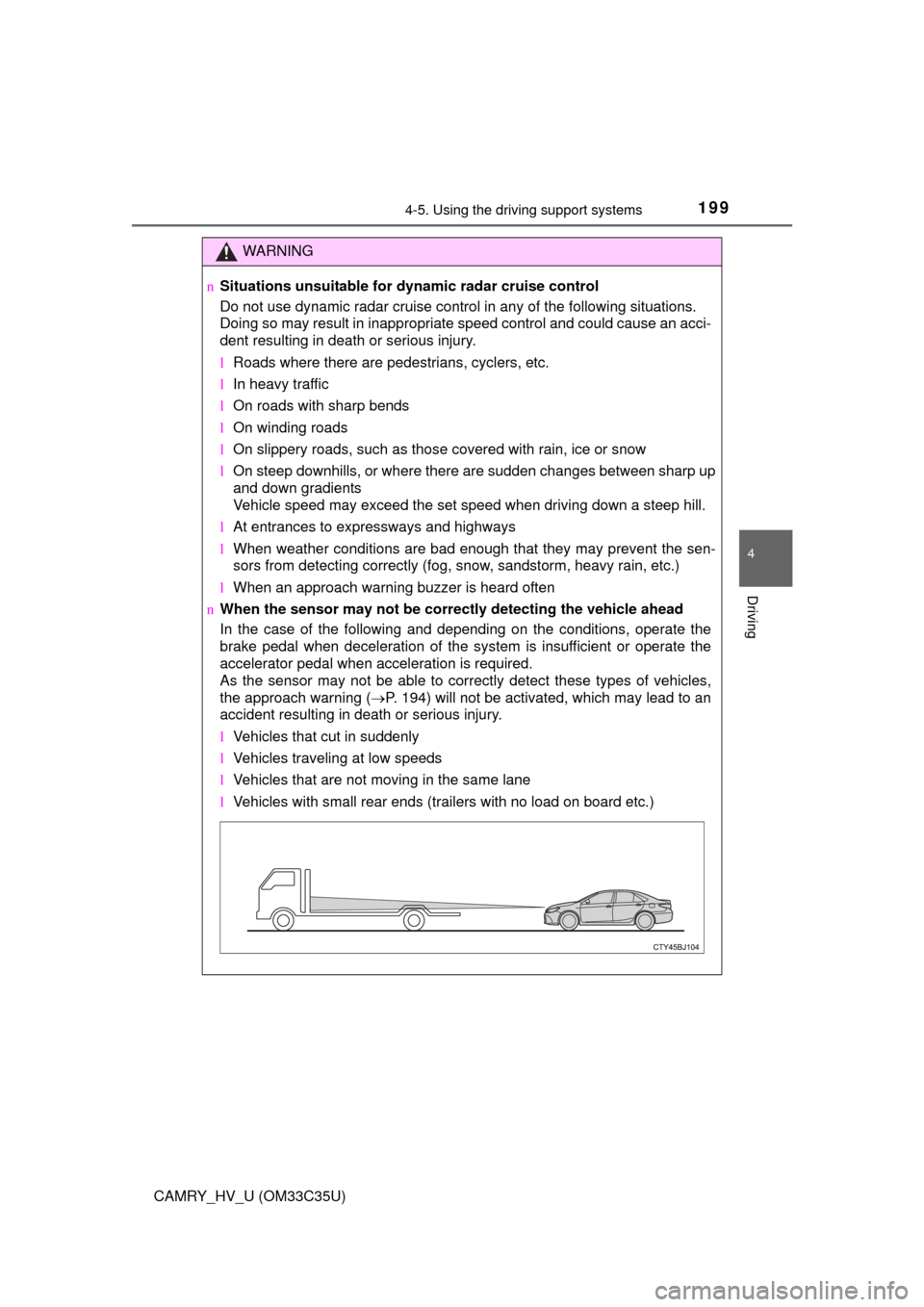
n When the sensor may not be correct ly detecting the vehicle ahead
In the case of the following and depending on the conditions, operate the
brake pedal when deceleration of the system is insufficient or operate the
accelerator pedal when acceleration is required.
As the sensor may not be able to correctly detect these types of vehicles,
the approach warning ( P. 194) will not be activated, which may lead to an
accident resulting in death or serious injury.
l Vehicles that cut in suddenly
l Vehicles traveling at low speeds
l Vehicles that are not moving in the same lane
l Vehicles with small rear ends (trailers with no load on board etc.)
Page 200 of 572
2004-5. Using the driving support systems
CAMRY_HV_U (OM33C35U)
WARNING
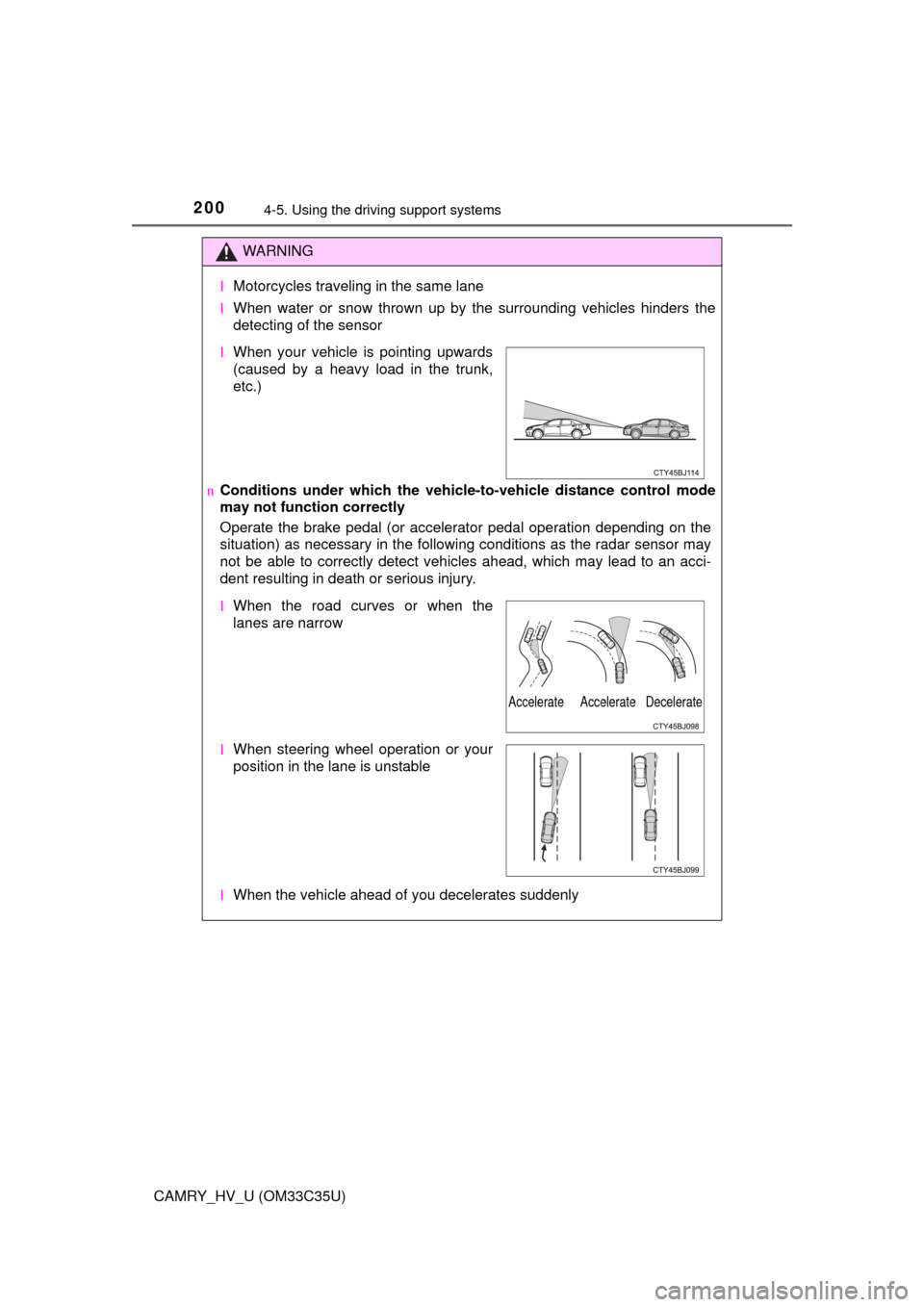
lMotorcycles traveling in the same lane
l When water or snow thrown up by the surrounding vehicles hinders the
detecting of the sensor
n Conditions under which the vehicle -to-vehicle distance control mode
may not function correctly
Operate the brake pedal (or accelerator pedal operation depending on the
situation) as necessary in the follow ing conditions as the radar sensor may
not be able to correctly detect vehicles ahead, which may lead to an acci-
dent resulting in death or serious injury.
l When the vehicle ahead of you decelerates suddenly
lWhen your vehicle is pointing upwards
(caused by a heavy load in the trunk,
etc.)
lWhen the road curves or when the
lanes are narrow
l When steering wheel operation or your
position in the lane is unstable
Accelerate Accelerate Decelerate