audio TOYOTA CAMRY HYBRID 2020 (in English) User Guide
[x] Cancel search | Manufacturer: TOYOTA, Model Year: 2020, Model line: CAMRY HYBRID, Model: TOYOTA CAMRY HYBRID 2020Pages: 592, PDF Size: 12.13 MB
Page 141 of 592
1412. Instrument cluster
2
Instrument cluster
■Multi-information display
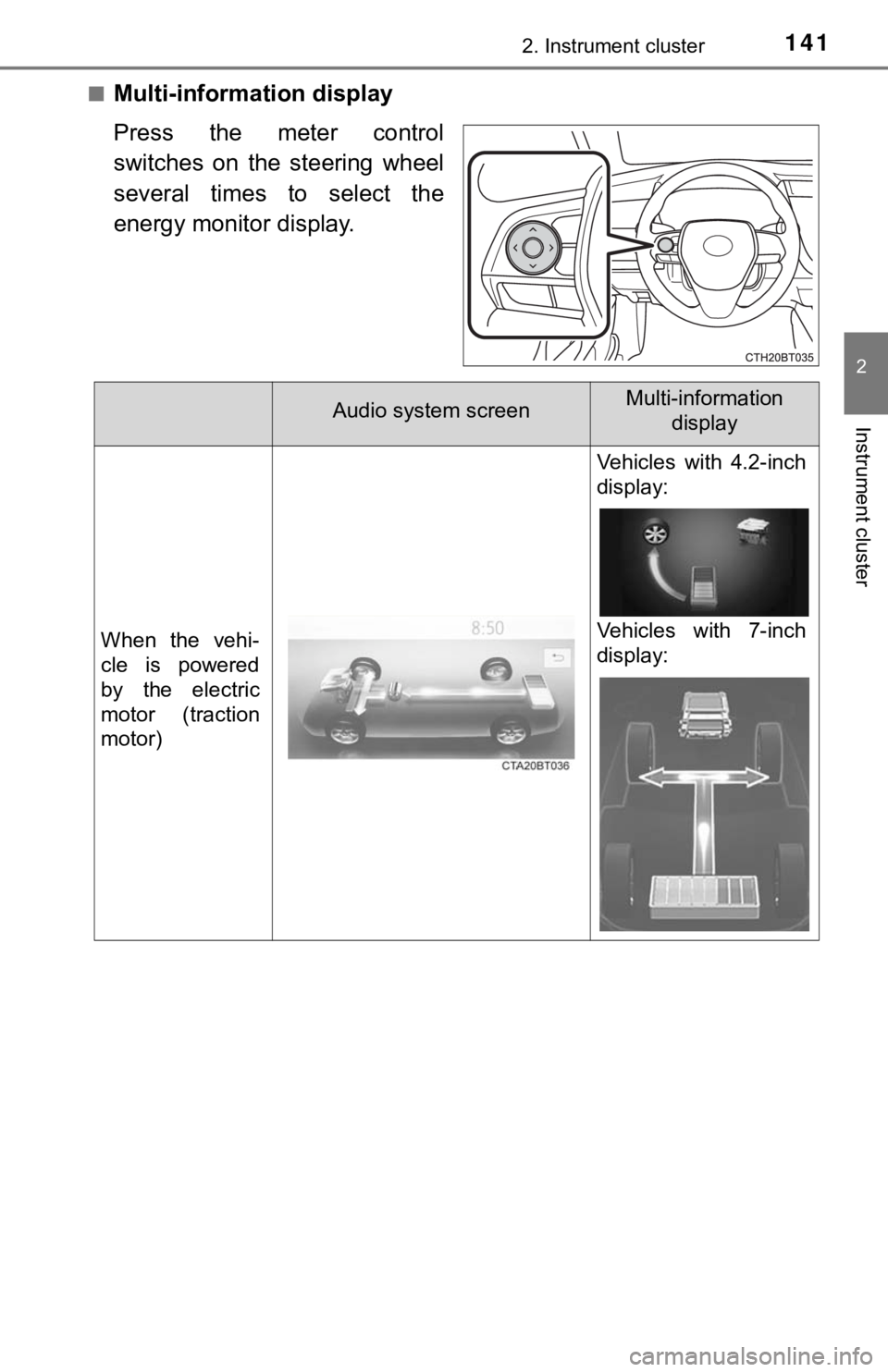
Press the meter control
switches on the steering wheel
several times to select the
energy monitor display.
Audio system screenMulti-information display
When the vehi-
cle is powered
by the electric
motor (traction
motor)
Vehicles with 4.2-inch
display:
Vehicles with 7-inch
display:
Page 142 of 592
1422. Instrument cluster
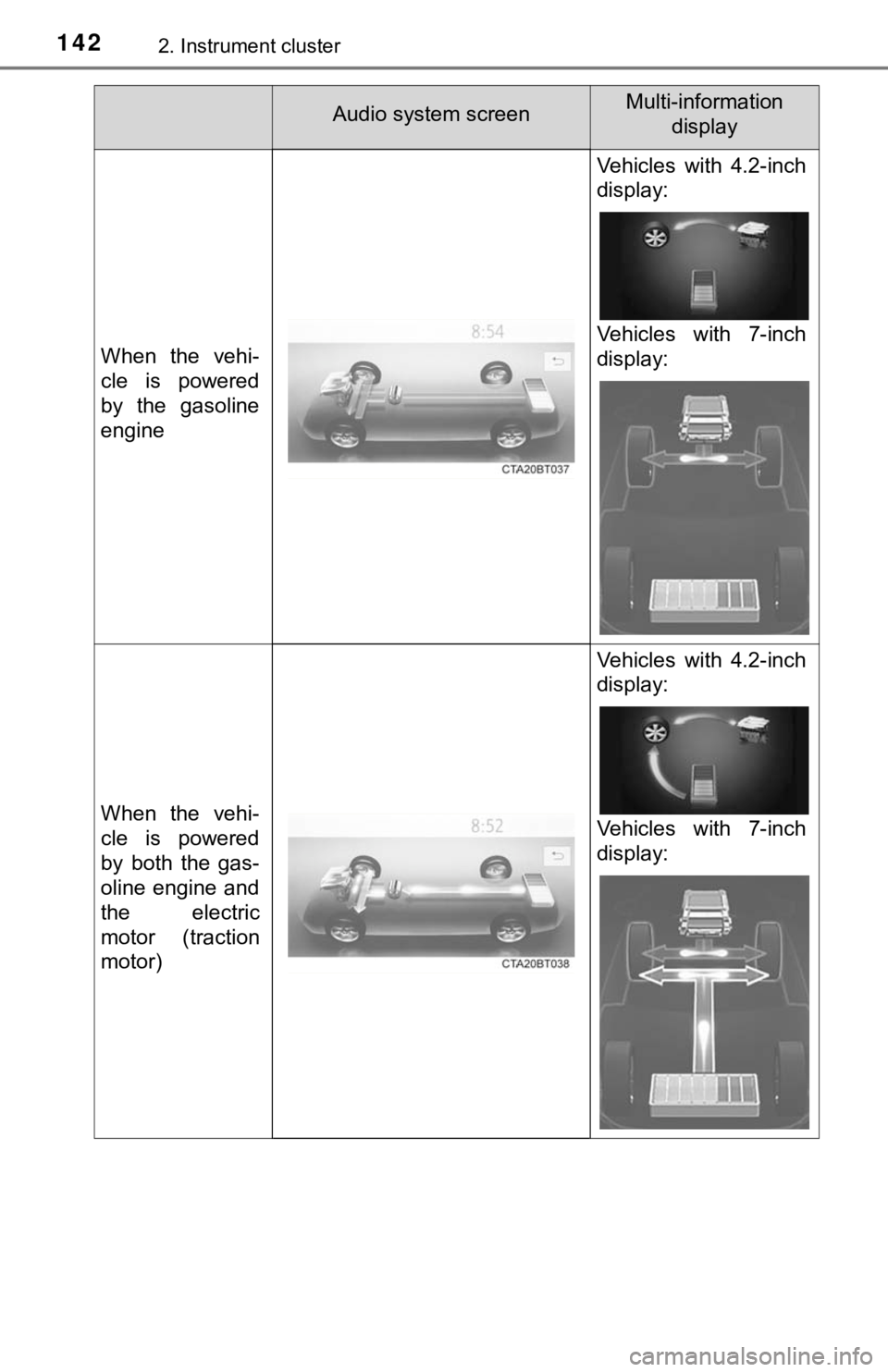
When the vehi-
cle is powered
by the gasoline
engine
Vehicles with 4.2-inch
display:
Vehicles with 7-inch
display:
When the vehi-
cle is powered
by both the gas-
oline engine and
the electric
motor (traction
motor)
Vehicles with 4.2-inch
display:
Vehicles with 7-inch
display:
Audio system screenMulti-information display
Page 143 of 592
1432. Instrument cluster
2
Instrument cluster
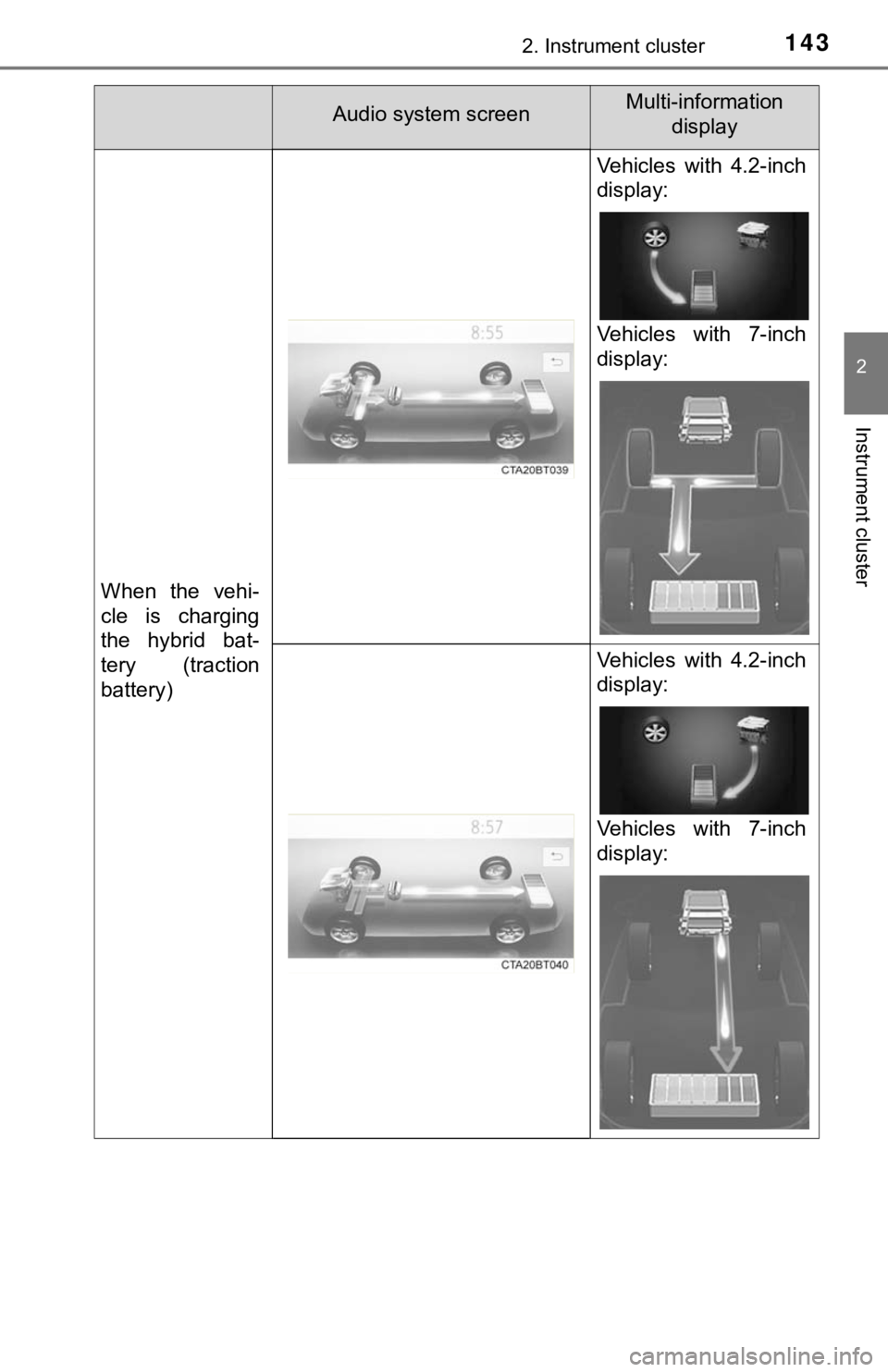
When the vehi-
cle is charging
the hybrid bat-
tery (traction
battery)
Vehicles with 4.2-inch
display:
Vehicles with 7-inch
display:
Vehicles with 4.2-inch
display:
Vehicles with 7-inch
display:
Audio system screenMulti-information display
Page 144 of 592
1442. Instrument cluster
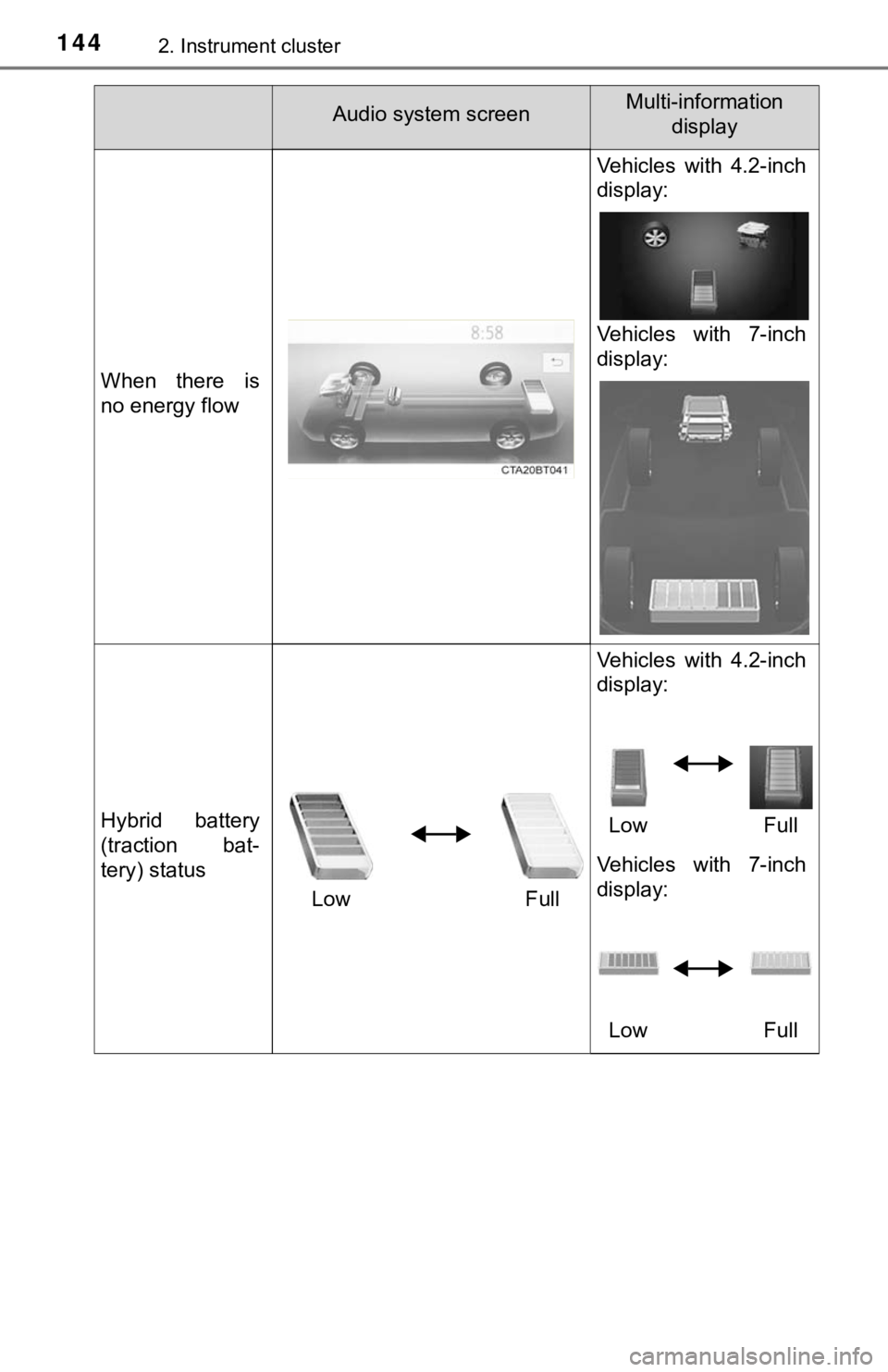
When there is
no energy flow
Vehicles with 4.2-inch
display:
Vehicles with 7-inch
display:
Hybrid battery
(traction bat-
tery) statusLow Full Vehicles with 4.2-inch
display:
Low Full
Vehicles with 7-inch
display:
Low Full
Audio system screenMulti-information display
Page 145 of 592
1452. Instrument cluster
2
Instrument cluster
■Trip information
Audio (vehicles without Data Communication Module) or Audio
Plus (vehicles without Data Communication Module)
Press the “MENU” button.
Select “Info” on t he “Menu” screen.
If the “Energy Monitor” or “History” screen is displayed, selec t “Trip
Information”.
Audio (vehicles with Data Com munication Module), Audio Plus
(vehicles with Data Communica tion Module) and Premium Audio
Press the “MENU” button.
Select “Info” on t he “Menu” screen.
Select “ECO” on the “Information” screen.
If “Energy Monitor” or “History” screen is displayed, select “T rip Informa-
tion”.
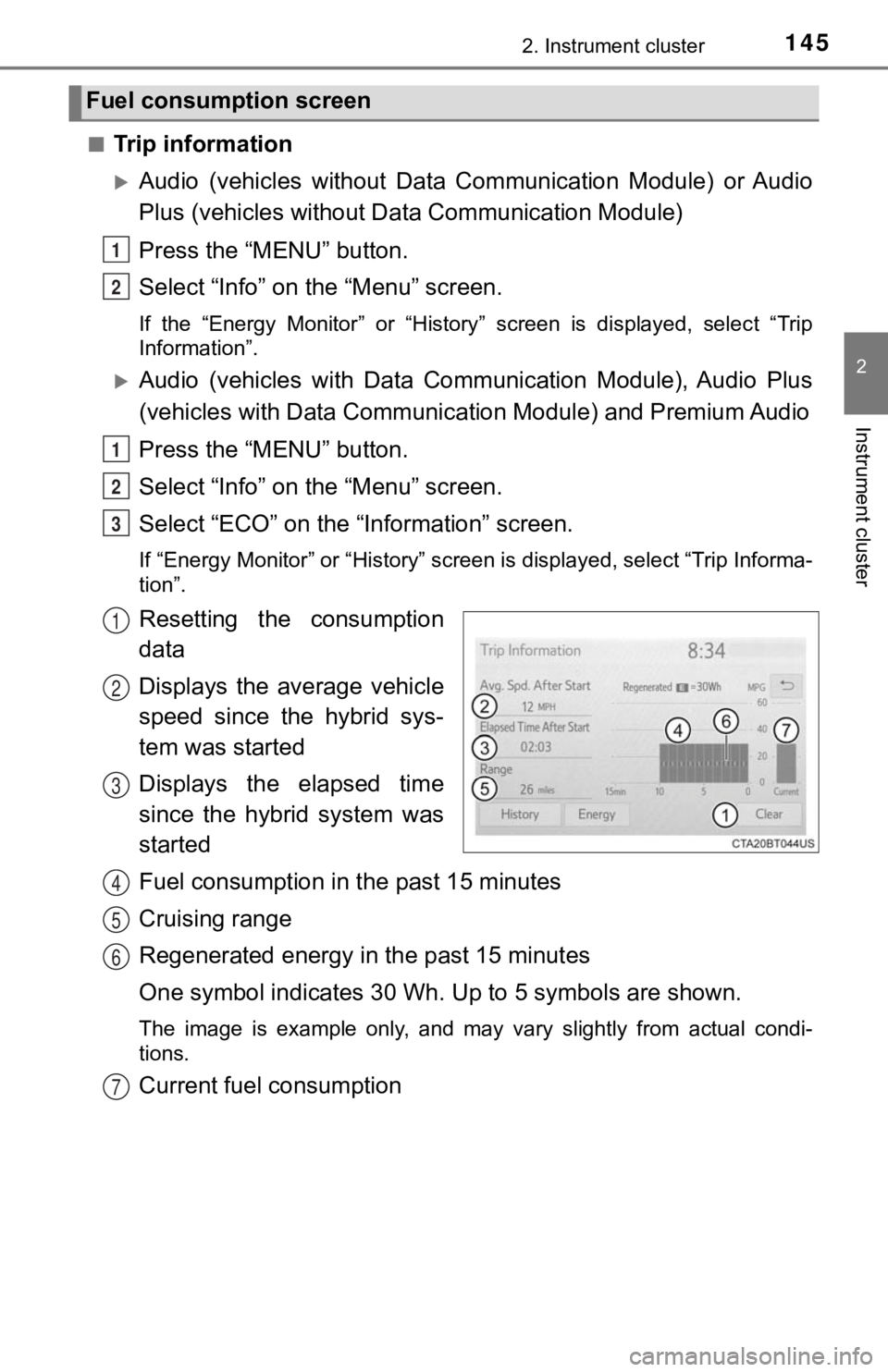
Resetting the consumption
data
Displays the average vehicle
speed since the hybrid sys-
tem was started
Displays the elapsed time
since the hybrid system was
started
Fuel consumption in t he past 15 minutes
Cruising range
Regenerated energy i n the past 15 minutes
One symbol indicates 30 Wh. Up to 5 symbols are shown.
The image is example only, and may vary slightly from actual co ndi-
tions.
Current fuel consumption
Fuel consumption screen
1
2
1
2
3
1
2
3
4
5
6
7
Page 146 of 592
1462. Instrument cluster
■History
Audio (vehicles without Data Communication Module) or Audio
Plus (vehicles without Data Communication Module)
Press the “MENU” button.
Select “Info” on t he “Menu” screen.
If the “Energy Monitor” or “Trip Information” screen is displayed, select
“History”.
Audio (vehicles with Data Com munication Module), Audio Plus
(vehicles with Data Communica tion Module) and Premium Audio
Press the “MENU” button.
Select “Info” on t he “Menu” screen.
Select “ECO” on the “Information” screen.
If “Energy Monitor” or “Trip Inf ormation” screen is displayed, select “His-
tory”.
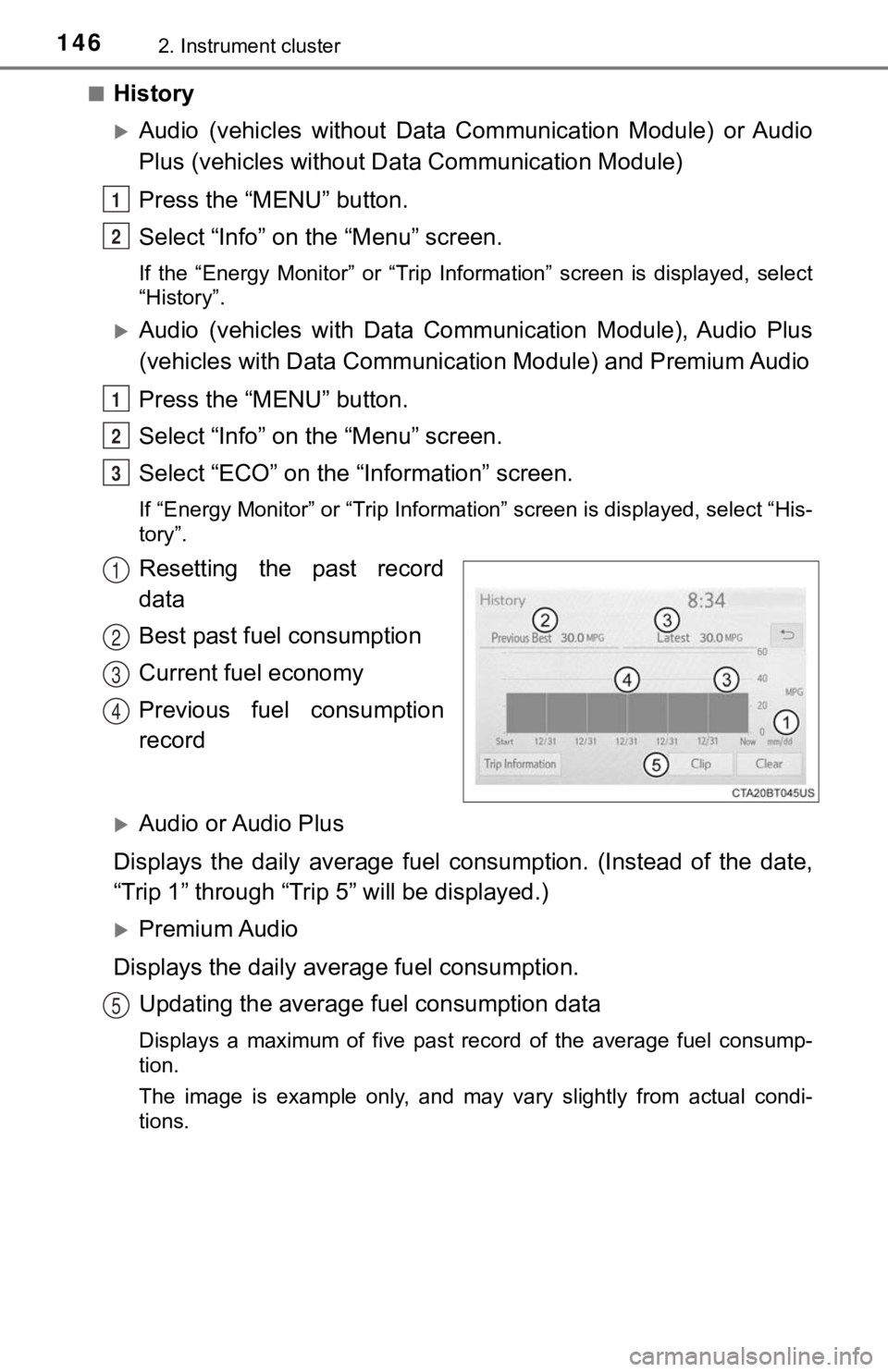
Resetting the past record
data
Best past fuel consumption
Current fuel economy
Previous fuel consumption
record
Audio or Audio Plus
Displays the daily average fuel consumption. (Instead of the da te,
“Trip 1” through “Trip 5” will be displayed.)
Premium Audio
Displays the daily average fuel consumption. Updating the average fuel consumption data
Displays a maximum of five past record of the average fuel cons ump-
tion.
The image is example only, and may vary slightly from actual co ndi-
tions.
1
2
1
2
3
1
2
3
4
5
Page 153 of 592
1533-1. Key information
3
Operation of each component
NOTICE
■To prevent key damage
● Do not drop the keys, subject them to strong shocks or bend them.
● Do not expose the keys to high temperatures for long periods of time.
● Do not get the keys wet or wash them in an ultrasonic washer et c.
● Do not attach metallic or magnetic materials to the keys or place the keys
close to such materials.
● Do not disassemble the keys.
● Do not attach a sticker or anything else to the surface of the electronic key.
● Do not place the keys near objects that produce magnetic fields , such as
TVs, audio systems and induction cookers, or medical electrical equip-
ment, such as low-frequency therapy equipment.
■ Carrying the electronic key on your person
Carry the electronic key 3.9 in. (10 cm) or more away from elec tric appli-
ances that are turned on. Radio waves emitted from electric app liances
within 3.9 in. (10 cm) of the electronic key may interfere with the key, caus-
ing the key to not function properly.
■ In case of a smart key system malfunction or other key-related prob-
lems
Take your vehicle with all the electronic keys provided with yo ur vehicle to
your Toyota dealer.
■ When an electronic key is lost
If the electronic key remains lost, the risk of vehicle theft i ncreases signifi-
cantly. Visit your Toyota dealer immediately with all remaining electronic
keys that were provided with your vehicle.
Page 167 of 592

1673-2. Opening, closing and locking the doors
3
Operation of each component
■Conditions affecting operation
The smart key system, wireless remote control and immobilizer s ystem use
weak radio waves. In the following situations, the communication between
the electronic key and the vehicle may be affected, preventing the smart key
system, wireless remote control and immobilizer system from operating prop-
erly. (Ways of coping: P. 504)
● When the electronic key battery is depleted
● Near a TV tower, electric power plant, gas station, radio stati on, large dis-
play, airport or other facility that generates strong radio wav es or electrical
noise
● When the electronic key is in contact with, or is covered by th e following
metallic objects
• Cards to which aluminum foil is attached
• Cigarette boxes that have aluminum foil inside
• Metallic wallets or bags
• Coins
• Hand warmers made of metal
• Media such as CDs and DVDs
● When other wireless keys (that emit radio waves) are being used nearby
● When carrying the electronic key together with the following devices that
emit radio waves
• Portable radio, cellular phone, cordless phone or other wirele ss commu-
nication devices
• Another vehicle’s electronic key, another electronic key of yo ur vehicle, or
a wireless key that emits radio waves
• Personal computers or personal digital assistants (PDAs)
• Digital audio players
• Portable game systems
● If window tint with a metallic content or metallic objects are attached to the
rear window
● When the electronic key is placed near a battery charger or ele ctronic
devices
● When the vehicle is parked in a pay parking spot where radio wa ves are
emitted.
Page 210 of 592
2104-2. Driving procedures
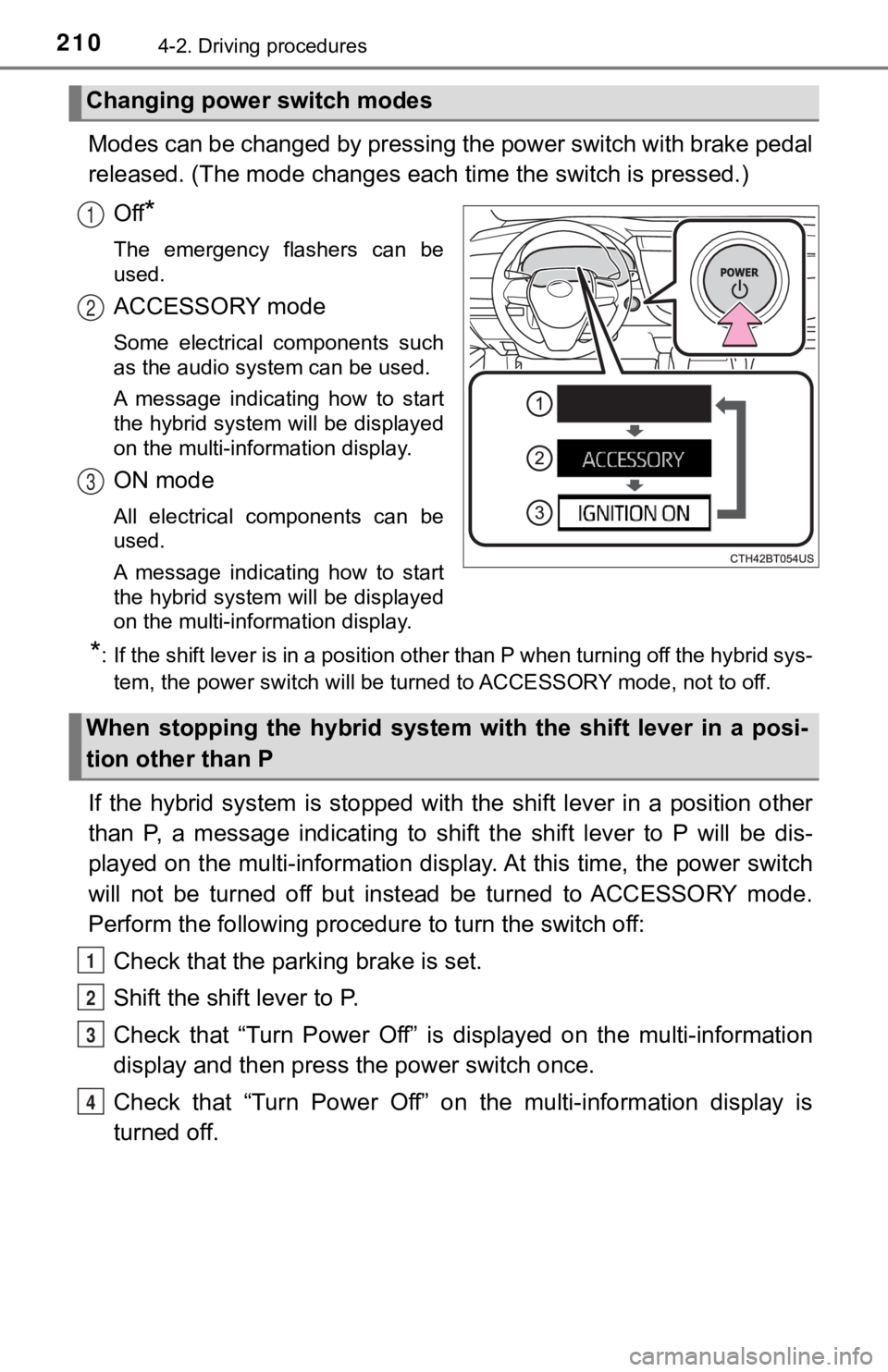
Modes can be changed by pressing the power switch with brake pedal
released. (The mode changes each time the switch is pressed.)
Off
*
The emergency flashers can be
used.
ACCESSORY mode
Some electrical components such
as the audio system can be used.
A message indicating how to start
the hybrid system will be displayed
on the multi-information display.
ON mode
All electrical components can be
used.
A message indicating how to start
the hybrid system will be displayed
on the multi-information display.
*: If the shift lever is in a position other than P when turning off the hybrid sys-
tem, the power switch will be turned to ACCESSORY mode, not to off.
If the hybrid system is stopped with the shift lever in a position other
than P, a message indicating to shift the shift lever to P will be dis-
played on the multi-information display. At this time, the powe r switch
will not be turned off but instead be turned to ACCESSORY mode.
Perform the following procedure to turn the switch off:
Check that the park ing brake is set.
Shift the shift lever to P.
Check that “Turn Power Off” is displayed on the multi-informati on
display and then press the power switch once.
Check that “Turn Power Off” on the multi-information display is
turned off.
Changing power switch modes
1
2
3
When stopping the hybrid system with the shift lever in a posi-
tion other than P
1
2
3
4
Page 271 of 592
2714-5. Using the driving support systems
4
Driving
■Temporary cancellation of functions
When the operation conditions are no longer met, a function may be tempo-
rarily canceled. However, when the operation conditions are met again, oper-
ation of the function is automatically restored. ( P. 270)
■ Steering control function
Depending on the vehicle speed, lane departure situation, road conditions,
etc., the driver may not feel the function is operating or the function may not
operate at all.
■ Lane departure alert function
The warning buzzer may be difficult to hear due to external noi se, audio play-
back, etc.
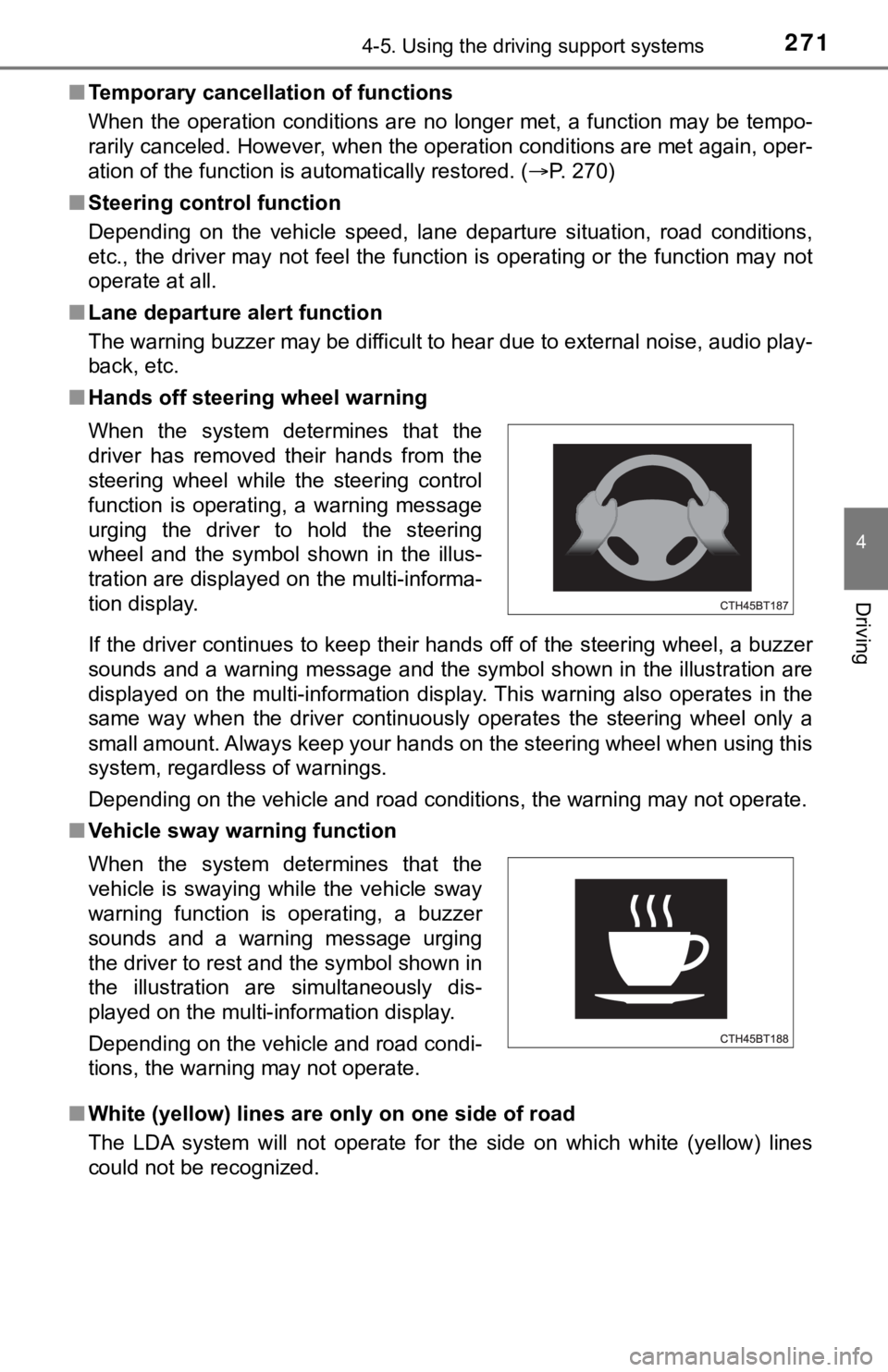
■ Hands off steering wheel warning
If the driver continues to keep their hands off of the steering wheel, a buzzer
sounds and a warning message and the symbol shown in the illust ration are
displayed on the multi-information display. This warning also o perates in the
same way when the driver continuously operates the steering whe el only a
small amount. Always keep your hands on the steering wheel when using this
system, regardless of warnings.
Depending on the vehicle and road conditions, the warning may n ot operate.
■ Vehicle sway warning function
■ White (yellow) lines are on ly on one side of road
The LDA system will not operate for the side on which white (ye llow) lines
could not be recognized. When the system determines that the
driver has removed their hands from the
steering wheel while the steering control
function is operating, a warning message
urging the driver to hold the steering
wheel and the symbol shown in the illus-
tration are displayed on the multi-informa-
tion display.
When the system determines that the
vehicle is swaying while the vehicle sway
warning function is operating, a buzzer
sounds and a warning message urging
the driver to rest and the symbol shown in
the illustration are simultaneously dis-
played on the multi-information display.
Depending on the vehicle and road condi-
tions, the warning may not operate.