brakes TOYOTA CAMRY HYBRID 2020 (in English) User Guide
[x] Cancel search | Manufacturer: TOYOTA, Model Year: 2020, Model line: CAMRY HYBRID, Model: TOYOTA CAMRY HYBRID 2020Pages: 592, PDF Size: 12.15 MB
Page 278 of 592
2784-5. Using the driving support systems
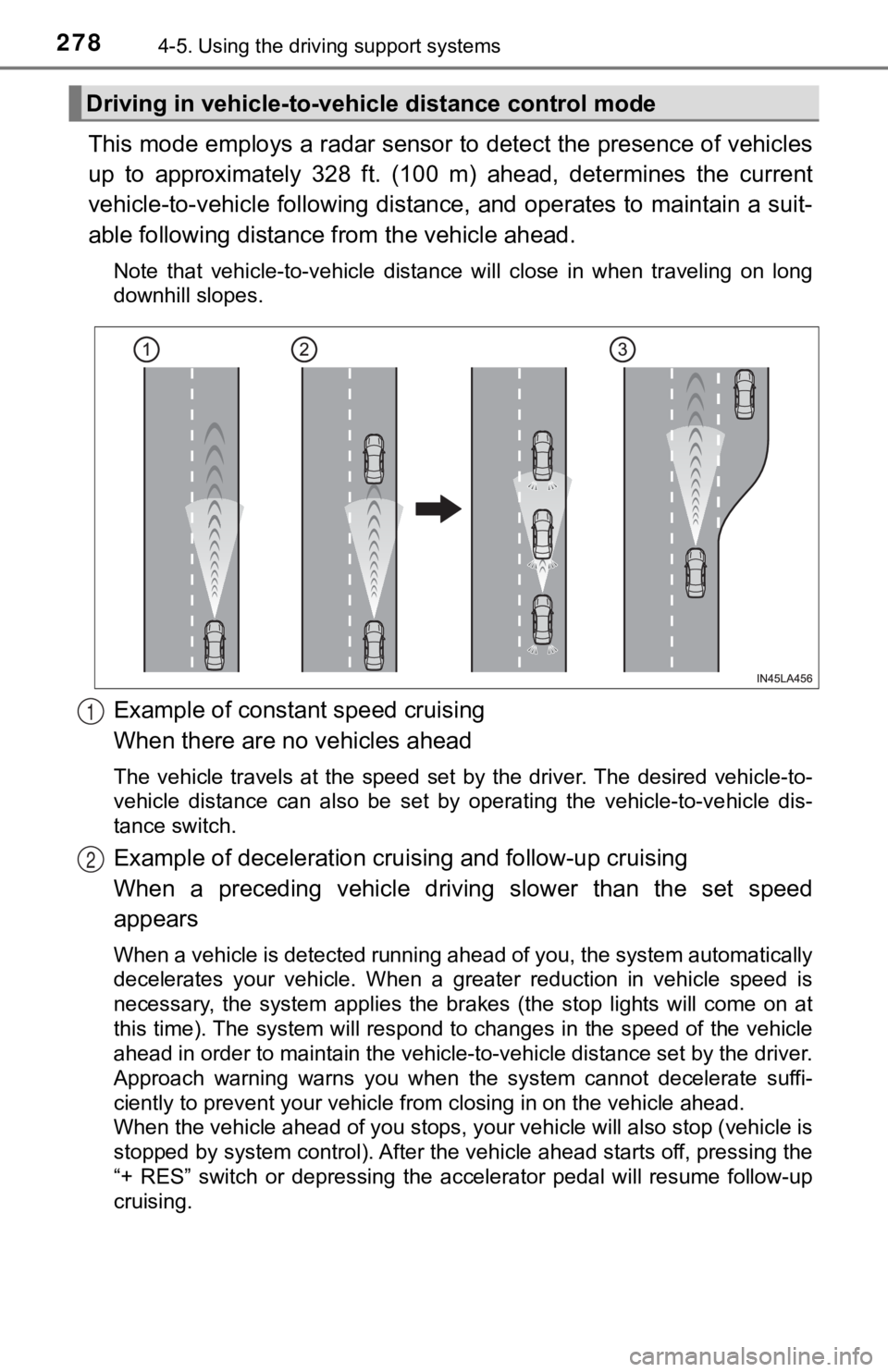
This mode employs a radar sensor to detect the presence of vehi cles
up to approximately 328 ft. (100 m) ahead, determines the curre nt
vehicle-to-vehicle following distance, and operates to maintain a suit-
able following distance from the vehicle ahead.
Note that vehicle-to-vehicle distance will close in when travel ing on long
downhill slopes.
Example of constant speed cruising
When there are no vehicles ahead
The vehicle travels at the speed set by the driver. The desired vehicle-to-
vehicle distance can also be set by operating the vehicle-to-ve hicle dis-
tance switch.
Example of deceleration crui sing and follow-up cruising
When a preceding vehicle driving slower than the set speed
appears
When a vehicle is detected running ahead of you, the system automatically
decelerates your vehicle. When a greater reduction in vehicle s peed is
necessary, the system applies the brakes (the stop lights will come on at
this time). The system will respond to changes in the speed of the vehicle
ahead in order to maintain the vehicle-to-vehicle distance set by the driver.
Approach warning warns you when the system cannot decelerate su ffi-
ciently to prevent your vehicle from closing in on the vehicle ahead.
When the vehicle ahead of you stops, your vehicle will also stop (vehicle is
stopped by system control). After the vehicle ahead starts off, pressing the
“+ RES” switch or depressing the accelerator pedal will resume follow-up
cruising.
Driving in vehicle-to-vehi cle distance control mode
1
2
Page 286 of 592
2864-5. Using the driving support systems
■Automatic cancelation of c onstant speed control mode
Constant speed control mode is automatically canceled in the following situa-
tions:
● Actual vehicle speed is more than approximately 10 mph (16 km/h ) below
the set vehicle speed.
● Actual vehicle speed falls below approximately 25 mph (40 km/h) .
● VSC is activated.
● TRAC is activated for a period of time.
● When the VSC or TRAC system is turned off.
● Pre-collision braking is activated.
If constant speed control mode is automatically canceled for an y other rea-
son, there may be a malfunction in the system. Contact your Toyota dealer.
■ Brake system operation sound
If the brakes are applied automatically while the vehicle is in vehicle-to-vehi-
cle distance control mode, a brake system operation sound may b e heard.
This does not indicate a malfunction.
■ Warning messages and buzzers for d ynamic radar cruise control with
full-speed range
Warning messages and buzzers are used to indicate a system malfunction or
to inform the driver of the need for caution while driving. If a warning message
is shown on the multi-information display, read the message and follow the
instructions.
■ When the sensor may not be correctly detect ing the vehicle ahead
In the case of the following and depending on the conditions, o perate the
brake pedal when deceleration of the system is insufficient or operate the
accelerator pedal when acceleration is required.
As the sensor may not be able to correctly detect these types o f vehicles, the
approach warning ( P. 283) may not be activated.
● Vehicles that cut in suddenly
● Vehicles traveling at low speeds
● Vehicles that are not moving in the same lane
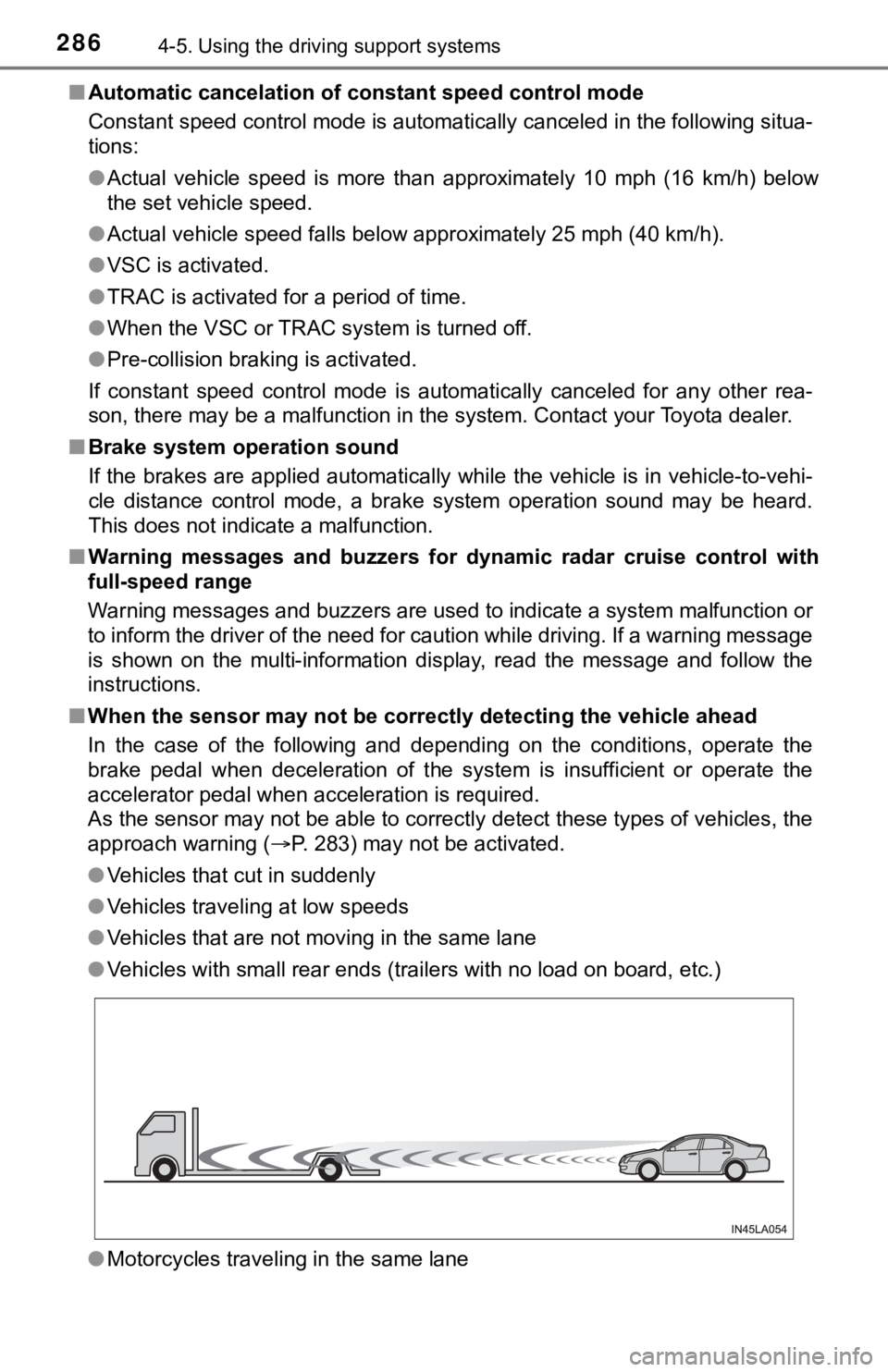
● Vehicles with small rear ends (trailers with no load on board, etc.)
● Motorcycles traveling in the same lane
Page 288 of 592
2884-5. Using the driving support systems
◆ECB (Electronically Controlled Brake System)
The electronically controlled system generates braking force co rre-
sponding to the brake operation
◆ABS (Anti-lock Brake System)
Helps to prevent wheel lock when the brakes are applied suddenl y,
or if the brakes are applied while driving on a slippery road surface
◆Brake assist
Generates an increased level of braking force after the brake p edal
is depressed when the system de tects a panic stop situation
◆VSC (Vehicle Stability Control)
Helps the driver to control skidding when swerving suddenly or
turning on slippery road surfaces.
◆Enhanced VSC (Enhanced Vehicle Stability Control)
Provides cooperative control of the ABS, TRAC, VSC and EPS.
Helps to maintain directional stability when swerving on slippe ry
road surfaces by controlling steering performance.
◆Secondary Collision Brake
When the airbag sensor detects a collision and the system oper-
ates, the brakes and stop light s are automatically controlled to
reduce the vehicle speed and hel p reduce the possibility of further
damage due to a secondary collision
◆TRAC (Traction Control)
Helps to maintain drive power and prevent the drive wheels from
spinning when starting the vehicl e or accelerating on slippery roads
Driving assist systems
To keep driving safety and perf ormance, the following systems
operate automatically in respon se to various driving situations.
Be aware, however, that these systems are supplementary and
should not be relied upon too heav ily when operating the vehi-
cle.
Page 315 of 592

3154-5. Using the driving support systems
4
Driving
WARNING
■Sensors
Certain vehicle conditions and the surrounding environment may affect the
ability of a sensor to correctly detect an object. Particular instances where
this may occur are listed below.
● There is dirt, snow or ice on the sensor. (Wiping the sensors w ill resolve
this problem.)
● The sensor is frozen. (Thawing the area will resolve this probl em.)
In especially cold weather, if a sensor is frozen the screen ma y show an
abnormal display, or objects may not be detected.
● The sensor is covered in any way.
● The vehicle is leaning considerably to one side.
● On an extremely bumpy road, on an incline, on gravel, or on grass.
● The vicinity of the vehicle is noisy due to vehicle horns, moto rcycle
engines, air brakes of large vehicles, or other loud noises pro ducing ultra-
sonic waves.
● There is another vehicle equipped with parking assist sensors i n the vicin-
ity.
● The sensor is coated with a sheet of spray or heavy rain.
● The sensor is drenched with water on a flooded road.
● The vehicle is equipped with a fender pole or wireless antenna.
● Towing eyelets are installed.
● The bumper or sensor receives a strong impact.
● The vehicle is approaching a tall or curved curb.
● The detection range is reduced due to an object such as a sign.
● In harsh sunlight or intense cold weather.
● The area directly under the bumpers is not detected.
● If objects draw too close to the sensor.
● A non-genuine Toyota suspension (lowered suspension, etc.) is i nstalled.
● A backlit license plate is installed.
In addition to the examples above, there are instances in which , because of
their shape, signs and other objects may be judged by a sensor to be closer
than they are.
Page 322 of 592

3224-5. Using the driving support systems
If the Intelligent Clearance Sona r function detects that a collision with
an object is possible, the hybrid system output will be restric ted to
restrain any increase in the vehicle speed. (Hybrid system outp ut
restriction control: See A below.)
Additionally, if the accelerator pedal continues to be depresse d, the
brakes will be applied automatically to reduce the vehicle spee d.
(Brake control: See B below.)
Intelligent Clearance Sonar function
Page 326 of 592
3264-5. Using the driving support systems
■Situations in which the Intellige nt Clearance Sonar function ma y operate
even if there is no possibility of a collision
In some situations such as the following, the Intelligent Clear ance Sonar
function may operate even though there is no possibility of a c ollision.
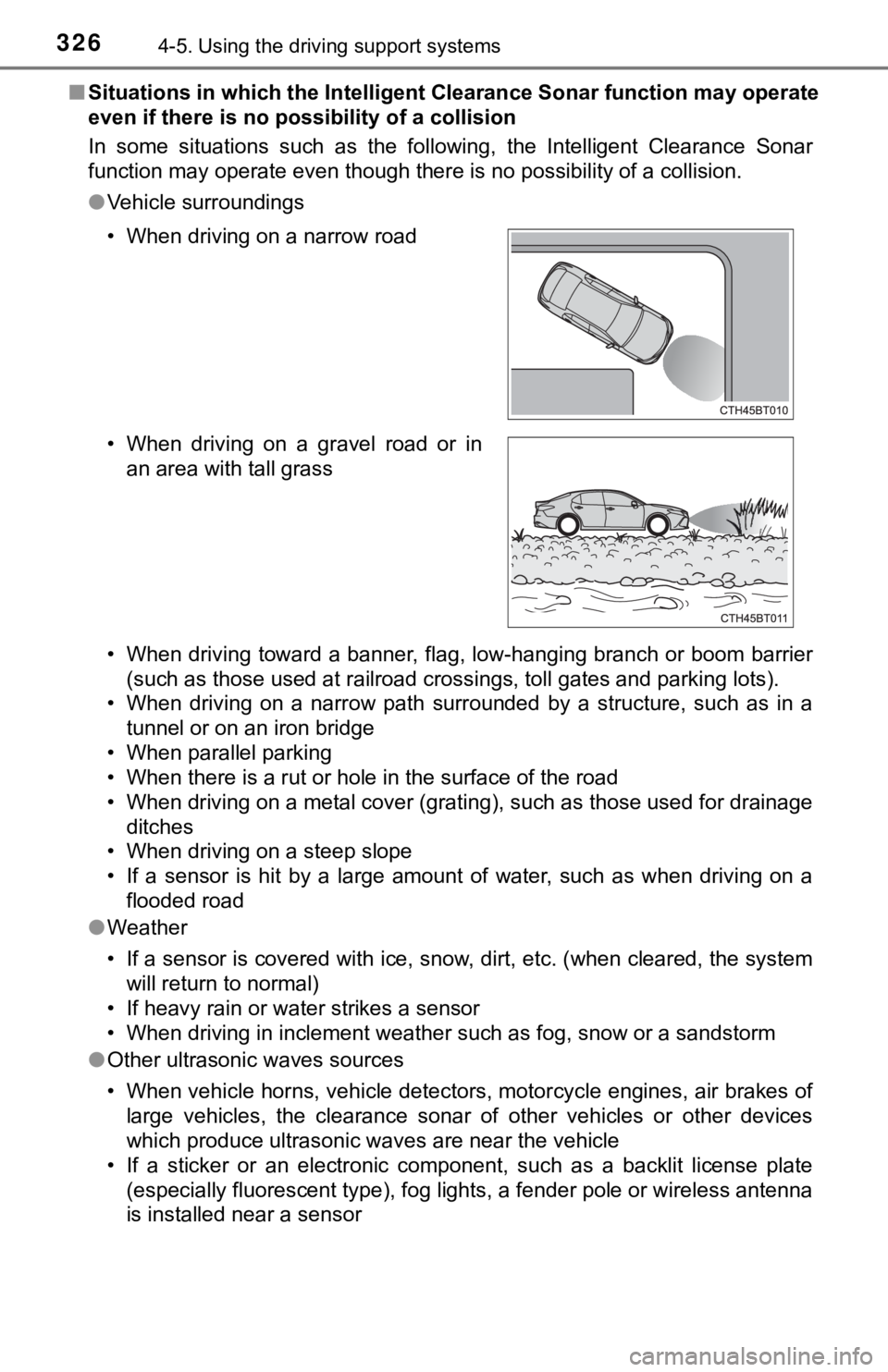
● Vehicle surroundings
• When driving toward a banner, flag, low-hanging branch or boom barrier
(such as those used at railroad crossings, toll gates and parki ng lots).
• When driving on a narrow path surrounded by a structure, such as in a
tunnel or on an iron bridge
• When parallel parking
• When there is a rut or hole in the surface of the road
• When driving on a metal cover (grating), such as those used fo r drainage
ditches
• When driving on a steep slope
• If a sensor is hit by a large amount of water, such as when driving on a flooded road
● Weather
• If a sensor is covered with ice, snow, dirt, etc. (when cleared, the system
will return to normal)
• If heavy rain or water strikes a sensor
• When driving in inclement weather such as fog, snow or a sands torm
● Other ultrasonic waves sources
• When vehicle horns, vehicle detectors, motorcycle engines, air brakes of
large vehicles, the clearance sonar of other vehicles or other devices
which produce ultrasonic waves are near the vehicle
• If a sticker or an electronic component, such as a backlit license plate (especially fluorescent type), fog lights, a fender pole or wir eless antenna
is installed near a sensor
• When driving on a narrow road
• When driving on a gravel road or in
an area with tall grass
Page 328 of 592

3284-5. Using the driving support systems
●Other ultrasonic waves sources
• When vehicle horns, vehicle detectors, motorcycle engines, air brakes of
large vehicles, the clearance sonar of other vehicles or other devices
which produce ultrasonic waves are near the vehicle
• If a sticker or an electronic component, such as a backlit license plate
(especially fluorescent type), fog lights, a fender pole or wir eless antenna
is installed near a sensor
● Changes in the vehicle posture
• If the vehicle is significantly tilted
• If the front of the vehicle is raised or lowered due to the ca rried load
• If the orientation of a sensor has been changed due to a collision or other impact
■ If a 12-volt battery terminal has been disconnected and reconne cted
The system needs to be initialized.
To initialize the system, drive the vehicle straight ahead for 5 seconds or more
at a speed of approximately 22 mph (35 km/h) or more.
■ If “ICS Unavailable” is displayed on the multi-information display and
the ICS OFF indicator is flashing
Initialization may not have been performed after a battery term inal was dis-
connected and reconnected. Initialize the system. ( P. 328)
If this message continues to be displayed even after initializa tion, have the
vehicle inspected by your Toyota dealer.
■ If “ICS Unavailable” and “Parking Assist Unavailable Clean Park ing
Assist Sensor” are displayed on th e multi-information display and the
ICS OFF indicator is flashing
● A sensor may be covered with ice, snow, dirt, etc. In this case , remove the
ice, snow, dirt, etc., from the sensor to return the system to normal. If this
message is shown even after removing dirt from the sensor, or s hown when
the sensor was not dirty to begin with, have the vehicle inspec ted at your
Toyota dealer.
● A sensor may be frozen. Once the ice melts, the system will ret urn to nor-
mal.
● Water may be continuously flowing over the sensor surface, such as in a
heavy rain. When the system determines that it is normal, the system will
return to normal.
Page 331 of 592

3314-5. Using the driving support systems
4
Driving
If the Rear Cross Traffic Auto Brake function detects that a collision
with an approaching vehicle is p ossible, the hybrid system output will
be restricted to restrain any increase in vehicle speed. (Hybri d system
output restriction c ontrol: See A below.)
Additionally, if the accelerator pedal continues to be depresse d, the
brakes will be applied automatically to reduce the vehicle spee d.
(Brake control: See B below.)
Rear Cross Traffic Auto Brake function
Page 341 of 592

3414-6. Driving tips
4
Driving
◆When braking
Make sure to operate the brakes gently and in a timely manner. A
greater amount of electrical energy can be regenerated when slow-
ing down.
◆Delays
Repeated acceleration and deceleration, as well as long waits a t
traffic lights, will lead to bad fuel economy. Check traffic re ports
before leaving and avoid delays as much as possible. When drivi ng
in a traffic jam, gently release the brake pedal to allow the v ehicle to
move forward slightly while avoiding overuse of the accelerator
pedal. Doing so can help control excessive gasoline consumption.
◆Highway driving
Control and maintain the vehicle at a constant speed. Before st op-
ping at a toll booth or similar, allow plenty of time to releas e the
accelerator and gently apply the brakes. A greater amount of el ec-
trical energy can be regenerated when slowing down.
◆Air conditioning
Use the air conditioning only when necessary. Doing so can help
reduce excessive gasoline consumption.
In summer: When the ambient tempe rature is high, use the recircu-
lated air mode. Doing so will help to reduce the burden on the air
conditioning system and reduce fuel consumption as well.
In winter: Because the gasolin e engine will not automatically cut out
until it and the interior of the vehicle are warm, it will cons ume fuel.
Also, fuel consumption can be improved by avoiding overuse of t he
heater.
◆Checking tire inflation pressure
Make sure to check the tire inflation pressure frequently. Impr oper
tire inflation pressure can cause poor fuel economy.
Also, as snow tires can cause large amounts of friction, their use on
dry roads can lead to poor fuel economy. Use tires that are app ro-
priate for the season.
Page 343 of 592
3434-6. Driving tips
4
Driving
●Use fluids that are appropriate t o the prevailing outside tempera-
tures. • Engine oil
• Engine/power control unit coolant
• Washer fluid
● Have a service technician inspect the condition of the 12-volt bat-
tery.
● Have the vehicle fitted with four snow tires or purchase a set of tire
chains for the front tires.
Ensure that all tires are the specified size and brand, and tha t chains
match the size of the tires.
Perform the following according to the driving conditions:
● Do not try to forcibly open a window or move a wiper that is fr ozen.
Pour warm water over the frozen area to melt the ice. Wipe away
the water immediately to p revent it from freezing.
● To ensure proper operation of the climate control system fan,
remove any snow that has accumulated on the air inlet vents in
front of the windshield.
● Check for and remove any excess ic e or snow that may have accu-
mulated on the exterior lights, vehicle’s roof, chassis, around the
tires or on the brakes.
● Remove any snow or mud from the bottom of your shoes before
getting in the vehicle.
Winter driving tips
Carry out the necessary preparations and inspections before
driving the vehicle in winter. Always drive the vehicle in a ma n-
ner appropriate to the prevailing weather conditions.
Preparation for winter
Before driving the vehicle