lights TOYOTA CAMRY HYBRID 2020 (in English) Service Manual
[x] Cancel search | Manufacturer: TOYOTA, Model Year: 2020, Model line: CAMRY HYBRID, Model: TOYOTA CAMRY HYBRID 2020Pages: 592, PDF Size: 12.15 MB
Page 261 of 592
2614-5. Using the driving support systems
4
Driving
• When a very bright light, such as the sun or the headlights of oncomingtraffic, shines directly into the camera sensor
• When the surrounding area is dim, such as at dawn or dusk, or while at
night or in a tunnel
• After the hybrid system has started the vehicle has not been d riven for a
certain amount of time
• While making a left/right turn and for a few seconds after mak ing a left/
right turn
• While driving on a curve and for a few seconds after driving o n a curve
• If your vehicle is skidding
• If the wheels are misaligned
• If a wiper blade is blocking the camera sensor
• The vehicle is wobbling.
• The vehicle is being driven at extremely high speeds.
• When driving on a hill
• If the radar sensor or camera sensor is misaligned
● In some situations such as the following, sufficient braking fo rce may not be
obtained, preventing the system from performing properly:
• If the braking functions cannot operate to their full extent, such as when
the brake parts are extremely cold, extremely hot, or wet
• If the vehicle is not properly maintained (brakes or tires are excessively
worn, improper tire inflation pressure, etc.)
• When the vehicle is being driven on a gravel road or other sli ppery sur-
face
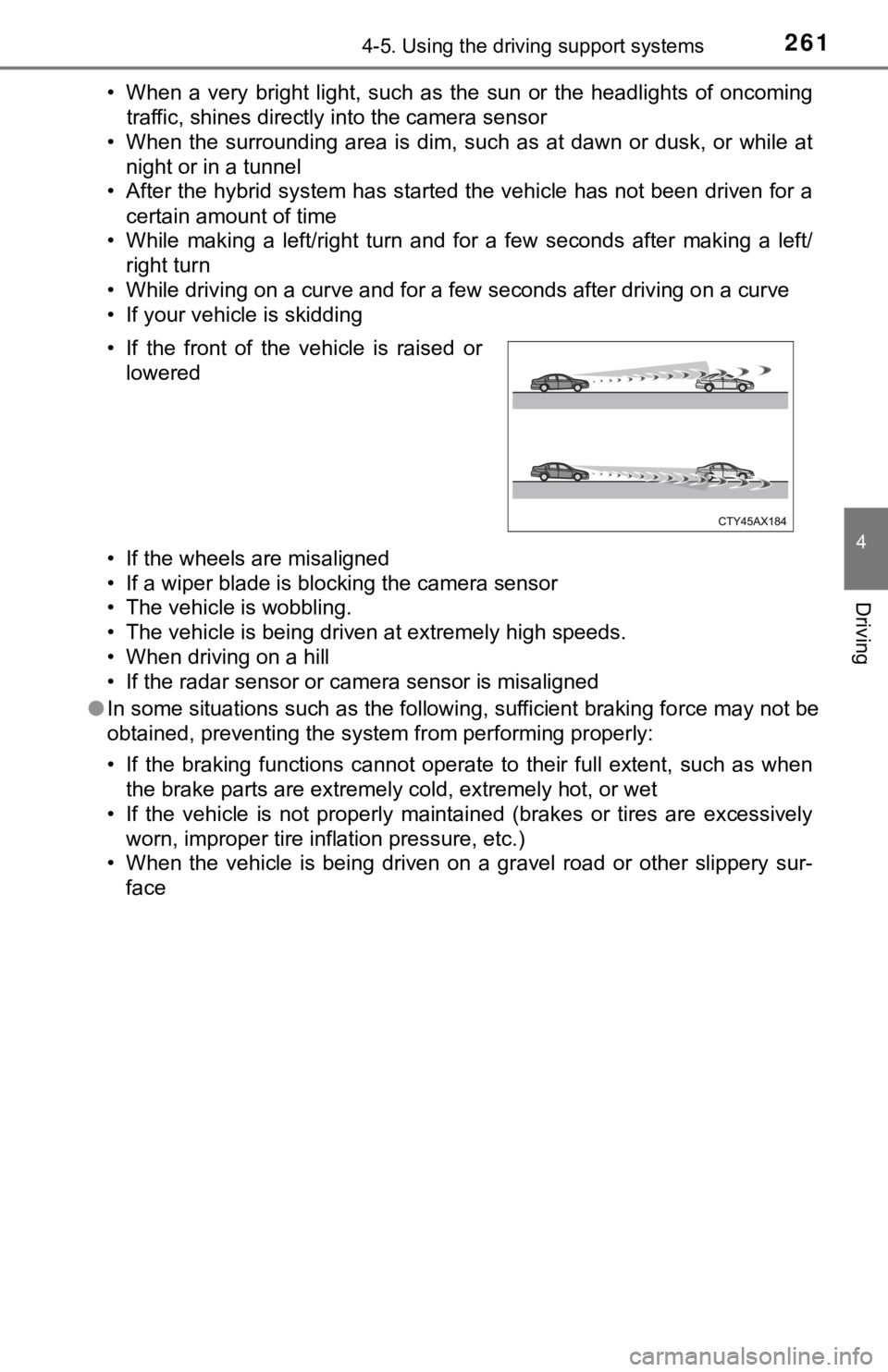
• If the front of the vehicle is raised or
lowered
Page 267 of 592

2674-5. Using the driving support systems
4
Driving
WARNING
■Situations unsuitable for LDA system
Do not use the LDA system in the following situations.
The system may not operate properly and lead to an accident, re sulting in
death or serious injury.
● A spare tire, tire chains, etc. are equipped.
● When the tires have been excessively worn, or when the tire inf lation pres-
sure is low.
● Tires which differ by structure, manufacturer, brand or tread p attern are
used.
● Objects or patterns that could be mistaken for white (yellow) l ines are
present on the side of the road (guardrails, curbs, reflective poles, etc.).
● Vehicle is driven on a snow-covered road.
● White (yellow) lines are diffi cult to see due to rain, snow, fo g, dust, etc.
● Asphalt repair marks, white (yellow) line marks, etc. are prese nt due to
road repair.
● Vehicle is driven in a temporary lane or restricted lane due to construction
work.
● Vehicle is driven on a road surface which is slippery due to rainy weather,
fallen snow, freezing, etc.
● Vehicle is driven in traffic lanes other than on highways and freeways.
● Vehicle is driven in a construction zone.
● During emergency towing
■ Preventing LDA system malfunctio ns and operations performed by
mistake
● Do not modify the headlights or place stickers, etc. on the sur face of the
lights.
● Do not modify the suspension etc. If the suspension etc. needs to be
replaced, contact your Toyota dealer.
● Do not install or place anything on the hood or grille. Also, d o not install a
grille guard (bull bars, kangaroo bar, etc.).
● If your windshield needs repairs, contact your Toyota dealer.
Page 272 of 592

2724-5. Using the driving support systems
■Conditions in which function s may not operate properly
In the following situations, the camera sensor may not detect w hite (yellow)
lines and various functions may not operate normally.
● There are shadows on the road that run parallel with, or cover, the white
(yellow) lines.
● The vehicle is driven in an area without white (yellow) lines, such as in front
of a tollgate or checkpoint, or at an intersection, etc.
● The white (yellow) lines are cracked, “Botts’ dots”, “Raised pa vement
marker” or stones are present.
● The white (yellow) lines cannot be seen or are difficult to see due to sand,
etc.
● The vehicle is driven on a road surface that is wet due to rain , puddles, etc.
● The traffic lines are yellow (which may be more difficult to re cognize than
lines that are white).
● The white (yellow) lines cross over a curb, etc.
● The vehicle is driven on a bright surface, such as concrete.
● The vehicle is driven on a surface that is bright due to reflec ted light, etc.
● The vehicle is driven in an area where the brightness changes s uddenly,
such as at the entrances and exits of tunnels, etc.
● Light from the headlights of an oncoming vehicle, the sun, etc. enters the
camera.
● The vehicle is driven where the road diverges, merges, etc.
● The vehicle is driven on a slope.
● The vehicle is driven on a road which tilts left or right, or a winding road.
● The vehicle is driven on an unpaved or rough road.
● The vehicle is driven around a sharp curve.
● The traffic lane is excessively narrow or wide.
● The vehicle is extremely tilted due to carrying heavy luggage or having
improper tire pressure.
● The distance to the preceding vehicle is extremely short.
● The vehicle is moving up and down a large amount due to road co nditions
during driving (poor roads or road seams).
● The headlight lenses are dirty and emit a faint amount of light at night, or the
beam axis has deviated.
● The vehicle is struck by a crosswind.
● The vehicle has just changed lanes or crossed an intersection.
● Snow tires, etc. are equipped.
Page 278 of 592
2784-5. Using the driving support systems
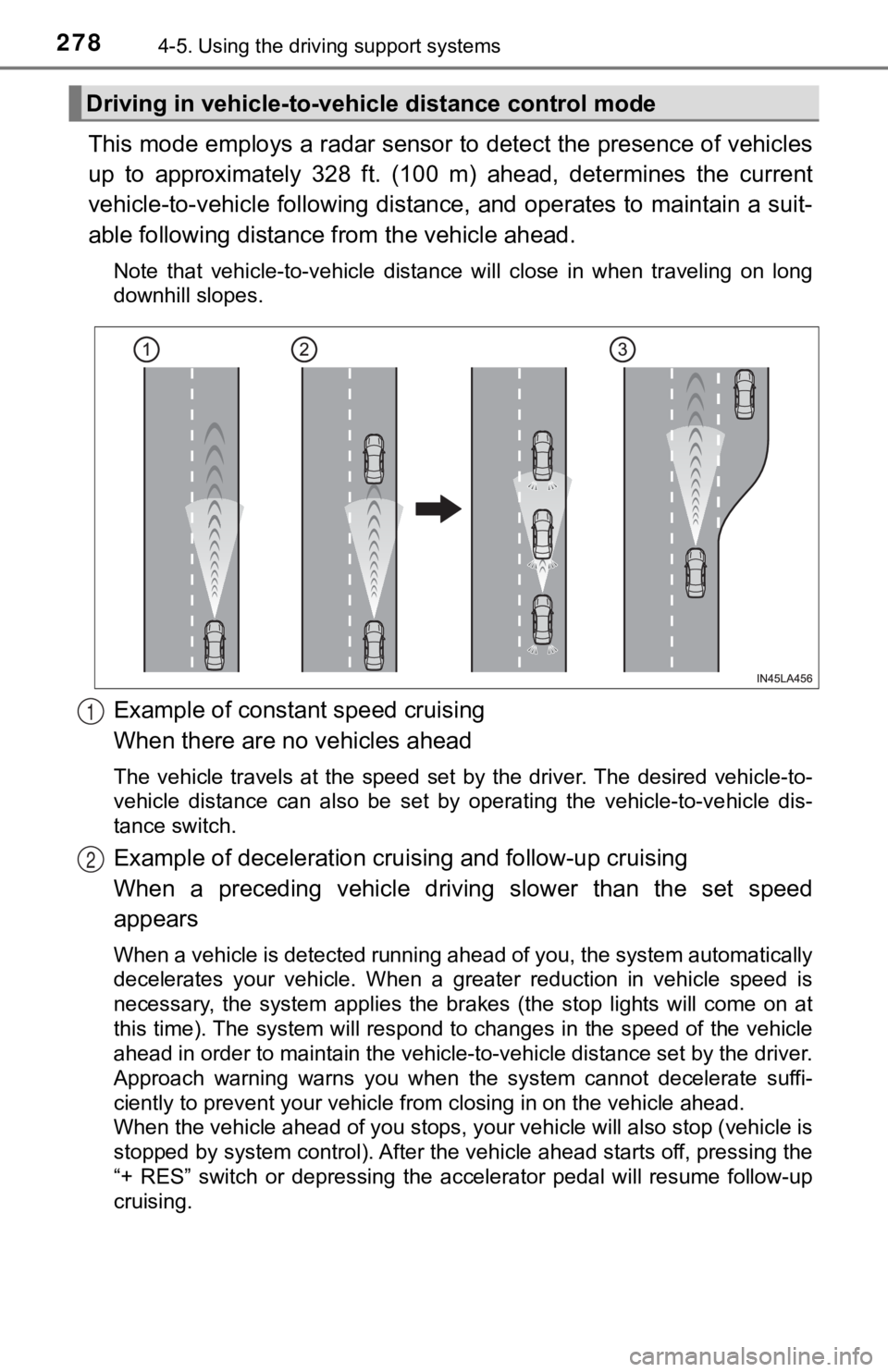
This mode employs a radar sensor to detect the presence of vehi cles
up to approximately 328 ft. (100 m) ahead, determines the curre nt
vehicle-to-vehicle following distance, and operates to maintain a suit-
able following distance from the vehicle ahead.
Note that vehicle-to-vehicle distance will close in when travel ing on long
downhill slopes.
Example of constant speed cruising
When there are no vehicles ahead
The vehicle travels at the speed set by the driver. The desired vehicle-to-
vehicle distance can also be set by operating the vehicle-to-ve hicle dis-
tance switch.
Example of deceleration crui sing and follow-up cruising
When a preceding vehicle driving slower than the set speed
appears
When a vehicle is detected running ahead of you, the system automatically
decelerates your vehicle. When a greater reduction in vehicle s peed is
necessary, the system applies the brakes (the stop lights will come on at
this time). The system will respond to changes in the speed of the vehicle
ahead in order to maintain the vehicle-to-vehicle distance set by the driver.
Approach warning warns you when the system cannot decelerate su ffi-
ciently to prevent your vehicle from closing in on the vehicle ahead.
When the vehicle ahead of you stops, your vehicle will also stop (vehicle is
stopped by system control). After the vehicle ahead starts off, pressing the
“+ RES” switch or depressing the accelerator pedal will resume follow-up
cruising.
Driving in vehicle-to-vehi cle distance control mode
1
2
Page 307 of 592

3074-5. Using the driving support systems
4
Driving
■Situations in which the syst em may not operate properly
● Some pedestrians, such as the following, may not be detected by the Rear
Camera Detection function, preventing the function from operati ng properly:
• Pedestrians who are squatting
• Pedestrians who are lying down
• Pedestrians who are running
• Pedestrians who suddenly enter the detection area
• Pedestrians riding a bicycle, skateboard, or other light vehic le
• Pedestrians wearing unusual clothing, such as a costume
• Pedestrians whose body is partially hidden by a cart or other object
• Pedestrians which are obscured by darkness, such as at night
● In some situations, such as the following, pedestrians may not be detected
by the Rear Camera Detection function, preventing the function from operat-
ing properly:
• When backing up in inclement weather (rain, snow, fog, etc.)
• When the rear camera is obscured (dirt, snow, ice, etc. are at tached) or
scratched
• When a very bright light, such as the sun, or the headlights o f another
vehicle, shines directly into the rear camera
• When backing up in a place where the surrounding brightness ch anges
suddenly, such as at the entrance or exit of a garage or underg round
parking lot
● In some situations, such as the following, the Rear Camera Dete ction func-
tion may operate even though there are no pedestrians in the detection
area.
• When a three dimensional object, such as a pole, traffic cone, fence, or parked vehicle, is detected
• When a moving object, such as a car or motorcycle is detected
• When backing up toward moving objects such as flags or puddles , or air-
borne matter, such as smoke, steam, rain, or snow
• When there is a pattern on the road, due to the road being mad e of cob-
blestone or gravel or having tram rails, traces of repair, white lines,
pedestrian crossings or fallen leaves on the surface
• When backing up on a metal cover (grating), such as those used for
drainage ditches
• When backing up toward the roadside or a bump on the road
• When an object is reflected in a puddle or on a wet road surfa ce
• When there are shadows on the road
• When backing up over a bump on the road
• If the vehicle is significantly tilted, such as when carrying a heavy load
• When backing up toward an incline/decline
• If the suspension has been modified or tires of a size other than specified
are installed
• If the rear of the vehicle is raised or lowered due to the carried load
• If an electronic compartment, such as a backlit license plate or rear fog
light, is installed near the rear camera
• If a bumper protector, such as an additional trim strip, is installed to the rear bumper
Page 326 of 592
3264-5. Using the driving support systems
■Situations in which the Intellige nt Clearance Sonar function ma y operate
even if there is no possibility of a collision
In some situations such as the following, the Intelligent Clear ance Sonar
function may operate even though there is no possibility of a c ollision.
● Vehicle surroundings
• When driving toward a banner, flag, low-hanging branch or boom barrier
(such as those used at railroad crossings, toll gates and parki ng lots).
• When driving on a narrow path surrounded by a structure, such as in a
tunnel or on an iron bridge
• When parallel parking
• When there is a rut or hole in the surface of the road
• When driving on a metal cover (grating), such as those used fo r drainage
ditches
• When driving on a steep slope
• If a sensor is hit by a large amount of water, such as when driving on a flooded road
● Weather
• If a sensor is covered with ice, snow, dirt, etc. (when cleared, the system
will return to normal)
• If heavy rain or water strikes a sensor
• When driving in inclement weather such as fog, snow or a sands torm
● Other ultrasonic waves sources
• When vehicle horns, vehicle detectors, motorcycle engines, air brakes of
large vehicles, the clearance sonar of other vehicles or other devices
which produce ultrasonic waves are near the vehicle
• If a sticker or an electronic component, such as a backlit license plate (especially fluorescent type), fog lights, a fender pole or wir eless antenna
is installed near a sensor
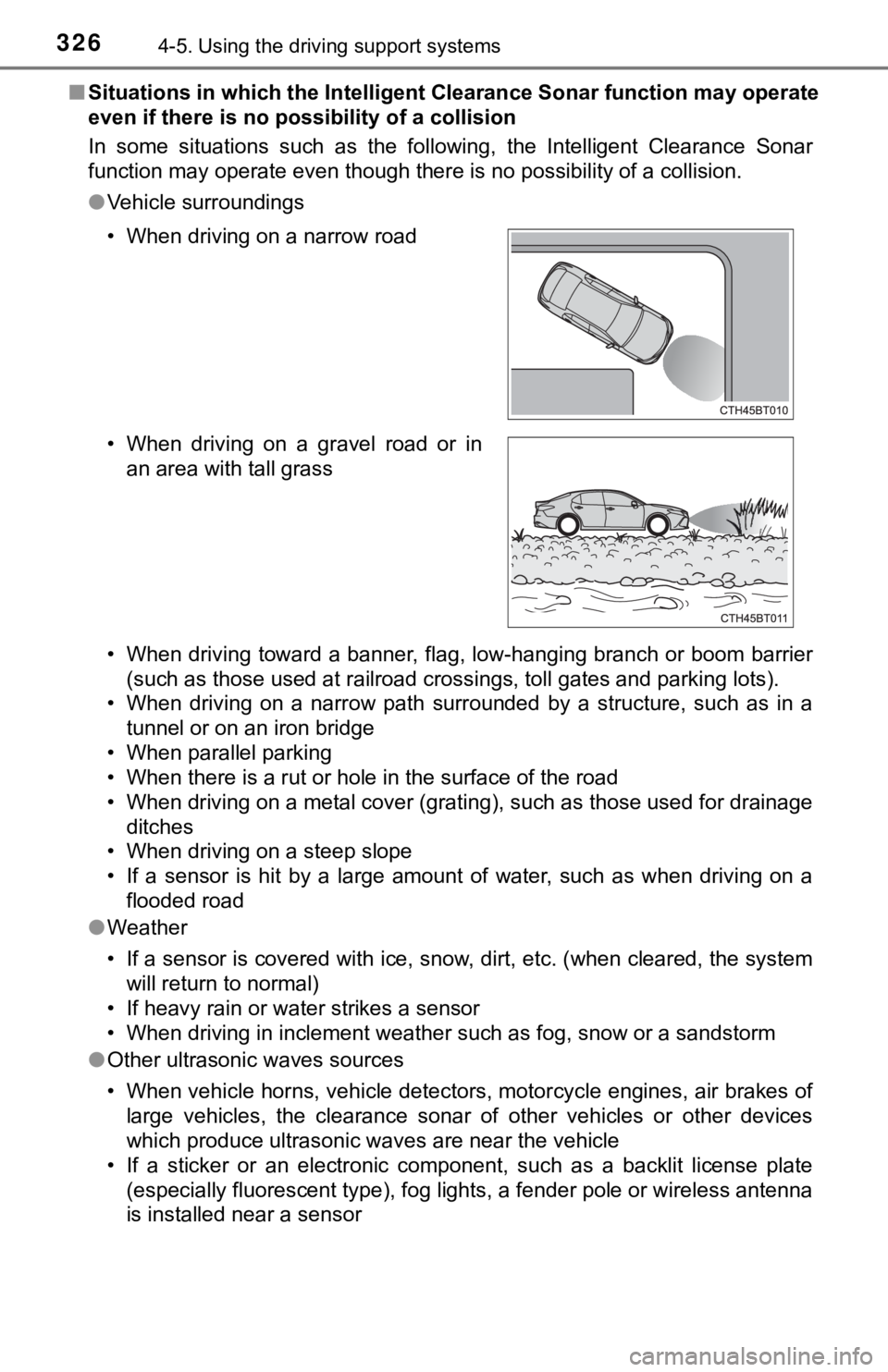
• When driving on a narrow road
• When driving on a gravel road or in
an area with tall grass
Page 328 of 592

3284-5. Using the driving support systems
●Other ultrasonic waves sources
• When vehicle horns, vehicle detectors, motorcycle engines, air brakes of
large vehicles, the clearance sonar of other vehicles or other devices
which produce ultrasonic waves are near the vehicle
• If a sticker or an electronic component, such as a backlit license plate
(especially fluorescent type), fog lights, a fender pole or wir eless antenna
is installed near a sensor
● Changes in the vehicle posture
• If the vehicle is significantly tilted
• If the front of the vehicle is raised or lowered due to the ca rried load
• If the orientation of a sensor has been changed due to a collision or other impact
■ If a 12-volt battery terminal has been disconnected and reconne cted
The system needs to be initialized.
To initialize the system, drive the vehicle straight ahead for 5 seconds or more
at a speed of approximately 22 mph (35 km/h) or more.
■ If “ICS Unavailable” is displayed on the multi-information display and
the ICS OFF indicator is flashing
Initialization may not have been performed after a battery term inal was dis-
connected and reconnected. Initialize the system. ( P. 328)
If this message continues to be displayed even after initializa tion, have the
vehicle inspected by your Toyota dealer.
■ If “ICS Unavailable” and “Parking Assist Unavailable Clean Park ing
Assist Sensor” are displayed on th e multi-information display and the
ICS OFF indicator is flashing
● A sensor may be covered with ice, snow, dirt, etc. In this case , remove the
ice, snow, dirt, etc., from the sensor to return the system to normal. If this
message is shown even after removing dirt from the sensor, or s hown when
the sensor was not dirty to begin with, have the vehicle inspec ted at your
Toyota dealer.
● A sensor may be frozen. Once the ice melts, the system will ret urn to nor-
mal.
● Water may be continuously flowing over the sensor surface, such as in a
heavy rain. When the system determines that it is normal, the system will
return to normal.
Page 336 of 592
3364-5. Using the driving support systems
■Situations in which the Rear Cross Traffic Auto Brake function may not
operate properly
In some situations such as the following, this function may not operate prop-
erly.
● Objects and vehicles which the radar sensors are not designed t o detect
• Stationary objects
• Vehicles which are moving away from your vehicle
• Pedestrians, motorcycles, bicycles, etc.
*
• Objects which are extremely close to a radar sensor
• Vehicles which are approaching from the right or left at the r ear of the
vehicle at a traveling speed of less than approximately 5 mph ( 8 km/h)
• Vehicles which are approaching from the right or left at the r ear of the
vehicle at a traveling speed of more than approximately 15 mph (24 km/h)
*: Depending on conditions, detection of a vehicle and/or object may occur.
● Situations in which the radar sensors may not be able to detect an object
• When a sensor or the area around a sensor is extremely hot or cold
• If the rear bumper is covered with ice, snow, dirt, etc.
• If heavy rain or water strikes the vehicle
• When the detection area of a radar sensor is obstructed by an adjacent
vehicle
• If the vehicle is significantly tilted
• When equipment that may obstruct a sensor is installed, such a s a towing
eyelet, bumper protector (an additional trim strip, etc.), bicy cle carrier, or
snow plow
• If the suspension has been modified or tires of a size other than specified
are installed
• If the front of the vehicle is raised or lowered due to the ca rried load
• If a sticker or an electronic component, such as a backlit license plate
(especially fluorescent type), fog lights, a fender pole or wir eless antenna
is installed near a radar sensor
• If the orientation of a radar sensor has been changed due to a collision or
other impact or removal and installation
• When multiple vehicles are approaching with only a small gap between each vehicle
• When a vehicle is approaching at high speed
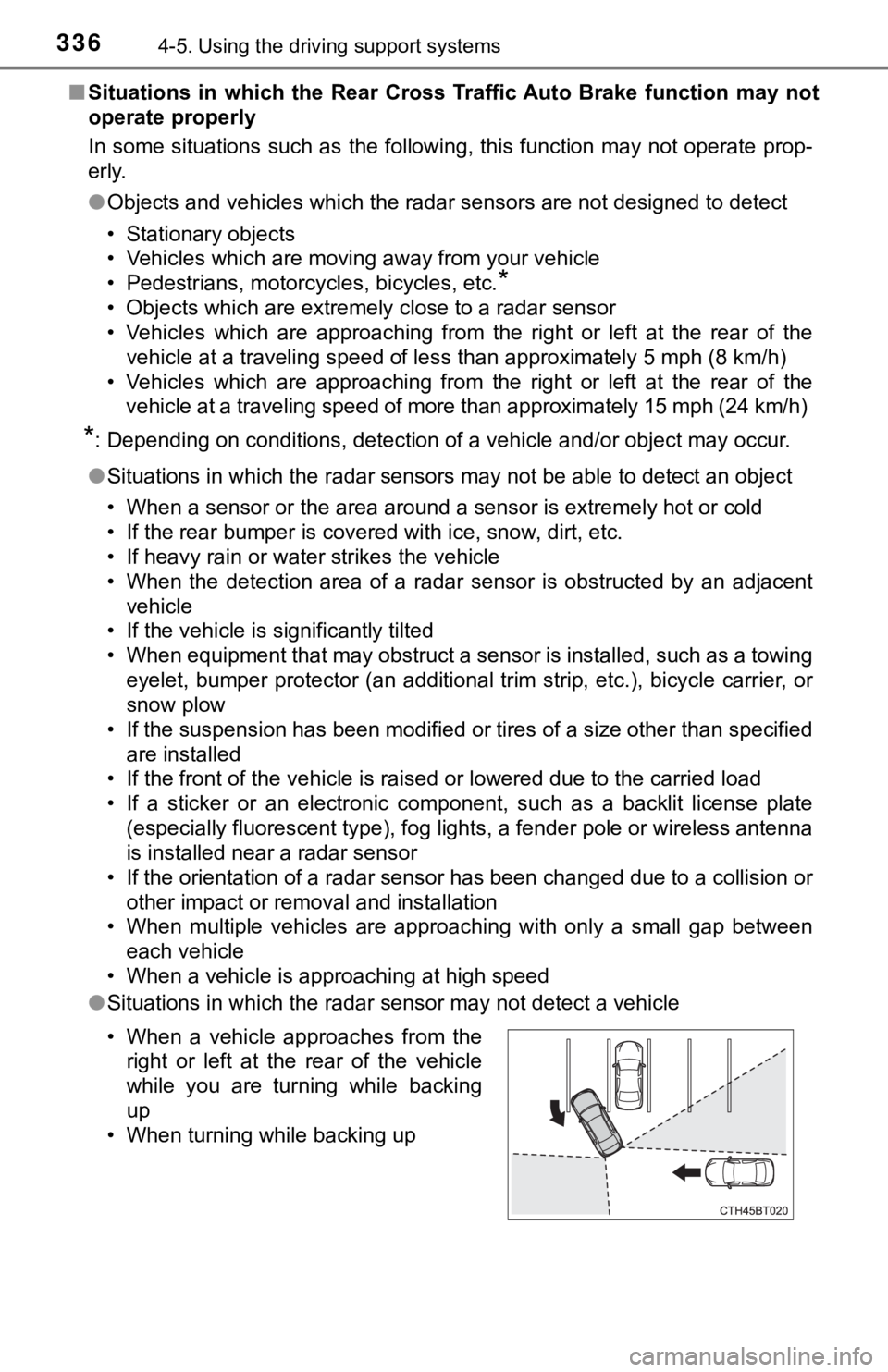
● Situations in which the radar sensor may not detect a vehicle
• When a vehicle approaches from the
right or left at the rear of the vehicle
while you are turning while backing
up
• When turning while backing up
Page 341 of 592

3414-6. Driving tips
4
Driving
◆When braking
Make sure to operate the brakes gently and in a timely manner. A
greater amount of electrical energy can be regenerated when slow-
ing down.
◆Delays
Repeated acceleration and deceleration, as well as long waits a t
traffic lights, will lead to bad fuel economy. Check traffic re ports
before leaving and avoid delays as much as possible. When drivi ng
in a traffic jam, gently release the brake pedal to allow the v ehicle to
move forward slightly while avoiding overuse of the accelerator
pedal. Doing so can help control excessive gasoline consumption.
◆Highway driving
Control and maintain the vehicle at a constant speed. Before st op-
ping at a toll booth or similar, allow plenty of time to releas e the
accelerator and gently apply the brakes. A greater amount of el ec-
trical energy can be regenerated when slowing down.
◆Air conditioning
Use the air conditioning only when necessary. Doing so can help
reduce excessive gasoline consumption.
In summer: When the ambient tempe rature is high, use the recircu-
lated air mode. Doing so will help to reduce the burden on the air
conditioning system and reduce fuel consumption as well.
In winter: Because the gasolin e engine will not automatically cut out
until it and the interior of the vehicle are warm, it will cons ume fuel.
Also, fuel consumption can be improved by avoiding overuse of t he
heater.
◆Checking tire inflation pressure
Make sure to check the tire inflation pressure frequently. Impr oper
tire inflation pressure can cause poor fuel economy.
Also, as snow tires can cause large amounts of friction, their use on
dry roads can lead to poor fuel economy. Use tires that are app ro-
priate for the season.
Page 343 of 592
3434-6. Driving tips
4
Driving
●Use fluids that are appropriate t o the prevailing outside tempera-
tures. • Engine oil
• Engine/power control unit coolant
• Washer fluid
● Have a service technician inspect the condition of the 12-volt bat-
tery.
● Have the vehicle fitted with four snow tires or purchase a set of tire
chains for the front tires.
Ensure that all tires are the specified size and brand, and tha t chains
match the size of the tires.
Perform the following according to the driving conditions:
● Do not try to forcibly open a window or move a wiper that is fr ozen.
Pour warm water over the frozen area to melt the ice. Wipe away
the water immediately to p revent it from freezing.
● To ensure proper operation of the climate control system fan,
remove any snow that has accumulated on the air inlet vents in
front of the windshield.
● Check for and remove any excess ic e or snow that may have accu-
mulated on the exterior lights, vehicle’s roof, chassis, around the
tires or on the brakes.
● Remove any snow or mud from the bottom of your shoes before
getting in the vehicle.
Winter driving tips
Carry out the necessary preparations and inspections before
driving the vehicle in winter. Always drive the vehicle in a ma n-
ner appropriate to the prevailing weather conditions.
Preparation for winter
Before driving the vehicle