ECO mode TOYOTA CAMRY HYBRID 2022 User Guide
[x] Cancel search | Manufacturer: TOYOTA, Model Year: 2022, Model line: CAMRY HYBRID, Model: TOYOTA CAMRY HYBRID 2022Pages: 624, PDF Size: 13.76 MB
Page 151 of 624
1513-1. Key information
3
Operation of each component
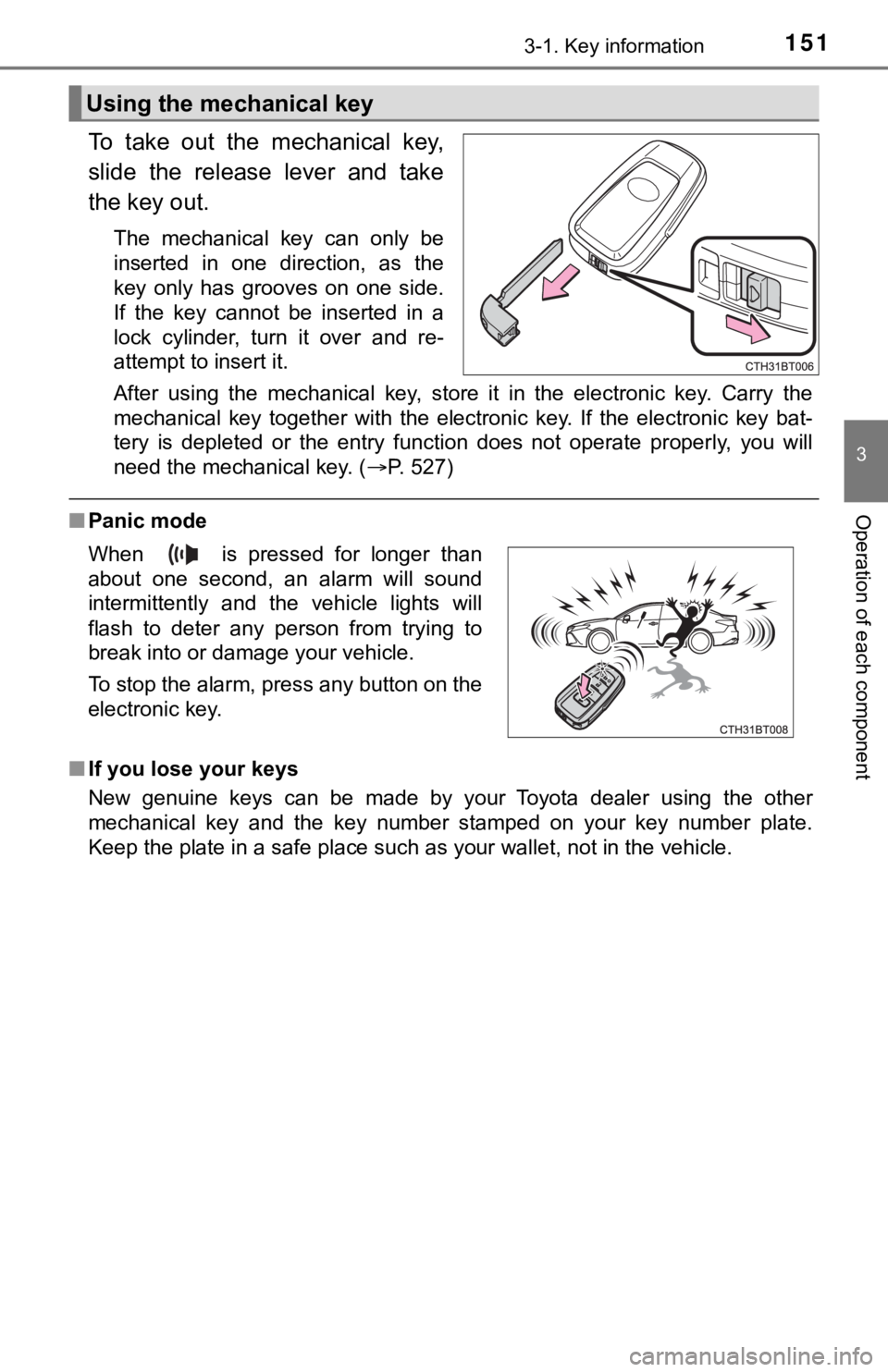
To take out the mechanical key,
slide the release lever and take
the key out.
The mechanical key can only be
inserted in one direction, as the
key only has grooves on one side.
If the key cannot be inserted in a
lock cylinder, turn it over and re-
attempt to insert it.
After using the mechanical key, store it in the electronic key. Carry the
mechanical key together with the electronic key. If the electronic key bat-
tery is depleted or the entry function does not operate properly, you will
need the mechanical key. (P. 527)
■Panic mode
■If you lose your keys
New genuine keys can be made by your Toyota dealer using the other
mechanical key and the key number stamped on your key number plate.
Keep the plate in a safe place such as your wallet, not in the vehicle.
Using the mechanical key
When is pressed for longer than
about one second, an alarm will sound
intermittently and the vehicle lights will
flash to deter any person from trying to
break into or damage your vehicle.
To stop the alarm, press any button on the
electronic key.
Page 152 of 624

1523-1. Key information
■When riding in an aircraft
When bringing an electronic key onto an aircraft, make sure you do not press
any button on the electronic key while inside the aircraft cabin. If you are car-
rying an electronic key in your bag etc., ensure that the buttons are not likely
to be pressed accidentally. Pressing a button may cause the electronic key to
emit radio waves that could interfere with the operation of the aircraft.
■Conditions affecting operation
P. 167
■Electronic key battery depletion
●The standard battery life is 1 to 2 years.
●If the battery becomes low, an alarm will sound in the cabin when the hybrid
system stops.
●As the electronic key always receives radio waves, the battery will become
depleted even if the electronic key is not used. The following symptoms indi-
cate that the electronic key battery may be depleted. Replace the battery
when necessary. (P. 470)
• The smart key system or the wireless remote control does not operate.
• The detection area becomes smaller.
• The LED indicator on the key surface does not turn on.
●To reduce key battery depletion when the electronic key is to not be used for
long periods of time, set the electronic key to the battery-saving mode.
(P. 166)
●To avoid serious deterioration, do not leave the electronic key within 3 ft. (1
m) of the following electrical appliances that produce a magnetic field:
•TVs
• Personal computers
• Cellular phones, cordless phones and battery chargers
• Recharging cellular phones or cordless phones
• Table lamps
• Induction cookers
■Replacing the battery
P. 470
■Confirmation of the registered key number
The number of keys already registered to the vehicle can be confirmed. Ask
your Toyota dealer for details.
■If a wrong key is used
<0037004b00480003004e0048005c00030046005c004f004c00510047004800550003005500520057004400570048005600030049005500480048004f005c0003005700520003004c00560052004f0044005700480003004c00510056004c00470048000300
5000480046004b00440051004c005600500011[
Page 165 of 624

1653-2. Opening, closing and locking the doors
3
Operation of each component
■Alarms and warning indicators
A combination of exterior and interior alarms as well as warning messages
shown on the multi-information display are used to prevent theft of the vehicle
and accidents resulting from erroneous operation. Take appropriate mea-
sures in response to any warning message on the multi-information display.
(P. 507)
When only an alarm sounds, circumstances and correction procedures are as
follows.
AlarmSituationCorrection procedure
Exterior alarm sounds
once for 5 secondsAn attempt was made
to lock the vehicle while
a door was open.Close all of the doors
and lock the doors
again.
The trunk was closed
while the electronic key
was still inside the trunk
and all the doors were
locked.Retrieve the electronic
key from the trunk and
close the trunk lid.
Interior alarm pings
repeatedlyThe power switch was
turned to ACCESSORY
mode while the driver’s
door was open (The
driver’s door was
opened when the
power switch was in
ACCESSORY mode).Turn the power switch
off and close the
driver’s door.
The power switch was
turned off while the
driver’s door was open.Close the driver’s door.
Page 168 of 624

1683-2. Opening, closing and locking the doors
■Note for the entry function
●Even when the electronic key is within the effective range (detection areas),
the system may not operate properly in the following cases:
• The electronic key is too close to the window or outside door handle, near
the ground, or in a high place when the doors are locked or unlocked.
• The electronic key is near the ground or in a high place, or too close to
the rear bumper center when the trunk is opened.
• The electronic key is on the instrument panel, rear package tray or floor,
or in the door pockets or glove box when the hybrid system is started or
power switch modes are changed.
●Do not leave the electronic key on top of the instrument panel or near the
door pockets when exiting the vehicle. Depending on the radio wave recep-
tion conditions, it may be detected by the antenna outside the cabin and the
door will become lockable from the outside, possibly trapping the electronic
key inside the vehicle.
●As long as the electronic key is within the effective range, the doors may be
locked or unlocked by anyone. However, only the doors detecting the elec-
tronic key can be used to unlock the vehicle.
●Even if the electronic key is not inside the vehicle, it may be possible to start
the hybrid system if the electronic key is near the window.
●The doors may unlock or lock if a large amount of water splashes on the
door handle, such as in the rain or in a car wash, when the electronic key is
within the effective range. (The doors will automatically be locked after
approximately 60 seconds if the doors are not opened and closed.)
●If the wireless remote control is used to lock the doors when the electronic
key is near the vehicle, there is a possibility that the door may not be
unlocked by the entry function. (Use the wireless remote control to unlock
the doors.)
●Touching the door lock sensor while wearing gloves may delay or prevent
lock operation. Remove the gloves and touch the lock sensor again.
●When the lock operation is performed using the lock sensor, recognition sig-
nals will be shown up to two consecutive times. After this, no recognition
signals will be given.
*
●If the door handle becomes wet while the electronic key is within the effec-
tive range, the door may lock and unlock repeatedly. In this case, follow the
<00490052004f004f0052005a004c0051004a00030046005200550055004800460057004c00520051000300530055005200460048004700580055004800560003005700520003005a00440056004b00030057004b0048000300590048004b004c0046004f00
48001d[
• Place the electronic key in a location 6 ft. (2 m) or more away from the
vehicle. (Take care to ensure that the key is not stolen.)
• Set the electronic key to battery-saving mode to disable the smart key
system. (P. 166)
●If the electronic key is inside the vehicle and a door handle becomes wet
during a car wash, a message may be shown on the multi-information dis-
play and a buzzer will sound outside the vehicle. To turn off the alarm, lock
all the doors.
Page 183 of 624
183
3
Operation of each component
3-5. Opening and closing the windows
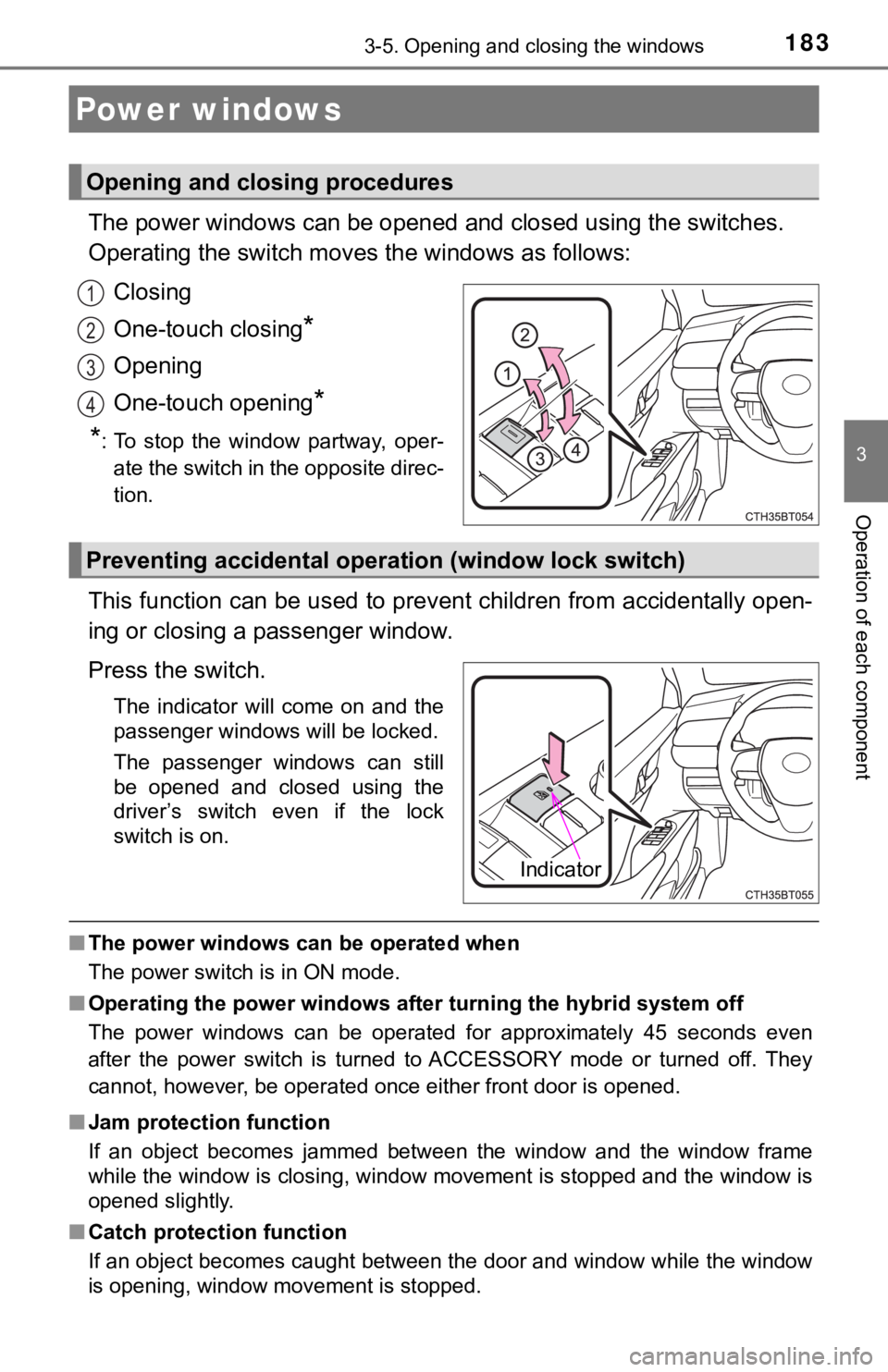
The power windows can be opened and closed using the switches.
Operating the switch moves the windows as follows:
Closing
One-touch closing
*
Opening
One-touch opening
*
*
: To stop the window partway, oper-
ate the switch in the opposite direc-
tion.
This function can be used to prevent children from accidentally open-
ing or closing a passenger window.
Press the switch.
The indicator will come on and the
passenger windows will be locked.
The passenger windows can still
be opened and closed using the
driver’s switch even if the lock
switch is on.
■The power windows can be operated when
The power switch is in ON mode.
■Operating the power windows after turning the hybrid system off
The power windows can be operated for approximately 45 seconds even
after the power switch is turned to ACCESSORY mode or turned off. They
cannot, however, be operated once either front door is opened.
■Jam protection function
If an object becomes jammed between the window and the window frame
while the window is closing, window movement is stopped and the window is
opened slightly.
■Catch protection function
If an object becomes caught between the door and window while the window
is opening, window movement is stopped.
Power windows
Opening and closing procedures
1
2
3
4
Preventing accidental operation (window lock switch)
Indicator
Page 184 of 624

1843-5. Opening and closing the windows
■When the window cannot be opened or closed
When the jam protection function or catch protection function operates
unusually and the door window cannot be opened or closed, perform the fol-
lowing operations with the power window switch of that door.
●Stop the vehicle. With the power switch in ON mode, within 4 seconds of the
jam protection function or catch protection function activating, continuously
operate the power window switch in the one-touch closing direction or one-
touch opening direction so that the door window can be opened and closed.
●If the door window cannot be opened and closed even when performing the
above operations, perform the following procedure for function initialization.
Turn the power switch to ON mode.
Pull and hold the power window switch in the one-touch closing direction
and completely close the door window.
Release the power window switch for a moment, resume pulling the
switch in the one-touch closing direction, and hold it there for approxi-
mately 6 seconds or more.
Press and hold the power window switch in the one-touch opening direc-
tion. After the door window is completely opened, continue holding the
switch for an additional 1 second or more.
Release the power window switch for a moment, resume pushing the
switch in the one-touch opening direction, and hold it there for approxi-
mately 4 seconds or more.
Pull and hold the power window switch in the one-touch closing direction
again. After the door window is completely closed, continue holding the
switch for a further 1 second or more.
If you release the switch while the window is moving, start again from the
beginning.
If the window reverses and cannot be fully closed or opened, have the vehicle
inspected by your Toyota dealer.
■Door lock linked window operation
●The power windows can be opened and closed using the mechanical key.
*
(P. 527)
●The power windows can be opened using the wireless remote control.
*
(P. 154)
*: These settings must be customized at your Toyota dealer.
■Alarm
The alarm may be triggered if the alarm is set and a power window is closed
using the door lock linked power window operation function. (P. 91)
■Power windows open warning buzzer
A buzzer sounds and a message is shown on the multi-information display in
the instrument cluster when the power switch is turned off and the driver’s
door is opened with the power windows open.
1
2
3
4
5
6
Page 187 of 624

1873-5. Opening and closing the windows
3
Operation of each component
■The moon roof can be operated when
The power switch is in ON mode.
■Operating the moon roof after turning the hybrid system off
The moon roof can be operated for approximately 45 seconds after the power
switch is turned to ACCESSORY mode or turned off. It cannot, however, be
operated once either front door is opened.
■Jam protection function
If an object is detected between the moon roof and the frame while the moon
roof is closing or tilting down, travel is stopped and the moon roof opens
slightly.
■Sunshade
The sunshade can be opened and closed manually. However, the sunshade
will open automatically when the moon roof is opened.
■Door lock linked moon roof operation
●The moon roof can be opened and closed using the mechanical key.
*
(P. 527)
●The moon roof can be opened using the wireless remote control.
*
(P. 154)
*: These settings must be customized at your Toyota dealer.
Page 193 of 624
1934-1. Before driving
4
Driving
When the following unusual operation is performed with the accelera-
tor pedal depressed, the hybrid system output may be restrained.
• When the shift lever is shifted to R
*.
• When the shift lever is shifted from P or R to forward drive shift
position such as D
*.
When the system operates, a message appears on the multi-informa-
tion display and head-up display (if equipped). Read the message and
follow the instruction.
*: Depending on the situation, the shift position may not be changed.
■When starting off on an uphill
The hill-start assist control will activate. (P. 304)
■For fuel-efficient driving
Keep in mind that hybrid vehicles are similar to conventional vehicles, and it
is necessary to refrain from activities such as sudden acceleration. (P. 357)
■Coasting (Auto Glide Control)
When Eco drive mode is selected, under certain conditions, Auto Glide Con-
trol will operate automatically and allow the vehicle coast, enhancing fuel
economy. (P. 356)
■Driving in the rain
●Drive carefully when it is raining, because visibility will be reduced, the win-
dows may become fogged-up, and the road will be slippery.
●Drive carefully when it starts to rain, because the road surface will be espe-
cially slippery.
●Refrain from high speeds when driving on an expressway in the rain,
because there may be a layer of water between the tires and the road sur-
face, preventing the steering and brakes from operating properly.
■Restraining hybrid system output (Brake Override System)
●When the accelerator and brake pedals are depressed at the same time, the
hybrid system output may be restrained.
●A warning message is displayed on the multi-information display and head-
up display (if equipped) while the system is operating.
Sudden start restraint control (Drive-Start Control [DSC])
Page 210 of 624
2104-2. Driving procedures
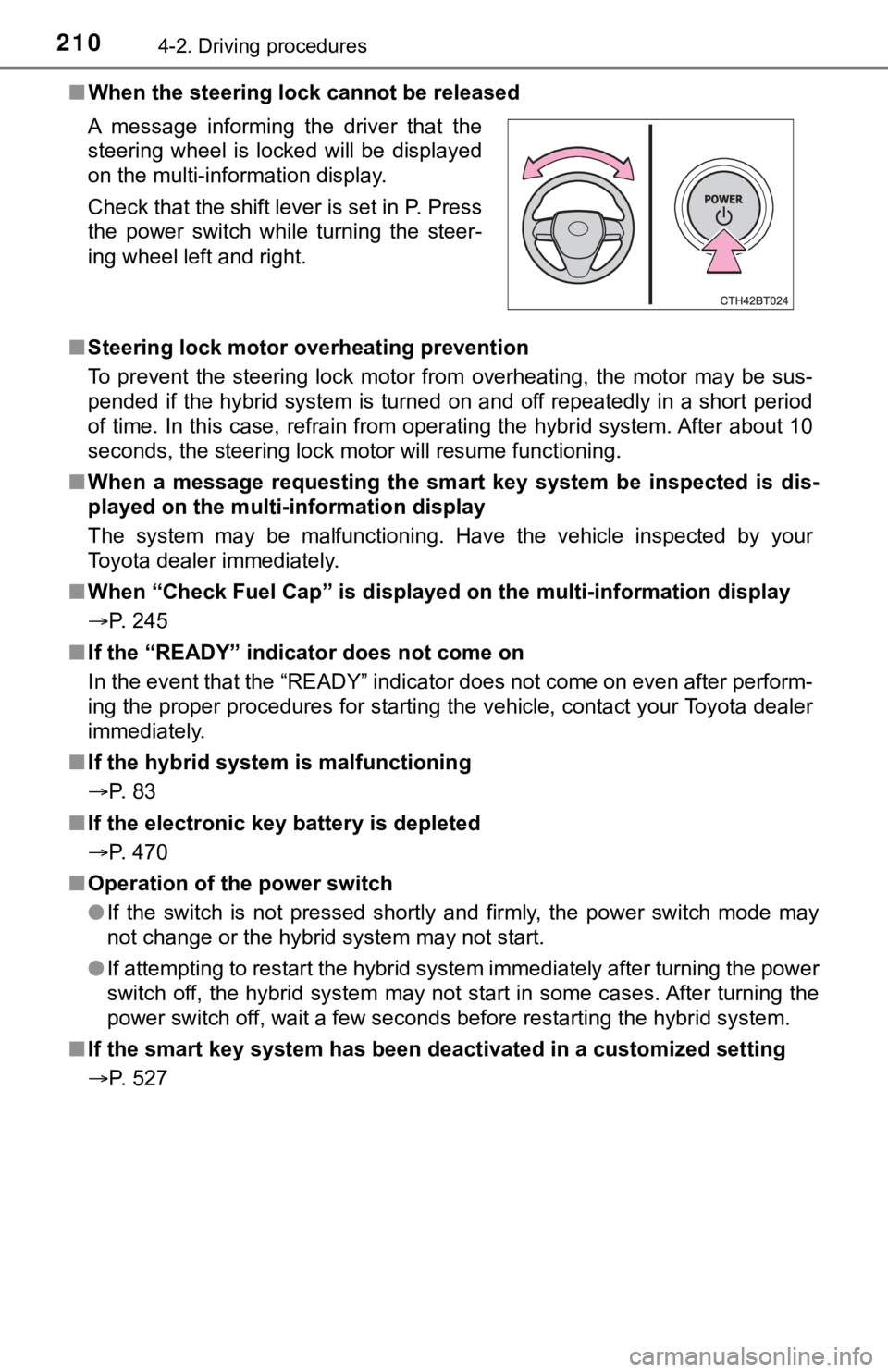
■When the steering lock cannot be released
■Steering lock motor overheating prevention
To prevent the steering lock motor from overheating, the motor may be sus-
pended if the hybrid system is turned on and off repeatedly in a short period
of time. In this case, refrain from operating the hybrid system. After about 10
seconds, the steering lock motor will resume functioning.
■When a message requesting the smart key system be inspected is dis-
played on the multi-information display
The system may be malfunctioning. Have the vehicle inspected by your
Toyota dealer immediately.
■When “Check Fuel Cap” is displayed on the multi-information display
P. 245
■If the “READY” indicator does not come on
In the event that the “READY” indicator does not come on even after perform-
ing the proper procedures for starting the vehicle, contact your Toyota dealer
immediately.
■If the hybrid system is malfunctioning
P. 83
■If the electronic key battery is depleted
P. 470
■Operation of the power switch
●If the switch is not pressed shortly and firmly, the power switch mode may
not change or the hybrid system may not start.
●If attempting to restart the hybrid system immediately after turning the power
switch off, the hybrid system may not start in some cases. After turning the
power switch off, wait a few seconds before restarting the hybrid system.
■If the smart key system has been deactivated in a customized setting
P. 527 A message informing the driver that the
steering wheel is locked will be displayed
on the multi-information display.
Check that the shift lever is set in P. Press
the power switch while turning the steer-
ing wheel left and right.
Page 212 of 624

2124-2. Driving procedures
NOTICE
■To prevent 12-volt battery discharge
●Do not leave the power switch in ACCESSORY or ON mode for long peri-
ods of time without the hybrid system on.
●If “ACCESSORY” or “IGNITION ON” is displayed on the multi-information
display, the power switch is not off. Exit the vehicle after turning the power
switch off.
●Do not stop the hybrid system when the shift lever is in a position other
than P. If the hybrid system is stopped in another shift lever position, the
power switch will not be turned off but instead be turned to ACCESSORY
mode. If the vehicle is left in ACCESSORY mode, 12-volt battery dis-
charge may occur.
■When starting the hybrid system
●Do not depress the accelerator pedal unnecessarily.
●If the hybrid system becomes difficult to start, have your vehicle checked
by your Toyota dealer immediately.
■Symptoms indicating a malfunction with the power switch
If the power switch seems to be operating somewhat differently than usual,
such as the switch sticking slightly, there may be a malfunction. Contact
your Toyota dealer immediately.