ECO mode TOYOTA CAMRY HYBRID 2022 Owner's Guide
[x] Cancel search | Manufacturer: TOYOTA, Model Year: 2022, Model line: CAMRY HYBRID, Model: TOYOTA CAMRY HYBRID 2022Pages: 624, PDF Size: 13.76 MB
Page 339 of 624

3394-5. Using the driving support systems
4
Driving
WARNING
■Cautions regarding the use of the system
The recognition and control capabilities for this system are limited.
The driver should always drive safely by always being responsible without
over relying on the system and have a understanding of the surrounding sit-
uations.
■To ensure the system can operate properly
Observe the following, otherwise there is the danger that could lead to an
accident.
●Always clean the camera without damaging it.
●Do not install market electronic parts (such as Illuminated license plate,
fog lamps, etc.) in the camera vicinity.
●Do not subject the camera vicinity to strong impacts. If the vicinity is sub-
jected to a strong impact, have the vehicle inspected at your Toyota dealer.
●Do not disassemble, remodel or paint the camera.
●<002700520003005100520057000300440057005700440046004b000300440046004600480056005600520055004c00480056000300520055000300560057004c0046004e00480055005600030057005200030057004b004800030046004400500048005500
440011[
●Do not install market protection parts (bumper trim, etc.) to the rear
bumper.
●Maintain suitable tire air pressure.
●Make sure the trunk is completely closed.
■RCD function is turned off
In the following situations the system turns off. The RCD function may not
operate properly and thus there is the danger that an accident may occur.
●The contents mentioned above are not observed.
●Suspensions other than Toyota genuine parts are installed.
Page 345 of 624

3454-5. Using the driving support systems
4
Driving
■If the Parking Support Brake function has operated
If the vehicle is stopped due to operation of the Parking Support Brake func-
tion, the Parking Support Brake system will be disabled and the PKSB OFF
indicator will illuminate. If the Parking Support Brake operates unnecessarily,
brake control can be canceled by depressing the brake pedal or waiting for
approximately 2 seconds for it to automatically be canceled. Then, the vehicle
can be operated by depressing the accelerator pedal.
■Re-enabling the Parking Support Brake system
To re-enable the Parking Support Brake system when it is disabled due to
operation of the Parking Support Brake function, either enable the system
again (P. 341), or turn the power switch off and then back to ON mode.
Additionally, if the object becomes no longer in the traveling direction of the
vehicle or if the traveling direction of the vehicle changes (such as changing
from moving forward to backing up, or from backing up to moving forward),
the system will be re-enabled automatically.
■If “PKSB Unavailable” and “Parking Assist Unavailable Clean Parking
Assist Sensor” are displayed on the multi-information display and the
PKSB OFF indicator is illuminating
●A sensor may be covered with ice, snow, dirt, etc. In this case, remove the
ice, snow, dirt, etc., from the sensor to return the system to normal. If this
message is shown even after removing dirt from the sensor, or shown when
the sensor was not dirty to begin with, have the vehicle inspected at your
Toyota dealer.
●A sensor may be frozen. Once the ice melts, the system will return to nor-
mal.
●Water may be continuously flowing over the sensor surface, such as in a
heavy rain. When the system determines that it is normal, the system will
return to normal.
Page 355 of 624
3554-5. Using the driving support systems
4
Driving
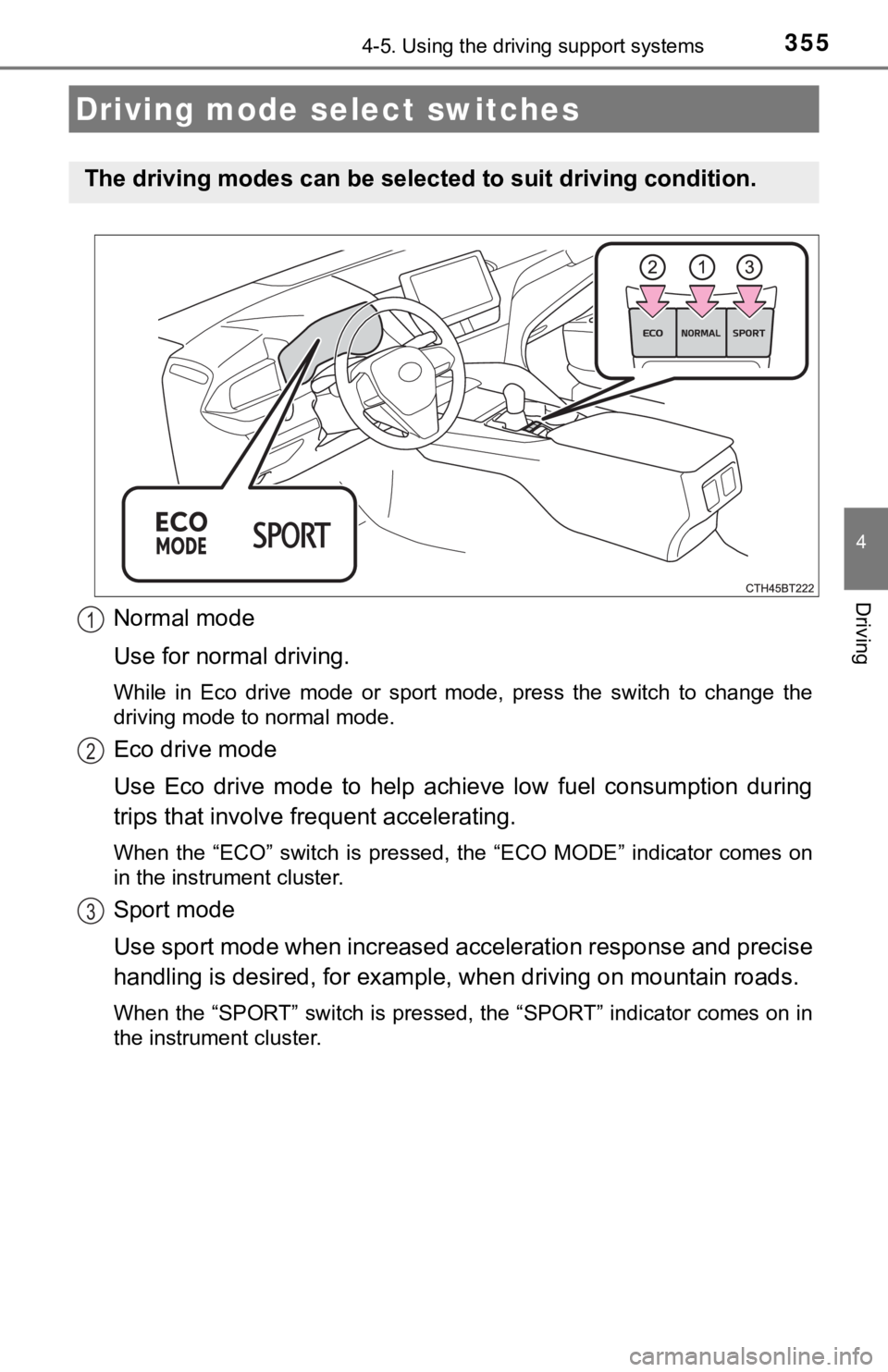
Normal mode
Use for normal driving.
While in Eco drive mode or sport mode, press the switch to change the
driving mode to normal mode.
Eco drive mode
Use Eco drive mode to help achieve low fuel consumption during
trips that involve frequent accelerating.
When the “ECO” switch is pressed, the “ECO MODE” indicator comes on
in the instrument cluster.
Sport mode
Use sport mode when increased acceleration response and precise
handling is desired, for example, when driving on mountain roads.
When the “SPORT” switch is pressed, the “SPORT” indicator comes on in
the instrument cluster.
Driving mode select switches
The driving modes can be selected to suit driving condition.
1
2
3
Page 356 of 624

3564-5. Using the driving support systems
■Operation of the air conditioning system in Eco drive mode
Eco drive mode controls the heating/cooling operations and fan speed of the
air conditioning system to enhance fuel efficiency (P. 366). To improve air
conditioning performance, adjust the fan speed or turn off Eco drive mode.
■Auto Glide Control
When Auto Glide Control operates, the AGC indicator light will illuminate.
●Auto Glide Control may not operate in the following situations:
• When the brake pedal is depressed
• When a shift position other than D is selected
• When the vehicle speed is approximately 10 mph (15 km/h) or lower
• When the vehicle is accelerating on a downward slope
• When the PCS (Pre-Collision System) is operating
• When the dynamic radar cruise control with full-speed range is operating
• When the Parking Support Brake system is operating
• When the TRAC or VSC system is operating
• When the TRAC or VSC system is disabled by pressing the VSC OFF
switch
■Sport mode automatic deactivation
Sport mode is automatically deactivated if the power switch is turned off after
driving in sport mode. ●While driving in Eco drive mode with D
selected, releasing the accelerator
pedal will activate Auto Glide Control
under certain conditions. (Auto Glide
Control may activate before the acceler-
ator pedal is fully released.)
When Auto Glide Control operates, the
electric motor (traction motor) will be
controlled, reducing the deceleration
force and allowing the vehicle to coast,
enhancing fuel economy.
Page 357 of 624
357
4
Driving
4-6. Driving tips
◆Using Eco drive mode
When using Eco drive mode, the torque corresponding to the accel-
erator pedal depression amount can be generated more smoothly
than it is in normal conditions. In addition, the operation of the air
conditioning system (heating/cooling) will be minimized, improving
the fuel economy. (P. 355)
◆Use of Hybrid System Indicator
The Eco-friendly driving is possible by keeping the needle of Hybrid
System Indicator within Eco area. (P. 102)
◆Shift lever operation
Shift the shift lever to D when stopped at a traffic light, or driving in
heavy traffic etc. Shift the shift lever to P when parking. When using
the N, there is no positive effect on fuel consumption. In the N, the
gasoline engine operates but electricity cannot be generated. Also,
when using the air conditioning system, etc., the hybrid battery
(traction battery) power is consumed.
◆Accelerator pedal/brake pedal operation
●Drive your vehicle smoothly. Avoid abrupt acceleration and
deceleration. Gradual acceleration and deceleration will make
more effective use of the electric motor (traction motor) without
having to use gasoline engine power.
●Avoid repeated acceleration. Repeated acceleration consumes
hybrid battery (traction battery) power, resulting in poor fuel con-
sumption. Battery power can be restored by driving with the
accelerator pedal slightly released.
Hybrid vehicle driving tips
For economical and ecological driving, pay attention to the fol-
lowing points:
Page 358 of 624

3584-6. Driving tips
◆When braking
Make sure to operate the brakes gently and in a timely manner. A
greater amount of electrical energy can be regenerated when slow-
ing down.
◆Delays
Repeated acceleration and deceleration, as well as long waits at
traffic lights, will lead to bad fuel economy. Check traffic reports
before leaving and avoid delays as much as possible. When driving
in a traffic jam, gently release the brake pedal to allow the vehicle to
move forward slightly while avoiding overuse of the accelerator
pedal. Doing so can help control excessive gasoline consumption.
◆Highway driving
Control and maintain the vehicle at a constant speed. Before stop-
ping at a toll booth or similar, allow plenty of time to release the
accelerator and gently apply the brakes. A greater amount of elec-
trical energy can be regenerated when slowing down.
◆Air conditioning
Use the air conditioning only when necessary. Doing so can help
reduce excessive gasoline consumption.
In summer: When the ambient temperature is high, use the recircu-
lated air mode. Doing so will help to reduce the burden on the air
conditioning system and reduce fuel consumption as well.
In winter: Because the gasoline engine will not automatically cut out
until it and the interior of the vehicle are warm, it will consume fuel.
Also, fuel consumption can be improved by avoiding overuse of the
heater.
◆Checking tire inflation pressure
Make sure to check the tire inflation pressure frequently. Improper
tire inflation pressure can cause poor fuel economy.
Also, as snow tires can cause large amounts of friction, their use on
dry roads can lead to poor fuel economy. Use tires that are appro-
priate for the season.
Page 372 of 624

3725-1. Using the air conditioning system and defogger
■Using automatic mode
Fan speed is adjusted automatically according to the temperature setting and
the ambient conditions.
Therefore, the fan may stop for a while until warm or cool air is ready to flow
immediately after is pressed.
■Fogging up of the windows
●The windows will easily fog up when the humidity in the vehicle is high.
Turning on will dehumidify the air from the outlets and defog the
windshield effectively.
●If you turn off, the windows may fog up more easily.
●The windows may fog up if the recirculated air mode is used.
■When driving on dusty roads
Close all windows. If dust thrown up by the vehicle is still drawn into the vehi-
cle after closing the windows, it is recommended that the air intake mode be
set to outside air mode and the fan speed to any setting except off.
■Outside/recirculated air mode
●Setting to the recirculated air mode temporarily is recommended in prevent-
ing dirty air from entering the vehicle interior and helping to cool the vehicle
when the outside air temperature is high.
●Outside/recirculated air mode may automatically switch depending on the
temperature setting or the inside temperature.
■When the outside temperature exceeds 75°F (24°C) and the air condition-
ing system is on
●In order to reduce the air conditioning power consumption, the air condition-
ing system may switch to recirculated air mode automatically. This may also
reduce fuel consumption.
●Recirculated air mode is selected as a default mode when the power switch
is turned to ON mode.
●It is possible to switch to outside air mode at any time by pressing .
■When the outside temperature is low
The dehumidification function may not operate even when is pressed.
Page 373 of 624
3735-1. Using the air conditioning system and defogger
5
Interior features
■Operation of the air conditioning system in Eco drive mode
●In the Eco drive mode, “ECO” is displayed on the air conditioning screen
and the air conditioning system is controlled as follows to prioritize fuel effi-
ciency:
• Engine speed and compressor operation controlled to restrict heating/
cooling capacity
• Fan speed restricted when automatic mode is selected
●To improve air conditioning performance, perform the following operations:
• Adjust the fan speed
• Turn off Eco drive mode
■Ventilation and air conditioning odors
●To let fresh air in, set the air conditioning system to the outside air mode.
●During use, various odors from inside and outside the vehicle may enter into
and accumulate in the air conditioning system. This may then cause odor to
be emitted from the vents.
●To reduce potential odors from occurring:
• It is recommended that the air conditioning system be set to outside air
mode prior to turning the vehicle off.
• The start timing of the blower may be delayed for a short period of time
immediately after the air conditioning system is started in automatic
mode.
■Air conditioning filter
P. 463
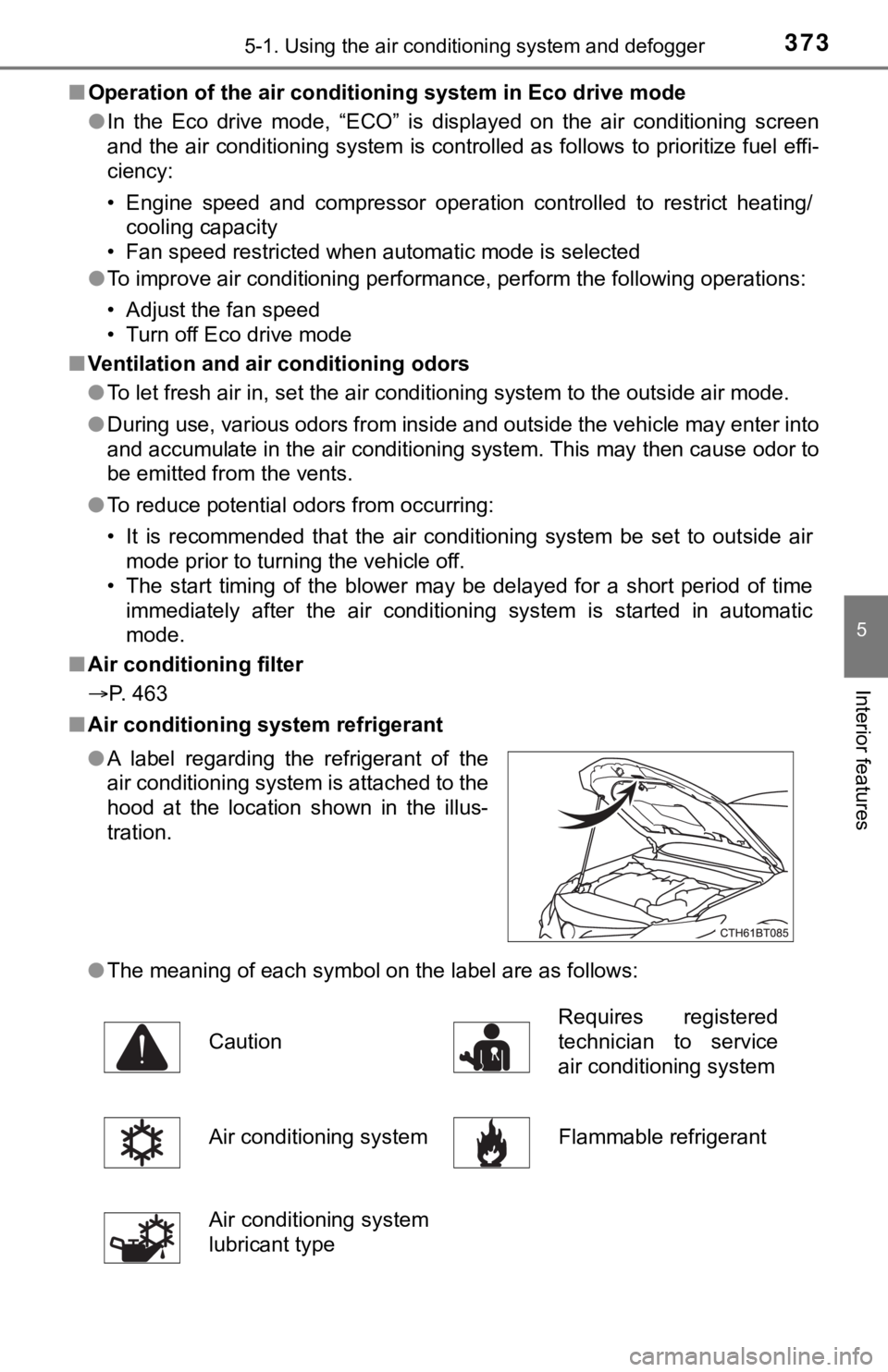
■Air conditioning system refrigerant
●The meaning of each symbol on the label are as follows: ●A label regarding the refrigerant of the
air conditioning system is attached to the
hood at the location shown in the illus-
tration.
CautionRequires registered
technician to service
air conditioning system
Air conditioning system Flammable refrigerant
Air conditioning system
lubricant type
Page 380 of 624
3805-2. Using the interior lights
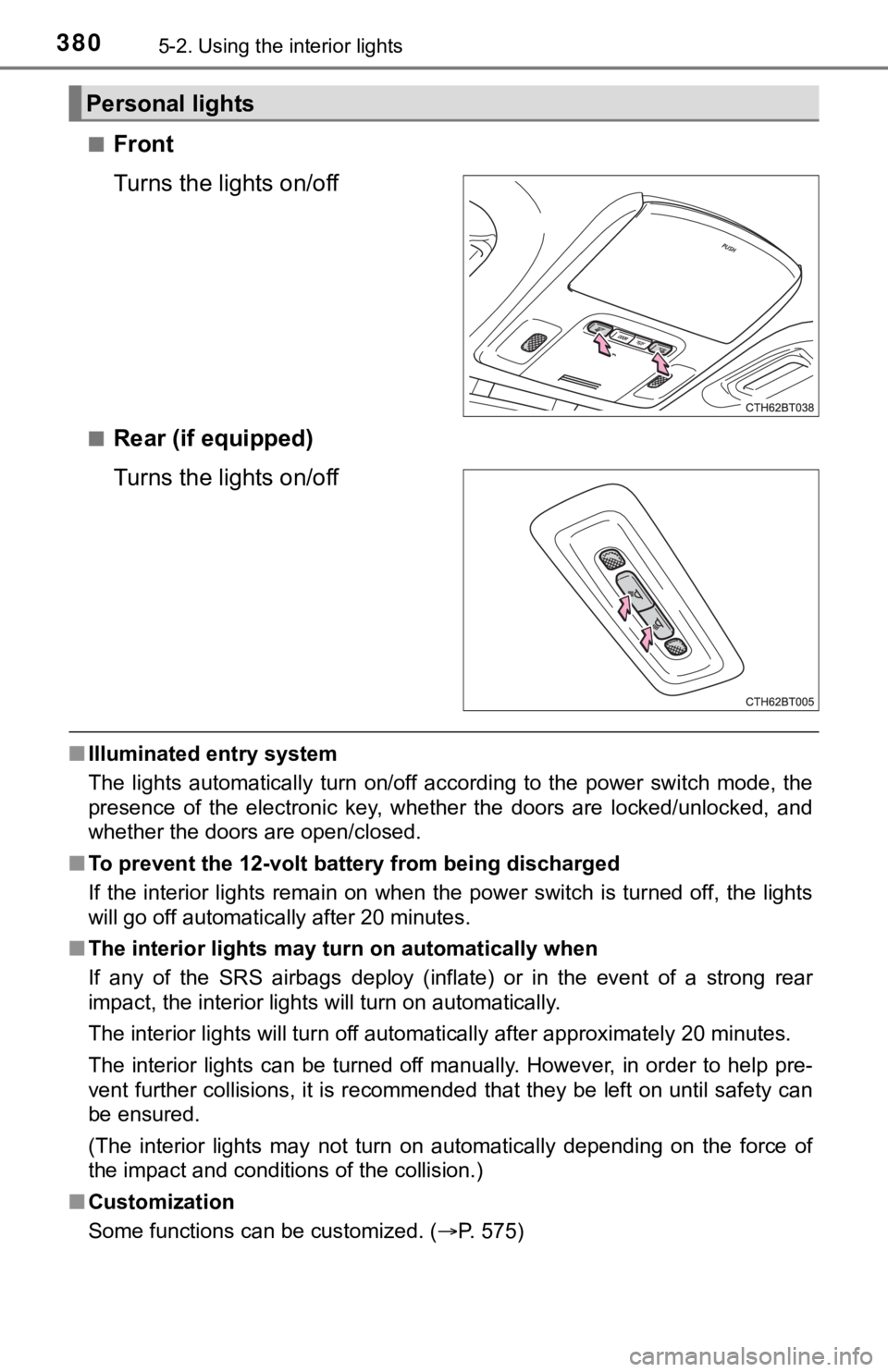
■Front
Turns the lights on/off
■Rear (if equipped)
Turns the lights on/off
■Illuminated entry system
The lights automatically turn on/off according to the power switch mode, the
presence of the electronic key, whether the doors are locked/unlocked, and
whether the doors are open/closed.
■To prevent the 12-volt battery from being discharged
If the interior lights remain on when the power switch is turned off, the lights
will go off automatically after 20 minutes.
■The interior lights may turn on automatically when
If any of the SRS airbags deploy (inflate) or in the event of a strong rear
impact, the interior lights will turn on automatically.
The interior lights will turn off automatically after approximately 20 minutes.
The interior lights can be turned off manually. However, in order to help pre-
vent further collisions, it is recommended that they be left on until safety can
be ensured.
(The interior lights may not turn on automatically depending on the force of
the impact and conditions of the collision.)
■Customization
Some functions can be customized. (P. 575)
Personal lights
Page 395 of 624

3955-4. Other interior features
5
Interior features
●If the operation indicator light blinks
If an error is detected, the operation indicator light will blink
(orange). Take the appropriate measures according to the table
below.
Operation indi-
cator lightSuspected causesMeasure
Continuously
blinks 1 time
per secondCommunication malfunc-
tion between the wire-
less charger and smart
key systemIf the hybrid system is oper-
ating, stop the hybrid sys-
tem and then restart it.
If the power switch is in
ACCESSORY mode, start
the hybrid system.
(P. 206)
Continuously
flashes 3 times
(orange)Foreign matter detected
If a metallic foreign object is
detected in the charge
area, the overheat preven-
tion function of the charging
coil will operateRemove the foreign object
from the charge area.
Portable device not
aligned correctly
If the charging coil of a por-
table device is not properly
positioned on the charging
area, the overheat preven-
tion function of the charging
coil will operateRemove the portable
device from the charging
tray, check that the opera-
tion indicator light changes
back to green, and then
place the portable device
so that it is near the center
of the charging tray.
Also, if a case or cover is
installed to the portable
device, remove it.
Continuously
flashes 4 times
(orange)Temperature inside wire-
less charger exceeded a
certain amountStop charging, remove the
portable device from the
charging tray, and wait for
the temperature to
decrease before attempt-
ing to begin charging again.