belt TOYOTA CAMRY V20 1986 Service Information
[x] Cancel search | Manufacturer: TOYOTA, Model Year: 1986, Model line: CAMRY V20, Model: TOYOTA CAMRY V20 1986Pages: 2389, PDF Size: 84.44 MB
Page 779 of 2389
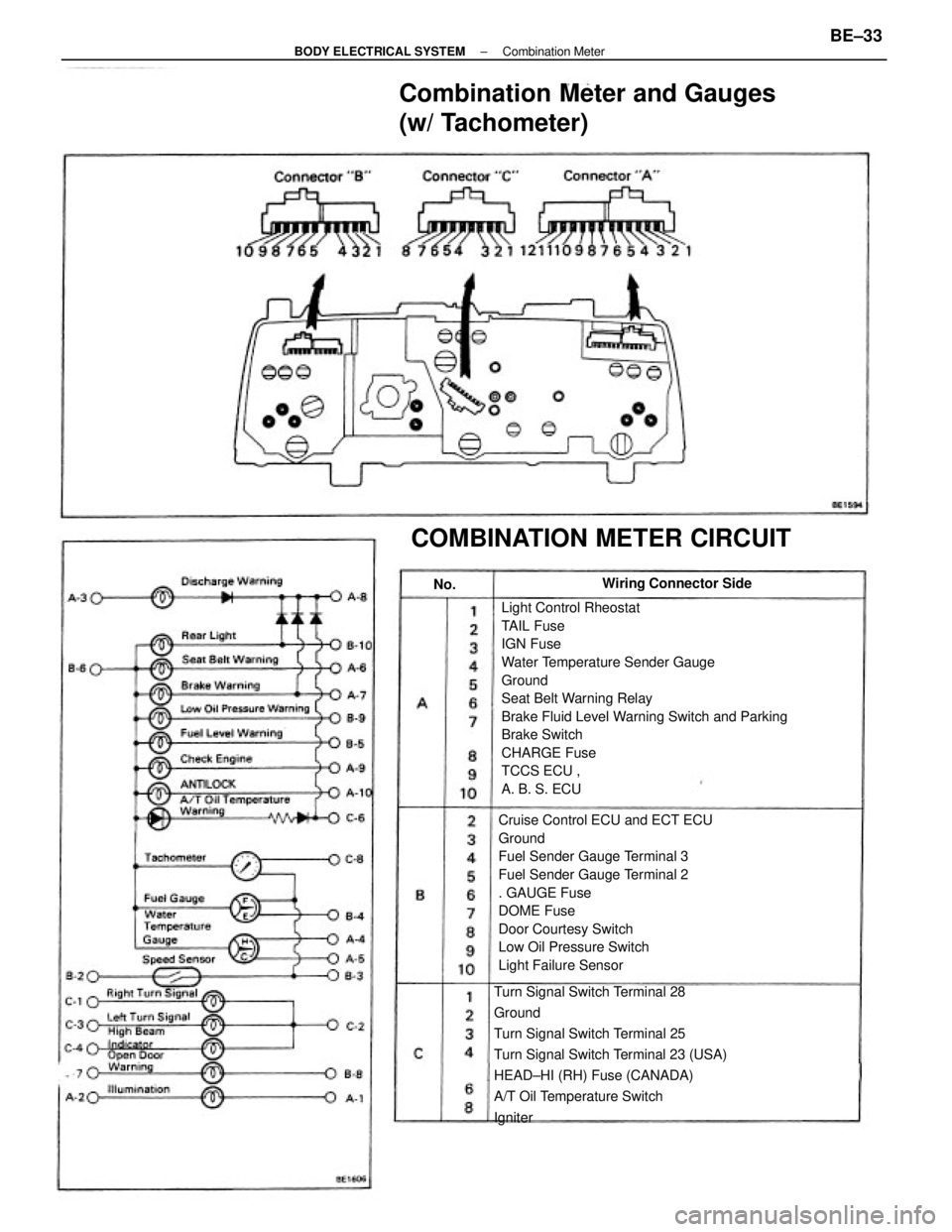
Light Control Rheostat
TAIL Fuse
IGN Fuse
Water Temperature Sender Gauge
Ground
Seat Belt Warning Relay
Brake Fluid Level Warning Switch and Parking
Brake Switch
CHARGE Fuse
TCCS ECU ,
A. B. S. ECU
Cruise Control ECU and ECT ECU
Ground
Fuel Sender Gauge Terminal 3
Fuel Sender Gauge Terminal 2
. GAUGE Fuse
DOME Fuse
Door Courtesy Switch
Low Oil Pressure Switch
Light Failure Sensor
Turn Signal Switch Terminal 28
Ground
Turn Signal Switch Terminal 25
Turn Signal Switch Terminal 23 (USA)
HEAD±HI (RH) Fuse (CANADA)
A/T Oil Temperature Switch
Igniter
Combination Meter and Gauges
(w/ Tachometer)
COMBINATION METER CIRCUIT
Wiring Connector Side
No.
± BODY ELECTRICAL SYSTEMCombination MeterBE±33
Page 787 of 2389
Seat Belt Warning
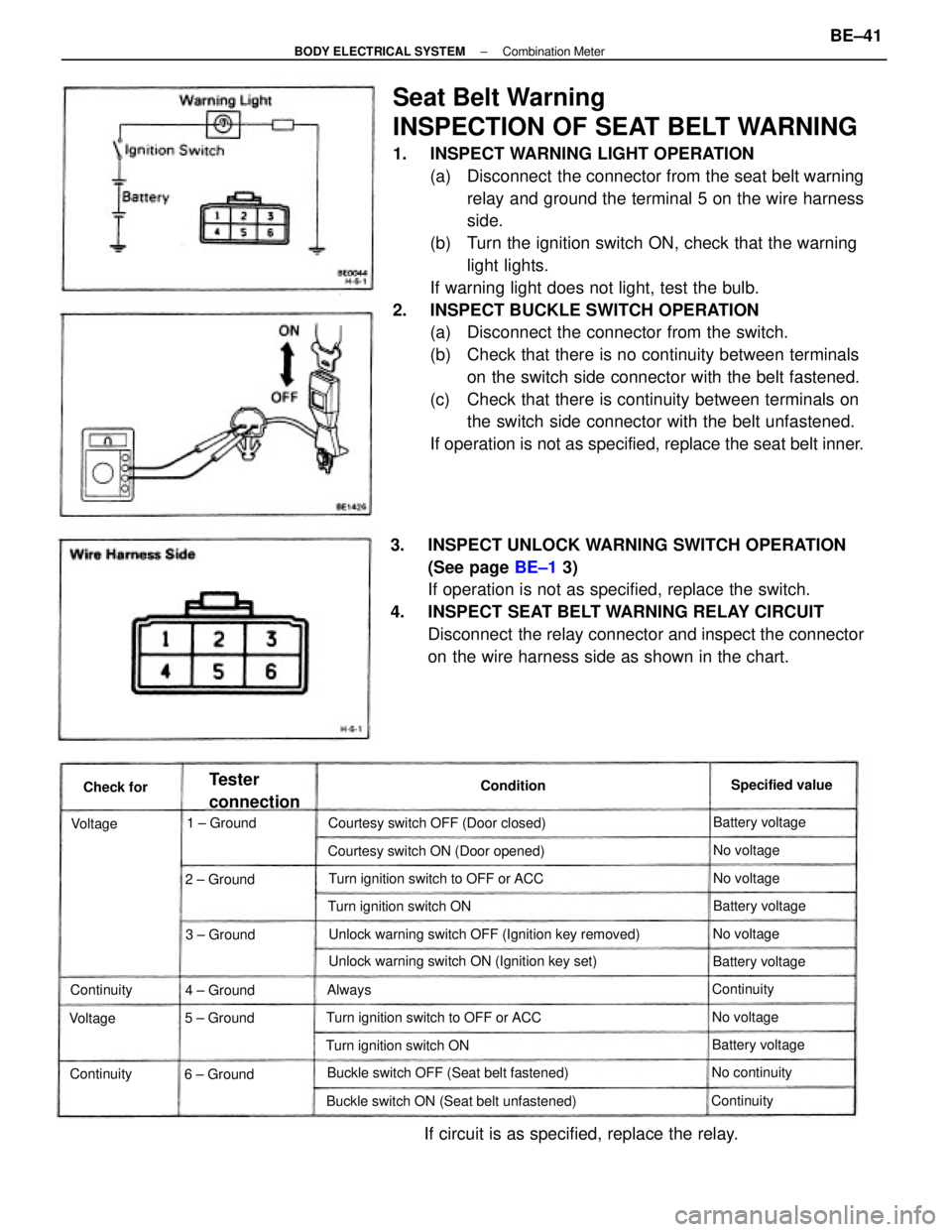
INSPECTION OF SEAT BELT WARNING
1. INSPECT WARNING LIGHT OPERATION
(a) Disconnect the connector from the seat belt warning
relay and ground the terminal 5 on the wire harness
side.
(b) Turn the ignition switch ON, check that the warning
light lights.
If warning light does not light, test the bulb.
2. INSPECT BUCKLE SWITCH OPERATION
(a) Disconnect the connector from the switch.
(b) Check that there is no continuity between terminals
on the switch side connector with the belt fastened.
(c) Check that there is continuity between terminals on
the switch side connector with the belt unfastened.
If operation is not as specified, replace the seat belt inner.
3. INSPECT UNLOCK WARNING SWITCH OPERATION
(See page BE±1 3)
If operation is not as specified, replace the switch.
4. INSPECT SEAT BELT WARNING RELAY CIRCUIT
Disconnect the relay connector and inspect the connector
on the wire harness side as shown in the chart.
Unlock warning switch OFF (Ignition key removed)
If circuit is as specified, replace the relay.
Unlock warning switch ON (Ignition key set)
Buckle switch ON (Seat belt unfastened)Buckle switch OFF (Seat belt fastened)Courtesy switch ON (Door opened)
Turn ignition switch to OFF or ACCTurn ignition switch to OFF or ACC Courtesy switch OFF (Door closed)
Turn ignition switch ONTurn ignition switch ON
6 ± Ground
Tester
connectionSpecified value
Battery voltage
Battery voltage
Battery voltageBattery voltage
No continuity 1 ± Ground
2 ± Ground
3 ± Ground
5 ± Ground4 ± GroundContinuity
Continuity
ContinuityNo voltageNo voltageNo voltage
No voltage
Continuity Condition
Check for
VoltageVoltage
Always
± BODY ELECTRICAL SYSTEMCombination MeterBE±41
Page 811 of 2389
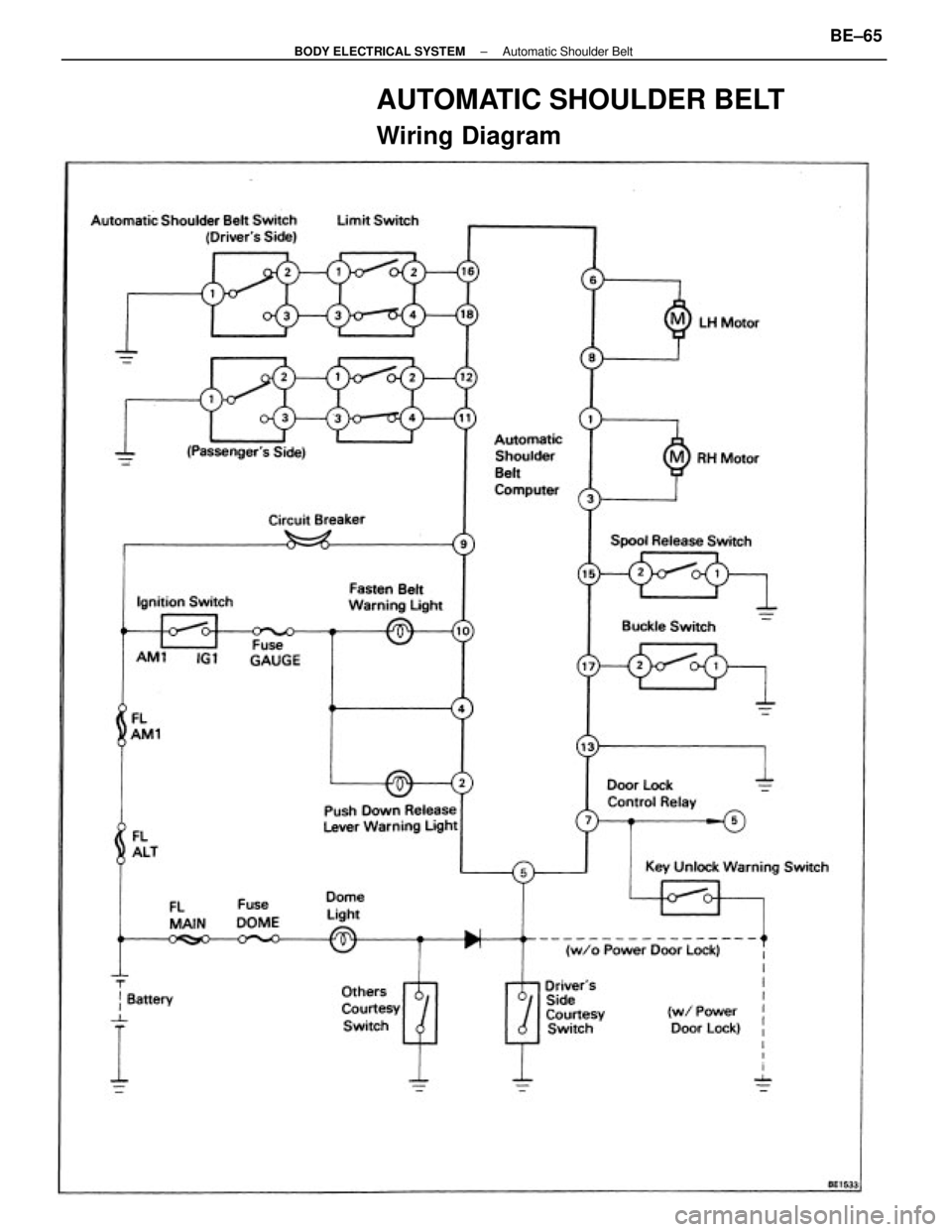
AUTOMATIC SHOULDER BELT
Wiring Diagram
± BODY ELECTRICAL SYSTEMAutomatic Shoulder BeltBE±65
Page 812 of 2389
Computer
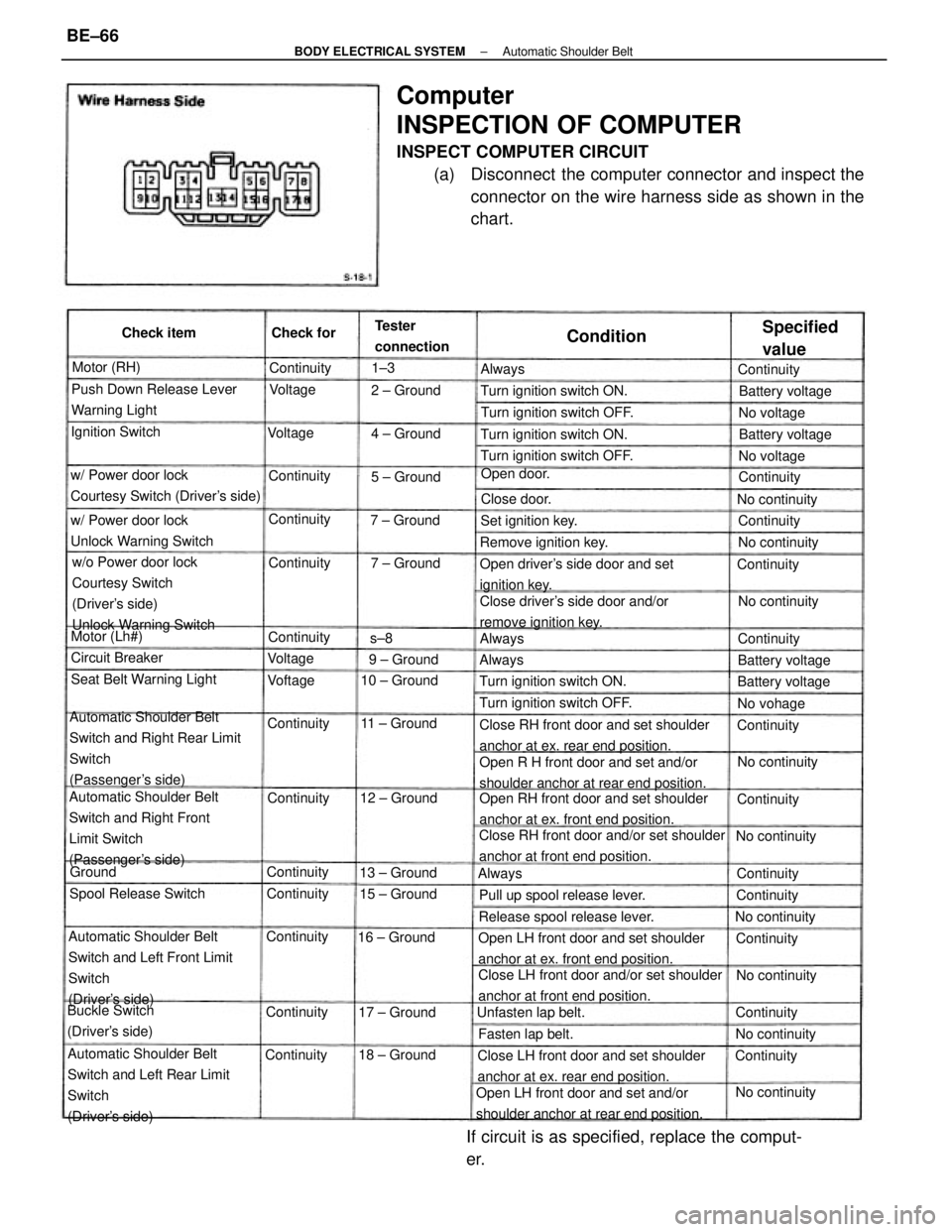
INSPECTION OF COMPUTER
INSPECT COMPUTER CIRCUIT
(a) Disconnect the computer connector and inspect the
connector on the wire harness side as shown in the
chart.
Automatic Shoulder Belt
Switch and Right Rear Limit
Switch
(Passenger's side)
Automatic Shoulder Belt
Switch and Left Front Limit
Switch
(Driver's side)
Automatic Shoulder Belt
Switch and Left Rear Limit
Switch
(Driver's side)Automatic Shoulder Belt
Switch and Right Front
Limit Switch
(Passenger's side)w/o Power door lock
Courtesy Switch
(Driver's side)
Unlock Warning Switch
Open RH front door and set shoulder
anchor at ex. front end position.
Close LH front door and/or set shoulder
anchor at front end position.Close RH front door and/or set shoulder
anchor at front end position.Close RH front door and set shoulder
anchor at ex. rear end position.
Open R H front door and set and/or
shoulder anchor at rear end position.
Open LH front door and set shoulder
anchor at ex. front end position.
Open LH front door and set and/or
shoulder anchor at rear end position.Close LH front door and set shoulder
anchor at ex. rear end position.
If circuit is as specified, replace the comput-
er.
Close driver's side door and/or
remove ignition key. Open driver's side door and set
ignition key. w/ Power door lock
Courtesy Switch (Driver's side)Push Down Release Lever
Warning Light
w/ Power door lock
Unlock Warning Switch
Release spool release lever.Pull up spool release lever.Turn ignition switch ON.
Seat Belt Warning LightTurn ignition switch OFF.
Turn ignition switch OFF.Turn ignition switch OFF.
Turn ignition switch ON.Turn ignition switch ON.
Buckle Switch
(Driver's side)Spool Release SwitchRemove ignition key. Tester
connection
Unfasten lap belt.
Specified
value
Set ignition key.
Battery voltage Ignition Switch
Battery voltage Battery voltage
Battery voltage
Fasten lap belt. Circuit Breaker
No continuity
No continuityNo continuity
No continuity No continuity
No continuity
No continuity
No continuity 15 ± Ground
No continuity 11 ± Ground 10 ± Ground
12 ± Ground
16 ± Ground
18 ± Ground13 ± Ground
17 ± GroundOpen door. Check item
7 ± Ground4 ± Ground
9 ± Ground7 ± Ground2 ± Ground
5 ± Ground Motor (RH)
Motor (Lh#)
Continuity
ContinuityNo voltage No voltage
No vohage Continuity
Continuity Continuity
ContinuityContinuity Continuity
Continuity
ContinuityContinuity Check for
Continuity ContinuityContinuity
Continuity Close door.
Continuity
ContinuityContinuityContinuity
ContinuityContinuity
Continuity
ContinuityContinuity
Condition
Voltage Voltage
VoftageVoltageAlways
AlwaysAlways
Always
Ground1±3
s±8
± BODY ELECTRICAL SYSTEMAutomatic Shoulder BeltBE±66
Page 813 of 2389
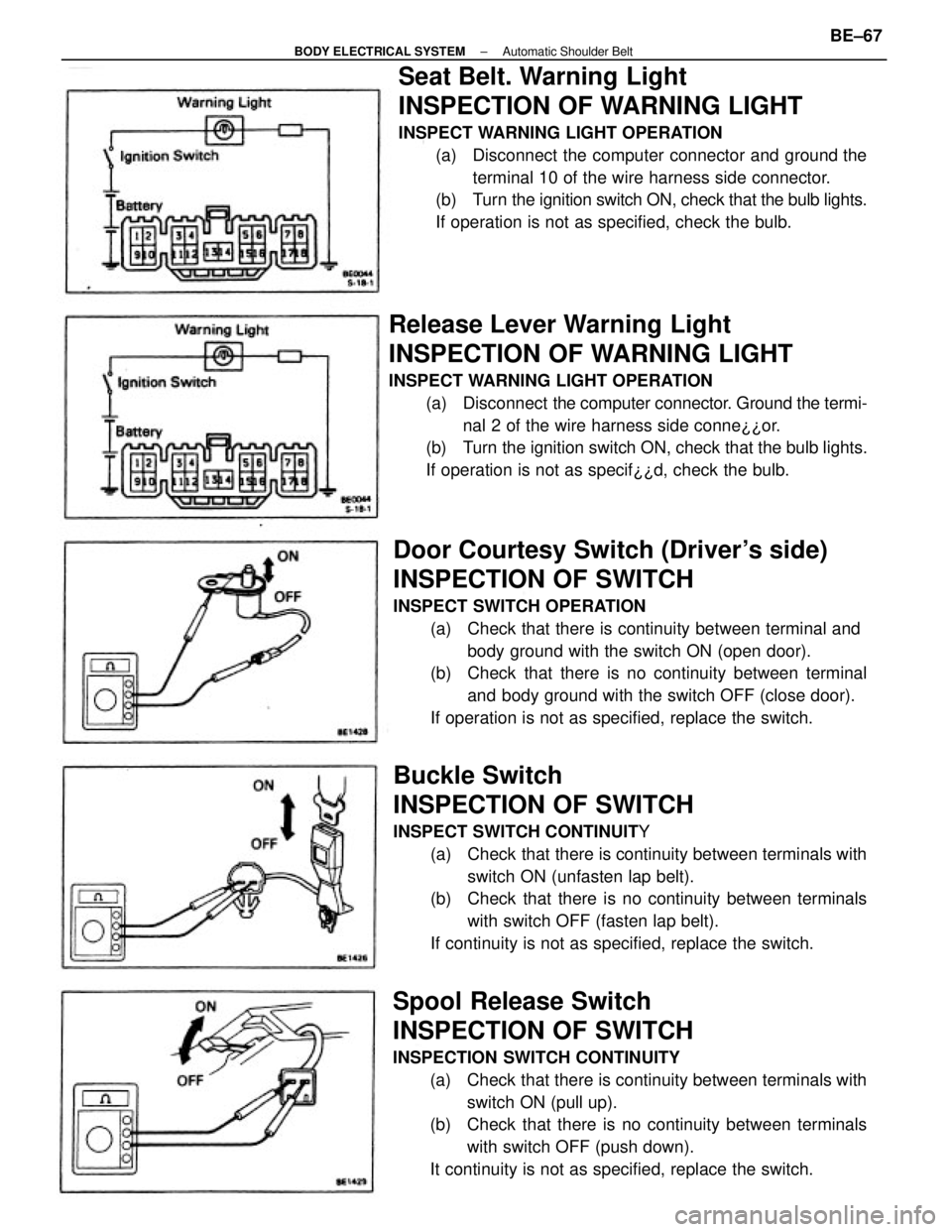
Seat Belt. Warning Light
INSPECTION OF WARNING LIGHT
INSPECT WARNING LIGHT OPERATION
(a) Disconnect the computer connector and ground the
terminal 10 of the wire harness side connector.
(b) Turn the ignition switch ON, check that the bulb lights.
If operation is not as specified, check the bulb.
Buckle Switch
INSPECTION OF SWITCH
INSPECT SWITCH CONTINUITY
(a) Check that there is continuity between terminals with
switch ON (unfasten lap belt).
(b) Check that there is no continuity between terminals
with switch OFF (fasten lap belt).
If continuity is not as specified, replace the switch.
Door Courtesy Switch (Driver's side)
INSPECTION OF SWITCH
INSPECT SWITCH OPERATION
(a) Check that there is continuity between terminal and
body ground with the switch ON (open door).
(b) Check that there is no continuity between terminal
and body ground with the switch OFF (close door).
If operation is not as specified, replace the switch.
Spool Release Switch
INSPECTION OF SWITCH
INSPECTION SWITCH CONTINUITY
(a) Check that there is continuity between terminals with
switch ON (pull up).
(b) Check that there is no continuity between terminals
with switch OFF (push down).
It continuity is not as specified, replace the switch.
Release Lever Warning Light
INSPECTION OF WARNING LIGHT
INSPECT WARNING LIGHT OPERATION
(a) Disconnect the computer connector. Ground the termi-
nal 2 of the wire harness side conne¿¿or.
(b) Turn the ignition switch ON, check that the bulb lights.
If operation is not as specif¿¿d, check the bulb.
± BODY ELECTRICAL SYSTEMAutomatic Shoulder BeltBE±67
Page 814 of 2389
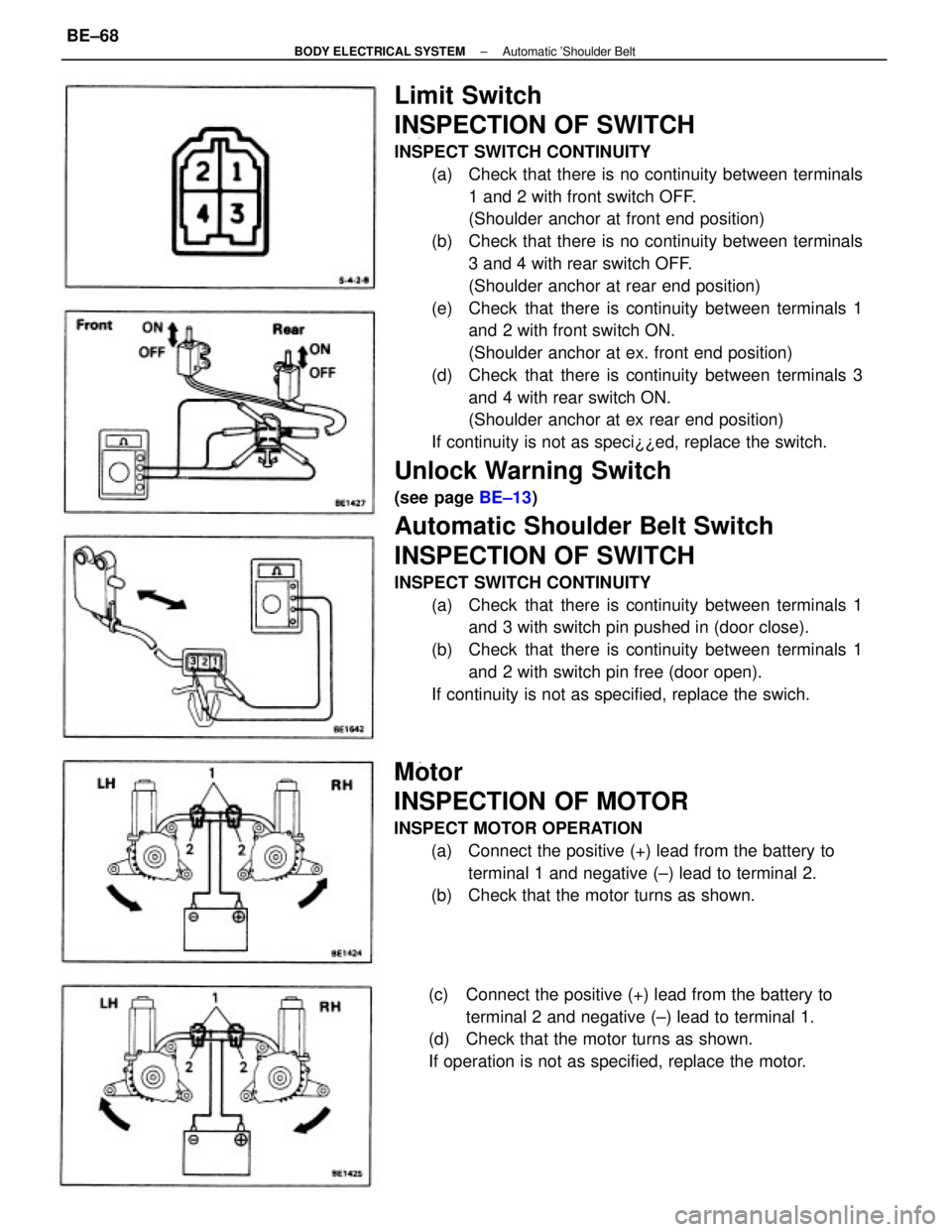
Limit Switch
INSPECTION OF SWITCH
INSPECT SWITCH CONTINUITY
(a) Check that there is no continuity between terminals
1 and 2 with front switch OFF.
(Shoulder anchor at front end position)
(b) Check that there is no continuity between terminals
3 and 4 with rear switch OFF.
(Shoulder anchor at rear end position)
(e) Check that there is continuity between terminals 1
and 2 with front switch ON.
(Shoulder anchor at ex. front end position)
(d) Check that there is continuity between terminals 3
and 4 with rear switch ON.
(Shoulder anchor at ex rear end position)
If continuity is not as speci¿¿ed, replace the switch.
Unlock Warning Switch
(see page BE±13)
Automatic Shoulder Belt Switch
INSPECTION OF SWITCH
INSPECT SWITCH CONTINUITY
(a) Check that there is continuity between terminals 1
and 3 with switch pin pushed in (door close).
(b) Check that there is continuity between terminals 1
and 2 with switch pin free (door open).
If continuity is not as specified, replace the swich.
Motor
INSPECTION OF MOTOR
INSPECT MOTOR OPERATION
(a) Connect the positive (+) lead from the battery to
terminal 1 and negative (±) lead to terminal 2.
(b) Check that the motor turns as shown.
(c) Connect the positive (+) lead from the battery to
terminal 2 and negative (±) lead to terminal 1.
(d) Check that the motor turns as shown.
If operation is not as specified, replace the motor.
± BODY ELECTRICAL SYSTEMAutomatic 'Shoulder BeltBE±68
Page 958 of 2389
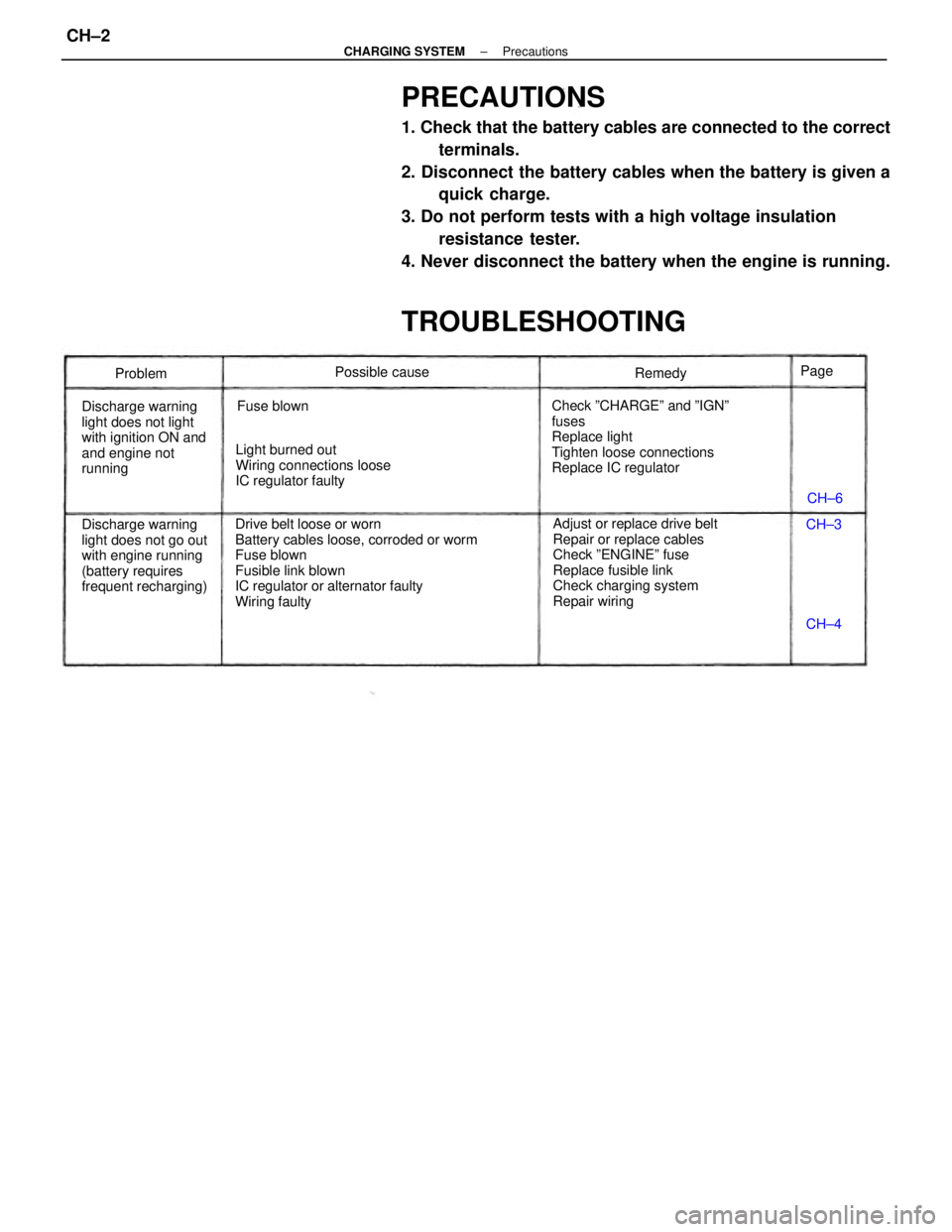
PRECAUTIONS
1. Check that the battery cables are connected to the correct
terminals.
2. Disconnect the battery cables when the battery is given a
quick charge.
3. Do not perform tests with a high voltage insulation
resistance tester.
4. Never disconnect the battery when the engine is running.
TROUBLESHOOTING
Drive belt loose or worn
Battery cables loose, corroded or worm
Fuse blown
Fusible link blown
IC regulator or alternator faulty
Wiring faultyAdjust or replace drive belt
Repair or replace cables
Check ºENGINEº fuse
Replace fusible link
Check charging system
Repair wiring Check ºCHARGEº and ºIGNº
fuses
Replace light
Tighten loose connections
Replace IC regulator
Discharge warning
light does not go out
with engine running
(battery requires
frequent recharging) Discharge warning
light does not light
with ignition ON and
and engine not
runningLight burned out
Wiring connections loose
IC regulator faultyPossible cause
Fuse blownRemedy
Problem
CH±6
CH±4 CH±3 Page
± CHARGING SYSTEMPrecautionsCH±2
Page 959 of 2389
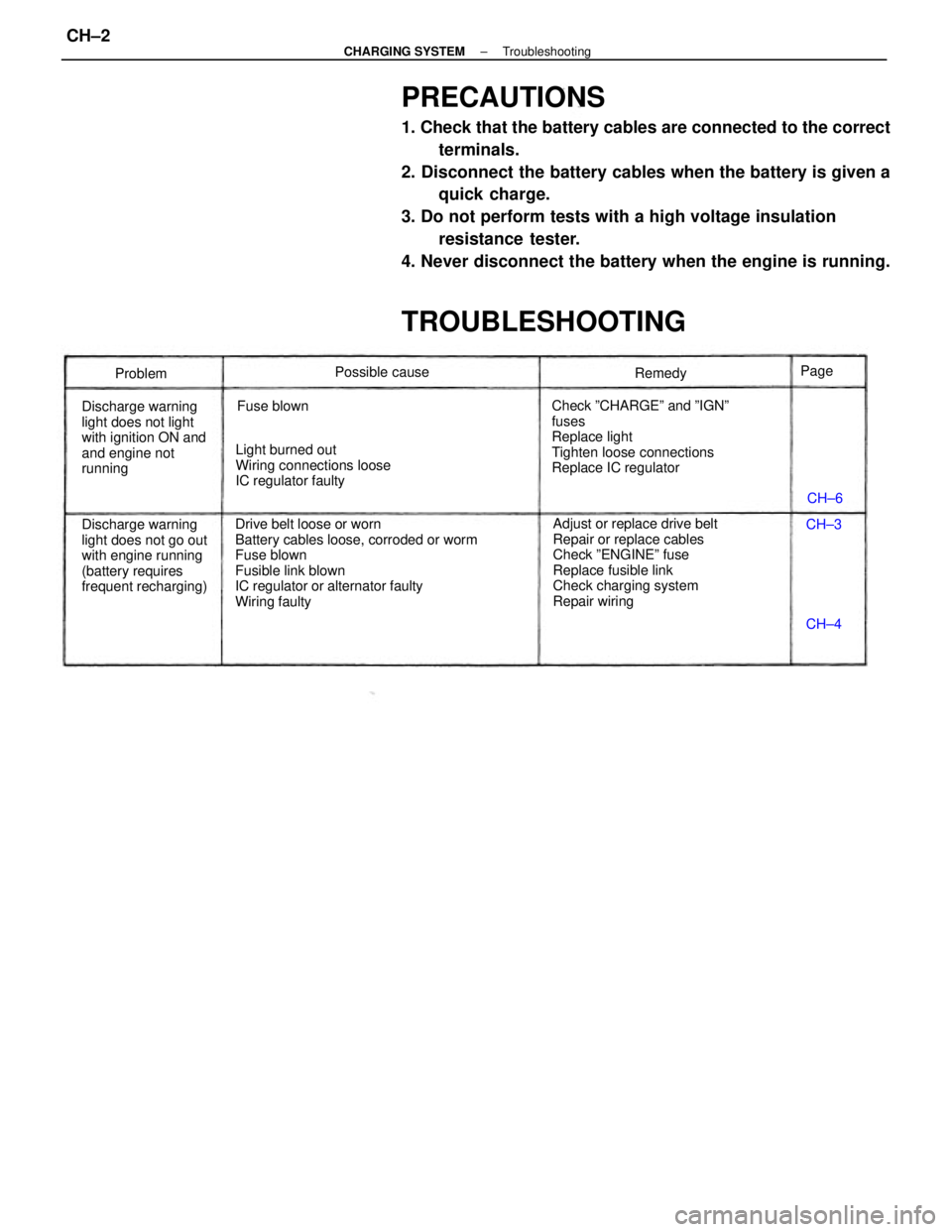
PRECAUTIONS
1. Check that the battery cables are connected to the correct
terminals.
2. Disconnect the battery cables when the battery is given a
quick charge.
3. Do not perform tests with a high voltage insulation
resistance tester.
4. Never disconnect the battery when the engine is running.
TROUBLESHOOTING
Drive belt loose or worn
Battery cables loose, corroded or worm
Fuse blown
Fusible link blown
IC regulator or alternator faulty
Wiring faultyAdjust or replace drive belt
Repair or replace cables
Check ºENGINEº fuse
Replace fusible link
Check charging system
Repair wiring Check ºCHARGEº and ºIGNº
fuses
Replace light
Tighten loose connections
Replace IC regulator
Discharge warning
light does not go out
with engine running
(battery requires
frequent recharging) Discharge warning
light does not light
with ignition ON and
and engine not
runningLight burned out
Wiring connections loose
IC regulator faultyPossible cause
Fuse blownRemedy
Problem
CH±6
CH±4 CH±3 Page
± CHARGING SYSTEMTroubleshootingCH±2
Page 960 of 2389
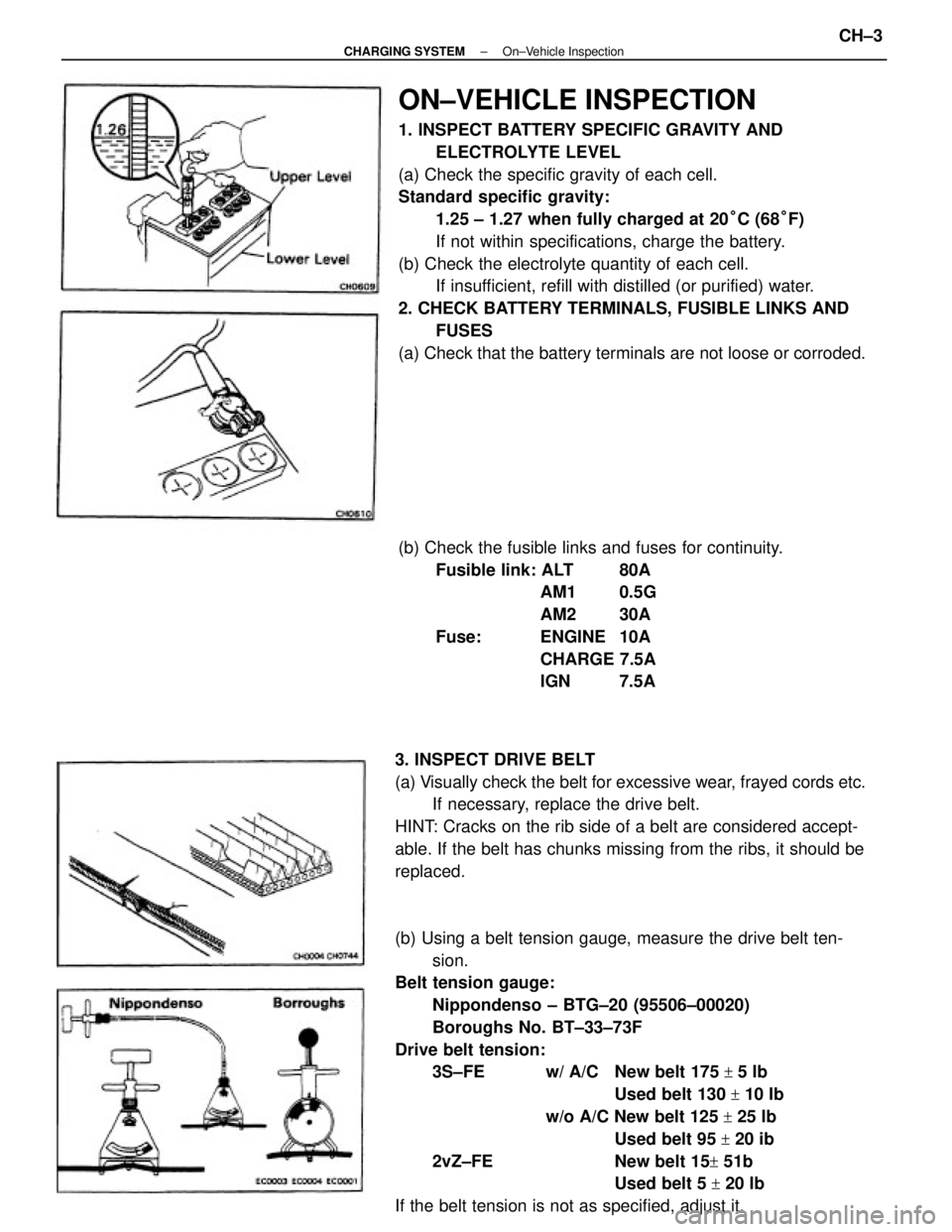
ON±VEHICLE INSPECTION
1. INSPECT BATTERY SPECIFIC GRAVITY AND
ELECTROLYTE LEVEL
(a) Check the specific gravity of each cell.
Standard specific gravity:
1.25 ± 1.27 when fully charged at 20°C (68°F)
If not within specifications, charge the battery.
(b) Check the electrolyte quantity of each cell.
If insufficient, refill with distilled (or purified) water.
2. CHECK BATTERY TERMINALS, FUSIBLE LINKS AND
FUSES
(a) Check that the battery terminals are not loose or corroded.
(b) Using a belt tension gauge, measure the drive belt ten-
sion.
Belt tension gauge:
Nippondenso ± BTG±20 (95506±00020)
Boroughs No. BT±33±73F
Drive belt tension:
3S±FE w/ A/C New belt 175
+ 5 Ib
Used belt 130
+ 10 Ib
w/o A/C New belt 125
+ 25 Ib
Used belt 95
+ 20 ib
2vZ±FE New belt 15
+ 51b
Used belt 5
+ 20 Ib
If the belt tension is not as specified, adjust it. 3. INSPECT DRIVE BELT
(a) Visually check the belt for excessive wear, frayed cords etc.
If necessary, replace the drive belt.
HINT: Cracks on the rib side of a belt are considered accept-
able. If the belt has chunks missing from the ribs, it should be
replaced.(b) Check the fusible links and fuses for continuity.
Fusible link: ALT 80A
AM1 0.5G
AM2 30A
Fuse: ENGINE 10A
CHARGE 7.5A
IGN 7.5A
± CHARGING SYSTEMOn±Vehicle InspectionCH±3
Page 961 of 2389
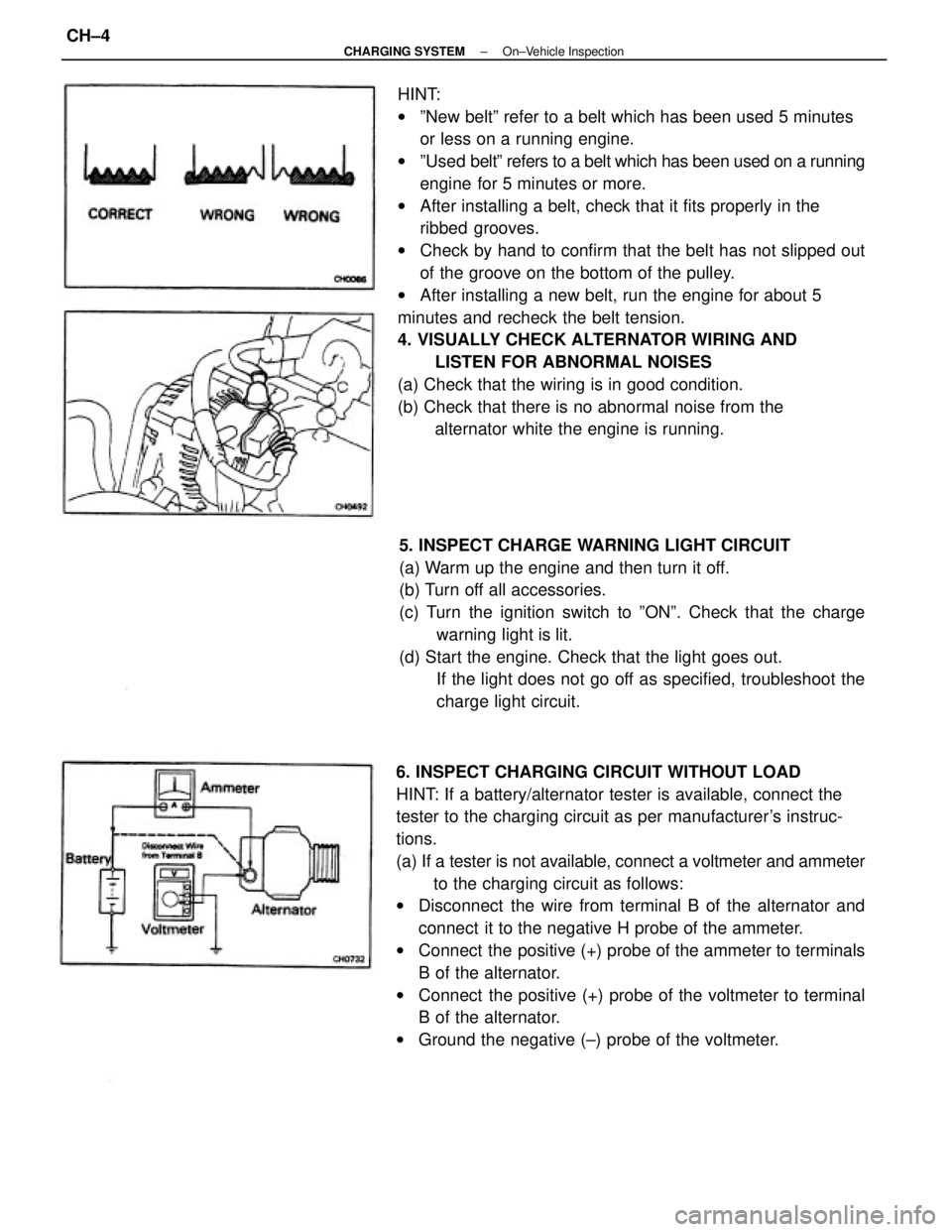
HINT:
wºNew beltº refer to a belt which has been used 5 minutes
or less on a running engine.
wºUsed beltº refers to a belt which has been used on a running
engine for 5 minutes or more.
wAfter installing a belt, check that it fits properly in the
ribbed grooves.
wCheck by hand to confirm that the belt has not slipped out
of the groove on the bottom of the pulley.
wAfter installing a new belt, run the engine for about 5
minutes and recheck the belt tension.
4. VISUALLY CHECK ALTERNATOR WIRING AND
LISTEN FOR ABNORMAL NOISES
(a) Check that the wiring is in good condition.
(b) Check that there is no abnormal noise from the
alternator white the engine is running.
6. INSPECT CHARGING CIRCUIT WITHOUT LOAD
HINT: If a battery/alternator tester is available, connect the
tester to the charging circuit as per manufacturer's instruc-
tions.
(a) If a tester is not available, connect a voltmeter and ammeter
to the charging circuit as follows:
wDisconnect the wire from terminal B of the alternator and
connect it to the negative H probe of the ammeter.
wConnect the positive (+) probe of the ammeter to terminals
B of the alternator.
wConnect the positive (+) probe of the voltmeter to terminal
B of the alternator.
wGround the negative (±) probe of the voltmeter. 5. INSPECT CHARGE WARNING LIGHT CIRCUIT
(a) Warm up the engine and then turn it off.
(b) Turn off all accessories.
(c) Turn the ignition switch to ºONº. Check that the charge
warning light is lit.
(d) Start the engine. Check that the light goes out.
If the light does not go off as specified, troubleshoot the
charge light circuit.
± CHARGING SYSTEMOn±Vehicle InspectionCH±4