lock TOYOTA COROLLA 2009 10.G Repair Manual
[x] Cancel search | Manufacturer: TOYOTA, Model Year: 2009, Model line: COROLLA, Model: TOYOTA COROLLA 2009 10.GPages: 468, PDF Size: 9.31 MB
Page 154 of 468
154 2-3. Operating the lights and wipers
■The windshield wipers and washers can be operated when
Vehicles with smart key system
The “ENGINE START STOP” switch is in IGNITION ON mode.
Vehicles without smart key system
The engine switch is in the “ON” position.
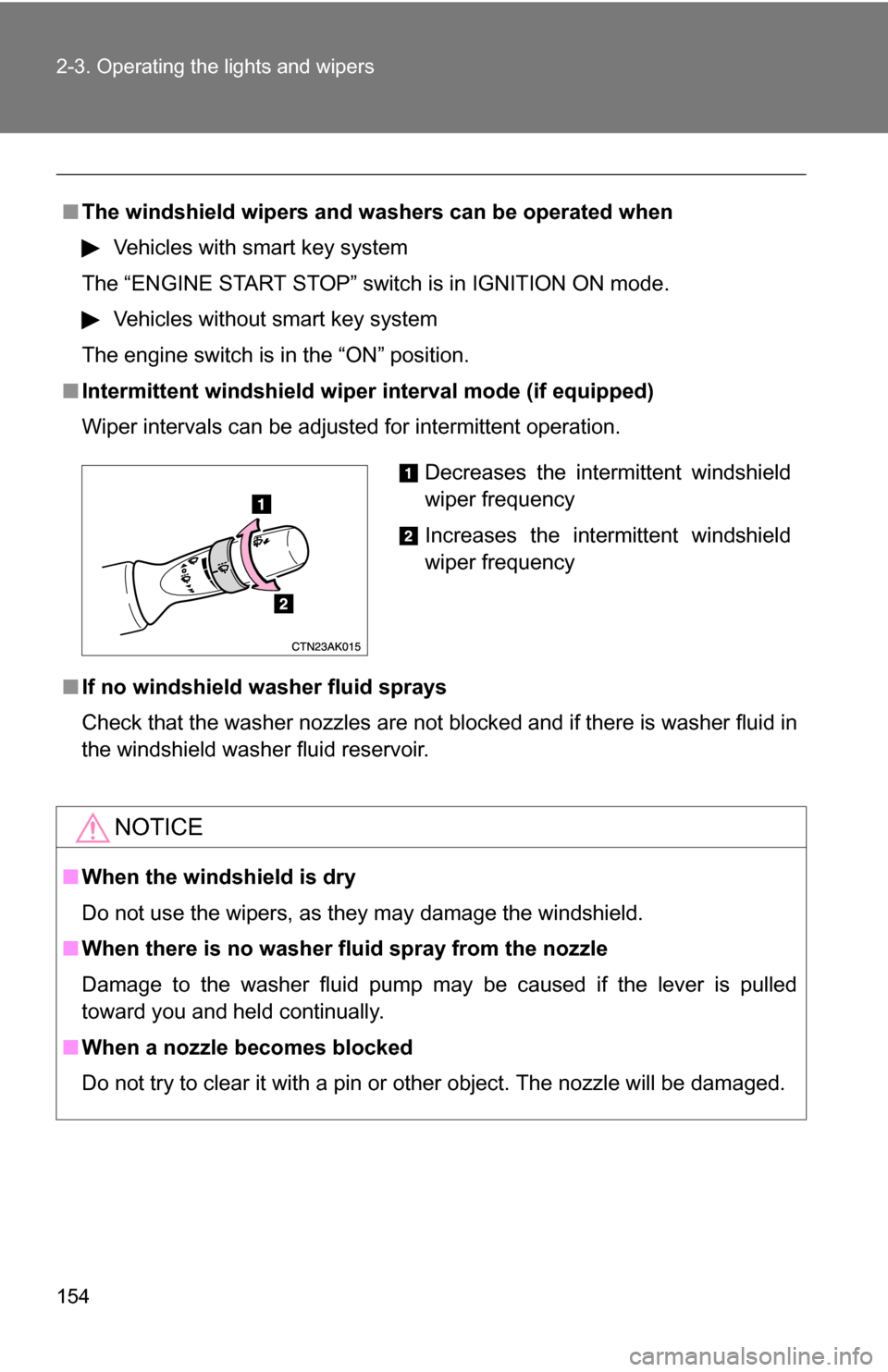
■ Intermittent windshield wiper interval mode (if equipped)
Wiper intervals can be adjusted for intermittent operation.
■ If no windshield washer fluid sprays
Check that the washer nozzles are not blocked and if there is washer fluid in
the windshield washer fluid reservoir.
NOTICE
■When the windshield is dry
Do not use the wipers, as they may damage the windshield.
■ When there is no washer fluid spray from the nozzle
Damage to the washer fluid pump may be caused if the lever is pulled
toward you and held continually.
■ When a nozzle becomes blocked
Do not try to clear it with a pin or other object. The nozzle will be damaged.
Decreases the intermittent windshield
wiper frequency
Increases the intermittent windshield
wiper frequency
Page 158 of 468
158
2-4. Using other driving systems
Driving assist systems
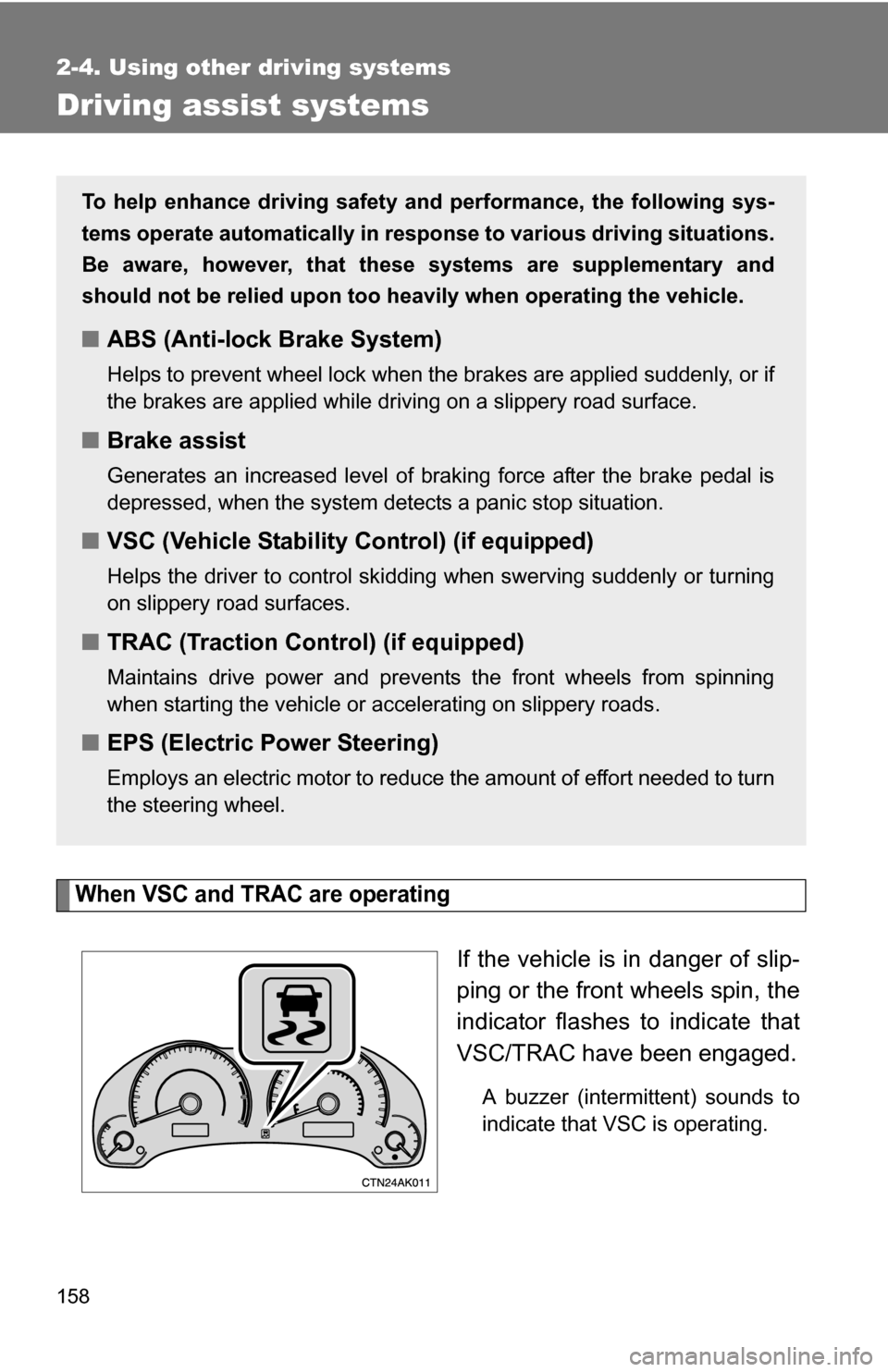
When VSC and TRAC are operating
If the vehicle is in danger of slip-
ping or the front wheels spin, the
indicator flashes to indicate that
VSC/TRAC have been engaged.
A buzzer (intermittent) sounds to
indicate that VSC is operating.
To help enhance driving safety and performance, the following sys-
tems operate automatically in res ponse to various driving situations.
Be aware, however, that these systems are supplementary and
should not be relied upon too h eavily when operating the vehicle.
■ABS (Anti-lock Brake System)
Helps to prevent wheel lock when the brakes are applied suddenly, or if
the brakes are applied while driving on a slippery road surface.
■Brake assist
Generates an increased level of braking force after the brake pedal is
depressed, when the system detects a panic stop situation.
■VSC (Vehicle Stability Control) (if equipped)
Helps the driver to control skidding when swerving suddenly or turning
on slippery road surfaces.
■TRAC (Traction Control) (if equipped)
Maintains drive power and prevents the front wheels from spinning
when starting the vehicle or accelerating on slippery roads.
■EPS (Electric Power Steering)
Employs an electric motor to reduce the amount of effort needed to turn
the steering wheel.
Page 176 of 468
176 2-5. Driving information
●In order to maintain efficient engine braking and electrical charging
performance, do not use overdrive (automatic transmission) or the
5th gear (manual transmission).
● Due to the added load of the trailer, your vehicle's engine may
overheat on hot days (at temper atures over 85°F [30°C]) when
driving up a long or steep grade. If the engine coolant temperature
gauge indicates overheating, immediately turn off the air condition-
ing (if in use), pull your vehicle off the road and stop in a safe spot.
( P. 4 1 1 )
● Always place wheel blocks under both the vehicle and the trailer
wheels when parking. Apply the parking brake firmly, and put the
transmission in P (automatic transmission) or in 1 or R (manual
transmission). Avoid parking on a slope, but if unavoidable, do so
only after performing the following:
Apply the brakes and keep them applied.
Have someone place wheel bloc ks under both the vehicle and
trailer wheels.
When the wheel blocks are in place, release the brakes slowly
until the blocks absorb the load.
Apply the parking brake firmly.
Shift into 1 or R (manual transmission) or P (automatic trans-
mission) and turn off the engine.
● When restarting after parking on a slope:
With the transmission in the P position (automatic transmis-
sion) or the clutch pedal (m anual transmission) depressed,
start the engine. On vehicles with an automatic transmission,
be sure to keep the brake pedal pressed.
Shift into a forward gear. If reversing, shift into the R position.
Release the parking brake (also brake pedal on vehicles with
an automatic transmission), and slowly pull or back away from
the wheel blocks. Stop and apply the brakes.
Have someone retrieve the blocks.
STEP1
STEP2
STEP3
STEP4
STEP5
STEP1
STEP2
STEP3
STEP4
Page 180 of 468
180 2-5. Driving information
NOTICE
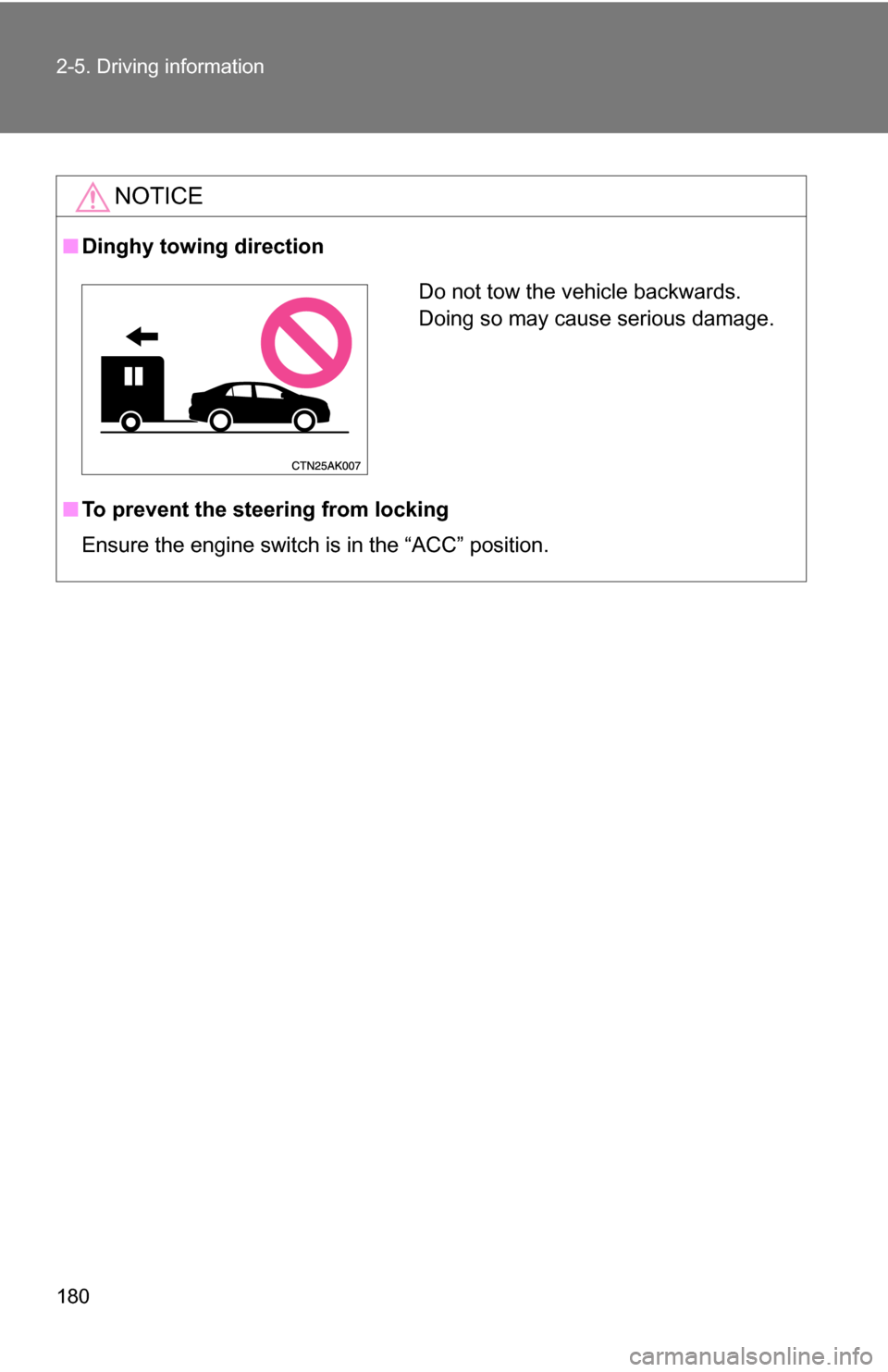
■Dinghy towing direction
■ To prevent the steering from locking
Ensure the engine switch is in the “ACC” position.
Do not tow the vehicle backwards.
Doing so may cause serious damage.
Page 189 of 468
189
3-1. Using the air conditioning system
and defogger
3
Interior features
CAUTION
■To prevent the windshield from fogging up
Do not use during cool air operation in extremely humid weather.
The difference between the temperature of the outside air and that of the
windshield can cause the outer surface of the windshield to fog up, blocking
your vision.
NOTICE
■To prevent battery discharge
Do not leave the automatic air conditioning system on longer than necessary
when the engine is stopped.
Page 191 of 468
191
3-1. Using the air conditioning system
and defogger
3
Interior features
Adjusting the settings
■ Adjusting the temperature setting (heater)
Turn the temperature control dial clockwise to increase the temper-
ature.
■ Adjusting the temperature setting (air conditioning system)
Turn the temperature control dial clockwise (warm) or counter-
clockwise (cool).
If is not pressed, the system will blow ambient temperature air or
heated air.
■ Adjusting the fan speed
Turn the fan speed control dial clockwise (increase) or counter-
clockwise (decrease).
Set the dial to “0” to turn the fan off.
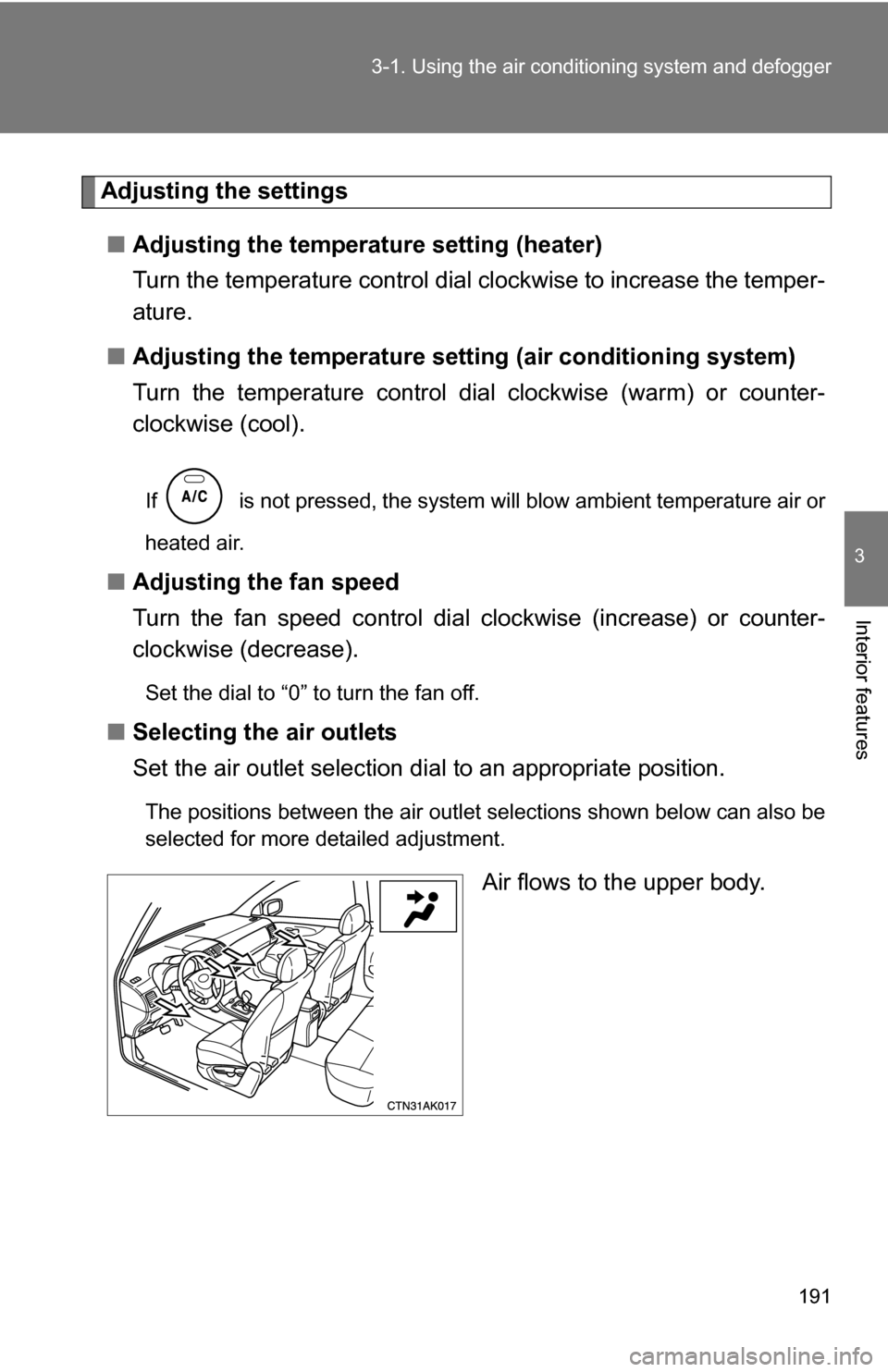
■ Selecting the air outlets
Set the air outlet selection di al to an appropriate position.
The positions between the air outlet selections shown below can also be
selected for more detailed adjustment.
Air flows to the upper body.
Page 195 of 468
195
3-1. Using the air conditioning system
and defogger
3
Interior features
■For quick cooling (vehicles wi th air conditioning system)
Turn the temperature control dial to the “MAX A/C” position and select the
recirculated air mode.
■ For quick clearing of th e windshield and side windows (vehicles with
air conditioning system)
Press to turn the air conditioning on.
■ Using the recirculated air mode
The windows will fog up more easily if the recirculated air mode is used for
an extended period.
■ When outside air temperature appro aches 32°F (0°C) (vehicles with air
conditioning system)
The air conditioning system may not operate even when
is pressed.
■ When
is selected for the air outlets used
For your driving comfort, air flowing to the feet may be warmer than air flow-
ing to the upper body depending on the position of the temperature adjust-
ment dial.
CAUTION
■ To prevent the windshield from fogging up
Do not set the air outlet selection dial to during cool air operation in
extremely humid weather. The difference between the temperature of the
outside air and that of the windshield can cause the outer surface of the
windshield to fog up, blocking your vision.
Page 237 of 468
237
3-3. Using the hand
s-free phone system (for cellular phone)
3
Interior features
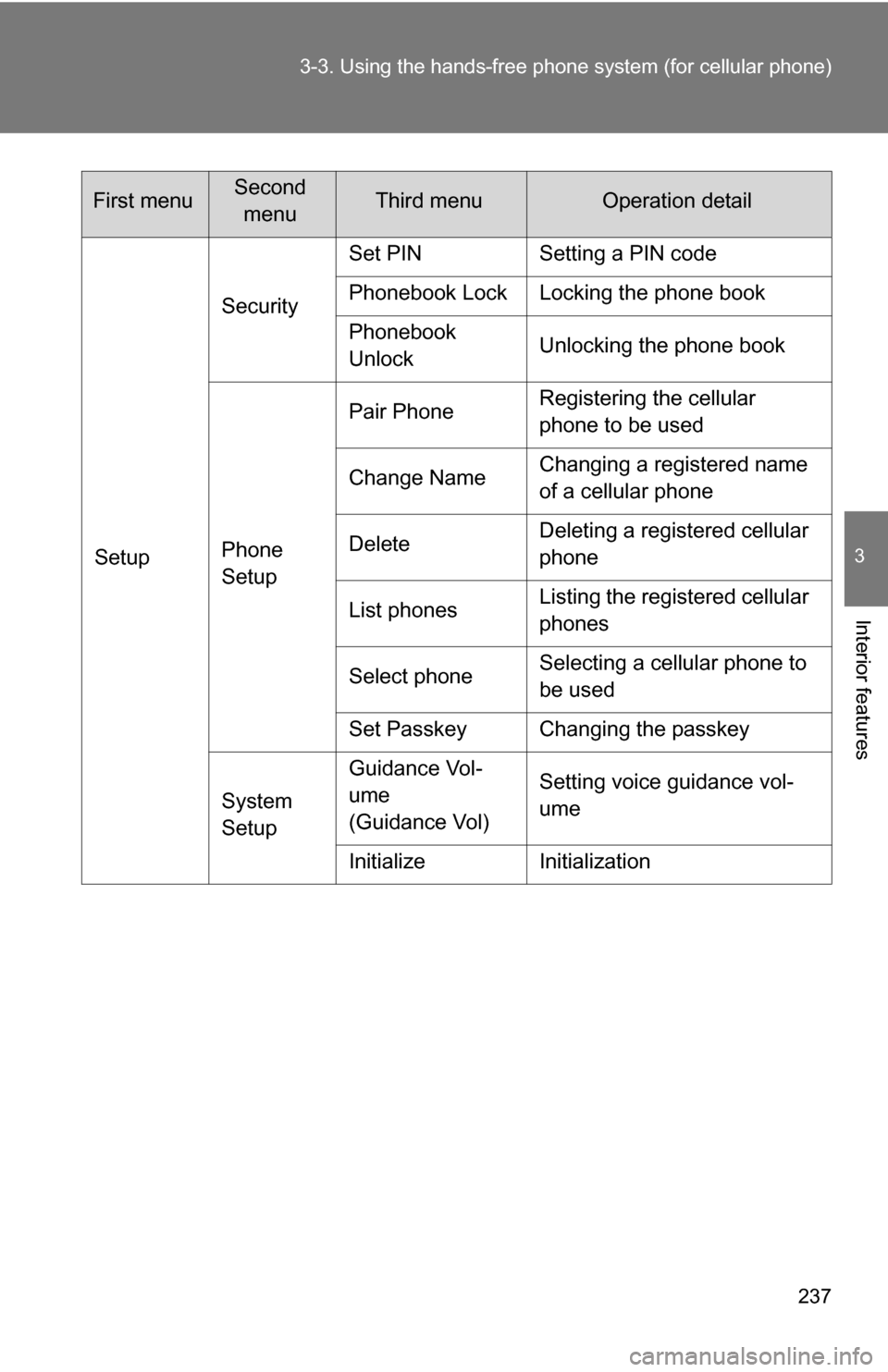
SetupSecurity
Set PIN Setting a PIN code
Phonebook Lock Locking the phone book
Phonebook
Unlock
Unlocking the phone book
Phone
Setup Pair Phone
Registering the cellular
phone to be used
Change Name Changing a registered name
of a cellular phone
Delete Deleting a registered cellular
phone
List phones Listing the registered cellular
phones
Select phone Selecting a cellular phone to
be used
Set Passkey Changing the passkey
System
Setup Guidance Vol-
ume
(Guidance Vol)
Setting voice guidance vol-
ume
Initialize Initialization
First menuSecond menuThird menuOperation detail
Page 238 of 468
238 3-3. Using the hands-free phone system (for cellular phone)
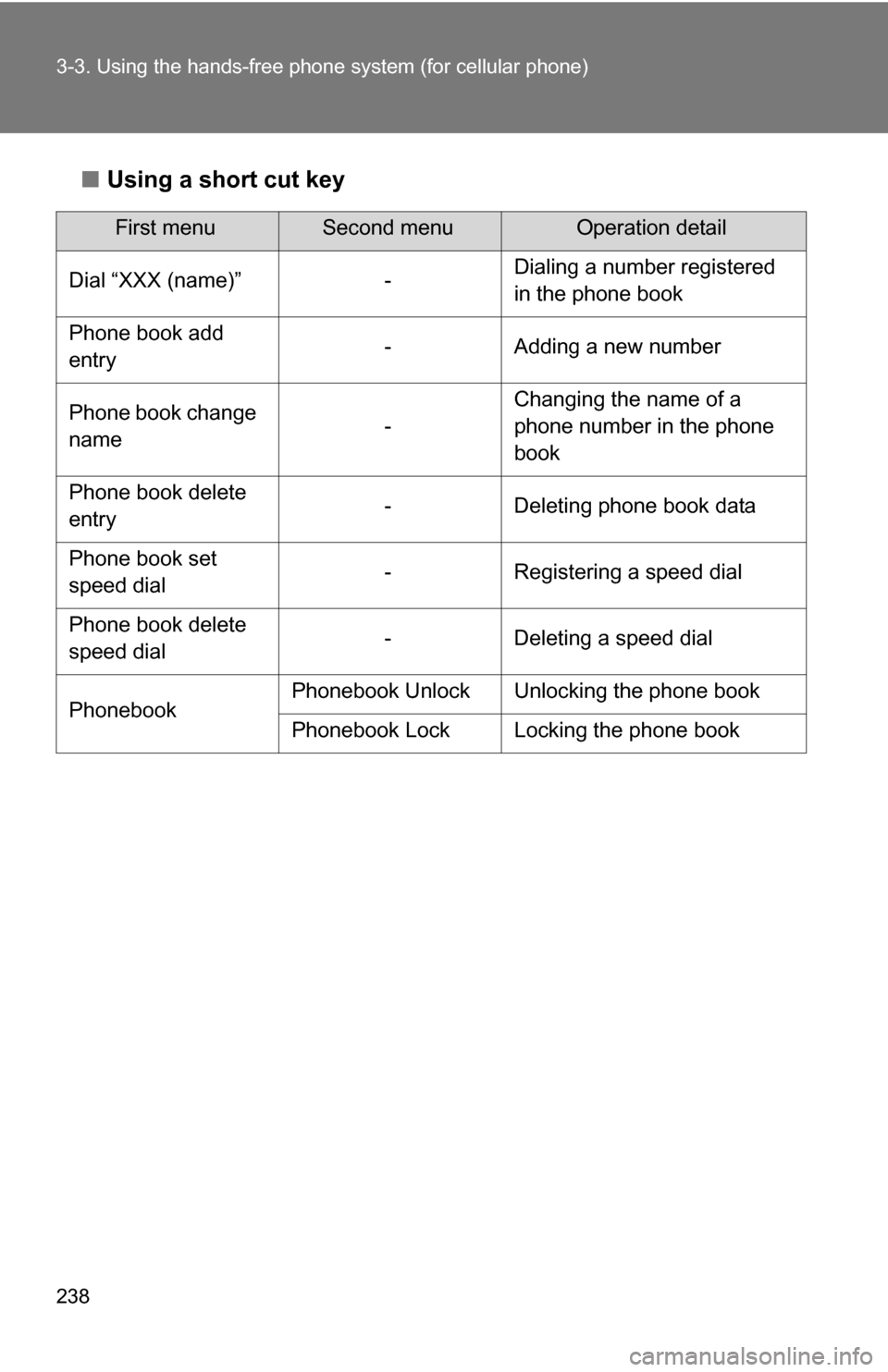
■Using a short cut key
First menuSecond menuOperation detail
Dial “XXX (name)” - Dialing a number registered
in the phone book
Phone book add
entry - Adding a new number
Phone book change
name -Changing the name of a
phone number in the phone
book
Phone book delete
entry - Deleting phone book data
Phone book set
speed dial - Registering a speed dial
Phone book delete
speed dial - Deleting a speed dial
Phonebook Phonebook Unlock Unlocking the phone book
Phonebook Lock Locking the phone book
Page 249 of 468
249
3-3. Using the hands-free phone system (for cellular phone)
3
Interior features
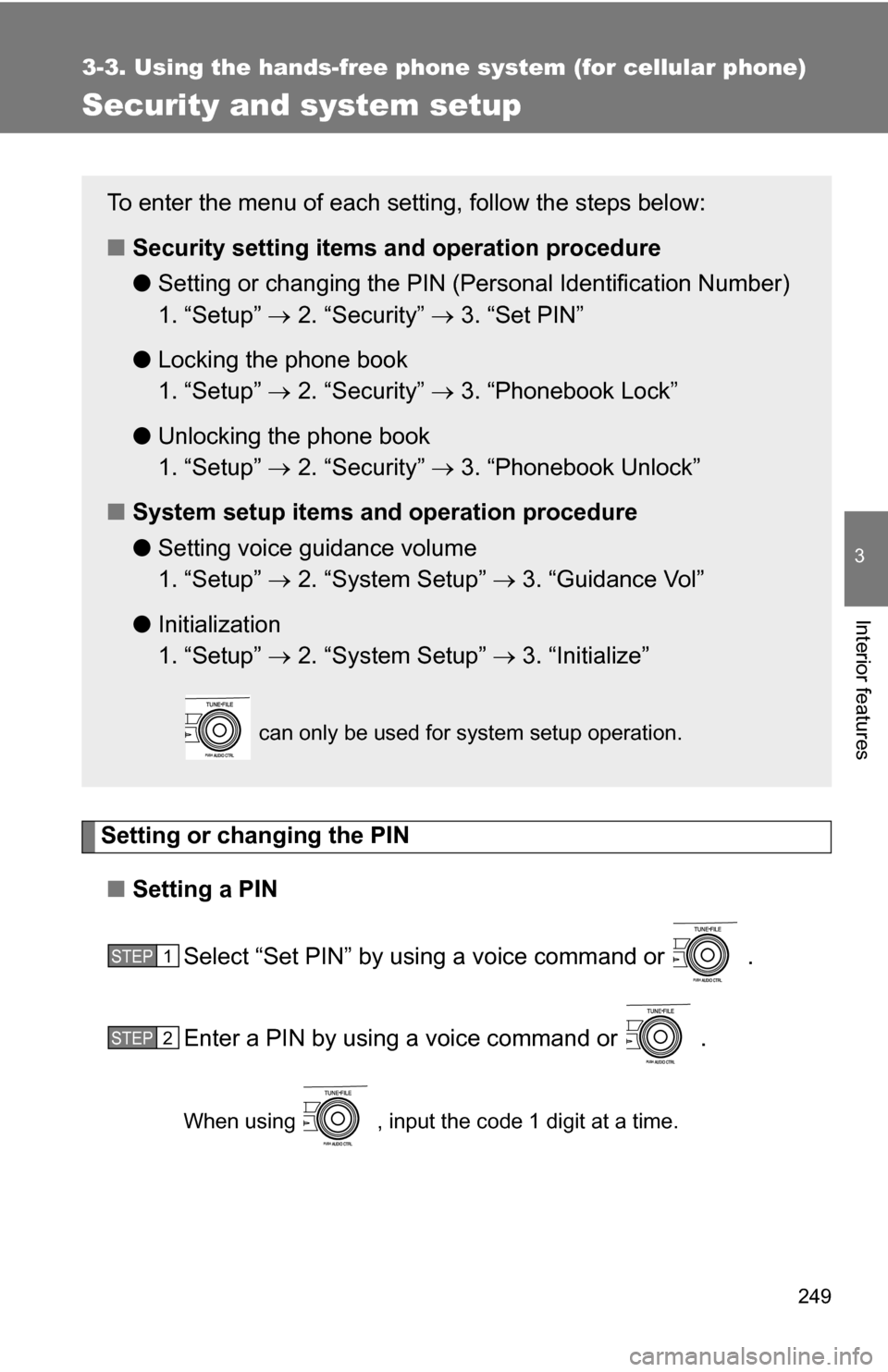
Security and system setup
Setting or changing the PIN■ Setting a PIN
Select “Set PIN” by using a voice command or .
Enter a PIN by using a voice command or .
When using , input the code 1 digit at a time.
To enter the menu of each setting, follow the steps below:
■Security setting items and operation procedure
● Setting or changing t he PIN (Personal Identification Number)
1. “Setup” 2. “Security” 3. “Set PIN”
● Locking the phone book
1. “Setup” 2. “Security” 3. “Phonebook Lock”
● Unlocking the phone book
1. “Setup” 2. “Security” 3. “Phonebook Unlock”
■ System setup items and operation procedure
●Setting voice guidance volume
1. “Setup” 2. “System Setup” 3. “Guidance Vol”
● Initialization
1. “Setup” 2. “System Setup” 3. “Initialize”
can only be used for system setup operation.
STEP1
STEP2